If you’re looking to enhance your workspace, a monitor arm can make a significant difference, especially for MacBook Pro users. The right monitor arm can improve your posture and productivity while keeping your desk organized. With various options available, from heavy-duty arms for ultrawide screens to versatile mounts for laptops, you have plenty of choices. Let’s explore the top contenders that could transform your work experience.
Ergotron LX Pro Premium Monitor Arm for Single Monitor (Up to 34 Inches)

If you’re looking for a reliable way to elevate your MacBook Pro and enhance your workspace, the Ergotron LX Pro Premium Monitor Arm is an excellent choice. This arm supports single monitors up to 34 inches and weighs between 4 to 22 lbs. With its sleek matte black design, it offers 360-degree rotation and 85 degrees of tilt, ensuring you find the perfect angle. The easy two-piece desk clamp accommodates various desk thicknesses. Plus, it features improved cable management for a tidy setup. Enjoy a 10-year warranty, providing peace of mind as you optimize your workspace for productivity and comfort.
Best For: Users seeking a versatile and adjustable monitor arm to enhance their workspace ergonomics and aesthetics.
Pros:
- Supports a wide range of monitor sizes (up to 34 inches) and weights (4 to 22 lbs) for flexibility.
- Offers excellent adjustability with 360-degree rotation and 85 degrees of tilt for optimal viewing angles.
- Sleek design with improved cable management helps maintain a clean and organized workspace.
Cons:
- Some users reported quality issues compared to older models, leading to concerns about durability.
- A few customers experienced monitor wobbling, especially with larger monitors.
- Installation may require adjustments based on specific desk designs, which could complicate setup for some users.
HUANUO TitanLift Heavy Duty Monitor Arm for Ultrawide Screens

The HUANUO TitanLift Heavy Duty Monitor Arm is ideal for ultrawide screen users who seek a robust and versatile mounting solution. It fits screens up to 49 inches and supports weights from 6.6 to 40 lbs, ensuring stability. Constructed from high-strength aluminum alloy, it features a reinforced VESA head and thicker arms for enhanced durability. With exceptional adjustability, you can tilt, swivel, and rotate your monitor for maximum comfort. Installation is quick with a VESA head, and built-in cable management keeps your workspace tidy. Plus, the one-hand tension adjustment makes fine-tuning effortless, so you can work efficiently.
Best For: Users with ultrawide screens up to 49 inches who need a sturdy and adjustable monitor arm for a comfortable workspace.
Pros:
- High Durability: Made from high-strength aluminum alloy, ensuring long-lasting use.
- Exceptional Adjustability: Offers extensive tilt, swivel, and rotation capabilities for personalized viewing angles.
- Easy Installation: Quick-install VESA head and clear instructions make setup a breeze.
Cons:
- Weight Limitations: Only supports monitors weighing between 6.6 to 40 lbs, which may not accommodate heavier models.
- VESA Compatibility Required: Requires VESA mounting holes, limiting use with non-compatible monitors.
- Potential for Overextension: The arm extension of up to 24.8 inches may be excessive for smaller desks, causing space issues.
Ergotron LX Pro Premium Monitor Arm (Single Monitor Desk Mount)
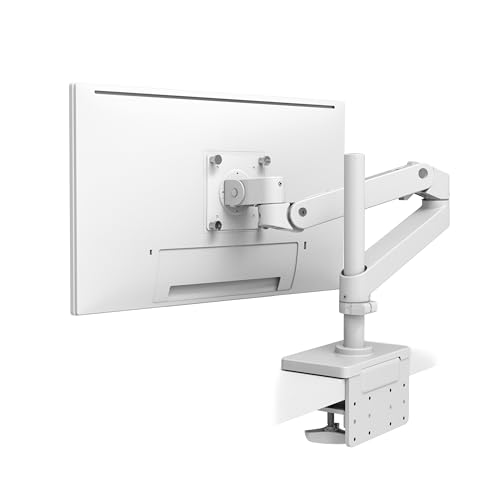
For MacBook Pro users seeking an ergonomic upgrade, the Ergotron LX Pro Premium Monitor Arm is an excellent choice. This single monitor desk mount supports flat, curved, and ultrawide monitors up to 34 inches and 22 lbs. With a sleek design and built-in cable management, it enhances your workspace aesthetics. You can easily adjust the monitor up to 25 inches high and enjoy 360-degree rotation and 85-degree tilt for the perfect viewing angle. Installation is a breeze, and with a 10-year warranty, you’re investing in durability. Users love its stability, making it ideal for sit-stand workstations.
Best For: MacBook Pro users and professionals seeking an ergonomic workspace upgrade with versatile monitor positioning.
Pros:
- Supports a wide range of monitor types including flat, curved, and ultrawide up to 34 inches and 22 lbs.
- Easy installation with all necessary components included and compatible with various desk types.
- Excellent adjustability with 360-degree rotation, 85-degree tilt, and height adjustment up to 25 inches.
Cons:
- Height limitations may require extension options for larger setups.
- Grommet mount sold separately, adding to the overall cost if needed.
- Weight capacity may not accommodate heavier monitors or additional accessories.
Ergotron LX Pro Premium Monitor Arm (Single Monitor Desk Mount)

Designed for professionals and gamers alike, the Ergotron LX Pro Premium Monitor Arm transforms your workspace by providing exceptional flexibility and support for monitors up to 34 inches. It fits both flat and curved screens, weighing between 4 to 22 lbs. The arm allows you to raise your monitor up to 25 inches above your desk, with 360-degree rotation and 85 degrees of tilt for ideal viewing. Its sleek design enhances your workspace aesthetics while built-in cable management keeps everything tidy. Plus, you’ll enjoy peace of mind with a 10-year warranty and dedicated technical support for any issues.
Best For: Professionals and gamers seeking a versatile and ergonomic solution for monitor setup.
Pros:
- Exceptional adjustability with up to 25 inches of height and 360-degree rotation for optimal viewing angles.
- Sleek design that enhances workspace aesthetics while providing built-in cable management.
- 10-year warranty and expert technical support ensure reliability and peace of mind.
Cons:
- Limited to single monitor use, which may not suit users with multiple monitors.
- Weight limit of 22 lbs, which could restrict the use of heavier monitors.
- Desk clamp may not fit all desk thicknesses, requiring additional purchases for grommet mount compatibility.
HUANUO Adjustable Monitor Stand, Single Arm Desk Mount for 32 inch Screen
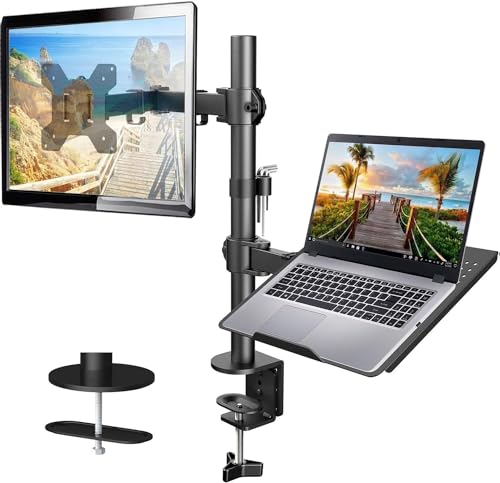
Elevate your workspace with the HUANUO Adjustable Monitor Stand, perfect for anyone using a 32-inch screen or a 17-inch laptop. This versatile single arm desk mount supports up to 22lbs and fits VESA-compatible monitors ranging from 13 to 32 inches. You’ll appreciate the flexible 2-in-1 design, allowing +/-90° tilt, +/-90° swivel, and 360° rotation for ideal viewing angles. Plus, the height adjustment range goes up to 17 inches, ensuring comfort. An integrated cable management system keeps your workspace neat. Installation is straightforward with C-clamp or grommet options, compatible with wooden desks. Upgrade your setup today!
Best For: Those looking to optimize their workspace with a versatile and adjustable monitor stand for large screens or laptops.
Pros:
- Flexible Adjustability: Offers +/-90° tilt, +/-90° swivel, and 360° rotation for customized viewing angles.
- Cable Management: Integrated system helps keep workspace organized and free of clutter.
- Strong Support: Can hold monitors and laptops up to 22lbs, accommodating a wide range of devices.
Cons:
- Desk Compatibility: Only compatible with wooden desks and has specific thickness requirements for mounting.
- Limited VESA Options: Must ensure that monitors are VESA 75x75mm or 100x100mm compatible.
- Installation Complexity: Requires following specific installation instructions, which may be challenging for some users.
Heavy Duty Monitor Arm for Ultrawide Monitors (MA20P-S)

If you’re looking to maximize your workspace with an ultrawide monitor setup, the Heavy Duty Monitor Arm (MA20P-S) is an excellent choice. Supporting monitors up to 57 inches and 44 lbs, it offers pneumatic height adjustment for smooth shifts up to 13 inches. With +25 to -25 degrees tilt and 180 degrees swivel, you can find the perfect viewing angle. The arm’s modular design allows for dual or triple monitor setups, while effective cable management keeps your workspace tidy. Installation is straightforward, and with a solid 4.5-star rating, users appreciate its sturdiness and space-saving capabilities.
Best For: Users seeking a sturdy and adjustable monitor arm for ultrawide monitors up to 57 inches to enhance their workspace efficiency.
Pros:
- Pneumatic height adjustment allows for smooth and effortless height changes up to 13 inches.
- Modular design supports dual or triple monitor setups, providing flexibility for multi-monitor configurations.
- Effective cable management keeps your workspace organized and free from clutter.
Cons:
- Some users report assembly challenges, which may require additional time and effort.
- For very large monitors, a larger or heavier-duty mount may be necessary for optimal support.
- The weight limit may not accommodate all ultrawide monitors, particularly those at the higher end of the weight spectrum.
Long Arm Monitor Mount for 13 to 32 inch Displays

The Long Arm Monitor Mount is perfect for professionals and creatives who use 13 to 32-inch displays and need a flexible setup. With an impressive reach of up to 27.76 inches, it saves over 80% of your desktop space, keeping your work area organized. The mount supports up to 19.8 lbs and offers VESA compatibility for various brands. Enjoy smooth adjustments with +/-90° swivel and 360° rotation. Its durable gas spring arms guarantee stability, while integrated cable management keeps your workspace tidy. Plus, with a 30-day return policy, you can purchase confidently and upgrade your ergonomic workspace today!
Best For: Professionals and creatives looking to optimize their workspace with flexible monitor positioning for 13 to 32-inch displays.
Pros:
- Space-saving design that frees up over 80% of desktop area for enhanced organization.
- Wide range of adjustments including swivel, tilt, and rotation for customized viewing angles.
- Durable construction with gas spring arms tested for 20,000 cycles, ensuring long-lasting stability.
Cons:
- Tilt mechanism may feel rigid, making some adjustments less smooth.
- Material quality of threads has received complaints, potentially affecting durability.
- Weight capacity limited to 19.8 lbs, which may not accommodate heavier monitors.
Viozon 2-in-1 Adjustable Dual Arm Desk Mount for Monitors and Laptops

For professionals and creatives who use both monitors and laptops, the Viozon 2-in-1 Adjustable Dual Arm Desk Mount is a game changer. This mount accommodates 17 to 32-inch monitors and 12 to 17-inch laptops, supporting up to 19.8 lbs. Crafted from heavy-duty aluminum, it guarantees stability and features tension adjustment to prevent drooping. With 360-degree swivel and 145-degree tilt for monitors, plus a 45-degree tilt for laptops, you can customize your setup perfectly. Its sleek design includes cable management, keeping your workspace organized while promoting ergonomic positioning, ultimately reducing neck and shoulder strain and enhancing your productivity.
Best For: Professionals and creatives who use both monitors and laptops and seek an ergonomic and organized workspace.
Pros:
- Supports a wide range of monitor and laptop sizes (17-32 inches for monitors and 12-17 inches for laptops) with a weight capacity of up to 19.8 lbs.
- Heavy-duty aluminum construction ensures stability and durability, with tension adjustment to prevent drooping.
- Customizable adjustability features including 360-degree swivel, 145-degree tilt for monitors, and cable management for an organized workspace.
Cons:
- Installation may require tools and some technical knowledge, making it less user-friendly for those not handy.
- Limited weight capacity may not accommodate heavier monitors or laptops beyond 19.8 lbs.
- Requires desk space for mounting, which may not be suitable for smaller work areas.
HUANUO Single Monitor Mount (13 to 32 Inch)

Designed to support monitors ranging from 13 to 32 inches, the HUANUO Single Monitor Mount is perfect for those seeking an ergonomic workspace. It holds up to 19.8 lbs and offers full adjustability with a tilt range of -50° to +30°, ±90° swivel, and 360° rotation. Installation is a breeze, taking just three minutes with included hardware, while the C-clamp or grommet mount saves valuable desk space. Rated 4.6 out of 5 stars, users praise its solid construction and ease of assembly. Just remember, it’s best suited for wooden desks, so check compatibility before installation.
Best For: Those seeking an ergonomic workspace solution for monitors between 13 to 32 inches.
Pros:
- Full adjustability with tilt, swivel, and rotation options for optimal viewing comfort.
- Quick and easy installation in just three minutes, saving valuable desk space.
- Highly rated with solid construction, ensuring durability and stability for various monitor sizes.
Cons:
- Not recommended for installation on glass or honeycomb material desks.
- Some users may experience challenges with the up/down tilt function requiring careful adjustment.
- Performance may vary based on monitor weight, necessitating tension adjustments prior to use.
VESA Laptop Tray for Monitor Mount (Holds Laptops up to 17.3 Inches)

Looking for a reliable way to elevate your laptop and maximize desk space? The VESA Laptop Tray for Monitor Mount is your solution, holding laptops up to 17.3 inches and 28.6 lbs. Designed for ergonomic comfort, it features an L-shaped blocker and non-slip pads to keep your laptop secure. Its hollow U-shaped design promotes heat dissipation, ensuring your device stays cool. Easy to install with any VESA accessory, it seamlessly integrates with monitor arms for adjustable angles. With a strong build and a 4.6-star rating, this tray is a dependable choice for enhancing your workspace while accommodating various laptop sizes.
Best For: Individuals seeking an ergonomic and space-saving solution to elevate their laptops while working at a desk.
Pros:
- Sturdy construction provides stable support for laptops up to 17.3 inches.
- Ergonomic design enhances comfort for both sitting and standing work positions.
- Easy integration with monitor arms allows for adjustable viewing angles.
Cons:
- Basic clamp grip may not accommodate varying laptop thicknesses effectively.
- Some users have reported misaligned rubber padding during quality control.
- Limited adjustability compared to other more advanced laptop mounting solutions.
Factors to Consider When Choosing a Macbook Pro Monitor Arm
When choosing a MacBook Pro monitor arm, you should consider several key factors. Think about the weight capacity, compatibility with VESA standards, and how adjustable and ergonomic the arm is for your workspace. Additionally, evaluate the ease of installation and the overall build quality to guarantee it lasts.
Weight Capacity Considerations
Choosing the right monitor arm for your MacBook Pro involves careful consideration of weight capacity. You’ll want to confirm the arm supports your device’s weight, which typically ranges from 4.4 to 22 lbs for compatible models. Check the monitor arm’s specified weight capacity, as some can hold up to 40 lbs, allowing for heavier setups. It’s essential to verify that the arm matches your specific MacBook Pro model, since different configurations can affect overall weight. Opting for an arm with a higher weight capacity provides greater stability and flexibility, especially if you plan to add accessories like monitors or laptops. Make certain the arm’s capacity aligns with your MacBook Pro and any extra peripherals for peak safety and performance.
Compatibility With VESA Standards
Compatibility with VESA standards is crucial for selecting the right monitor arm for your MacBook Pro. You’ll need to check if your MacBook Pro or any external monitor has the appropriate VESA mounting holes, typically 75x75mm or 100x100mm. If it doesn’t, you can use a compatible VESA adapter for proper attachment. Keep in mind that some monitor arms cater specifically to ultrawide and larger monitors, supporting different VESA patterns and handling increased weight capacities. Always verify the weight limits of the monitor arm, which usually ranges from 4 to 40 lbs, to guarantee it can safely support your MacBook Pro model. Additionally, consider size compatibility, as some options accommodate screens up to 34 inches or larger ultrawide displays.
Adjustability and Ergonomics
Considering adjustability and ergonomics is essential for enhancing your workspace with a MacBook Pro monitor arm. When choosing one, pay attention to the height adjustment range; many models lift up to 25 inches, helping you reduce neck and shoulder strain. Look for options that offer wide tilt (up to 85 degrees) and swivel (360 degrees) capabilities for ideal viewing angles and comfort. Gas spring mechanisms make height adjustments smooth and can accommodate various monitor sizes. One-hand adjustments are a great feature, allowing you to quickly change positions based on your seating height. Finally, integrated cable management keeps your workspace tidy, ensuring cables don’t interfere with adjustments. Prioritizing these factors will create a more ergonomic and efficient workspace.
Installation Ease and Options
An ergonomic setup can only be fully realized with an installation process that’s straightforward and adaptable. When choosing a MacBook Pro monitor arm, consider those that feature a two-piece desk clamp, accommodating desks between 0.4 to 2.4 inches thick. Look for options with clear installation instructions and labeled components to speed up your setup. Evaluate mounting options like C-clamp or grommet mounts, which offer flexibility based on your workspace. Make certain the monitor arm allows for tension adjustment, essential for maintaining stability, especially if you plan to add more equipment. Finally, check for compatibility with VESA mounting holes (75x75mm or 100x100mm) to guarantee a secure attachment to your MacBook Pro or monitor.
Build Quality and Durability
When you’re choosing a MacBook Pro monitor arm, build quality and durability should be at the top of your list. Look for materials like high-strength aluminum alloy or reinforced steel, as they offer enhanced stability over time. Ascertain the monitor arm has passed rigorous tests, such as 50,000 cycle motion tests, guaranteeing it can handle daily use without failure. Pay attention to the weight capacity; arms supporting a broader range (4 to 40 lbs) generally offer better compatibility. Also, consider design features that boost durability, like thicker arms and wider bases, which help prevent wobbling. Finally, a long warranty period, such as 10 years, reflects the manufacturer’s confidence in the product, giving you peace of mind for long-term use.
Cable Management Features
A tidy workspace can greatly enhance your productivity, and effective cable management is key to achieving that. When choosing a MacBook Pro monitor arm, look for models with built-in cable routing systems. These features help conceal and organize cables, reducing clutter and potential tangling. Some monitor arms come equipped with clips or channels for easy attachment and positioning of cables, making it simple to maintain a neat setup. Integrated cable management can accommodate various cable types and sizes, ensuring flexibility for your equipment needs. Additionally, utilizing these features can prevent wear and tear on your cables, extending their lifespan by minimizing friction and stress points. Prioritizing cable management will lead to a more efficient and professional workspace.
Aesthetic Design Preferences
Maintaining a tidy workspace not only improves functionality but also elevates the overall aesthetic of your setup. When choosing a MacBook Pro monitor arm, consider sleek, modern lines that complement the minimalist design of your device. Color finishes like matte black or aluminum can greatly enhance your workspace’s look, creating a cohesive aesthetic. Opt for modular designs with built-in cable management to keep your area clean and organized. It’s crucial to find a monitor arm that matches or enhances your existing decor, providing seamless integration with your furniture and equipment. Additionally, verify the size and shape of the monitor arm align with your monitor’s dimensions and workspace layout for a balanced, visually appealing arrangement.
Price and Warranty Options
Selecting a monitor arm for your MacBook Pro involves weighing both price and warranty options carefully. Prices can vary considerably, typically ranging from $50 to over $300, depending on features and brand reputation. Investing in a higher-priced model might seem intimidating, but it often comes with better durability and support. Warranty options are essential—many premium monitor arms offer warranties from 5 to 10 years, reflecting manufacturer confidence. Make sure to evaluate warranty coverage details; some brands provide extensive support, while others focus only on defects. Customer reviews can also give you insights into warranty experiences and the manufacturer’s responsiveness. A well-chosen monitor arm could save you money in the long run by minimizing replacement or repair needs.