If you’re looking to enhance your MacBook’s connectivity in 2025, you’ve come to the right place. With a variety of hubs featuring Ethernet options, you can guarantee reliable internet access while enjoying multiple ports for all your devices. These hubs are designed for portability and efficiency, making them ideal for professionals on the go. Curious about which models stand out this year? Let’s explore the top choices that could transform your setup.
Anker 6-in-1 USB C Hub with 65W Power Delivery

If you’re a MacBook user who needs reliable connectivity alongside power management, the Anker 6-in-1 USB C Hub with 65W Power Delivery is an excellent choice. This compact hub boasts HDMI for 4K video, a 1Gbps Ethernet port for stable internet, and multiple USB ports for data transfer. Weighing just 2.89 ounces, it’s easy to carry. Users praise its durability and efficient data speeds, making it perfect for transferring large files. Plus, with 65W power delivery, you can keep your devices charged during heavy usage. Trust Anker’s reputation for quality; this hub is a smart investment for enhancing your tech setup.
Best For: Professionals, students, and casual users seeking reliable connectivity and efficient power management for their USB-C devices.
Pros:
- Compact and lightweight design makes it easy to carry and perfect for on-the-go use.
- Multiple connectivity options including HDMI, Ethernet, and USB ports enhance versatility and productivity.
- 65W Power Delivery ensures devices stay charged during heavy usage, preventing battery drain.
Cons:
- Device may not gain power while connected, leading to slower charging during heavy usage.
- Limited to USB-C compatible devices, which may exclude some older models.
- HDMI output supports only up to 4K@30Hz, which may not meet the needs of users requiring higher refresh rates for gaming or high-speed video.
Anker 555 USB-C Hub (8-in-1)

The Anker 555 USB-C Hub (8-in-1) stands out as an excellent choice for MacBook users seeking a versatile solution that includes Ethernet connectivity. With 85W Power Delivery, a 4K 60Hz HDMI port, and multiple data ports, it guarantees seamless connections for all your devices. You’ll appreciate its compatibility with macOS 12 and newer, alongside Windows 10 and 11. At just 4.5 ounces, it’s portable too. Users love its build quality and ease of integration, though some have reported minor issues like overheating. Overall, this hub is a reliable addition to your workspace, enhancing productivity without sacrificing connectivity.
Best For: MacBook users and professionals seeking a versatile USB-C hub for enhanced connectivity and productivity.
Pros:
- Versatile 8-in-1 design includes Ethernet, multiple USB ports, and a 4K HDMI output.
- Lightweight and portable at just 4.5 ounces, making it easy to carry.
- High customer ratings (4.3 out of 5 stars) and responsive customer support from Anker.
Cons:
- Some users report overheating issues during heavy use.
- Lacks an additional USB-C port for expanded versatility.
- Visibility of port labels may be poor due to color choices.
Hiearcool USB C Hub Ethernet Multi-Port Adapter

For those seeking seamless connectivity with their MacBook, the Hiearcool USB C Hub Ethernet Multi-Port Adapter stands out with its robust array of ports, including a reliable 10/100/1000 Gigabit Ethernet connection. This 8-in-1 hub features a 4K HDMI port, three USB 3.0 ports, and TF/SD card slots, making it perfect for various devices. It supports 100W Power Delivery for fast charging, ensuring you stay powered up. While many users praise its performance, some report HDMI reliability issues. Overall, it’s a solid choice if you need versatility, but keep the HDMI limitations in mind.
Best For: Users needing multiple ports for USB-C devices, particularly those with MacBook products seeking reliable Ethernet connectivity.
Pros:
- Versatile 8-in-1 design with multiple ports for various devices.
- Supports 4K visuals at 60Hz, ideal for gaming and video conferencing.
- 100W Power Delivery for fast charging of connected devices.
Cons:
- HDMI port reliability issues reported by some users.
- Occasional audio disturbances and background noise during use.
- Compatibility issues noted with newer MacBook models.
UGREEN Revodok 6 in 1 USB C Hub with Gigabit Ethernet and 4K HDMI

Looking to enhance your MacBook’s connectivity? The UGREEN Revodok 6 in 1 USB C Hub is your answer. This hub transforms a single USB-C port into six, featuring a gigabit ethernet port for stable internet at 1000Mbps, perfect for gaming or work. You’ll also enjoy a 4K HDMI output for stunning visuals during movies or presentations, though it doesn’t support HDR/3D. With three USB-A 3.0 ports, you can connect multiple devices at speeds up to 5Gbps. Plus, it offers PD 100W charging, making it a versatile addition to your tech setup. Compatible with various devices, it’s a must-have!
Best For: Users looking to expand their MacBook’s connectivity options with multiple ports for high-speed data transfer, stable internet, and 4K video output.
Pros:
- Versatile Connectivity: Transforms one USB-C port into six, accommodating various devices and peripherals.
- High-Speed Data Transfer: USB-A 3.0 ports enable data transfer speeds up to 5Gbps, significantly faster than previous USB standards.
- Stable Internet Connection: Gigabit Ethernet port ensures reliable internet access, ideal for remote work and online gaming.
Cons:
- Limited HDMI Features: 4K HDMI output does not support HDR or 3D, which may disappoint those seeking high-end visual experiences.
- Charging Only Port: The USB-C port for charging does not support data transmission or video output, limiting its functionality.
- Device Compatibility: While compatible with many devices, it may not work with all USB-C enabled gadgets, so checking compatibility is essential.
Anker Laptop Docking Station Dual Monitor (8-in-1 USB C Hub)

Anker’s Laptop Docking Station Dual Monitor (8-in-1 USB C Hub) stands out as an ideal choice for professionals and content creators who rely on dual displays for multitasking. With support for 4K dual monitors, you can enjoy stunning visuals through two HDMI ports, while the 1 Gbps Ethernet guarantees a stable internet connection. Its 85W Power Delivery keeps your device charged, and the SD card reader adds convenience. Compatible with various systems, including macOS and Windows, this hub connects multiple devices seamlessly, making it a must-have accessory for any MacBook user looking to enhance their workspace.
Best For: Professionals and content creators who need dual displays for enhanced multitasking and productivity.
Pros:
- 4K dual monitor support enables stunning visuals for improved workflow.
- Multiple ports allow seamless connection of various devices, enhancing functionality.
- 85W Power Delivery ensures your laptop stays charged while in use.
Cons:
- Limited compatibility with Linux systems, restricting its user base.
- macOS users may experience identical displays on both external monitors.
- Charger not included, which may require an additional purchase for optimal use.
MOKiN 10Gbps USB C Hub Ethernet, 7 in 1 USB C Adapter for MacBook Pro/Air
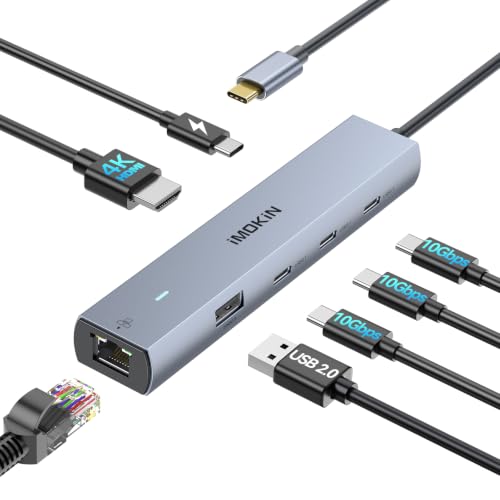
The MOKiN 10Gbps USB C Hub Ethernet is an ideal choice for MacBook Pro and Air users who demand high-speed performance and versatility. With three USB-C ports offering up to 10Gbps transfer speeds, you can quickly move large files. The hub features a 4K@60Hz HDMI output for stunning visuals, while the RJ45 Ethernet port guarantees a stable internet connection. You’ll appreciate the 100W Power Delivery, allowing you to charge your devices simultaneously. Compact and lightweight, it’s perfect for travel. Plus, with a solid 4.6-star rating from users, it’s clear that this hub fulfills diverse connectivity needs seamlessly.
Best For: Users of MacBook Pro and Air who require a versatile hub for high-speed data transfer, video output, and reliable internet connectivity.
Pros:
- Multiple connectivity options with 7 ports including 3 USB-C, HDMI, and Ethernet.
- High-speed performance with data transfer speeds up to 10Gbps.
- Compact and portable design makes it easy to carry for travel.
Cons:
- USB-C port does not support video output, limiting some usage scenarios.
- SD card must be inserted before connecting to certain devices for proper detection.
- May not be compatible with all USB-C devices, requiring specific compatibility checks.
ABLEWE USB C Hub Ethernet, 8 in 1 Multiport USB C to HDMI Adapter

For those who need a reliable and versatile connectivity solution, the ABLEWE USB C Hub Ethernet is an excellent choice. This 8-in-1 adapter extends your USB-C port with a 4K@60Hz HDMI output, a 1000Mbps Ethernet port, and three USB 3.0 ports for speedy data transfer. You’ll appreciate the 100W Power Delivery charging, ensuring your devices stay powered. Its compact design makes it easy to carry, perfect for on-the-go use. While most users love its performance, some experienced HDMI output issues needing extra power. Overall, it’s a solid option for enhancing your MacBook’s connectivity.
Best For: Users seeking a reliable and versatile connectivity solution for their Type-C devices, especially MacBook owners.
Pros:
- 4K@60Hz HDMI output provides exceptional picture quality for media display.
- 1000Mbps Ethernet port ensures a stable and fast wired internet connection.
- Compact and lightweight design makes it easy to carry for on-the-go use.
Cons:
- Some users reported HDMI output issues requiring additional power for optimal performance.
- Occasional network disconnects have been experienced by some users.
- Limited compatibility may not support all Type-C devices seamlessly.
UtechSmart USB C Hub Multiport Adapter (6 In 1)
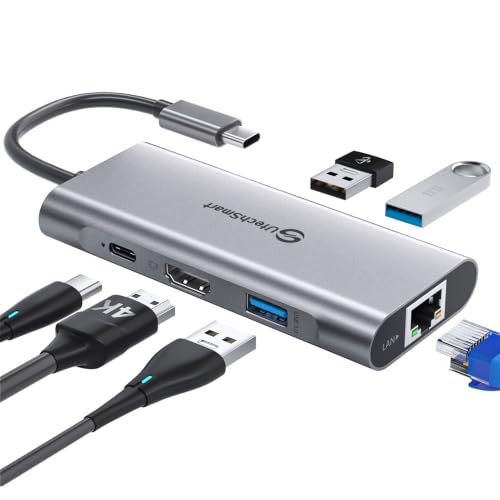
If you’re looking for a versatile solution to expand your MacBook’s connectivity, the UtechSmart USB C Hub Multiport Adapter (6 In 1) stands out with its reliable 1000M Ethernet port. This hub features a 4K HDMI output, three USB 3.0 ports for fast data transfer, and a USB C charging port that supports 100W Power Delivery. Weighing just 3.03 ounces, it’s easy to carry. Users appreciate its plug-and-play functionality, ensuring stable connections without extra drivers. Although some report overheating, overall, it’s a highly rated option, backed by solid customer support and an 18-month warranty for peace of mind.
Best For: Users seeking a compact and versatile USB C hub for their MacBook or other Type C devices that require multiple connectivity options.
Pros:
- Plug-and-play functionality ensures easy setup without the need for additional drivers.
- Offers high-speed data transfer of up to 5 Gbps and reliable 1000M Ethernet connectivity.
- Supports 100W Power Delivery for fast charging while using other ports simultaneously.
Cons:
- Some users have reported overheating issues, especially under heavy usage.
- HDMI output performance may vary depending on device compatibility.
- Initial device recognition problems can occur, requiring proper power connections to resolve.
Acer USB C Hub with 4K HDMI (9-in-1 Docking Station)

Looking for a versatile solution to expand your MacBook’s connectivity? The Acer USB C Hub with 4K HDMI is a powerful 9-in-1 docking station that features HDMI, USB A 3.0, Ethernet, VGA, and an SD card reader. You can easily stream 4K video at 30Hz to multiple displays, and with 1Gbps Ethernet support, your data transfers will be stable and swift. Plus, the PD 100W charging guarantees your devices stay powered up. Compatible with various systems, this hub’s durable aluminum design holds up well, making it a reliable choice for your connectivity needs.
Best For: Users seeking a versatile and high-quality connectivity solution for their laptops, particularly MacBook users who require multiple ports and high-speed data transfer.
Pros:
- Multiple Connectivity Options: Offers 9 ports including HDMI, USB A 3.0, Ethernet, and SD card reader for versatile use.
- High-Speed Data Transfer: Supports USB 3.0 speeds of up to 5 Gbps and 1Gbps Ethernet for stable and swift data transfers.
- Durable Design: Constructed with high-quality aluminum for enhanced durability and effective heat dissipation.
Cons:
- HDMI Issues: Some users have reported HDMI functionality problems with specific PCs.
- Short Cable Length: The short cable may affect ergonomics and positioning during use.
- Single USB C Charging Port: The USB C port is dedicated solely to charging, limiting its versatility for data transfer.
MOKiN USB C Multiport Adapter Hub for MacBook Pro/Air

The MOKiN USB C Multiport Adapter Hub stands out as an excellent choice for MacBook Pro and Air users from 2016 to 2019 who need reliable connectivity options. Weighing just 2.39 ounces, it features a slim aluminum design and offers a variety of ports, including USB 3.0, HDMI for 4K UHD, and a Gigabit Ethernet connection for fast wired internet. With high customer ratings of 4.6 stars, users appreciate its speed and utility. However, some have noted that it may not grip tightly, which could lead to wear on your USB-C connectors over time.
Best For: Users of MacBook Pro and Air models from 2016 to 2019 who need a versatile and compact multiport adapter for enhanced connectivity.
Pros:
- Versatile Connectivity: Offers a variety of ports including USB 3.0, HDMI for 4K UHD, and Gigabit Ethernet.
- Lightweight and Portable: Weighing only 2.39 ounces, it is easy to carry and does not add bulk.
- High Customer Satisfaction: Rated 4.6 out of 5 stars by users who appreciate its speed and utility.
Cons:
- Grip Issues: Some users report that the adapter does not grip tightly, which may lead to wear on USB-C connectors over time.
- Limited Compatibility: Specifically designed for MacBook Pro/Air (2016-2019), limiting use with other devices.
- Not Suitable for Protective Cases: The ultra-slim design may not fit well with laptop cases, reducing its protective use.
Factors to Consider When Choosing a Macbook Hub With Ethernet
When choosing a Macbook hub with Ethernet, you should consider several key factors. Think about the variety and types of ports you need, as well as the power delivery capacity and video output quality. Additionally, guarantee the hub provides a stable Ethernet connection and fits your design and portability preferences.
Port Variety and Types
Choosing the right MacBook hub with Ethernet involves considering the variety and types of ports available. Look for a hub that offers 6 to 9 ports to maximize your connectivity options for multiple devices. A mix of USB-A and USB-C ports is essential, ensuring compatibility with a wider range of peripherals and accessories. Don’t forget to check for at least one HDMI port, ideally supporting 4K resolution, to enhance your video output during presentations or streaming. Additionally, having an SD and TF card reader can make accessing files from cameras easier. This port variety will help you stay productive and connected, making your MacBook experience seamless and efficient.
Power Delivery Capacity
Power delivery capacity is a critical factor to evaluate for anyone wanting to maximize their MacBook hub’s efficiency. Look for hubs with a power delivery capacity of 65W or higher, as they’re typically capable of charging your laptop while you use other ports. Remember that some hubs require a minimum wattage to function properly, so checking those operational requirements is vital. If you opt for a hub supporting 85W or 100W, you’ll enjoy faster charging and can connect multiple high-demand peripherals simultaneously. Finally, verify that your power adapter is compatible with the hub’s power delivery system to guarantee peak performance and avoid any potential power delivery issues. Your MacBook deserves the best!
Video Output Quality
Considering video output quality is vital for maximizing your experience with a MacBook hub that includes Ethernet. When choosing a hub, check the supported resolutions and refresh rates; ideally, you want one that offers 4K@60Hz for crisp visuals. If the hub features HDMI ports, verify compatibility with DisplayPort versions, as only those with DP 1.4 typically support 4K@60Hz. A higher refresh rate, like 60Hz, is essential for smooth video playback and gaming, so review the HDMI output specifications carefully. Confirm the hub’s HDMI output aligns with your display device’s capabilities; mismatched specs can lead to poor video quality. Remember, some hubs may deliver 4K at only 30Hz, which can diminish your viewing experience.
Stability of Ethernet Connection
While it might be tempting to rely on Wi-Fi for your internet needs, a stable Ethernet connection is essential for maximizing your MacBook hub experience. Ethernet typically supports speeds up to 1000 Mbps, perfect for gaming, streaming, and video conferencing. Choosing a USB-C hub with Gigabit Ethernet reduces latency and offers reliable internet access, especially in multi-device environments. Look for hubs with advanced chipsets, as they manage data flow efficiently, enhancing stability. Confirm the Ethernet port meets your internet service requirements; some hubs only support 10/100 Mbps, which may not suffice for high-speed plans. A good USB-C hub allows simultaneous use of Ethernet and other ports, preserving the stability of your wired connection while connecting multiple peripherals.
Design and Portability
A reliable Ethernet connection sets the stage for your MacBook hub experience, but it’s just as important to think about design and portability when selecting the right hub. Choose a compact hub, ideally around 4-6 inches long and under 4 ounces, to enhance portability for travel and daily use. A slim profile guarantees it fits seamlessly alongside your MacBook, avoiding extra bulk. Look for hubs made from durable materials like aluminum, which are lightweight and effective for heat dissipation. Additionally, make certain the design allows easy access to all ports without obstruction. This facilitates seamless connections to multiple peripherals, making it easier for you to stay organized and efficient, especially when you’re frequently on the go.
Compatibility With Devices
Choosing the right MacBook hub with Ethernet boils down to a few key factors that guarantee compatibility with your devices. First, make sure the hub is compatible with your specific MacBook model; some are designed for particular versions or require macOS 12 or newer. Look for hubs that support USB-C, USB4, or Thunderbolt connections for peak performance. It’s essential to have an Ethernet port for stable wired internet, especially if you need high-speed connectivity. Also, consider the hub’s power delivery capabilities; higher wattage, like 85W or 100W, lets your MacBook charge while using other ports. Finally, check that the HDMI and data transfer specifications align with your needs, such as supporting 4K video output.
Warranty and Support Options
When selecting a MacBook hub with Ethernet, considering warranty and support options is essential for your peace of mind. Look for hubs that offer an 18 to 24-month warranty, ensuring reliability and customer support. It’s also important to choose a hub with 24/7 customer service for troubleshooting and warranty claims. Pay attention to manufacturers that explicitly state their customer care policies, as some provide prompt replacements or repairs for defects. Reading user reviews can be invaluable, giving insights into the effectiveness of warranty claims and customer experiences. Additionally, check for the availability of documentation and support resources, as thorough guides can greatly enhance your installation and troubleshooting experience.