If you spend long hours working on your MacBook Pro 16-inch, you know how important it is to maintain comfort and proper posture. Choosing the right stand can make a significant difference in your workspace. From adjustable heights to enhanced ventilation, these stands offer various features that cater to your needs. Let’s explore the top options available and see how they can transform your work experience.
Nulaxy Aluminum Detachable Laptop Stand (Compatible with All 10-16 Inch Laptops)

If you’re looking for a versatile stand that perfectly accommodates your MacBook Pro 16-inch, the Nulaxy Aluminum Detachable Laptop Stand is an excellent choice. Weighing just 1.76 pounds, this durable aluminum stand fits laptops from 10 to 16 inches, making it incredibly versatile. Its ergonomic design elevates your screen by 7 inches, reducing neck strain and creating a clutter-free workspace. Plus, the detachable feature allows for easy storage and transport. While some users report slight wobbling when typing, using an external keyboard enhances stability. With an impressive 4.8-star rating, it’s a top choice among laptop stands.
Best For: Individuals seeking an ergonomic and portable laptop stand that fits a wide range of laptop sizes from 10 to 16 inches.
Pros:
- Versatile Compatibility: Supports all laptops from 10 to 16 inches, including popular brands like MacBook and Dell.
- Ergonomic Design: Elevates the laptop screen by 7 inches, promoting better posture and reducing neck pain.
- Detachable and Portable: Easily disassembles into three parts for convenient storage and transport.
Cons:
- Slight Wobbling: Some users experience wobbliness when typing directly on the laptop.
- External Keyboard Recommended: For optimal stability, using a Bluetooth keyboard and mouse is suggested.
- Weight Consideration: At 1.76 pounds, it may be slightly heavier than some other portable stands.
Adjustable Laptop Stand with 360 Rotating Base for Laptops up to 16 Inches

The Adjustable Laptop Stand with a 360 Rotating Base is an excellent choice for professionals and students alike who use laptops up to 16 inches. Made from durable aluminum, it offers adjustable height and tilt, ensuring an ergonomic setup for long work sessions. The 360° swivel base allows easy screen rotation during meetings, enhancing productivity. Weighing just 2.46 pounds, it’s portable and convenient for on-the-go use. With a stellar rating of 4.8 stars from over 3,000 users, it effectively improves posture while providing a sleek, unobtrusive design that complements your MacBook. Upgrade your workspace today!
Best For: Professionals and students seeking a versatile and ergonomic laptop stand for laptops up to 16 inches.
Pros:
- Adjustable height and tilt for enhanced ergonomics, reducing strain during long work sessions.
- 360° swivel base allows for easy screen rotation, facilitating collaboration during meetings.
- Sturdy aluminum construction provides stability and support for full-size laptops without wobbling.
Cons:
- Higher price point compared to some competitors, though justified by quality and durability.
- Some users may find the tabs for laptop edge support to be shallow.
- Heavier design may not be ideal for frequent transport or travel.
Lamicall Adjustable Laptop Stand for Desk (10-17.3 inches)

For those seeking an ergonomic solution to enhance their workspace, the Lamicall Adjustable Laptop Stand is an excellent choice for MacBook Pro 16-inch users. This portable, foldable aluminum riser supports laptops from 10 to 17.3 inches, ensuring compatibility with various models. You can easily adjust the height and angle to elevate your screen to eye level, promoting better posture and reducing discomfort. Its sturdy design features an anti-skid base for stability and includes ventilation holes to prevent overheating. Lightweight and easy to store, the Lamicall stand is perfect for both home and on-the-go productivity.
Best For: Those seeking an ergonomic and portable solution to enhance their workspace while using laptops from 10 to 17.3 inches.
Pros:
- Adjustable height and angle for personalized comfort and improved posture.
- Lightweight and foldable design makes it easy to transport and store.
- Sturdy aluminum construction with anti-skid features ensures stability and protection for your laptop.
Cons:
- May not be suitable for larger laptops exceeding 17.3 inches.
- Some users may find the price higher compared to basic laptop stands.
- Limited color options may not appeal to all aesthetic preferences.
Adjustable Laptop Stand with 360 Rotating Base (Fits MacBook Pro/Air)

Looking for a versatile solution to enhance your workspace? The Adjustable Laptop Stand with a 360° rotating base is perfect for your MacBook Pro or Air. Its ergonomic design lets you easily adjust the height and angle for ideal eye level alignment. Made from durable fiber metal, it guarantees stability while supporting laptops up to 16 inches. Lightweight and foldable, it’s ideal for home, office, or outdoor use. With a solid customer rating of 4.6 out of 5 stars, you’ll appreciate its sturdy construction and aesthetic appeal. Plus, LOXP offers excellent support and a hassle-free return policy.
Best For: Those seeking a portable and ergonomic solution to enhance their laptop usage at home, in the office, or on the go.
Pros:
- Adjustable height and angle for personalized comfort and eye level alignment.
- Durable fiber metal construction ensures stability and longevity.
- Foldable and lightweight design makes it easy to transport.
Cons:
- Some users report difficulty in adjusting the height.
- Weighing 3.36 pounds may be considered heavy for frequent travelers.
- Limited compatibility with laptops larger than 16 inches.
UGREEN Vertical Laptop Stand Holder for Desk (Compatible with Up to 17.3 Inch Laptops)

Maximizing your desk space is essential for productivity, and the UGREEN Vertical Laptop Stand Holder is an excellent choice for anyone using a MacBook Pro or other laptops up to 17.3 inches. Made from premium aluminum alloy, this stand securely holds your laptop vertically, freeing up valuable workspace. With adjustable width to accommodate different laptop thicknesses, it guarantees a snug fit. The anti-slip silicone pads protect your device from scratches and keep it stable. Compact and stylish, it’s perfect for professionals on the go. Rated 4.6 out of 5 stars, it’s a top choice for organizing your workspace effectively.
Best For: Professionals and students who need to maximize desk space while keeping their laptops organized and secure.
Pros:
- Space-saving design allows for vertical storage, freeing up desk area for other tasks.
- Sturdy construction ensures stability with no wobble, accommodating various laptop sizes.
- Anti-slip silicone pads protect laptops from scratches and prevent slipping during use.
Cons:
- May not be suitable for laptops thicker than 1 inch, limiting compatibility.
- The compact size might not provide enough stability for larger or heavier laptops.
- Some users may find the price slightly higher compared to basic laptop stands.
Laptop Stand Aluminum Cooling Holder for Apple MacBook

The Bestand Laptop Stand Aluminum Cooling Holder is an excellent choice for MacBook Pro 16-inch users seeking improved ergonomics and cooling during intensive tasks. Made from durable 7000 series aluminum, it elevates your screen to eye level, reducing neck and back strain. Weighing just one pound and featuring a sleek, stable design, this stand supports up to 66 pounds. Its ventilation hollow design guarantees your laptop stays cool, while silicone pads prevent slipping and scratches. While it lacks height adjustability, users rave about its comfort and functionality, making it a top-rated option for both aesthetics and performance.
Best For: Users of Apple MacBook Pro 16-inch who are looking for enhanced ergonomics and cooling during intensive tasks.
Pros:
- Durable Material: Constructed from 7000 series aluminum, offering superior hardness and wear resistance.
- Ergonomic Design: Elevates the laptop screen to eye level, promoting better posture and reducing strain.
- Effective Cooling: Ventilation hollow design ensures effective heat dissipation during extended use.
Cons:
- Lack of Adjustability: Does not offer height adjustability, which may limit customization for some users.
- Coarser Finish: Some users may find the finish coarser compared to the smooth aluminum of MacBooks.
- Limited Portability: Best suited for stationary use, which may not be ideal for users on the go.
Foldable Laptop Stand, Height Adjustable Ergonomic Riser for Desk
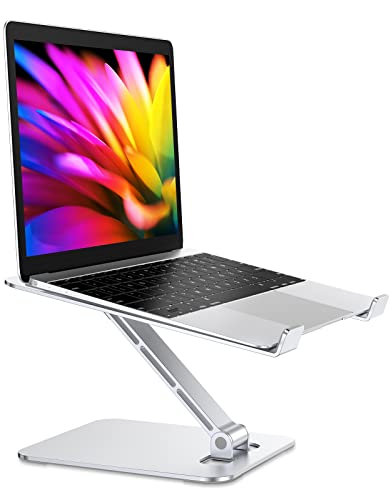
If you’re seeking a versatile solution to enhance your workspace, the Foldable Laptop Stand is an excellent choice for anyone using a MacBook Pro or similar laptops. Made from durable aluminum, it supports laptops up to 16 inches and adjusts up to 7.48 inches in height, allowing you to find the perfect angle. Its foldable design makes it easy to store or transport, while non-slip features guarantee stability during use. Plus, the open design promotes ventilation, preventing overheating. With a high customer rating of 4.7 stars, this stand’s ergonomic benefits and practicality make it a top pick for any setting.
Best For: Those seeking an ergonomic and portable solution to elevate their laptop for improved comfort and ventilation during work or study.
Pros:
- Adjustable height allows for customizable viewing angles, promoting better posture.
- Foldable design makes it easy to store and carry, perfect for on-the-go professionals.
- Sturdy aluminum construction supports a significant weight without wobbling, ensuring reliability.
Cons:
- Limited weight capacity of 8.8 lbs may not accommodate larger gaming or workstation laptops.
- May require adjustment for optimal ergonomics depending on user height and desk setup.
- Non-adjustable base means it may not suit all desk configurations or preferences.
HumanCentric Vertical Laptop Stand for MacBook Pro and Air
Designed specifically for MacBook Pro and Air users, the HumanCentric Vertical Laptop Stand is an ideal choice for those seeking to optimize their workspace. Made from durable aluminum and available in space gray, it supports models from 2016 to 2024, ensuring compatibility with your device. This minimalist stand allows you to connect an external monitor and use your laptop in closed clamshell mode, saving desk space. With silicone pads for stability, it securely holds your MacBook while preventing slipping. Rated 4.7 out of 5 stars, users love its sturdiness and aesthetic appeal, making it a worthy addition to any setup.
Best For: Users with MacBook Pro and Air models from 2016 to 2024 who want to save desk space and enhance their workspace aesthetics.
Pros:
- Sleek minimalist design that complements any workspace.
- Multiple exchangeable inserts for compatibility with various MacBook models.
- High customer satisfaction with a rating of 4.7 out of 5 stars for sturdiness and functionality.
Cons:
- Not suitable for laptops with cases, limiting its usability for some users.
- Limited to specific MacBook models, which may exclude some potential buyers.
- Potentially higher price point compared to less specialized laptop stands.
Tounee Telescopic Laptop Stand for Desk

For anyone looking to enhance their workspace ergonomics, the Tounee Telescopic Laptop Stand for Desk stands out with its impressive height adjustability, ranging from 2.1 to 21 inches. This stand’s 360° swivel base and sturdy aluminum alloy construction provide stability, supporting laptops up to 22 lbs. It promotes a healthy sit-stand posture, reducing muscle tension and alleviating neck and shoulder pain. Users love its portability and compact design, making it perfect for home offices or while using treadmills. With an average rating of 4.8 stars from over 3,200 reviews, it’s a reliable choice for boosting productivity and comfort.
Best For: Individuals seeking an ergonomic solution to enhance their workspace and promote a healthy sit-stand posture.
Pros:
- Sturdy construction: Made from high-quality aluminum alloy, supporting laptops up to 22 lbs for enhanced stability.
- Height adjustability: Offers a wide range of height settings from 2.1 to 21 inches to cater to various user preferences.
- Portability: Compact and foldable design makes it easy to transport and store, ideal for home offices and on-the-go use.
Cons:
- Typing comfort: Some users have noted critiques regarding the height adjustment and edge design for comfortable typing.
- Adjustment mechanism: A few reviews mention the height adjustment could be smoother or more intuitive.
- Limited compatibility: While compatible with laptops 10-17 inches, it may not accommodate larger devices or some tablet setups.
Laptop Stand for Desk, Adjustable Ergonomic Riser (Fits 10-16 Laptops)

The JOYEKY Laptop Stand is perfect for those who work on a variety of laptops ranging from 10 to 16 inches, including the MacBook Pro 16-inch. Crafted from high-quality aluminum alloy, this adjustable stand supports up to 11 lbs and features a 360° swivel base for easy collaboration. You can customize the height and angle to ease shoulder and neck strain while promoting airflow to prevent overheating. Weighing only 2.16 pounds and foldable for portability, it’s great for on-the-go professionals. With an impressive 4.7-star rating, users rave about its stability and aesthetic appeal. Experience comfort and efficiency with this versatile stand!
Best For: Individuals seeking a portable and ergonomic laptop stand that enhances comfort and promotes better posture during work.
Pros:
- Sturdy aluminum alloy construction provides durability and stability for various laptop models.
- 360° swivel base facilitates easy screen sharing and collaboration with others.
- Adjustable height and angle help reduce shoulder and neck strain while improving airflow to prevent overheating.
Cons:
- Some users find height adjustment challenging, requiring two hands for optimal setup.
- Weight capacity may not accommodate heavier laptops, limiting usability with certain models.
- Foldable design might not be as robust as fixed stands, potentially affecting long-term durability.
Factors to Consider When Choosing a Macbook Pro 16 Inch Stand
When choosing a MacBook Pro 16-inch stand, consider how the material quality impacts durability and stability. You’ll also want to think about ergonomic design features and adjustability to guarantee comfort during use. Ultimately, don’t overlook the importance of cooling and ventilation efficiency for your laptop’s performance.
Material Quality and Durability
Choosing the right material for your MacBook Pro 16-inch stand is essential for ensuring durability and performance. High-grade aluminum alloys, especially 7000 series, provide superior hardness and wear resistance. Look for stands with a thickness of at least 4 mm, as this enhances load-bearing capacity and stability, preventing wobbling during use. Additionally, consider stands that include anti-slip features like silicone pads or textured surfaces to protect your laptop from scratches while ensuring it stays securely in place. Ventilation features, such as open-back designs or multiple holes, promote airflow and heat dissipation, extending your laptop’s lifespan. Finally, prioritize sturdy construction with seamless designs to maintain stability and effectiveness over time.
Ergonomic Design Features
After guaranteeing your stand’s material quality and durability, it’s time to focus on ergonomic design features that can greatly enhance your user experience. An ergonomic stand elevates your MacBook Pro screen to eye level, promoting better posture and reducing neck and back pain during long hours of use. Look for stands with open designs or ventilation holes to improve airflow, which helps prevent overheating. Non-slip pads are essential for stabilizing your laptop, minimizing wobbling while you type. Additionally, an ergonomic stand can create extra desk space, helping you maintain a more organized and efficient work environment. Prioritizing these features guarantees that your workspace is not only comfortable but also conducive to productivity.
Adjustability and Height Options
A well-designed stand for your MacBook Pro 16 inch can make a considerable difference in your comfort and productivity. When choosing a stand, look for models with adjustable height options that elevate the screen to eye level, promoting better posture and reducing neck strain. Ideally, opt for stands with a height adjustment range of at least 7.48 inches to accommodate various seating positions and desk heights. Angle adjustments are also essential for finding your most comfortable viewing position, whether you’re working or gaming. Ergonomic designs that support multiple height settings can greatly reduce discomfort during long sessions. Finally, make sure the stand remains stable at different heights to maintain typing comfort and overall usability.
Stability and Non-Slip Base
When setting up your MacBook Pro 16-inch stand, stability is just as important as adjustability. A sturdy base is essential; make sure it can support your laptop’s weight without wobbling. Look for non-slip features like rubber pads or silicone grips on the bottom to prevent sliding on surfaces, especially while typing. A wider base enhances stability, reducing the risk of tipping when you adjust height or angle. Also, check for anti-slip materials on the top surface to keep your MacBook secure and scratch-free. Finally, high-quality materials like aluminum alloy not only boost stability but also enhance durability, giving you a reliable support system for your MacBook during use.
Cooling and Ventilation Efficiency
Effective cooling and ventilation efficiency are essential for your MacBook Pro 16-inch, especially during demanding tasks. Choosing a stand with an open design enhances airflow, allowing heat to dissipate effectively. Look for materials like aluminum alloy that not only support your laptop but also act as thermal pads to absorb and release heat. Stands equipped with ventilation holes or slots boost airflow, reducing the chances of thermal throttling and system crashes. By elevating your laptop, you promote better air circulation, helping maintain lower internal temperatures. This can greatly prolong your device’s lifespan, ensuring it performs at its best when you need it most. Prioritizing cooling efficiency in your stand choice is key to a healthier MacBook experience.
Portability and Storage Convenience
Maintaining ideal cooling is just one part of the equation; portability and storage convenience are equally important when choosing a stand for your MacBook Pro 16-inch. Look for lightweight designs that weigh between 1.76 to 2.46 pounds, making transportation a breeze. Opt for foldable or detachable stands, which can considerably reduce size for easy storage, fitting perfectly in your backpack or laptop bag. Many compact stands measure around 11.5 x 8.3 x 2.3 inches or smaller, ensuring stability without taking up much space. Choose stands that assemble and disassemble quickly, enhancing their portability for various environments. Also, consider those with built-in slots for small items to keep your workspace organized while you’re on the go.
Compatibility With Accessories
Choosing the right stand for your MacBook Pro 16-inch is essential, especially when evaluating compatibility with accessories. Make sure the stand you select accommodates external keyboards and mice to create an ergonomic setup. Look for models that offer sufficient space for cable management, keeping your workspace organized. Additionally, check if the stand supports external monitors and other peripherals while maintaining a secure and stable position for your laptop. It’s important to take into account height and angle adjustments, which can prevent strain during long working hours. Finally, verify that the stand’s design doesn’t obstruct ports or connections, allowing you to easily charge and connect your accessories without hassle. A thoughtful choice here enhances your overall productivity and comfort.
Aesthetic and Style Appeal
After ensuring compatibility with your accessories, the style and aesthetic appeal of your MacBook Pro 16-inch stand can greatly enhance your workspace. Look for minimalist and sleek designs that complement your laptop’s premium aesthetics. Stands made from high-quality materials like aluminum alloy not only boost durability but also match the modern styling of your MacBook. Selecting a stand in colors like space gray or silver can create a cohesive look. Thoughtful design elements, such as cable management features, help keep your desk organized and uncluttered. Additionally, a low-profile design maintains your MacBook’s elegance while providing ergonomic benefits. Choosing the right stand can elevate both your comfort and your workspace’s visual appeal.