If you want to keep your MacBook Pro cool and running efficiently, investing in a reliable cooling fan stand is key. These stands come with various features, such as adjustable heights and powerful fans, to enhance airflow. From the Havit HV-F2056 to the SOUNDANCE Laptop Cooling Pad, there’s a perfect option for everyone. But what should you consider before making a choice? Let’s explore the top picks and essential factors to guarantee you find the right fit.
Havit HV-F2056 Laptop Cooler Cooling Pad

If you’re looking for a reliable cooling solution for your MacBook Pro, the Havit HV-F2056 Laptop Cooler Cooling Pad is an excellent choice. This slim, portable, and lightweight pad is compatible with 15.6 to 17-inch laptops. With three ultra-quiet fans, it guarantees a noise-free experience while effectively cooling your device through its high-quality metal mesh. It doubles as an ergonomic stand, offering two adjustable height settings for your comfort. Plus, the built-in dual-USB hub lets you connect additional devices effortlessly. Its durable surface provides stable support, making it perfect for on-the-go use without compromising your laptop’s safety.
Best For: Users seeking an effective and portable cooling solution for their 15.6 to 17-inch laptops, especially those who prioritize ergonomics and quiet operation.
Pros:
- Three ultra-quiet fans ensure a noise-free environment while cooling.
- Ergonomic design with adjustable height settings enhances user comfort.
- Built-in dual-USB hub allows for easy connection of additional devices.
Cons:
- Requires a Type C to USB adapter for Type C devices, which may be an extra cost.
- May not fit laptops larger than 17 inches, limiting compatibility.
- Some users may find the design less sturdy on uneven surfaces.
Laptop Cooling Pad for 12-15.6 Inch Laptops

For those using laptops between 12 and 15.6 inches, the AIMIUZI Laptop Cooling Pad stands out with its five fan design, ensuring ideal airflow and cooling efficiency. This pad features a honeycomb metal mesh and adjustable fan speeds, giving you control over cooling performance. Weighing only 1.38 pounds, it’s portable and compatible with various brands like Apple and Dell. With five adjustable height settings, it promotes ergonomic use, reducing strain during long sessions. Plus, it operates quietly, making it perfect for gaming or work. Enjoy added connectivity with two USB ports and a convenient phone stand for extra utility.
Best For: Users of 12-15.6 inch laptops looking for an effective cooling solution to enhance performance during gaming or prolonged work sessions.
Pros:
- Excellent cooling performance with five fans and adjustable speeds to maintain optimal laptop temperatures.
- Ergonomic design with adjustable height settings and an anti-slip pad for comfortable use.
- Quiet operation ensures minimal noise, making it suitable for quiet environments.
Cons:
- May not effectively support larger or heavier laptops beyond the specified size range.
- Some users found the phone stand less useful than expected.
- Limited to USB-powered functionality, which may restrict placement options.
Targus Dual Fan Lap Chill Mat for 17 Inch Laptops

The Targus Dual Fan Lap Chill Mat is ideal for anyone using laptops up to 17 inches, especially if you often work on your lap or need a portable cooling solution. Its soft neoprene material guarantees comfort, while the ergonomic tilt promotes easy typing. The dual fans, powered by USB-A or mini-USB, effectively cool your laptop without much noise. With an open mesh top for airflow and adjustable height options, it enhances cooling performance. Plus, the built-in 4-port USB hub keeps your peripherals connected. Users appreciate its comfort and cooling efficiency, making it a top choice for laptop users.
Best For: Those seeking a comfortable and effective cooling mat for laptops up to 17 inches, particularly for use on their lap or in portable settings.
Pros:
- Soft neoprene material provides excellent comfort during extended use.
- Dual fans offer effective cooling with minimal noise, enhancing laptop performance.
- Built-in 4-port USB hub allows for easy connectivity of peripherals.
Cons:
- Some users have raised concerns about build quality and long-term durability.
- Cable management can be challenging, requiring additional organization solutions.
- Mixed reviews on used versions, with new products recommended for best performance.
Adjustable Laptop Cooling Stand with RGB Lighting (10-16 Inch, Gray)

Looking for a way to keep your laptop cool during intense gaming sessions or long work hours? The Adjustable Laptop Cooling Stand with RGB Lighting is perfect for you. It features two ultra-quiet fans with three-speed settings, ensuring ideal temperature for your 10-16 inch laptop. Its ergonomic design reduces strain, allowing for comfortable viewing angles. Plus, it’s lightweight and foldable, making it easy to carry and store. Crafted from durable aluminum alloy with anti-slip pads, it securely holds your device. Whether you’re working, gaming, or DJing, this stand enhances performance while adding a stylish touch with RGB lighting.
Best For: Gamers, professionals, and students seeking an ergonomic and effective cooling solution for their laptops during extended use.
Pros:
- Durable Construction: Made from premium aluminum alloy, ensuring both durability and lightweight properties.
- Adjustable Cooling: Features 3-speed settings and ultra-quiet fans for optimal temperature management.
- Portability: Lightweight and foldable design makes it easy to transport and store, perfect for travel.
Cons:
- Limited Size Compatibility: Only suitable for laptops ranging from 10 to 16 inches.
- Requires Adjustment: Users must remove the laptop to adjust the height or angle, which may be inconvenient.
- Limited RGB Lighting Options: RGB lighting may not appeal to all users or fit every aesthetic preference.
TECKNET Portable Laptop Cooling Pad (Fits 12-17 Inches)

If you own a laptop between 12 and 17 inches, the TECKNET Portable Laptop Cooling Pad is an excellent choice for keeping your device cool during intense gaming sessions or long work hours. Weighing just 1.44 pounds, this USB-powered cooler features three powerful fans operating at 1200 RPM, ensuring efficient heat management. Its ultra-quiet design keeps distractions at bay while you work or play. Plus, with adjustable height levels and rubber grips, it enhances your comfort. Just plug it in, and you’re ready to go. With a 36-month warranty, TECKNET’s got you covered for peace of mind.
Best For: Gamers and professionals using laptops between 12 and 17 inches who need effective cooling during extended usage.
Pros:
- Efficient Cooling: Three powerful fans operating at 1200 RPM significantly reduce laptop temperature.
- Quiet Operation: Ultra-quiet design minimizes noise, allowing for an undistracted work or gaming environment.
- Ergonomic Design: Adjustable height levels and rubber grips enhance comfort and prevent laptop sliding.
Cons:
- Flimsy Feel: Some users report the material feels lightweight and flimsy.
- USB Connectivity: The USB port is not USB-C compatible, requiring a workaround for modern laptops.
- Limited Size Compatibility: Only fits laptops within the 12 to 17 inches range, which may not accommodate larger devices.
Kootek Laptop Cooling Pad with 5 Quiet Fans

For anyone using a MacBook Pro or similar laptop, the Kootek Laptop Cooling Pad with 5 Quiet Fans is an ideal choice. With five built-in fans—one large and four smaller ones—it delivers impressive cooling power, and you can customize the airflow by activating one, four, or all five fans. The whisper-quiet operation lets you focus without distractions. Plus, the built-in dual USB hub adds extra connectivity for your devices. Its adjustable height settings guarantee comfort during long sessions, and the included stoppers keep your laptop secure. Compatible with a wide range of laptops, it’s perfect for any user.
Best For: Users of laptops, especially MacBook Pro or similar models, seeking effective cooling solutions for extended work or gaming sessions.
Pros:
- Whisper-quiet operation ensures a distraction-free environment.
- Adjustable fan settings allow customization of cooling performance.
- Ergonomic design with adjustable height enhances comfort during use.
Cons:
- Requires a Type C to USB adapter for Type C devices, which is not included.
- May not be as portable as smaller cooling pads due to its size.
- Some users may find the blue LED lights distracting during use.
Laptop Cooling Stand with Detachable Thermoelectric Cooler (Up to 15.6” Laptop)
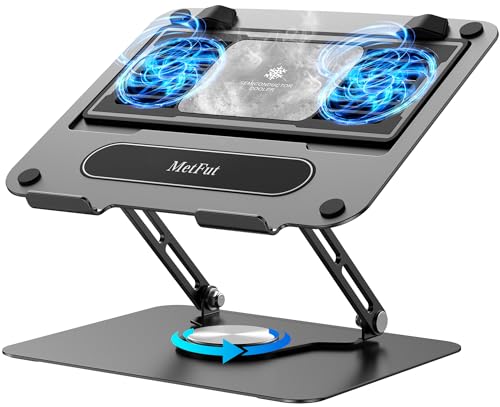
The Laptop Cooling Stand with Detachable Thermoelectric Cooler is an excellent choice for gamers and professionals who demand optimum performance from their laptops. Supporting devices up to 15.6 inches, this stand features a robust carbon steel build and adjustable height for ergonomic comfort. Its innovative thermoelectric cooling system efficiently drops temperatures to 47℉ in just three seconds, making it superior to standard fan-based options. With ultra-quiet operation and a 360° rotating base, you can enjoy a cool laptop without distractions. Just keep in mind that it requires a power source, which may affect portability.
Best For: Gamers and professionals seeking effective cooling solutions for high-performance laptops up to 15.6 inches.
Pros:
- Effective thermoelectric cooling performance, rapidly reducing temperatures.
- Sturdy carbon steel construction ensuring durability and stability.
- Ultra-quiet operation at ≤20Db, making it suitable for quiet environments.
Cons:
- Requires a power source, limiting mobility during use.
- Heavier than some alternatives, which may impact travel convenience.
- Some users reported insufficient fan speed for optimal cooling under heavy loads.
SOUNDANCE Laptop Cooling Pad with Low-Noise Fan and USB Hubs
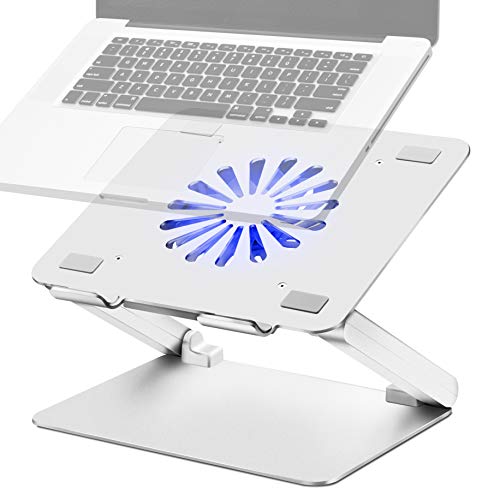
SOUNDANCE Laptop Cooling Pad is an excellent choice for anyone seeking efficient cooling for larger laptops, including those up to 17.3 inches. Its 140mm fan guarantees powerful airflow, helping to prevent overheating while keeping noise levels low. Though some users find it slightly louder than expected, the ergonomic design allows you to adjust the height and angle for better viewing. Plus, with four USB 3.0 ports at the back, you can easily connect your accessories. The sturdy aluminum construction and rubber mats provide stability, making sure your laptop stays securely in place while you work or play.
Best For: Individuals using larger laptops up to 17.3 inches who require efficient cooling and ergonomic support during extended use.
Pros:
- Sturdy aluminum construction with rubber mats ensures stability and protection from scratches.
- Ergonomic design with adjustable height and angle helps reduce neck and shoulder strain.
- Four USB 3.0 ports provide convenient connectivity for accessories.
Cons:
- Some users report the fan noise is louder than expected.
- Rear USB port placement may be inconvenient for some users preferring side access.
- Lack of speed control for the fan limits customization of cooling performance.
KLIM Wind Laptop Cooling Pad with 4 Cooling Fans
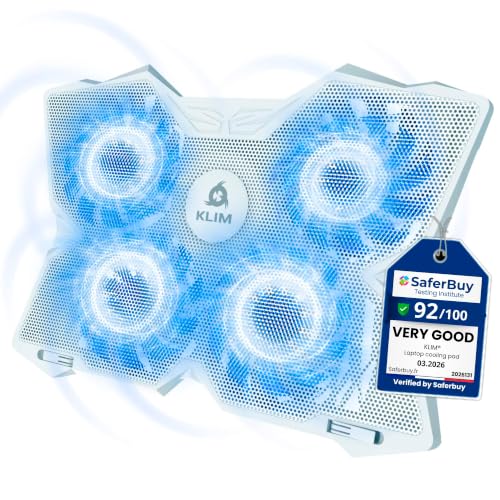
If you’re a gamer or someone who frequently engages in resource-intensive tasks like photo and video editing, the KLIM Wind Laptop Cooling Pad is an ideal choice for your MacBook Pro. With four cooling fans spinning at 1200 RPM, it efficiently cools your laptop in under a minute, preventing overheating. Weighing just 1.61 pounds, it’s lightweight yet durable, with a sleek design and adjustable legs for best positioning. Plus, it includes two USB ports for added convenience. Users love its quiet operation and effective cooling, earning it a solid 4.5-star rating. Enjoy enhanced performance and longevity with this reliable cooling solution.
Best For: Gamers and users engaged in resource-intensive tasks like photo and video editing who need effective cooling solutions for their laptops.
Pros:
- Effective Cooling: Cools laptops quickly, reducing temperatures by 3-5 degrees within minutes.
- Lightweight and Portable: Weighs only 1.61 pounds, making it easy to transport.
- Quiet Operation: Features silent fans that operate efficiently without disruptive noise.
Cons:
- Awkward Port Placement: Some users find the positioning of fan switches and USB ports inconvenient.
- Sturdiness Concerns: A few reviews mention minor issues with the sturdiness of the front guards.
- Variable LED Brightness: Brightness of LED lights may vary depending on laptop coverage.
Adjustable Laptop Stand with Cooling Fan for All Laptops
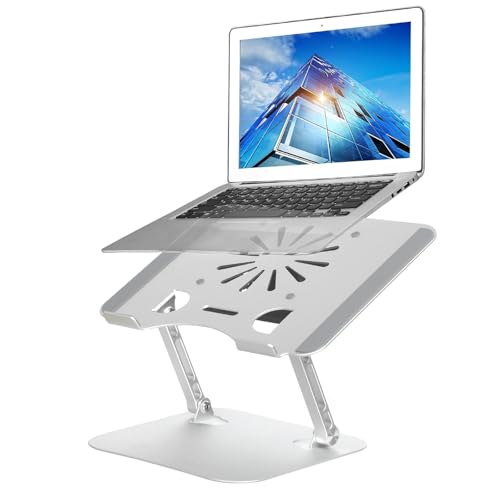
For anyone using a laptop as their primary workstation, the Adjustable Laptop Stand with Cooling Fan is an ideal choice. Made from sturdy aluminum alloy, it supports laptops from 11 to 17.3 inches, providing stability and an ergonomic Z-type design for optimal viewing angles. The built-in cooling fan enhances airflow, keeping your device chill during long work sessions. Plus, it’s versatile enough for various environments like offices and libraries. Users appreciate its durability and cooling efficiency, though some mention fan noise. Overall, this stand considerably improves your work-from-home experience and promotes better posture.
Best For: Individuals using laptops as their primary workstation who seek improved ergonomics and cooling efficiency.
Pros:
- Sturdy and stable design supports laptops up to 22 lbs, ensuring durability during use.
- Built-in cooling fan enhances airflow, preventing overheating and improving laptop performance.
- Ergonomic Z-type design allows for height adjustment, promoting better posture and reducing muscle strain.
Cons:
- Fan noise may become noticeable over time, which could be distracting for some users.
- Improper fan direction reported by some users may affect cooling efficiency, requiring adjustments.
- Limited power source options for the fan, as some users prefer external power for optimal functionality.
Factors to Consider When Choosing a Macbook Pro Cooling Fan Stand
When choosing a MacBook Pro cooling fan stand, you’ll want to contemplate several key factors. Cooling efficiency and ergonomic design can greatly impact your comfort and device performance. Additionally, think about compatibility, noise levels, and how portable the stand needs to be for your lifestyle.
Cooling Efficiency Performance
Understanding the cooling efficiency performance of a MacBook Pro cooling fan stand is essential for maintaining ideal laptop function, especially during intensive tasks. Look for stands with multiple fans, as they typically provide better airflow and faster temperature reduction. Adjustable fan speeds let you optimize cooling based on your needs—higher speeds are vital for gaming or video editing. The materials used in the stand also matter; metal surfaces usually enhance cooling efficiency over plastic due to better thermal conductivity. Effective cooling pads can lower your laptop’s temperature markedly within minutes, helping prevent overheating. Finally, consider noise levels; models operating around 20-40 dB maintain efficient cooling without being distracting.
Ergonomic Design Features
Choosing a MacBook Pro cooling fan stand with ergonomic design features can greatly enhance your comfort during long hours of use. Look for adjustable height settings that promote a comfortable viewing angle, reducing neck and shoulder strain. Many stands use a Z-type design, allowing you to customize the angle for ideal posture while working or gaming, which can help alleviate muscle pain. Enhanced stability is essential, so opt for stands with larger rubber grips or non-slip surfaces to keep your laptop securely in place. Some designs even offer added elevation features for improved air circulation, further boosting cooling efficiency. Additionally, consider stands with built-in fans that operate quietly, minimizing distractions for a focused environment.
Compatibility With Laptops
An ergonomic design is only one part of the equation; compatibility with your specific MacBook Pro model is equally important. When choosing a cooling fan stand, verify it matches your laptop’s size, which typically ranges from 11 to 17 inches. Look for adjustable height settings to optimize ergonomics and fit your MacBook’s design. Some stands are specifically tailored for Apple laptops, catering to their unique heat dissipation needs. It’s also crucial to check the weight capacity, as MacBook Pro models can vary considerably in weight. Finally, confirm the cooling stand offers appropriate ventilation and fan placements that align with your MacBook Pro’s cooling system to prevent overheating during intensive tasks.
Noise Level Considerations
When considering a MacBook Pro cooling fan stand, noise level plays a crucial role in your overall experience. Many cooling pads operate at 20-40 dB, which is typically quiet enough for work or gaming. If you need a silent environment, look for ultra-quiet fans rated at ≤20 dB. These are perfect for offices or libraries where concentration is key. Keep in mind that cooling pads with multiple fans can offer great temperature control but may vary in noise output, so check user reviews for feedback. Some models feature adjustable fan speeds, letting you balance cooling and noise based on your activity. Finally, consider the materials; soft materials and rubberized components tend to produce less noise than hard plastics.
Portability and Weight
As you explore options for a MacBook Pro cooling fan stand, portability and weight are key factors that can greatly enhance your user experience. Look for stands weighing between 1.38 and 3.63 pounds; lighter models make traveling and commuting easier. Slim, foldable designs are perfect for slipping into your bag without taking up too much space. Some stands use lightweight aluminum alloy, which not only reduces weight but also boosts durability and heat dissipation. Choose a compact design that accommodates various MacBook Pro sizes, ensuring compatibility while remaining easy to carry. Additionally, ergonomic adjustments in portable stands can enhance your comfort, allowing you to find the best viewing angle, no matter where you are.
Additional Connectivity Options
Finding the right MacBook Pro cooling fan stand goes beyond just portability and weight; additional connectivity options can considerably enhance your experience. Many stands come with built-in USB hubs, letting you connect devices like mice and keyboards without sacrificing laptop ports. Look for models that offer multiple USB ports, which allow you to connect peripherals while powering the cooling fan. It’s vital to check for USB-C compatibility, as some stands might need an adapter. You might also appreciate integrated phone stands or tablet slots, making multitasking more convenient. A well-designed cooling stand with these features can streamline your workspace, reduce cable clutter, and give you easy access to essential devices, improving your overall productivity.