A good sleeve makes a 15-inch MacBook Air easier to carry without adding more bulk than you need. The right choice depends on whether you want a slim layer for your bag, extra padding for travel, or pockets for your charger and cables.
These 10 picks cover protective, minimalist, and accessory-friendly designs. Check the fit for your exact MacBook Air model before buying, especially if you use a hard shell case.
Best 10 Macbook Air 15 Inch Sleeve Picks for 2026
Protection Pick

- Reinforced corners and padded edges
- Spill-resistant recycled fabric
- Front pocket plus key or AirTag strap
Best For: Impact-conscious daily commuters
Organization Pick
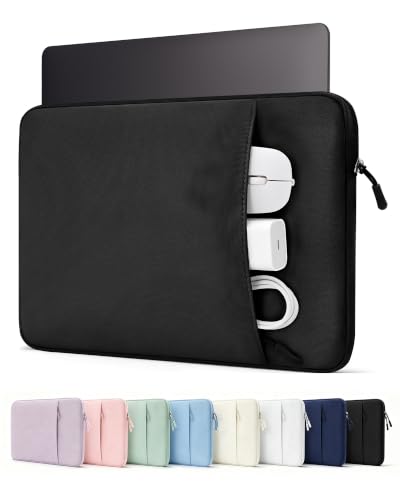
- Multi-compartment accessory pocket
- Plush lining and padded construction
- Slim fit for larger bags
Best For: Carrying a laptop with organized small tech essentials
Slim Protection Pick

- CornerArmor reinforced corners
- Slim, flat-edge silhouette
- Expanded front accessory pocket
Best For: Protective carry in a backpack or tote
Roomier Fit Pick

- Roomier listed interior dimensions
- Foam padding and fleece lining
- Top zipper and vertical front pocket
Best For: A simple sleeve with extra interior room
Simple Everyday Sleeve
MOSISO Laptop Sleeve with Front Pocket

- Fits listed 15.3-inch MacBook Air models
- Foam padding with fleece lining
- Slim design and front accessory pocket
Best For: Low-bulk carry inside another bag
Water-Resistant Pick
ProElife Canvas Sleeve for MacBook Air 15

- Water-resistant canvas exterior
- Cushioned layer and suede lining
- Front pocket; weighs about 217 g
Best For: Slim commuter carry with light-moisture protection
Organizer Travel Case

- Reinforced interior edges and padding
- Four zippered accessory pockets
- Tuck-away handle and trolley belt
Best For: Travel with a laptop and small accessories
Best Stand-Ready Sleeve
HYZUO Faux Suede Laptop Sleeve

- Flap folds into a typing stand
- Separate accessory pouch included
- Magnetic closure for quick access
Best For: Slim carry with an occasional typing stand
Best Built-In Pocket

- Attached front accessory pocket
- Foam padding with fleece lining
- Top zipper for easy access
Best For: Keeping small accessories attached to the sleeve
Best Matching Pouch Set

- Matching small pouch included
- Neoprene padding and fleece lining
- Slim, top-zip design
Best For: Carrying a laptop and small accessories in matching pieces
Protection Pick – tomtoc 360° Protective Sleeve
If your macbook air 15 inch sleeve needs to handle a crowded commute, this tomtoc model pairs reinforced corners and padded edges with a relatively sleek pouch design. Its stated internal dimensions are 13.58 x 9.6 x 0.87 inches, and it lists compatibility with 15-inch MacBook Air M2 through M5 models.
Best For: Commuters who prioritize impact protection and want a pocket for small accessories.
Pros:
- CornerArmor, resilient edges, and soft padding provide all-around protection; tomtoc says the sleeve passed a military-standard drop test.
- Spill-resistant recycled fabric, soft lining, and YKK zippers suit daily use.
- Front pocket holds accessories, with a separate strap for an AirTag or key.
Cons:
- The front pocket is better suited to small essentials than a full work kit.
- Its 1.57-inch listed exterior depth may take more bag space than a slimmer sleeve.
Choose this one when protective construction matters more than minimizing every bit of bulk. Check your laptop dimensions against the stated interior fit before ordering.
This macbook air 15 inch sleeve is a practical choice if you want a slim case with room to sort your everyday tech accessories. ProCase lists an interior of 13.42 x 9.37 x 0.95 inches and compatibility with 15-inch MacBook Air M2 through M5 models.
Best For: Students and commuters carrying a laptop plus several small accessories.
Pros:
- Multi-compartment front pocket organizes items such as cables, a mouse, and a power bank.
- Shock-absorbing padding and plush lining help guard against everyday bumps and scratches.
- Slim profile is intended to slide into a backpack, briefcase, or luggage.
Cons:
- The stated 13.42 x 9.37-inch interior calls for a careful fit check, especially for non-MacBook laptops.
- No specific water-resistance rating is provided in the supplied details.
Its main advantage is accessory organization without turning the sleeve into a separate bag. Measure your device before buying, as ProCase recommends.
For a macbook air 15 inch sleeve that balances a close fit with reinforced corners, the tomtoc Essence-A35 is worth considering. It lists a 13.58 x 9.64 x 0.79-inch interior and compatibility with 15-inch MacBook Air M2 through M5 models.
Best For: Office and hybrid-work users who want protective padding without a bulky profile.
Pros:
- CornerArmor corners and padding on both sides help protect against bumps and pressure in a bag.
- Slim, flat-edge design slips into backpacks, totes, and briefcases.
- Expanded front pocket carries essentials such as cables, chargers, or notebooks.
Cons:
- The 0.79-inch stated interior depth leaves limited room for a laptop with an added hard shell.
- A front pocket adds storage, but it does not replace a dedicated accessory bag for larger gear.
This is the more streamlined tomtoc option here: prioritize it if you want reinforced corners and everyday storage in a sleeve designed to stay close to the laptop.
If you prefer a less snug macbook air 15 inch sleeve, this MOSISO case lists a 14.57 x 10.24 x 0.79-inch interior and compatibility with 15-inch MacBook Air M2 through M5 models. Its vertical front pocket gives small accessories a separate place to go.
Best For: Buyers who want a simple sleeve with more interior length and width than the closer-fitting options here.
Pros:
- Polyester foam padding and fluffy fleece lining help cushion against bumps and scratches.
- Top-opening zipper provides straightforward access to the laptop.
- Front pocket holds items such as a mouse, earphones, pens, or a notepad.
Cons:
- The larger listed interior may allow more movement around a bare 15-inch MacBook Air than a fitted sleeve.
- No reinforced-corner construction is specified in the supplied notes.
This is a straightforward option when easy access and a roomier fit matter most. Compare the interior measurements with your laptop, particularly if you want it held snugly.
Simple Everyday Sleeve – MOSISO Laptop Sleeve with Front Pocket
This macbook air 15 inch sleeve keeps everyday carry straightforward: a slim polyester case with a fleece lining and a front pocket for small accessories. MOSISO lists compatibility with 15.3-inch MacBook Air M2 through M5 models, but check the 14.57 x 10.24 x 0.79-inch internal dimensions before ordering.
Best For: Carrying a MacBook Air inside a backpack or briefcase with a few small accessories.
Pros:
- Foam padding and fleece lining help cushion the laptop and guard against scratches.
- Front pocket holds items such as a mouse, earphones, pens, or a notepad.
- Slim, lightweight design slides into a larger bag.
Cons:
- Not water resistant.
- Soft sleeve offers less structured protection than a reinforced case.
Choose this one for a simple, low-bulk sleeve with useful accessory storage; keep it inside another bag when rain is a concern.
If you want a macbook air 15 inch sleeve with a water-resistant exterior, the ProElife pairs canvas with a cushioning layer and soft suede lining. It is designed for 15.3-inch MacBook Air M2 through M5 models; compare your laptop with its 13.78 x 9.84 x 0.78-inch internal dimensions before buying.
Best For: Commuters who want a slim sleeve with some resistance to light moisture.
Pros:
- Water-resistant canvas exterior adds protection against light moisture.
- Three-layer construction includes cushioning and a soft suede lining.
- Front pocket organizes a charger, mouse, cables, or other small accessories.
- At about 217 g, it is easy to slip into a backpack or tote.
Cons:
- Water resistant does not mean waterproof.
- Its listed internal dimensions should be checked carefully for your device.
This is a practical choice for daily travel when a close-fitting sleeve and light-moisture protection matter more than heavy-duty reinforcement.
This macbook air 15 inch sleeve is the more feature-packed MOSISO option, with reinforced interior edges, a tuck-away handle, and four front zippered pockets. It lists compatibility with 15.3-inch MacBook Air M2 through M5 models; its internal dimensions are 14.37 x 10.04 x 0.79 inches.
Best For: Travelers who want to carry a laptop and small accessories together.
Pros:
- Reinforced interior edges and foam padding add cushioning against bumps.
- Four front zippered pockets keep accessories separated.
- Tuck-away handle and rear trolley belt provide carrying options.
- Side-opening zipper helps keep the laptop contained while carrying.
Cons:
- Multiple pockets and a handle make it less minimal than a basic sleeve.
- Check the internal dimensions if you use a bulky laptop cover.
Pick this case when organization and travel features are priorities, while remembering that its cushioning is not a guarantee against damage from a drop.
Best Stand-Ready Sleeve – HYZUO Faux Suede Laptop Sleeve
If you want a macbook air 15 inch sleeve that does more than cover your laptop, this HYZUO model has a flap that folds into a triangular typing stand. Its stated 13.78 x 9.45-inch interior is listed as compatible with MacBook Air 15 models from M2 through M5.
Best For: MacBook Air owners who want a slim sleeve with a built-in stand and separate accessory storage.
Pros:
- Foldable flap doubles as a typing stand.
- Includes a separate pouch for a charger, mouse, or cables.
- Magnetic closure provides quick access without a zipper.
- Faux suede material is described as water-resistant and scratch-resistant.
Cons:
- The soft sleeve is not a rigid protective case.
- Accessories go in a separate pouch rather than an attached pocket.
The stand is the main reason to pick this one over a basic sleeve. Check your laptop’s dimensions against the listed interior if you use a case or cover on your MacBook.
Best Built-In Pocket – MOSISO Polyester Sleeve
This MOSISO macbook air 15 inch sleeve keeps small essentials with the laptop in a front vertical pocket. It has a zippered top opening, polyester foam padding, and a fleece lining; its stated interior measures 14.57 x 0.79 x 10.24 inches.
Best For: People who prefer an attached pocket for a mouse, earphones, pens, or a notepad.
Pros:
- Front pocket keeps accessories with the sleeve.
- Foam padding and fleece lining help cushion against bumps and scratches.
- Slim design is intended to slide into a backpack or briefcase.
- Listed as compatible with MacBook Air 15 models from M2 through M5.
Cons:
- Soft construction offers no rigid shell.
- The 0.79-inch interior depth is worth checking if your laptop has a bulky cover.
Choose this one if you want built-in storage without carrying a second pouch. The pocket is convenient for small accessories, while the sleeve remains designed for use inside a larger bag.
Best Matching Pouch Set – MOSISO Neoprene Sleeve
For a macbook air 15 inch sleeve with coordinated accessory storage, this MOSISO option pairs a zippered neoprene sleeve with a separate small pouch. The main compartment’s stated interior is 14.3 x 0.79 x 10.04 inches, and the listing includes MacBook Air 15 models from M2 through M5.
Best For: Buyers who want a simple, slim sleeve and a matching pouch for a mouse or earphones.
Pros:
- Includes a matching small accessory pouch.
- Neoprene foam padding and fleece lining help protect against bumps and scratches.
- Top-loading zipper allows straightforward laptop access.
- Slim construction fits into a backpack or briefcase.
Cons:
- The accessory pouch is separate and can be left behind.
- Its listed 5.71 x 0.59 x 5.12-inch pouch interior may not fit larger chargers.
This is the straightforward pick if you prefer a separate matching pouch to a pocket on the sleeve. Measure any accessories you plan to carry, since the included pouch is relatively small.
How We Picked the Best Macbook Air 15 Inch Sleeve
We focused on sleeves marketed for the 15-inch MacBook Air, then compared their stated fit, padding, closure style, carrying options, and accessory storage. The selection includes slim sleeves, 360-degree protective designs, water-resistant options, and cases with pockets or a built-in stand. Several MOSISO entries represent different configurations or included accessories, so check the exact listing rather than relying on the brand name alone. Product claims are not a substitute for an independent drop or waterproofing test.
Quick Comparison: Which Style Fits Your Routine?
For commuting with your laptop inside a backpack, a slim sleeve keeps bulk down. If you often carry it alongside books or other gear, consider a padded design with reinforced edges or corners, such as the tomtoc or MOSISO 360-degree options. Pocketed ProCase and MOSISO styles are more convenient when you need space for a cable, mouse, or small adapter, though a filled pocket can press against the laptop. The HYZUO stand-style case may suit desk-to-meeting use, while a water-resistant ProElife sleeve is worth considering for routine exposure to light rain or spills. Water resistance does not mean waterproofing.
Key Buying Factors for a MacBook Air 15-Inch Sleeve
Check the Fit, Not Just the Label
Confirm that the listing names your MacBook Air generation or provides interior dimensions that accommodate it. A “15-inch laptop sleeve” can be made for a thicker computer and fit loosely, while a snug MacBook-specific sleeve may not close over an added hard shell. If you use a case, measure the laptop with that case installed.
Match Protection to How You Carry It
Soft lining helps prevent surface scuffs, but padding and corner coverage matter more when a bag is bumped or set down hard. A sleeve is not a replacement for careful handling: check whether the zipper is separated from the laptop by a protective lip, and avoid putting heavy items on top of the computer.
Balance Storage Against Bulk
An external pocket is useful for flat items and small accessories. Bulky chargers can distort a slim sleeve or create pressure points, so consider carrying them separately. Handles and stand features add convenience but also take up room; choose them only if you will use them regularly.
Who Should Buy Which Macbook Air 15 Inch Sleeve?
Choose a slim tomtoc or similarly streamlined sleeve if your MacBook Air already travels in a well-padded bag. Pick a 360-degree protective design if corner coverage is your priority. Go with a pocketed ProCase or MOSISO configuration if you want essential accessories together, and consider the HYZUO if an integrated stand would simplify your workspace. For damp commutes, look at the ProElife water-resistant option, but keep electronics inside a weatherproof bag during heavy rain. The best Macbook Air 15 Inch Sleeve is the one that fits your exact setup and provides the protection you need without becoming inconvenient to carry.