Choosing among the best overhead camera rigs for beginners can be difficult when desk space, camera weight, and mounting options vary so widely. The right setup should hold your camera securely while making top-down framing easy to adjust.
We’ve compared 10 overhead mounts and rigs across stability, adjustability, compatibility, workspace fit, and value so you can choose a practical setup for photography, video, streaming, crafts, cooking, or product demonstrations.
Best 10 Overhead Camera Rigs for Beginners Picks for 2026
Best Heavy-Duty Clamp Rig

- Supports up to 26.5 pounds
- Adjustable height and width
- Includes phone holder and dual ball head
Best For: Heavy-duty desktop overhead shooting and expandable setups
Best Tripod Versatility
SmallRig CT200 Overhead Tripod

- 180-degree tilt and 360-degree rotation
- Converts to a monopod
- Includes counterweight bag and case
Best For: Portable overhead shooting with flexible camera positions
Best Tabletop Platform

- Steel frame supports up to 10 pounds
- 14 height positions from 24 to 39 inches
- 12 crossbar mounting points
Best For: Dedicated tabletop flat-lay, cooking, and craft filming
Best Compact Desk Arm

- Adjustable pole and 360-degree arm
- Supports up to 2 kilograms
- Can hold two devices simultaneously
Best For: Compact desk setups for streaming and light tabletop gear
Versatile Studio Stand

- 27–34-inch adjustable height
- Multiple 1/4-20-inch mounting points
- Supports up to 6 pounds
Best For: Tabletop tutorials, art demos, and stop-motion
Compact Extension Arm

- 11.8–20-inch telescoping range
- 360-degree rotation and 120-degree tilt
- Supports up to 2 pounds horizontally
Best For: Lightweight cameras, webcams, and LED lights
Heavy-Duty Desk Rig
EMART Adjustable Overhead Mount

- 27.2–48-inch height adjustment
- Supports up to 26.5 pounds
- Desk clamp fits edges up to 3.5 inches
Best For: Expanded DSLR, phone, and multi-accessory setups
Best Adjustable Desk Stand

- Height adjusts from 15.75 to 33.45 inches
- Padded C-clamp fits desks up to 1.97 inches
- Supports 1/4-inch camera, webcam, phone, and light mounts
Best For: Beginners needing a flexible, lighter-duty overhead desk mount
Best Multi-Device Rig
NEEWER ST008 Overhead Camera Stand

- Center column and two arms support flexible layouts
- Multiple adapters fit cameras, lights, phones, and microphones
- Folds down and includes cable ties for organization
Best For: Beginners planning a versatile multi-device desktop studio
Best Heavy-Duty Arm
DNSbabi 3-Section Overhead Mount
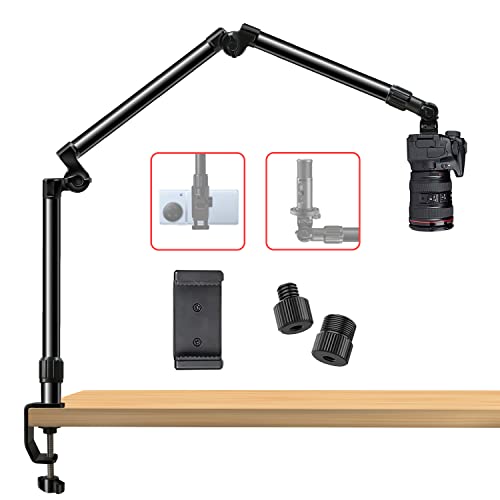
- 35.4-inch reach with 360-degree top and bottom rotation
- Designed for up to 16 pounds horizontally
- Includes multiple screw sizes and a phone holder
Best For: Beginners needing a compact arm for heavier equipment
Best Heavy-Duty Clamp Rig – NEEWER NK002 Overhead Mount
For beginners comparing overhead camera rigs for beginners, the NEEWER NK002 is a strong desktop option when you want substantial support without using a floor-standing tripod. Its adjustable crossbar, dual ball head, phone holder, and sturdy C-clamp design suit tabletop videos, unboxing, meetings, and product photography.
Best For: Creators who need a heavy-duty clamp-mounted rig for cameras, phones, webcams, or accessories.
Pros:
- Supports up to 26.5 pounds, while the included dual-ball-head clamp supports up to 3.3 pounds.
- Height adjusts from 27.2 to 48 inches and width from 25.2 to 47.2 inches.
- Includes a phone holder and mounting points for additional lights and devices.
- Space-saving C-clamp installation works well on desks and limited workspaces.
Cons:
- Crossarms and some expansion accessories are sold separately.
- The desktop surface must accommodate the 2.6-inch-wide clamp.
- Its larger support capacity may be more than a basic phone-only setup requires.
The NK002 is a practical pick if stability and expandability matter more than the smallest possible footprint. Its adjustable frame gives beginners room to build a more capable overhead setup over time.
Best Tripod Versatility – SmallRig CT200 Overhead Tripod
The SmallRig CT200 is a versatile choice among overhead camera rigs for beginners who want a portable tripod rather than a permanent desk mount. Its horizontal center column supports overhead and panoramic positioning, while the included counterweight bag and carrying case make the system easier to transport.
Best For: Beginners who need overhead shooting flexibility for cameras, smartphones, and changing locations.
Pros:
- Horizontal column tilts 180 degrees and rotates 360 degrees for flexible positioning.
- Supports up to 33 pounds overall, with a 22-pound head load rating listed in the notes.
- Converts from a tripod to a monopod and offers three leg-angle settings.
- Includes a counterweight bag, smartphone holder, and carrying bag.
Cons:
- At 4.4 pounds, it is less compact than a simple desktop arm.
- Overhead stability may require using the included counterweight bag.
- The tripod footprint needs more floor or tabletop space than a clamp rig.
The CT200 is the better fit when portability and shooting-angle range are priorities. It takes up more space than a desk arm, but its tripod-to-monopod design gives beginners more ways to use it beyond overhead work.
Best Tabletop Platform – NEEWER ST100 Overhead Rig
The NEEWER ST100 is a straightforward tabletop platform for beginners learning overhead camera rigs for beginners. Its steel frame, spring-loaded height adjustments, and stable T-base are designed for flat-lay photography, cooking demonstrations, drawing, crafts, tutorials, and unboxing videos.
Best For: Creators who want a stable tabletop frame for top-down content and accessory expansion.
Pros:
- Steel construction supports up to 10 pounds.
- Spring-loaded columns provide 14 height positions from 24 to 39 inches.
- The crossbar has 12 mounting points for adding compatible accessories.
- Includes backdrop brackets and clips, while nonslip bases help protect the desk.
Cons:
- It requires a desk at least 39.4 inches wide or a suitable floor surface.
- Super clamps, phone clamp, backdrop, and other expansion accessories are sold separately.
- The fixed tabletop frame is less portable than a compact arm mount.
The ST100 makes sense for a dedicated filming station where repeatable top-down framing is important. Its broad base and accessory points are useful for beginners who plan to expand a tabletop production setup.
Best Compact Desk Arm – SmallRig DTCK001 Camera Mount
The SmallRig DTCK001 is a compact desk-mounted choice for beginners seeking overhead camera rigs for beginners for streaming, video calls, and tabletop shooting. Its adjustable main pole and secondary arm provide flexible positioning, while the 360-degree ball head and dual-device capability support a range of small accessories.
Best For: Desk-based creators using a camera, phone, light, or microphone in a compact indoor setup.
Pros:
- Main pole adjusts from 30 to 73 centimeters, and the secondary arm extends from 30 to 50 centimeters.
- The secondary arm provides 360-degree angle adjustment.
- Supports up to 2 kilograms and can hold two devices simultaneously.
- Offers 1/4-20 and 3/8-16 mounting options plus a detachable ball head.
Cons:
- Its 2-kilogram capacity is lower than the larger NEEWER and SmallRig tripod options.
- The base only fits surfaces from 1 to 6 centimeters thick.
- It is intended for indoor desk use rather than broad floor-standing setups.
The DTCK001 is a sensible starter arm when desk space is limited and your equipment is relatively light. Its quick adjustments and compact design make it convenient for everyday streaming and overhead tabletop work.
Versatile Studio Stand – Glide Gear OH100
For beginners comparing overhead camera rigs for beginners, the Glide Gear OH100 is a sturdy tabletop platform designed for top-down photography and video. Its adjustable height, multiple mounting points, and compatibility with cameras and phones make it a flexible choice for hands-on content.
Best For: Cooking tutorials, art demonstrations, stop-motion projects, and other tabletop videos.
Pros:
- Adjusts from 27 to 34 inches for more precise overhead angles.
- Supports cameras, cellphones, and monitors with multiple 1/4-20-inch mounting points.
- Aluminum-and-steel construction balances portability with stability.
- Camera sled can mount above or below the crossbar.
Cons:
- Maximum recommended load is 6 pounds, so heavier setups may not be suitable.
- At 8 pounds, it is less compact than a simple arm-style mount.
The OH100 is a practical beginner-friendly option when you want a dedicated tabletop frame rather than a single extension arm. Its adjustable structure is particularly useful for creators who expect to change subjects or shooting angles regularly.
Compact Extension Arm – NEEWER DS001 Overhead Arm
The NEEWER DS001 is a compact option for beginners exploring overhead camera rigs for beginners. Its telescoping arm attaches to a table stand and combines a rotating ball head with broad screw compatibility for small cameras, webcams, lights, and microphones.
Best For: Small overhead setups, webcams, compact cameras, LED lights, and microphones.
Pros:
- Telescopes from 11.8 to 20 inches for adjustable reach.
- Ball head rotates 360 degrees and tilts up to 120 degrees.
- Includes 1/4-inch, 3/8-inch, and 5/8-inch screw adapters.
- Lightweight anodized aluminum construction weighs 9 ounces.
Cons:
- Horizontal load capacity is limited to 2 pounds.
- It is an extension arm, so a compatible table stand is required.
This arm makes sense when portability and flexible positioning matter more than high load capacity. It is best suited to lightweight gear and compact desktop recording rather than a full DSLR-and-accessory rig.
Heavy-Duty Desk Rig – EMART Adjustable Overhead Mount
For beginners who need room to expand, the EMART mount is one of the more substantial overhead camera rigs for beginners. Its telescoping frame adjusts in both height and width, while the edge-of-desk clamp and included phone holder simplify setup for top-down video and studio work.
Best For: DSLR top shots, cooking demonstrations, unboxing videos, streaming, teaching, and larger desk setups.
Pros:
- Adjusts from 27.2 to 48 inches in height and 25.2 to 47.2 inches in width.
- Supports up to 26.5 pounds for cameras and additional equipment.
- Includes a phone holder, dual 1/4-inch screws, and a 5/8-inch stud.
- C-clamp fits desk edges up to 3.5 inches thick and uses rubber pads for grip.
Cons:
- Additional lights, monitors, and magic arms are sold separately.
- The larger frame requires more desk space than a compact arm.
The EMART is a strong choice if you want a scalable overhead setup with substantial capacity. Its wider adjustment range and expanded frame are useful for multi-device projects, though the larger footprint may be unnecessary for simple phone-only recording.
Best Adjustable Desk Stand – Ailight Overhead Camera Mount
For beginners comparing overhead camera rigs for beginners, the Ailight mount offers a straightforward, compact setup with adjustable height and reach. Its C-clamp base, ball heads, and standard 1/4-inch screws make it suitable for cameras, webcams, phones, and lights.
Best For: Beginners who need a flexible overhead mount for a desk-based filming, teaching, streaming, or video-call setup.
Pros:
- Adjustable height from 15.75 to 33.45 inches and an extension arm from 11.8 to 20 inches.
- Rubber-padded C-clamp fits desks from 0.2 to 1.97 inches thick.
- Standard 1/4-inch screws and swiveling ball heads support cameras, webcams, phones, and lights.
- Aviation aluminum construction and a 1 kg extension-arm capacity provide a durable setup for lighter equipment.
Cons:
- The extension arm is limited to 2.2 pounds, so it is better suited to lighter devices.
- It requires a desk edge for C-clamp installation.
This is a practical entry-level choice when adjustability and broad device compatibility matter more than carrying a heavy DSLR or multi-device load. Check the extension-arm capacity against your planned equipment.
Best Multi-Device Rig – NEEWER ST008 Overhead Camera Stand
The NEEWER ST008 is one of the more expandable overhead camera rigs for beginners, combining a center column with two arms. It is designed for desktop content creation when you want to position a camera, light, microphone, or phone in the same general workspace.
Best For: Beginners building a versatile home-office or studio setup with several compatible accessories.
Pros:
- Center column supports up to 11 pounds, while each arm supports up to 5.5 pounds within the stated joint limit.
- Multiple height, extension, tilt, and swivel adjustments allow flexible positioning.
- 1/4-inch mounting points and included adapters support cameras, webcams, lights, phones, and microphones.
- Folding components and included cable ties help with storage and desk organization.
Cons:
- The multi-part design weighs 5.5 pounds and may be more setup than a single-arm mount.
- Its total load must not exceed 11 pounds at joints when multiple devices are attached.
Choose this model if you expect your setup to grow beyond one camera. The dual-arm layout is useful for adding lighting or audio equipment, but careful tightening and load distribution remain important.
Best Heavy-Duty Arm – DNSbabi 3-Section Overhead Mount
For beginners who want substantial capacity without a large base, this DNSbabi articulating arm is a strong option among overhead camera rigs for beginners. Its three-section arm folds for storage, rotates at both ends, and uses geared joints to help hold a camera or accessory in position.
Best For: Beginners who need a compact articulating arm for heavier cameras, projectors, lights, or microphones.
Pros:
- Extends to 35.4 inches, folds to 13.8 inches, and rotates 360 degrees at the top and bottom.
- Rated for up to 16 pounds horizontally and a maximum load of 22 pounds according to the supplied specifications.
- Includes 1/4-, 3/8-, and 5/8-inch screws plus a spring-loaded phone holder.
- Padded desk clamp and geared locking joints are designed for a stable, scratch-protected installation.
Cons:
- The stated maximum capacity varies by loading position, so horizontal use should stay within the 16-pound rating.
- Its heavier-duty articulating design may be more than needed for a lightweight webcam.
This mount stands out when load capacity and arm articulation are priorities. Before mounting a heavy device, confirm its position relative to the clamp and use the lower horizontal rating as the practical limit.
How We Picked the Best Overhead Camera Rigs for Beginners
We focused on the features that matter most when learning top-down shooting: dependable support, straightforward setup, useful adjustment range, and compatibility with common cameras, phones, webcams, lights, and microphones. We also considered whether each rig suits a desk, tabletop, studio, or larger floor-based setup.
Load capacity is only part of the decision. A mount must remain stable at the boom’s maximum extension, and its clamp, base, joints, and locking controls should match the weight and balance of your equipment. Models with ball heads, telescoping arms, or multiple mounting points can offer more flexibility, while simpler mounts may be easier for beginners to position.
Quick Comparison
| Best for | Look for | Recommended setup type |
|---|---|---|
| Small desks and phones | Compact clamp, 1/4-inch mount, light weight | Basic desk arm |
| DSLR or mirrorless cameras | Strong clamp or base, rated load capacity, locking joints | Heavy-duty arm or studio stand |
| Flexible content creation | Multiple mounts, ball heads, accessory support | Modular overhead rig |
| Large work areas | Long horizontal reach and broad footprint | Floor or tripod-style rig |
Key Buying Factors for Overhead Camera Rigs for Beginners
Camera and Accessory Weight
Check the combined weight of the camera, lens, cage, adapter, microphone, and any attached accessories. Choose a rig with meaningful capacity above that total rather than operating at its limit. A heavier lens may also shift the center of gravity even when the listed weight appears acceptable.
Mounting Method and Stability
C-clamps are convenient for desks and shelves but need enough edge clearance and a solid surface. A tripod or freestanding base is better when clamping is impossible or when you need to move the setup between locations. Protect delicate furniture with suitable padding and tighten all locking points before recording.
Reach, Height, and Framing
Measure the shooting area before buying. A short arm may work well for a notebook or small product, while a longer horizontal boom is more suitable for craft tables, cooking demonstrations, and larger layouts. Telescoping sections improve flexibility but can require extra tightening to prevent drift.
Thread and Device Compatibility
Most camera mounts use a 1/4-inch thread, but some rigs also provide 3/8-inch or 5/8-inch connections. Confirm that your camera, phone holder, webcam, light, and microphone can attach directly or with the required adapter.
Who Should Buy Which Overhead Camera Rigs for Beginners?
Choose a compact desk clamp if you mainly use a phone, webcam, or lightweight camera and want the simplest entry point. A dual-arm or multi-head model is a better fit for creators who need a camera plus a light, microphone, or secondary device. For DSLR or mirrorless cameras with heavier lenses, prioritize a heavy-duty mount, reinforced clamp, or freestanding studio-style design over maximum portability.
If you regularly shoot across a wide tabletop, select a rig with longer reach and broad adjustment range. Beginners who are unsure of their workflow should start with a stable, easy-to-lock model rather than the most elaborate option; reliable framing and safe support matter more than having every possible adjustment.