When you’re looking for the best modems to boost your high-speed PC internet, it’s crucial to know which options truly deliver. With so many models available, finding one that meets your needs can be overwhelming. You want something reliable, compatible with your ISP, and capable of handling heavy usage. Explore the top contenders in this category and discover what sets them apart, ensuring you make a choice that enhances your online experience.
TP-Link AC1900 Smart WiFi Router (Archer A8)

If you’re looking for a reliable router that delivers high-speed internet for your everyday needs, the TP-Link AC1900 Smart WiFi Router (Archer A8) is an excellent choice. With dual-band speeds of 600 Mbps on 2.4GHz and 1300 Mbps on 5GHz, it’s perfect for streaming, gaming, and video calls. The MU-MIMO technology allows multiple devices to connect simultaneously, ensuring peak performance throughout your home. Setting it up takes under 15 minutes, and the TP-Link app simplifies management. With a solid customer rating of 4.4 stars, this router offers dependable coverage for medium to large homes, making it a smart investment.
Best For: Families and individuals looking for a reliable and high-speed router for everyday internet activities such as streaming, gaming, and video calls.
Pros:
- High-speed dual-band performance with 600 Mbps on 2.4GHz and 1300 Mbps on 5GHz for seamless connectivity.
- MU-MIMO technology allows multiple devices to connect simultaneously, ensuring optimal performance across the home.
- Easy setup and management through the TP-Link app, making it user-friendly for all skill levels.
Cons:
- No USB port available, limiting connectivity options for external storage devices or printers.
- Lacks advanced features compared to higher-end models, which may not satisfy tech-savvy users.
- LED display concerns, although the lights can be turned off, may still be a downside for some users.
NETGEAR Nighthawk AC1900 WiFi Cable Modem Router Combo (C7000)

The NETGEAR Nighthawk AC1900 WiFi Cable Modem Router Combo (C7000) is an ideal choice for households with high-speed cable internet plans, especially those up to 800 Mbps. This powerful device combines a modem and router, helping you save up to $150 annually on rental fees. It’s compatible with major providers like Xfinity, Spectrum, and COX, offering reliable coverage for up to 1800 sq ft and connecting up to 30 devices. With 4 Gigabit Ethernet ports and a USB port for storage, you’ll enjoy seamless wired and wireless connections while benefiting from robust security protocols.
Best For: Households with high-speed cable internet plans up to 800 Mbps looking for a cost-effective modem and router combo.
Pros:
- Saves up to $150/year on rental fees by replacing the cable modem and router.
- Wide coverage of up to 1800 sq ft, accommodating multiple devices seamlessly.
- Four Gigabit Ethernet ports and one USB port for enhanced connectivity options.
Cons:
- Not compatible with DSL providers or specific services like Verizon and AT&T.
- Performance may vary depending on the specific speed tier offered by your internet provider.
- Limited to cable internet, which may not suit users with different internet service needs.
USB WiFi Adapter AX1800 Dual Band for Desktop PC
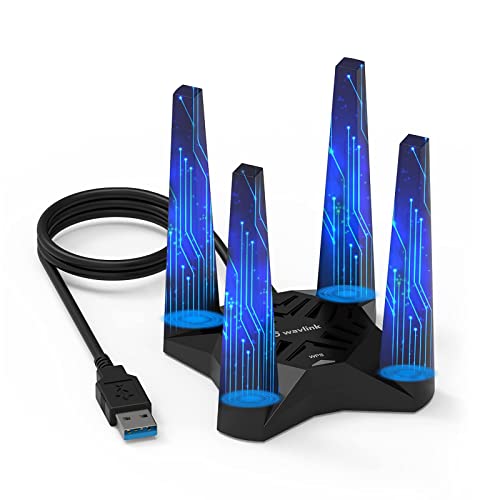
For gamers and streaming enthusiasts seeking a reliable internet connection, the USB WiFi Adapter AX1800 Dual Band for Desktop PC stands out with its ultra-low latency and impressive speeds. Operating on 2.4GHz and 5.8GHz bands, it delivers up to 1800Mbps, ensuring smooth gameplay and flawless streaming. With four high-gain antennas, you’ll enjoy strong, stable signals everywhere in your space. Plus, WPA3 encryption keeps your connection secure. Installation is a breeze thanks to the built-in driver, and the magnetic base allows ideal positioning. Although some users mention durability concerns, the performance improvements are hard to ignore.
Best For: Gamers and streaming enthusiasts seeking a reliable and high-speed internet connection.
Pros:
- Provides ultra-low latency, making it ideal for gaming and streaming.
- Easy installation with a built-in driver and user-friendly setup process.
- Strong and stable signal coverage thanks to four high-gain antennas.
Cons:
- Some users report connection drops and hardware issues after extended use.
- Concerns over the durability of the wire housing and magnetic base affecting computer components.
- Limited compatibility as it only supports Windows 10/11.
NETGEAR Nighthawk Modem Router Combo (CAX30) – DOCSIS 3.1 Cable Modem and WiFi 6 Router

Designed for heavy internet users, the NETGEAR Nighthawk Modem Router Combo (CAX30) delivers impressive speeds up to 2.7 Gbps, making it an excellent choice for gaming, 4K streaming, and seamless browsing. Compatible with major cable providers, it covers up to 2,000 sq. ft. and supports 25 devices simultaneously. With four Gig Ethernet ports and a USB 3.0 port, you can enjoy versatile connectivity options. Plus, NETGEAR Armor offers robust online protection. The easy setup and user-friendly Nighthawk app enhance your experience, letting you manage your network effortlessly. Upgrade to the CAX30 and enjoy significant savings on rental fees!
Best For: The NETGEAR Nighthawk Modem Router Combo (CAX30) is best for heavy internet users who require high-speed connectivity for gaming, 4K streaming, and multiple device support.
Pros:
- High speeds up to 2.7 Gbps, ideal for demanding online activities.
- Covers up to 2,000 sq. ft. and supports 25 concurrent devices.
- User-friendly setup and management through the Nighthawk app.
Cons:
- Not compatible with Verizon, AT&T, CenturyLink, or DSL providers.
- Initial cost may be higher compared to renting a modem from ISPs.
- Some users may find the advanced features overwhelming if not tech-savvy.
NETGEAR Nighthawk WiFi 6 Cable Modem Router (CAX30-100NAR, Renewed)

Looking for a powerful solution to enhance your home network? The NETGEAR Nighthawk WiFi 6 Cable Modem Router (CAX30-100NAR, Renewed) is an excellent choice. It’s compatible with major providers like Xfinity and Spectrum, offering speeds up to 1Gbps. With dual-band WiFi 6 technology, enjoy speeds up to 2.7Gbps and coverage for up to 2,500 sq. ft., supporting up to 25 devices. Plus, you’ll save on rental fees while benefiting from exceptional security protocols. The easy setup through the Nighthawk app allows you to manage settings and monitor your internet speed effortlessly. Upgrade your network experience today!
Best For: Those seeking a high-performance home network solution with extensive coverage and speed for multiple devices.
Pros:
- Dual-band WiFi 6 technology allows for faster speeds up to 2.7Gbps and supports up to 25 concurrent devices.
- Easy setup and management through the Nighthawk app simplifies network configuration and monitoring.
- Cost-effective by replacing rental equipment, potentially saving users up to $168/year.
Cons:
- Limited compatibility with certain internet providers, excluding Verizon, AT&T, and other DSL services.
- Renewed product status may raise concerns regarding warranty and longevity compared to new models.
- Coverage may vary, as the maximum range of 2,500 sq. ft. may not be sufficient for larger homes.
NETGEAR Cable Modem DOCSIS 3.0 (CM500) for Major Cable Providers
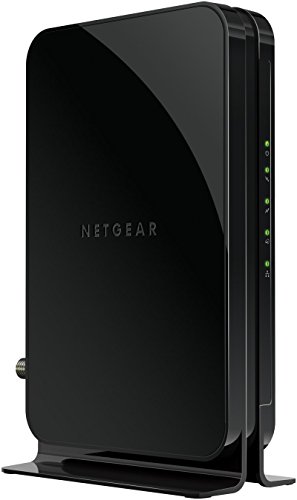
If you’re seeking a reliable and cost-effective solution for high-speed internet, the NETGEAR Cable Modem DOCSIS 3.0 (CM500) stands out, especially for users with major cable providers like Xfinity and Cox. It supports internet plans up to 400 Mbps, making it perfect for streaming and gaming. By replacing your rented modem, you could save up to $168 per year in rental fees. With 16×4 channel bonding, it guarantees smooth connectivity. Plus, it features one Gigabit Ethernet port, allowing easy connection to your computer or any WiFi router. Experience high-speed internet without the extra costs!
Best For: Users with major cable providers looking for a reliable and cost-effective high-speed internet solution.
Pros:
- Saves up to $168/year in rental fees by replacing your rented modem.
- Supports internet plans up to 400 Mbps, ideal for streaming and gaming.
- Easy connectivity with one Gigabit Ethernet port for a computer or any WiFi router.
Cons:
- Limited to cable internet; not compatible with DSL or fiber internet services.
- Requires separate WiFi router for wireless connectivity, adding to setup complexity.
- Maximum speed varies by provider; Xfinity up to 200 Mbps and Cox up to 150 Mbps.
NETGEAR Nighthawk Cable Modem CM1200 (DOCSIS 3.1)

For those seeking top-tier internet performance, the NETGEAR Nighthawk Cable Modem CM1200 (DOCSIS 3.1) stands out with its compatibility across major cable providers like Xfinity, Spectrum, and Cox. Supporting plans up to 2 Gbps, it offers impressive dual-band WiFi 6 speeds up to 2.7 Gbps and covers up to 2,500 sq. ft. With four 1G Ethernet ports and a USB 3.0 port, it seamlessly connects wired devices. Plus, NETGEAR Armor enhances your security. While customer reviews are generally positive, some users have reported connectivity issues. Overall, it’s a solid choice for serious gamers and streamers alike.
Best For: Serious gamers and streamers looking for high-speed internet performance and extensive coverage.
Pros:
- Supports cable plans up to 2 Gbps and offers dual-band WiFi 6 speeds up to 2.7 Gbps.
- Features multiple Ethernet ports and a USB 3.0 port for versatile wired connections.
- Includes NETGEAR Armor for enhanced security and real-time protection against hackers.
Cons:
- Some users have reported intermittent connectivity issues.
- Customer service experiences have been mixed, with dissatisfaction noted by some customers.
- Problems with Ethernet ports not functioning as expected for certain users.
ARRIS SB8200-RB Cable Modem (Renewed)

The ARRIS SB8200-RB Cable Modem (Renewed) stands out as an excellent choice for gamers and heavy internet users who demand high-speed connectivity. With DOCSIS 3.1 technology, it supports 32 downstream and 8 upstream channels, providing speeds up to 1 Gbps. It’s compatible with major U.S. cable providers like Comcast Xfinity and Cox, but not with fiber optic or DSL services. Users praise its easy setup and stable connections, often reporting a noticeable speed boost. Just remember that it doesn’t include Wi-Fi, and you may need to reboot it occasionally during setup or when swapping devices.
Best For: Gamers and heavy internet users who require high-speed connectivity and stable performance.
Pros:
- Easy setup process with stable connections that enhance internet speeds.
- Supports high-speed internet up to 1 Gbps with DOCSIS 3.1 technology.
- Compatible with major U.S. cable providers, making it versatile for many users.
Cons:
- Does not include Wi-Fi capabilities, requiring a separate router for wireless access.
- May need occasional rebooting during setup or when swapping devices on the LAN jack.
- Limited technical support available for third-party purchased modems.
KKH WiFi Router AC1200 Dual Band Gaming Router
Gamers seeking a reliable connection will find the KKH WiFi Router AC1200 Dual Band Gaming Router an excellent choice for high-speed internet. With speeds up to 1200Mbps, it supports smooth streaming and rapid downloads. The dual-band feature, offering 2.4GHz at 300Mbps and 5GHz at 900Mbps, guarantees peak performance for gaming. Its six powerful external antennas help eliminate dead zones, while three Gigabit LAN ports allow for lightning-fast wired connections. Setup is a breeze with a simple two-step process, and it’s compatible with major ISPs. While reviews are mixed, many users appreciate its overall performance.
Best For: Gamers and streamers looking for a high-speed, reliable WiFi connection with extensive coverage.
Pros:
- Dual-band capability providing speeds up to 1200Mbps for optimal performance.
- Powerful external antennas that eliminate dead zones for better coverage throughout your space.
- Easy setup process that gets users connected quickly and efficiently.
Cons:
- Mixed customer reviews with reports of disconnections and compatibility issues.
- Limited warranty information may raise concerns for some users regarding long-term reliability.
- Best Sellers Rank suggests it is not among the top-performing routers on the market.
4G LTE USB Network Adapter for Laptop and Desktop PC

Ideal for users who need a reliable internet connection on the go, the 4G LTE USB Network Adapter seamlessly transforms your laptop or desktop into a high-speed online hub. With connection speeds reaching up to 100Mbps, you can enjoy smooth web browsing, chatting, and streaming without needing a SIM card. Its built-in 4G/3G+ antenna guarantees maximum coverage and signal strength, keeping you connected anywhere. Plus, you can share your internet connection with up to eight users, making it perfect for family and friends. Just remember to check SIM card compatibility before purchase for a hassle-free experience.
Best For: Users who require a reliable and portable internet connection for laptops and desktops, particularly while traveling or in areas with limited connectivity.
Pros:
- High-speed connectivity with speeds of up to 100Mbps, ideal for streaming and browsing.
- Built-in 4G/3G+ antenna enhances signal strength and coverage for reliable internet access.
- User sharing capability allows up to eight devices to connect simultaneously, perfect for group use.
Cons:
- Requires SIM card compatibility which may necessitate prior verification with the service provider.
- Memory card expansion is limited to 32GB, which may not be sufficient for all users.
- Not all areas may have optimal 4G/3G coverage, potentially affecting performance.
Factors to Consider When Choosing Modems for High Speed PC Internet
When you’re choosing a modem for high-speed PC internet, it’s essential to evaluate several factors. Think about your internet speed requirements and how well the modem will work with your ISP. You’ll also want to check the modem technology standards, the number of Ethernet ports, and whether you need built-in WiFi.
Internet Speed Requirements
Choosing the right modem for high-speed PC internet means understanding your specific internet speed requirements. First, verify the modem supports the speed tier offered by your ISP, which can range from 100 Mbps to over 2 Gbps. For the best performance, opt for DOCSIS 3.0 or DOCSIS 3.1 technology; the latter provides higher speeds and better efficiency with multiple data streams. Pay attention to channel bonding capabilities; a 24×8 bond can handle higher speeds more effectively than a 16×4 bond, especially during peak usage. Assess your internet habits—if you have multiple devices streaming simultaneously, aim for speeds of 300 Mbps or higher. Choosing a modem that meets or exceeds your plan’s maximum speed is essential for peak performance.
Compatibility With ISPS
Compatibility with your Internet Service Provider (ISP) is essential for ensuring a seamless online experience. Make sure the modem you choose is compatible with your specific ISP to avoid connectivity issues, as not all modems work with every provider. Check the maximum speed supported by the modem to match or exceed your internet plan, allowing you to fully utilize the bandwidth. Additionally, confirm the modem supports necessary technology standards, like DOCSIS 3.0 or DOCSIS 3.1, which impacts performance and future-proofing. Review the modem’s channel bonding capability, such as 16×4 or 24×8, to align with your ISP’s requirements. Finally, consider whether the modem has built-in wireless capabilities or needs a separate router for ideal home network compatibility.
Modem Technology Standards
Understanding modem technology standards is key to maximizing your high-speed internet experience. DOCSIS (Data Over Cable Service Interface Specification) defines these standards, with DOCSIS 3.0 and DOCSIS 3.1 being the most common for high-speed connections. DOCSIS 3.0 supports speeds up to 1 Gbps using channel bonding, while DOCSIS 3.1 boosts performance to 10 Gbps and enhances data efficiency. When you choose a modem, look for one that supports DOCSIS 3.1, as it offers advanced capabilities like 32×8 channel bonding, which improves both download and upload speeds, reducing latency. Verify your modem aligns with your internet plan’s technology standards to access the full potential of your connection and enjoy a more reliable online experience.
Number of Ethernet Ports
When selecting a modem for high-speed PC internet, the number of Ethernet ports is a crucial factor. More ports mean you can connect multiple wired devices directly, which is essential for gaming, streaming, and heavy data usage. Ideally, look for a modem with at least four Ethernet ports, especially if you have several devices like PCs, gaming consoles, and smart TVs. Some modems even support port aggregation, allowing you to combine bandwidth for demanding tasks. Plus, having extra ports gives you flexibility to expand your home network by connecting a router or switches. Consider your current and future needs, as more Ethernet ports can accommodate the growing number of smart home devices and gadgets.
Built-in WiFi or Not
Choosing between a modem with built-in WiFi or a standalone unit can greatly impact your internet experience, especially for high-speed PC use. A built-in WiFi modem simplifies your setup by eliminating the need for a separate router. These models often include dual-band capabilities, allowing simultaneous connections on both 2.4GHz and 5GHz frequencies, which enhances performance for multiple devices. Plus, features like MU-MIMO and beamforming can improve coverage and connection stability in larger homes. While a built-in option might save you money on equipment rental fees, a standalone modem offers greater flexibility and performance, particularly if you plan to invest in higher-end routers later. Weigh these factors carefully to find the best fit for your needs.
Price and Value
While you might be tempted to go for the cheapest modem on the market, considering price and value is essential for ensuring a high-speed PC internet experience. Investing in a modem that eliminates rental fees can save you around $150 to $168 annually. If you’re a heavy internet user, a higher initial investment in a modem that supports speeds up to 2 Gbps might be worth it. Evaluate the price-to-performance ratio, as advanced models like DOCSIS 3.1 offer better long-term value. Also, check the number of Gigabit Ethernet ports; more ports mean better connectivity for multiple devices. Finally, consider renewed or refurbished models—they can provide reliable performance at substantial discounts, making them excellent choices for budget-conscious consumers.
Installation and Setup Ease
Many modern modems and modem-router combos make installation a breeze, allowing you to get online in under 20 minutes. With simplified processes often guided by mobile apps, you won’t need extensive technical skills to set things up. Most devices come with built-in drivers or easy setup wizards that streamline configuration. You’ll appreciate the clear LED indicators that help you quickly check your connection status and troubleshoot any issues. Plus, some modems feature plug-and-play functionality—just plug it in, and you’re good to go. User-friendly management apps also let you adjust settings, monitor internet speeds, and manage connected devices effortlessly. This ease of setup enhances your overall experience and gets you connected without hassle.