When it comes to optimizing your PC server’s connectivity, the right network controller can make all the difference. With options that range from 2.5Gb to 10Gb speeds, you can find a solution tailored to your specific needs, whether for gaming or business applications. But how do you choose? The following list of the top controllers will help you weigh the features and specifications that matter most to you.
TP-Link 2.5GB PCIe Network Card (TX201)

If you’re looking for a network card that greatly boosts your PC’s connectivity, the TP-Link 2.5GB PCIe Network Card (TX201) is an excellent choice. This PCIe adapter supports speeds up to 2.5 Gbps, making it 2.5 times faster than standard Gigabit Ethernet. It’s compatible with various Windows versions and Linux, ensuring it works seamlessly with your setup. Plus, its Quality of Service (QoS) feature prioritizes performance, perfect for gamers. With easy installation and a solid customer rating of 4.6 out of 5, the TX201 is a reliable choice to enhance your network experience.
Best For: Gamers and users seeking fast, reliable network connectivity to enhance their online experience.
Pros:
- Easy installation with automatic recognition by Windows.
- Achieves significant speed improvements, often exceeding 2 Gbps in tests.
- Includes both low-profile and full-height brackets for versatile case compatibility.
Cons:
- Some users have reported connectivity issues when waking from sleep mode.
- May require driver updates to resolve certain connectivity problems.
- Limited to PCIe slots, which may not be available on all older motherboards.
NICGIGA 5G PCIe Ethernet Adapter

The NICGIGA 5G PCIe Ethernet Adapter is an ideal choice for users who demand high-speed connectivity without compromising on performance or compatibility. With speeds up to 5Gbps, it guarantees stable internet access and local data transmission, minimizing packet loss. Compatible with Windows 10/11, Windows Server, and Linux, installation is a breeze—just plug it in, and Windows 11 auto-detects the drivers. Backward compatibility with various speeds makes this adapter versatile, while excellent heat dissipation maintains low temperatures. Users appreciate its reliability and ease of use, making it a top choice for enhancing your server’s connectivity.
Best For: Users seeking high-speed connectivity for gaming, streaming, or data-intensive applications on Windows and Linux systems.
Pros:
- High Speed: Provides up to 5Gbps for stable internet access and local data transmission.
- Easy Installation: Plug and play setup with automatic driver recognition on Windows 11.
- Versatile Compatibility: Supports multiple operating systems and backward compatibility with various connection speeds.
Cons:
- Compatibility Issues: Some users report problems with specific configurations, especially with Intel chipsets.
- Limited Support for Older Systems: May not perform optimally with older hardware or software setups.
- Potential Configuration Challenges: Users experienced difficulties with Windows port trunking in certain setups.
10Gtek 10Gb Dual RJ45 Port Network Card

For businesses and tech enthusiasts seeking robust network performance, the 10Gtek 10Gb Dual RJ45 Port Network Card stands out with its dual copper RJ45 ports and support for speeds up to 10 Gbps. Compatible with various operating systems, including Windows and Linux, this card features a PCI Express interface for easy installation. You’ll appreciate its efficient heat dissipation and support for jumbo frames, enhancing productivity during large file transfers. With a solid warranty and positive user feedback, it’s a reliable choice for high-speed connectivity. Just be aware of potential driver installation quirks with Windows 11 for a seamless experience.
Best For: Businesses and tech enthusiasts looking for high-speed networking solutions with reliable performance and compatibility across multiple operating systems.
Pros:
- Dual RJ45 ports supporting speeds up to 10 Gbps enhance productivity for large file transfers.
- Compatible with various operating systems, including Windows Server and Linux, making it versatile for different setups.
- Excellent build quality with efficient heat dissipation and robust design, ensuring reliability during operation.
Cons:
- Driver installation for Windows 11 may require additional manual setup, potentially complicating the user experience.
- Not hot-swappable, which may limit flexibility during upgrades or replacements.
- Mixed reviews regarding driver support may lead to uncertainty for less tech-savvy users.
BrosTrend 5Gb PCIe Network Card for PC

Designed specifically for desktop PCs, the BrosTrend 5Gb PCIe Network Card is an exceptional choice for gamers and streamers who demand high-speed connectivity. With speeds reaching 5 Gbps, it’s five times faster than standard Gigabit cards, ensuring reduced latency and enhanced responsiveness. Installation is a breeze—just plug it into your motherboard and install the necessary drivers. It’s compatible with Windows 11/10 and Linux, offering flexibility across systems. Built with high-quality aluminum for ideal heat dissipation, this sturdy card promises reliable performance. With a 4.6-star rating from users, it’s a solid investment for anyone seeking impressive network solutions.
Best For: Gamers and streamers seeking high-speed connectivity for an enhanced online experience.
Pros:
- Unparalleled 5 Gbps speed, providing five times the performance of standard Gigabit cards.
- Easy installation process with compatibility for Windows and Linux systems.
- Sturdy build quality with optimal heat dissipation, ensuring reliability during intensive tasks.
Cons:
- Requires driver installation for full speed; otherwise, speed is capped at 2500 Mbps.
- Some users report concerns about longevity and driver compatibility.
- Limited feedback on performance in older Windows versions or Linux distributions prior to kernel 6.9.
YuanLey 10G PCIe Network Card
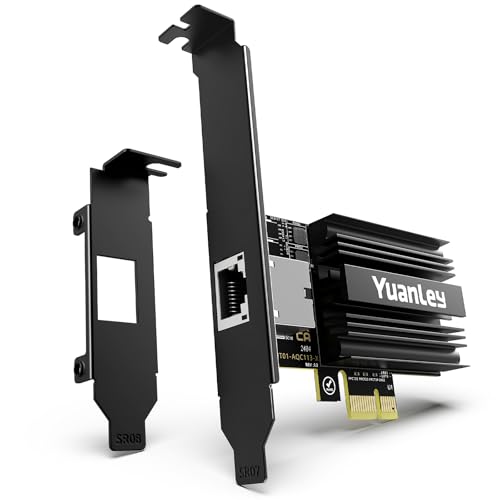
Offering ultra-fast performance, the YuanLey 10G PCIe Network Card is an excellent choice for gamers and professionals who demand high-speed connectivity. Powered by the Marvell AQC113 controller, it supports speeds up to 10GBASE-T and is compatible with various PCIe slots and operating systems. With plug-and-play functionality, installation’s a breeze, and dual brackets accommodate both full-height and low-profile setups. Users rave about significant speed boosts and the card’s durability, thanks to gold-plated connectors and robust capacitors. Enjoy lifetime technical support, ensuring you’re covered for any setup guidance or troubleshooting needs. Upgrade your network experience today!
Best For: Gamers and professionals seeking ultra-fast network connectivity for data-intensive tasks.
Pros:
- Ultra-fast performance with support for speeds up to 10GBASE-T, ideal for gaming and streaming.
- Easy installation with plug-and-play functionality and dual brackets for full-height and low-profile setups.
- Durable design featuring gold-plated connectors and solid capacitors, ensuring reliable and low-latency performance.
Cons:
- Driver updates may be necessary for optimal performance, particularly on FreeBSD-based systems.
- Limited compatibility with older PCIe slots, as it requires at least PCIe 4.0.
- Weight and size may be a consideration for compact builds, as it measures 5.71 x 5.08 x 1.06 inches.
X520-DA1 10GbE SFP+ Fiber Ports Ethernet Adapter

The X520-DA1 10GbE SFP+ Fiber Ports Ethernet Adapter stands out as an ideal choice for data centers and multi-processor servers that demand reliable high-speed connections. With its Intel 82599EN controller and PCIe 2.0 interface, you’ll enjoy 10GbE LAN and SAN connections, perfect for NAS and gaming. Installation is straightforward—just plug and play on supported Windows Server versions, while Linux users can access compatible drivers. Users praise its solid build and performance, achieving speeds around 9.30Gbps. With a fair price and robust features like virtualization support, this adapter is a valuable addition to your server setup.
Best For: Data centers, multi-processor servers, and gaming setups that require reliable high-speed network connections.
Pros:
- Plug and play installation on supported Windows Server versions simplifies setup.
- Achieves high speeds of approximately 9.30Gbps, ensuring efficient data transfer.
- Supports advanced features such as virtualization technology and traffic management for enhanced performance.
Cons:
- May require driver installation for non-Windows Server operating systems, which could complicate setup.
- Some users have reported compatibility issues with specific NAS systems, like QNAP.
- Limited to 10GbE speeds with Direct Attached Cables, which may restrict options for certain users.
X520-DA2 2X 10GbE SFP+ Fiber Ports Ethernet Adapter

If you’re looking for a powerful networking solution for your server or high-performance desktop, the X520-DA2 2X 10GbE SFP+ Fiber Ports Ethernet Adapter is an ideal choice. With dual 10GbE SFP+ ports, it supports a blazing 10Gbps connection, perfect for data centers, gaming, and 4K HD streaming. Powered by the Intel 82599ES controller, it offers advanced features like Virtual Machine Device Queues and Receive Side Coalescing for peak performance. Installation is straightforward, requiring a PCIE X8 slot, and it’s compatible with various Windows and Linux systems. Upgrade your connectivity and experience seamless data transfer today!
Best For: Users looking for a high-performance networking solution for servers, NAS, or high-end desktops that require fast and reliable data transfer.
Pros:
- High-speed connectivity: Supports dual 10Gbps connections, ideal for data-intensive applications.
- Advanced features: Includes virtualization support and traffic management for optimized performance in virtualized environments.
- Easy installation: Compatible with various operating systems and requires only a PCIE X8 slot for setup.
Cons:
- Requires specific transceivers: Must use SFP+ transceivers or direct attach cables, which may add to overall costs.
- Limited compatibility with older systems: Requires newer PCIE standards and may not work with legacy hardware.
- Driver installation needed for some OS: Users may need to install drivers for Windows versions prior to 2022, which could complicate setup.
2.4G Wireless PC/Switch Controller with RGB Lighting

Designed for gamers who seek versatility, the 2.4G Wireless PC/Switch Controller with RGB Lighting excels across multiple platforms, including Windows PC, Android, and Switch. Its vibrant RGB lighting features seven colors to enhance your gaming setup. With an 800mAh lithium battery, you get extended playtime after just 2-3 hours of charging. Enjoy precise controls with Hall Effect Joysticks and a 1000Hz esports return rate, reducing delay considerably. Customize your gaming experience with programmable buttons and a turbo feature for rapid fire. With a solid 4.4-star rating, it’s recognized for performance and value—perfect for any serious gamer.
Best For: Gamers seeking a versatile and high-performance controller compatible with Windows PC, Android, and Switch.
Pros:
- RGB lighting with seven colors enhances gaming aesthetics.
- Extended playtime from the 800mAh battery, allowing for 2-3 hours of charging.
- Precision controls with Hall Effect Joysticks and a 1000Hz esports return rate for minimal delay.
Cons:
- Not compatible with Xbox, PS4, PS5, PS3, Fire TV, Firestick, and Nvidia GeForce Now.
- Limited battery life compared to some competitors after intensive use.
- Customization options may be complex for casual gamers.
TP-Link Gigabit Ethernet PCI Express Network Card (TG-3468)

For those looking to enhance their PC’s networking capabilities, the TP-Link Gigabit Ethernet PCI Express Network Card (TG-3468) stands out with its ultra-fast transmission rates of up to 1000Mbps. This PCIe adapter easily upgrades your Ethernet speed and supports various operating systems, including Windows 11 and Linux. Installation is a breeze with its plug-and-play feature, and the dual bracket design accommodates both mini and standard PCs. Users rave about its reliability and improved internet speeds, making it ideal for gaming and streaming. Plus, with a 2-year warranty and 24/7 support, you’re covered for peace of mind.
Best For: Those seeking to upgrade their PC’s networking capabilities with a reliable and high-speed Ethernet connection suitable for gaming, streaming, and general internet use.
Pros:
- Plug-and-play installation makes it easy to set up without requiring additional drivers for Windows 11.
- Dual bracket design allows compatibility with both mini and standard PC cases.
- High customer satisfaction with a rating of 4.5 out of 5 stars from over 14,000 reviews.
Cons:
- Limited to PCIe slots, so not compatible with older systems that do not support this interface.
- Some users may experience difficulties if they are not familiar with hardware installation.
- Performance may be limited by the overall network configuration and internet service speed.
10Gb PCIe NIC Network Card with Single RJ45 Port
The 10Gb PCIe NIC Network Card with a single RJ45 port is an ideal choice for high-performance server environments that demand fast and reliable connectivity. With the Aquantia AQC107 chipset, you’ll benefit from stable, low-latency 10GbE speeds over Cat6a cabling, reaching up to 100 meters. It supports multiple speeds, including 5Gbps and 1Gbps, ensuring versatility for various network setups. Installation is straightforward, compatible with Windows and Linux, while advanced features like Jumbo Frames and VLAN tagging enhance performance. Just be mindful of potential heat generation; additional cooling might be necessary for peak operation.
Best For: Users seeking high-speed network connectivity for servers and advanced networking setups.
Pros:
- Supports multiple speeds (10Gbps, 5Gbps, 2.5Gbps, 1Gbps, and 100Mbps) for versatile network performance.
- Easy installation with compatibility across various operating systems including Windows and Linux.
- Advanced features like Jumbo Frames and VLAN tagging enhance network efficiency and performance.
Cons:
- Reported connectivity issues with Windows 11, including driver availability challenges.
- Potential heat generation may require additional cooling solutions in desktop setups.
- Average customer rating of 3.9 out of 5 stars indicates some user dissatisfaction.
Factors to Consider When Choosing Network Controllers for PC Servers
When you’re choosing network controllers for your PC servers, several key factors come into play. You’ll want to contemplate speed and performance, compatibility with your operating system, and how easy the installation process is. Additionally, think about the form factor, size, and overall price to guarantee you get the best value for your needs.
Speed and Performance
Choosing the right network controller for your PC server can greatly impact speed and performance, especially as data demands increase. You’ll find options ranging from standard Gigabit Ethernet (1 Gbps) to advanced 10 Gigabit (10 Gbps) connections, enhancing your data transmission rates. Technologies like NBASE-T allow you to achieve higher speeds on existing Cat5e/Cat6 cables, offering 2.5 Gbps and 5 Gbps connections. Look for Quality of Service (QoS) features that prioritize bandwidth for essential applications, reducing latency during peak usage. Additionally, consider jumbo frame support, which improves throughput and lessens CPU load. Finally, verify you choose a network controller with a suitable PCIe interface version to maximize data transfer rates and minimize bottlenecks.
Compatibility With Operating Systems
Ensuring your network controller is compatible with your operating systems can save you significant headaches down the line. Check that the controller works with the OS versions you plan to use, like Windows 10, 11, or various Linux distributions, as compatibility can vary widely. If you’re setting up a server, confirm that the network card supports necessary Windows Server versions since many specify compatibility with different editions. Additionally, look for any required driver installations for specific operating systems, as some controllers may not be automatically recognized. It’s also wise to take into account backward compatibility with older systems, especially if you’re running legacy software. Finally, reviewing user feedback can provide insights into potential compatibility issues before making your purchase.
Installation Ease and Process
How smoothly a network controller installs can greatly affect your server setup experience. Most modern controllers feature plug-and-play functionality, allowing your operating system to automatically recognize them without manual driver installation. This means you can get your server up and running quickly. Many network cards also come with dual brackets, allowing you to fit them into various PC case sizes with ease. User experiences often report straightforward installations, especially with Windows 11 recognizing products immediately. Some controllers even include QR codes for easy driver downloads, simplifying updates. However, keep in mind that installation simplicity may vary depending on your OS, as certain configurations might require manual driver installation for peak performance.
Form Factor and Size
When selecting a network controller for your PC server, it’s vital to take into account the form factor and size, as these factors directly influence compatibility and installation. The form factor, like PCIe, determines which motherboard slots you can use, so pay attention to the specific PCIe version and lane configuration (x1, x4, x8, or x16). Consider the physical dimensions of the network card and the available space in your server chassis; you might need low-profile brackets for compact builds. Larger cards often provide better heat dissipation, which is important during high-performance tasks. Also, heavier controllers could impact stability in vertical mounts, and those with multiple ports require thoughtful planning for cable management and airflow.
Price and Value Proposition
Choosing the right network controller for your PC server involves balancing price and performance to get the best value. Prices can range from around $20 for basic Gigabit Ethernet cards to several hundred dollars for 10Gbps options. Higher speeds often justify the costs for businesses needing robust data handling. Consider the performance specifications and compatibility with your existing setup, as these greatly impact value. Don’t overlook warranties and support; longer warranties and good technical assistance can save you money in the long run. Customer ratings offer insights into reliability, helping you choose products that deliver better value. Finally, energy-efficient models can lower operational costs, enhancing overall value while keeping your network running smoothly.
Advanced Networking Features
While selecting a network controller for your PC server, it’s important to evaluate advanced networking features that can enhance performance and efficiency. Look for support for Jumbo Frames, which allows larger packet sizes up to 16KB, improving data transfer efficiency and reducing CPU overhead in high-bandwidth situations. Quality of Service (QoS) capabilities, like 802.1p, help prioritize traffic, ensuring critical applications get the bandwidth they need, especially during peak times. Additionally, support for IEEE 802.1Q VLAN tagging improves security and performance by isolating traffic. Energy-Efficient Ethernet (EEE 802.3az) standards help cut power consumption during idle periods, while Wake-on-LAN (WOL) enables remote management of devices, making operations smoother and more automated.
Heat Management Solutions
Effective heat management is essential for network controllers in PC servers, as overheating can lead to performance drops and hardware failures. When selecting a network controller, look for models that feature advanced thermal designs, like aluminum heatsinks and optimized PCB layouts, which help maintain low temperatures during heavy use. If your setup demands high data throughput and continuous operation, make sure your controller supports efficient heat dissipation features. Additionally, consider installing extra cooling solutions, such as case fans or dedicated cooling systems, to manage thermal output effectively. Finally, using monitoring software can help you track temperature levels, allowing you to address any overheating issues proactively to maintain system stability and performance.
Warranty and Support Options
When considering network controllers for PC servers, warranty and support options play a crucial role in your decision-making process. Most manufacturers offer warranties ranging from 30 days to several years, with a standard minimum of two years. It’s important to evaluate the availability of technical support, including 24/7 assistance, online resources, and community forums, which can help you with installation and troubleshooting. Some products even provide lifetime technical support, ensuring you have help as your network evolves. Don’t forget to check the return policy for defective items, as it can vary considerably and affect your total cost of ownership. Customer reviews can also give you insights into the company’s responsiveness and effectiveness during warranty claims.