Choosing the right PC for wedding video editing can save hours on every project. From timeline scrubbing to color grading and final export, the right system keeps your workflow smooth and reliable.
Below, we focus on prebuilt desktops that balance CPU speed, GPU power, memory, and storage so you can edit ceremonies, receptions, and highlight reels without constant lag.
Best 7 PC for Wedding Video Editing Picks for 2026
Best for Heavy 4K Workflows
Skytech Shadow i7 RTX 5060 Ti Desktop

- i7-14700F handles editing and rendering well
- RTX 5060 Ti 16GB supports GPU-accelerated workflows
- Gen4 NVMe SSD and AIO cooling keep it responsive
Best For: Wedding editors working on 4K timelines, effects, and faster exports.
Best Value GTX 1660 Ti Pick
STGAubron Gaming PC with i7, 16GB RAM

- Core i7 and 16GB RAM suit light-to-moderate editing
- GTX 1660 Ti helps with playback and effects
- 512GB SSD and Wi-Fi 6 add everyday convenience
Best For: Editors who need an affordable desktop for lighter wedding video projects.
Best for Heavy Duty Editing

- Ryzen 7 7800X3D and 32GB DDR5 for smooth editing
- RTX 5060 Ti 16GB supports effects and GPU acceleration
- 1TB Gen4 NVMe SSD for fast project load times
Best For: Editors handling wedding films, 4K timelines, and heavy multitasking.
Best Budget Starter
i5 Prebuilt Gaming PC with 16GB RAM

- Core i5 CPU handles basic wedding edits and multitasking.
- 16GB RAM and 512GB SSD support quick everyday workflow.
- Entry-level GPU suits light editing, not heavy 4K work.
Best For: Beginners and budget-minded editors needing an affordable desktop for basic wedding video projects.
Best High-End Performance
Thermaltake View i570-170 Gaming Desktop

- Core i9-14900KF and RTX 5070 for fast editing and exports
- 32GB DDR5 RAM for smooth multitasking on large projects
- 240mm liquid cooling helps sustain performance during long renders
Best For: Wedding editors who want a high-power prebuilt for 4K timelines, effects, and fast turnaround.
Best for Balanced 4K Editing
Ryzen 7 5700X RTX 3050 Desktop

- 8-core Ryzen 7 handles editing multitasking well
- RTX 3050 helps with creative acceleration
- 16GB RAM and 512GB SSD keep it responsive
Best For: Wedding editors who want a ready-to-use desktop for 4K cuts, exports, and everyday creative work.
Best Mid-Range Editing Value
Thermaltake Versa i1460S Gaming Desktop
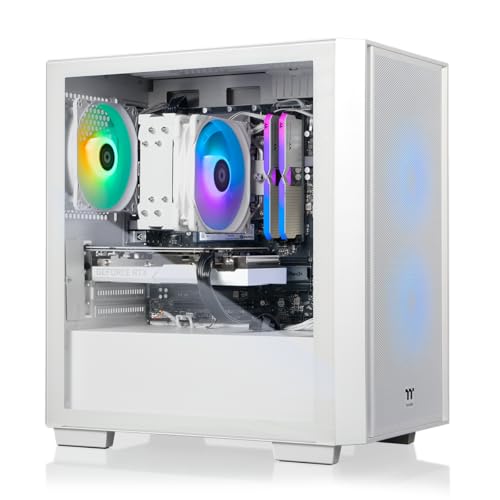
- 32GB DDR5 and RTX 5060 support smooth editing
- 1TB NVMe SSD keeps projects loading quickly
- Good ready-made option for wedding video workflows
Best For: Editors who need a balanced, ready-to-use desktop for 1080p and light-to-moderate 4K wedding projects.
Best for Heavy 4K Workflows – Skytech Shadow i7 RTX 5060 Ti Desktop
If you want a pc for wedding video editing that can handle multicam timelines, effects, and fast exports without feeling sluggish, this Skytech Shadow build is a strong fit. The Intel Core i7-14700F, RTX 5060 Ti 16GB, and Gen4 NVMe SSD give it the kind of responsive performance editors need for 4K projects and busy post-production work.
Best For: Wedding editors who want a fast, plug-and-play desktop for 4K footage, color grading, and motion graphics.
Pros:
- Core i7-14700F offers plenty of CPU power for editing and rendering
- RTX 5060 Ti 16GB helps with GPU-accelerated effects and timeline playback
- 1TB Gen4 NVMe SSD keeps project loading and file transfers snappy
- 360mm AIO cooling supports sustained performance during long renders
Cons:
- 16GB RAM is workable, but 32GB would be better for heavier wedding timelines
- No dedicated content-creator tuning, so it’s still a gaming-first system
- 1TB storage may fill up quickly with large raw video archives
This is a practical pc for wedding video editing if you want strong out-of-the-box speed and cooling without building from scratch. It’s especially appealing for editors who regularly work in 1440p or 4K and want a desktop that can keep up with real-world post-production demands.
Best Value GTX 1660 Ti Pick – STGAubron Gaming PC with i7, 16GB RAM
If you want a practical pc for wedding video editing without jumping to a higher-end workstation, this STGAubron desktop offers a solid entry point. The Intel Core i7, 16GB of RAM, and 512GB SSD should handle basic edits, organizing footage, and lighter export workloads, while the GTX 1660 Ti adds useful GPU support for many editing tasks.
Best For: Beginner to intermediate editors who need an affordable desktop for trimming, assembling, and exporting wedding projects in 1080p or lighter 4K timelines.
Pros:
- Intel Core i7 and 16GB RAM provide decent everyday editing performance
- GTX 1660 Ti offers helpful acceleration for video playback and effects
- 512GB SSD keeps boot times and project loading quick
- Wi-Fi 6, Bluetooth 5.0, and multiple USB ports make setup convenient
Cons:
- 16GB RAM may feel limiting for heavy 4K wedding timelines or multitasking
- 512GB storage fills up fast with raw wedding footage and cache files
- Not as future-proof as newer RTX-based editing PCs
For editors who need a budget-conscious pc for wedding video editing, this is a capable starter tower, but serious multi-cam 4K work will likely benefit from more memory and storage. It makes the most sense if you want enough horsepower to get editing done now and can upgrade later.
Best for Heavy Duty Editing – Skytech O11 Vision Gaming PC
If you want a fast, modern pc for wedding video editing that can handle long timelines, effects, and multitasking without feeling sluggish, the Skytech O11 Vision is a strong pick. Its Ryzen 7 7800X3D, 32GB of DDR5 RAM, and RTX 5060 Ti 16GB give it plenty of headroom for 4K footage, color work, and smooth preview playback.
Best For: Editors who want a high-performance desktop for wedding films, client revisions, and other demanding creative projects.
Pros:
- Ryzen 7 7800X3D and 32GB DDR5 deliver strong overall editing performance
- 16GB RTX 5060 Ti helps with GPU-accelerated effects and timeline responsiveness
- 1TB Gen4 NVMe SSD keeps project loading and file transfers quick
- 360mm AIO cooling supports sustained performance during long edits
Cons:
- 1TB storage may fill up quickly with large wedding video projects
- More GPU than some basic editors need, which can raise the price
- Best value depends on whether you’ll take advantage of the extra graphics power
This is a well-rounded choice if you need a pc for wedding video editing that can also double as a capable all-purpose workstation. It is especially appealing for editors who want strong speed now without immediately needing upgrades.
Best Budget Starter – i5 Prebuilt Gaming PC with 16GB RAM
If you need a practical pc for wedding video editing without spending workstation money, this prebuilt desktop gives you a usable starting point. The Intel Core i5, 16GB RAM, and 512GB SSD are enough for light to moderate editing, especially for trimming ceremony footage, assembling highlight reels, and handling 1080p projects.
Best For: Beginners and budget-focused creators who want an affordable desktop for basic wedding editing, streaming, and everyday production work.
Pros:
- 16GB RAM and a 512GB SSD help with smoother timeline loading and quicker project access.
- Core i5 performance is solid for basic editing, exports, and multitasking.
- Includes Wi-Fi, RGB accessories, and Windows 11 Home for an out-of-box setup.
- Good value if you also want a system for general home, business, and media use.
Cons:
- R7-350 graphics are entry-level and not ideal for heavy effects or high-resolution color grading.
- 512GB storage may fill up quickly with large wedding video files.
- Not the best choice for demanding 4K workflows or pro-level editing timelines.
For a pc for wedding video editing on a tighter budget, this machine makes sense if your projects stay modest and you prioritize an easy, ready-to-run setup. If you regularly work with multicam 4K footage or heavy plugins, you’ll likely want more GPU and storage headroom.
Best High-End Performance – Thermaltake View i570-170 Gaming Desktop
If you want a pc for wedding video editing that can handle 4K timelines, layered effects, and fast exports without feeling sluggish, this Thermaltake View i570-170 is built for the job. Its Intel Core i9-14900KF, RTX 5070, 32GB DDR5 memory, and fast 1TB NVMe SSD give it the kind of headroom serious editors need for smooth multitasking and responsive playback.
Best For: Editors who want a powerful prebuilt desktop for demanding wedding video projects, color work, and heavy multitasking.
Pros:
- Core i9-14900KF and RTX 5070 offer strong editing and export performance
- 32GB DDR5 RAM helps with large project files and multitasking
- 1TB NVMe SSD supports quick boot times and fast project loading
- 240mm liquid cooling helps keep performance steadier under long renders
Cons:
- 1TB storage may fill up quickly with high-bitrate wedding footage
- Overkill if you only edit occasional short-form clips
- Premium parts likely place it above budget-conscious options
As a pc for wedding video editing, this model stands out because it balances top-tier CPU speed with a capable GPU and enough memory for demanding creative workflows. It’s a strong pick if you want a polished prebuilt that can edit now and stay relevant for future projects.
Best for Balanced 4K Editing – Ryzen 7 5700X RTX 3050 Desktop
If you want a practical pc for wedding video editing without overspending on a high-end workstation, this prebuilt tower is a solid middle-ground choice. The Ryzen 7 5700X brings strong multi-core performance for timelines, exports, and multitasking, while the RTX 3050 adds helpful acceleration for editing and streaming tasks.
Best For: Editors who need a ready-to-use desktop for 4K wedding projects, light streaming, and everyday creative work.
Pros:
- Ryzen 7 5700X offers 8 cores and 16 threads for smoother editing multitasking
- RTX 3050 supports creative workloads and hardware-accelerated video workflows
- 16GB RAM and 512GB NVMe SSD deliver quick startup and responsive day-to-day use
- WiFi 6 and Bluetooth make setup and connectivity simple out of the box
Cons:
- 16GB RAM is workable, but heavier 4K projects may benefit from an upgrade
- 512GB storage can fill quickly with large video files and cache data
- RTX 3050 is capable, but not ideal for demanding color grading or effects-heavy workflows
Overall, this is a sensible pc for wedding video editing if you want dependable speed for cutting, rendering, and client delivery without jumping to a much pricier creator machine. It makes the most sense for editors who value a simple prebuilt setup and plan to expand storage or memory later.
Best Mid-Range Editing Value – Thermaltake Versa i1460S Gaming Desktop
If you want a practical pc for wedding video editing without jumping into a full creator workstation, the Thermaltake LCGS Versa i1460S lands in a strong middle ground. The Core i5-14400F, 32GB of DDR5 memory, and RTX 5060 give you a capable mix for editing, timeline scrubbing, and exporting in modern NLEs.
Best For: Editors who need a balanced, ready-to-use desktop for 1080p and light-to-moderate 4K wedding projects.
Pros:
- 32GB DDR5 RAM is a solid baseline for multitasking and editing software
- RTX 5060 helps with GPU-accelerated effects and smoother playback
- 1TB NVMe SSD offers fast boot and project loading speeds
- WiFi and Windows 11 make it easy to get up and running quickly
Cons:
- 1TB storage may fill up fast with large wedding footage libraries
- i5-14400F is capable, but not ideal for heavy multicam or long-form 4K workloads
- No mention of a large-capacity secondary drive for media archiving
Overall, this is a sensible pc for wedding video editing if you want a desktop that feels fast in everyday use and can handle creative work without overcomplicating the setup. It’s especially appealing for editors who value memory, SSD speed, and a modern GPU in a straightforward package.
How We Picked the Best PC for Wedding Video Editing
For PC for Wedding Video Editing, we prioritized fast multi-core CPUs, capable NVIDIA graphics, at least 16GB of RAM, and SSD storage for quick project loading and cache performance. We also looked for configurations that make sense for modern editing apps, especially when handling 4K footage, effects, and multi-layer timelines.
Quick Comparison
If you want the safest all-around choice, look for 32GB of RAM, a newer midrange-or-better GPU, and a strong CPU. Systems with RTX 5060-class or higher graphics are better suited to accelerated effects and smoother playback, while entry-level builds can still work for lighter edits, proxy workflows, and shorter projects.
Key Buying Factors for PC for Wedding Video Editing
CPU Performance
Wedding editing depends heavily on CPU speed for decoding, rendering, and export times. Faster high-core-count processors help when you stack transitions, noise reduction, stabilization, and color corrections.
GPU Capability
A stronger GPU helps with timeline acceleration, effects, and GPU-supported encoding. For Adobe Premiere Pro, DaVinci Resolve, and similar software, this can noticeably improve responsiveness.
RAM and Multitasking
16GB is the practical minimum, but 32GB is a better target for longer 4K sequences and heavier projects. More memory helps when you run editing software alongside browsers, asset managers, or music tools.
Storage Speed and Capacity
Fast NVMe SSD storage reduces project load times and helps with cache files. A 1TB drive is more comfortable than 512GB once you start storing multiple wedding shoots, exports, and working media.
Thermals and Power Headroom
Editing loads can run for long periods, so a well-cooled desktop with a quality power supply is worth it. Stable thermals help maintain performance during long exports and busy batch sessions.
Who Should Buy Which PC for Wedding Video Editing?
Budget-focused editors working on shorter or less complex projects can get by with a lower-cost prebuilt, especially if they plan to use proxy files and keep timelines simple. Enthusiasts and part-time creators should aim for a balanced system with a modern CPU, 32GB of RAM, and a solid RTX card for a smoother all-around experience.
Professional editors handling 4K weddings, multiple camera angles, and frequent turnaround deadlines should prioritize the strongest CPU and GPU combination in the lineup. If you want the best long-term fit for PC for Wedding Video Editing, choose the build that gives you extra RAM, a larger SSD, and enough graphics headroom to stay productive as your projects grow.