Choosing a pc for multicam video editing is mostly about keeping playback smooth when several angles, effects, and high-bitrate files are active at once. That means strong CPU performance, enough RAM, and fast SSD storage matter more than flashy specs.
Below, we focus on nine systems that make sense for creators who need responsive timelines, reliable exports, and a setup that fits everything from 1080p projects to heavier 4K workflows.
Best 9 PC for Multicam Video Editing Picks for 2026
Best for AI-Accelerated Editing
GEEKOM A9 Max Ryzen AI Mini PC

- Ryzen AI 9 HX 370 for strong creator performance
- 32GB DDR5 + 1TB SSD out of the box
- Dual USB4, dual HDMI 2.1, and Wi‑Fi 7
Best For: Editors and creators who want a compact workstation for multicam projects, AI tools, and multi-monitor setups.
Best for Heavy Multicam Projects
VidCore Core Ultra 9 Editing PC
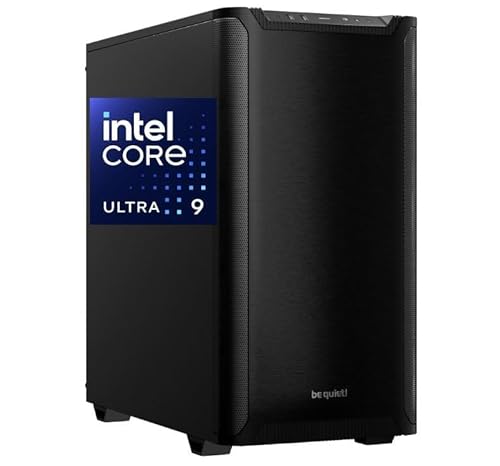
- Core Ultra 9 285K CPU with 64GB RAM
- Quadro RTX 2000 ADA for pro app support
- 2TB NVMe SSD and liquid cooling
Best For: Editors tackling dense multicam timelines, 4K/8K footage, and multi-monitor workflows.
Best Budget Workstation
Dell Precision 3620 i7 Workstation PC

- 32GB DDR4 RAM supports smoother editing multitasking
- 512GB SSD + 2TB HDD balances speed and storage
- Good fit for lighter multicam and 1080p workflows
Best For: Editors who want a low-cost workstation-style desktop for lighter multicam projects and general editing.
Best for Multicam Value
Getorli Mini PC Ryzen 7 PRO 8845HS

- Ryzen 7 PRO 8845HS with 8 cores and 16 threads
- 32GB DDR5 plus 1TB PCIe 4.0 SSD out of the box
- Dual USB4 and support for four 4K displays
Best For: Editors who want a compact mini PC for multicam projects and multi-monitor workflows.
Best for Balanced Editing
suevery Ryzen 7 5700X Gaming PC

- Ryzen 7 5700X delivers strong 8-core/16-thread performance
- RTX 3050 and 16GB RAM handle editing, streaming, and multitasking
- 512GB NVMe SSD and WiFi 6 make it quick to set up and use
Best For: Creators who want a ready-to-use desktop for light multicam editing and streaming.
Best for Triple-Display Editing
HP Mini Desktop PC i7-12700T, 64GB RAM, 2TB SSD

- 12th Gen Core i7-12700T with 64GB RAM for smooth multitasking
- 3x 4K display support keeps multicam timelines and bins visible
- 2TB NVMe SSD gives fast load times and lots of project storage
Best For: Editors who want a compact workstation with strong multitasking and triple-monitor support.
Best for High-Clocked Editing

- 24-core i9-14900HX for timeline and export performance
- RTX 5060 Ti supports GPU-accelerated editing workflows
- 1TB NVMe SSD with DDR5 memory for quick project access
Best For: Editors and streamers who want a ready-to-use PC for heavy multitasking and multicam work.
Best Wired Business Tower

- 20-core Core i7-14700 handles multitasking well
- 16GB DDR5 RAM and 512GB SSD keep the system responsive
- Windows 11 Pro, TPM 2.0, and Gigabit Ethernet suit office setups
Best For: Editors and business users who want a reliable wired tower for everyday productivity and lighter video work.
Best Value Refurbished Tower
Dell OptiPlex 3040 i5 Video Editing Desktop

- 16GB RAM supports smoother editing multitasking
- RX 550 4GB helps with effects and motion graphics
- 240GB SSD + 2TB HDD balances speed and storage
Best For: Budget-minded editors who need a dependable desktop for 1080p multicam timelines and light 4K work.
Best for AI-Accelerated Editing – GEEKOM A9 Max Ryzen AI Mini PC
If you want a compact pc for multicam video editing that also leaves room for AI tools, the GEEKOM A9 Max is a strong high-end option. Its Ryzen AI 9 HX 370, Radeon 890M graphics, and fast DDR5 memory make it a practical fit for timelines with multiple camera angles, 4K projects, and background multitasking.
Best For: Editors and creators who want a small desktop with strong AI-assisted performance, 4K editing headroom, and modern connectivity for a multi-monitor workflow.
Pros:
- Ryzen AI 9 HX 370 and Radeon 890M handle demanding editing and multitasking well
- Dual USB4 and dual HDMI 2.1 support up to four 8K displays
- 32GB RAM and 1TB SSD give you a solid out-of-box creator setup
- Wi‑Fi 7, dual 2.5GbE, and Windows 11 Pro suit pro workflows
Cons:
- Premium pricing may be overkill for casual editors
- Integrated graphics won’t match a dedicated GPU workstation
- Best results still depend on using proxies for heavy multicam 4K projects
For editors who need a compact, well-connected pc for multicam video editing, this mini PC stands out for balancing CPU power, memory, and display support in a tiny footprint. It’s especially appealing if your workflow also includes AI apps, streaming, or light 3D work.
Best for Heavy Multicam Projects – VidCore Core Ultra 9 Editing PC
If you need a pc for multicam video editing that can keep timelines responsive while juggling effects, this VidCore workstation is built around high-end CPU power, pro graphics, and fast storage. It’s aimed at editors working in 4K or 8K who want a ready-to-run tower with Windows 11 Pro and minimal setup.
Best For: Editors handling dense multicam timelines, high-resolution footage, and other demanding creative workloads that benefit from a strong CPU/GPU combo.
Pros:
- Intel Core Ultra 9 285K and 64GB RAM are well suited to demanding editing workloads
- Quadro RTX 2000 ADA offers professional drivers and strong multi-display support
- 2TB NVMe SSD helps with fast project loading, caching, and media storage
- Liquid cooling and a 650W PSU are designed for longer editing sessions
Cons:
- Overkill for casual editors or short-form projects
- 16GB GPU memory may still be limiting for some extreme 8K workflows
- Priced more like a workstation than a general-purpose desktop
As a pc for multicam video editing, this model makes sense if you want a workstation-style tower with fast storage, ample RAM, and pro-grade graphics in one package. It’s especially compelling for creators who value stability and multi-monitor productivity over a budget build.
Best Budget Workstation – Dell Precision 3620 i7 Workstation PC
If you need a dependable pc for multicam video editing without jumping to a high-end tower, this renewed Dell Precision 3620 is a practical entry point. The Core i7-6700, 32GB of DDR4 RAM, and SSD-plus-HDD storage give it a solid mix of speed and capacity for timelines, proxies, and project files.
Best For: Editors who want an affordable workstation-style desktop for lighter multicam projects, 1080p workflows, and general content creation.
Pros:
- 32GB RAM helps with smoother multitasking in editing apps
- 512GB SSD boot drive improves load times and responsiveness
- 2TB HDD provides extra room for footage, exports, and archives
- Workstation-class Dell build with HDMI and DisplayPort output options
Cons:
- Older i7-6700 platform is not ideal for demanding 4K multicam timelines
- Integrated Intel HD Graphics 530 limits GPU-accelerated effects work
- Renewed unit may show cosmetic wear compared with a new PC
This is a sensible value pick if your pc for multicam video editing needs are focused on reliability, memory, and storage rather than cutting-edge GPU power. For smaller projects and budget-conscious creators, it offers enough headroom to stay productive.
Best for Multicam Value – Getorli Mini PC Ryzen 7 PRO 8845HS
If you want a compact pc for multicam video editing without stepping into a full tower build, this Getorli mini PC brings a strong mix of CPU horsepower, fast SSD storage, and useful I/O. The Ryzen 7 PRO 8845HS and 32GB of DDR5 memory should handle timeline playback, light-to-moderate effects, and exporting better than typical budget minis, while the dual USB4 ports and 4K display support make it easier to build a practical editing desk.
Best For: Editors who want a compact, expandable mini PC for multicam projects, 4K monitoring, and mixed creative work.
Pros:
- 8-core Ryzen 7 PRO 8845HS offers solid headroom for editing and multitasking
- 32GB DDR5 and 1TB PCIe 4.0 SSD provide a strong out-of-box media workflow
- Dual USB4, HDMI 2.1, and DP 1.4 support up to four 4K displays
- Dual 2.5G LAN and WiFi 6 help with fast file transfers and shared storage
Cons:
- Integrated Radeon 780M graphics are capable, but not ideal for heavy GPU effects
- Compact cooling is good for a mini PC, though sustained renders may still run warmer than larger desktops
- Storage expansion is available, but advanced users may prefer a larger chassis for easier upgrades
This is a smart pc for multicam video editing if you value a small footprint, strong everyday performance, and flexible connectivity over workstation-class expandability. It is especially appealing for creators who need a tidy desktop that can still support multiple monitors and a busy editing workflow.
Best for Balanced Editing – suevery Ryzen 7 5700X Gaming PC
If you want a practical pc for multicam video editing without jumping to workstation pricing, this suevery prebuilt is a solid middle-ground option. The Ryzen 7 5700X gives you 8 cores and 16 threads for smoother timeline scrubbing and multitasking, while the RTX 3050 and 16GB of RAM help with editing, streaming, and everyday creative work.
Best For: Creators who need a ready-to-use desktop for 1080p multicam editing, light 4K projects, and streaming on a budget-conscious setup.
Pros:
- Ryzen 7 5700X offers strong multi-core performance for editing and multitasking
- RTX 3050 supports creative apps, streaming, and hardware-assisted encoding
- 16GB RAM and a 512GB NVMe SSD keep launches and file access responsive
- WiFi 6, Bluetooth, and multiple ports make setup easy out of the box
Cons:
- 16GB RAM may feel tight for heavier multicam timelines or larger 4K projects
- 512GB storage fills quickly once caches and video files build up
- RTX 3050 is fine for light editing, but not ideal for demanding GPU effects
Overall, this is a sensible pc for multicam video editing if you value convenience and balanced performance over maximum headroom. It’s better suited to creators starting with moderate timelines than to users who regularly push large 4K projects or intensive effects work.
Best for Triple-Display Editing – HP Mini Desktop PC i7-12700T, 64GB RAM, 2TB SSD
If you want a compact pc for multicam video editing, this HP mini desktop stands out for its 12th Gen Core i7 processor, 64GB of RAM, and 2TB NVMe SSD. It has enough memory and storage headroom for large project files, background apps, and fast boot times, while triple 4K display support makes it easier to keep your timeline, preview, and media bins visible at once.
Best For: Editors who want a small, quiet desktop with enough multitasking power and monitor support for timeline-heavy workflows.
Pros:
- Intel i7-12700T and 64GB RAM handle heavy multitasking smoothly
- 3x 4K display output is ideal for editing across multiple screens
- 2TB SSD provides fast loading and ample space for active projects
- Compact, quiet design fits easily in tight desks or studio setups
Cons:
- Integrated graphics limit it for very demanding effects work or high-end color grading
- Not as upgrade-friendly as a full tower workstation
- WiFi 5 is adequate, but not the latest wireless standard
For many buyers, this is a practical pc for multicam video editing when desk space matters more than expandability. It offers strong everyday editing performance, excellent RAM capacity, and a triple-monitor layout that can speed up real-world post-production work.
Best for High-Clocked Editing – i9 RTX 5060 Ti Prebuilt PC
If you want a pc for multicam video editing that can keep timelines responsive while you preview effects and export in the background, this prebuilt brings a strong CPU/GPU mix. The Core i9-14900HX and RTX 5060 Ti should handle modern editing apps well, especially for 4K work, streaming, and multitasking-heavy workflows.
Best For: Editors and streamers who need fast scrubbing, solid multitasking, and a ready-to-use tower for demanding creative work.
Pros:
- 24-core Core i9-14900HX offers plenty of headroom for multicam timelines and exports
- RTX 5060 Ti helps with GPU-accelerated effects, playback, and modern creative tools
- 1TB NVMe SSD and DDR5 memory support quick project loading and smoother workflow
- Prebuilt setup with WiFi 6 makes it easy to get working right away
Cons:
- 16GB RAM is usable, but heavier multicam projects may benefit from an upgrade
- 8GB VRAM may be limiting for especially large 4K/8K timelines or complex effects
- HX-class processor naming can make cooling and upgrade expectations less straightforward than a traditional desktop CPU
For buyers prioritizing speed over tinkering, this is a practical pc for multicam video editing with enough graphics muscle for creative apps and enough storage to get started immediately. It’s a good fit if you want a capable workstation-style PC without building from scratch.
Best Wired Business Tower – Dell Pro Tower i7 Desktop
If you want a dependable pc for multicam video editing that also handles office work, coding, and general multitasking, this Dell Pro Tower is a practical option. The Core i7-14700 and DDR5 memory give it solid day-to-day responsiveness, while the tower design leaves room for a more flexible desktop workflow.
Best For: Editors, remote workers, and business users who want a wired, Windows 11 Pro tower with strong CPU performance for everyday video projects and productivity.
Pros:
- Intel Core i7-14700 with 20 cores is strong for multitasking and timeline-heavy workloads.
- 16GB DDR5 RAM and a 512GB SSD help keep launches, boots, and file access snappy.
- HDMI 2.1, DisplayPort 1.4a, and Gigabit Ethernet make it easy to build a reliable workstation.
- Windows 11 Pro and TPM 2.0 add business-friendly security and manageability.
Cons:
- Integrated graphics limit performance for heavier effects work and GPU-accelerated editing.
- 512GB storage may feel tight once you start saving large video projects locally.
- 16GB RAM is usable, but serious multicam editing may benefit from an upgrade.
As a pc for multicam video editing, this model makes more sense for editors who value stable wired connectivity and CPU strength over gaming-style graphics power. It is a good fit for lighter-to-moderate editing workflows, but power users will likely want more memory, storage, and a discrete GPU.
Best Value Refurbished Tower – Dell OptiPlex 3040 i5 Video Editing Desktop
If you want a practical pc for multicam video editing without paying workstation prices, this refurbished Dell OptiPlex 3040 is a sensible budget pick. The 6th-gen Intel Core i5, 16GB of RAM, RX 550 graphics, and mixed SSD/HDD storage give it a good balance of speed for editing and capacity for keeping media files close at hand.
Best For: Budget-conscious editors who need a dependable desktop for 1080p multicam projects, light 4K work, and general content creation.
Pros:
- 16GB RAM helps with smoother timeline multitasking
- 240GB SSD speeds boot and app loading, while 2TB HDD stores footage
- RX 550 4GB adds extra help for effects, motion graphics, and visual tasks
Cons:
- Older i5-6500 platform is not ideal for heavy modern 4K multicam workflows
- 240GB SSD is relatively small for active project files and caches
- Renewed model may vary slightly in cosmetic condition
For editors who care more about value than maximum speed, this Dell hits a useful middle ground. It can serve as a solid pc for multicam video editing when your projects are modest in complexity and you want enough storage and memory to stay productive.
How We Picked the Best PC for Multicam Video Editing
We prioritized systems that can handle the real demands of a PC for Multicam Video Editing: sustained CPU performance, at least 16GB of RAM, SSD-based boot and cache storage, and enough expansion headroom for bigger projects. We also looked at whether each machine offers practical creator value, such as multiple display outputs, modern connectivity, and a chassis or form factor that fits a desk-based editing setup.
Quick Comparison
For fast multicam work, the strongest choices generally pair newer CPUs with 32GB or more of memory and NVMe SSDs. Mini PCs can be excellent for lighter or mobile editing, especially when they include efficient modern processors and strong integrated graphics. Full towers tend to offer better long-term upgrade potential, more cooling, and more room for discrete GPUs and additional storage.
Key Buying Factors for a PC for Multicam Video Editing
CPU Performance
Multicam editing is often CPU-heavy, especially during decoding, waveform generation, and export. Look for modern Intel Core i7/Core Ultra or AMD Ryzen 7/Ryzen AI 9-class processors when possible. More cores help, but sustained performance and efficient cooling matter just as much.
RAM Capacity
16GB is the practical floor, but 32GB is the better starting point for most editors. If you regularly work with 4K clips, heavy color grading, or several open applications, 64GB can reduce timeline stutter and background slowdowns.
Storage Speed and Capacity
An NVMe SSD should be your main drive. Multicam projects benefit from fast scratch disk access and enough space for source media, proxies, and exports. A second SSD or large HDD can help with archive storage, but your active project files should stay on solid-state storage.
Graphics and Display Support
A discrete GPU is helpful for effects, color work, and some accelerated editing tasks, but it is not always the top priority for every workflow. What matters most is whether the PC can comfortably drive your monitors and support the resolution you edit at. For a PC for Multicam Video Editing, multiple 4K outputs are a useful bonus.
Who Should Buy Which PC for Multicam Video Editing?
If you want the best balance for serious editing, choose a newer tower with 32GB or more RAM, a fast NVMe SSD, and room to grow. If desk space is tight or you mainly edit lighter multicam projects, a capable mini PC can be a smart value pick. Budget buyers should expect to compromise on upgrade room and long-term performance, while power users should favor the newer high-core-count systems with stronger cooling and better expansion options.
In short, the best choice depends on your footage, your software, and how much room you need for future upgrades. Match the PC to your timeline complexity first, then look at storage, ports, and form factor.