If your games stutter during updates, voice chat drops out, or your Wi-Fi just can’t keep up, a PCIe network card can be an easy upgrade with a big payoff.
Below, we’ve rounded up the best options for faster Ethernet and wireless performance, with picks for budget builds, multi-gig internet, and gaming desktops that need more reliable connectivity.
Best 10 Pcie Network Cards for Gaming PCs Picks for 2026
Best for 2.5Gb Upgrades
BrosTrend 2.5Gb PCIe Network Card

- 2.5GbE offers a worthwhile bump over 1Gb networking
- Wide Windows compatibility, including older systems
- Low-profile bracket included for compact cases
Best For: Gamers and PC users who want an easy wired networking upgrade.
Best for Wi‑Fi 6E Speed
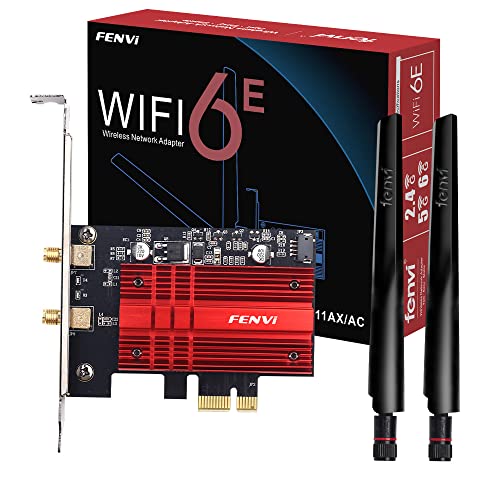
- Tri-band Wi‑Fi 6E with up to 5400Mbps
- Bluetooth 5.3 for gaming accessories
- Dual antennas and low-profile bracket included
Best For: Gamers upgrading to a fast Wi‑Fi 6E desktop adapter with Bluetooth 5.3.
Best for Compact 10GbE Upgrades
VunLink 10Gb PCIe Network Card

- 10GbE speeds with Realtek RTL8127AT
- PCIe 4.0 x1 fits small and slim builds
- Works with 10G/5G/2.5G/1G networks
Best For: Gaming PCs and compact systems that need a simple 10GbE upgrade.
Best for Wi‑Fi + Bluetooth

- Dual-band AC1200 Wi‑Fi up to 1200 Mbps
- Bluetooth 5.0 for gaming peripherals
- Includes two antennas and low-profile bracket
Best For: Gamers who need one PCIe card for both wireless networking and Bluetooth accessories.
Best Budget Gigabit Add-On
TP-Link TG-3468 Gigabit PCIe Ethernet Card

- Low-cost wired networking upgrade
- 1GbE speed for stable gaming connections
- Simple Windows 10/11 desktop compatibility
Best For: Gamers and PC builders who want an inexpensive PCIe Ethernet card for reliable wired play.
Best for 2.5Gbps Upgrades

- 2.5Gbps wired speed for gaming and fast transfers
- Includes both full-height and low-profile brackets
- Windows and Linux compatible with Realtek RTL8125
Best For: Gamers and desktop users wanting a simple wired 2.5GbE upgrade.
Best Value 2.5Gb Upgrade
TP-Link TX201 2.5Gb PCIe Adapter

- 2.5GbE speed for a simple wired upgrade
- Wide Windows and Linux compatibility
- Strong value for budget gaming desktops
Best For: Gamers who want a low-cost PCIe networking upgrade for faster wired performance.
Best for Simple Gigabit Upgrades
Broadcom BCM5751 PCIe Gigabit Adapter
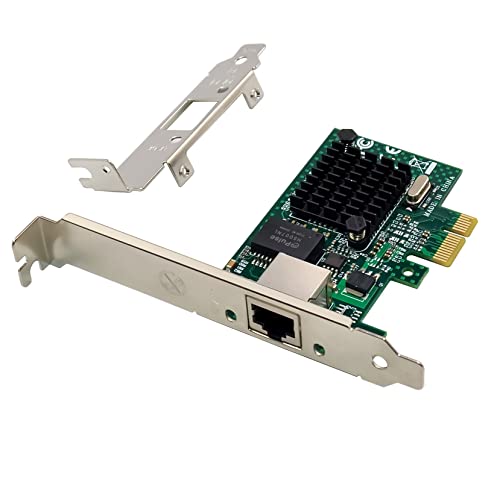
- Integrated 10/100/1000 Mbps Gigabit Ethernet
- Includes half-height bracket for small cases
- Wide support for Windows, Linux, FreeBSD, and more
Best For: Older or budget gaming PCs that need a reliable wired Ethernet upgrade.
Best for 10Gb Upgrades
TP-Link TX401 10Gb PCIe Ethernet Adapter

- 10GbE speeds for fast wired networking
- QoS support for gaming traffic prioritization
- Includes CAT6A cable and low-profile bracket
Best For: Gamers who want a straightforward 10Gb wired upgrade with broad compatibility.
Best Simple Pick
TP-Link 2.5Gb PCIe Network Card TX201

- 2.5Gb Ethernet for a faster-than-gigabit upgrade
- QoS support helps prioritize gaming traffic
- Includes full-height and low-profile brackets
Best For: Gamers upgrading from 1Gb Ethernet who want an easy 2.5Gb PCIe networking boost.
Best for 2.5Gb Upgrades – BrosTrend 2.5Gb PCIe Network Card
If you want a simple speed boost from a standard Gigabit port, this BrosTrend card is a strong pick among pcie network cards for gaming pcs. Its 2.5GbE connection can improve download speeds, reduce bottlenecks on fast broadband, and make local file transfers much quicker without requiring a full network overhaul.
Best For: Gamers and home users who want a straightforward 2.5Gb Ethernet upgrade with broad Windows support.
Pros:
- 2.5Gbps speed is a clear step up from typical 1Gb PCIe adapters.
- Realtek-based design supports a wide range of Windows versions and Server editions.
- Metal shielding helps with durability, stability, and heat dissipation.
- Includes a low-profile bracket for compact desktop builds.
Cons:
- Driver installation may still be needed on some older operating systems.
- Won’t help gaming latency much unless your router, switch, and internet plan can also keep up.
For budget-conscious builders who just want faster wired networking, this is a practical upgrade rather than an enthusiast feature piece. It fits well in pcie network cards for gaming pcs when the goal is better throughput, solid compatibility, and easy everyday use.
Best for Wi‑Fi 6E Speed – WiFi 6E AX210 PCI-E WiFi Card
If you want one of the faster pcie network cards for gaming pcs, this Intel AX210-based PCIe adapter is a strong upgrade path. It adds Wi‑Fi 6E support with tri-band connectivity, 160MHz channels, and Bluetooth 5.3, making it a practical fit for low-latency play, high-bandwidth downloads, and modern wireless peripherals.
Best For: Gamers who want a Wi‑Fi 6E PCIe upgrade with strong wireless speed, Bluetooth 5.3, and broad desktop compatibility.
Pros:
- Wi‑Fi 6E tri-band design can reduce congestion and improve latency on supported routers
- Bluetooth 5.3 is useful for headsets, controllers, keyboards, and mice
- Dual high-gain antennas help improve signal stability and range
- Includes full-height and low-profile brackets for more desktop builds
Cons:
- Requires Windows 11/10 and driver installation from the manufacturer
- Wi‑Fi 6E benefits depend on having a compatible router and 6GHz support
- Not the simplest choice if you want plug-and-play setup
For buyers comparing pcie network cards for gaming pcs, this model stands out when you want a future-ready wireless upgrade rather than just basic connectivity. It is especially appealing if your setup can take advantage of 6GHz networking and you also want a built-in Bluetooth upgrade.
Best for Compact 10GbE Upgrades – VunLink 10Gb PCIe Network Card
If you want a fast, practical upgrade among pcie network cards for gaming pcs, this VunLink 10GbE adapter is built to deliver high-speed wired networking without demanding a full-size slot. Its PCIe 4.0 x1 design, multi-gig support, and broad OS compatibility make it a smart fit for gaming rigs, small form-factor builds, and home lab systems that need faster transfers and lower network bottlenecks.
Best For: Gaming PCs, mini PCs, and compact workstations that need an affordable jump to 10GbE over existing Ethernet cabling.
Pros:
- Realtek RTL8127AT controller with up to 10Gbps wired networking
- PCIe 4.0 x1 layout fits compact systems and limited-slot builds
- Auto-negotiates 10G/5G/2.5G/1G for easy network upgrades
- Includes low-profile bracket for slimmer cases
Cons:
- Requires a compatible multi-gig switch or router to reach top speeds
- Overkill if you only need standard 1GbE gaming traffic
This is a strong pick if you want pcie network cards for gaming pcs that also make sense for NAS access, large file transfers, and compact builds. It focuses on speed, compatibility, and space efficiency rather than flashy extras, which is exactly what many upgrade-minded buyers need.
Best for Wi‑Fi + Bluetooth – TP-Link AC1200 PCIe WiFi Card
If you want one of the more practical pcie network cards for gaming pcs, the TP-Link Archer T5E is a simple way to add dual-band Wi‑Fi and Bluetooth 5.0 to a desktop. It’s a solid fit for players who need stable wireless access, controller support, and an easy PCIe upgrade without moving to a full motherboard replacement.
Best For: Gamers and desktop PC owners who want reliable Wi‑Fi plus Bluetooth in one PCIe card.
Pros:
- Up to 1200 Mbps dual-band wireless for 5 GHz gaming and streaming
- Bluetooth 5.0 for controllers, headsets, keyboards, and mice
- Two external antennas help improve range and stability
- Includes standard and low-profile brackets for broader PC compatibility
Cons:
- Bluetooth requires connecting the included USB cable to a motherboard header
- Wi‑Fi performance depends on antenna placement and local interference
- Not the fastest option if you want top-tier Wi‑Fi 6/6E speeds
For shoppers comparing pcie network cards for gaming pcs, this model stands out as an easy, well-rounded upgrade rather than a speed-first premium pick. It covers the essentials well: decent wireless throughput, Bluetooth support, and straightforward installation.
Best Budget Gigabit Add-On – TP-Link TG-3468 Gigabit PCIe Ethernet Card
If you just need a simple wired upgrade, this TP-Link card is a straightforward pick among pcie network cards for gaming pcs. It adds a 1GbE Ethernet connection over PCIe, which is ideal for stable online play, lower latency than flaky Wi‑Fi, and easy drop-in compatibility with most desktop builds.
Best For: Gamers who want a low-cost, no-frills Gigabit Ethernet upgrade for a desktop PC.
Pros:
- Affordable way to add reliable wired networking
- Gigabit speeds are a solid match for most home internet plans
- Broad Windows 10/11 support keeps setup simple
- Compact PCIe design fits standard gaming desktops
Cons:
- No Wi‑Fi or advanced gaming features
- Limited to 1GbE, so it won’t suit multi-gig upgrade paths
For buyers comparing pcie network cards for gaming pcs, this model stands out more for value and reliability than for premium specs. It’s a practical choice if you want a dependable wired connection without paying for features you may not use.
Best for 2.5Gbps Upgrades – 2.5G PCIe Ethernet Card
If you want a simple wired speed boost without replacing your whole network, this is a practical pick among pcie network cards for gaming pcs. The Realtek RTL8125 controller, 2.5Gbps link speed, and included low-profile bracket make it easy to drop into a desktop or SFF build for smoother online play and faster local transfers.
Best For: Gamers and desktop users who want a straightforward 2.5GbE upgrade for lower-latency gaming, faster downloads, and better home-network performance.
Pros:
- 2.5Gbps speed is a noticeable step up from standard gigabit Ethernet
- Fits full-size and compact PCs with both standard and low-profile brackets
- Compatible with Windows 7/8/10/11 and Linux
- Works with existing 1G and 100M network gear
Cons:
- Limited to wired Ethernet, so it won’t help if you need Wi‑Fi
- Requires a 2.5GbE-capable router or switch to reach full speeds
This is a strong value option if you’re comparing pcie network cards for gaming pcs and want a reliable, no-fuss way to improve wired connectivity. It’s especially appealing for players who also move large files or stream high-bitrate content.
Best Value 2.5Gb Upgrade – TP-Link TX201 2.5Gb PCIe Adapter
If you want a straightforward speed boost without overspending, the TP-Link TX201 is a practical pick among pcie network cards for gaming pcs. It adds 2.5Gb Ethernet support over PCIe, making it a solid upgrade for faster local transfers, smoother downloads, and a more stable wired connection than older gigabit adapters.
Best For: Gamers and PC builders who want an affordable 2.5GbE upgrade for a desktop that already has a wired network setup.
Pros:
- 2.5Gb Ethernet offers a noticeable step up from standard gigabit networking
- Broad OS support, including Windows and Linux compatibility
- Simple PCIe installation for most desktop builds
- Good value for upgrading an older motherboard or budget gaming PC
Cons:
- Requires an open PCIe slot, so it is not ideal for very compact systems
- Only useful if your router, switch, or home network supports faster-than-gigabit speeds
For buyers comparing pcie network cards for gaming pcs, this adapter stands out as a no-frills way to improve wired performance without paying for 10Gb hardware you may not need. It is especially appealing if you want a dependable, everyday network upgrade rather than a feature-heavy add-on.
Best for Simple Gigabit Upgrades – Broadcom BCM5751 PCIe Gigabit Adapter
If you need a straightforward wired networking upgrade, this Broadcom-based card is one of the more practical pcie network cards for gaming pcs that just need stable 1GbE performance. It’s a PCIe x1-era desktop adapter with integrated 10/100/1000BASE-T support, so it’s aimed more at reliable connectivity than flashy features.
Best For: Budget-minded builders or older gaming PCs that need a dependable Ethernet port for downloads, updates, and low-latency wired play.
Pros:
- Built-in Broadcom BCM5751 Gigabit controller for wired 1Gbps networking
- Includes a half-height bracket for compact desktop cases
- Broad OS compatibility across Windows, Linux, FreeBSD, and VMware environments
- Simple plug-in upgrade for PCs without onboard Ethernet
Cons:
- Only supports Gigabit speeds, not 2.5GbE or faster
- Older PCIe v1.0a design may be less appealing for newer builds
- Driver support is broad, but the card itself is an older-generation part
For gamers who mainly want a dependable wired connection instead of advanced networking extras, this card covers the basics well. Among pcie network cards for gaming pcs, it makes sense when compatibility and low-cost stability matter more than modern speed tiers.
Best for 10Gb Upgrades – TP-Link TX401 10Gb PCIe Ethernet Adapter
If you want a simple wired speed boost, this is one of the most practical pcie network cards for gaming pcs because it adds 10GbE support, low-latency QoS, and broad OS compatibility without overcomplicating the build.
Best For: Gamers and power users who want a 10Gb Ethernet upgrade for faster local transfers, a more responsive wired connection, and easy compatibility with mainstream Windows and Linux systems.
Pros:
- Up to 10 Gbps speeds for faster downloads, transfers, and LAN use
- QoS support helps prioritize gaming traffic and reduce congestion
- Includes CAT6A cable plus full-height and low-profile brackets
- Works with Windows, Windows Server, and Linux
Cons:
- Requires a 10Gb-capable network to see full performance
- Not useful for buyers who only need basic Gigabit speeds
- Wired-only upgrade, so it won’t help Wi-Fi setups
For builders comparing pcie network cards for gaming pcs, the TX401 stands out as a straightforward 10Gb option that balances speed, compatibility, and practical extras like the included cable and low-profile bracket.
Best Simple Pick – TP-Link 2.5Gb PCIe Network Card TX201
If you want a straightforward speed boost from a standard gigabit port, the TP-Link TX201 is a practical pick for pcie network cards for gaming pcs. It brings 2.5Gb Ethernet, broad OS support, and a low-profile bracket, making it easy to slot into a modern tower or compact build without overcomplicating setup.
Best For: Gamers upgrading from 1Gb Ethernet who want a simple, compatible 2.5Gb PCIe adapter for better local network performance.
Pros:
- 2.5Gbps speed can outperform typical gigabit adapters on a matching network
- QoS support helps prioritize gaming traffic and reduce congestion
- Includes both full-height and low-profile brackets for flexible case fit
- Wide compatibility with Windows, Windows Server, and Linux
Cons:
- Won’t improve internet speed beyond your router, modem, or ISP limits
- Needs a 2.5Gb-capable network path to see full benefit
For pcie network cards for gaming pcs, the TX201 makes the most sense as a value-friendly upgrade when your home network can actually take advantage of 2.5Gb speeds. It is not the flashiest option, but it covers the essentials well for smoother file transfers, lower congestion, and a cleaner PC networking upgrade.
How We Picked the Best Pcie Network Cards for Gaming PCs
We focused on cards that make sense for gaming desktops: stable drivers, sensible speed tiers, broad Windows support, and straightforward installation. We also looked for models with useful extras such as low-profile brackets, Bluetooth support, or multi-gig Ethernet where it actually benefits home networks.
Quick Comparison
The main choice is between wired and wireless. Wired cards are usually the best pick for the lowest latency and most consistent throughput, while wireless cards are useful when running Ethernet is impractical. For most players, 1GbE is the baseline, 2.5GbE is the sweet spot for newer routers and fast file transfers, and 10GbE is best for users with a matching network setup and heavier local-network workloads.
Key Buying Factors for Pcie Network Cards for Gaming PCs
Connection Type
Choose Ethernet if you want the most reliable online gaming performance. Choose Wi-Fi only if cable routing is not realistic. If you go wireless, look for Wi-Fi 6 or 6E and dual- or tri-band support.
Speed and Network Match
Don’t overbuy bandwidth you cannot use. A 2.5Gb card is a strong upgrade for many gaming PCs, but it only reaches full potential with a 2.5Gb router, switch, or modem setup. The same logic applies to 10GbE.
Driver and OS Support
Good drivers matter more than flashy specs. Check support for your operating system before buying, especially if you use Windows 10, Windows 11, or an older Windows installation.
Form Factor and Brackets
Many Pcie Network Cards for Gaming PCs include low-profile brackets for compact cases. Make sure the card fits your slot layout and your case clearance before you install it.
Who Should Buy Which Pcie Network Cards for Gaming PCs?
Budget builders should start with a solid 1GbE card if the motherboard’s networking is weak or unreliable. Most gamers will be happiest with a 2.5GbE card because it offers a practical step up without needing a complex network overhaul. Power users, streamers moving large files, and users with fast NAS or fiber setups can consider 10GbE. If you need mobility or your setup is cable-limited, a Wi-Fi card with Bluetooth can be the better all-around choice.
In short, the best card is the one that matches your internet speed, router, and gaming habits—not just the biggest number on the box.