Upgrading to one of the best pcie network cards for windows 11 can improve wired speeds, reduce bottlenecks, and make your desktop or workstation feel far more responsive on a modern network.
Whether you want a simple gigabit card, a 2.5Gb upgrade, or a full 10GbE solution, the right adapter depends on your internet plan, local network gear, and available PCIe slot.
Best 10 Pcie Network Cards for Windows 11 Picks for 2026
Best for 2.5Gb Speed
TP-Link TX201 2.5Gb PCIe Adapter

- Up to 2.5 Gbps wired networking
- Windows 11, Server, and Linux support
- Includes QoS, WOL, and both bracket sizes
Best For: Windows 11 users upgrading to a faster wired Ethernet card.
Best Budget Gigabit Upgrade
TP-Link TG-3468 Gigabit PCIe Adapter

- 10/100/1000Mbps Gigabit Ethernet port
- Windows 11 compatible with broad legacy support
- Includes low-profile and standard brackets
Best For: Affordable wired network upgrades on Windows 11 desktops and small PCs.
Best for Compact Builds
VunLink 10GbE PCIe x1 Network Card

- Realtek RTL8127AT controller with up to 10Gbps speeds
- PCIe 4.0 x1 design fits compact PCs and ITX builds
- Windows 10/11, Linux, and server support with low-profile bracket
Best For: Small-form-factor PCs, NAS rigs, and Windows 11 users needing a fast x1 10GbE upgrade.
Best for 10GbE Upgrades
TRENDnet 10G PCIe Network Adapter

- 10GbE RJ-45 port with multi-gig fallback speeds
- Works over standard Cat5e for 2.5G/5G links
- Windows and Windows Server support
Best For: Desktop users who want a dependable 10GbE upgrade with broad Windows support.
Best for Easy Setup
BrosTrend 2.5Gb PCIe Network Card

- 2.5GbE speeds for a clear upgrade over Gigabit
- Windows 11 support plus broad legacy compatibility
- Includes low-profile bracket for compact desktops
Best For: Desktop users upgrading to faster wired networking on Windows 11.
Best for 5Gb Upgrades
BrosTrend 5Gb PCIe Ethernet Card

- 5GbE speed for a strong wired upgrade over gigabit
- Compatible with Windows 11, Windows 10, and Server 2022
- Low-profile bracket and aluminum heatsink included
Best For: Windows 11 desktop users who want a fast, practical 5Gb wired upgrade.
Best Linux Support
BrosTrend 2.5G PCIe Network Adapter

- 2.5Gbps wired speeds for faster everyday networking
- Broad Linux distro support with kernel 5.9+
- Low-profile bracket included for compact PCs
Best For: Linux users and mixed-OS buyers who want an easy 2.5GbE upgrade.
Best for 10G Upgrade
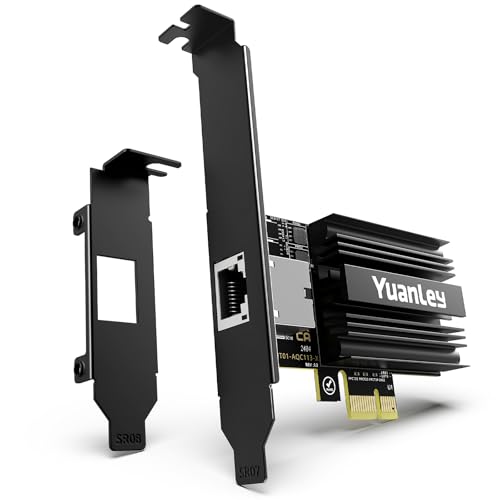
- 10GBASE-T RJ45 with 1G/2.5G/5G/10G support
- Fits PCIe x1, x4, x8, and x16 slots
- Includes full-height and low-profile brackets
Best For: Windows 11 users who want a simple 10GbE copper Ethernet upgrade with broad slot compatibility.
Best Heavy-Duty Pick
TP-Link TX401 10Gb PCIe Adapter

- 10GbE speed for desktop upgrades
- Windows 11 support plus Linux compatibility
- Includes CAT6A cable for easier setup
Best For: Desktop users and small office setups that need a simple 10GbE upgrade on Windows 11.
Best Dual-Port Pick
Dual-Port PCIe Gigabit Intel NIC
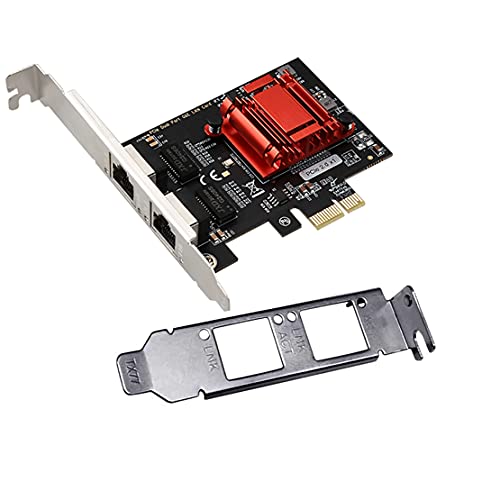
- Two Intel Gigabit Ethernet ports
- PXE boot, WoL, VLAN, and iSCSI support
- Standard and low-profile PCIe compatibility
Best For: Users who need a dual-port PCIe NIC for Windows 11-compatible networking and lab or server use.
Best for 2.5Gb Speed – TP-Link TX201 2.5Gb PCIe Adapter
If you want a straightforward upgrade from a basic gigabit port, the TP-Link TX201 is a practical pick among pcie network cards for windows 11. It supports 2.5GbE speeds, broad Windows and Linux compatibility, and includes both full-height and low-profile brackets for flexible desktop installs.
Best For: Windows 11 users who want an affordable 2.5GbE PCIe upgrade for faster file transfers, gaming, and everyday networking.
Pros:
- Up to 2.5 Gbps speeds for a noticeable step up from standard gigabit adapters
- Works with Windows 11, older Windows versions, Windows Server, and Linux
- Includes QoS, Wake on LAN, and both full-height and low-profile brackets
Cons:
- Requires a free PCIe slot and compatible router/switch to reach 2.5Gb speeds
- Not a Wi-Fi solution, so it only helps wired Ethernet setups
For buyers comparing pcie network cards for windows 11, this model stands out for balancing speed, compatibility, and value without adding unnecessary extras. It’s a solid fit if you mainly want reliable wired networking and a simple upgrade path.
Best Budget Gigabit Upgrade – TP-Link TG-3468 Gigabit PCIe Adapter
If you want a simple wired speed upgrade without overpaying, the TP-Link TG-3468 is a practical pick among pcie network cards for windows 11. It adds a 10/100/1000Mbps RJ45 port, supports Windows 11, and includes both low-profile and standard brackets for flexible desktop installs.
Best For: Budget-minded PC owners who need a reliable Gigabit Ethernet upgrade for a Windows 11 desktop or small-form-factor build.
Pros:
- Gigabit 10/100/1000Mbps performance for faster wired networking
- Windows 11 support plus broad compatibility with older Windows versions
- Low-profile and standard brackets included for easy fitment
- Wake-on-LAN and Auto MDI/MDIX support for added convenience
Cons:
- Only a single Ethernet port, with no multi-gig speed support
- Basic feature set compared with newer premium adapters
For most users, this card covers the essentials: stable Gigabit wired networking, simple installation, and Windows 11 compatibility. If you need dependable value rather than advanced extras, it stands out as a straightforward choice among pcie network cards for windows 11.
Best for Compact Builds – VunLink 10GbE PCIe x1 Network Card
If you’re comparing pcie network cards for windows 11 and need a fast, space-saving upgrade, this VunLink 10GbE adapter is built around the Realtek RTL8127AT and a PCIe 4.0 x1 design. It aims to deliver full 10GbE-class networking without demanding a wide slot, making it a practical fit for mini PCs, ITX systems, NAS builds, and compact workstations.
Best For: Users who want a high-speed 10GbE upgrade for a small-form-factor Windows 11 PC, NAS, or home lab.
Pros:
- 10GbE performance with multi-gig auto-negotiation for 10G/5G/2.5G/1G compatibility
- PCIe 4.0 x1 layout is ideal for compact systems with limited expansion room
- Includes low-profile bracket for easier fit in slim desktops and servers
- Hardware offload helps keep CPU usage lower during heavy transfers
Cons:
- 10GbE speeds depend on matching switches, cabling, and storage on the network
- Single-port design may be less flexible than multi-port NIC options
- Overkill for users who only need basic gigabit networking
For buyers focused on pcie network cards for windows 11, this card stands out for packing serious speed into a compact x1 form factor. It’s a strong fit when you want straightforward installation, broad OS support, and enough headroom for large file transfers, NAS access, or creator workflows.
Best for 10GbE Upgrades – TRENDnet 10G PCIe Network Adapter
If you need a straightforward way to add faster wired networking to a desktop, this TRENDnet adapter is a practical pick among pcie network cards for windows 11. It turns a PCIe x4 slot into a 10GbE RJ-45 port and also supports 5G, 2.5G, 1G, and 100Mbps links for flexible home or office use.
Best For: Desktop users who want a dependable 10GbE upgrade with broad Windows and Windows Server support.
Pros:
- 10GbE RJ-45 port with multi-gig fallback speeds
- Works over standard Cat5e for 2.5G/5G connections up to 100m
- Windows and Windows Server support make it a solid compatibility pick
- Includes 802.1Q VLAN tagging for advanced network setups
Cons:
- Requires an available PCIe x4 slot
- Bulkier than simpler 1GbE adapters
- 10GbE speeds depend on a matching router, switch, or NAS
For buyers comparing pcie network cards for windows 11, this model stands out for its mix of speed, standard Ethernet cabling, and business-friendly support. It is a sensible choice if you want a dependable upgrade without moving to fiber or a more specialized setup.
Best for Easy Setup – BrosTrend 2.5Gb PCIe Network Card
If you want a simple way to upgrade your desktop networking, this is a practical pick among pcie network cards for windows 11. It adds 2.5GbE speed, supports a wide range of Windows versions, and includes an extra low-profile bracket for tighter builds.
Best For: Desktop users who want a straightforward Windows 11-compatible 2.5Gb Ethernet upgrade for faster gaming, streaming, and local file transfers.
Pros:
- 2.5GbE speeds offer a noticeable step up from standard Gigabit adapters
- Works with Windows 11 and many older Windows and Server versions
- Includes an extra low-profile bracket for compact PC cases
- Metal shielding helps improve stability and heat handling
Cons:
- Best performance depends on a 2.5Gb-capable network and internet plan
- Driver installation may be needed on some operating systems
For buyers comparing pcie network cards for windows 11, this model stands out as a solid value if you want faster-than-Gigabit networking without moving into higher-priced enthusiast gear. It is especially appealing for everyday desktop upgrades and local network transfers.
Best for 5Gb Upgrades – BrosTrend 5Gb PCIe Ethernet Card
If you want one of the faster pcie network cards for windows 11 without moving to a full 10Gb setup, this BrosTrend adapter is a straightforward 5Gb upgrade for desktops and servers. It’s aimed at users who want noticeably better wired performance for gaming, streaming, backups, and fast local file transfers, as long as their Windows 11 or Windows 10 system is compatible.
Best For: Windows 11 PC owners who want a simple 5GbE upgrade for faster wired internet and LAN transfers.
Pros:
- 5GbE speeds deliver a big step up from standard gigabit adapters.
- Works with Windows 11, Windows 10, and Windows Server 2022.
- Low-profile bracket included for small or compact desktop cases.
- Aluminum heatsink design helps with consistent, reliable operation.
Cons:
- Requires driver installation to reach full speed.
- Only supports the listed operating systems, so it’s not a universal plug-and-play pick.
- 5GbE is great for most users, but power users may still want 10GbE.
For buyers comparing pcie network cards for windows 11, this model stands out as a practical middle ground: faster than gigabit, easier to justify than 10GbE, and backed by a cooling-focused design that suits everyday high-speed desktop use.
Best Linux Support – BrosTrend 2.5G PCIe Network Adapter
If you need one of the more compatibility-friendly pcie network cards for windows 11 and Linux, this BrosTrend 2.5GbE adapter is worth a look. It’s aimed at users who want faster-than-gigabit wired networking, low-profile case support, and broad Linux distro coverage without a lot of setup hassle.
Best For: Linux-first desktops, workstations, and servers that also need a dependable Windows 11-capable PCIe Ethernet upgrade.
Pros:
- 2.5Gbps Ethernet helps speed up file transfers, streaming, and local network tasks.
- Works out of the box on many Linux distros with kernel 5.9 or later.
- Includes an extra low-profile bracket for compact PC builds.
- Metal shielding and Wake on LAN support add practical everyday value.
Cons:
- Linux compatibility depends on having a sufficiently new kernel.
- Not the best pick if you need 10GbE or higher speeds.
This is a strong fit for buyers who care more about reliable Linux support than flashy extras, and it still makes sense for pcie network cards for windows 11 if you want a straightforward 2.5GbE upgrade. It’s a sensible middle-ground choice for mixed-use systems where stability and broad OS support matter.
Best for 10G Upgrade – YuanLey 10G PCIe RJ45 Adapter
If you want one of the more straightforward pcie network cards for windows 11, this YuanLey 10G Base-T card is built for fast wired upgrades without needing a fiber switch or special cabling. The Marvell AQC113 controller, RJ45 port, and wide PCIe slot support make it a practical fit for modern desktops, workstations, and compact builds alike.
Best For: Users upgrading a Windows 11 PC to 10GbE over standard Ethernet, especially if they want broad slot compatibility and included low-profile mounting options.
Pros:
- 10GBASE-T RJ45 port supports 10G, 5G, 2.5G, and 1G connections
- Works in PCIe x1, x4, x8, and x16 slots for flexible installs
- Includes both full-height and low-profile brackets
- WOL support and plug-and-play setup on many systems
Cons:
- PCIe 4.0 x1 performance may vary by system and slot configuration
- 10GbE speed requires compatible cabling and network equipment
For buyers comparing pcie network cards for windows 11, this model stands out as a simple copper Ethernet upgrade with strong compatibility and useful install extras. It is a solid pick if you want 10GbE performance without overcomplicating the setup.
Best Heavy-Duty Pick – TP-Link TX401 10Gb PCIe Adapter
If you want a straightforward speed boost from a trusted brand, the TP-Link TX401 is one of the more practical pcie network cards for windows 11. It adds 10Gb Ethernet support to a desktop or workstation and includes a CAT6A cable, making it easier to get up and running without extra accessories.
Best For: Desktop users, home labs, and small office builds that need a simple 10GbE upgrade on Windows 11.
Pros:
- Supports Windows 11 plus older Windows and Linux systems
- 10GbE performance is a big step up from standard gigabit networking
- Includes a CAT6A cable for easier first-time setup
- Works well for fast file transfers, backups, and NAS access
Cons:
- Requires a compatible 10GbE network and cabling to see full speed
- Best suited to desktops with an open PCIe slot
For buyers comparing pcie network cards for windows 11, the TX401 stands out for its mix of broad OS support and true 10GbE capability. It’s not the cheapest path to faster networking, but it is a clean, well-rounded upgrade for users who want serious wired speed.
Best Dual-Port Pick – Dual-Port PCIe Gigabit Intel NIC
If you need a straightforward upgrade among pcie network cards for windows 11, this dual-port Intel-based adapter is a practical choice for adding two reliable Gigabit Ethernet connections at once. It fits standard and low-profile PCIe slots, supports PXE and WoL, and is built for users who want flexible networking on Windows, Linux, or server environments.
Best For: Users who want a dual-port PCIe NIC for Windows 11-compatible networking, PXE boot, and server or lab setups.
Pros:
- Dual Intel Gigabit ports provide flexible multi-connection networking
- Supports PXE boot, WoL, VLAN filtering, and iSCSI boot
- Works with standard and low-profile PCIe slots for broader case compatibility
- Broad OS support makes it useful for mixed Windows and Linux environments
Cons:
- Driver support is listed for older Windows versions, so Windows 11 may need manual setup
- Limited to 1GbE speeds, which may not suit faster home or office networks
- Best for utility and compatibility, not modern high-throughput builds
This is a solid pick if you value dual-port flexibility and boot/network-management features over raw speed. For buyers comparing pcie network cards for windows 11, it stands out more as a dependable workhorse for labs, servers, and DIY networking than as a cutting-edge consumer upgrade.
How We Picked the Best Pcie Network Cards for Windows 11
We focused on cards that offer dependable Windows 11 compatibility, sensible driver support, and a clear value proposition for different users. The goal was to highlight Pcie Network Cards for Windows 11 that balance speed, stability, and installation simplicity rather than chasing raw specs alone.
We also considered connector type, bracket options, controller reputation, and whether the card makes sense for a typical home PC, a small office system, or a performance-focused build.
Quick Comparison
For most Windows 11 users, 2.5GbE is the sweet spot because it delivers a noticeable upgrade over 1GbE without requiring an expensive network overhaul. Gigabit cards remain a good budget choice for replacing a failed port or adding a secondary connection, while 5GbE and 10GbE models are better suited to fast NAS transfers, content creation, and high-throughput local networks.
Key Buying Factors for Pcie Network Cards for Windows 11
Speed and Network Compatibility
Match the card to your router, switch, modem, or NAS. A 10Gb card will not deliver 10Gb speeds unless the rest of your network supports it, while 2.5GbE can often work with existing Cat5e cabling and is easier to adopt.
Chipset and Driver Support
Driver reliability matters as much as peak speed. Look for well-known controllers and confirmed Windows 11 support so the adapter installs cleanly and stays stable after updates.
Slot and Form Factor
Check whether your PC has an open PCIe x1, x4, or x16 slot, and make sure the card includes a low-profile bracket if you are using a compact case. Physical fit is a common mistake with desktop upgrades.
Use Case
If you mainly browse, stream, and game, 1GbE or 2.5GbE is usually enough. If you move large files, edit video from a NAS, or run a home lab, 5GbE or 10GbE is the better long-term choice.
Who Should Buy Which Pcie Network Cards for Windows 11?
Choose a gigabit card if you want the lowest-cost fix or a basic expansion port. Pick a 2.5Gb model if you want the best all-around upgrade for Windows 11 without replacing every piece of network hardware. Step up to 5Gb or 10Gb if your workflow regularly depends on fast local transfers and your switch or router can keep up.
For most buyers, the best path is to buy for your network today, not just for theoretical maximum speed. A well-matched adapter will feel faster, install more smoothly, and deliver better real-world results than an overpowered card your network cannot fully use.