If you need more bandwidth, better link aggregation options, or a cleaner upgrade path for a PC, server, or lab box, the right network card can make a noticeable difference.
This roundup of PCIe network cards with 2 5GbE port options focuses on speed, compatibility, driver support, and practical features that matter during real-world use.
Best 10 Pcie Network Cards with 2 5gbe Port Picks for 2026
Best for Intel I225/I226 Upgrades

- Dual Intel 2.5GbE ports
- Broad OS and virtualization support
- Low-profile bracket included
Best For: Users upgrading a workstation, homelab, or small server with reliable dual 2.5GbE networking.
Best 10GbE Dual-Port
StarTech 2-Port 10GbE PCIe Network Card

- Dual RJ45 ports with 10GbE, 5GbE, and 2.5GbE support
- Independent controllers improve reliability and load balancing
- Includes low-profile bracket plus PXE, WoL, VLAN, and jumbo frames
Best For: IT setups, home labs, and servers needing dual multi-gig Ethernet with redundancy.
Best Dual 10GbE Pick

- Dual RJ45 10GbE ports for high-speed copper networking
- Intel X540-T2 offers proven compatibility and stability
- Supports Windows, Windows Server, Linux, and VMware
Best For: Users who want a dual-port copper NIC for fast transfers, virtualization, or server workloads.
Best Windows PCIe Adapter
TRENDnet TEG-25GECTX 2.5GBase-T Adapter

- Adds 2.5GbE from a PCIe 2.0 or later slot
- Includes standard and low-profile brackets
- Supports VLAN tagging and jumbo frames
Best For: Windows desktop users who need a simple 2.5GbE add-in card.
Best for Windows & Linux
TP-Link TX201 2.5Gb PCIe Ethernet Adapter

- 2.5GbE speeds in a simple PCIe add-in card
- Broad support for Windows and Linux systems
- Includes low-profile and full-height brackets
Best For: Users who want a reliable 2.5GbE desktop upgrade with broad OS compatibility.
Best for Broad Compatibility
RTL8125B 2.5G PCIe Ethernet Card
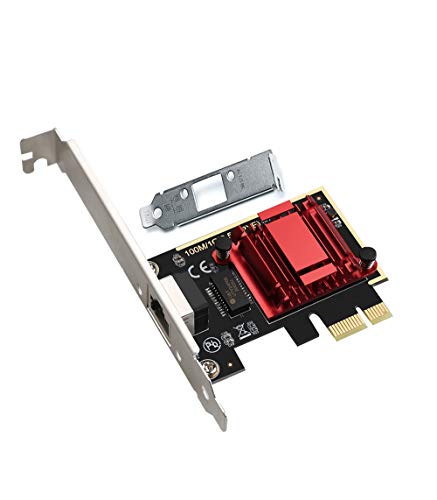
- 2.5GbE RJ45 with backward support for 1GbE and 100Mbps
- Broad OS support, including Windows, Linux, and macOS
- Low-profile bracket plus PXE and Wake on LAN support
Best For: Users who want a straightforward 2.5GbE upgrade with wide compatibility and boot/networking features.
Best for Multi-Port Lab Builds
Quad Port 2.5GbE Intel i226-V Card

- Four 2.5GbE Intel i226-V ports
- Great for pfSense, Proxmox, and TrueNAS
- Needs PCIe x4 slot and compatible hardware
Best For: Homelab users and builders who want multiple dedicated 2.5GbE ports for routing, storage, or virtualization.
Best for Wide Compatibility
BrosTrend 2.5Gb PCIe Network Card

- 2.5GbE RJ45 port for faster-than-gigabit networking
- Includes low-profile bracket for compact cases
- Broad Windows and Windows Server support
Best For: Windows desktop users who want a simple 2.5GbE PCIe upgrade with easy compatibility.
Best for 5Gb Single-Port Upgrades
NICGIGA 5G PCIe Ethernet Adapter

- Realtek RTL8126 controller with 5GbE speed
- Backward compatible with 2.5G/1G/100M networks
- Includes WOL support and both bracket sizes
Best For: People who want a simple, reliable 5GbE PCIe upgrade for Windows or Linux.
Best for Legacy Support
Dual-Port Intel PCIe Gigabit NIC
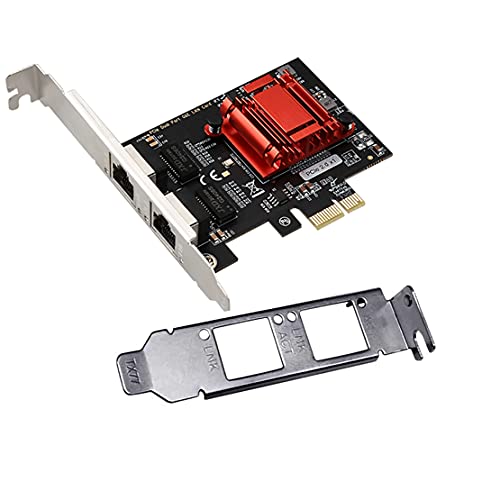
- Dual Intel ports with broad OS support
- PXE, WoL, iSCSI boot, and VLAN filtering
- Low-profile PCIe 2.1 x1 design
Best For: Legacy systems, server provisioning, and users who need dependable dual-port compatibility.
Best for Intel I225/I226 Upgrades – Intel I226-V 2.5G PCIe NIC
If you’re comparing pcie network cards with 2 5gbe port, this Intel-based dual-port adapter is a practical choice for users who want stable 2.5GbE performance, broad OS support, and a low-profile fit for compact desktops or servers. It’s especially appealing if you want a straightforward RJ45 upgrade for Windows 10/11, Linux, or virtualization setups.
Best For: Users upgrading a workstation, homelab, or small server that needs reliable dual 2.5GbE ports and strong compatibility.
Pros:
- Dual Intel I225-V/I226-V 2.5GbE ports for flexible multi-port networking
- Wide support across Windows, Linux, VMware ESXi, OpenWRT, and more
- Low-profile bracket included for compact PC and server builds
- PXE support and x1 PCIe 3.1 compatibility for easier deployment
Cons:
- Only 2.5GbE, so it won’t satisfy users looking for 10GbE speeds
- Driver and OS setup may take extra work on non-Windows systems
- Requires available PCIe slot and is not ideal for laptops
This card is a strong fit if you want dependable Intel networking rather than chasing the cheapest option. For pcie network cards with 2 5gbe port, it stands out for compatibility, low-profile hardware, and a sensible feature set for home labs and everyday upgrades.
Best 10GbE Dual-Port – StarTech 2-Port 10GbE PCIe Network Card
If you want one of the more capable pcie network cards with 2 5gbe port support, this StarTech dual-port adapter is a strong fit for mixed-speed networks and bandwidth-heavy workloads. It gives you two RJ45 ports, multi-gig compatibility, and independent controllers, making it a practical upgrade for servers and desktops that need flexible connectivity.
Best For: IT setups, home labs, and PCs or servers that need dual multi-gig Ethernet with redundancy or load balancing.
Pros:
- Dual RJ45 ports with 10GbE plus 5GbE and 2.5GbE support
- Independent controllers help with reliability, failover, and load balancing
- Works with Cat5e/Cat6 cabling and includes a low-profile bracket
- Useful management features like PXE boot, WoL, VLAN, and jumbo frames
Cons:
- Overkill if you only need basic single-port networking
- Requires a compatible PCIe x4 slot and proper driver support
- Pricier than simpler 2.5GbE cards
This card makes the most sense when you want pcie network cards with 2 5gbe port flexibility but also need headroom for 10GbE now or later. It is a solid choice if you value stability, dual-link convenience, and enterprise-style features over a bare-bones upgrade.
Best Dual 10GbE Pick – VIMIN Dual RJ45 10GbE Adapter
If you need pcie network cards with 2 5gbe port, this VIMIN adapter is a strong high-speed alternative that actually goes beyond that class with dual 10GbE RJ45 ports. Built around the Intel X540-T2 controller, it’s a practical choice for anyone upgrading a desktop, server, or lab machine that needs dependable copper networking and broad OS support.
Best For: Users who want a dual-port copper NIC for fast transfers, virtualization, or server workloads and don’t mind stepping up to 10GbE.
Pros:
- Dual RJ45 10GbE ports provide more headroom than standard 2.5GbE cards
- Intel X540-T2 controller is well known for stable compatibility
- Works with Windows, Windows Server, Linux, and VMware
- Fits PCIe x8 and x16 slots for easy system integration
Cons:
- Overkill if you only need basic 2.5GbE speeds
- Higher power and cooling demands than slower network adapters
For buyers comparing pcie network cards with 2 5gbe port, this card makes sense if you want a future-proof copper option and can take advantage of 10GbE performance. It’s less about entry-level value and more about getting a proven dual-port adapter for demanding networking setups.
Best Windows PCIe Adapter – TRENDnet TEG-25GECTX 2.5GBase-T Adapter
If you want a straightforward upgrade among pcie network cards with 2 5gbe port, the TRENDnet TEG-25GECTX is a practical pick for adding 2.5GbE to a desktop through a free PCIe 2.0 or later slot. It supports 2.5Gbps, 1Gbps, and 100Mbps over Cat5e, and the included standard and low-profile brackets make it easy to fit a range of cases.
Best For: Windows desktop users who want a simple 2.5GbE add-in card with VLAN and jumbo frame support.
Pros:
- Converts a PCIe 2.0 or later slot into a 2.5GbE Ethernet port
- Includes both standard and low-profile brackets
- Supports VLAN tagging and jumbo frames up to 9KB
- Works over Cat5e cable runs up to 100m
Cons:
- Windows and Windows Server support only
- Single-port card, not a dual-port adapter
- No bundled advanced management software
For shoppers comparing pcie network cards with 2 5gbe port, this TRENDnet model stands out for its clean compatibility story and no-fuss feature set. It is a solid choice if you mainly need a reliable 2.5GbE upgrade for a Windows PC rather than a multi-port or specialty networking card.
Best for Windows & Linux – TP-Link TX201 2.5Gb PCIe Ethernet Adapter
If you’re comparing pcie network cards with 2 5gbe port, the TP-Link TX201 is a straightforward way to add 2.5GbE to a desktop without paying for extra features you may not need. It’s a practical pick for users who want faster local transfers, stable everyday networking, and broad OS support.
Best For: Home or office PC builds that need a reliable 2.5GbE upgrade with strong compatibility across Windows and Linux.
Pros:
- Up to 2.5 Gbps speeds for a noticeable step up from standard gigabit Ethernet
- Wide compatibility with Windows, Windows Server, and Linux
- Includes both low-profile and full-height brackets for more cases
- Wake-on-LAN support and QoS features add useful everyday convenience
Cons:
- Single-port card only, so it won’t suit dual-port networking needs
- Best performance depends on having 2.5GbE-capable networking gear
- Not aimed at advanced users who need multiple ports or enterprise features
For most buyers, the TX201 hits the sweet spot between price, compatibility, and speed. If you want one of the simpler pcie network cards with 2 5gbe port for a mainstream desktop upgrade, this is an easy recommendation.
Best for Broad Compatibility – RTL8125B 2.5G PCIe Ethernet Card
If you need one of the more flexible pcie network cards with 2 5gbe port support for a mixed PC or lab setup, this RTL8125B adapter is an easy fit. It offers 2.5GbE speeds, works across common PCIe slots, and includes a low-profile bracket for compact cases.
Best For: Home users, homelab builders, and upgrade buyers who want broad OS support, PXE, and Wake on LAN without moving to a more expensive multiport card.
Pros:
- 2.5GbE RJ45 performance with backward support for 1GbE and 100Mbps networks
- Wide compatibility across Windows, Linux, macOS, and several virtualization/network OS options
- Includes low-profile bracket and supports PXE plus Wake on LAN
Cons:
- Single-port design, so it is not ideal if you specifically need dual 2.5GbE ports
- ESXi 7.0 is not supported, which may limit some virtualization users
- Basic feature set compared with higher-end multiport networking cards
For buyers comparing pcie network cards with 2 5gbe port options, this model stands out more for dependable compatibility and simple upgrading than for port count. It is a practical pick when you want one stable 2.5GbE interface that works across many systems.
Best for Multi-Port Lab Builds – Quad Port 2.5GbE Intel i226-V Card
If you need pcie network cards with 2 5gbe port for a router, firewall, NAS, or virtualization host, this quad-port Intel i226-V adapter is built for advanced home networking setups. It gives you four separate 2.5GbE ports, making it useful when you want dedicated links for WAN, LAN, storage, and lab segmentation.
Best For: Home servers, pfSense/OPNsense builds, Proxmox, TrueNAS, and other multi-port networking projects that need flexible 2.5GbE connectivity.
Pros:
- Four Intel i226-V 2.5GbE ports support multi-role networking and segmentation.
- Good fit for routers, firewalls, NAS systems, and virtualization labs.
- Compatible with Windows 10/11 and many Linux-based server environments.
- PCIe x4 design suits systems with the slot and chassis space available.
Cons:
- Not a simple plug-and-play upgrade for every system or OS.
- Full 2.5GbE performance depends on compatible switches, cabling, and clients.
- Requires an open PCIe slot and enough clearance in the case.
This is a strong pick if you want pcie network cards with 2 5gbe port capabilities for a serious homelab or custom networking build, but it makes the most sense when you already have the right hardware and drivers in place.
Best for Wide Compatibility – BrosTrend 2.5Gb PCIe Network Card
If you need one of the more straightforward pcie network cards with 2 5gbe port alternatives for a desktop upgrade, this BrosTrend adapter is built around a single 2.5GbE RJ45 connection and broad Windows support. It’s a practical pick for users who want a simple speed bump over onboard gigabit Ethernet without moving to a more complex multi-port setup.
Best For: Windows desktops, older PCs, and buyers who want an easy 2.5GbE upgrade with a low-profile bracket included.
Pros:
- 2.5GbE RJ45 port for faster-than-gigabit networking
- Includes an extra low-profile bracket for compact cases
- Wide Windows and Windows Server compatibility
- Simple PCIe install for desktop upgrades
Cons:
- Single-port design, so it won’t suit multi-link or dual-port needs
- Limited details on advanced features like offloads or teaming
- Best value depends on whether you specifically need 2.5GbE, not dual 5GbE
For shoppers comparing pcie network cards with 2 5gbe port, this model makes more sense as a compatibility-first upgrade than a feature-heavy choice. It’s a solid fit when you mainly want reliable 2.5GbE performance, broad OS support, and an easy install in a standard desktop or small-form-factor build.
Best for 5Gb Single-Port Upgrades – NICGIGA 5G PCIe Ethernet Adapter
If you want one of the more practical pcie network cards with 2 5gbe port alternatives for a simple speed bump, this NICGIGA adapter is built around a Realtek RTL8126 controller and a single 5GbE RJ45 port. It’s a straightforward PCIe add-in card for desktops, workstations, and servers that need faster wired networking, broad OS support, and reliable day-to-day transfer speeds.
Best For: Users who need a dependable 5GbE upgrade for a Windows or Linux PC, especially in systems that can benefit from included full-height and low-profile brackets.
Pros:
- Realtek RTL8126 controller with up to 5Gbps wired networking
- Backwards compatible with 2.5GbE, 1GbE, and 100Mbps links
- Supports Windows 10/11, Windows Server, and Linux
- Includes WOL support plus standard and slim brackets
Cons:
- Only one Ethernet port, not a dual-port card
- Requires a PCIe slot; not compatible with older PCI slots
- May be overkill if your network is still limited to 1GbE
As a practical choice among pcie network cards with 2 5gbe port search results, this model stands out more for dependable single-port 5GbE performance than for multiport flexibility. It’s a good fit if your priority is stable speed, easy compatibility, and a simple install rather than dual-port expansion.
Best for Legacy Support – Dual-Port Intel PCIe Gigabit NIC
If you need pcie network cards with 2 5gbe port for compatibility-first installs, this dual-port Intel-based card is a strong fit for older systems and specialized boot environments. It is a 1GbE adapter rather than 2.5GbE, but it stands out for broad OS support, PXE boot, and server features like iSCSI boot and VLAN filtering.
Best For: Users who need a dependable dual-port PCIe NIC for legacy Windows, Linux, FreeBSD, DOS, or server imaging workflows.
Pros:
- Dual Intel 82575/82576 ports with solid driver compatibility
- Supports PXE, WoL, iSCSI boot, VLAN filtering, SNMP, and RMON
- Works with a wide range of operating systems, including legacy platforms
- Low-profile bracket and PCIe 2.1 x1 compatibility
Cons:
- Only supports 1GbE, not 2.5GbE
- Not compatible with VMware ESXi 7.0 or later
- Older chipset design may be overkill for simple home desktop use
For buyers comparing pcie network cards with 2 5gbe port, this model is really about reliability and backwards compatibility rather than faster throughput. If your priority is dual-port networking with proven boot and management features, it’s a practical choice.
How We Picked Pcie Network Cards with 2 5gbe Port
We prioritized cards that balance real-world throughput, stable chipset support, and broad OS compatibility. For Pcie Network Cards with 2 5gbe Port use cases, the most important factors are reliable drivers, adequate PCIe lane support, and enough flexibility for desktops, NAS builds, and small servers.
We also weighed form factor details such as low-profile brackets, cooling needs, and whether the card is better suited to consumer PCs or always-on systems.
Quick Comparison
For simple desktop upgrades, single-port 2.5GbE models are usually the most affordable and easiest to install. If you want more advanced networking, dual-port and multi-port cards are better for link aggregation, separate WAN/LAN roles, virtualization, or lab environments.
Higher-speed 5GbE and 10GbE cards can be a smarter long-term buy if your storage, switch, and router already support faster networking, but they often cost more and may need better cooling or a wider PCIe slot configuration.
Key Buying Factors for Pcie Network Cards with 2 5gbe Port
Chipset and Driver Support
Intel-based cards are often preferred for server, firewall, and Linux builds because they typically offer strong compatibility and stable performance. Realtek-based cards can be a good value for Windows desktops, but it is worth checking driver availability for your exact operating system.
Port Count and Speed
If your goal is a clean upgrade to faster networking, decide whether one port is enough or whether you specifically need dual-port flexibility. A dual-port card can support separate networks, aggregation, or failover, while a single-port card is simpler and usually cheaper.
PCIe Slot and Lane Requirements
Make sure the card matches your available slot and lane layout. A card with multiple faster ports may benefit from x4 or higher bandwidth, especially in performance-sensitive environments.
Use Case Fit
Home users usually want easy installation and better file-transfer speeds. Prosumers and small businesses may value VLAN support, PXE boot, and multi-port configurations. Lab and virtualization users often need compatibility with Proxmox, pfSense, OPNsense, or Linux-based systems.
Who Should Buy Which Pcie Network Cards with 2 5gbe Port?
If you want the simplest upgrade, choose a dependable single-port 2.5GbE adapter. If you are building a NAS, router, or multi-purpose server, a dual-port or quad-port card makes more sense. If you already have faster networking hardware in place, a 5GbE or 10GbE adapter may offer better future-proofing.
In short, the best choice depends less on raw speed alone and more on chipset reliability, operating system support, and how your network is actually wired.