Choosing the right cycling computer can make long rides, training blocks, and unfamiliar routes easier to manage. The best models combine dependable navigation, clear displays, and fast data sync without adding clutter to your cockpit.
Below, we focus on professional bike navigation computers that balance mapping, battery life, connectivity, and ride-ready features for serious cyclists.
Best 10 Professional Bike Navigation Computers Picks for 2026
Premium All-Rounder
Garmin Edge 1050 Premium Cycling Computer

- Vivid touchscreen with on-device route creation
- Up to 20 hours battery, or 60 in saver mode
- ClimbPro, power guide, and ride awareness features
Best For: Riders wanting premium navigation and advanced training tools
Touchscreen Navigator
Hammerhead Karoo Bike Computer

- 3.2-inch touchscreen with intuitive controls
- Multi-band GNSS for accurate tracking
- Works with SRAM AXS, e-bikes, and ANT+ lights
Best For: Cyclists who want precise navigation and broad compatibility
Easy-Use Explorer
Garmin Edge Explore 2 GPS Navigator

- Glove- and rain-friendly 3-inch touchscreen
- Preloaded profiles and ride-type maps
- Supports eBike routing and Varia devices
Best For: Riders who want simple navigation with strong visibility
Value Pro Navigator
Magene C606 Pro GPS Bike Computer

- Waypoint routing with rerouting and 1000 km route support
- Up to 25 hours battery life
- Climb Pro, live segments, and broad sensor support
Best For: Long-distance cyclists wanting navigation and climb data
Flagship Touchscreen Navigator
Garmin Edge 840 Compact GPS Cycling Computer
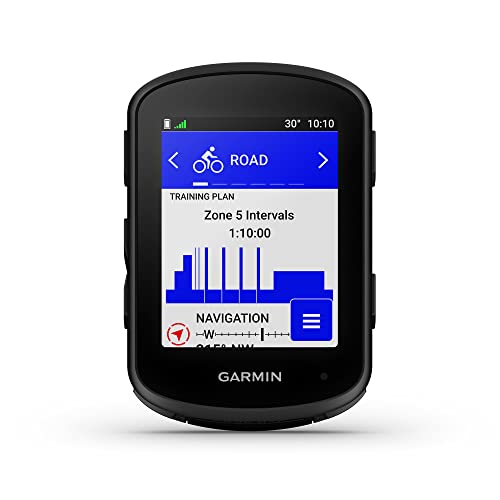
- Touchscreen and button control
- Multi-band GNSS for better accuracy
- ClimbPro and adaptive training tools
Best For: Riders who want advanced navigation and coaching in a compact unit
Value Color Navigator
COOSPO CS600 Color Touchscreen GPS Bike Computer

- 2.4-inch color touchscreen with auto-backlight
- Built-in route navigation and breadcrumb trail
- 36-hour battery life with app syncing
Best For: Riders wanting an affordable navigation computer with strong battery life
Button-Control Endurance Computer
Garmin Edge 540 Compact GPS Cycling Computer

- Button controls with multi-band GNSS
- Up to 42 hours in battery saver mode
- ClimbPro, power guide, and stamina insights
Best For: Cyclists who want long battery life and advanced ride guidance
Value-Focused Navigation Pick
GEOID CC700 Pro 2.8" Touchscreen GPS Computer

- 2.8-inch color touchscreen with 3-button control
- Offline maps with turn prompts, zoom, and re-route planning
- WiFi sync, FIT export, and indoor training support
Best For: Riders who want touchscreen navigation and broad training features
Balanced Performance Pick
Garmin Edge 550 Compact GPS Cycling Computer
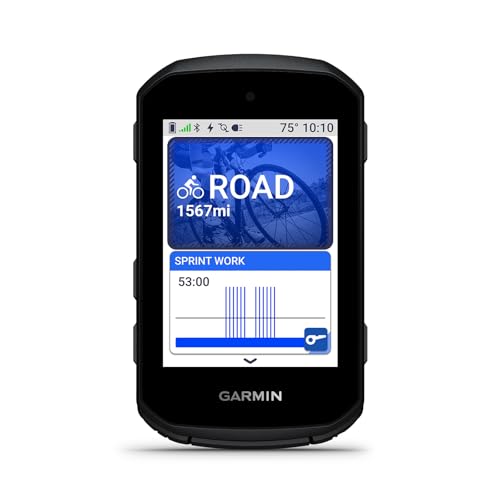
- Vivid color display with button controls
- Preloaded road, gravel, and Trailforks maps
- Multi-band GPS and Garmin Connect features
Best For: Cyclists who want compact navigation and training tools
Premium Feature Pick
Garmin Edge 850 Touchscreen GPS Cycling Computer
- Touchscreen plus button controls for flexible use
- Built-in speaker for prompts and bike-bell alerts
- Garmin Pay and advanced navigation features
Best For: Cyclists who want touchscreen navigation with extra convenience
Premium All-Rounder – Garmin Edge 1050 Premium Cycling Computer
If you want professional bike navigation computers that do more than show a route, the Garmin Edge 1050 is built for riders who want premium navigation, performance tracking, and connected ride features in one unit. Its vivid touchscreen, built-in speaker, and planning tools make it easy to manage training and route changes on the bike.
Best For: Riders who want a high-end cycling computer with strong navigation, smart connectivity, and advanced training support.
Pros:
- Vivid color touchscreen with responsive on-device course creation.
- Up to 20 hours of battery life, or up to 60 hours in battery saver mode.
- ClimbPro, power guide, and personalized coaching for structured rides.
- Live ride features like messaging, incident detection, and road hazard reports.
Cons:
- Advanced features are best used with a compatible smartphone and sensors.
- Premium feature set may be more than casual riders need.
For riders who want one of the most capable navigation-first bike computers in Garmin’s lineup, the Edge 1050 combines mapping, awareness, and training tools in a polished package.
Touchscreen Navigator – Hammerhead Karoo Bike Computer
The Hammerhead Karoo is a strong choice if you want professional bike navigation computers with a clean touchscreen interface and dependable route guidance. It focuses on intuitive map handling, fast rendering, and accurate tracking, making it a practical pick for riders who value control without clutter.
Best For: Cyclists who want a touchscreen GPS computer with precise navigation and broad accessory compatibility.
Pros:
- 3.2-inch touchscreen with intuitive hardware and software design.
- Multi-band GNSS for accurate tracking in varied environments.
- Extended battery life and ample memory for longer rides and faster map rendering.
- Works with SRAM AXS products, e-bikes, ANT+ lights, and more.
Cons:
- Battery life is listed at 15 hours, which is shorter than some rivals.
- Details emphasize ecosystem features, so standalone buyers may not use everything.
Overall, the Karoo is a solid pick for riders who want a modern navigation computer with strong mapping performance and an interface that stays focused on the ride.
Easy-Use Explorer – Garmin Edge Explore 2 GPS Navigator
The Garmin Edge Explore 2 is aimed at riders who want professional bike navigation computers that are simple to set up and easy to read in real-world conditions. Its glove-friendly touchscreen, preloaded ride profiles, and ride type-specific maps make it a straightforward option for navigating roads, trails, and indoor sessions.
Best For: Riders who want an easy-to-use GPS cycling navigator with strong map visibility and eBike support.
Pros:
- 3-inch high-resolution touchscreen that is glove- and rain-friendly.
- Preloaded road, off-road, and indoor profiles for quick setup.
- Improved maps with searchable POIs, high-traffic road awareness, and eBike routing.
- Compatible with sensors and Varia awareness devices sold separately.
Cons:
- Focused more on navigation and ease of use than advanced training analysis.
- Some features depend on a compatible smartphone or optional accessories.
For riders who want a practical navigator rather than an overly complex training unit, the Edge Explore 2 offers a clean, dependable experience with useful route awareness.
Value Pro Navigator – Magene C606 Pro GPS Bike Computer
The Magene C606 Pro is built for riders who want professional bike navigation computers with advanced route tools, climb data, and long battery life. Its transflective touchscreen and broad connectivity make it a compelling option for long-distance riders who want navigation and training features in a compact unit.
Best For: Long-distance cyclists who want pro-level navigation, climb analysis, and strong sensor support.
Pros:
- Pro-level map navigation with waypoint routing, rerouting, and 1000 km route support.
- Up to 25 hours of battery life from the 2.8-inch transflective touchscreen.
- Climb Pro tools with real-time gradient, distance, elevation gain, and profile data.
- Broad connectivity for sensors, smart trainers, electronic shifting, lights, and cameras.
Cons:
- Smaller 2.8-inch display may feel limited compared with larger screens.
- Many advanced features rely on compatible accessories and connected devices.
For riders who want a feature-rich cycling computer without chasing the biggest screen, the C606 Pro delivers strong navigation and training depth for its class.
Flagship Touchscreen Navigator – Garmin Edge 840 Compact GPS Cycling Computer
If you want a professional bike navigation computer that balances detailed routing with training tools, the Garmin Edge 840 is a strong all-around pick. It combines touchscreen and button control, multi-band GNSS for improved positioning accuracy, and ride type-specific maps with searchable points of interest for practical day-to-day navigation.
Best For: Riders who want a compact premium cycling computer with advanced navigation and coaching features.
Pros:
- Touchscreen plus button control gives you flexible operation in different riding conditions.
- Multi-band GNSS improves positioning accuracy in challenging environments.
- ClimbPro, power guidance, stamina insights, and adaptive training prompts add serious performance value.
- Up to 26 hours of battery life in demanding use, or up to 32 hours in battery saver mode.
Cons:
- Many advanced training features depend on compatible power and heart rate sensors.
- The 2.6-inch screen is compact rather than oversized.
Overall, the Edge 840 is built for cyclists who want navigation and training support in one compact device. Its mix of mapping, climb data, and adaptive coaching makes it one of the more capable professional bike navigation computers in this group.
Value Color Navigator – COOSPO CS600 Color Touchscreen GPS Bike Computer
The COOSPO CS600 is a practical choice if you want professional bike navigation computer features without a premium price structure. It offers a 2.4-inch color touchscreen, GPS and GLONASS tracking, built-in route navigation, and app syncing for riders who want clear ride data and simple route following.
Best For: Riders looking for an affordable touchscreen cycling computer with navigation and long battery life.
Pros:
- Color touchscreen with auto-backlight helps visibility and control in changing light.
- Built-in route navigation and breadcrumb trail support help keep you on course.
- 36-hour battery life is well suited to long rides and multi-day use.
- Bluetooth and ANT+ support plus app syncing to Strava and TrainingPeaks add useful connectivity.
Cons:
- Compatible cadence, heart rate, and power accessories are sold separately.
- The included notes do not list premium mapping or coaching depth like higher-end units.
For riders who mainly want navigation, visibility, and reliable ride tracking, the CS600 covers the essentials well. It is a solid fit if you want a feature-rich computer that emphasizes route guidance, battery endurance, and everyday usability.
Button-Control Endurance Computer – Garmin Edge 540 Compact GPS Cycling Computer
The Garmin Edge 540 is a smart pick for riders who prefer button controls and want the core features found in professional bike navigation computers. It brings multi-band GNSS, ride type-specific maps, ClimbPro, and performance-focused training prompts into a compact format built for serious riding.
Best For: Cyclists who want a button-based Garmin with long battery life and advanced ride guidance.
Pros:
- Button controls are straightforward and dependable for riding in varied conditions.
- Multi-band GNSS improves positioning accuracy when navigation gets tricky.
- Up to 42 hours of battery life in battery saver mode is excellent for long days out.
- ClimbPro, power guide, stamina insights, and adaptive training prompts support focused riding.
Cons:
- No touchscreen, which some riders may miss for map interaction.
- Several training and performance features require compatible power and heart rate sensors.
The Edge 540 is a strong option if you value endurance, precision, and Garmin’s training ecosystem over touchscreen convenience. It is especially appealing for riders who want a compact computer that can handle navigation and structured performance use at the same time.
Value-Focused Navigation Pick – GEOID CC700 Pro 2.8" Touchscreen GPS Computer
If you want one of the more feature-packed professional bike navigation computers without moving into premium pricing territory, the GEOID CC700 Pro is built to help you plan, follow, and recover from routes more easily. Its 2.8-inch color touchscreen, offline map support, and re-route planning make it practical for riders who want clear guidance on unfamiliar roads and trails.
Best For: Riders who want touchscreen navigation, offline maps, and broad training features in one compact unit.
Pros:
- 2.8-inch color touchscreen plus 3-button control makes operation easier while riding.
- Supports offline map downloads with color-coded navigation, zoom, turn prompts, and dual-perspective views.
- Re-route planning helps keep you moving if you leave the planned course.
- WiFi sync, firmware updates, FIT export, and compatibility with STRAVA and TrainingPeaks add convenience.
Cons:
- Re-route planning works when the computer stays connected to the designated app.
- Some features, like DJI camera control, are limited to specific compatible models.
- Positioning speed depends on having updated AGNSS data and suitable reception conditions.
The CC700 Pro stands out for riders who want navigation tools, indoor training support, and connected features in a single device. It is especially appealing if you value a larger touchscreen and route recovery features for everyday riding.
Balanced Performance Pick – Garmin Edge 550 Compact GPS Cycling Computer
The Garmin Edge 550 is aimed at riders who want a compact, dependable option among professional bike navigation computers with strong navigation and performance tools. Its vivid color display, button-based control, preloaded road, gravel, and trail maps, plus advanced GPS accuracy make it a solid fit for structured training and route following.
Best For: Cyclists who want a compact Garmin with strong navigation, training, and awareness features.
Pros:
- Preloaded maps for road, gravel, and trails, including Trailforks maps with Forksight mode.
- Multi-band GPS with automatic 5 Hz recording supports accurate position tracking.
- Smart fueling alerts help prompt hydration and refueling during rides.
- Connects with the Garmin Connect app for weather overlays, group ride features, and incident detection.
Cons:
- Battery life is rated at up to 12 hours in demanding use, which may be limiting for longer days.
- Control is button-based only, so riders who prefer touch input may want the Edge 850 instead.
- Several awareness and messaging features depend on a compatible smartphone and the Garmin Connect app.
Overall, the Edge 550 is a practical choice if you care most about reliable mapping, accurate tracking, and Garmin’s training ecosystem. It keeps the interface straightforward while still covering the essentials serious riders expect.
Premium Feature Pick – Garmin Edge 850 Touchscreen GPS Cycling Computer
The Garmin Edge 850 is built for riders who want a more advanced entry in professional bike navigation computers with touchscreen convenience and added on-device features. Along with preloaded maps, multi-band GPS, and training insights, it adds a built-in speaker and Garmin Pay, making it the most feature-rich option in this group.
Best For: Cyclists who want touchscreen navigation plus extra convenience features like audio prompts and contactless payment.
Pros:
- Touchscreen and button controls offer flexible operation on the bike.
- Preloaded road, gravel, and trail maps with Trailforks and Forksight mode support route awareness.
- Built-in speaker can play workout and navigation prompts and function as a bike bell.
- Garmin Pay adds contactless payment convenience on the go.
Cons:
- Battery life is rated at up to 12 hours in demanding use.
- Many connected features require a compatible smartphone and the Garmin Connect app.
- The screen is 2.7 inches, so riders wanting a larger display may prefer other models.
If you want a compact Garmin with more built-in convenience than the Edge 550, the Edge 850 is the stronger all-rounder. It combines navigation, training, safety, and audio tools in a package that still stays bike-focused and practical.
How We Picked the Best Professional Bike Navigation Computers
We prioritized models that are built for real-world riding: accurate GPS performance, reliable turn-by-turn navigation, readable screens in changing light, strong battery life, and seamless pairing with sensors and apps. We also weighed ease of use, since even advanced Professional Bike Navigation Computers should be quick to operate while riding.
Quick Comparison
Some computers here are best for deep training and performance metrics, while others lean toward simple navigation and all-day usability. Premium units typically offer more advanced mapping, faster processors, and richer ecosystem support, while value-focused options can cover route guidance and core ride data at a lower price.
Key Buying Factors for Professional Bike Navigation Computers
Navigation and Mapping
Look for clear map detail, reliable rerouting, saved course support, and on-device route prompts. If you often explore new roads or ride in unfamiliar areas, navigation quality matters more than extra training widgets.
Display and Controls
Touchscreens are convenient for map panning and menu browsing, but physical buttons can be easier in rain, gloves, or rough terrain. Screen size, brightness, and glare resistance all affect ride usability.
Battery Life
Match battery claims to your longest typical ride. A computer that lasts 10 to 15 hours may be enough for most cyclists, but endurance riders and bikepackers should look for much longer runtime or power-saving modes.
Connectivity and Sensors
Professional Bike Navigation Computers should connect cleanly to heart rate monitors, power meters, cadence sensors, electronic drivetrains, and smartphone apps. ANT+ and Bluetooth support remain important for flexible setup.
Training Features
If you structure workouts, check for climb profiles, structured workouts, performance metrics, and segment support. If your priority is route guidance, these features are useful but secondary.
Who Should Buy Which Professional Bike Navigation Computers?
Choose a premium flagship if you want the most polished navigation, the fastest interface, and the broadest feature set. Pick a compact midrange model if you want a strong balance of routing, training, and battery life without going top-tier. Choose a simpler navigator if your rides are mostly recreational, commuting, or route-following and you value straightforward operation over advanced analytics.
In short, the best choice depends on how you ride: performance athletes, endurance riders, commuters, and adventure cyclists all benefit from different strengths in Professional Bike Navigation Computers. Focus on the mix of map quality, usability, and battery life that fits your rides most often.