The best professional telephone audio interfaces make it easier to connect phone systems with mixers, computers, paging equipment, and recording setups while preserving clean, controllable audio. The right choice depends on whether you need a dedicated telephone adapter, a USB interface, or a network-ready installation component.
We compared these 10 options by connectivity, signal flow, compatibility, controls, and intended use so you can quickly narrow the field for office communications, broadcast work, live production, and commercial paging.
Best 10 Professional Telephone Audio Interfaces Picks for 2026
Analog Line Specialist
TAP-1 Telephone Audio Interface

- Simulates an analog phone line
- Supplies -48V telephone power
- Separate transmit and receive RCA audio
Best For: Telephone testing and analog phone audio integration
Paging System Integrator
Bogen UTI1 Universal Telephone Interface

- Single-zone analog telephone paging
- Separate paging and music outputs
- Built-in 24V DC power supply
Best For: Commercial paging and background-music installations
Best Mobile Recording Pick

- Vintage preamp mode for UA-style character
- Up to 24-bit/192 kHz recording
- Supports Mac, Windows, iPad, and iPhone
Best For: Mobile musicians and compact voice-recording setups
Best Dante XLR Expansion
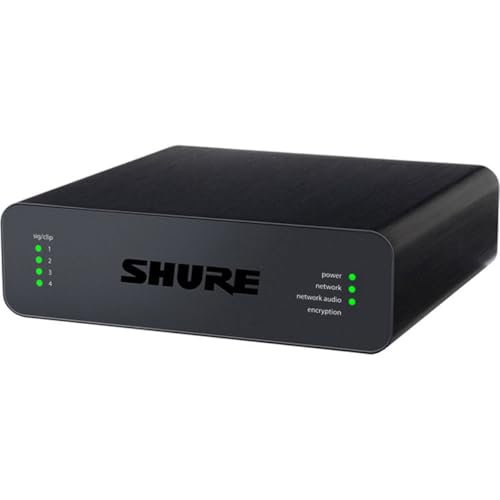
- Four mic/line XLR inputs
- Dante audio networking
- Crestron and AMX support
Best For: Networked conference-room and professional AV installations
Best All-Around Studio Connectivity
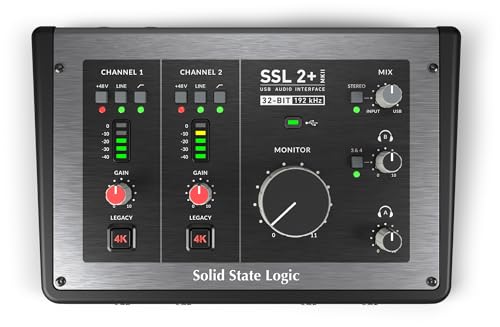
- Two XLR preamps and two line/Hi-Z inputs
- Loopback, MIDI I/O, and dual headphone outputs
- 32-bit/192 kHz converters with 48V phantom power
Best For: Producers, podcasters, and live-studio musicians
Versatile Starter

- Two combo inputs for microphones, instruments, and line sources
- 48 kHz USB recording with direct monitoring
- Includes MPC Beats and supports Ableton Live Lite
Best For: Podcasters, streamers, and home musicians needing two flexible inputs
Studio Simplicity

- Midas-designed mic preamp for clean microphone capture
- Combo input plus separate instrument input
- Direct monitoring and monitor outputs in a compact interface
Best For: Solo musicians and voice creators recording on a Windows computer
Streaming Specialist

- Loopback and direct monitoring require no extra software
- Music and Streaming modes simplify signal routing
- USB-C bus powered for Mac, PC, iOS, and Android
Best For: Solo creators recording or livestreaming from a portable setup
Analog Line Specialist – TAP-1 Telephone Audio Interface
JK Audio TAP-1 Telephone Audio and Power Interface, 600 ohms RCA Line Input and Output
Check Price On AmazonThe TAP-1 is designed for specialized telephone audio work rather than general studio recording. It simulates an analog phone line, supplies the -48V DC needed for telephone operation, and separates transmit and receive audio through RCA connections.
Best For: Telephone testing, recording, and audio interfacing with standard or cordless phones.
Pros:
- Simulates the electrical characteristics of an analog phone line.
- Provides -48V DC for telephone operation.
- Offers separate transmit and receive signals with RCA input and output.
- Includes recessed volume controls and hybrid null adjustment.
Cons:
- RCA connectivity may be less convenient for modern USB-based setups.
- Its telephone-specific design is not intended as a general-purpose microphone interface.
Among professional telephone audio interfaces, the TAP-1 is the focused choice for analog phone-line integration. Its line simulation, power delivery, and hybrid adjustment make it practical when telephone compatibility matters more than computer connectivity.
Mobile Creator Hub – MAONO P2 Hybrid USB Audio Interface
The MAONO P2 brings professional telephone audio interfaces-style flexibility to creators who record across computers and mobile devices. Dual USB connectivity, two XLR inputs, loopback, and direct monitoring support podcasts, streams, vocals, and instruments.
Best For: Podcasters, streamers, and musicians who need simultaneous computer-and-phone recording.
Pros:
- Connects a computer and phone or iPad simultaneously through dual USB ports.
- Supports two XLR microphones with up to 56dB of gain and 48V phantom power compatibility.
- Provides 24-bit/192kHz recording, direct monitoring, and ASIO support.
- Includes loopback and routing features for desktop audio, backing tracks, and streams.
Cons:
- Its wide creator feature set may be more than needed for a simple one-microphone setup.
- Computer software routing may require setup before use.
The P2 is a versatile modern option for content creators who need more than basic XLR-to-USB conversion. Its mobile connectivity and loopback tools make it especially useful for flexible recording and live-streaming workflows.
Paging System Integrator – Bogen UTI1 Universal Telephone Interface
The Bogen UTI1 is a commercial telephone interface for connecting analog phone systems to single-zone paging equipment. It adds separate paging outputs, background-music handling, programmable tones, and built-in 24V power for compatible external devices.
Best For: Offices, facilities, and paging installations using analog telephone ports and self-amplified speakers.
Pros:
- Supports one-way paging through standard analog phone ports.
- Provides separate paging-with-music and paging-only outputs.
- Offers variable background-music muting during announcements.
- Includes a built-in 24V DC supply rated up to 1A.
Cons:
- Designed for commercial paging rather than personal recording.
- Supports a single paging zone.
- Its 6.7-pound, installation-oriented design is less portable.
For facility audio systems, the UTI1 is a practical choice among professional telephone audio interfaces because it bridges telephone access and paging hardware. Its dual outputs and power supply simplify installations that need announcements alongside background music.
Portable XLR Solution – Shure MVX2U Gen 2 Interface
The Shure MVX2U Gen 2 is a compact XLR-to-USB-C interface for recording and streaming with a dynamic or condenser microphone. It combines up to 60dB of gain and 48V phantom power with onboard processing for consistent audio on computers, tablets, and smartphones.
Best For: Podcasters, livestreamers, and mobile creators using one XLR microphone.
Pros:
- Works with XLR microphones across desktop, tablet, and smartphone setups.
- Provides Auto Level Mode, real-time denoising, and Digital Popper Stopper processing.
- Offers up to +60dB of clean gain and 48V phantom power.
- Supports MOTIV apps for tone, EQ, compression, and limiter adjustments.
Cons:
- Its single-channel design does not support two-microphone recording.
- It is focused on XLR microphone input rather than telephone-line interfacing.
The MVX2U Gen 2 is a strong compact option when clean, processed microphone audio is the priority. Its automatic gain and portable USB-C design reduce setup complexity, while the MOTIV apps provide additional control for creators.
Best Mobile Recording Pick – Universal Audio Volt 1
The Universal Audio Volt 1 is a practical choice for professional telephone audio interfaces when you need a compact USB setup that can also handle computer, tablet, and phone recording. Its single-channel design includes a Vintage preamp mode, 24-bit/192 kHz recording, and compatibility with Mac, Windows, iPad, and iPhone.
Best For: Mobile musicians, voice recording, and creators who want a portable interface with a characterful preamp option.
Pros:
- Vintage mode is designed to deliver the sound of UA 610-style preamps.
- Supports up to 24-bit/192 kHz recording with crystal-clear converters.
- Works with Mac, Windows, iPad, and iPhone, with the required adapters or power supply.
- Includes access to LUNA and a selection of production software and learning resources.
Cons:
- Provides two channels according to the listed specifications, but only one microphone preamp is highlighted.
- Mobile recording may require an external Volt power supply and Apple Lightning to USB Camera Adapter.
Volt 1 is especially appealing if portability and UA-inspired tonal shaping matter more than extensive I/O. Confirm the required mobile accessories before buying.
Best Dante XLR Expansion – Shure ANI4IN-XLR
The Shure ANI4IN-XLR is built for installed and networked professional telephone audio interfaces, pairing four mic/line XLR inputs with Dante audio networking. It is intended for professional audio environments and supports control ecosystems including Crestron and AMX.
Best For: Conference rooms and professional installations that need multiple XLR sources routed over a Dante network.
Pros:
- Offers four microphone/line XLR inputs.
- Uses Dante audio networking for professional signal distribution.
- Supports professional audio devices along with Crestron and AMX environments.
- Lists a maximum sample rate of 192 kHz.
Cons:
- Its XLR and Dante-focused design is less suited to casual USB recording.
- The supplied specifications do not describe bundled recording software.
Choose the ANI4IN-XLR when networked XLR connectivity is the priority. It is a specialized installation component rather than a general-purpose desktop interface.
Best All-Around Studio Connectivity – SSL 2 MKII Plus
The Solid State Logic 2 MKII Plus is a flexible option among professional telephone audio interfaces for producers, podcasters, and live-studio musicians. It combines two XLR mic preamps, line/Hi-Z inputs, multiple outputs, MIDI I/O, loopback, and 32-bit/192 kHz conversion in a bus-powered USB-C design.
Best For: Producers and podcasters who need mic inputs, instrument connectivity, loopback, headphone monitoring, and MIDI in one interface.
Pros:
- Includes two XLR microphone preamps plus two line/Hi-Z inputs.
- Provides two discrete headphone outputs and four 1/4-inch line outputs.
- Offers 32-bit/192 kHz AD/DA conversion, 48V phantom power, and zero-latency monitoring.
- Adds stereo loopback, MIDI I/O, high-pass filters, and Legacy 4K analog enhancement.
Cons:
- The supplied specifications do not identify the included software titles in detail.
- Its larger feature set may be more than needed for a simple single-microphone setup.
SSL’s 2 MKII Plus is the strongest general-purpose choice here for a desktop studio that needs both recording flexibility and routing options. Its bus-powered USB-C operation also keeps the setup relatively straightforward.
Versatile Starter – M-AUDIO M-Track Duo
The M-AUDIO M-Track Duo is a practical choice among professional telephone audio interfaces for users who also record, podcast, or livestream. Its two combo inputs, 48 kHz audio, and USB connectivity support microphones, instruments, and line-level sources from a Mac or PC.
Best For: Podcasters, livestreamers, and home musicians who need flexible two-channel recording.
Pros:
- Two combo XLR/line/instrument inputs with phantom power
- Direct monitoring switch helps provide zero-latency monitoring
- Includes MPC Beats and supports Ableton Live Lite
Cons:
- Maximum sample rate is 48 kHz
- USB Type-B connection may require the included cable or an adapter for newer devices
The M-Track Duo covers common recording and streaming tasks without excessive complexity. Its combination of dual inputs, transparent Crystal Preamps, and flexible monitoring makes it a well-rounded option for a compact setup.
Studio Simplicity – Behringer UMC22
The Behringer UMC22 is a straightforward option for shoppers comparing professional telephone audio interfaces with a compact computer recording setup. It pairs a Midas-designed mic preamp with a combo input, dedicated instrument input, phantom power, and direct monitoring.
Best For: Solo musicians and voice-focused creators recording into a Mac or Windows computer.
Pros:
- Midas-designed mic preamp for microphone recording
- Combo XLR/TRS/TS input plus a separate 1/4-inch instrument input
- Direct monitoring, headphone output, and monitor outputs
Cons:
- Only one microphone-capable combo input is specified
- Supplied notes list Windows compatibility rather than a broader operating-system range
The UMC22 keeps the controls and connections focused on essential recording duties. Its compact design and direct-monitoring features suit a solo setup, while the Midas preamp adds an emphasis on clean microphone capture.
Streaming Specialist – Zoom AMS-22
The Zoom AMS-22 is a portable choice among professional telephone audio interfaces for solo creators who switch between recording and livestreaming. It combines an XLR/TRS input, stereo 3.5 mm input, loopback, direct monitoring, and USB-C bus power in a lightweight design.
Best For: Solo musicians, podcasters, and mobile streamers who want simple platform-ready routing.
Pros:
- Loopback combines input audio with computer playback for streaming
- Music and Streaming modes simplify recording or livestream routing
- USB-C bus powered and compatible with Mac, PC, iOS, and Android
Cons:
- Provides one XLR/TRS combo input rather than multiple microphone inputs
- Maximum sample rate is 48 kHz
The AMS-22 stands out when quick streaming changes matter more than a large input count. Its switches reduce software setup, while the compact, bus-powered design is convenient for mobile recording and content creation.
How We Picked These Professional Telephone Audio Interfaces
We focused on interfaces that solve a real telephone-audio or voice-routing need, rather than treating every USB recording interface as an interchangeable option. Our comparison considers telephone-line compatibility, analog and digital connections, input and output flexibility, gain control, monitoring, power requirements, and installation complexity.
Some products are dedicated telephone or paging interfaces, while others are better suited to hybrid calls, voice recording, streaming, or connecting microphones and instruments to a computer. Because these categories overlap but are not identical, confirm the required signal path before buying.
Quick Comparison
| Best For | What to Prioritize | Typical Connection |
|---|---|---|
| Telephone-line integration | Impedance, isolation, line-level I/O | RCA or telephone interface |
| Hybrid calls and phone-based streaming | Mix-minus routing, phone compatibility | USB, phone, or TRRS |
| Computer recording | Preamp quality, latency, monitoring | USB or USB-C |
| Commercial paging | Zone support, tones, balanced outputs | Terminal or line-level connections |
| Networked installations | Audio-over-IP compatibility | Ethernet |
Key Buying Factors for Professional Telephone Audio Interfaces
Connection and Signal Compatibility
First identify whether you are connecting an analog telephone line, a handset, a mobile device, a computer, or a networked audio system. A dedicated telephone interface may use different impedance and wiring standards than a conventional USB recording interface. Do not assume an XLR or RCA connector alone guarantees compatibility.
Audio Direction and Routing
Check whether you need one-way output, two-way conversation, separate send and return paths, or mix-minus operation. Two-way telephone work benefits from independent input and output control, while paging installations may prioritize multiple outputs and programmable tones.
Computer Support and Monitoring
For recording, streaming, or software-based calling, verify the operating-system support, USB connector type, driver requirements, sample rate, headphone monitoring, and direct-monitoring options. USB-C describes the connector, not necessarily the interface’s performance or included cable.
Noise Control and Installation
Look for balanced connections, electrical isolation, dependable gain controls, and appropriate line-level handling when the system will run for long periods. Rack, desk, and permanent-installation needs can also affect the best choice.
Who Should Buy Which Professional Telephone Audio Interfaces?
Choose a dedicated telephone or paging interface when your priority is integrating an analog phone system, distributing announcements, or connecting telephone audio to existing commercial equipment. These products are generally more suitable for fixed installations than compact recording interfaces.
Choose a USB interface when you need microphone input, computer recording, streaming, or software calling. Models with one or two inputs are practical for solo voice work, while additional outputs and stronger routing are more useful for hybrid production and monitoring.
For professional installations, prioritize compatibility and signal flow over headline specifications. For occasional calls or content creation, a compact USB model may provide the simplest setup. Before ordering, map every source and destination, confirm connector and impedance requirements, and check whether any required cables, adapters, or telephone-line accessories are included.