When it comes to safeguarding your data while ensuring exceptional performance, choosing the right QNAP RAID enclosure can make all the difference. With a range of options available, you’ll find enclosures that not only offer impressive storage capacities but also various RAID configurations tailored to your needs. As you explore these top picks, consider what features matter most to you and how they can elevate your data management strategy. Let’s take a closer look at these models.
QNAP TR-004 4 Bay USB Type-C Direct Attached Storage (DAS)

If you’re looking for a reliable and versatile storage solution, the QNAP TR-004 4 Bay USB Type-C Direct Attached Storage (DAS) is an excellent choice for users who need expandable capacity and hardware RAID configurations. This diskless device accommodates up to four 3.5-inch SATA drives, supporting RAID levels 0, 1, 5, JBOD, and individual disks. With a data transfer rate of 6 Gbps via USB Type-C, it delivers impressive performance. It’s compatible with Windows, macOS, and Linux, though be mindful of its limitations regarding certain NAS models. The compact design makes it easy to integrate into any setup, weighing just 4.08 pounds.
Best For: Users seeking a reliable and expandable storage solution with hardware RAID configurations for their Windows, macOS, or Linux systems.
Pros:
- Compact design weighing only 4.08 pounds, making it easy to integrate into various setups.
- Supports multiple RAID levels (0, 1, 5, JBOD) for enhanced data protection and flexibility.
- High data transfer rate of 6 Gbps via USB Type-C for impressive performance.
Cons:
- Not compatible with specific NAS models, limiting its use with certain systems.
- Drives can only be migrated between TR-004 units, making data transfer to/from NAS or other devices problematic.
- NAS applications cannot be installed on the TR-004, restricting its functionality as a standalone device.
QNAP TR-002-A-US 2 Bay USB Type-C Direct Attached Storage (DAS)
The QNAP TR-002-A-US 2 Bay USB Type-C Direct Attached Storage (DAS) is an ideal choice for users seeking reliable external storage solutions with robust data protection features. You can easily connect it to Windows, macOS, or Linux systems via its USB 3.2 Gen 2 Type-C interface, achieving impressive data transfer rates of up to 7200 MB/s. With support for two SATA drives and various RAID options, including RAID 0 and 1, you’ll enjoy flexibility and security. Lockable drive bays add an extra layer of protection, making it a perfect addition to enhance your QNAP NAS capacity.
Best For: Users seeking a reliable and flexible external storage solution with robust data protection features for various operating systems.
Pros:
- High-speed performance with data transfer rates of up to 7200 MB/s.
- Versatile RAID options including RAID 0, 1, JBOD, and individual disk support for tailored data protection.
- Lockable drive bays enhance security and protect against unauthorized access.
Cons:
- Diskless design requires additional purchase of SATA drives, which may increase overall cost.
- Limited to USB Type-C connectivity, which may not be compatible with older devices without adapters.
- No hot-swapping capability for drives, requiring system shutdown for drive replacements or changes.
CENMATE Aluminum 4 Bay Hard Drive RAID Enclosure

Designed for users needing robust data protection, the CENMATE Aluminum 4 Bay Hard Drive RAID Enclosure offers impressive versatility with support for both 2.5 and 3.5-inch HDDs and SSDs, accommodating a maximum capacity of 80TB. Its aluminum-alloy construction guarantees durability, while dual 2-inch fans keep your drives cool, operating at a noise level of 40-50 decibels. You can choose from 8 RAID modes for peak performance, but be cautious when switching, as it may lead to data loss. With USB 3.0 and eSATA interfaces, you’ll enjoy speedy transfers up to 5Gbps, making it perfect for personal or enterprise use.
Best For: Users needing robust data protection and high-capacity storage solutions for personal or enterprise use.
Pros:
- Durable aluminum-alloy construction ensures longevity and reliability.
- Supports a maximum capacity of 80TB, accommodating both HDDs and SSDs.
- Fast data transfer speeds of up to 5Gbps via USB 3.0 and eSATA interfaces.
Cons:
- Operating noise level of 40-50 decibels may not be suitable for noise-sensitive environments.
- Switching RAID modes requires caution and can lead to potential data loss.
- Requires power disconnection and specific steps for RAID mode switching, which may be inconvenient.
CENMATE Aluminum 2 Bay Hard Drive RAID Enclosure

For users needing robust data protection and versatile storage options, the CENMATE Aluminum 2 Bay Hard Drive RAID Enclosure stands out as an excellent choice. It supports both 2.5” and 3.5” SATA HDDs/SSDs, allowing up to 20TB per drive. With four RAID modes—RAID 0, RAID 1, Normal, and JBOD—you can tailor your setup to your needs. The built-in fan keeps your drives cool, operating quietly at 40-50 decibels. Plus, with USB 3.0, you’ll enjoy speeds up to 5Gbps. Compatible with multiple operating systems, it’s ready for plug-and-play action, backed by responsive customer support.
Best For: Users seeking a reliable and versatile storage solution for both personal and enterprise data protection.
Pros:
- Supports a maximum capacity of 20TB per drive, accommodating large data needs.
- Offers four RAID modes for customizable data protection and performance.
- Includes a built-in cooling fan to maintain optimal operating temperatures.
Cons:
- Configuring RAID may result in potential data loss if not managed properly.
- No RAID software is available for MAC OS users.
- Fan noise levels may be noticeable for noise-sensitive individuals.
QNAP TL-D800C 8 Bay Desktop JBOD Storage Enclosure
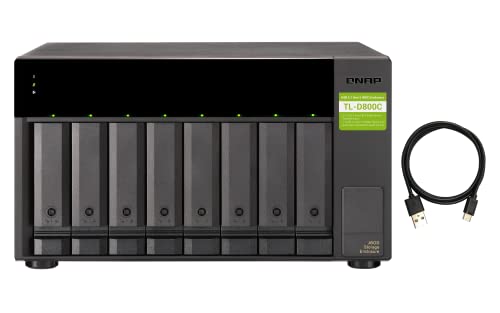
When you need high-capacity storage solutions, the QNAP TL-D800C 8 Bay Desktop JBOD Storage Enclosure stands out as an excellent choice. This versatile enclosure supports up to eight 3.5-inch SATA drives, offering you ample space for storage expansion. With USB 3.2 Gen 2 Type-C connectivity, you can easily connect it to your QNAP NAS, Windows, or Mac systems. The 250W power supply guarantees reliable performance, while the included USB Type-C to Type-A cable simplifies setup. Just remember, the TL-D800C operates as a separate storage pool, so it won’t integrate with your existing volumes. Enjoy seamless data management!
Best For: Users in need of high-capacity storage solutions for data management, particularly those using QNAP NAS, Windows, or Mac systems.
Pros:
- Ample Storage Capacity: Supports up to eight 3.5-inch SATA drives for extensive data expansion.
- Fast Connectivity: Features USB 3.2 Gen 2 Type-C for quick and efficient data transfer.
- Reliable Power Supply: Equipped with a 250W power supply for consistent performance.
Cons:
- Separate Storage Pool: Cannot be integrated with existing storage pools or volumes on QNAP NAS.
- Diskless Design: Requires separate purchase of SATA drives, as it does not come pre-installed.
- Limited Compatibility: While it works with QNAP NAS and computers, it may not support all server configurations.
MAIWO 4 Bay HDD RAID Enclosure for 3.5″ SATA Drive

The MAIWO 4 Bay HDD RAID Enclosure is perfect for professionals and businesses looking to maximize data protection and storage efficiency. Supporting RAID configurations like 0, 1/10, and 5, you can easily tailor your setup to your needs, with a maximum capacity of 96TB. Its USB-C connection guarantees speedy transfers up to 5Gbps, making data management seamless. Two built-in cooling fans help keep your drives at ideal temperatures, and you have the option to control them. Whether you’re backing up data or managing extensive media libraries, this enclosure is a reliable choice for your storage needs.
Best For: The MAIWO 4 Bay HDD RAID Enclosure is best for professionals and businesses needing high-capacity storage solutions with robust data protection.
Pros:
- Supports multiple RAID configurations for customizable data management.
- USB-C connectivity allows for fast data transfer speeds up to 5Gbps.
- Built-in cooling fans help maintain optimal operating temperatures for hard drives.
Cons:
- May require technical knowledge to set up and configure RAID settings effectively.
- The weight of 2.7 pounds makes it less portable compared to single-drive enclosures.
- Limited warranty details may require further inquiry from potential buyers.
CENMATE Aluminum 8 Bay Hard Drive RAID Enclosure

CENMATE’s Aluminum 8 Bay Hard Drive RAID Enclosure stands out as an excellent solution for both personal and enterprise users seeking robust data protection. Supporting 2.5”/3.5” SATA HDDs/SSDs and offering eight RAID modes, it provides flexibility for all your storage needs. With a maximum capacity of 160TB, you can easily manage large amounts of data. The tool-free design simplifies installation, while dual fans guarantee maximum cooling. Just remember, it’s not compatible with WD 20TB drives but does support Seagate. Plus, its plug-and-play functionality makes setup a breeze on various operating systems, guaranteeing you’re up and running in no time.
Best For: Users looking for a reliable and versatile RAID enclosure for managing large data storage needs in both personal and enterprise environments.
Pros:
- Supports a maximum capacity of 160TB with 8 RAID modes for flexible storage configurations.
- Tool-free design allows for easy installation and setup without the need for additional tools.
- Dual fans provide effective cooling, ensuring data security during operation.
Cons:
- Not compatible with WD 20TB hard drives, limiting options for specific brands.
- Fan noise levels range from 40-50 decibels, which may be disruptive in quiet environments.
- Changing RAID configurations can result in data loss, requiring careful planning and backups.
ACASIS Dual-Bay M.2 NVMe SSD Enclosure
For professionals and enthusiasts who demand high-speed data transfer and robust storage solutions, the ACASIS Dual-Bay M.2 NVMe SSD Enclosure stands out with its 40Gbps USB4 compatibility. This tool-free design features an aluminum dock that supports dual monitors, allowing you to expand your display up to 8K at 60Hz. With various RAID configurations, you can choose between performance and data protection, supporting up to 8TB per drive for a total of 16TB in RAID 0. Plus, built-in fans and thermal slots keep your drives cool, ensuring peak performance during heavy workloads.
Best For: Professionals and enthusiasts seeking high-speed data transfer and versatile storage solutions.
Pros:
- Supports high-speed data transfer with up to 40Gbps USB4 compatibility.
- Flexible RAID configurations allow for optimal performance or data protection.
- Efficient thermal management with built-in fans and aluminum alloy design to maintain optimal temperatures.
Cons:
- Requires identical drives for optimal performance in RAID 0 configuration.
- Limited to macOS for JBOD support, which may restrict options for some users.
- Potential heat generation under heavy workloads, despite thermal management features.
ORICO 5-Bay RAID External Hard Drive Enclosure

If you’re seeking a reliable and versatile storage solution, the ORICO 5-Bay RAID External Hard Drive Enclosure is an excellent choice. It supports both 2.5 and 3.5-inch SATA HDDs or SSDs, allowing a massive total capacity of up to 110TB. With data transfer rates reaching 235MB/s via USB 3.0, your files are transferred quickly and efficiently. You can choose from various RAID configurations, including RAID 0 for speed and RAID 5 for redundancy. Plus, its aluminum alloy design and built-in cooling fan guarantee durability and peak performance. With a 2-year warranty, you’re well-covered for any issues.
Best For: Those who require a high-capacity, flexible storage solution for data-intensive applications, such as video editing or backup systems.
Pros:
- Supports up to 110TB total capacity, accommodating large data storage needs.
- Offers multiple RAID configurations for optimized performance and data redundancy.
- Durable aluminum alloy design and built-in cooling fan enhance longevity and stability.
Cons:
- Current customer rating of 3.0 out of 5 stars indicates mixed user experiences.
- Limited to USB 3.0 transfer rates, which may not meet the needs of users requiring faster speeds.
- The built-in power supply may limit portability compared to external power supply options.
Dual Bay Raid SSD Enclosure with Clone Mode & Raid 0/1

The Dual Bay RAID SSD Enclosure with Clone Mode and RAID 0/1 is an ideal solution for professionals and enthusiasts who demand high-speed data transfer and robust data protection. With support for PCIe NVMe drives, you can easily switch and replace SSDs thanks to its tool-free design. Choose between RAID 0 for maximum performance or RAID 1 for automatic file backup. The Clone Mode allows you to duplicate disks directly, making backups a breeze. Enjoy data transfer speeds up to 20 Gbps, and with a maximum capacity of 16 TB, this enclosure is perfect for handling large files and intensive tasks.
Best For: Professionals and enthusiasts who require high-speed data transfer and reliable data protection for their SSDs.
Pros:
- Tool-free installation allows for easy SSD switching and replacement.
- Supports high-speed data transfer rates of up to 20 Gbps, ideal for large file handling.
- Offers multiple RAID modes (0/1/JBOD) to suit various data management needs.
Cons:
- Maximum storage capacity limited to 16 TB, which may not be sufficient for all users.
- Requires an external power supply for high-capacity SSDs, adding to setup complexity.
- Customer rating of 4.2 stars suggests some users may have experienced issues or limitations.
Factors to Consider When Choosing Qnap Raid Enclosures
When selecting a QNAP RAID enclosure, you need to take into account several key factors. Think about the storage capacity options, RAID configuration flexibility, and the types of connections available. Additionally, pay attention to cooling and noise levels, as well as compatibility with your existing systems to guarantee a seamless integration.
Storage Capacity Options
Choosing the right QNAP RAID enclosure involves considering several factors related to storage capacity. The available models can support up to 160TB by utilizing multiple drives, with some configurations allowing 20TB per drive. For instance, the QNAP TR-004 features four drive bays, providing ample storage expansion and flexibility. You’ll want to evaluate the number of drive bays and the maximum supported drive size to determine your total storage potential. Compatibility is also essential; enclosures like the CENMATE Aluminum 4 Bay can accommodate drives with a maximum capacity of 80TB. Additionally, consider how RAID configurations like RAID 0 or RAID 5 can optimize your storage capacity and performance while weighing the trade-offs in redundancy and data safety.
RAID Configuration Flexibility
Understanding your storage capacity options sets the stage for exploring RAID configuration flexibility in QNAP enclosures. Different RAID setups, like RAID 0, 1, 5, and JBOD, allow you to customize performance and redundancy based on your needs. RAID 0 boosts speed by striping data across multiple drives, but it lacks redundancy—perfect for high-speed applications where data loss isn’t a concern. If data safety is your priority, RAID 1 mirrors information on two drives, ensuring protection against failure. More advanced RAID 5 configurations require at least three drives, offering both redundancy and enhanced read performance. Remember, switching between RAID modes can risk data loss, so always back up your data before reconfiguring.
Connection Types Available
As you explore QNAP RAID enclosures, the connection types available play an essential role in determining performance and compatibility. You’ll find options like USB Type-C, USB 3.0, and eSATA, each with distinct advantages. USB Type-C often offers the highest data transfer rates, reaching up to 7200 MB/s, making it ideal for maximizing performance. USB 3.0, while slightly slower at up to 5 Gbps, remains suitable for standard RAID setups and external storage applications. eSATA connections are also included for backward compatibility with older systems, guaranteeing stable high-speed transfers. When choosing a connection type, consider compatibility with your operating system—whether it’s Windows, macOS, or Linux—to guarantee seamless integration with your existing setup.
Cooling and Noise Levels
When evaluating QNAP RAID enclosures, cooling and noise levels are key factors that can greatly impact your experience. Effective cooling systems often feature built-in fans that help dissipate heat, ensuring your drives perform at their best and last longer. However, these fans typically generate noise levels between 40 to 50 decibels, which might be noticeable in quieter environments. It’s essential to take into account the acoustics of your workspace. Some enclosures even allow you to control fan operation, giving you the flexibility to adjust based on cooling needs or noise sensitivity. Additionally, the material construction, like aluminum alloy, enhances heat dissipation while contributing to durability. Balancing cooling efficiency with acceptable noise levels is vital for long-term use in noise-sensitive areas.
Compatibility With Systems
How do you guarantee your QNAP RAID enclosure will work seamlessly with your existing setup? Start by checking the compatibility with your operating system—QNAP enclosures support Windows, macOS, and Linux. Be aware that some models may have restrictions, especially with older NAS systems that can’t be updated to necessary software versions. It’s also vital to verify the supported drive types, such as SATA or NVMe, and confirm they match your existing hardware. Additionally, most enclosures require a USB Type-C or USB 3.0 connection for peak performance, so confirm that your host system has the right ports. By considering these factors, you can ensure your QNAP RAID enclosure integrates smoothly into your current environment.