When you’re looking to enhance your Mac’s performance, choosing the right Thunderbolt RAID enclosure can make a significant difference. These enclosures not only boost speed but also provide ample storage for demanding applications. From the OWC Express 4M2 to the OWC ThunderBay 8, each option has unique features tailored for various needs. Curious about which enclosures stand out and what factors you should consider? Let’s explore your top picks.
OWC Express 4M2 Four-Slot USB4 RAID Storage Enclosure for NVMe SSDs

If you’re a creative professional or power user needing high-speed data transfer and reliability, the OWC Express 4M2 Four-Slot USB4 RAID Storage Enclosure is an excellent choice. This enclosure supports NVMe M.2 SSDs and offers up to 64 TB of storage with real-world speeds reaching 3200 MB/s. Its smart adaptive cooling guarantees quiet operation, activating fans only under heavy loads. You can easily configure RAID setups like RAID 0/1/4/5, making it versatile for your needs. Weighing just 3.9 pounds and crafted from durable aluminum, it’s built to withstand regular use while delivering exceptional performance.
Best For: Creative professionals and power users who need high-speed data transfer and reliable storage solutions.
Pros:
- High performance: Offers real-world speeds up to 3200 MB/s for efficient data handling.
- Versatile RAID options: Supports multiple RAID configurations for customized data protection and performance.
- Smart cooling system: Features adaptive cooling that ensures quiet operation, activating fans only when necessary.
Cons:
- Weight: At 3.9 pounds, it may be heavier compared to some other portable storage solutions.
- DIY installation required: Users must install their own NVMe SSDs, which may not be suitable for everyone.
- Limited warranty period: Comes with a 2-Year warranty, which might be considered short by some users.
JEYI 4-Bay NVMe RAID Enclosure

The JEYI 4-Bay NVMe RAID Enclosure is an excellent choice for creative professionals and power users who demand high-speed data transfer and extensive storage capacity. You can install up to 32TB of NVMe SSDs, ensuring ample space for your projects. With USB4/Thunderbolt 3/4 support, you’ll enjoy peak speeds of 40Gbps, powered by the efficient ASM2464PDX controller. The all-aluminum design features a turbo fan for enhanced cooling, offering three speed modes for your convenience. Remember, while it’s compatible with Intel and Apple systems, check AMD compatibility before purchasing to make the most of its RAID capabilities.
Best For: Creative professionals and power users needing high-speed data transfer and extensive storage capacity.
Pros:
- Supports up to 32TB of storage with 4 x 8TB NVMe M.2 SSDs.
- Achieves peak speeds of 40Gbps with USB4/Thunderbolt 3/4 connectivity.
- Efficient cooling system with adjustable speed modes for optimal performance.
Cons:
- Compatibility issues may arise with AMD systems using USB4/Thunderbolt interfaces.
- Standard USB connection does not support RAID configuration, limiting functionality.
- Requires specific RAID configurations to fully utilize its capabilities, which may not be straightforward for all users.
OWC ThunderBay 4 0TB Four-Bay Thunderbolt 40Gb/s RAID Storage Enclosure

For creative professionals and power users seeking high-speed data access, the OWC ThunderBay 4 0TB Four-Bay Thunderbolt 40Gb/s RAID Storage Enclosure stands out as an exceptional choice. With up to 1527MB/s sustained performance, you’ll experience lightning-fast data transfers. This user-configurable enclosure supports RAID 0/1/4/5/1+0 and works seamlessly with both 3.5 and 2.5 drives—no adapter needed. Crafted from ultra-quiet aluminum, it efficiently dissipates heat while providing a sleek design. Dual Thunderbolt 3 ports guarantee compatibility with your desktop or laptop, and the 3-year limited warranty offers peace of mind for your investment.
Best For: Creative professionals and power users seeking high-speed data access and reliable storage solutions.
Pros:
- User-configurable RAID options provide flexibility for various data protection needs.
- Sustained performance of up to 1527MB/s ensures rapid data transfers for demanding applications.
- Ultra-quiet aluminum chassis effectively dissipates heat while maintaining an attractive design.
Cons:
- No drives included; users must purchase their own drives separately.
- Higher price point compared to non-RAID storage solutions may not fit all budgets.
- Limited to Thunderbolt connectivity, which may not be compatible with all devices.
ACASIS 40Gbps Mac mini M4 Dock & Stand with Dual-Bay NVMe SSD Enclosure
Designed specifically for Mac mini M4 and M4 Pro 2024 users, the ACASIS 40Gbps Dock & Stand with Dual-Bay NVMe SSD Enclosure transforms your setup into a powerhouse of performance. You can expand your storage up to 16TB using two NVMe SSDs, achieving impressive speeds with RAID configurations. The dock supports dual 4K displays and features three USB-A 3.1 ports for fast data transfer. Its aluminum design guarantees peak cooling with silent fans, keeping everything running smoothly. Plus, you’ll appreciate the included cables and a two-year warranty for peace of mind. This dock is a must-have for maximizing your Mac mini experience.
Best For: Users of Mac mini M4 and M4 Pro 2024 looking to expand storage and enhance their workstation with high-speed connectivity and display capabilities.
Pros:
- High Storage Capacity: Expandable up to 16TB using dual NVMe SSDs, ideal for professionals needing substantial storage.
- Fast Data Transfer: Supports RAID configurations for impressive speeds, up to 2869MB/s in RAID 0 mode.
- Dual Display Support: Can connect dual 4K displays for enhanced productivity and multitasking.
Cons:
- Limited Compatibility: Only compatible with Mac mini M4 and M4 Pro 2024, which may exclude other users.
- Cooling Noise: The silent cooling fans operate at approximately 52dB, which might be noticeable in quiet environments.
- Price Point: Higher cost compared to standard docks without dual-bay capabilities or advanced features.
ACASIS Mac mini M4 Dock & Stand with Dual-Bay NVMe SSD Enclosure
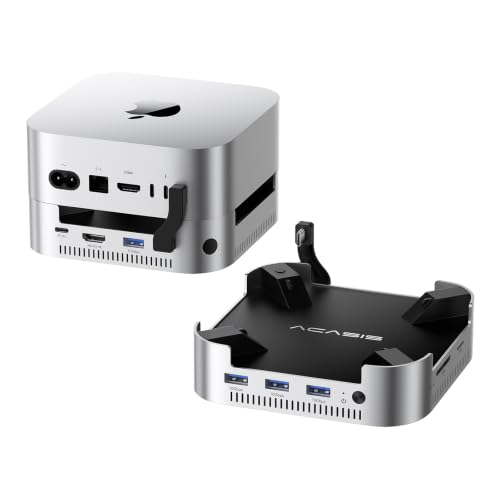
Looking to boost your Mac mini M4’s storage capabilities? The ACASIS Mac mini M4 Dock & Stand with Dual-Bay NVMe SSD Enclosure is your ideal solution. Designed specifically for Mac mini M4 and M4 Pro 2024, it supports up to 16TB in RAID 0 mode, offering impressive speeds of 917MB/s. With four USB-A 3.1 ports and 4K@60Hz HDMI output, connectivity is seamless. Plus, its aluminum design guarantees durability while the cooling system keeps temperatures safe. Backed by a 2-year warranty, you can trust this stylish enclosure for all your storage needs.
Best For: Users of the Mac mini M4 and M4 Pro 2024 seeking to expand their storage capacity and enhance connectivity.
Pros:
- Supports up to 16TB in RAID 0 mode for high-speed data access.
- Features four USB-A 3.1 ports for fast data transmission and multiple device connections.
- Durable aluminum design with an efficient cooling system to maintain safe operating temperatures.
Cons:
- Limited to compatibility with Mac mini M4 and M4 Pro 2024 models only.
- The automatic cooling fans may be audible at approximately 52dB, which could be distracting in quiet environments.
- Higher initial investment compared to standard storage options without RAID capabilities.
ACASIS 11-in-1 Docking Station for Mac mini M4
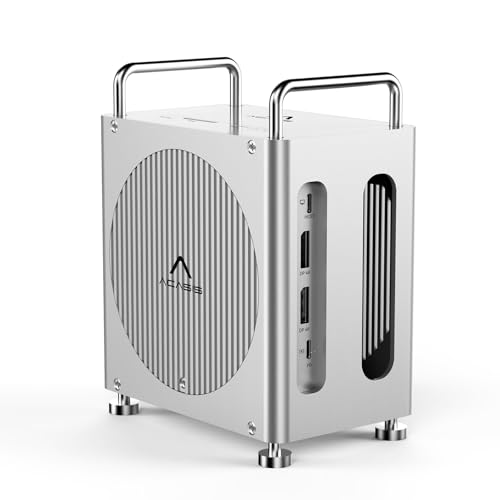
The ACASIS 11-in-1 Docking Station is perfect for creative professionals who need robust performance from their Mac mini M4. With 40Gbps host connectivity, it supports dual 4K displays at impressive refresh rates. You’ll appreciate the versatility of three USB-A 10Gbps ports and dual M.2 slots, allowing for RAID expansion that can reach up to 40Gbps. This dock’s efficient RAID modes and massive storage options guarantee your data-intensive tasks, like 4K video editing, run smoothly. Plus, the SD/TF card readers deliver speeds up to 312MB/s, making your workflow even more streamlined. Enjoy a powerful, all-in-one solution for your creative needs!
Best For: Creative professionals and users who require high-performance connectivity and multiple display options for their Mac mini M4.
Pros:
- Supports dual 4K displays at high refresh rates, enhancing productivity for video editing and design.
- Offers versatile RAID functionality with dual M.2 slots, allowing for fast data transfer and massive storage capacity.
- Includes multiple high-speed USB-A ports and SD/TF card readers, streamlining workflow and device connectivity.
Cons:
- Using dual DisplayPort monitors may reduce RAID 0 SSD speeds due to shared bandwidth.
- The dock may be bulkier compared to standard USB hubs, occupying more space on a desk.
- Limited to specific Mac mini models, which may restrict compatibility for other devices.
ACASIS Dual-Bay M.2 NVMe SSD Enclosure
For professionals and creatives seeking a high-speed storage solution, the ACASIS Dual-Bay M.2 NVMe SSD Enclosure stands out with its impressive 40Gbps transfer rate. This tool-free design supports USB4 compatibility and can expand your workspace with dual monitors, delivering stunning 8K at 60Hz or 4K at 60Hz resolutions. You’ll appreciate the flexible RAID options, including RAID 0 for speed and RAID 1 for data protection. Plus, built-in fans and aluminum construction guarantee efficient heat dissipation. With support for up to 8TB M.2 SSDs, you can achieve lightning-fast read/write speeds, perfect for your demanding projects.
Best For: Professionals and creatives who need a high-speed, reliable storage solution with advanced connectivity options.
Pros:
- Supports high-speed transfers with up to 40Gbps, enhancing productivity for demanding tasks.
- Flexible RAID options allow for customization based on performance needs or data protection.
- Dual monitor support enables expansive workspace with impressive resolutions up to 8K at 60Hz.
Cons:
- Limited compatibility as JBOD configuration is only available for macOS users.
- Potentially high heat generation may require monitoring despite built-in thermal management features.
- Requires identical drives for optimal RAID 0 performance, which may limit storage expansion options.
MOKiN M.2 NVMe SSD Enclosure with LCD Display

Designed for creative professionals and tech enthusiasts, the MOKiN M.2 NVMe SSD Enclosure with LCD Display offers lightning-fast data transfer rates of up to 80Gbps. Compatible with Thunderbolt 5 and accommodating NVMe M.2 SSDs up to 8TB, it’s perfect for your large media libraries and project backups. The built-in silent fan keeps temperatures in check while the LCD display shows real-time stats, alerting you to any overheating issues. With a solid 4.5-star rating from over 2,000 reviews, this enclosure is a reliable choice for anyone needing speed and storage without compromise. Plus, it comes with an 18-month warranty.
Best For: Creative professionals and tech enthusiasts who require high-speed data transfer and ample storage for large projects.
Pros:
- Lightning-fast transfer rates of up to 80Gbps, significantly reducing data transfer times.
- Built-in silent fan with adjustable speeds helps maintain optimal temperatures and prevent thermal throttling.
- Real-time LCD display provides useful information on temperature and fan status, enhancing user experience.
Cons:
- Requires Thunderbolt 5 port for maximum speed, limiting compatibility with older devices.
- Does not support SATA M.2 SSDs, which may restrict options for some users.
- Higher price point compared to standard SSD enclosures, which might not fit all budgets.
Yottamaster 2 Bay RAID Enclosure with Built-in NVMe SSD Slot

Engineered for creative professionals and power users, the Yottamaster 2 Bay RAID Enclosure shines with its unique built-in NVMe SSD slot, offering an impressive combination of storage versatility and speed. You can support up to 56TB across two SATA drives and add an 8TB M.2 NVMe SSD for high-speed performance. With USB 3.2 Gen 2 connectivity, you’ll enjoy data transfer rates up to 10Gbps. The enclosure features user-selectable RAID modes, ensuring efficient data management. Plus, its robust thermal design keeps everything cool, while various ports expand your connectivity options, making it perfect for both professional and home office environments.
Best For: Creative professionals and power users seeking high-capacity and high-speed storage solutions.
Pros:
- Supports up to 56TB of SATA storage and an additional 8TB NVMe SSD for versatile storage options.
- Features USB 3.2 Gen 2 connectivity for data transfer speeds up to 10Gbps, enhancing efficiency.
- User-selectable RAID modes provide flexibility in data management and protection.
Cons:
- RAID mode selector can be confusing as it operates in reverse order, risking data integrity if not verified.
- The active fan, while low-noise, may still introduce some sound in quiet environments.
- Limited to specific form factors for the NVMe SSD, which may not accommodate all M.2 drives.
OWC ThunderBay 8 0TB Eight-Bay Thunderbolt 40Gb/s RAID 5 Storage Enclosure

The OWC ThunderBay 8 0TB Eight-Bay Thunderbolt 40Gb/s RAID 5 Storage Enclosure is an ideal choice for creative professionals and data-heavy users who demand high-speed performance and extensive storage capabilities. With eight universal drive bays, you can easily mix 2.5 or 3.5-inch SSDs and HDDs. It supports daisy-chaining up to six units, giving you an impressive total of 1,152TB of storage. Plus, its plug-and-play design means you won’t need any drivers, and quick drive swaps are a breeze with thumb screw release trays. Backed by a limited warranty, it’s Thunderbolt certified for both Mac and Windows systems.
Best For: Creative professionals and data-heavy users seeking high-speed performance and extensive storage capabilities.
Pros:
- High storage capacity: Supports up to 1,152TB with daisy-chaining.
- Versatile drive bays: Compatible with both 2.5 and 3.5-inch SSDs and HDDs.
- User-friendly design: Plug-and-play functionality with quick drive swap capability.
Cons:
- No drives included: Requires separate purchase of SSDs or HDDs.
- Price point: May be considered expensive for casual users.
- Limited warranty: Only up to 1 year OWC limited warranty.
Factors to Consider When Choosing Thunderbolt Raid Enclosures for Mac
When you’re choosing a Thunderbolt RAID enclosure for your Mac, several key factors come into play. You’ll want to contemplate storage capacity options, RAID configuration flexibility, and connectivity compatibility to guarantee it meets your needs. Additionally, look at cooling solutions and build quality to get the best performance and longevity from your investment.
Storage Capacity Options
Choosing the right Thunderbolt RAID enclosure for your Mac involves considering several key factors, especially storage capacity. Look for enclosures that support a wide range of storage, from 32TB to over 1,152TB, depending on the number of bays and drive types. You’ll find options for 2.5-inch and 3.5-inch HDDs/SSDs, as well as M.2 NVMe SSDs, providing flexibility in your storage setup. Some enclosures enable combining multiple drives in RAID configurations to boost performance and redundancy while maximizing capacity. Keep an eye out for expandability features, like daisy-chaining, to connect additional units for increased storage. Finally, be mindful of RAID options, as configurations like RAID 0 maximize capacity, while RAID 1 prioritizes data security.
RAID Configuration Flexibility
Opting for a Thunderbolt RAID enclosure with flexible configuration options lets you tailor your storage to fit your specific needs. RAID configurations provide various choices: RAID 0 maximizes performance, RAID 1 guarantees redundancy, and RAID 5 strikes a balance with fault tolerance. Many enclosures support multiple RAID levels, letting you pick the setup that best meets your performance and data protection goals. If you prefer a hands-on approach, some enclosures allow for DIY RAID configurations, enabling you to choose your own NVMe SSDs and set them up as RAID 0, RAID 1, JBOD, or other combinations. Additionally, compatibility with software RAID options can enhance your versatility, allowing you to use built-in tools for easy management and setup.
Connectivity Compatibility
To guarantee seamless performance and compatibility, it’s essential to take into account several factors when selecting a Thunderbolt RAID enclosure for your Mac. First, confirm the enclosure supports the latest Thunderbolt standards (3 or 4) for ideal data transfer rates, reaching up to 40Gbps. Next, check compatibility with various drive types; some enclosures accept NVMe M.2 SSDs, while others may only support SATA drives. Confirm that the enclosure operates smoothly with both Mac and Windows systems, noting any potential issues with AMD configurations. Additionally, look for RAID configuration support that meets your needs, like RAID 0 for speed or RAID 1 for redundancy. Finally, verify the presence of dual Thunderbolt ports to enable daisy-chaining multiple devices for expanded storage.
Cooling Solutions Efficiency
While selecting a Thunderbolt RAID enclosure for your Mac, it’s crucial to prioritize effective cooling solutions, as they play an important role in maintaining ideal operating temperatures. Efficient cooling prevents thermal throttling, ensuring consistent performance during heavy workloads. Look for enclosures with smart adaptive cooling systems, where fans activate only under heavy loads, minimizing noise and enhancing your comfort. Aluminum chassis are a great choice, as their natural thermal conductivity aids in passive heat dissipation. Some models include built-in thermal management systems with silent cooling fans that respond to specific temperature thresholds. By investing in efficient cooling, you increase the longevity and reliability of your RAID enclosure, particularly important when handling high data transfer rates and sustained usage.
Build Quality and Design
Effective cooling solutions naturally lead to reflections on build quality and design when choosing a Thunderbolt RAID enclosure for your Mac. Look for enclosures crafted from durable materials like aircraft-grade aluminum, ensuring rugged protection and effective heat dissipation. A compact and lightweight design enhances portability and space management, making it easier to transport your setup. Evaluate cooling features, such as smart adaptive cooling systems or built-in fans, to maintain peak performance while minimizing noise. User-configurable options, like RAID support and compatibility with various NVMe SSD sizes (2230, 2242, 2280), improve flexibility and performance. Finally, opt for designs that allow tool-free installation, simplifying the setup and maintenance of your drives for a hassle-free experience.