If you’re serious about video editing, you know how essential efficient storage solutions are. The right RAID enclosure can streamline your workflow and keep your projects organized. Two standout options are the Yottamaster 5 Bay RAID Hard Drive Enclosure and the Syba 5 Bay SATA HDD External RAID Hard Drive Enclosure. But what makes these enclosures truly beneficial for your editing process? Let’s explore their features and find out which one suits your needs best.
Yottamaster 5 Bay RAID Hard Drive Enclosure (PS500RC3)
![Yottamaster 5 Bay RAID Hard Drive Enclosure USB C, Aluminum RAID Enclosure for 3.5 & 2.5 Inch SATA HDD/SSD, Support 110TB(5x22TB) Direct Attached Storage DAS RAID1/5/10/JBOD/CLONE [PS500RC3]](https://m.media-amazon.com/images/I/41njpYo+teL._SL500_.jpg)
The Yottamaster 5 Bay RAID Hard Drive Enclosure (PS500RC3) is a game-changer for video editors and photographers who need massive storage and reliable data management. It supports up to five SATA HDDs or SSDs, allowing for a total of 110TB. With multiple RAID configurations, you can tailor your storage to fit your workflow, whether you prefer RAID 0 for speed or RAID 1 for redundancy. The USB 3.1 connection guarantees fast transfer rates, while the aluminum-alloy design and built-in cooling fan keep your drives safe. Plus, with easy installation and a solid warranty, it’s a must-have for your setup.
Best For: The Yottamaster 5 Bay RAID Hard Drive Enclosure is best for photographers, video editors, and businesses that require extensive data storage and management.
Pros:
- Supports multiple RAID configurations for customized data management and performance.
- High transfer rates with USB 3.1, ensuring efficient data transfers.
- Built-in cooling system with an adjustable fan to maintain optimal drive temperatures.
Cons:
- Requires external power for high-power drives, which may complicate setup.
- New drives may need formatting before use, adding extra steps for setup.
- Limited to SATA drives, which may not suit users with other types of storage.
Syba 5 Bay SATA HDD External RAID Hard Drive Enclosure (SY-ENC50122)
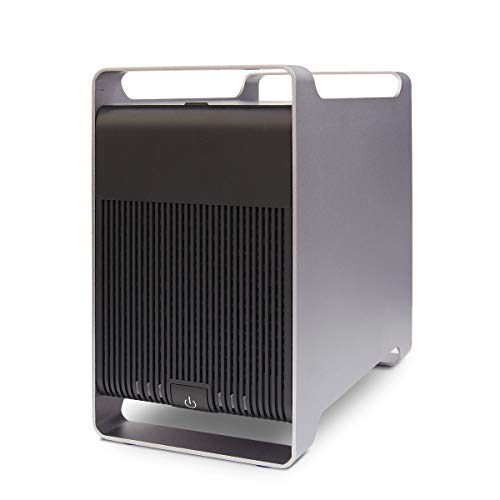
For video editors seeking a reliable and spacious storage solution, the Syba 5 Bay SATA HDD External RAID Hard Drive Enclosure (SY-ENC50122) stands out with its impressive support for up to 120TB of total storage. You can easily install up to five 2.5” or 3.5” SATA drives, accommodating any brand. With multiple RAID configurations, including RAID 0, RAID 1, and RAID 5, you’ll find the setup that fits your workflow perfectly. Plus, its USB 3.0 and eSATA interfaces guarantee speedy data transfer up to 5 Gb/s. The tray-less design makes drive swapping a breeze, enhancing your editing efficiency.
Best For: Video editors and content creators looking for a high-capacity, versatile storage solution.
Pros:
- Supports up to 120TB total storage capacity with the ability to install five drives, accommodating various needs.
- Multiple RAID configurations allow for tailored performance and data protection, enhancing workflow flexibility.
- Fast data transfer speeds of up to 5 Gb/s via USB 3.0 and eSATA interfaces ensure efficient file handling.
Cons:
- Requires a Port Multiplier for simultaneous access through eSATA, which may add to the overall cost and setup complexity.
- No built-in backup software included, necessitating third-party solutions for data management and protection.
- Limited to SATA drives, which may restrict options for users with different drive types or preferences.
Factors to Consider When Choosing Raid Enclosures for Video Editing
When choosing RAID enclosures for video editing, you need to take into account several key factors. Think about storage capacity options, RAID configuration flexibility, and transfer speed performance to guarantee smooth workflow. Don’t forget to evaluate cooling mechanisms and drive compatibility to keep your system running efficiently.
Storage Capacity Options
Choosing the right storage capacity for your RAID enclosure is vital for effective video editing. You’ll want to take into account models that support significant storage, with some reaching up to 110TB or even 120TB. Check the maximum capacity per drive, which typically ranges from 22TB to 24TB for individual SATA HDDs or SSDs. It’s essential to verify the enclosure is compatible with both 2.5-inch and 3.5-inch drives, giving you flexibility in your storage solutions. Keep in mind that the number of drives you use in your RAID configuration will directly affect the available storage space and overall performance. This way, you can optimize your workflow and manage your video files efficiently.
RAID Configuration Flexibility
While selecting a RAID enclosure for video editing, it’s vital to evaluate the flexibility of RAID configurations available. Consider options like RAID 0, 1, 3, 5, and 10, which let you balance redundancy and performance based on your specific needs. Hardware RAID configurations simplify setup and often enhance performance, while software RAID gives you more management control and flexibility. The choice of RAID mode impacts your data security considerably; for example, RAID 1 mirrors data for redundancy, whereas RAID 0 boosts speed but sacrifices safety. You can also explore JBOD or SPAN configurations to maximize storage without RAID overhead. The ability to switch between RAID modes can be pivotal depending on whether you prioritize speed or data protection during your workflow.
Transfer Speed Performance
Understanding RAID configuration flexibility sets the stage for evaluating transfer speed performance, which is essential for video editing efficiency. When selecting a RAID enclosure, consider the maximum transfer rates. USB 3.1 and eSATA interfaces can reach speeds up to 5Gbps, greatly enhancing your workflow. If your system supports UASP, you can further optimize data transfer speeds, reducing latency. RAID 0 configurations are ideal for boosting read and write performance as they stripe data across multiple drives. Make sure to choose enclosures that accommodate high-capacity drives, like those supporting up to 24TB per drive. This guarantees you can manage large video files effectively without sacrificing transfer speeds, keeping your video editing smooth and efficient.
Cooling Mechanisms Efficiency
Efficient cooling mechanisms are essential when selecting RAID enclosures for video editing, as high-performance drives can produce considerable heat during demanding tasks. Enclosures made from aluminum alloys tend to dissipate heat better than plastic, enhancing overall efficiency. If you’re pushing your drives hard, consider those with active cooling systems featuring adjustable fans. These can optimize airflow based on temperature, keeping your drives within safe limits. While passive cooling solutions are quieter, they may not suffice for high-capacity setups, requiring extra cooling strategies. Regularly monitoring drive temperatures is key to identifying any cooling inefficiencies, so look for RAID enclosures with integrated thermal management features. This guarantees sustained performance during your video editing projects.
Drive Compatibility Range
Choosing the right RAID enclosure for video editing involves more than just cooling efficiency. You need to take into account drive compatibility, which is vital for accommodating your storage needs. Look for enclosures that support both 2.5-inch and 3.5-inch SATA HDDs/SSDs. Verify the enclosure can handle high-capacity drives, ideally up to 24TB, for extensive data management. Compatibility with SATA I/II/III drives is essential, as it allows you to use existing hardware. Also, check the supported RAID configurations—options like RAID 0, 1, 5, or JBOD can optimize performance and redundancy for your editing workflow. Finally, designs featuring removable trays or tray-less systems make drive installation and replacement hassle-free, keeping your workflow smooth.
Installation Ease and Design
When you’re diving into video editing, the installation ease and design of your RAID enclosure can make all the difference in your workflow. Look for enclosures with removable trays; they let you install and replace hard drives quickly, often without tools. A tray-less design enhances convenience, allowing for simple HDD installation and removal with just a handle. To maximize compatibility with your existing drives, choose enclosures that support both 2.5-inch and 3.5-inch SATA HDDs/SSDs. Also, prioritize user-friendly setups that require minimal configuration for immediate use. This way, you can focus on your projects rather than fussing with complicated installations, ensuring a smoother and more efficient editing experience.
Power Requirements Consideration
Power requirements play an essential role in selecting the right RAID enclosure for video editing, especially since multiple drives can considerably impact overall performance. You need to take into account the total power consumption of the drives, as enclosures support varying wattages, which affects reliability. Verify the enclosure can handle high-capacity drives that may exceed standard wattage limits, potentially requiring external power sources. Different RAID configurations also influence power consumption; setups with redundancy features often demand more power. Look for enclosures with efficient power management systems, like smart cooling solutions, to maintain ideal temperatures while reducing power draw. Always check the manufacturer’s specifications for recommended power supply requirements to confirm compatibility and avoid power-related issues during demanding tasks.
Warranty and Support Services
Understanding warranty and support services is vital for guaranteeing your RAID enclosure meets the demands of video editing. When choosing an enclosure, review the warranty duration and coverage details to protect against hardware failures. Look for reliable support services, including technical assistance and troubleshooting resources, which can be pivotal during critical editing tasks. Confirm the warranty includes data recovery services, offering peace of mind when handling irreplaceable footage. Additionally, check the return policy; a flexible option is beneficial if the enclosure doesn’t meet your performance expectations. Finally, make certain the manufacturer provides clear warranty terms outlining coverage and the process for claiming support, saving you time and hassle if issues arise.