When you’re looking to elevate your Raspberry Pi projects, the right accessory kit can make all the difference. These kits, featuring various display options, offer a perfect blend of functionality and creativity. Whether you’re a beginner or a seasoned pro, finding the best fit for your needs is vital. Explore the top contenders and discover how they can transform your DIY endeavors into something truly remarkable.
Hosyond 7 Inch Touchscreen IPS DSI Display for Raspberry Pi

If you’re looking to enhance your Raspberry Pi experience, the Hosyond 7 Inch Touchscreen IPS DSI Display is a fantastic choice for developers and educators alike. With a resolution of 800×480 pixels and a 170-degree viewing angle, it provides vibrant visuals. This plug-and-play display connects directly via MIPI DSI, requiring no drivers or complicated setups. While it supports Raspbian OS for 2-point touch, other systems like Ubuntu offer single-touch functionality. Weighing only 0.73 pounds, it’s lightweight and portable. Ideal for programming and interactive projects, this display elevates your Raspberry Pi projects to a whole new level of engagement and functionality.
Best For: Developers and educators looking to enhance their Raspberry Pi projects with an interactive touchscreen display.
Pros:
- Plug-and-play setup with no drivers required, making installation quick and easy.
- Lightweight and portable design at only 0.73 pounds, suitable for various applications.
- Vibrant visuals with a 170-degree viewing angle and 800×480 resolution for enhanced user experience.
Cons:
- Limited touch functionality (2-point touch on Raspbian and single-touch on other systems).
- No HDMI port, restricting compatibility to Raspberry Pi models only.
- No warranty offered, which may concern potential buyers regarding product longevity.
Freenove Ultimate Starter Kit for Raspberry Pi

The Freenove Ultimate Starter Kit for Raspberry Pi stands out as the ideal choice for enthusiasts and beginners alike, offering an extensive collection of 223 electronic components and modules. Compatible with various Raspberry Pi models, this kit lets you tackle 128 projects, from simple to complex. You’ll appreciate the 962-page online tutorial that guides you through basic electronics and coding in Python, C, Java, Scratch, and Processing. With a solid customer rating of 4.6 stars, Freenove also provides a return policy for peace of mind. Immerse yourself in your DIY projects with this thorough and user-friendly starter kit!
Best For: Beginners and electronics enthusiasts looking to dive into Raspberry Pi projects with comprehensive resources and support.
Pros:
- Extensive Component Collection: Includes 223 electronic components, making it versatile for various projects.
- Comprehensive Tutorial: Access to a 962-page online guide covering basic electronics and coding in multiple programming languages.
- High Customer Satisfaction: Maintains a strong customer rating of 4.6 out of 5 stars based on numerous reviews.
Cons:
- No Paper Version of Tutorial: The tutorial is only available online, which may not be suitable for everyone.
- Raspberry Pi Not Included: The kit does not come with a Raspberry Pi, requiring a separate purchase.
- Return Policy Limitations: Full refunds are only applicable for “dead on arrival” or damaged products, with strict conditions on customer misuse.
SunFounder Raphael Ultimate Starter Kit for Raspberry Pi

For beginners aged 10 and up, the SunFounder Raphael Ultimate Starter Kit stands out as an ideal choice in the domain of Raspberry Pi accessory kits. With over 337 components and 161 projects, you’ll immerse yourself in programming using Python, C, Java, and more. The included 70+ expert-led video tutorials simplify learning, making it accessible and fun. You’ll explore diverse hardware like sensors, cameras, and LEDs, enabling endless experimentation. Plus, enjoy dedicated community support and a one-year warranty for peace of mind. Whether you’re a budding engineer or a curious learner, this kit is perfect for your Raspberry Pi journey!
Best For: Beginners aged 10 and up looking to explore Raspberry Pi programming and hardware projects.
Pros:
- Comprehensive Learning: Over 337 components and 161 projects provide extensive opportunities for hands-on learning.
- Expert Guidance: Access to 70+ video tutorials simplifies complex concepts for effective understanding.
- Community Support: Dedicated forums and technical help ensure a seamless learning experience.
Cons:
- Age Limitation: Designed for individuals aged 10 and up, which may not cater to younger learners.
- Complexity for Some: Beginners may still find some projects challenging without prior knowledge.
- Return Conditions: Restrictions on returns after 30 days may be inconvenient for some customers.
Hosyond 3.5 Inch Touch Screen TFT LCD Display Panel for Raspberry Pi

Looking to enhance your Raspberry Pi projects? The Hosyond 3.5 Inch Touch Screen TFT LCD Display Panel is a fantastic choice. With a resolution of 320×480 pixels and a 16:9 aspect ratio, it delivers clear visuals and a vibrant viewing experience. You’ll appreciate its easy installation—just plug it into your Raspberry Pi without needing an external power supply. Compatible with several operating systems, this resistive touch screen includes a touch pen and helpful tutorials. With a low power consumption of 0.65 watts, it’s perfect for both casual and advanced projects. Get ready to elevate your DIY creations!
Best For: Hobbyists and developers looking to add a compact touch screen interface to their Raspberry Pi projects.
Pros:
- Easy installation with no external power supply required.
- Compatible with various operating systems, enhancing versatility.
- Low power consumption makes it suitable for portable applications.
Cons:
- Resistive touch screen may not be as responsive as capacitive screens.
- Limited resolution (320×480) may not meet the needs of high-detail applications.
- Average customer rating of 3.7 stars indicates mixed user satisfaction.
GeeekPi GPIO Expansion Module with 3.5inch Screen for Raspberry Pi Pico

Experience seamless project development with the GeeekPi GPIO Expansion Module, designed specifically for Raspberry Pi Pico enthusiasts. This module features a 3.5-inch capacitive touch screen with a resolution of 320×480, making visual outputs and user interactions effortless. You’ll enjoy precise navigation with the mini PSP joystick and have additional control through two buttons. The RGB light adds dynamic visual effects, while the integrated buzzer provides audible feedback for alerts. Compatible with Raspberry Pi Pico 1, 1 W, and 2 series, it’s perfect for your DIY projects. Plus, it comes with a 6-month warranty for peace of mind.
Best For: Raspberry Pi Pico enthusiasts looking for an interactive and versatile expansion module for their DIY projects.
Pros:
- High-resolution 3.5-inch capacitive touch screen enhances user interaction and visual output.
- Mini PSP joystick and two additional buttons provide versatile control options for navigation and project management.
- Dynamic RGB light and integrated buzzer offer visual effects and audible feedback for an engaging user experience.
Cons:
- Limited warranty period of 6 months may not cover long-term usage issues.
- Compatibility restricted to specific Raspberry Pi Pico models, which may limit its use with other devices.
- Return policy fees may apply for misrepresented conditions, potentially complicating returns.
GeeekPi Basic Starter Kit for Raspberry Pi Pico

The GeeekPi Basic Starter Kit for Raspberry Pi Pico stands out as the perfect choice for beginners enthusiastic to immerse themselves in the world of embedded programming and electronics. This kit includes everything you need, such as the Raspberry Pi Pico microcontroller, a breadboard, and an I2C 1602 LCD display module. You’ll also get a 9g micro servo, LED lights, a PIR sensor, a buzzer, and resistors. With its dual-core Arm Cortex M0+ processor and support for MicroPython or C/C++, you can engage in DIY projects and build impressive circuits while gaining hands-on experience in programming and electronics.
Best For: Beginners eager to explore embedded programming and electronics through hands-on projects.
Pros:
- Comprehensive Kit: Includes essential components like the Raspberry Pi Pico, breadboard, and various sensors, making it a complete starter package.
- User-Friendly: Designed for easy learning with support for popular programming languages like MicroPython and C/C++.
- Hands-On Experience: Encourages practical learning by allowing users to build their own circuits and projects.
Cons:
- Limited Advanced Features: May not suffice for experienced users seeking more complex functionalities or components.
- Basic Documentation: Some users may find additional resources or detailed guides necessary for advanced projects.
- Size Constraints: The components may be small, which could pose challenges for those with limited experience in handling electronic parts.
SunFounder Raspberry Pi Pico W Ultimate Starter Kit

For those exploring the world of IoT and coding, the SunFounder Raspberry Pi Pico W Ultimate Starter Kit stands out as an excellent choice. With over 450 components and 117 projects, you’ll find everything you need to experiment and create. This kit supports MicroPython, C/C++, and Arduino IDE, making it versatile for beginners aged 8 and up. You’ll also benefit from 27 expert-led video tutorials by Paul McWhorter, simplifying complex concepts. Plus, with Bluetooth and Wi-Fi connectivity, your projects will be truly connected. Enjoy a 1-year warranty and a community forum for ongoing support. Immerse yourself and start creating!
Best For: This product is best for beginners aged 8 and up who are interested in exploring IoT and coding through hands-on projects.
Pros:
- Comprehensive Kit: Includes over 450 components and 117 projects for extensive experimentation.
- Diverse Learning Resources: Features 27 expert-led video tutorials that simplify complex concepts and a supportive community forum.
- Versatile Programming Support: Compatible with MicroPython, C/C++, and Arduino IDE, catering to various coding preferences.
Cons:
- Age Restriction: Aimed primarily at beginners aged 8 and up, which may limit its appeal to older or more advanced users.
- Limited USB Ports: Only one USB port may restrict connectivity options for multiple devices.
- Warranty Limitations: Warranty is only for one year, which might be a concern for long-term users.
Hosyond 5 Inch Touchscreen IPS Display for Raspberry Pi

Looking to enhance your Raspberry Pi projects? The Hosyond 5 Inch Touchscreen IPS Display is a fantastic choice. This 5-inch capacitive touch screen boasts a resolution of 800×480 pixels and offers a stunning viewing angle of 178 degrees. It’s compatible with Raspberry Pi models 5, 4, and 3, and connects easily via MIPI DSI without needing driver installations. With a refresh rate of 60 Hz and a contrast ratio of 1000:1, your visuals will pop. Plus, it features PWM brightness adjustment for perfect lighting. Weighing just 6 ounces, it’s a lightweight option for any DIY enthusiast.
Best For: DIY enthusiasts and Raspberry Pi users looking for a compact and high-quality touchscreen display for their projects.
Pros:
- Easy installation: Plug and play with no driver installation required.
- Vibrant display: IPS technology provides excellent color reproduction and wide viewing angles.
- Lightweight design: Weighs only 6 ounces, making it portable and easy to integrate into various projects.
Cons:
- Limited compatibility: Only compatible with specific Raspberry Pi models and not with HDMI or other devices.
- Single-touch support on certain OS: Supports only single-touch on Ubuntu, Kali, and Win10 IoT.
- No warranty information provided: Lacks warranty details, which may concern some buyers.
FREENOVE 5 Inch Touchscreen Monitor for Raspberry Pi

Experience the versatility of the FREENOVE 5 Inch Touchscreen Monitor, tailored specifically for Raspberry Pi enthusiasts. This monitor connects via the MIPI DSI port, ensuring compatibility with models like the Raspberry Pi 5, 4B, and more. With a resolution of 800 x 480 pixels and 5-point capacitive touch technology, it delivers a responsive experience. The IPS display offers a wide viewing angle, making it perfect for various projects. Installation is straightforward, with no configuration needed, plus you’ll find helpful tutorials included. Enjoy the convenience of free technical support and a one-year warranty for peace of mind.
Best For: Raspberry Pi enthusiasts looking for a compact and responsive touchscreen solution for their projects.
Pros:
- High-resolution display with 800 x 480 pixels for clear visuals.
- 5-point capacitive touch technology ensures a responsive and interactive experience.
- Easy installation with no configuration required and included tutorials.
Cons:
- Limited compatibility as it only connects via MIPI DSI port, with no HDMI support.
- Single touch functionality on Ubuntu operating systems may restrict usability compared to multi-touch on Raspberry Pi OS.
- Small screen size (5 inches) may not be suitable for all applications or preferences.
Geekworm Raspberry Pi Installation Tool Kit (100 Pcs)
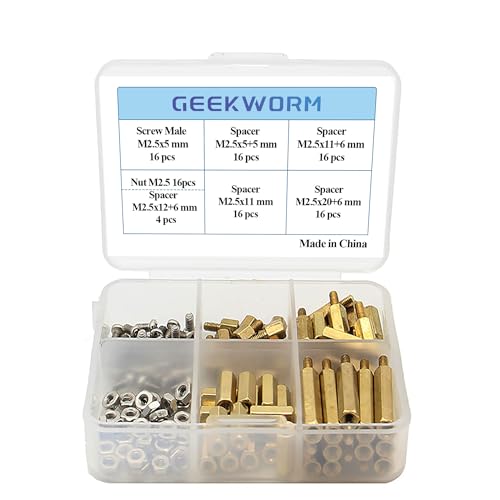
The Geekworm Raspberry Pi Installation Tool Kit is an essential companion for hobbyists and professionals alike, offering an extensive set of 100 pieces designed specifically for Raspberry Pi models. With durable brass and stainless steel components, you’ll find M2.5 series hex spacers, standoffs, nuts, and screws that guarantee secure installations. This kit is compatible with popular Raspberry Pi models, making it versatile for your projects. Its compact size and included plastic storage box keep everything organized. Plus, you can shop confidently with a 30-day return policy and a 3-month warranty. Enhance your Raspberry Pi experience with this thorough tool kit!
Best For: Hobbyists and professionals looking for a comprehensive installation tool kit for Raspberry Pi projects.
Pros:
- Wide Compatibility: Suitable for multiple Raspberry Pi models, enhancing versatility for various projects.
- Durable Materials: Made from brass and stainless steel, ensuring longevity and resistance to corrosion.
- Organized Storage: Comes with a plastic storage box, making it easy to keep components organized.
Cons:
- Limited Warranty: Warranty period is only 3 months, which may be short for some users.
- Potential Overkill for Casual Users: The extensive 100-piece set may be more than what casual hobbyists need.
- Specific Thread Size: Only compatible with M2.5 series, limiting use with other fastener sizes.
Factors to Consider When Choosing Raspberry Pi Accessory Kits With Display
When choosing a Raspberry Pi accessory kit with a display, you’ll want to take into account several important factors. Think about the display size options and the type of touchscreen technology that fits your needs. Also, verify compatibility with your Raspberry Pi model, and check for ease of installation and included components.
Display Size Options
Choosing the right display size for your Raspberry Pi accessory kit can greatly enhance your project’s usability and visual appeal. Display sizes typically range from 3.5 inches to 7 inches, catering to various project needs. A 3.5-inch display is perfect for compact projects and basic applications, while a 5-inch option strikes a balance between portability and usability. If you need enhanced visibility and interactivity, a 7-inch display is ideal for detailed visuals or user interactions. Keep in mind that resolution often improves with size; for instance, a 3.5-inch screen may have a resolution of 320×480 pixels, whereas a 7-inch display can offer 800×480 pixels. Additionally, consider the aspect ratio, which can affect how content is arranged on-screen.
Touchscreen Technology Types
Selecting the right display size is just the beginning; understanding the types of touchscreen technology can greatly impact your project’s functionality. For instance, capacitive touchscreens offer multi-touch input and higher responsiveness compared to resistive ones, which only support single-point touch. If visual quality matters, consider IPS (In-Plane Switching) displays for their wider viewing angles and superior color reproduction. The resolution also plays a crucial role; common options are 800×480 pixels for larger screens and 320×480 pixels for smaller ones, affecting text clarity. Don’t overlook the refresh rates, as 60 Hz is standard for smooth interactions. Finally, think about aspect ratios; 5:3 works well for larger displays, while 16:9 is common for smaller ones, influencing your layout design.
Compatibility With Raspberry Pi
Understanding compatibility is essential for ensuring your Raspberry Pi accessory kit works seamlessly with your project. First, check that the display kit matches your specific Raspberry Pi model—be it the 5, 4, 3, or 2—as different models have varying connection interfaces. You’ll also need to confirm the display’s interface type, like MIPI DSI for touchscreens, since some may not support HDMI. Additionally, verify the operating system compatibility; certain touchscreens offer multi-touch on Raspbian but only single-touch on Ubuntu. Finally, consider the display’s size and resolution, as these factors impact clarity and usability. Common sizes include 3.5, 5, and 7 inches, so choose one that fits your project needs.
Installation Ease and Support
When it comes to installing display kits for your Raspberry Pi, ease of installation can make all the difference in your project’s success. Many display kits feature plug-and-play interfaces, so you won’t have to deal with complex configurations or driver installations. Look for kits that come with detailed support documentation and tutorials, which can be a lifesaver for beginners. Some displays also include helpful accessories like ribbon cables and mounting hardware, simplifying the setup process even further. Additionally, check if the kit offers technical support; having access to free assistance can help you troubleshoot any issues that arise. Finally, guarantee compatibility with various Raspberry Pi operating systems for a smooth integration into your projects.
Included Components and Tools
Choosing the right Raspberry Pi accessory kit with a display involves more than just looking at the screen size. You’ll want to take into account the number and variety of included components, like screens, sensors, and wiring, as these enhance your project’s versatility. Check for tool kits that offer instructional materials, such as detailed tutorials or step-by-step guides, to help you implement your projects more easily. Make sure the kit includes essential assembly tools like screwdrivers and standoffs for securely mounting displays. Compatibility is vital, so verify that the kit works with your specific Raspberry Pi model. Finally, look for additional features like capacitive touch capabilities or different display sizes, which can greatly expand your project’s possibilities.
Learning Resources Availability
To make the most of your Raspberry Pi accessory kit, it’s crucial to take into account the availability of learning resources. Look for kits that provide detailed tutorials, like 962-page guides or video lessons, to deepen your understanding of electronics and programming. Confirm there’s step-by-step coding instruction in languages like Python, C, and Java, catering to your learning style. Evaluate the range of projects included; some kits offer over 100 projects that give you practical experience and reinforce your skills. Don’t forget to check for community support or forums, which can provide ongoing assistance and foster a collaborative learning environment. Finally, consider kits with extensive online resources or downloadable materials for easy access to information and troubleshooting.
Warranty and Return Policies
While evaluating Raspberry Pi accessory kits, understanding the warranty and return policies can greatly impact your purchase decision. Many kits offer limited warranties, typically ranging from 30 days to a year. It’s essential to check what the warranty covers—some only include manufacturing defects, while others might extend to user-related issues. Most return policies allow full refunds within 30 days for items that arrive dead or damaged, but conditions may apply for returns due to misuse. If a kit lacks warranty information, it might indicate a riskier purchase. Customer reviews can provide valuable insights into a company’s warranty effectiveness, so look for higher ratings that reflect better customer satisfaction with support and claims processing.
Price and Value Comparison
Understanding warranty and return policies is just one piece of the puzzle when it comes to selecting the right Raspberry Pi accessory kits with displays. You should start by comparing price ranges, as they can differ greatly based on display size, type, and included components. Assess the overall value by looking at the number of items in each kit; some may offer more for a similar price. Customer ratings and reviews are essential too; higher-rated kits often reflect better value and satisfaction. Additionally, consider the compatibility with various Raspberry Pi models, as kits supporting multiple versions can enhance value for your diverse projects. By weighing these factors, you’ll make a more informed choice.