When you’re gearing up for your next Raspberry Pi project, picking the right OLED display can make a significant difference in functionality and aesthetics. With various options available, it’s crucial to take into account factors like resolution, interface, and power consumption. Each display has unique features that could either enhance or limit your project’s potential. Let’s explore the top contenders that might just fit your needs perfectly.
UCTRONICS 0.96 Inch OLED Module Display Board for Arduino and Raspberry Pi Pico
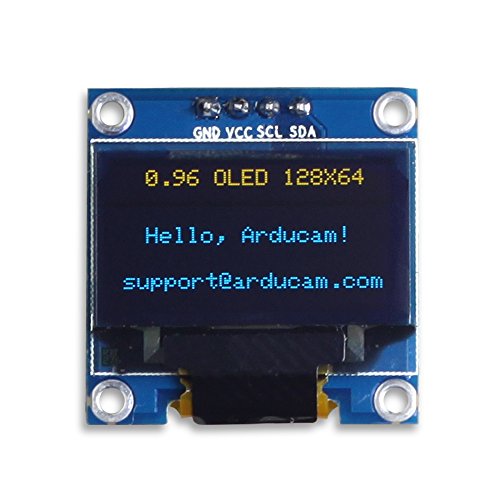
If you’re looking for a compact and efficient display for your Raspberry Pi Pico or Arduino projects, the UCTRONICS 0.96 Inch OLED Module is a top choice. With a resolution of 128×64 pixels and a viewing angle of over 160°, this self-luminous display offers bright, crisp visuals without needing a backlight. Weighing only 0.35 grams and measuring just 27mm x 27mm, it’s perfect for tight spaces. Plus, it operates on 3.3V-5V DC, making it versatile for various applications. Compatible with multiple devices, it’s an excellent option whether you’re building simple meters or sophisticated instruments.
Best For: Hobbyists and developers looking for a lightweight and efficient display solution for their Raspberry Pi Pico or Arduino projects.
Pros:
- High contrast and bright visuals without requiring a backlight.
- Compact size and lightweight design ideal for space-constrained projects.
- Wide compatibility with various devices like Arduino UNO, Mega, and Raspberry Pi.
Cons:
- Requires users to create custom fonts as no embedded fonts are provided.
- Limited temperature range may restrict use in extreme environments.
- Power consumption can increase when the full screen is lit.
Hosyond 5 Pcs OLED Display Module (128×64 Pixel SSD1306)

The Hosyond 5 Pcs OLED Display Module is an excellent choice for hobbyists and developers looking to enhance their Raspberry Pi projects with vibrant visuals. With a resolution of 128×64 pixels, these 0.96-inch displays provide sharp images in blue and yellow. They operate on a voltage range of 3.3V-5V DC and consume only 0.04W during normal use. The I2C interface simplifies connectivity, requiring just two I/O ports. Plus, the wide viewing angle of over 160° guarantees everyone can see the display clearly. With positive customer feedback, this module is a reliable option for your next project.
Best For: Hobbyists and developers seeking to integrate vibrant OLED displays into their Raspberry Pi projects.
Pros:
- Easy connectivity with I2C interface requiring only two I/O ports.
- Low power consumption of 0.04W during normal operation, making it energy efficient.
- Wide viewing angle of over 160° for clear visibility from different angles.
Cons:
- No embedded fonts, requiring users to generate custom fonts for display.
- Limited warranty information provided, which may concern some buyers.
- Small size (0.96 inches) may not be suitable for applications needing larger displays.
Waveshare 1.5inch RGB OLED Display Module (128×128 Pixels)

For makers and hobbyists looking to add vibrant visuals to their projects, the Waveshare 1.5inch RGB OLED Display Module offers a fantastic solution with its 128×128 pixel resolution and stunning 65K color support. This display utilizes the SSD1351 driver, ensuring excellent performance and clarity. With a wide viewing angle of over 160°, you can easily showcase your designs from various perspectives. The module supports both 4-wire and 3-wire SPI communication, making it versatile for different setups. Plus, its compact size (44.5 x 37 mm) and compatibility with platforms like Raspberry Pi and Arduino make it a superb choice for your next project.
Best For: Makers and hobbyists seeking a compact and vibrant display solution for their electronic projects.
Pros:
- High resolution of 128×128 pixels for clear and detailed visuals.
- Supports 65K colors, providing vibrant and diverse color representation.
- Compatible with popular platforms like Arduino and Raspberry Pi, ensuring versatility in use.
Cons:
- Limited screen size may not be suitable for applications requiring larger displays.
- Requires knowledge of SPI communication for setup and integration.
- May need additional components for specific configurations, potentially increasing project complexity.
ELEGOO 3PCS 0.96 Inch OLED Display Screen Module for Arduino Projects

With its compact 0.96-inch size and high-resolution display, the ELEGOO 3PCS OLED Screen Module is perfect for hobbyists and developers working on Arduino projects. Featuring a resolution of 128×64 pixels and self-luminous technology, each pixel emits light independently, giving you superior contrast. It easily integrates with platforms like Raspberry Pi and Arduino via the user-friendly I2C protocol. Plus, it comes with 10 Dupont wires for added convenience. Weighing just 1.06 ounces, this module is lightweight and portable. With a solid customer rating of 4.6 out of 5 stars, it’s a reliable choice for your next project.
Best For: Hobbyists and developers looking for a compact, high-resolution display for their Arduino projects.
Pros:
- Compact Size: The 0.96-inch display is perfect for space-constrained projects.
- High Resolution: Offers a clear 128×64 pixel display for detailed graphics and text.
- Easy Integration: Compatible with multiple platforms and utilizes the user-friendly I2C protocol.
Cons:
- Limited Size: The small screen may not be suitable for applications requiring larger displays.
- Dependency on I2C: Users must be familiar with I2C communication for proper functionality.
- Potential Compatibility Issues: Although it works with many platforms, some setups may require additional configuration.
Waveshare 2.42inch OLED Display Module for Raspberry Pi and Arduino

Ideal for hobbyists and developers alike, the Waveshare 2.42inch OLED Display Module offers a crisp 128×64 pixel resolution, making it an excellent choice for projects requiring clear and vibrant visual outputs. Weighing just 0.64 ounces, this lightweight display operates on 3.3V or 5V, providing flexibility for various setups. With support for 4-wire SPI and I2C communication, it easily integrates with Raspberry Pi, Arduino, and more. The included GH1.25 7PIN cable simplifies connections, while online development resources guarantee you hit the ground running. With a solid 4.0-star rating, this display module is a reliable addition to your toolkit.
Best For: Hobbyists and developers looking for a lightweight, versatile display module for their Raspberry Pi, Arduino, and other projects.
Pros:
- Easy integration with multiple platforms like Raspberry Pi, Arduino, and ESP32.
- High resolution of 128×64 pixels for clear visual outputs.
- Lightweight design at only 0.64 ounces, making it portable and easy to incorporate into various projects.
Cons:
- Limited to a single color (white), which may not suit all project aesthetics.
- Requires additional configuration for communication mode selection, which could be challenging for beginners.
- Only a modest customer review rating of 4.0 out of 5 stars, indicating mixed user experiences.
Dorhea 0.96 inch OLED Display Module

The Dorhea 0.96 inch OLED Display Module stands out for its impressive resolution of 128 x 64 pixels, making it a perfect choice for hobbyists and developers working on Raspberry Pi projects. With a view angle exceeding 160° and super high contrast, your displays will be bright and clear, even in full sunlight. This I2C module operates efficiently on 3.3V-5V and consumes minimal power. Installation is a breeze with four mounting holes, and you can create custom fonts through software, enhancing versatility. Weighing just 0.634 ounces, it’s lightweight and easy to integrate into your designs.
Best For: Hobbyists and developers looking for a compact and efficient display solution for their Raspberry Pi projects.
Pros:
- High resolution of 128 x 64 pixels ensures clear and crisp visuals.
- Self-luminous design means no backlight is needed, enhancing readability in bright conditions.
- Lightweight and easy to install with four mounting holes for versatile integration.
Cons:
- Requires custom font generation through software, which may be a learning curve for some users.
- Limited to I2C interface, which may not be suitable for all applications.
- Power consumption increases when the full screen is lit, which may affect battery-powered projects.
Hosyond 5 Pcs OLED I2C Display Module (128×64 Pixel)

For makers and hobbyists looking to add a compact yet powerful display to their projects, the Hosyond 5 Pcs OLED I2C Display Module stands out with its impressive 128×64 pixel resolution. This 0.96-inch display features self-luminous dots that provide ultra-high contrast and clarity from over a 160° view angle. It operates on a low power consumption of just 0.04W, making it efficient for various devices like Arduino and Raspberry Pi. With I2C communication, it only requires two I/O ports. Plus, you can customize fonts using generation software, ensuring your display fits your project perfectly.
Best For: Makers and hobbyists looking for a compact, efficient display for their Arduino or Raspberry Pi projects.
Pros:
- High resolution of 128×64 pixels offers clear and bright visuals.
- Low power consumption (0.04W) makes it energy-efficient for portable applications.
- Easy integration with I2C communication, requiring only two I/O ports.
Cons:
- No embedded fonts; users must create their own using font generation software.
- Limited warranty details may require additional inquiry for clarity on support.
- Viewing angle may vary slightly based on the specific installation setup.
Waveshare 1.3inch OLED Display HAT for Jetson Nano and Raspberry Pi

Designed specifically for the Jetson Nano and various Raspberry Pi models, the Waveshare 1.3inch OLED Display HAT stands out with its vibrant blue OLED display and impressive 128×64 pixel resolution. With a 2:1 aspect ratio and a contrast ratio of 1,000,000:1, you’ll enjoy clear visuals from any angle, thanks to a 160-degree viewing angle. This display supports multiple connectivity options, including 4-wire SPI, 3-wire SPI, and I2C. Plus, it features a joystick and three pushbuttons for easy navigation. It’s a fantastic choice for your next project, combining functionality with ease of use for developers.
Best For: Developers and hobbyists looking for a compact and versatile display solution for their Jetson Nano or Raspberry Pi projects.
Pros:
- High contrast ratio of 1,000,000:1 for vibrant and clear images.
- Multiple connectivity options (4-wire SPI, 3-wire SPI, and I2C) for flexibility in project design.
- Integrated joystick and pushbuttons for intuitive navigation and control.
Cons:
- Limited screen size of 1.3 inches may not suit all applications.
- Moderate customer reviews with a rating of 3.6 out of 5 stars may indicate varied user experiences.
- Operating voltage of 3.3V may require additional considerations for power supply compatibility.
Triple OLED/LCD HAT for Raspberry Pi (2inch IPS LCD Main Screen & Dual 0.96inch OLED Screens)

With its vibrant 2-inch IPS LCD main screen and dual 0.96-inch OLED displays, the Triple OLED/LCD HAT is perfect for hobbyists and developers looking to enhance their Raspberry Pi projects. The main screen boasts a 240×320 resolution and supports 262K colors, providing stunning visuals. Meanwhile, the dual OLED screens, with a resolution of 128×64, can show essential information or graphics. You’ll appreciate the onboard user-defined keys for customized functionality. This HAT is compatible with various Raspberry Pi models, and you’ll find helpful development resources online to guide you through your next innovative project.
Best For: Hobbyists and developers looking to enhance their Raspberry Pi projects with versatile display options.
Pros:
- Offers a vibrant 2-inch IPS LCD main screen with 240×320 resolution and 262K color support.
- Includes dual 0.96-inch OLED screens for displaying key information and graphics.
- Compatible with various Raspberry Pi models and provides online development resources for guidance.
Cons:
- Limited screen size may not be suitable for complex graphics or detailed visuals.
- Requires additional programming knowledge for optimal use of user-defined keys and display features.
- Potential compatibility issues with certain Raspberry Pi models or configurations.
1.51inch Transparent OLED Display for Raspberry Pi
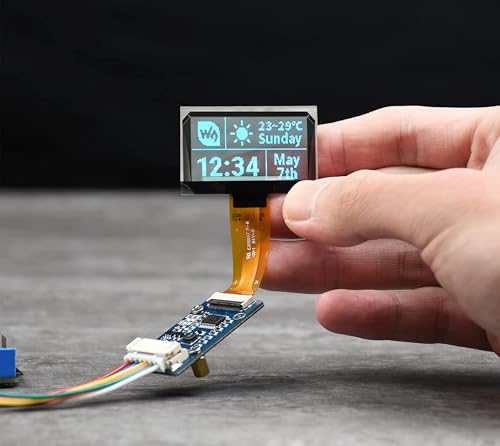
The 1.51-inch Transparent OLED Display is perfect for hobbyists and developers looking to add a unique visual element to their Raspberry Pi projects. With a resolution of 128 x 64, this display is compatible with various Raspberry Pi models, including the Pi Zero W and 4B. It utilizes SPI/I2C interfaces, operating at both 3.3V and 5V, ensuring faster data rates. When using it, be cautious about power supply connections to prevent damage. Remember not to display static images for too long to avoid afterimages. For quick setup, check out the available tutorials at bit.ly/4keLnGx.
Best For: Hobbyists and developers looking to enhance their Raspberry Pi projects with a unique visual display.
Pros:
- High resolution of 128 x 64 for clear visuals.
- Compatible with multiple Raspberry Pi models and other platforms like Arduino and STM32.
- Fast data rates due to SPI/I2C interface options.
Cons:
- Risk of damage if the power supply is connected incorrectly.
- Potential for afterimages if static images are displayed for prolonged periods.
- Requires modification of DEV_Config.h to switch between SPI and I2C modes.
Factors to Consider When Choosing Raspberry Pi OLED Displays
When choosing a Raspberry Pi OLED display, you’ll want to take into account several key factors. Display size, resolution, power consumption, interface compatibility, and mounting options all play an essential role in your project’s success. Making informed decisions on these aspects guarantees you get the best performance and usability from your display.
Display Size Options
How do you choose the right display size for your Raspberry Pi OLED project? Start by considering the available sizes, which typically range from 0.96 inches to 2.42 inches. If your project needs compactness, smaller displays like the 0.96-inch option are perfect for wearables or tight spaces. However, if your application requires detailed graphics or text, larger displays provide enhanced readability and higher resolutions, such as 128×128 pixels. Keep in mind that larger screens might consume more power and require more complex integration. Ultimately, think about your project’s purpose; the right size will balance functionality and ease of use while fitting into your design seamlessly.
Resolution and Clarity
Choosing the right display size is just the first step; resolution and clarity play a significant role in your Raspberry Pi OLED project. The resolution, measured in pixels, directly impacts how sharp and detailed your images and text appear. For instance, a common resolution of 128×64 pixels provides decent clarity for basic graphics and text, suitable for compact applications. Additionally, OLED displays typically offer a viewing angle greater than 160°, ensuring your content remains clear from various perspectives. Thanks to self-luminous technology, each pixel emits its own light, enhancing contrast and clarity compared to traditional displays. Make sure your chosen display supports the necessary font sizes and graphics resolution for presenting information precisely and clearly.
Power Consumption Rates
While evaluating OLED displays for your Raspberry Pi project, it’s essential to contemplate their power consumption rates. Typically, these displays consume between 0.04W during normal operation and 0.08W when the full screen is lit, making them energy-efficient. Most OLED displays support voltages of 3.3V to 5V DC, ensuring compatibility with various microcontrollers while keeping power usage low. The unique self-luminous nature of OLED technology means that power consumption varies greatly based on the displayed content; darker images use less power than bright visuals. Additionally, some OLED modules utilize I2C communication, which minimizes power consumption by requiring only two I/O ports. Understanding these consumption characteristics is vital for battery-powered projects, as higher usage can deplete batteries quickly.
Interface Compatibility
When selecting an OLED display for your Raspberry Pi project, it’s important to take into account interface compatibility, as it directly affects communication between the display and your microcontroller. Many displays utilize I2C or SPI interfaces. I2C is popular because it requires only two I/O ports (SDA and SCL), making it ideal for projects with limited GPIO availability. SPI, while offering faster data rates, typically needs more connections, including chip select (CS) and clock (SCK) pins. Verify the display’s interface is compatible with your specific Raspberry Pi model to avoid communication issues. Some OLED displays even allow switching between I2C and SPI modes, providing flexibility for various project requirements. Choose wisely to optimize performance!
Mounting and Installation
Selecting the right mounting and installation options for your Raspberry Pi OLED display can greatly impact your project’s success. First, consider the mounting options; some modules have pre-drilled holes for easy installation. Make certain the display’s physical dimensions fit your project enclosure to avoid compatibility issues. Weight is another factor; lightweight displays are easier to mount without needing extra support. Check the installation requirements, including any specific cables or connectors, to guarantee a smooth setup process. Finally, look for displays that come with user-friendly mounting accessories like screws or brackets, as these can greatly simplify installation. By keeping these factors in mind, you’ll set your project up for success!