When you’re planning your next Raspberry Pi project, the case you choose can make all the difference. A well-designed case with a display not only boosts functionality but also enhances the overall look of your setup. With so many options available, from touchscreens to various sizes, it can be tough to decide which one fits your needs best. Let’s explore the top choices that will elevate your project and keep you engaged.
SmartiPi Touch 2 Case for Raspberry Pi 7″ Touchscreen Display

The SmartiPi Touch 2 Case is perfect for anyone looking to enhance their Raspberry Pi experience with a 7″ touchscreen display. Compatible with Raspberry Pi models 3, 4, and 5, this case offers a sleek black design made from durable ABS material. It includes a cooling fan to keep your projects running smoothly and features three interchangeable faceplates for customization. With two USB 3.0 ports and a dedicated camera mounting point for various Raspberry Pi cameras, it provides versatility. Weighing only 392 grams and measuring 17.4D x 7.6W x 12H cm, it’s both functional and compact for your needs.
Best For: The SmartiPi Touch 2 Case is best for Raspberry Pi enthusiasts looking to create interactive projects with a touchscreen display.
Pros:
- Versatile Compatibility: Supports Raspberry Pi models 3, 4, and 5, along with various HAT boards.
- Customizable Design: Comes with three interchangeable faceplates for personalization.
- Efficient Cooling: Includes a cooling fan to maintain optimal performance during use.
Cons:
- Camera Limitations: Not compatible with the Raspberry Pi HQ camera or the Raspberry Pi Touch Display 2.
- Weight: At 392 grams, it may add some bulk compared to lighter cases.
- Limited USB Ports: Only two USB ports are available, which might be insufficient for some users’ needs.
CUQI Raspberry Pi Display with Case and Touchscreen

Looking for a compact solution to elevate your Raspberry Pi experience? The CUQI Raspberry Pi Display is a 3.5-inch touchscreen monitor that fits perfectly with your Raspberry Pi 4 and 5. With a resolution of 480×320 and a refresh rate of 60 FPS, it offers clear visuals for your projects. The case includes essential components like a mini fan, heatsink, screws, and even a stylus for easy navigation. Plus, it supports popular operating systems like Raspbian and RetroPie. With a lightweight design and effective cooling, this display is a great choice for maximizing your Raspberry Pi setup.
Best For: Raspberry Pi enthusiasts looking for an affordable and compact touchscreen solution to enhance their projects.
Pros:
- Easy Setup: Compatible with Raspberry Pi 4 and 5, along with included installation components and tutorials.
- Compact Design: The 3.5-inch size makes it portable and ideal for small projects.
- Effective Cooling: Comes with a mini fan and heatsink to prevent overheating during use.
Cons:
- Limited Resolution: The 480×320 resolution may not be sufficient for high-detail applications.
- Compatibility Restriction: The case is only designed for Raspberry Pi 5, which may limit use with other models.
- Mixed Customer Reviews: With a 3.8 out of 5-star rating, some users may have experienced issues that could affect satisfaction.
ROADOM 10.1’’ Touch Screen Monitor for Raspberry Pi

For those seeking an engaging and interactive experience with their Raspberry Pi, the ROADOM 10.1’’ Touch Screen Monitor stands out with its vibrant IPS FHD display and responsive 5-point capacitive touch technology. With a resolution of 1024×600, upgradeable to 1920×1080, and a wide 178° viewing angle, it delivers stunning visuals. Weighing just 1.23 pounds, it’s easy to set up using its included cables and versatile stand. You’ll appreciate the dual built-in speakers and plug-and-play compatibility across various operating systems. Plus, the integrated protection guarantees durability, making it a fantastic addition to your Raspberry Pi projects.
Best For: Enthusiasts and developers looking for an interactive display solution for their Raspberry Pi projects.
Pros:
- Vibrant IPS FHD display with upgradeable resolution for stunning visuals.
- Responsive 5-point capacitive touch technology enables easy interaction and control.
- Plug-and-play compatibility with various operating systems simplifies setup.
Cons:
- Touch functionality disabled on iOS systems, limiting compatibility with Apple devices.
- Max resolution of 1920×1080 may not meet the needs of users wanting higher display quality.
- Weight of 1.23 pounds may be slightly heavier compared to similar portable monitors.
Raspberry Pi 4 Touch Screen with Case (3.5 inch TFT LCD)
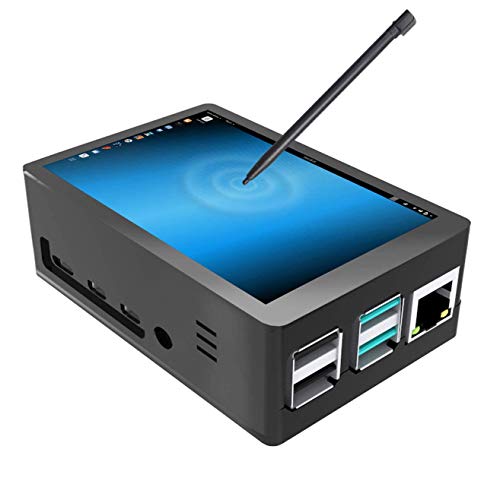
If you’re someone who enjoys hands-on projects and needs a compact display solution, the JUN-ELECT Raspberry Pi 4 Touch Screen with Case is an excellent choice. This 3.5-inch TFT LCD features a 320×480 resolution, making it suitable for video and gaming with a refresh rate of about 50fps. The built-in fan helps manage temperatures during extended use. It connects easily via HDMI and supports various Raspberry Pi models. The package includes all necessary accessories, like a stylus and heat sinks, ensuring a smooth setup. With a 3.9-star rating from over 1,000 users, this display is a reliable option for your projects.
Best For: Individuals and hobbyists who seek a compact, touch-enabled display for their Raspberry Pi projects.
Pros:
- Easy installation with included accessories like a stylus and heat sinks.
- Supports a variety of Raspberry Pi models, ensuring compatibility.
- Built-in fan helps maintain optimal temperature during extended use.
Cons:
- Requires driver installation for proper functionality; without it, the screen displays only white.
- Limited display resolution (320×480) may not meet the needs of all users for detailed graphics.
- Customer rating of 3.9 out of 5 stars indicates mixed feedback from users.
SmartiPi Touch Pro 3 – Compatible with the 7″ Raspberry Pi Touch Display 2

The SmartiPi Touch Pro 3 is an ideal choice for Raspberry Pi enthusiasts who want a sleek, functional case that seamlessly integrates with the 7″ Raspberry Pi Touch Display 2. This black plastic enclosure supports Raspberry Pi models 3, 4, and 5, offering extra space for HAT boards or custom components. You’ll find accessible ports for power, HDMI, and audio at the back, while the Micro SD card slot remains easily reachable. Plus, it features a power button for Raspberry Pi 5. With a 1-year warranty and solid customer ratings, this case is a reliable option for your next project.
Best For: Raspberry Pi enthusiasts seeking a stylish and functional case for the 7″ Raspberry Pi Touch Display 2.
Pros:
- Easy access to ports for power, HDMI, and audio, along with an external Micro SD card slot.
- Extra space available for HAT boards or custom components, enhancing project versatility.
- Includes a power button specifically for Raspberry Pi 5, adding convenience for users.
Cons:
- Limited to compatibility with specific Raspberry Pi models (3, 4, and 5).
- Plastic material may not appeal to those preferring more durable materials like metal.
- Customer ratings indicate some mixed feedback, suggesting potential quality concerns for a few users.
Raspberry Pi 3 B+ 3.5 inch Touch Screen Monitor with Case
![JUN-ELECTRON for Raspberry Pi 3 B+ 3.5 inch Touch Screen with Case, 320x480 Pixel Monitor TFT LCD Game Display [Support Raspbian, Ubuntu, Kali, RetroPie System]](https://m.media-amazon.com/images/I/41VFDo7L2NL._SL500_.jpg)
Ideal for hobbyists and developers, the JUN-ELECT Raspberry Pi 3 B+ 3.5 inch Touch Screen Monitor brings a compact and interactive display to your projects. With a resolution of 320×480 pixels and a 4:3 aspect ratio, it’s perfect for gaming and multimedia applications. The monitor connects via SPI without needing extra power, providing seamless performance at around 50fps. Its resistive touchscreen enhances usability, while the protective case guarantees easy installation. Weighing just 0.16 kg, it’s lightweight and portable. Plus, with a solid customer rating of 3.9 out of 5 stars, you know you’re investing in a quality product.
Best For: Hobbyists and developers looking for a compact and interactive display for their Raspberry Pi projects.
Pros:
- Easy Installation: Comes with a protective case and installation tools for straightforward setup.
- Seamless Performance: Connects via SPI without extra power, achieving approximately 50fps for smooth video and gaming.
- Portable Design: Weighs only 0.16 kg, making it easy to transport and integrate into various projects.
Cons:
- Limited Resolution: The 320×480 pixel resolution may not be suitable for high-definition applications.
- Resistive Touchscreen: The resistive touchscreen may not be as responsive as capacitive alternatives, affecting user experience.
- Customer Rating: While rated 3.9 out of 5 stars, some users may have varying opinions on performance and usability.
Hosyond 5 Inch Touchscreen IPS Display for Raspberry Pi

For Raspberry Pi enthusiasts seeking a compact and versatile display, the Hosyond 5 Inch Touchscreen IPS Display stands out with its plug-and-play MIPI DSI interface. Compatible with Raspberry Pi 5, 4, and 3 models, this 800×480 resolution capacitive touch screen delivers vibrant visuals thanks to IPS technology. You’ll appreciate the 60 Hz refresh rate and expansive 178-degree viewing angle for a smooth experience. With no driver installation required, setup is a breeze. Plus, the PWM brightness adjustment lets you customize your display. Weighing just 6 ounces, it’s perfect for portable projects. Enjoy seamless integration with various operating systems!
Best For: Raspberry Pi enthusiasts looking for a compact, high-quality touchscreen display for their projects.
Pros:
- Plug-and-play MIPI DSI interface simplifies setup with no driver installation required.
- Vibrant visuals with 800×480 resolution and IPS technology provide excellent color and viewing angles.
- Lightweight design (6 ounces) makes it ideal for portable Raspberry Pi projects.
Cons:
- Limited compatibility as it does not support HDMI or other devices.
- Single-touch support for some operating systems may restrict functionality for certain applications.
- No warranty information provided, which may concern some buyers.
Waveshare 4.3 Inch Touch Screen DSI LCD for Raspberry Pi 4B

When you’re looking to enhance your Raspberry Pi 4B projects, the Waveshare 4.3 Inch Touch Screen DSI LCD stands out with its impressive 800×480 resolution and responsive IPS capacitive touch capabilities. This 4.3-inch screen includes a toughened glass panel and offers a wide viewing angle, making it perfect for various applications. With a refresh rate of up to 60Hz, it delivers smooth visuals. You’ll appreciate its 5-point touch support for Raspbian and single point touch for other operating systems like Ubuntu and Kali. Plus, it’s driver-free, simplifying your setup process. Ideal for gaming, computing, and development tasks!
Best For: This product is best for Raspberry Pi enthusiasts looking to enhance their projects with a versatile touch display.
Pros:
- High-resolution display (800×480) with a wide viewing angle for excellent visuals.
- Driver-free operation simplifies installation across multiple operating systems.
- Supports 5-point touch functionality in Raspbian, enhancing user interaction.
Cons:
- Limited to a 4.3-inch size, which may not be suitable for all applications.
- Touch support varies by operating system; some may only offer single-point touch.
- May require additional setup for optimal performance in certain use cases.
GeeekPi 3.5 inch Touch Screen with Case for Raspberry Pi 4

The GeeekPi 3.5 inch Touch Screen with Case for Raspberry Pi 4 is a fantastic choice for hobbyists and developers looking to enhance their projects with an interactive display. This kit includes a durable ABS case, a responsive resistive touch screen with a resolution of 320×480, and a cooling fan with aluminum heatsinks. Its 125MHz SPI input guarantees stable video playback at 50fps. Compatible with all Raspberry Pi versions, it supports Raspbian, Ubuntu, and Kali, with free software drivers available. Just remember to remove the protective film before use to get the best performance out of your setup!
Best For: Hobbyists and developers seeking an interactive display solution for their Raspberry Pi projects.
Pros:
- High Compatibility: Works with all versions of Raspberry Pi boards and supports multiple operating systems.
- Responsive Touch Screen: Features a 3.5 inch resistive touch screen with a decent resolution and refresh rate for smooth interaction.
- Comprehensive Kit: Includes essential components like a case, cooling fan, and heatsinks for enhanced performance.
Cons:
- Limited Resolution: The 320×480 resolution may not meet the needs of users requiring higher display quality.
- Resistive Touch Screen: Lacks the sensitivity and multi-touch capabilities of capacitive screens, which may affect user experience.
- No Raspberry Pi Board Included: Requires separate purchase of the Raspberry Pi 4B, increasing overall project cost.
SmartiPi Touch Pro 3 – Compatible with the 7″ Raspberry Pi Touch Display 2

If you’re looking for a versatile case that perfectly integrates with the 7″ Raspberry Pi Touch Display 2, the SmartiPi Touch Pro 3 is an excellent choice. This case supports Raspberry Pi models 3, 4, and 5, and even accommodates Waveshare 7-inch DSI LCDs. You’ll appreciate the accessible ports for power, HDMI, and audio, all located on the back, along with an external micro SD card slot. With extra room for HAT boards or custom components, it’s designed for flexibility. Plus, it features a convenient power switch for Raspberry Pi 5, making it a practical option for your projects.
Best For: The SmartiPi Touch Pro 3 is best for Raspberry Pi enthusiasts looking for a versatile and customizable case for their projects.
Pros:
- Easy access to all essential ports including power, HDMI, and audio.
- Extra space for HAT boards or custom components enhances flexibility.
- Compatible with multiple Raspberry Pi models and Waveshare LCDs.
Cons:
- Limited to specific Raspberry Pi models (3, 4, and 5).
- Plastic material may not be as durable as metal alternatives.
- Cooling method relies solely on air, which might be insufficient for heavy usage.
Factors to Consider When Choosing a Raspberry Pi Case With Display
When choosing a Raspberry Pi case with a display, you need to evaluate several key factors. Think about the size and compatibility with your specific Raspberry Pi model, as well as the type and quality of the display. Don’t forget to check for cooling options, touchscreen capabilities, and how easily you can access the ports.
Size and Compatibility
Choosing a Raspberry Pi case with a display involves careful consideration of size and compatibility to confirm everything fits seamlessly. First, verify the display size is compatible with your Raspberry Pi model, like the 3, 4, or 5, as this impacts both fit and functionality. Check the case dimensions, since larger displays can affect portability. If your project requires additional components like HAT boards, look for cases that accommodate them. Finally, consider the display’s resolution and aspect ratio; they should match your intended use to avoid distortion and guarantee an ideal viewing experience. By keeping these factors in mind, you’ll select a case that enhances your Raspberry Pi project effectively.
Display Type and Quality
Selecting the right display type and quality is vital for getting the most out of your Raspberry Pi case. Consider the resolution first; smaller screens typically offer 320×480 pixels, while larger options can reach 1920×1080, affecting clarity. Display technologies, like TFT LCD and IPS, influence viewing angles and color accuracy, with IPS generally outperforming TFT. Refresh rates around 60 Hz guarantee smooth visuals, which is essential for gaming or video playback. Touchscreen features also vary; some displays support multi-touch, while others are limited to single-point touch, impacting how you interact. Finally, pay attention to the aspect ratio—4:3 or 16:9—as it affects how your content is displayed, aligning it with your intended applications for the best experience.
Cooling Mechanism Options
A great display enhances your Raspberry Pi experience, but it’s equally important to contemplate how to keep your device cool. Effective cooling mechanisms, like built-in fans or heatsinks, are essential to prevent overheating during intensive tasks. Cases with active cooling, such as mini fans, can greatly lower the operating temperature, improving system performance and longevity. If you prefer a quieter solution, consider passive cooling options like aluminum heatsinks, which dissipate heat without needing power. Pay attention to the case design and airflow, as these factors affect cooling efficiency. Finally, some cases offer extra space for custom cooling solutions, giving you flexibility for specific thermal management needs. Choose wisely to guarantee peak performance for your projects.
Touchscreen Capabilities
When you’re considering a Raspberry Pi case with a display, touchscreen capabilities play an essential role in your overall experience. You’ll find options ranging from basic resistive touchscreens to advanced capacitive ones that support multi-touch. Pay attention to the resolution, as higher resolutions like 800×480 or even 1920×1080 offer clearer visuals, enhancing your projects. Refresh rates also matter; a 60 Hz rate is ideal for smooth interactions, especially in gaming or video applications. Ascertain the touchscreen’s compatibility with your desired operating system, as some support multiple platforms like Raspbian and Ubuntu, while others don’t. Finally, consider how touch functionality is handled—some screens are plug-and-play, while others may require driver installation for operation.
Port Accessibility
Touchscreen capabilities enhance your interaction with a Raspberry Pi, but port accessibility is just as important for a seamless experience. When choosing a case, make certain that the ports for power, HDMI, and audio are easily accessible to facilitate connectivity. Some cases offer external access to the Micro SD card slot, making storage management straightforward without disassembling the case. If you’re planning to use HAT boards or custom components, consider cases that provide additional space for these additions, as they can influence port placement. Pay attention to cable management, too; look for designs that allow for clean routing to keep your setup organized. Finally, a case with a power switch can greatly enhance convenience, especially for the Raspberry Pi 5.
Case Material Durability
Choosing the right case material is essential for ensuring the longevity and performance of your Raspberry Pi. Durable materials like ABS (Acrylnitril-Butadien-Styrol) provide excellent protection against impacts and wear, making them ideal for various applications. Plastic cases are lightweight and can withstand moderate temperatures, while metal cases, though heavier, offer superior heat dissipation and shielding against electromagnetic interference. This enhances your Raspberry Pi’s performance and lifespan. Additionally, consider the thickness of the case material; thicker walls can better absorb shocks and resist deformation. A protective finish or coating can also improve resistance to scratches and environmental factors, keeping your display and components in prime condition for longer. Choose wisely to maximize your Raspberry Pi’s potential!
Additional Accessories Included
Many Raspberry Pi cases with displays come packed with useful accessories that enhance your setup and user experience. For instance, many include mini fans for cooling, ensuring your device runs at ideal temperatures. You might find heatsinks in some kits, which improve heat dissipation and boost performance during extended use. If you’re opting for a touchscreen monitor, look for cases that include styluses or pens to make navigation smoother and more precise. Most packages also come with installation tools, like screwdrivers and mounting hardware, making setup a breeze. Additionally, certain cases offer protective features, such as rubber feet or durable casings, enhancing stability and longevity during your projects. These accessories can make a significant difference in your Raspberry Pi experience.