If you want a desktop that stays discreet on your desk and quiet during long work sessions, a silent mini tower pc can be the ideal middle ground between a full-size tower and an ultra-compact mini PC.
In this roundup, we focus on compact systems that balance low noise, practical performance, and easy everyday usability for home offices, WFH setups, and light productivity.
Best 7 Silent Mini Tower PC Picks for 2026
Best Refurbished Value
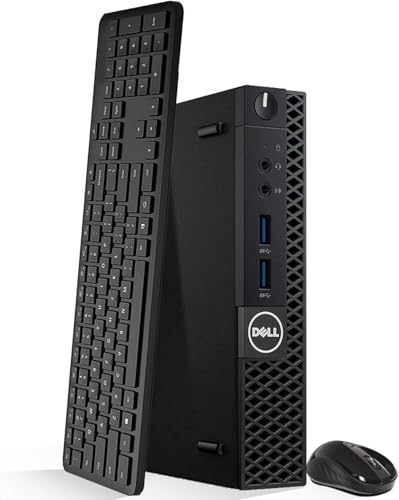
- Compact micro form factor for tight desks and small spaces
- 16GB RAM plus 512GB NVMe SSD for smooth everyday use
- Wi-Fi, HDMI, DisplayPort, and wireless accessories included
Best For: Users who want a quiet, space-saving desktop for office tasks and casual use.
Best for Triple-Display Productivity

- Ryzen 5 7430U delivers dependable everyday performance
- Triple 4K display support helps power multi-monitor workspaces
- 16GB RAM, 512GB SSD, WiFi 6, and BT 5.2 add strong value
Best For: Work-from-home users and multitaskers who want a compact, quiet desktop with flexible display support.
Best for Refurbished Power
Dell Optiplex 9020 i7 Mini Tower
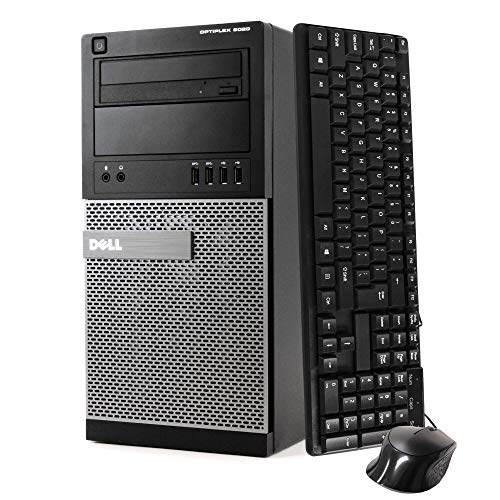
- Core i7 and 32GB RAM for responsive multitasking
- 1TB SSD with Windows 11 Pro for fast, ready-to-use performance
- Includes Wi-Fi, DVD-RW, keyboard, and mouse
Best For: Shoppers who want a refurbished desktop with strong specs and easy setup.
Best for Easy Setup

- 16GB DDR4 RAM and 256GB SSD for snappy everyday performance
- Certified refurbished with testing and a 91-day minimum warranty
- Compact mini tower fits small desks and home offices
Best For: Budget-conscious buyers who want a compact Windows 11 Pro desktop for everyday productivity.
Best for Quiet Office Deployments
GEEKOM Air12 Mini PC for Business

- Quiet, compact design suited to desks and shared workspaces
- Upgradeable RAM and SSD for longer-term use
- Triple-display support with Windows 11 Pro included
Best For: Small businesses and WFH users who need a compact, quiet Windows mini PC.
Best for Office Multitasking

- Responsive Core i3 performance for everyday work
- 16GB dual-channel RAM with 512GB SSD included
- Dual 4K HDMI, WiFi 6, BT 5.2, and 2.5GbE connectivity
Best For: Office users and light multitaskers who want a compact desktop with broad connectivity.
Best Refurbished Value – Dell OptiPlex 3050 Tiny PC
If you want a silent mini tower pc for basic office work, streaming, or a compact home setup, the renewed Dell OptiPlex 3050 is a practical pick. Its Core i5-6500T, 16GB of RAM, and 512GB NVMe SSD give it enough speed for everyday multitasking without taking up much desk space.
Best For: Buyers who want a low-noise, space-saving PC for productivity, web use, and light media tasks.
Pros:
- Compact micro form factor fits easily on or under a desk
- 16GB RAM and NVMe SSD help it feel quick for routine tasks
- Includes Wi-Fi, HDMI, DisplayPort, and wireless keyboard/mouse
- Windows 11 Pro comes preinstalled for a ready-to-use setup
Cons:
- Older 6th-gen processor is not ideal for heavy workloads
- Renewed condition may not appeal to buyers wanting brand-new hardware
For shoppers comparing a silent mini tower pc on value and convenience, this Dell stands out more for practicality than raw power. It is a sensible choice if you want a tidy, quiet desktop with the right basics already included.
Best for Triple-Display Productivity – KAMRUI E3B Ryzen 5 Mini PC
If you want a silent mini tower pc that can handle office work, streaming, and light gaming without taking over your desk, the KAMRUI E3B is a strong all-round pick. Its Ryzen 5 7430U, 16GB of LPDDR4X memory, and 512GB SSD give it enough speed for everyday multitasking, while USB-C and triple 4K display support make it especially practical for multi-monitor setups.
Best For: Buyers who want a compact, quiet desktop for work-from-home, media, and light gaming with strong display flexibility.
Pros:
- Ryzen 5 7430U offers solid everyday performance for productivity and light gaming
- Triple 4K display support is great for multitasking across multiple monitors
- Compact design with WiFi 6 and Bluetooth 5.2 keeps the setup clean and modern
- 16GB RAM and 512GB SSD provide a responsive out-of-the-box experience
Cons:
- Integrated graphics limit demanding gaming and heavier creative workloads
- LPDDR4X memory is not as upgrade-friendly as standard desktop RAM
Overall, the KAMRUI E3B is a smart choice if you want a silent mini tower pc that prioritizes compact size, multi-monitor productivity, and everyday speed over raw performance.
Best for Refurbished Power – Dell Optiplex 9020 i7 Mini Tower
If you want a silent mini tower pc-style desktop with strong everyday performance, this renewed Dell OptiPlex 9020 is a practical pick. It pairs a Core i7-4770 CPU with 32GB of RAM and a 1TB SSD, so it should feel quick for office work, browsing, media, and multitasking without a lot of fuss.
Best For: Buyers who want a refurbished desktop with high memory, fast storage, and easy out-of-the-box setup.
Pros:
- Core i7 processor and 32GB RAM handle multitasking smoothly
- 1TB SSD offers fast boots and plenty of storage
- Includes Wi-Fi, DVD-RW, keyboard, and mouse for convenience
- Windows 11 Pro gives it a current, business-friendly software setup
Cons:
- Renewed hardware is older than current-generation desktops
- DDR3 memory and 4th-gen Intel platform limit upgrade headroom
- Not the smallest or quietest option if ultra-compact silence is the priority
This is a strong value choice if you need a reliable desktop that feels responsive and practical, but it is more of a compact business tower than a true silent mini tower pc. For shoppers who care most about speed, storage, and straightforward setup, it makes a lot of sense.
Best for Triple-Monitor Productivity – KAMRUI P2 Mini PC Ryzen 4300U
If you want a silent mini tower pc for a compact desk or media setup, the KAMRUI Pinova P2 is a strong value pick. Its Ryzen 4300U chip and 16GB of memory give it enough headroom for everyday multitasking, while the triple 4K display support makes it especially useful for busy workstations.
Best For: Home offices, conference rooms, and users who want a compact PC that can run multiple monitors without taking up much space.
Pros:
- Ryzen 4300U offers solid 4-core performance for everyday productivity
- Triple 4K output over HDMI, DP, and USB-C helps power multi-monitor setups
- 16GB RAM and 512GB SSD deliver quick boot times and smooth app switching
- Small chassis and efficient cooling suit space-saving desktop setups
Cons:
- Not intended for heavy gaming or demanding creative workloads
- Storage and memory are good for the class, but not as expansive as larger desktops
- USB-C display and performance benefits depend on compatible monitors and cables
For buyers who need a silent mini tower pc-style machine for spreadsheets, video calls, and a clean triple-screen desk, this model stands out more for versatility than raw power. It is a practical compact desktop that balances speed, expandability, and display support well.
Best for Easy Setup – HP 600 G2 i5 Mini Tower PC
If you want a silent mini tower pc for everyday work without paying for a brand-new system, this renewed HP 600 G2 is a practical option. It pairs a quad-core Intel i5-6500T with 16GB of DDR4 RAM and a 256GB SSD, so it feels responsive for office apps, web browsing, and light multitasking.
Best For: Budget-minded buyers who want a compact Windows 11 Pro desktop for productivity, schoolwork, or a quiet home office setup.
Pros:
- 16GB RAM and SSD storage help it boot fast and handle daily tasks smoothly
- Certified refurbished with testing, cleaning, and a minimum 91-day warranty
- Compact mini tower design fits neatly under or beside a desk
- Windows 11 Pro is ready to use out of the box
Cons:
- Renewed hardware may show light cosmetic wear
- 256GB storage is fine for basics but limited for large media libraries
- Not ideal for gaming or heavier creative workloads
Overall, this is a sensible pick if you need a silent mini tower pc that emphasizes low cost, everyday speed, and a small footprint over raw power. It is especially appealing for users who want a dependable Windows machine for routine tasks.
Best for Quiet Office Deployments – GEEKOM Air12 Mini PC for Business
If you want a silent mini tower pc for a desk, front counter, classroom, or lightweight home office, the GEEKOM Air12 is a practical pick. It focuses on low power use, quiet cooling, and enough everyday speed for browsing, documents, video calls, and simple multitasking without taking much space.
Best For: Small businesses, WFH setups, and shared workspaces that need a compact, quiet Windows 11 Pro mini PC with easy upgrade options.
Pros:
- Very compact footprint with a quiet cooling design for low-noise environments
- Dual-slot upgrade path for up to 64GB RAM and 2TB SSD
- Triple-display support and business-friendly ports for flexible setups
- Windows 11 Pro preinstalled with a 3-year warranty for peace of mind
Cons:
- Pentium-class performance is fine for office work, but not ideal for heavy creative tasks
- 8GB RAM and 256GB SSD are workable starter specs, but power users will likely upgrade
As a silent mini tower pc, the Air12 stands out more for efficiency, expandability, and office convenience than raw speed. If your priority is a compact system that stays quiet while handling routine business work, it fits the brief well.
Best for Office Multitasking – GMKtec G3 Pro i3 Mini PC
If you want a silent mini tower pc for desks, reception areas, or home office use, the GMKtec G3 Pro is a practical pick thanks to its Core i3-10110U, 16GB of dual-channel RAM, and 512GB SSD. It focuses on responsive everyday performance rather than heavy-duty work, while still offering the connectivity and dual-display support most buyers need.
Best For: Office users, students, and light multitaskers who want a compact, easy-to-place desktop with strong connectivity.
Pros:
- Core i3-10110U delivers solid single-core responsiveness for browsing and office apps
- 16GB dual-channel RAM and 512GB SSD help with fast boot times and smooth multitasking
- Dual 4K HDMI, WiFi 6, Bluetooth 5.2, and 2.5GbE add excellent connection options
- Upgraded cooling is aimed at lowering fan noise and heat
Cons:
- Not intended for demanding gaming or heavy creative workloads
- Storage is expandable, but the included 512GB may still feel modest for large media libraries
- Quiet operation is improved, but it is not completely fanless
This is a smart fit if you want a silent mini tower pc style machine for productivity and dual-monitor work without spending on higher-end hardware. It offers enough speed for daily tasks and enough ports to handle a tidy, low-clutter setup.
How We Picked the Best Silent Mini Tower PC Options
We looked for compact desktops that pair efficient processors with sensible cooling, SSD storage, and enough memory for smooth everyday use. Noise matters, but so does stability, upgrade potential, and port selection. The best choices here are quiet enough for shared spaces while still handling office apps, streaming, video calls, and light multitasking without feeling underpowered.
Quick Comparison: What Matters Most
When comparing a Silent Mini Tower PC, focus first on the processor class, then on RAM and storage. Older business towers can offer strong value if they include ample memory and a fast SSD, while newer mini PCs often deliver better efficiency and lower idle noise. If you need multiple monitors, check display outputs carefully. If you expect expansion later, favor systems with accessible upgrade paths.
Key Buying Factors for Silent Mini Tower PC
Noise and Cooling
Look for efficient low-TDP CPUs, well-designed fans, and compact cases with decent airflow. A quieter system usually relies on modest power draw rather than aggressive cooling.
Performance Headroom
For office work and browsing, 8GB to 16GB of RAM is a practical baseline. If you keep many tabs, apps, or spreadsheets open at once, 16GB is the safer choice. SSD storage is strongly preferred over hard drives because it improves responsiveness and keeps the system feeling quiet.
Connectivity and Display Support
Make sure the machine supports the monitors you already own. HDMI, DisplayPort, and USB-C options can matter a lot, especially for dual-screen desks. Wi-Fi and Bluetooth are also worth checking if you want a cleaner setup with fewer cables.
Form Factor and Upgrades
Some models are true mini towers, while others are more like tiny business desktops. Smaller systems save space, but larger compact towers can sometimes be easier to service and expand. Choose based on whether you value silence, portability, or future upgrades more.
Who Should Buy Which Silent Mini Tower PC?
If you want the best balance of quiet operation and everyday performance, choose a newer efficient mini PC with 16GB RAM and an SSD. If you want the most value for basic office use, a renewed business-class tower can be a smart pick. Power users who juggle heavier multitasking should prioritize stronger CPUs and more storage, while minimal users can save money with a simpler configuration.
In short, the right Silent Mini Tower PC is the one that matches your workload, monitor setup, and noise tolerance without paying for performance you will not use.