Finding the right small form factor PC for creators means balancing speed, thermals, noise, and port selection without giving up too much desk space. The best models can handle photo editing, 4K timelines, light 3D work, and everyday multitasking in a compact chassis.
Below, we focus on six options that stand out for different creator workflows, from ultra-compact office-ready systems to higher-performance mini workstations and gaming-class builds with stronger GPU headroom.
Best 6 Small Form Factor PC for Creators Picks for 2026
Best for High-Speed Creator Workflows
MINISFORUM MS-01 Mini Workstation

- Core i9-13900H for demanding creator tasks
- Dual USB4 and HDMI for up to three displays
- 2x 10G SFP+ plus 2x 2.5G LAN for rapid transfers
Best For: Creators who need a compact workstation with fast networking, strong CPU performance, and multi-display support.
Best High-Performance Mini ITX
Cooler Master NR2 Pro Gaming PC
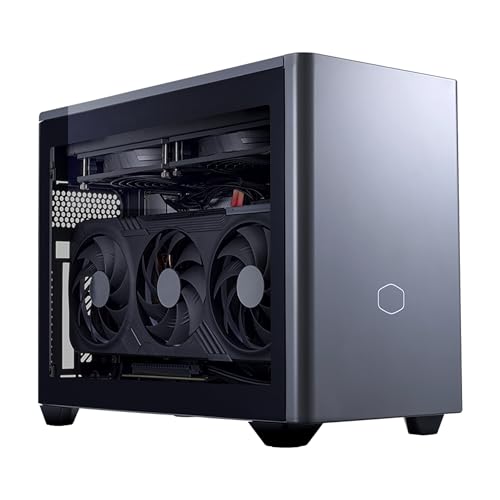
- Compact 18.25L Mini ITX footprint
- Ryzen 7 9800X3D + RTX 5070 Ti 16GB
- 32GB DDR5, 2TB Gen4 SSD, 850W Gold PSU
Best For: Creators and power users who want a compact PC for editing, multitasking, and 1440p gaming.
Best Value for Creators
BOSGAME P6 Ryzen 9 6900HX Mini PC

- Ryzen 9 6900HX handles light editing and multitasking well
- 24GB LPDDR5X RAM with 1TB PCIe 4.0 SSD for quick responsiveness
- Triple 4K display support plus dual LAN for flexible setups
Best For: Creators and power users who want a compact, value-focused mini PC for light content work.
Best for Triple-Display Workflows

- Triple 4K display support for cleaner multi-monitor setups
- Ultra-quiet compact chassis saves desk space
- 16GB DDR5 and Windows 11 Pro handle everyday multitasking
Best For: Creators and professionals who need a tiny desktop for multi-monitor productivity and light creative work.
Best for Triple Displays
GMKtec Nucbox G10 Ryzen 5 Mini PC

- Triple-display support for multitasking and creator workflows
- Includes 16GB RAM and a 1TB SSD out of the box
- 2.5GbE LAN helps with fast file transfers and local networking
Best For: Creators who want a compact desktop for multitasking, light editing, and three-screen workstations.
Best for Heavy Multitasking
BOSGAME P3 Mini PC Ryzen 7 6800H

- Ryzen 7 6800H with 8 cores and 16 threads
- 32GB DDR5 RAM and 1TB PCIe 4.0 SSD
- USB4 with triple 4K display support
Best For: Creators and power users who want a compact, well-connected mini PC for multitasking.
Best for High-Speed Creator Workflows – MINISFORUM MS-01 Mini Workstation
If you need a small form factor pc for creators, the MINISFORUM MS-01 stands out for its Core i9-13900H performance, dual USB4 outputs, and unusually strong networking. It’s a compact workstation-style machine built for editing, CAD, multitasking, and fast local transfers without taking over your desk.
Best For: Creators who want a compact workstation with serious CPU power, multi-display support, and enterprise-style networking.
Pros:
- Core i9-13900H delivers strong performance for editing, rendering, and heavy multitasking
- Dual USB4 plus HDMI supports up to three displays for a flexible creator setup
- 2x 10G SFP+ and 2x 2.5G LAN make it excellent for fast file transfers and NAS workflows
- Expandable storage and PCIe x16 slot add unusual upgrade headroom for a mini PC
Cons:
- Integrated graphics are fine for light creative work, but not ideal for GPU-heavy 3D tasks without an add-on card
- Its advanced networking and expansion features may be overkill for basic office use
- Higher-end capability usually means a higher price than simpler mini PCs
Overall, the MS-01 is a strong pick if your small form factor pc for creators needs to act more like a tiny workstation than a basic desktop replacement. Its mix of CPU power, display flexibility, and high-speed networking makes it especially appealing for creators with demanding storage and transfer needs.
Best High-Performance Mini ITX – Cooler Master NR2 Pro Gaming PC
If you want a small form factor pc for creators that still has serious gaming horsepower, the Cooler Master NR2 Pro is a strong fit. Its 18.25L Mini ITX case keeps the footprint compact while pairing a Ryzen 7 9800X3D, RTX 5070 Ti 16GB, 32GB of DDR5 memory, and a 2TB Gen4 SSD for fast editing, rendering, and multitasking.
Best For: Creators and power users who need a compact desktop that can handle both demanding workloads and high-refresh 1440p gaming.
Pros:
- Very compact 18.25L Mini ITX design that fits easily on crowded desks
- Strong CPU/GPU combo for creative apps, gaming, and multitasking
- 32GB DDR5 RAM and 2TB Gen4 SSD provide fast, roomy everyday performance
- Included 850W Gold PSU and 280mm AIO cooling support sustained output
Cons:
- Premium parts make it a costly choice
- Mini ITX systems are less upgrade-friendly than larger desktops
- Compact cooling can be noisier under heavy sustained loads
For buyers shopping for a small form factor pc for creators, this NR2 Pro stands out because it balances size, cooling, and top-tier performance better than many tiny desktops. It is a practical pick if you want one machine for editing, streaming, and gaming without giving up desk space.
Best Value for Creators – BOSGAME P6 Ryzen 9 6900HX Mini PC
If you want a small form factor pc for creators without paying workstation prices, the BOSGAME P6 is a practical fit. Its Ryzen 9 6900HX, fast LPDDR5X memory, and PCIe 4.0 SSD make it a strong everyday machine for light editing, multitasking, and a tidy multi-monitor desk setup.
Best For: Creators, remote workers, and power users who want a compact, good-value PC for light content creation and multitasking.
Pros:
- Ryzen 9 6900HX delivers solid responsiveness for editing, office work, and light gaming.
- 24GB LPDDR5X RAM and 1TB PCIe 4.0 SSD help keep apps and large files moving quickly.
- Triple 4K display support is useful for timelines, dashboards, and productivity workflows.
- Dual LAN, Wi-Fi 6E, and Bluetooth 5.3 add flexible connectivity for home or lab use.
Cons:
- Integrated graphics are fine for light gaming, but not ideal for heavy 3D work.
- 24GB RAM is good for most creators, though more demanding projects may still benefit from a larger workstation.
- Bluetooth 5.3 may require an updated Intel driver to fully enable.
Overall, the BOSGAME P6 makes sense as a small form factor pc for creators who care more about value, desk space, and everyday speed than raw workstation muscle. It’s a balanced compact system for editing, streaming, and multi-display productivity.
Best for Triple-Display Workflows – HP Pro 400 G9 Mini PC
If you want a small form factor pc for creators that fits neatly beside a monitor setup, the HP Pro 400 G9 Mini PC is a practical choice. It keeps the footprint tiny while still offering Windows 11 Pro, Wi‑Fi 6, Bluetooth 5.2, and support for multiple 4K displays, which is handy for editing, streaming tools, and day-to-day production tasks.
Best For: Creators and office users who need a compact desktop for multi-monitor productivity, light content work, and quiet operation.
Pros:
- Triple 4K display support makes it easy to build a clean multi-screen workstation.
- Ultra-quiet, compact design is ideal for desks where space and noise matter.
- Includes 16GB DDR5 RAM, an SSD, and Windows 11 Pro for responsive everyday use.
Cons:
- Intel Celeron G6900T is better for light creative tasks than heavy rendering or 4K editing.
- 256GB storage may feel tight if you work with large media files.
- Not the best pick for GPU-heavy production workloads.
For buyers comparing a small form factor pc for creators, this HP mini stands out more for tidy desk integration and display flexibility than raw power. It makes the most sense if your workflow leans toward multitasking, admin work, and lighter creative projects.
Best for Triple Displays – GMKtec Nucbox G10 Ryzen 5 Mini PC
If you want a compact machine that can handle light creative work without taking over your desk, this small form factor pc for creators is a practical pick. The Ryzen 5 3500U, 16GB dual-channel RAM, and 1TB SSD give it enough headroom for photo editing, everyday content tasks, and smooth multitasking, while the triple-display support is especially useful for timeline, chat, and preview setups.
Best For: Creators who want a compact desktop for multitasking, light editing, and three-screen workstations.
Pros:
- Triple-display output via HDMI 2.1, USB-C, and DisplayPort
- 16GB dual-channel memory plus 1TB SSD included
- 2.5GbE LAN is useful for fast local transfers and network work
- Low-power Ryzen 5 platform fits small desks and media setups
Cons:
- Not built for heavy 4K editing or demanding 3D workloads
- Integrated Vega graphics are fine for casual creative use, not pro GPU tasks
- Wi‑Fi 5 is behind newer Wi‑Fi 6/6E systems
For a small form factor pc for creators who value desk space, wired speed, and multi-monitor flexibility, the Nucbox G10 lands in a useful middle ground. It is better suited to light creative workflows than powerhouse production, but that balance makes it easy to recommend for compact home studios and productivity-focused setups.
Best for Heavy Multitasking – BOSGAME P3 Mini PC Ryzen 7 6800H
If you want a small form factor pc for creators that can handle editing, multitasking, and a clutter-free desk setup, the BOSGAME P3 is a strong fit. Its Ryzen 7 6800H, 32GB DDR5 RAM, and 1TB NVMe SSD give it enough headroom for everyday creative workloads, while USB4 and triple-display output make it easy to build a compact workstation.
Best For: Creators, remote workers, and power users who need a compact PC with strong multitasking performance and multi-monitor support.
Pros:
- Ryzen 7 6800H with 8 cores and 16 threads handles demanding multitasking well
- 32GB DDR5 RAM and 1TB PCIe 4.0 SSD deliver fast out-of-box performance
- USB4 plus HDMI/DisplayPort supports triple 4K displays and eGPU options
- Dual 2.5GbE, Wi-Fi 6E, and Bluetooth 5.2 provide versatile connectivity
Cons:
- Integrated graphics are fine for light creative work, but not ideal for heavy 3D or pro gaming
- Compact systems like this rely on airflow, so sustained loads may be more limited than larger desktops
As a small form factor pc for creators, the BOSGAME P3 stands out more for efficiency, connectivity, and desk-friendly flexibility than raw workstation muscle. It is a smart choice if you want a compact machine that can keep up with creative apps and multiple monitors without taking over your workspace.
How We Picked the Best Small Form Factor PC for Creators
For this roundup, we prioritized CPU performance, memory and storage configuration, graphics capability, connectivity, and practicality for real creator workflows. A strong Small Form Factor PC for Creators should offer enough cores for rendering and exporting, fast storage for project files, and the right ports for external drives, displays, and accessories. We also considered noise, upgrade potential, and how well each system fits different budgets and workloads.
Quick Comparison of the Main Use Cases
Not every compact PC is built for the same job. Some are better suited to office production, browsing, and light creative work, while others are far stronger for video editing, motion graphics, and heavier multitasking. Mini PCs with integrated graphics can be excellent for photo work and general content creation, but users who work in GPU-accelerated apps will usually benefit more from a system with a discrete NVIDIA card. If your workflow includes multiple displays, fast external storage, or network-attached media, port selection matters just as much as raw CPU speed.
Key Buying Factors for Small Form Factor PC for Creators
CPU and Core Count
Look for modern multi-core processors with strong single-thread performance. Creators often juggle export jobs, background sync, browser tabs, and asset management at the same time, so a balanced CPU helps more than peak benchmark numbers alone.
Memory and Storage
For most creative workloads, 16GB is the bare minimum, while 32GB is a better starting point for editing, design, and multitasking. Fast NVMe storage reduces project load times and keeps caches responsive. If you work with large media files, prioritize systems with room for additional drives or straightforward upgrades.
Graphics Needs
Integrated graphics are fine for everyday content work, but creators using Adobe apps, DaVinci Resolve, Blender, or AI-assisted tools may want discrete graphics for smoother previews and faster exports. This is where gaming-oriented compact PCs can offer an advantage.
Connectivity and Displays
Creators benefit from USB4, USB-C, HDMI, DisplayPort, and multi-display support. A strong network setup also matters for file transfers and cloud backups, especially if you move large raw or project files regularly.
Who Should Buy Which Small Form Factor PC for Creators?
If you want a versatile mini workstation, choose a higher-end model with strong CPU performance and generous I/O. If you need the most compact, quiet office-friendly system, a business mini PC is often the best fit for lighter creative tasks. For users who need serious GPU power in a compact chassis, a gaming-class desktop is the better choice. If your workload is primarily photo editing, design, and general productivity, a well-equipped mini PC with 32GB of RAM can deliver excellent value without taking over your desk.
In short, the best Small Form Factor PC for Creators is the one that matches your apps, display setup, and upgrade needs today while leaving a little headroom for the projects you take on next.