Wall-mounted PC storage can free up desk space, improve airflow, and create a cleaner, more professional office layout.
This roundup focuses on practical options for different tower sizes, mounting styles, and workspace needs, so you can choose a setup that fits your desk and your case.
Best 10 Wall Mount PC Cases for Office Setup Picks for 2026
Under-Desk Versatility
VIVO Adjustable PC Mount for Desks and Walls

- Works under a desk or on a wall
- Adjustable fit from 3.5" to 7.8" wide
- 135° swivel helps with cable access
Best For: Office users needing flexible placement and easy rear access
IT-Pro Stability
StarTech Adjustable Metal CPU Wall Mount

- Open frame keeps the tower easy to reach
- Supports up to 22 lb
- Adjustable from 4.8" to 8.3" wide
Best For: IT setups that need a simple, sturdy wall mount
Large-Case Support
VIVO Deskside Wall Mount for Bigger PCs

- Fits wider cases from 7.1" to 11.8"
- Supports up to 66 lbs on solid walls
- Open frame design keeps side panels visible
Best For: Larger PCs near standing desks or space-tight offices
Compact Office Saver
Mount Plus Adjustable CPU and Console Wall Holder

- Adjustable from 4.8" to 8.3" wide
- Fits many SFF and USFF desktop models
- Metal wall bracket helps save desk space
Best For: Small office PCs and other compact devices
Space-Saving 2-in-1 Tower Mount

- Mounts under desk or on wall
- Fits 5.9" to 9.8" wide cases
- Supports up to 50 lbs
Best For: Medium PC towers in compact office setups
Wall-Mounted Open-Frame Bracket
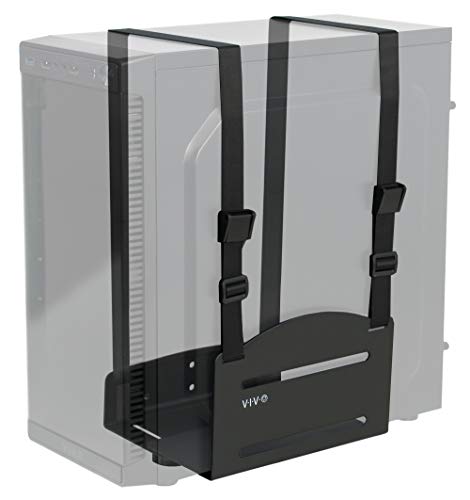
- Wall-mounted steel bracket with straps
- Adjustable width fits many cases
- Supports up to 10 kg
Best For: Standard office towers on a proper wall surface
Adjustable Space-Saver
Suptek Under Desk & Wall CPU Mount

- Adjusts for 3.74" to 8.26" wide cases
- 360-degree rotation for cable access
- Steel build holds up to 44 lbs
Best For: Office users who want adjustable mounting and easy rear access
Flexible Strap Mount
VIVO Under-Desk & Wall PC Holder

- Fits a very wide range of case sizes
- Steel bracket supports up to 44 lbs
- Includes mounting hardware and 3-year warranty
Best For: Users needing broad compatibility for unusual PC cases
Under-Desk Versatility – VIVO Adjustable PC Mount for Desks and Walls
If you want wall mount pc cases for office setup that keep a tower off the floor and easy to reach, this VIVO mount is a flexible option. It works under a desk or on a wall, fits a wide range of case widths, and adds a 135° swivel so cable and rear-port access is simpler during everyday use.
Best For: Office users who want an adjustable, space-saving mount that can go under a desk or on a wall.
Pros:
- Adjustable width from 3.5" to 7.8" and height from 11.5" to 20.5"
- 135° swivel makes backside access easier
- Thick padding dots help protect the case finish
- Solid steel construction supports up to 22 lbs
Cons:
- Requires a desk with enough overhang for under-desk mounting
- Weight limit is best suited to standard office towers, not heavier systems
Overall, this is a practical pick if you want one mount that can handle either under-desk or wall placement. The adjustable frame and swivel design make it especially useful in tidy office setups where access and flexibility matter.
IT-Pro Stability – StarTech Adjustable Metal CPU Wall Mount
For wall mount pc cases for office setup, this StarTech bracket focuses on simple access and a clean workspace. The open-frame metal design keeps the tower reachable, while the adjustable width and included hardware make it a straightforward choice for mounting a desktop computer securely on the wall.
Best For: IT-managed offices and users who want a straightforward, heavy-duty CPU wall mount with open access.
Pros:
- Open frame design allows unrestricted access to the computer
- Heavy-duty metal frame supports up to 22 lb
- Adjustable width from 4.8" to 8.3"
- Hardware is included for setup
Cons:
- Less feature-rich than mounts with swivel or more advanced positioning
- Designed around standard desktop tower sizes, so very large cases may not fit
This is a no-nonsense wall mount built for practicality and workspaces that prioritize access over extras. If your office setup needs a dependable metal holder with clear space-saving benefits, it is an easy one to evaluate.
Large-Case Support – VIVO Deskside Wall Mount for Bigger PCs
If your wall mount pc cases for office setup need to support a larger tower, this VIVO deskside mount is built with more capacity in mind. It fits wider cases, keeps side panels visible, and offers a secure locking design that works well for space-conscious desks and standing desk setups.
Best For: Larger office or gaming-style PC cases that need a secure wall-mounted position near the desk.
Pros:
- Fits wider PCs from 7.1" to 11.8"
- Supports up to 66 lbs on wood and concrete/brick walls
- Open frame design keeps side panels visible and helps airflow
- Raised side rails and padding help secure and protect the case
Cons:
- Drywall-only support is limited to 22 lbs
- Primarily aimed at larger cases, so it may be overkill for smaller office towers
This model stands out when you need more room for a bigger chassis without losing desk space. The higher weight capacity and open design make it a strong fit for modern office builds, especially where side-window visibility or standing-desk movement matters.
Compact Office Saver – Mount Plus Adjustable CPU and Console Wall Holder
For wall mount pc cases for office setup, this Mount Plus bracket is a compact way to free desk space and keep smaller systems close at hand. It is sized for a wide range of desktop towers and small form factor machines, and its metal build makes it suitable for computers or select UPS units where wall mounting is the goal.
Best For: Small form factor office PCs and users who want a versatile wall bracket for computers or compatible UPS units.
Pros:
- Adjustable width from 4.8" to 8.3"
- Works with small form factor and ultra small form factor systems listed in the notes
- Metal construction with wall-mount design saves desk space
- Can also be used for some UPS and game console applications
Cons:
- Best suited to smaller systems rather than full-size towers
- Compatibility depends on checking the exact device dimensions
This is a practical pick when your goal is to reclaim space in a compact office. Its broad compatibility list is useful, but the size range means it makes the most sense for SFF and USFF hardware rather than bulky desktop cases.
Large Under-Desk/Wall PC Mount – VIVO Adjustable Full-Tower Mount
For wall mount pc cases for office setup, this VIVO mount is a practical option when you want your tower off the floor but still easy to reach. It works under a desk or on a flat wall, and the swivel design helps when you need quick access to rear ports and cables.
Best For: Larger PC cases in office setups that need flexible under-desk or wall placement.
Pros:
- Adjustable width from 8.3″ to 13″ and height from 14.6″ to 25.2″ for many full-tower cases
- 135° swivel makes backside cable and port access easier
- Thick padding dots help protect the case from scratches
- Solid steel construction supports up to 44 lbs
Cons:
- Requires a desk surface at least 1″ thick for under-desk mounting
- Desktop overhang must be wide enough for the PC width
- Best suited to larger cases, so smaller towers may not need this much capacity
This is a strong pick if you want a secure, adjustable mount for a heavier office tower and value easy access during maintenance. Its size range and swivel function make it especially useful for workstations where cable management matters.
Space-Saving 2-in-1 Tower Mount – TooCust Heavy Duty PC Holder
If you’re shopping for wall mount pc cases for office setup, this TooCust holder is built for either under-desk or wall placement. Its adjustable frame and heavy-duty steel construction make it a sensible choice when you want to free up floor space and keep the tower protected from dust and spills.
Best For: Compact-to-medium PC towers that need a sturdy, flexible office mount.
Pros:
- 2-in-1 design works under a desk or on a flat wall
- Adjustable width from 5.9″ to 9.8″ and height from 12.5″ to 20″
- Cold-rolled carbon steel frame supports up to 50 lbs
- Powder-coated finish helps resist rust and daily wear
Cons:
- Width range is narrower than some larger full-tower mounts
- Installation relies on mounting holes and side holes, so planning placement matters
- Not as broad a fit for oversized cases
Overall, this is a solid office-focused mount if your tower falls within its size range and you want a clean, durable setup. The higher load rating is a useful advantage for heavier systems without moving to a bulkier bracket.
Wall-Mounted Open-Frame Bracket – VIVO Universal PC Wall Mount
For wall mount pc cases for office setup, this VIVO bracket is a straightforward wall-only solution that prioritizes floor-space savings and easy access. The adjustable width and included straps make it a practical choice for many standard towers, as long as you’re mounting to a suitable surface.
Best For: Users who want a simple wall-mounted PC holder for a standard office tower.
Pros:
- Wall-mount design clears floor space and keeps the case accessible
- Adjustable width from 12.2 cm to 21.1 cm fits many PC cases
- Steel construction with adjustable straps adds security
- Helps reduce exposure to dust and ground vibrations
Cons:
- Cannot be mounted to drywall alone
- Weight support is limited to 10 kg
- Not as flexible as under-desk/wall combo mounts
This is a clean, focused option if you specifically want to wall-mount a tower and don’t need a dual-install bracket. It’s best for lighter systems and installations on the right type of wall structure.
Adjustable Space-Saver – Suptek Under Desk & Wall CPU Mount
If you’re comparing wall mount pc cases for office setup, this Suptek hanger is a flexible option for keeping a tower off the floor and out of the way. It adjusts to fit a wide range of case sizes, rotates 360 degrees for easier cable access, and can be installed under a desk or on a wall.
Best For: Office users who want an adjustable, heavy-duty PC mount with easy access for cable management.
Pros:
- Fits cases from 3.74″ to 8.26″ wide and 11.41″ to 20.66″ high
- 360-degree rotation helps when reaching rear ports and cables
- Cold rolled steel construction supports up to 44 lbs
- Can be mounted under a desk or on a wall
Cons:
- Only suits towers within the listed width and height range
- Open-hanger style may not appeal if you want a fully enclosed holder
Overall, this is a practical pick if you want a versatile mount that helps clear floor space while improving access behind the PC. The included protective pad and mounting hardware add convenience for a straightforward office installation.
Flexible Strap Mount – VIVO Under-Desk & Wall PC Holder
For wall mount pc cases for office setup, this VIVO holder is aimed at users who want a simple way to secure a tower off the floor. Its adjustable straps and slotted steel bracket design make it adaptable to many case shapes while keeping the PC under a desk or on another flat work surface.
Best For: Buyers who want a versatile strap-style mount for broad case compatibility.
Pros:
- Adjustable straps fit cases from 3.15″ to 27.58″ wide and 1.18″ to 25.61″ high
- Under-surface mounting helps keep the PC off the floor
- Heavy-duty steel construction supports up to 44 lbs
- All mounting hardware is included
Cons:
- Strap-based design may feel less rigid than an open frame bracket
- Best suited to users comfortable measuring perimeter and aligning straps
This model stands out for compatibility, especially if your office tower has an uncommon shape or size. The 3-year warranty and included hardware add confidence for a clean, practical install.
Open-Frame Heavy Duty – TooCust Wall PC Mount
If you’re shopping wall mount pc cases for office setup and want a more rigid bracket, this TooCust open-frame mount is built for heavier towers. It uses thickened steel, supports up to 50 lbs, and keeps the case mounted on a flat wall for a cleaner desk area and better airflow.
Best For: Users who want a strong wall-mounted bracket for a full tower PC.
Pros:
- Thickened steel construction supports up to 50 lbs
- Open frame design has no height limit
- Width adjusts from 5.2″ to 8.5″
- Powder-coated finish helps resist rust and corrosion
Cons:
- Only designed for wall mounting, not under-desk use
- Width range is narrower than some strap-style alternatives
This is a strong fit if you want a straightforward, durable wall bracket instead of straps. The simple four-step installation and open design make it a practical choice for office setups focused on stability and space savings.
How We Picked the Best Wall Mount PC Cases for Office Setup
We focused on Wall Mount PC Cases for Office Setup that balance stability, fit range, build quality, and everyday convenience. Priority went to models with adjustable widths, secure steel construction, flexible mounting positions, and designs that support common office towers without overcomplicating installation.
Quick Comparison
The main differences come down to case size support, mounting method, and how much adjustability you need. Smaller adjustable brackets are usually best for standard mid-towers, while larger or full-tower-capable mounts suit heavier systems. Strap-based designs can offer extra adaptability, while open-frame brackets often provide simpler access and a more rigid hold.
Key Buying Factors for Wall Mount PC Cases for Office Setup
Case Size and Weight
Measure your PC’s width, height, and depth before buying. Many mounts advertise adjustable width, but height clearance and overall weight support matter just as much, especially for full-tower systems.
Mounting Location
Decide whether you want the PC under a desk, beside a desk, or directly on the wall. Desk-side and under-desk mounts are often easier to install in office spaces, while true wall mounts can create more floor clearance.
Stability and Build Material
Steel brackets generally offer better long-term support than lightweight alternatives. Look for designs with secure locking points, reinforced contact surfaces, and hardware suited to your wall or desk material.
Access and Maintenance
Leave room for power buttons, ports, and cable routing. A mount should make it easy to reach the system for cleaning, upgrades, and routine office maintenance without removing the entire tower.
Who Should Buy Which Wall Mount PC Cases for Office Setup?
If you have a standard mid-tower and want a simple office upgrade, a compact adjustable bracket is often the best fit. If your workstation uses a larger gaming-style or full-tower case, choose a heavy-duty or large-capacity mount with broader adjustment range. For shared offices or tighter layouts, under-desk and wall-compatible models are usually the most practical choice because they save space while keeping the PC accessible.
For the best results, match the mount to your case dimensions first, then compare installation style and adjustability. That approach makes Wall Mount PC Cases for Office Setup easier to choose and far more reliable in daily use.