If you want a clean, showroom-style gaming build, wall mount PC cases with vertical GPU support can be a smart way to show off your hardware while saving desk space. They’re especially appealing for open layouts, custom lighting, and premium GPUs that deserve the spotlight.
This roundup focuses on options that balance mounting flexibility, build quality, and compatibility so you can choose a case or kit that fits your platform without unnecessary guesswork.
Best 10 Wall Mount PC Cases with Vertical GPU Picks for 2026
Showcase-Ready Full Tower
darkFlash DY470 Vertical GPU Case

- Vertical GPU mounting support
- Dual-chamber layout with back-plug motherboard support
- Fits large GPUs and up to dual 360mm radiators
Best For: Showcase gaming builds that need space and GPU visibility
Vertical GPU Upgrade Kit
Cooler Master Vertical Card Holder Kit V3

- PCIe 4.0 riser included
- Toolless adjustable mounting design
- Supports up to 4-slot GPUs
Best For: Compatible case owners wanting a vertical GPU mount
Wall-Mounted Open Frame
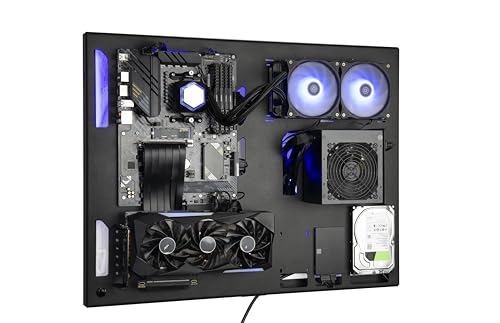
- Wall-mount open-frame chassis
- Supports GPUs up to 39cm with sag bracket
- Works with ATX, mATX, and Mini ITX boards
Best For: Showpiece wall builds with broad hardware compatibility
Vertical GPU Mounting Kit
Lian Li 4-Slot Vertical GPU Kit

- PCIe 4.0 riser cable included
- Toolless adjustable positioning
- Supports up to 4-slot GPUs
Best For: Lian Li-compatible builds needing a vertical GPU display
RGB Airflow Pick

- 4 pre-installed ARGB PWM fans
- Supports GPUs up to 420mm
- Tool-less tempered-glass side panels
Best For: Showcase builds with strong stock cooling and wide hardware clearance
Vertical Upgrade Kit

- PCIe 4.0 riser cable included
- Fits NZXT H7 series cases
- Keeps clearance for air and AIO cooling
Best For: NZXT H7 builders wanting a vertical GPU setup
Showcase Full-Tower

- Supports vertical GPU mounting
- Dual-chamber full-tower layout
- Fits GPUs up to 410mm
Best For: Large showcase builds with vertical GPU presentation
NZXT Mounting Kit
H7 Series Vertical GPU Mount Kit

- PCIe 4.0 riser cable included
- Thick steel bracket helps prevent sag
- Made for NZXT H7 Series cases
Best For: NZXT H7 builders wanting a sturdy vertical GPU upgrade
MUSETEX GR3 Case
Vertical GPU Mid-Tower with 5 ARGB Fans

- Direct-insert vertical GPU design
- Pre-installed 5 PWM ARGB fans
- Supports GPUs up to 410mm
Best For: Showcase builders who want vertical GPU styling and included cooling
Cooler Master V3 Kit
Adjustable Vertical GPU Holder for ATX Cases

- PCIe 4.0 riser supports 4.0 and 5.0
- Toolless adjustment up to 65mm
- Fits ATX and many Micro ATX cases
Best For: Builders needing an adjustable vertical GPU kit for standard towers
Showcase-Ready Full Tower – darkFlash DY470 Vertical GPU Case
If you want wall mount pc cases with vertical gpu support in a more traditional tower form, the darkFlash DY470 is built for a display-first gaming setup. Its dual-chamber layout, back-plug motherboard support, and panoramic angled glass make it a strong choice for builders who want clean visuals and room for large hardware.
Best For: Gamers and creators who want a spacious full-tower case with vertical GPU mounting and a showcase look.
Pros:
- Supports vertical GPU mounting with room for large graphics cards up to 410mm.
- Dual-chamber design helps with cable management and airflow.
- Fits up to two 360mm radiators for liquid-cooling builds.
- Angled panoramic glass creates a clean display-focused presentation.
Cons:
- Full-tower size takes up more desk or floor space than compact cases.
- Only one fan is included, so most builds will need additional cooling.
The DY470 is a practical pick if your priority is showcasing hardware while still leaving room for serious components and cooling. It leans heavily toward aesthetics and build space, which suits high-end gaming rigs well.
Vertical GPU Upgrade Kit – Cooler Master Vertical Card Holder Kit V3
If you already have one of the compatible cases and want wall mount pc cases with vertical gpu styling inside your build, this Cooler Master kit is a simple way to display the card. It is a vertical card holder with a Gen 4 riser and adjustable positioning, so it is aimed at builders who want a cleaner GPU presentation rather than a full chassis.
Best For: Owners of supported cases who want to mount a GPU vertically with a Gen 4 riser.
Pros:
- Includes a PCIe 4.0 riser cable for modern GPU compatibility.
- Toolless design makes installation and adjustment easier.
- Supports up to 4-slot thick GPUs to reduce sag and deformation.
- Offers horizontal and side-to-panel adjustment for fit tuning.
Cons:
- It is an accessory, not a full PC case.
- Compatibility is limited to specific case models listed by the manufacturer.
This kit makes sense when you want a vertical GPU look without replacing your case. It is a focused upgrade for compatible builds, especially if you care about clean presentation and a sturdy mount.
Wall-Mounted Open Frame – ABK Design Wall PC Case
For builders specifically shopping for wall mount pc cases with vertical gpu-friendly layouts, this ABK Design wall computer case is built to be mounted on the wall and show off the hardware. It supports Mini ITX, Micro ATX, and Full ATX boards, includes GPU sag prevention, and leaves plenty of room for long cards and custom cooling.
Best For: Enthusiasts who want a wall-mounted open-frame case with broad motherboard support and display appeal.
Pros:
- Designed as a wall computer case with an open, display-oriented layout.
- Supports graphics cards up to 39cm long and includes a GPU sag bracket.
- Accepts ATX, Micro ATX, and Mini ITX motherboards.
- Supports 240mm or 280mm liquid cooling, plus air-cooling flexibility.
Cons:
- Open-frame wall designs leave components more exposed than closed cases.
- Cooling and storage options are more specialized than in mainstream towers.
This is a good fit if you want your PC to become part of the room setup rather than hide under a desk. It prioritizes display, custom cooling support, and flexible component sizing over traditional enclosure features.
Vertical GPU Mounting Kit – Lian Li 4-Slot Vertical GPU Kit
If you are building wall mount pc cases with vertical gpu presentation in a compatible Lian Li chassis, this universal 4-slot kit is made to show off the graphics card cleanly. It uses a Gen 4 riser, supports ATX and EATX cases, and gives you adjustable placement so the GPU sits where you want it.
Best For: Builders using compatible ATX or EATX cases who want a sturdy vertical GPU showcase kit.
Pros:
- PCIe 4.0 riser cable supports 16GT/s transfer rates and backward compatibility.
- Toolless adjustment allows horizontal and side-panel positioning changes.
- Supports up to 4-slot thick GPUs with a sturdy steel structure.
- Compatible with ATX and EATX cases in the supported lineup.
Cons:
- It is not a standalone case, so you need a compatible chassis.
- Limited to specific Lian Li case models listed by the manufacturer.
For the right case, this is a clean and well-built way to switch to a vertical GPU layout. It is best viewed as a premium mounting solution rather than a general-purpose accessory.
RGB Airflow Pick – Lian Li V100 ATX Mid-Tower
If you want a wall mount pc cases with vertical gpu style setup that still prioritizes airflow and clean presentation, the Lian Li V100RX is a strong mid-tower option. It comes with four pre-installed 120mm ARGB PWM fans, a 26-LED ARGB strip, and support for up to a 420mm GPU, so it is built for visible hardware and straightforward cooling.
Best For: Builders who want a glass-heavy, RGB-focused case with broad hardware support and easy internal access.
Pros:
- 4 pre-installed 120mm ARGB PWM fans with daisy-chain connectivity
- Integrated 26-LED ARGB strip with motherboard sync support
- Supports GPUs up to 420mm and CPU coolers up to 178mm
- Tool-less side panels make access and maintenance easier
Cons:
- Vertical GPU mounting is not listed in the supplied notes
- Mid-tower format may be less spacious than a true full-tower build
The V100RX stands out if your priority is a polished, high-airflow showcase build rather than a specialized mounting layout. It gives you strong stock cooling, modern motherboard support, and plenty of room for large components.
Vertical Upgrade Kit – NZXT H7 Vertical GPU Mount
For builders searching for wall mount pc cases with vertical gpu presentation, this NZXT Vertical GPU Mounting Kit is the add-on to check if you already use a compatible H7 series case. The included PCIe 4.0 riser cable is designed for high-speed data transfer, and the bracket is made to replace the standard horizontal mounting setup while leaving room for air and AIO cooling.
Best For: NZXT H7 owners who want a vertical graphics card layout without sacrificing case compatibility.
Pros:
- PCIe 4.0 riser cable supports high-speed bi-directional transfer
- Designed to fit NZXT H7 series cases
- Allows clearance for air and AIO cooling systems
- Replaces the standard horizontal mounting bracket
Cons:
- It is a mounting kit, not a full PC case
- Compatibility is limited to NZXT H7 series cases in the supplied notes
This is a focused solution for users who already have the right chassis and want a cleaner vertical GPU presentation. It is more about enabling the layout than adding enclosure features.
Showcase Full-Tower – darkFlash DY470 Vertical GPU
If you are shopping for wall mount pc cases with vertical gpu support, the darkFlash DY470 is built around that style of build. Its dual-chamber layout, panoramic glass, and support for vertical GPU mounting make it a good fit for large, display-focused systems, while the back-plug-in motherboard design helps with cable management.
Best For: Builders who want a large showcase case with room for big hardware and a vertical GPU layout.
Pros:
- Supports vertical GPU mounting and ATX back-mounted motherboards
- Dual-chamber layout helps separate components and improve organization
- Fits GPUs up to 410mm and up to 2 x 360mm radiators
- Panoramic glass and angled top glass create a display-focused look
Cons:
- Only 1 PWM ARGB fan is included in the supplied notes
- Full-tower size may be more case than some builders need
The DY470 is the most purpose-built showcase option here for vertical GPU builds. It combines strong component clearance with layout features that make cable routing and visual presentation easier.
NZXT Mounting Kit – H7 Series Vertical GPU Mount Kit
If you’re shopping for wall mount pc cases with vertical gpu support, this NZXT vertical GPU mounting kit is a straightforward way to switch a compatible build to a cleaner, upright graphics card display. It includes a PCIe 4.0 riser cable and a sturdy steel bracket, so it is built for a vertical GPU installation that prioritizes support and proper clearance in NZXT H7 Series cases.
Best For: NZXT H7 owners who want a vertical GPU setup with a PCIe 4.0 riser and a heavy-duty bracket.
Pros:
- Thick steel bracket is designed to support heavy graphics cards and help prevent sagging.
- PCIe 4.0 riser cable supports high-speed data transfer between the GPU and motherboard.
- Fits NZXT H7 Series cases with clearance for air and AIO cooling systems.
- Replaces the standard horizontal mounting bracket for a vertical presentation.
Cons:
- Compatibility is focused on NZXT H7 Series cases.
- It is a mounting kit, not a full PC case.
For an NZXT build, this kit is a practical way to get a vertical GPU look without guessing on fitment. The steel bracket and PCIe 4.0 riser make it a focused upgrade for builders who want stability, clearance, and a cleaner display.
MUSETEX GR3 Case – Vertical GPU Mid-Tower with 5 ARGB Fans
For shoppers comparing wall mount pc cases with vertical gpu styling, the MUSETEX GR3 stands out because it is a full ATX mid-tower case with a built-in vertical GPU mounting design. The GPU installs directly into the motherboard’s native slot, so you get the vertical look without a riser cable, along with a layout that emphasizes airflow, tempered glass, and pre-installed ARGB lighting.
Best For: Builders who want a vertical GPU showcase case with strong visual appeal, direct-insert installation, and included ARGB fans.
Pros:
- Vertical GPU mounting design showcases the graphics card front and supports the card to help prevent sag.
- Direct-insert design avoids a riser cable and is described as reducing performance loss from traditional vertical installs.
- Pre-installed 5 PWM ARGB fans add cooling and lighting right out of the box.
- Supports large hardware, including GPUs up to 410mm and multiple radiator mounting options.
Cons:
- It is a mid-tower case, so it is not a compact option.
- The removable ATX extension bracket may not be needed for every build.
The GR3 is aimed at builders who want a display-focused case with a vertical GPU layout already built in. If you want the look of a vertical mount plus included fans and broad hardware support, this is a strong all-in-one option.
Cooler Master V3 Kit – Adjustable Vertical GPU Holder for ATX Cases
If you want wall mount pc cases with vertical gpu compatibility, this Cooler Master Vertical GPU Card Holder Kit V3 is a flexible upgrade for standard tower builds. It uses a PCIe 4.0 riser cable and an adjustable bracket system, making it a practical choice for ATX and Micro ATX cases that need a vertical graphics card layout with easier positioning.
Best For: PC builders who want an adjustable vertical GPU mount for ATX or Micro ATX cases.
Pros:
- PCIe 4.0 riser cable supports PCIe 4.0 and 5.0 motherboards and GPUs.
- Toolless adjustment allows up to 65mm horizontal movement and 30mm toward the side panel.
- Fits standard 7-slot ATX cases and can also work in many 4-slot Micro-ATX cases with the removable bracket.
- Flexible installation lets you secure the holder before placing the GPU.
Cons:
- May block a rear fan in some cases.
- It is a holder kit, not a complete case solution.
This kit is a good pick when you need vertical GPU support but want the freedom to fine-tune placement inside a conventional case. Its toolless adjustability and broad motherboard support make it useful for both gaming and creative systems.
How We Picked the Best Wall Mount PC Cases with Vertical GPU
We prioritized compatibility, mounting stability, ease of installation, and value for different build styles. Because Wall Mount PC Cases with Vertical GPU setups vary from full cases to add-on mounting kits, we looked for options that support modern GPUs, proper riser cable quality, and practical clearance for cables, cooling, and side panels.
We also considered whether each pick makes sense for a first-time builder or a more advanced custom setup. A good solution should look clean, hold the GPU securely, and avoid choking airflow around a high-end graphics card.
Quick Comparison
If you want an all-in-one showcase build, choose a full case with built-in vertical GPU support. If you already own a compatible chassis, a dedicated vertical mount kit is often the more affordable and flexible route. For builders focused on aesthetics, tempered glass, panoramic layouts, and ARGB-friendly designs matter more. For performance-first users, prioritize strong ventilation, radiator support, and enough spacing around the GPU.
Key Buying Factors for Wall Mount PC Cases with Vertical GPU
Compatibility and Form Factor
Check motherboard size, GPU length, and slot spacing before buying. Some Wall Mount PC Cases with Vertical GPU support are designed for ATX builds, while others are better suited to specific chassis families or universal kits.
Riser Cable Quality
A vertical GPU install depends on the riser cable. Look for PCIe 4.0 support at minimum, and verify whether the kit is future-ready for newer cards and boards. A poor cable can limit performance or cause stability issues.
Airflow and Thermal Clearance
Vertical mounting can improve presentation, but it can also trap heat if the GPU sits too close to glass or a wall surface. Make sure there’s room for intake, exhaust, and radiator placement so the system can breathe properly.
Mounting Strength and Build Access
Heavy GPUs need sturdy brackets and secure fastening. Also consider how easy the case is to assemble, since wall-mounted systems may be less forgiving once installed.
Who Should Buy Which Wall Mount PC Cases with Vertical GPU?
Buy a full wall-mountable case if you want a complete display build with a unified look and the least amount of compatibility hassle. Choose a vertical GPU kit if you already like your current case but want a better visual presentation for your graphics card.
Content creators, enthusiasts, and RGB-focused builders usually benefit most from panoramic designs and clean cable routing. Gamers running large flagship GPUs should put stability and airflow ahead of pure aesthetics. If you’re building on a tighter budget, a well-matched mounting kit can deliver the vertical GPU look without replacing the whole chassis.