Shopping for a UI designer? The best gifts support focus, comfort, creativity, and a cleaner workflow—without adding clutter to the desk.
From ergonomic essentials to color-accurate tools and inspiration boosters, these gift ideas for UI designers are practical picks for 2026.
25 Gift Ideas for UI Designers to Consider in 2026
Clean Desk Upgrade

- Large 35.4 x 15.7 in desk mat with stitched edges
- Water-resistant, anti-slip surface for a tidier setup
- Modern deep green look that fits an office-friendly workspace
Best For: UI designers who want a cleaner, more comfortable workspace
Eye-Friendly Lighting

- Screen light bar designed for eye-caring, no-glare use
- Auto-dimming and touch control for long work sessions
- Space-saving desk lighting for a focused design setup
Best For: UI designers who work long hours at a screen
Maximum Canvas
Samsung 49" Curved Ultrawide Monitor

- 49-inch curved ultrawide display with Dual QHD resolution
- Extra horizontal space for layouts and side-by-side windows
- Built-in eye care and an adjustable stand for productivity
Best For: UI designers who need more canvas for layouts and side-by-side windows
Travel Screen Boost

- Portable 1080p IPS second monitor for laptop setups
- USB-C and HDMI make it easy to connect on the go
- Cover included for travel, hybrid work, and flexible use
Best For: UI designers who travel or work hybrid
Ergo Mouse
Logitech Lift Vertical Ergonomic Wireless Mouse

- Vertical ergonomic shape helps support long clicking and dragging sessions.
- Quiet wireless design fits everyday UI work at home or in the office.
- A reputable, giftable pick for designers who live in design tools.
Best For: UI designers who spend hours clicking and dragging in design tools.
Quiet Typing
SteelSeries Apex 3 RGB Keyboard

- Whisper-quiet switches suit shared workspaces and late-night design sessions.
- Tactile keyboard feel is a nice upgrade for daily UI work.
- A mainstream, well-reviewed gift with broad appeal and approachable style.
Best For: UI designers who like tactile typing but work in shared spaces.
Wrist Comfort
Gimars Keyboard and Mouse Wrist Rest Set

- Keyboard and mouse wrist support adds comfort during long work sessions.
- Gel memory foam build is made for typing pain relief and everyday use.
- A practical ergonomic gift with strong review volume and broad appeal.
Best For: UI designers who want extra comfort during long work sessions.
Desk Elevation
BESIGN LS03 Aluminum Laptop Stand

- Adjustable aluminum design helps lift a laptop to a more comfortable angle.
- Works well for UI designers using a laptop as their primary machine.
- A simple, practical desk upgrade with clear gift appeal.
Best For: UI designers using a laptop as a primary machine.
Clutter-Free Desk
Under-Desk Cable Management Tray

- Clamp-mounted tray helps tidy cords under a desk
- No-drill design suits standing desks and home offices
- Great for UI designers with busy, cluttered workspaces
Best For: UI designers who want a cleaner, more organized desk setup.
Dot-Grid Wireframing Pad
Large Dot Grid Spiral Notebook, 2 Pack
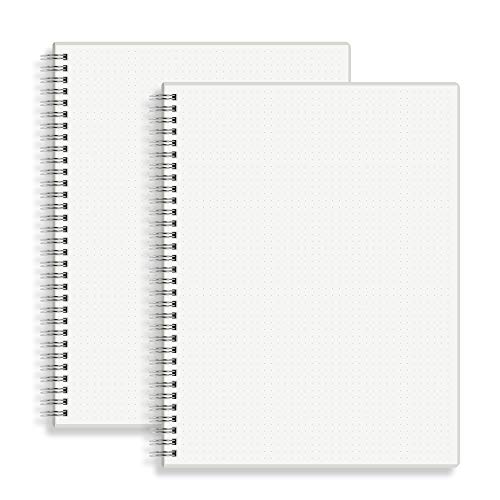
- Large 8.5" x 11" dotted pages for sketching wireframes and layouts
- Premium 100gsm ivory white paper with sturdy see-through cover
- Practical 2-pack gift for UI designers who plan ideas on paper
Best For: UI designers who sketch wireframes and layout ideas.
Tablet Sketching Aid
MEKO 3-in-1 Universal Touchscreen Stylus

- A practical Apple Pencil alternative for UI designers who sketch or take notes on tablets.
- Includes fine tips in 3 sizes with high sensitivity for touchscreen use.
- Broad compatibility works across iPad, iPhone, Switch, and other touch devices.
Best For: UI designers using tablets for sketching or note-taking.
Late-Night Desk Lighting
Lepro LED Desk Lamp with 5 Color Modes

- A flexible desk lamp for UI designers who work late and want adjustable lighting.
- Offers 5 color modes and 5 brightness levels for a more comfortable setup.
- A clear home-office gift with broad appeal and eye-caring task-light functionality.
Best For: UI designers who need flexible lighting for long work sessions.
Screen Fatigue Relief
livho Blue Light Blocking Computer Glasses
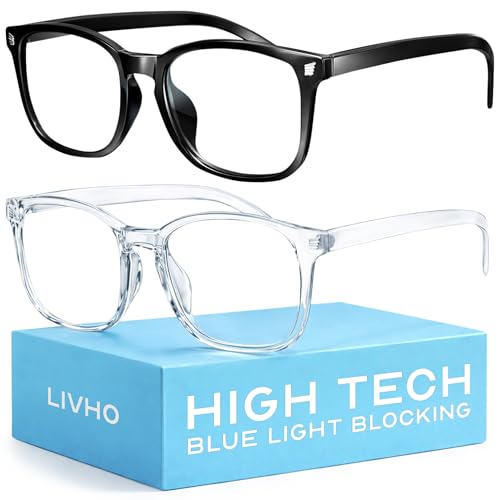
- A straightforward gift for UI designers who spend many hours in front of screens.
- Designed to help with screen fatigue and UV protection during long computer sessions.
- Strong review volume and broad everyday usefulness make it easy to gift.
Best For: UI designers who want screen-time comfort during long workdays.
Focus-Boosting Audio Gift

- Active noise cancelling helps UI designers block out office or home distractions.
- Over-ear Bluetooth design fits work, travel, and long focus sessions.
- A well-known, highly reviewed gift with broad appeal at a reasonable price point.
Best For: UI designers who need focus in open offices or shared homes.
Multi-Display Desk Hub
Anker 8-in-1 USB-C Docking Station

- Dual-monitor support makes it a strong fit for designers with multiple displays.
- Adds Ethernet, SD/TF, and USB-C expansion for a more capable desk setup.
- A reliable, giftable hub for UI designers with multiple peripherals and devices.
Best For: UI designers with multiple peripherals and displays.
Clean Desk Planning
SKYDUE Small Desk Calendar 2026-2027

- Minimalist black desk calendar fits a clean workspace aesthetic
- To-do and notes sections support visual planning
- Includes 280 planner stickers for extra organization
Best For: UI designers who like visual planning and clean desk aesthetics.
How to Choose the Right Gift for a UI Designer
The best Gift Ideas for UI Designers usually solve a real day-to-day problem. Think about how they work: long hours at a screen, lots of visual judgment, constant switching between tools, and a desk setup that needs to stay organized. A good gift should make that experience smoother, more comfortable, or more inspiring.
If you are unsure where to start, match the gift to their workflow. A designer who spends all day refining layouts may appreciate a monitor light, a desk mat, or a better keyboard wrist rest. Someone who sketches concepts or takes notes might prefer a notebook, fineliners, or a drawing tablet. If they work remotely or travel often, a portable monitor, laptop stand, or USB-C hub can be especially useful.
Budget Considerations for Gift Ideas for UI Designers
You do not need a huge budget to give something thoughtful. Small accessories like cable organizers, desk accessories, blue light glasses, or a calendar can be both affordable and genuinely useful. Mid-range gifts often hit the sweet spot for designers, especially items that improve comfort or productivity such as an ergonomic mouse, wrist rest set, or monitor lamp.
For a larger budget, consider higher-impact upgrades like a curved ultrawide monitor, a portable monitor, a docking station, or a color calibration tool. These are the types of gifts that can meaningfully improve a designer’s setup and daily output. If you are buying for a team gift exchange, a practical accessory is often the safest choice; for a close friend or partner, a bigger workstation upgrade can feel extra special.
Personalization Tips That Make the Gift Feel More Thoughtful
UI designers tend to appreciate gifts that feel intentional, clean, and design-forward. Neutral colors, minimalist finishes, and premium materials usually work well. You can also personalize the gift based on their style: a dark desk mat for a sleek setup, a sketchbook for a visual thinker, or a Pantone color guide for someone who lives and breathes branding.
Another easy way to personalize Gift Ideas for UI Designers is to pair a main gift with a small add-on. For example, combine a monitor lamp with a notebook, or a mouse pad with wrist support. That creates a more complete desk upgrade without making the gift feel overly complicated.
Choose Tools That Fit Their Workflow
Not every designer needs the same thing. A visual UI professional working on interfaces and prototypes may benefit from a stylus, graphics tablet, or webcam for meetings. A designer focused on screen accuracy may appreciate a monitor calibrator or color reference guide. Thinking about their actual tasks will help you pick a gift they will use often.
Last-Minute Buying Advice
If you are shopping late, choose gifts with broad appeal and easy compatibility. USB-C hubs, desk lights, headphones, notebooks, calendars, and ergonomic accessories are usually safe bets because they work across many setups. Check device compatibility, return policies, and delivery timing before buying, especially for electronics.
When in doubt, go for something useful, modern, and easy to enjoy right away. The best gifts for UI designers are the ones that make the desk feel better on day one and keep paying off through every project after that.