As you navigate the fast-paced world of technology in 2026, finding the right Razer Thunderbolt dock can greatly enhance your workspace. With options that boast multiple ports and support for dual 4K displays, each dock brings unique features to the table. But how do you choose the best one for your needs? Let’s explore the top contenders that promise to power up your setup and keep you ahead of the curve.
Razer Thunderbolt 5 Dock Chroma 11 Port Docking Station

The Razer Thunderbolt 5 Dock Chroma 11 Port Docking Station is the perfect choice for power users who demand high-performance connectivity and versatility. With 11 ports, including multiple Thunderbolt 5 options and an M.2 SSD storage slot, it’s designed to enhance your productivity. You’ll enjoy lightning-fast transfer speeds of up to 120 Gb/s and support for triple 4K displays at 144 Hz or an 8K display at 60 Hz. Plus, the 140W power delivery guarantees your Thunderbolt 5 laptops stay charged. Its active cooling system keeps everything running smoothly, making this dock a must-have for serious tech enthusiasts.
Best For: Power users and tech enthusiasts who require high-performance connectivity and extensive display capabilities.
Pros:
- High-Speed Transfer: Offers lightning-fast data transfer speeds of up to 120 Gb/s.
- Versatile Display Support: Can support triple 4K displays at 144 Hz or a single 8K display at 60 Hz.
- Robust Power Delivery: Provides 140W power delivery to keep Thunderbolt 5 laptops charged and operational.
Cons:
- Price Point: May be considered expensive compared to standard docking stations.
- Size and Weight: The docking station may be larger and heavier than other portable options.
- Limited Compatibility: Primarily designed for Thunderbolt 5 devices, which may limit its use with older laptops.
Razer Thunderbolt 4 Dock with 10 Ports

Designed for professionals and gamers alike, the Razer Thunderbolt 4 Dock with 10 Ports offers unparalleled connectivity and versatility. With four Thunderbolt 4 ports, you can connect multiple devices effortlessly, supporting dual 4K or single 8K video output. It features a USB-A and C hub, Gigabit Ethernet, a 3.5 mm audio jack, and a UHS-II SD card slot, ensuring you’re covered for all your needs. The dock’s 40 Gbps data transfer rate and pass-through charging keep your devices powered. Compatible with both Mac and PC, it provides flexibility for past and present technology, making it a must-have for your setup.
Best For: Professionals and gamers seeking a versatile docking solution with extensive connectivity options for their Mac or PC setups.
Pros:
- High-speed connectivity with 40 Gbps data transfer rate for efficient data management.
- Multiple display support, allowing for dual 4K or single 8K video output for enhanced visual experience.
- Wide compatibility with Thunderbolt 4 and legacy devices, ensuring future-proofing for various technology setups.
Cons:
- Limited charging capability may not support all high-power laptops.
- Weight of 0.75 pounds may be less portable for users needing a lightweight solution.
- Customer reviews indicate mixed feedback with an average rating of 3.8 out of 5 stars.
Razer USB 4 Dock with 14 Ports (Type C, Type A, HDMI, DP, Ethernet, SD, 3.5mm)

For tech enthusiasts and professionals who demand versatility, the Razer USB 4 Dock with 14 ports is a game-changer. Boasting Type C, Type A, HDMI, DisplayPort, Ethernet, SD, and 3.5mm connections, it supports multiple devices through a single USB-C connection. You can enjoy dual monitor support at up to 4K 120 Hz, while the lightweight aluminum casing guarantees durability. With 100 W power delivery and a 180 W adapter, fast charging is a breeze. Plus, its compact design minimizes cable clutter, making it perfect for any workspace. Experience seamless connectivity and efficiency with this powerhouse dock.
Best For: Tech enthusiasts and professionals seeking versatile connectivity and fast charging capabilities in a compact design.
Pros:
- Supports dual monitors with up to 4K 120 Hz for enhanced productivity.
- 100 W power delivery allows for fast charging of laptops and devices.
- Durable aluminum casing ensures longevity and minimal heat buildup during extended use.
Cons:
- Minimum OS requirement of Windows 11 may limit compatibility with older systems.
- Compact design may not accommodate larger or bulkier connectors easily.
- Best Sellers Rank of #216 suggests it may not be the top choice among USB hubs.
Razer Thunderbolt 5 Docking Station

With its impressive support for triple 4K displays at 144 Hz, the Razer Thunderbolt 5 Docking Station stands out as the ultimate choice for creatives and gamers alike. It features 11 ports, including multiple Thunderbolt 5 connections and a UHS-II SD card slot, ensuring you’ve got all the connectivity options you need. You’ll enjoy blazing-fast transfer speeds of up to 120 Gb/s and power delivery of up to 140W for your laptop. Plus, with the M.2 SSD slot supporting up to 8TB, you can store massive files easily. Its active cooling system keeps everything running smoothly during intense sessions.
Best For: Creatives and gamers seeking a high-performance docking station with extensive connectivity and display support.
Pros:
- Impressive triple 4K display support at 144 Hz, ideal for multitasking and high-resolution content.
- Fast transfer speeds of up to 120 Gb/s and 140W power delivery, enhancing productivity and device charging.
- M.2 SSD slot supporting up to 8TB, allowing for vast storage options tailored for large files and applications.
Cons:
- Moderate customer review rating of 3.6 out of 5 stars, indicating mixed user experiences.
- Limited availability of Thunderbolt 5 devices, which may restrict full utilization of the dock’s capabilities.
- Active cooling system may introduce additional noise during operation, which could be disruptive in quiet environments.
Razer Thunderbolt 4 Dock with 10 Ports
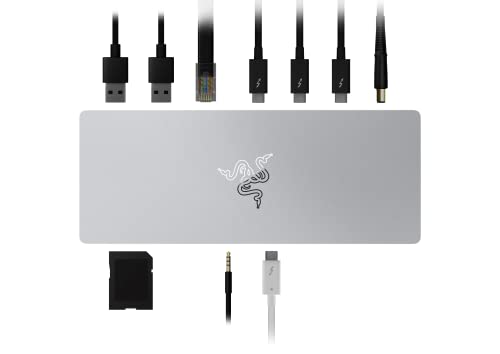
The Razer Thunderbolt 4 Dock with 10 ports is perfect for tech enthusiasts who demand versatility and high performance. With four Thunderbolt 4 ports, Gigabit Ethernet, and multiple USB-A 3.2 Gen 2 ports, it connects all your devices effortlessly. You can enjoy dual monitor setups with stunning visuals, supporting up to 2x 4K 120Hz displays or 1x 5K display. It also allows for pass-through charging, keeping your laptop powered while you work. Designed to be future-proof, this dock guarantees compatibility with evolving technology, making it a reliable choice for years to come. Experience seamless connectivity and efficiency today!
Best For: Tech enthusiasts and professionals who require versatile connectivity and high performance for multiple devices and displays.
Pros:
- Supports dual monitor setups with up to 2x 4K 120Hz displays or 1x 5K display for enhanced productivity.
- Pass-through charging keeps your laptop powered while using the dock, eliminating the need for multiple chargers.
- Future-proof design ensures compatibility with evolving technology, making it a long-term investment.
Cons:
- Higher price point compared to standard docks, which may not suit budget-conscious users.
- Requires Thunderbolt 4 compatible devices to fully utilize its capabilities, limiting its use with older hardware.
- Size and weight may be less portable, making it less ideal for users who need a travel-friendly solution.
Razer USB 4 Dock with 14 Ports (Type C, Type A, HDMI, DP)

Designed for professionals and gamers alike, the Razer USB 4 Dock boasts an impressive 14 ports, including Type C, Type A, HDMI, and DP, making it an essential tool for those seeking a versatile and efficient docking solution. With ultra-fast USB 4 connectivity, it supports dual monitors at up to 4K 120 Hz, enhancing your productivity and gaming experience. Its durable aluminum casing guarantees longevity, while the 100 W power delivery fast-charges your devices. Plus, the dedicated power button helps save energy. Backed by a 2-year warranty, this dock is a reliable addition to any setup.
Best For: Professionals and gamers seeking a versatile docking solution with extensive connectivity options.
Pros:
- Supports dual monitors up to 4K 120 Hz for enhanced productivity and gaming.
- Durable aluminum casing ensures longevity and resistance to wear and tear.
- 100 W power delivery for fast charging of laptops and phones.
Cons:
- Minimum required operating system is Windows 11, limiting compatibility with older systems.
- Higher price point compared to simpler docking solutions.
- May be overkill for users with fewer devices needing connection.
Razer Thunderbolt 4 Dock (Renewed)

For those seeking a powerful, versatile docking solution, the Razer Thunderbolt 4 Dock (Renewed) stands out as an exceptional choice. With 10 ports, including an HDMI option, you can connect multiple displays, supporting dual 4K or a single 8K output. This dock offers high-speed data transfer and pass-through charging, so you can power your USB-C laptop and connected devices with one cable. It’s compatible with USB 4 and legacy Thunderbolt devices across Windows and Mac systems. Plus, it’s been professionally inspected to look and work like new, backed by an Amazon Renewed Guarantee for your peace of mind.
Best For: Users looking for a high-performance docking solution with extensive connectivity options for dual displays and fast charging capabilities.
Pros:
- High-speed data transfer capabilities enhance productivity with quick file transfers.
- Supports dual 4K or single 8K display output, making it ideal for graphic-intensive tasks.
- Pass-through charging allows you to power devices and charge laptops simultaneously through one connection.
Cons:
- Limited warranty period of 90 days may not provide enough assurance for long-term use.
- Average customer rating of 3.6 out of 5 stars suggests mixed user experiences.
- Not compatible with smart home devices, limiting its versatility for integrated setups.
Belkin Thunderbolt 3 Dock Pro with Thunderbolt 3 Cable

Looking for a powerful docking solution that enhances your productivity? The Belkin Thunderbolt 3 Dock Pro is just what you need. With 12 versatile ports, including Thunderbolt, USB-A, USB-C, Ethernet, SD, and audio, it’s compatible with both MacOS and Windows. You can connect dual 4K monitors at 60Hz for an expansive workstation. Plus, its 170W power supply provides up to 85W upstream charging for your laptop, keeping everything powered without extra cables. Included is a 2.6ft Thunderbolt cable, perfect for flexible desk setups. Experience lightning-fast 40Gbps transfer speeds and elevate your work efficiency with this impressive dock.
Best For: Professionals and creatives seeking a high-performance docking station to enhance productivity with multiple connections and dual 4K monitor support.
Pros:
- 12 versatile ports for connecting various peripherals, including Thunderbolt, USB-A, and USB-C.
- Supports dual 4K monitors at 60Hz for an expansive and efficient workstation setup.
- Provides up to 85W upstream charging to keep your laptop powered without additional cables.
Cons:
- Higher price point compared to standard USB hubs and docks.
- Requires a Thunderbolt 3 or USB-C compatible laptop for full functionality.
- Limited to 2.6ft cable length, which may restrict placement options in larger setups.
Razer USB C Dock 11-Port Travel Charging Station

The Razer USB C Dock 11-Port Travel Charging Station is perfect for tech-savvy professionals and gamers who need versatility on the go. With its 11 ports, you can connect everything from laptops to tablets effortlessly. Enjoy stunning 4K display output at 60 Hz and Full HD gaming at 240 Hz through HDMI. Plus, the advanced 7.1 surround sound audio jack enhances your audio experience. With 85 W power delivery, you can charge your laptop while powering other devices. Built from durable aluminum alloy, it’s designed for travel and desktop use, backed by a 2-year warranty for peace of mind.
Best For: Tech-savvy professionals and gamers needing a versatile charging and connectivity solution while on the go.
Pros:
- Supports 4K display output at 60 Hz and Full HD gaming at 240 Hz for an enhanced visual experience.
- 85 W power delivery allows for simultaneous charging of laptops and other devices.
- Durable aluminum alloy construction ensures strength and thermal management, making it ideal for travel.
Cons:
- USB charging cable and adapter are not included, which may require additional purchases.
- May be considered bulky compared to simpler, single-port chargers.
- Limited compatibility with some older devices that do not support USB-C.
Razer Handheld Dock Chroma for Mobile Gaming & Tablets

Mobile gamers and tablet enthusiasts seeking seamless connectivity will find the Razer Handheld Dock Chroma an indispensable accessory. This versatile docking station supports devices like the iPhone 16, Steam Deck, ROG Ally, and Switch. With its fully loaded 6-port design, you get HDMI 2.0 for big-screen gaming, three USB A ports for controllers, and a 1 GB ethernet port for stable connections. Its lightweight, portable design features a collapsible chassis and adjustable hinge for ideal viewing angles. Plus, the 100 W power delivery guarantees your devices stay charged while gaming, all enhanced by customizable Razer Chroma RGB lighting.
Best For: Mobile gamers and tablet enthusiasts looking for a versatile and portable docking station to enhance their gaming experience.
Pros:
- Fully loaded 6-port design allows for multiple connections and big-screen gaming.
- Lightweight and collapsible design makes it easy to transport and set up.
- 100 W power delivery ensures devices remain charged during intense gaming sessions.
Cons:
- May be too specialized for users who do not game on mobile devices or tablets.
- The price point might be higher compared to standard docking stations.
- Limited compatibility with some older devices that do not support HDMI 2.0 or USB A connections.
Factors to Consider When Choosing Razer Thunderbolt Docks
When choosing a Razer Thunderbolt dock, you’ll want to take into account several key factors. Think about the variety and configuration of ports, as well as performance and speed to guarantee it meets your needs. Don’t forget power delivery capability, compatibility with your devices, and the overall design and build quality.
Port Variety and Configuration
Selecting the right Razer Thunderbolt dock involves careful consideration of port variety and configuration, as these factors directly impact your connectivity options. First, look at the total number of ports; options can range from 10 to 14, providing ample connections for your devices. Evaluate the types of ports included, such as Thunderbolt, USB-A, USB-C, HDMI, and Ethernet, which determine the peripherals you can connect. Specialized ports like SD card slots and M.2 SSD storage slots can enhance your workflow with faster data transfer and additional storage. Don’t forget to assess display capabilities, ensuring you can connect multiple 4K or 8K displays for improved productivity and gaming. Finally, check power delivery specifications to keep your devices charged during heavy use.
Performance and Speed
To guarantee your Razer Thunderbolt dock meets your performance needs, consider its transfer speeds and display capabilities. Thunderbolt docks can achieve transfer speeds up to 120 Gb/s, enabling rapid data exchange for seamless operation. Look for models with high-speed data transfer rates, like 40 Gbps, which are essential for smooth streaming and quick file access—especially for professionals and gamers. Additionally, check the display capabilities; some docks support resolutions up to 8K at 60 Hz or triple 4K displays at 144 Hz, catering to your high-performance visual needs. If you’re working with heavy workloads, consider docks with active cooling systems to maintain peak performance and prevent overheating during extended usage sessions.
Power Delivery Capability
While high performance and speed are essential for ideal operation, power delivery capability also plays a significant role in your choice of a Razer Thunderbolt dock. The maximum wattage a dock can provide directly affects charging speed and efficiency. Opting for a dock with higher power delivery, like 140W or 100W, guarantees faster charging of your laptop and devices, keeping them powered during intensive tasks. Verify the dock is compatible with power delivery standards, such as USB PD, to prevent any damage to your devices. Docks supporting pass-through charging allow you to charge your laptop while powering peripherals, enhancing usability. Always consider the total power requirements of your devices to avoid performance drops.
Compatibility With Devices
Ensuring your Razer Thunderbolt dock is compatible with your devices is essential for seamless operation. Start by checking the compatibility with your operating system; some docks work with both Mac and PC, while others may have specific requirements. Next, examine the number and types of ports available, ensuring they correspond with your devices, whether Thunderbolt, USB-A, HDMI, or Ethernet. It’s also important to confirm the dock supports the necessary video output resolutions and refresh rates, especially if you plan on using dual or triple monitors. Additionally, look for backward compatibility with older Thunderbolt and USB standards to connect legacy devices. Finally, verify the power delivery specifications to make sure the dock can charge your laptop while powering peripherals.
Design and Build Quality
After confirming your Razer Thunderbolt dock’s compatibility with your devices, the next area to focus on is its design and build quality. Consider a durable aluminum casing that resists wear and tear while aiding thermal management during extended use. A compact and lightweight design enhances portability, making it perfect for both your desktop setup and travel needs. Assess the dock’s footprint—an effective design minimizes cable clutter and guarantees easy access to all ports. Features like adjustable hinges or collapsible designs can improve usability in various settings. Finally, verify the dock includes active cooling systems to maintain peak performance during heavy workloads and prevent overheating. These factors will greatly enhance your overall experience.