If you need serious desktop storage, a 5 bay hard drive RAID enclosure is one of the most flexible ways to build a high-capacity setup at home or in a small office.
This roundup focuses on models that balance speed, capacity, cooling, and RAID support so you can choose the right enclosure for backups, media libraries, or active work files.
Best 10 5 Bay Hard Drive Raid Enclosure Picks for 2026
Best for RAID Workflows
Yottamaster 5-Bay RAID Enclosure

- RAID 0/1/5/10, JBOD, CLONE, and normal mode
- Supports 2.5-inch and 3.5-inch SATA HDDs/SSDs
- Up to 120TB total capacity with aluminum cooling
Best For: Video creators, small studios, and power users who want configurable RAID storage.
Best for Large-Scale Expansion
ORICO 5-Bay 10Gbps Aluminum Enclosure

- Up to 110TB in five bays, 330TB with daisy-chaining
- 10Gbps USB 3.2 Gen 2 for fast transfers
- 150W PSU plus 80mm fan for steady cooling
Best For: Creators and power users needing expandable multi-drive storage with fast USB-C connectivity.
Best for RAID Flexibility

- 8 RAID modes for flexible backup setups
- Up to 88TB total capacity with 22TB drives
- 150W power supply and 80mm fan for cooling
Best For: Users who want a flexible multi-drive enclosure for backup, media storage, and RAID-based data protection.
Best for Small Spaces
CENMATE 4-Bay Aluminum RAID Enclosure

- 8 RAID modes for backup, cloning, and performance tuning
- Aluminum case with cooling fan for better drive stability
- USB 3.0 A/C and eSATA support for broad compatibility
Best For: Users who want a flexible DAS enclosure for mixed SATA drives and RAID storage.
Best for Easy Setup
Syba 5-Bay USB/eSATA RAID Enclosure
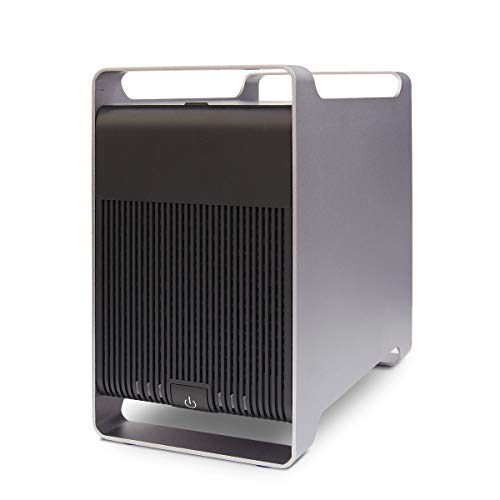
- RAID 0/1/3/5/10, SPAN, and JBOD support
- Up to 120TB total with 24TB drives
- Tray-less bays for faster drive swaps
Best For: Buyers who want a flexible multi-RAID enclosure for backups, media, or mixed-drive storage.
Best for Everyday Use
- Supports RAID 0, 1, 3, 5, 10, JBOD, Clone, and ClearMode
- Up to 5 x 22TB drives for massive external storage
- Built-in 150W PSU and 80mm fan for steadier operation
Best For: Creators and power users who need a configurable multi-drive enclosure with big capacity and RAID options.
Best for Easy Expansion
CENMATE 4-Bay Aluminum HDD Enclosure

- Tool-free, hot-swappable drive access
- Aluminum build with cooling fan
- USB 3.0 with UASP for faster transfers
Best For: Users who need simple multi-drive external storage without RAID setup.
Best with Extra Features

- 8 RAID options, including RAID 5, 10, JBOD, and clone mode
- Up to 22TB per drive for substantial storage expansion
- Silent cooling fan and aluminum case for better heat control
Best For: Users who want flexible RAID modes and high-capacity desktop storage.
Best Non-RAID DAS Pick
Yottamaster 5-Bay USB 3.0 Enclosure

- Up to 120TB across five SATA drives
- Aluminum build with auto-cooling fan
- 150W PSU suits larger-capacity drives
Best For: Users who want high-capacity direct-attached storage without hardware RAID.
Best for Flexible RAID Workflows
Yottamaster 5-Bay RAID USB-C Enclosure

- RAID 0/1/3/5/10, JBOD, and CLONE support
- Up to 110TB total capacity with five 22TB drives
- Aluminum shell with auto-speed cooling fan
Best For: Creators and small teams needing configurable direct-attached RAID storage.
Best for RAID Workflows – Yottamaster 5-Bay RAID Enclosure
If you need a 5 bay hard drive raid enclosure for serious storage expansion, the Yottamaster FS5RU3 is built for multi-drive capacity, flexible RAID modes, and everyday use in editing, backup, and archive workflows. It supports up to 120TB total and works with both 2.5-inch and 3.5-inch SATA HDDs/SSDs.
Best For: Video creators, small studios, and power users who want configurable RAID storage with room to grow.
Pros:
- Supports RAID 0/1/5/10, JBOD, CLONE, and normal mode
- Fits both 2.5-inch and 3.5-inch SATA HDDs/SSDs
- Up to 120TB capacity across five drive bays
- Aluminum body, built-in 80mm fan, and ventilation for cooling
Cons:
- USB 3.0 tops out at 5Gbps, so it is not the fastest option for large transfers
- RAID setup may be more than casual users need
Overall, this 5 bay hard drive raid enclosure stands out for its RAID flexibility and strong cooling in a straightforward DAS design. It is a practical choice when you want centralized storage without moving up to a full NAS.
Best for Large-Scale Expansion – ORICO 5-Bay 10Gbps Aluminum Enclosure
If you need a 5 bay hard drive raid enclosure for growing media libraries, backups, or multi-drive workflows, this ORICO model stands out for its huge expansion potential and practical hot-swap design. It supports 2.5-inch and 3.5-inch SATA HDDs and SSDs, runs over USB 3.2 Gen 2 at up to 10Gbps, and is built to stay stable under heavier workloads.
Best For: Editors, creators, and power users who want a roomy external enclosure with fast USB-C connectivity and easy drive swapping.
Pros:
- Up to 110TB across five bays, with 330TB possible via daisy-chaining.
- Independent bays with single-drive eject support for easier maintenance.
- 150W internal PSU helps keep multi-drive operation steady.
- Aluminum chassis and 80mm fan improve cooling for long sessions.
Cons:
- Does not include a built-in hardware RAID controller.
- Large footprint is less ideal for tight desks or portable setups.
- Designed more for expansion than for a simple plug-and-forget NAS replacement.
Overall, this is a strong 5 bay hard drive raid enclosure alternative for users who care more about capacity, speed, and flexibility than built-in RAID management. If your priority is scaling storage quickly with reliable cooling and easy swapping, it is an easy unit to shortlist.
Best for RAID Flexibility – ORICO 4-Bay RAID Enclosure
If you want a practical 5 bay hard drive raid enclosure alternative for expandable desktop storage, this ORICO 4-bay model stands out for its RAID variety, solid cooling, and high capacity support. It’s a good fit when you need configurable redundancy for backups, media files, or project data without moving up to a larger NAS setup.
Best For: Users who want a flexible multi-drive enclosure for backup, media storage, and RAID-based data protection.
Pros:
- Supports 8 RAID modes, including RAID 0, 1, 3, 5, 10, JBOD, CLONE, and CLEAR.
- Handles up to 88TB total capacity with 22TB per 3.5-inch SATA drive.
- Built-in 150W power supply and 80mm cooling fan help keep multi-drive operation stable.
- Aluminum housing and trayless design make drive handling simpler and sturdier.
Cons:
- Only a 4-bay enclosure, so it may not match true 5-bay capacity needs.
- USB 3.0 speeds are good, but not ideal for users expecting faster modern interfaces.
- RAID setup may be more than casual users need for simple plug-and-play storage.
For buyers comparing a 5 bay hard drive raid enclosure, this ORICO unit is a strong pick if RAID options and cooling matter more than raw bay count. It offers a balanced mix of backup protection, capacity, and everyday usability for desktop storage builds.
Best for Small Spaces – CENMATE 4-Bay Aluminum RAID Enclosure
If you want a practical 5 bay hard drive raid enclosure alternative for a smaller desktop setup, this CENMATE 4-bay unit is built for people who need flexible RAID options without moving to a full NAS. It supports 2.5/3.5-inch SATA HDDs and SSDs, up to 80TB total, and gives you multiple RAID modes for backup, cloning, and speed-focused storage.
Best For: Users who want an affordable DAS enclosure with RAID modes, USB/eSATA connectivity, and support for mixed-size SATA drives.
Pros:
- 8 RAID modes, including RAID 0/1/3/5/10 plus clone and JBOD-style options
- Aluminum body and cooling fan help with long-session drive stability
- USB 3.0 A/C and eSATA support make it easy to connect to older or newer systems
- Up to 80TB capacity is plenty for backups and media storage
Cons:
- Only 4 bays, so it is not a true 5 bay hard drive raid enclosure
- Fan noise may bother users who want a very quiet workspace
- RAID changes require careful switching and can cause data loss if handled incorrectly
This is a strong pick if you value RAID flexibility and straightforward DAS expansion over NAS features. For shoppers comparing a 5 bay hard drive raid enclosure, it stands out as a simpler, more compact option that still covers the core storage and redundancy needs.
Best for Easy Setup – Syba 5-Bay USB/eSATA RAID Enclosure
If you need a versatile 5 bay hard drive raid enclosure that can handle everything from simple JBOD storage to RAID 0, 1, 5, and 10, the Syba SY-ENC50122 is built for flexibility. It supports both 2.5-inch and 3.5-inch SATA drives, up to 24TB per drive, and offers USB 3.0 plus eSATA connectivity for a wide range of setups.
Best For: Buyers who want a feature-rich enclosure for backups, shared media libraries, or mixed-drive RAID setups.
Pros:
- Supports RAID 0/1/3/5/10, SPAN, and JBOD for multiple storage layouts
- Fits both 2.5-inch and 3.5-inch SATA drives up to 120TB total capacity
- Tray-less design makes drive swaps and installation quick and simple
- USB 3.0 with UASP support helps maximize transfer performance
Cons:
- eSATA multi-drive access depends on a compatible port multiplier setup
- Not the most plug-and-play option if you’re new to RAID configuration
This 5 bay hard drive raid enclosure stands out if you want broad RAID support and flexible drive compatibility in one box. It’s especially appealing for users who care more about storage modes, capacity, and easy drive access than compact size.
Best for Everyday Use – ORICO 5-Bay RAID Enclosure
If you want a 5 bay hard drive raid enclosure that can handle backups, media storage, and configurable redundancy, the ORICO 9958RU3 is built around flexibility. It supports RAID 0, 1, 3, 5, 10, JBOD, Clone, and ClearMode, while also handling up to 22TB per drive for serious expansion.
Best For: Creators, power users, and small office setups that need a configurable multi-drive enclosure for large-capacity storage and backup planning.
Pros:
- Wide RAID support, including RAID 5 and RAID 10 for safer storage setups
- Holds 2.5/3.5-inch SATA HDDs or SSDs up to 110TB total capacity
- Built-in 150W power supply helps keep multi-drive operation stable
- Aluminum shell and 80mm fan improve cooling under heavier workloads
Cons:
- USB 3.0 is solid, but not as fast as newer USB-C or Thunderbolt enclosures
- Advanced RAID options may be more than casual users need
Overall, this 5 bay hard drive raid enclosure stands out for buyers who want lots of RAID modes and high-capacity support in one external box. It is especially appealing if you need one enclosure to cover both performance-oriented and redundancy-focused storage jobs.
Best for Easy Expansion – CENMATE 4-Bay Aluminum HDD Enclosure
If you want a simple way to turn multiple SATA drives into a desktop storage hub, this 5 bay hard drive raid enclosure-style pick is a practical DAS option to consider. It supports 2.5-inch and 3.5-inch HDDs or SSDs, offers hot-swappable, tool-free drive access, and keeps things straightforward with USB 3.0 connectivity instead of RAID complexity.
Best For: Users who want a plug-and-play multi-drive enclosure for backups, media libraries, or office storage without RAID setup.
Pros:
- Tool-free, hot-swappable bay design makes drive changes easy
- Aluminum body plus cooling fan helps manage heat during longer use
- USB A/C 3.0 support and UASP help speed up transfers
- Works with 2.5-inch and 3.5-inch SATA HDDs and SSDs
Cons:
- No RAID or NAS features, so it is not for redundancy or network sharing
- Fan noise may bother users who need a very quiet setup
- Only four bays, so it is not ideal if you specifically need five-drive support
Overall, this is a solid choice if your priority is simple, direct-attached storage rather than a full 5 bay hard drive raid enclosure. It fits best in workflows where ease of use, cooling, and fast USB access matter more than advanced RAID control.
Best with Extra Features – ORICO 4-Bay RAID Enclosure
If you want a 5 bay hard drive raid enclosure-style storage solution with serious configuration options, this ORICO 4-bay model is built for users who care more about RAID flexibility and capacity than sheer bay count. It supports RAID 0, 1, 3, 5, 10, JBOD, CLONE, and CLEAR, making it a strong fit for backup-heavy workflows, media libraries, and small production setups.
Best For: Home users, creators, and IT-minded buyers who want flexible RAID modes, fast USB 3.0 transfers, and high-capacity storage in a desktop enclosure.
Pros:
- Supports multiple RAID modes, including RAID 5, 10, JBOD, and clone mode
- Handles up to 22TB per drive for a large total storage ceiling
- USB 3.0 connection delivers up to 5Gbps transfer speeds for faster backups
- Quiet 80mm fan and aluminum housing help manage heat during long sessions
Cons:
- Only 4 bays, so it is not a true 5-bay enclosure
- RAID mode changes require caution and a separate backup first
- Desktop footprint and external power supply make it less travel-friendly
For buyers comparing a 5 bay hard drive raid enclosure, this ORICO stands out more for RAID versatility and practical speed than raw bay count. It is a smart choice if you can work with four drives and want dependable expansion, cooling, and data protection in one unit.
Best Non-RAID DAS Pick – Yottamaster 5-Bay USB 3.0 Enclosure
If you want a practical 5 bay hard drive raid enclosure alternative for large-capacity storage without the complexity of hardware RAID, the Yottamaster FS5U3 is built for straightforward DAS use. It supports up to 120TB across five SATA drives, includes a 150W power supply, and uses an aluminum body with active cooling to help keep drives stable during long transfers.
Best For: Creators, backup-heavy users, and small office setups that need simple multi-drive storage with easy drive access.
Pros:
- Supports up to 5 x 24TB drives for 120TB total capacity
- Plug-and-play USB 3.0 connection with SATA III support
- Aluminum chassis, removable trays, and automatic cooling fan
- 150W power supply helps handle larger enterprise drives
Cons:
- No hardware RAID, so it is not a true RAID enclosure
- Bulkier than single-bay or compact desktop storage
- Software RAID setup depends on your operating system
As a 5 bay hard drive raid enclosure option, this model is really about capacity, cooling, and simplicity rather than built-in redundancy. If you can live without hardware RAID, it delivers a solid mix of storage scale and easy day-to-day use.
Best for Flexible RAID Workflows – Yottamaster 5-Bay RAID USB-C Enclosure
If you need a practical 5 bay hard drive raid enclosure for backups, media storage, or a small editing setup, the Yottamaster PS500RC3 gives you plenty of room to grow. It supports up to 110TB across 3.5-inch and 2.5-inch SATA drives, plus multiple RAID modes so you can balance speed, redundancy, and simplicity depending on the job.
Best For: Creators, IT users, and small teams that want flexible RAID options with easy USB-C direct-attached storage.
Pros:
- Supports RAID 0/1/3/5/10, JBOD, and CLONE for different storage needs
- Up to 110TB capacity with five 22TB drives
- Aluminum build and 80mm temperature-controlled fan help with cooling
- Works with both 2.5-inch and 3.5-inch SATA HDDs/SSDs
Cons:
- 5Gbps USB 3.1 speeds are fine for DAS use, but not as fast as higher-end interfaces
- Brand-new drives may need formatting before use
- High-power drives may require careful attention to the 78W power limit
Overall, this 5 bay hard drive raid enclosure stands out for buyers who want configurable RAID modes, broad drive compatibility, and a straightforward desktop DAS setup rather than a more complex network storage system.
How We Picked the Best 5 Bay Hard Drive Raid Enclosure
We focused on enclosures that offer practical capacity, useful RAID modes, and broad drive compatibility with 2.5-inch and 3.5-inch SATA HDDs or SSDs. We also prioritized build quality, thermal design, interface speed, and whether the enclosure makes sense for long-term storage use.
Quick Comparison
In simple terms, the main differences come down to connection speed, supported RAID levels, drive-size compatibility, and maximum per-bay or total capacity. USB 3.0 models are often enough for backup and archive tasks, while USB-C and USB 3.2 Gen 2 options are better if you want faster transfers and a more modern desktop workflow.
Key Buying Factors for a 5 Bay Hard Drive Raid Enclosure
RAID Mode Support
Look for the RAID levels you actually plan to use. RAID 0 can improve speed, RAID 5 offers a strong balance of usable capacity and redundancy, and JBOD is useful if you want each drive to appear separately. If you mainly want simple expansion, RAID flexibility matters less than easy setup.
Capacity and Drive Compatibility
Check both the total supported capacity and the maximum size per drive. Some enclosures support high overall totals but still cap individual bays. Make sure the enclosure supports the exact drive sizes you plan to install, especially if you mix 2.5-inch SSDs with 3.5-inch HDDs.
Cooling and Noise
A 5 Bay Hard Drive Raid Enclosure can generate heat quickly, especially with 3.5-inch drives. Aluminum bodies, active fans, and ventilation design help protect drive health during longer workloads. If the enclosure will sit near your desk, consider fan noise as part of the buying decision.
Connectivity and Real-World Speed
USB 3.0 is adequate for many users, but higher-speed interfaces are better for larger transfers and multi-drive workflows. Also consider whether you need USB-A, USB-C, or eSATA for your current system. The fastest enclosure only helps if your computer connection can keep up.
Who Should Buy Which 5 Bay Hard Drive Raid Enclosure?
If you want a simple backup or media storage box, choose a model with strong cooling, easy installation, and JBOD or basic RAID support. If redundancy matters most, prioritize RAID 5-capable enclosures with good thermal management. If you work with large files or move data often, select a USB-C or faster USB 3.2 Gen 2 enclosure with solid build quality. For users expanding an existing desktop storage workflow, the best 5 Bay Hard Drive Raid Enclosure is usually the one that matches your drive mix, noise tolerance, and RAID goals rather than the one with the highest headline capacity.