Choosing a silent PC case for workstation use is about more than just keeping noise down. The best options also protect sustained performance, support serious cooling, and make life easier during upgrades.
Below, we focus on cases that make sense for productivity builds first, with a practical eye on airflow, build quality, and compatibility for modern components.
Best 10 Silent PC Case for Workstation Picks for 2026
Best for Quiet Flexibility
be quiet! Silent Base 802 Black Case

- Swappable panels for silent or airflow-focused builds
- Thick insulation mats help cut down noise
- 3 pre-installed fans and USB-C front I/O
Best For: Quiet workstation builders who want flexible airflow and strong noise control.
Best for High-Airflow Workstation Builds
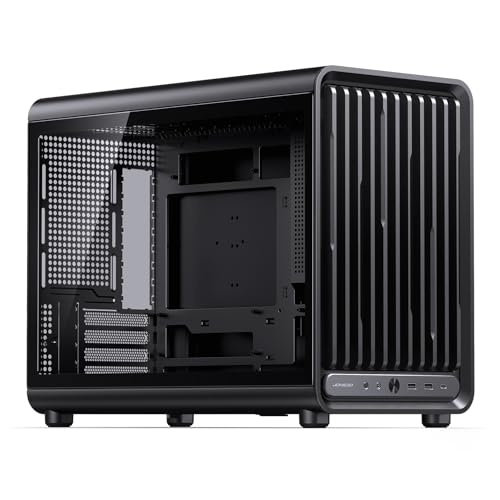
- 9 fan positions with 360mm AIO support
- Fits 435mm GPUs and 172mm air coolers
- Supports MATX BTF boards and ATX/SFX PSUs
Best For: Workstation builders who want a compact mATX case with strong cooling and big-component support.
Best for High-Airflow Builds

- Dual-chamber layout helps separate heat and cable clutter
- Six pre-installed PWM ARGB fans boost cooling right away
- Fits 360mm radiators and large GPUs for workstation builds
Best For: Workstation users who want strong cooling, clean routing, and room for big parts.
Best for Airflow-First Workstations
JONSBO D33 Wood Black MATX Case

- 9 fan mounts and 360mm AIO support
- Fits 435mm GPUs and tall CPU coolers
- MATX BTF support with wood-accent styling
Best For: Airflow-focused workstation builders who want compact MATX compatibility and high hardware clearance.
Best for Airflow-Conscious Workstations
be quiet! Pure Base 501 Black ATX Case

- Two 140mm PWM fans included for quiet, efficient airflow
- Fits high-end GPUs, large coolers, and up to 360mm front radiators
- Compact ATX layout with USB-C and optional vertical GPU support
Best For: Quiet workstation builders who want strong cooling in a compact ATX case.
Best for Legacy Drives

- ATX, mATX, and mini-ITX support
- 5.25-inch bay plus multiple drive mounts
- Pre-installed 120mm rear fan
Best For: Workstation builders who need legacy drive support and a simple, flexible case layout.
Best for Showcase Workstations
JONSBO D200 Curved Glass Micro-ATX Case
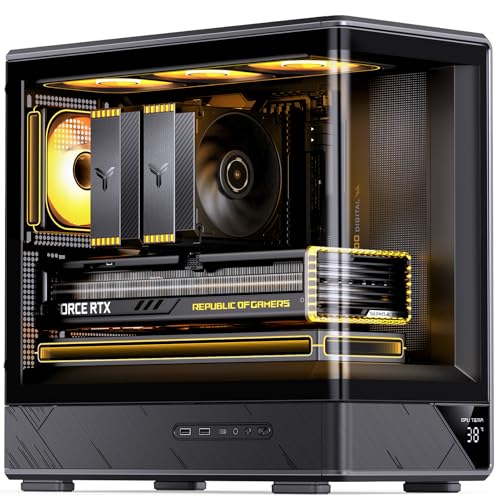
- 270° curved glass for a premium display look
- Supports GPU lengths up to 410mm and 240mm AIO cooling
- Digital temperature readout and flexible fan layout
Best For: Compact workstation builders who want a showpiece case with strong cooling potential.
Best for Airflow-Quiet Builds

- Three pre-installed RS ARGB PWM fans with Zero RPM mode
- High-airflow front panel supports cooler, quieter workstation use
- Modular FRAME and InfiniRail systems simplify future upgrades
Best For: Workstation builders who want quiet-leaning airflow and modular expandability.
Best for Compact, Airy Builds
Cooler Master Q300L Micro-ATX Case

- Perforated panels favor strong airflow in a small case
- Fits large GPUs and tall CPU coolers for workstation builds
- Modular I/O and dust filters improve placement and maintenance
Best For: Compact Micro-ATX or Mini-ITX workstations that need airflow and flexibility.
Best Airflow Pick
DARKROCK EC2 Black ATX Mid Tower

- Mesh front panel supports strong airflow for demanding parts
- Fits ATX, M-ATX, ITX boards and up to 340mm GPUs
- Type-C ready with dust filters and 360mm radiator support
Best For: Workstation builders who prioritize cooling, compatibility, and modern connectivity.
Best for Quiet Flexibility – be quiet! Silent Base 802 Black Case
The be quiet! Silent Base 802 is a strong silent pc case for workstation builds when you want low noise without giving up cooling headroom. Its interchangeable top and front panels let you choose between quieter operation and higher airflow, while the thick insulation helps keep system noise in check during long work sessions.
Best For: Creators, engineers, and professionals who want a quiet, configurable ATX case for a high-performance workstation.
Pros:
- Swappable panels support either silent operation or maximum airflow.
- Extra-thick insulation mats help reduce fan and component noise.
- Includes 3 pre-installed Pure Wings 2 fans for a solid out-of-box setup.
- Front I/O adds USB 3.2 Gen. 2 Type-C and fan control.
Cons:
- Not as compact as smaller mid-towers.
- Acoustic panels can slightly limit airflow in silence-focused mode.
For a silent pc case for workstation use, the Silent Base 802 stands out because it balances noise control with practical flexibility. If your build needs to stay quiet under load but still support powerful hardware, this case is an easy fit.
Best for High-Airflow Workstation Builds – JONSBO D33 Micro ATX Case
If you want a silent pc case for workstation use but still need serious cooling headroom, the JONSBO D33 is a strong fit for compact mATX builds. It focuses on airflow and hardware compatibility, making it a practical choice for creators who run long rendering sessions, large GPUs, or high-wattage components.
Best For: Workstation users who need a compact Micro-ATX case with space for powerful parts and strong cooling support.
Pros:
- Up to 9 fan positions and 360mm AIO support for robust thermal performance
- Fits large GPUs up to 435mm and CPU air coolers up to 172mm
- Supports MATX BTF boards plus ATX or SFX power supplies
- Aluminum-accented front panel gives it a cleaner, more premium look
Cons:
- Tempered glass and airflow-first design are not ideal for a true ultra-quiet build
- Best suited to mATX systems rather than full ATX workstations
- Fans are optional, so you may need to budget for extra cooling
Overall, the D33 is better for builders who prioritize cooling and expansion over absolute silence. If your idea of a silent pc case for workstation use includes keeping temperatures low under heavy loads, this case delivers the space and airflow to support that goal.
Best for High-Airflow Builds – FOIFKIN F1 PC Case
If you want a silent pc case for workstation use but still need strong cooling for a heavy-duty build, the FOIFKIN F1 is a practical pick. Its dual-chamber layout helps separate the PSU and drives from the main hardware area, while the included 6 PWM ARGB fans and 360mm radiator support give you plenty of thermal headroom for demanding parts.
Best For: Workstation buyers who want high airflow, tidy cable management, and room for large components without giving up a clean tempered-glass look.
Pros:
- Dual-chamber design improves airflow separation and cable routing
- Six pre-installed PWM ARGB fans provide strong out-of-box cooling
- Supports 360mm radiators, GPUs up to 400mm, and PSUs up to 200mm
- Type-C front I/O adds modern connectivity for daily use
Cons:
- Tempered-glass styling is more showpiece than stealthy silence
- Included RGB fans may be brighter than some workstation users prefer
- Mid-tower sizing is roomy, but not ideal for ultra-compact setups
Overall, the FOIFKIN F1 is better suited to airflow-first workstation builds than true noise-optimized cases. If your version of a silent pc case for workstation prioritizes cooler component temps and easier cable management over full acoustic damping, this case delivers a compelling balance of features and value.
Best for Airflow-First Workstations – JONSBO D33 Wood Black MATX Case
If you want a silent pc case for workstation use, the JONSBO D33 is worth considering only if your priority is airflow and component flexibility over built-in sound dampening. Its 9 fan positions, 360mm radiator support, and roomy GPU clearance make it a practical chassis for productivity builds that need strong cooling for sustained loads.
Best For: Builders who want a compact micro-ATX workstation case with excellent cooling headroom, modern cable-management support, and a more refined wood-and-metal look.
Pros:
- Supports up to 9 fans plus a 360mm top radiator for strong thermal performance
- Fits large hardware, including 435mm GPUs and 172mm air coolers
- Compatible with MATX BTF boards and ATX or SFX power supplies
- Wood-accented front design gives it a more premium workstation feel
Cons:
- Tempered glass and airflow focus are not ideal for a truly quiet build
- Micro-ATX layout may be limiting for users who want full ATX expansion
- Included noise control features appear minimal compared with acoustic cases
For workstation users who care most about cooling and compatibility, the D33 is a strong compact chassis, but it is not the most obvious silent pc case for workstation buyers who want heavy sound isolation.
Best for Airflow-Conscious Workstations – be quiet! Pure Base 501 Black ATX Case
If you want a silent pc case for workstation builds without giving up cooling headroom, the be quiet! Pure Base 501 is a strong compact option. It focuses on clean airflow, includes two 140mm Pure Wings 3 PWM fans, and still leaves room for high-end GPUs, large coolers, and even a 360mm front radiator.
Best For: Quiet workstation users who want a compact ATX case with strong airflow, modern front I/O, and room for serious hardware.
Pros:
- Includes two 140mm Pure Wings 3 PWM fans tuned for low turbulence and solid airflow
- Supports large components, including long GPUs, tall coolers, and front radiators up to 360mm
- Optional vertical GPU installation adds flexibility for custom workstation layouts
- Front USB-C and tidy cable routing make daily use and setup more convenient
Cons:
- Not a true sound-damped enclosure, so it relies more on airflow than heavy insulation
- Compact size may feel tight during especially complex builds
- Vertical GPU setup needs the optional riser cable
Overall, the Pure Base 501 is a practical pick if you need a silent pc case for workstation use but still prioritize cooling and flexibility over maximum noise isolation. It’s especially appealing for creators and professionals who want a restrained, efficient case that won’t struggle with demanding parts.
Best for Legacy Drives – Zalman T6 Mid Tower Case
The Zalman T6 is a practical silent pc case for workstation builds if you need a budget-friendly tower with flexible drive support and a straightforward internal layout. Its mesh front and rear 120mm fan focus more on airflow than pure silence, so it suits users who want steady cooling for office, home, or mixed workstation tasks.
Best For: Workstation builders who still need a 5.25-inch bay, multiple drives, and a simple ATX/mATX/mini-ITX layout.
Pros:
- Supports ATX, mATX, and mini-ITX motherboards for flexible workstation builds
- Includes a pre-installed 120mm rear fan and mesh panels for decent airflow
- Offers a rare 5.25-inch external bay plus multiple 2.5-inch and 3.5-inch drive mounts
- Powder-coated steel chassis adds durability for long-term use
Cons:
- Mesh-heavy design is not optimized for maximum noise reduction
- ATX boards with side-facing SATA ports are not compatible
- Limited built-in fan setup compared with more modern airflow cases
For workstation users prioritizing storage flexibility and a clean, functional layout, the T6 is a sensible pick, but it is more of a value airflow case than a true silent pc case for workstation use.
Best for Showcase Workstations – JONSBO D200 Curved Glass Micro-ATX Case
If you want a silent pc case for workstation builds that still looks polished on a desk, the JONSBO D200 is more about clean presentation and practical airflow than true sound-dampening panels. Its 270° curved glass layout, separate PSU chamber, and support for up to a 240mm AIO make it a strong fit for tidy productivity rigs with high-end parts.
Best For: Workstation users who want a compact Micro-ATX case with a premium display-oriented design and flexible cooling.
Pros:
- 270° curved glass creates a clean, panoramic look for showcase builds
- Fits Micro-ATX/ITX systems with GPUs up to 410mm and CPU coolers up to 171mm
- Supports a 240mm AIO plus multiple fan placements for better thermal tuning
- Digital temperature display adds a useful at-a-glance monitoring touch
Cons:
- Not a true silence-focused case, since glass panels do little to block noise
- Micro-ATX/ITX only, so it is not ideal for full-size ATX workstation builds
- Best results depend on choosing quiet fans and components separately
This is a better pick for builders who value airflow, GPU clearance, and a premium desktop look than for those chasing the quietest enclosure. If your priority is a silent pc case for workstation use, you’ll still want low-RPM fans and quieter hardware inside to get the most from it.
Best for Airflow-Quiet Builds – CORSAIR FRAME 4000D RS ARGB
If you want a silent pc case for workstation use without giving up cooling headroom, the CORSAIR FRAME 4000D RS ARGB is a strong middle ground. Its high-airflow front panel, three pre-installed RS ARGB fans, and zero-RPM fan behavior at low loads make it easier to build a quiet system that can still handle long renders, heavy multitasking, and powerful GPUs.
Best For: Workstation builders who want a quiet-leaning case with flexible cooling options, modern cable-routing support, and room to grow.
Pros:
- Three pre-installed RS ARGB PWM fans with near-silent Zero RPM operation at light loads
- High-airflow 3D Y-pattern front panel helps keep workstation parts cool
- InfiniRail and modular FRAME design make fan, radiator, and layout changes easy
- Good fit for clean builds, reverse-connector boards, and large graphics cards
Cons:
- Not a true sound-dampened silent case
- ARGB styling may not suit minimalist workstation setups
- Quiet operation still depends on fan tuning and component choice
For a silent pc case for workstation use, this Corsair leans more toward controlled airflow than full acoustic isolation, but that tradeoff can be ideal if you need stable thermals during sustained loads. It is a better fit for builders who want quiet behavior, strong cooling, and modular flexibility in one case.
Best for Compact, Airy Builds – Cooler Master Q300L Micro-ATX Case
If you want a budget-friendly chassis that can still support a quiet, well-cooled setup, the Cooler Master MasterBox Q300L is a practical pick for a silent pc case for workstation builds. Its perforated panels, magnetic dust filters, and flexible fan/radiator support make it easier to tune airflow and noise balance in a compact footprint.
Best For: Compact Micro-ATX or Mini-ITX workstations where airflow, easy access, and flexible layout matter more than premium sound-damping.
Pros:
- Open perforated design helps keep components cool under workstation loads
- Fits large GPUs and taller CPU coolers for a small mATX case
- Modular I/O panel and magnetic dust filters add setup flexibility
- Can support up to a 240mm radiator for quieter liquid cooling options
Cons:
- No dedicated noise-damping material, so fan choice matters
- Open mesh-style panels may let more sound escape than sealed cases
- Only one 120mm fan is included, so quieter performance may need upgrades
For workstation users who value cooling headroom and a compact layout, this case is better seen as an airflow-first choice than a true soundproof enclosure. It can still work well as a silent pc case for workstation use if you pair it with low-noise fans and restrained cooling settings.
Best Airflow Pick – DARKROCK EC2 Black ATX Mid Tower
If you want a silent pc case for workstation use without sacrificing cooling, the DARKROCK EC2 is a practical mid-tower to consider. Its mesh front, support for multiple fans, and room for a 360mm radiator make it easier to manage heat from long work sessions and high-power components.
Best For: Builders who want strong airflow, modern I/O, and broad hardware compatibility for a workstation-focused PC.
Pros:
- Mesh front panel helps move air efficiently through the case
- Supports up to 8 x 120mm fans plus a 360mm front radiator
- Type-C ready with ATX, M-ATX, ITX, and 50-series GPU support
- Magnetic dust filters help keep the interior cleaner over time
Cons:
- Tempered glass side panel is less sound-dampening than solid steel
- Only one pre-installed fan, so extra cooling may need to be added
For a silent pc case for workstation builds, this model leans more toward quiet-by-cooling than true acoustic damping. It makes the most sense if you want a flexible, well-ventilated enclosure that can be tuned with quieter fans and smart component choices.
How We Picked the Best Silent PC Case for Workstation
For a Silent PC Case for Workstation use, we prioritized noise dampening or low-noise-friendly airflow design, radiator and fan support, build flexibility, and compatibility with full-size GPUs, large coolers, and storage-heavy setups. We also looked at practical features like USB-C, dust filtration, cable management, and room for future upgrades.
Quick Comparison
If your priority is quiet operation above all else, cases with sound insulation and balanced airflow are the safest pick. If you need maximum thermal headroom for long rendering or compiling sessions, a high-airflow mesh case may be the better fit even if it is not the quietest on paper. Compact mATX options work well for space-saving workstation builds, while larger ATX cases are better for expansion and acoustics tuning.
Key Buying Factors for a Silent PC Case for Workstation
Noise Control Vs. Airflow
True silence is rare in a powerful workstation. Look for sound-dampened panels, well-designed front intakes, and quality pre-installed fans. A case that runs fans slower while maintaining safe temperatures is often quieter in real use than one with heavy insulation but restricted airflow.
Component Clearance and Expansion
Workstations often need larger GPUs, tall CPU coolers, multiple drives, and sometimes additional capture or storage hardware. Check GPU length, CPU cooler height, radiator support, and drive mounts before buying. If your build may grow over time, a roomy ATX tower is usually the safer choice.
Cooling Layout
Good fan placement matters as much as fan count. Front intake, rear exhaust, and top exhaust support help maintain steady temperatures under long workloads. If you plan to use a high-wattage CPU or GPU, prioritize cases that can handle larger radiators or multiple 140mm fans.
Build Quality and Daily Usability
For a workstation, easy maintenance matters. Magnetic dust filters, tool-free panels, sensible cable routing, and front I/O with modern ports can save time. If the PC sits on or near a desk, lower-vibration construction and quieter stock fans are especially valuable.
Who Should Buy Which Silent PC Case for Workstation?
If you want the quietest possible workstation experience, choose a sound-insulated case with balanced airflow and high-quality fans. If you run demanding creative or engineering workloads, a high-airflow ATX case may be the better Silent PC Case for Workstation use because it can keep fans spinning slower under load. Compact builders should look at mATX options for a smaller footprint, while users planning multiple drives, large GPUs, or frequent upgrades should lean toward a full-size mid-tower with extra headroom.
In short, the best choice depends on whether your priority is lower noise, stronger thermals, or a compact footprint. Match the case to your workload first, then refine for style and feature set.