Choosing the right mini ITX PC for video editing is about more than raw specs. You need enough CPU power for timelines, a capable GPU for effects and exports, fast SSD storage, and a compact design that still stays cool under load.
Below, we’ve focused on compact systems that make sense for creators who want a smaller footprint without giving up serious editing performance. The best option depends on your footage, software, and how much multitasking you do.
Best 10 Mini Itx PC for Video Editing Picks for 2026
Best for Thunderbolt Networking
MINISFORUM MS-01 i9 Mini Workstation

- Core i9-13900H is well suited to editing workloads.
- Two USB4 and triple-display support boost productivity.
- Dual 10G SFP+ plus PCIe expansion are standout features.
Best For: Editors who need a compact workstation with fast networking and upgrade headroom.
Best High-Performance Compact Build
Cooler Master NR2 Pro Gaming PC
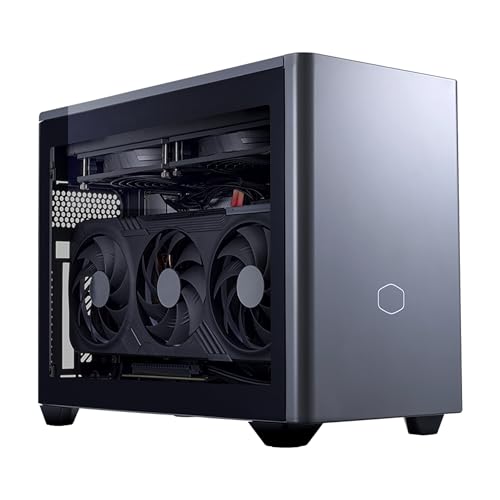
- Ryzen 7 9800X3D + RTX 5070 Ti for demanding editing and gaming
- 32GB DDR5 6000MHz and 2TB Gen4 SSD for fast workflows
- 18.25L Mini ITX case keeps the footprint small
Best For: Creators who want a compact, high-end desktop for video editing and gaming.
Best for Heavy Multitasking
ACEMAGIC M5 i9-14900HX Mini PC

- 24-core Intel i9-14900HX for strong CPU-focused editing performance
- 32GB RAM, 1TB SSD, and expandable storage for project work
- Triple 4K display support for a compact workstation layout
Best For: Creators who want a compact, high-CPU mini PC for editing and multitasking.
Best for High-End Portable Editing
Thermaltake Traveler 9880S Mini-ITX PC
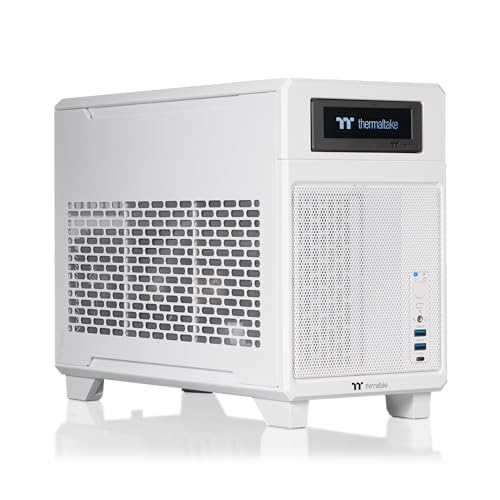
- Ryzen 7 9800X3D + RTX 5080 for fast editing performance
- 32GB DDR5 and 2TB NVMe for smooth multitasking
- Compact 18.4L dual-chamber case with liquid cooling
Best For: Creators who need a travel-friendly SFF system with top-tier editing performance.
Best for AI-Powered Editing
GEEKOM IT15 Intel Ultra 9 Mini PC

- Intel Core Ultra 9 285H with 99 TOPS AI performance
- 32GB DDR5 RAM and 1TB Gen 4 SSD for smooth multitasking
- Dual 8K output, USB4, WiFi 7, and 2.5GbE connectivity
Best For: Creators who want a compact mini PC for editing, coding, and AI-assisted workflows.
Best for Multi-Display Editing

- Ryzen 5 7430U handles light creative work and everyday multitasking
- Quad-display support suits editing timelines and productivity layouts
- Upgradeable RAM and storage add long-term flexibility
Best For: Budget-conscious creators who want a compact, upgradeable mini PC for light-to-moderate editing and multi-monitor workflows.
Best for Quiet 4-Display Editing

- Supports up to four 4K displays for editing workflows
- Ryzen 7-class CPU with 16GB RAM and NVMe storage
- Compact, quiet, and expandable for future upgrades
Best For: Creators and home-office users who want a small, quiet desktop for light video editing and multi-monitor work.
Best Silent Pick
GEEKOM AX8 Max Ryzen 7 Mini PC

- Quiet operation for distraction-free editing
- Ryzen 7 8745HS with Radeon 780M graphics
- Upgradeable RAM, SSD, and creator-friendly I/O
Best For: Creators and multitaskers who want a quiet compact PC for editing and streaming.
Best Simple Pick

- Core Ultra 9 185H delivers strong editing and multitasking performance
- Dual 2.5GbE, WiFi 7, and quad-display output improve workflow flexibility
- Upgradeable to 96GB RAM and 4TB SSD for future-proofing
Best For: Editors and power users who want a compact workstation for 4K projects, AI workflows, and multiple displays.
Best for Thunderbolt Networking – MINISFORUM MS-01 i9 Mini Workstation
The MINISFORUM MS-01 is a serious mini itx pc for video editing if you care as much about connectivity and expandability as raw size. Its Core i9-13900H, DDR5 memory, triple-display support, and PCIe expansion make it a strong fit for editors who want a compact machine that can still handle media workflows and fast storage.
Best For: Video editors who want a compact workstation with high-speed networking, multiple displays, and room to grow storage or add a GPU.
Pros:
- Core i9-13900H offers strong performance for editing and multitasking.
- Two USB4 ports plus HDMI support up to three displays.
- Dual 10G SFP+ and dual 2.5G LAN are excellent for fast media transfer.
- Expandable storage and PCIe x16 slot add unusual flexibility for a mini PC.
Cons:
- More of a workstation than a simple plug-and-play edit box.
- Discrete GPU support exists, but it may require careful configuration.
- Compact design prioritizes expansion, so it is not the quietest or simplest option.
For buyers comparing a mini itx pc for video editing, the MS-01 stands out because it is built around speed, I/O, and future upgrades rather than just a fast CPU. It is especially appealing if your workflow includes external storage, networked media, or multiple monitors.
Best High-Performance Compact Build – Cooler Master NR2 Pro Gaming PC
If you want a mini itx pc for video editing that still leaves room for gaming, the Cooler Master NR2 Pro is built around strong CPU/GPU pairing, fast DDR5 memory, and a roomy 2TB Gen4 SSD. Its 18.25L footprint keeps it desk-friendly, while the Ryzen 7 9800X3D and RTX 5070 Ti give it the headroom for timeline scrubbing, effects, and export-heavy workflows.
Best For: Creators who need a compact desktop that can handle 4K editing, multitasking, and high-end gaming without moving up to a large tower.
Pros:
- Ryzen 7 9800X3D and RTX 5070 Ti offer serious performance for editing and rendering
- 32GB DDR5 6000MHz and 2TB Gen4 SSD provide fast, practical creator-friendly specs
- Mini ITX 18.25L case keeps the system compact for tighter workspaces
- 280mm AIO and 850W Gold PSU help support sustained performance
Cons:
- Price will likely be high for casual users
- Compact case can be less convenient to upgrade than a larger desktop
- Overkill if you only do light editing or basic office work
For buyers comparing a mini itx pc for video editing, this model stands out because it combines creator-grade speed with a genuinely small footprint, making it a strong choice when you want performance without giving up desk space.
Best for Heavy Multitasking – ACEMAGIC M5 i9-14900HX Mini PC
If you want a mini itx pc for video editing that prioritizes raw CPU horsepower, the ACEMAGIC M5 is built around Intel’s Core i9-14900HX with 24 cores and 32 threads. It’s a strong fit for creators who need fast timelines, smooth multitasking, and plenty of headroom for large projects in a compact desktop.
Best For: Editors, power users, and creators who want a compact mini PC with high-end multitasking performance and triple-display support.
Pros:
- Intel Core i9-14900HX delivers flagship-level multi-core performance
- 32GB RAM and 1TB PCIe 4.0 SSD provide a solid editing-ready baseline
- Supports up to three 4K displays for a productive workstation setup
- Dual M.2 slots and up to 64GB RAM make it easy to expand later
Cons:
- Integrated graphics limit performance for GPU-heavy video effects and exports
- DDR4 memory is less future-forward than newer DDR5-based systems
- Compact cooling may be a consideration during sustained heavy workloads
This is a compelling pick if your mini itx pc for video editing needs are centered on CPU speed, compact size, and a clean multi-monitor setup rather than discrete-GPU acceleration.
Best for High-End Portable Editing – Thermaltake Traveler 9880S Mini-ITX PC
If you want a mini itx pc for video editing that doesn’t compromise on performance, the Thermaltake LCGS Traveler 9880S is a serious contender. Its Ryzen 7 9800X3D processor, RTX 5080 graphics, 32GB of DDR5 memory, and 2TB NVMe SSD give it the horsepower for timeline scrubbing, effects-heavy projects, and fast exports in a compact 18.4-liter chassis.
Best For: Creators who need a travel-friendly SFF system with top-tier CPU and GPU performance for demanding editing workloads.
Pros:
- Ryzen 7 9800X3D and RTX 5080 deliver excellent editing and GPU-accelerated performance.
- 32GB DDR5 memory and 2TB NVMe storage handle multitasking and large project files well.
- Compact dual-chamber Mini-ITX design improves portability and airflow.
- 280mm liquid cooling and 1000W SFX PSU support sustained heavy workloads.
Cons:
- High-end pricing puts it out of reach for many casual editors.
- Mini-ITX layouts limit future internal expansion versus larger towers.
As a mini itx pc for video editing, this Traveler build is aimed at users who want workstation-class speed in a compact form factor. It’s especially appealing if you edit on the go or need a small desktop that can still handle modern creative workloads without slowing down.
Best for AI-Powered Editing – GEEKOM IT15 Intel Ultra 9 Mini PC
If you want a compact mini itx pc for video editing that can also handle AI-assisted workflows, the GEEKOM IT15 is built around Intel’s Core Ultra 9 285H, 32GB of DDR5 memory, and a fast 1TB Gen 4 SSD. It’s aimed at creators who need strong multitasking, quick storage access, and enough graphics muscle for Adobe apps, Blender, and lighter 4K/8K projects in a small desktop footprint.
Best For: Video editors, coders, and creators who want a powerful small-form-factor workstation with modern AI and connectivity features.
Pros:
- Core Ultra 9 performance with 99 TOPS AI capability for demanding creative tasks
- 32GB DDR5 RAM and 1TB Gen 4 SSD help keep timelines, caches, and large files moving smoothly
- Supports up to four displays, including dual 8K output and USB4 expansion
- WiFi 7, 2.5GbE, and quiet cooling make it well suited to connected workstations
Cons:
- Integrated graphics are capable, but not a substitute for a dedicated pro GPU
- Base storage and memory may still feel tight for heavy 8K production workflows
- Premium specs can push it above entry-level mini PC pricing
This is a strong pick if your mini itx pc for video editing needs to stay compact without giving up modern CPU power, fast connectivity, or room for future upgrades. It makes the most sense for creators who value versatility more than raw workstation-class graphics.
Best for Multi-Display Editing – GEEKOM A5 Mini PC
If you need a compact mini itx pc for video editing that can also handle office work, streaming, and light creative tasks, the GEEKOM A5 is a practical pick. Its Ryzen 5 7430U, 16GB of RAM, and quad-display support make it easy to build a small, productive editing setup without taking up much desk space.
Best For: Budget-conscious creators who want a compact, upgradeable mini PC for light-to-moderate editing, multitasking, and multi-monitor workflows.
Pros:
- Ryzen 5 7430U and Radeon Vega 7 are solid for light 4K editing and everyday creative work
- Supports up to four displays, which is great for timelines, previews, and productivity
- Upgradeable RAM and storage help extend the machine as your needs grow
- Windows 11 Pro comes preinstalled for a ready-to-use setup
Cons:
- Integrated graphics limit performance for heavy effects, color grading, or long 4K exports
- 16GB RAM is workable, but serious editors will likely want to upgrade quickly
- Not a true desktop-class workstation for demanding professional video projects
For buyers comparing a mini itx pc for video editing, the A5 stands out more for flexibility and small-form-factor convenience than raw power. It makes sense if you edit casually, want multiple screens, and value upgrade options over maxed-out performance.
Best AI Workstation – GEEKOM IT15 Mini PC
If you want a compact machine that can handle editing timelines, exports, and multitasking without taking up much desk space, the GEEKOM IT15 is a strong mini itx pc for video editing. Its Intel Ultra 9 285H, 32GB of DDR5 memory, and 2TB Gen 4 SSD give it the kind of responsiveness creators need for everyday 4K work and heavier project management.
Best For: Video editors, coders, and creators who want a powerful small-form-factor PC with modern connectivity and room for expansion.
Pros:
- Intel Ultra 9 285H and Arc 140T graphics are well suited to creative workloads and AI-assisted tasks.
- 32GB DDR5 RAM and a 2TB NVMe SSD provide fast multitasking and generous storage out of the box.
- Supports up to four displays, plus USB4 and WiFi 7 for a flexible editing setup.
- Quiet cooling and a durable metal frame make it practical for long work sessions.
Cons:
- Integrated graphics are capable, but not a replacement for a high-end discrete GPU in demanding 8K workflows.
- Premium specs push it above entry-level mini PCs on price.
For creators shopping for a mini itx pc for video editing, the IT15 stands out as a polished all-in-one option that balances speed, connectivity, and expandability in a very small footprint.
Best for Quiet 4-Display Editing – GEEKOM A5 Business Mini PC
If you want a mini itx pc for video editing that stays compact, quiet, and flexible, the GEEKOM A5 is a practical pick. It pairs a Ryzen 7-class AMD chip with 16GB of RAM, a 512GB NVMe SSD, and support for four displays, making it well suited for light-to-moderate editing, streaming, and everyday creator work.
Best For: Creators, students, and home-office buyers who want a small desktop for 4K playback, multi-monitor workflows, and occasional Adobe editing.
Pros:
- Supports up to four 4K displays, which is useful for editing timelines, previews, and reference windows
- Ryzen 7-class performance with 16GB RAM and a fast NVMe SSD for smooth general creative work
- Compact, quiet, and expandable, with room to grow RAM and storage later
- Windows 11 Pro is preinstalled, so it is ready to use out of the box
Cons:
- Integrated graphics are fine for light editing, but not ideal for heavy effects work or color-critical production
- 512GB storage may fill quickly once you start working with large video files
- Not a true mini-ITX tower, so upgrade and cooling expectations should stay realistic
Overall, the GEEKOM A5 makes sense if your mini itx pc for video editing needs are more about portability, quiet operation, and multi-display productivity than raw rendering power. It is a strong value option for everyday creators who edit in shorter projects and want a small desktop that can do more than basic office tasks.
Best Silent Pick – GEEKOM AX8 Max Ryzen 7 Mini PC
If you want a mini itx pc for video editing that stays quiet while still offering strong everyday performance, the GEEKOM AX8 Max is a compelling compact option. Its Ryzen 7 8745HS, Radeon 780M graphics, DDR5 memory, and fast Gen 4 SSD make it well suited to editing timelines, managing large media files, and handling multitasking without much fuss.
Best For: Creators, streamers, and office users who want a quiet mini PC with solid editing and multitasking headroom.
Pros:
- Quiet cooling design helps keep noise down during long edits or streaming sessions
- Ryzen 7 8745HS and Radeon 780M offer strong compact performance for creative workloads
- Upgradeable RAM and SSD give it room to grow as projects get heavier
- USB4, dual 2.5GbE LAN, and quad-display support add useful creator-friendly flexibility
Cons:
- 16GB RAM may feel limiting for heavier 4K or effects-heavy video work out of the box
- Integrated graphics are capable, but not a replacement for a true discrete GPU workstation
- Better suited to compact editing and multitasking than demanding pro-grade post-production
This is a practical choice if you want a mini itx pc for video editing that prioritizes low noise, modern connectivity, and upgrade potential over raw workstation power.
Best Simple Pick – GEEKOM IT13 MAX AI Mini PC
If you want a compact but seriously capable mini itx pc for video editing, the GEEKOM IT13 MAX stands out with its Intel Core Ultra 9 185H, Arc graphics, and support for up to four displays. It’s built for creators who need strong timeline performance, fast multitasking, and a small footprint without giving up modern connectivity.
Best For: Editors, developers, and power users who want a compact workstation for 4K projects, AI-assisted workflows, and multi-monitor setups.
Pros:
- Core Ultra 9 185H offers excellent performance for editing and multitasking
- Dual 2.5GbE, WiFi 7, and quad-display support add real workstation flexibility
- Up to 96GB DDR5 and 4TB SSD support gives it long-term upgrade room
- Quiet cooling and a small chassis make it easy to place in a studio or office
Cons:
- 16GB RAM and 1TB SSD are modest for heavier professional projects out of the box
- Integrated Arc graphics won’t match a dedicated GPU for demanding effects work
- Not the cheapest option if you only need basic editing performance
As a mini itx pc for video editing, this model is strongest for users who value speed, connectivity, and upgradeability in a space-saving system. It’s a smart pick if you want near-desktop performance now and room to grow later.
How We Picked the Best Mini Itx PC for Video Editing
We prioritized systems with modern multi-core processors, fast NVMe storage, and enough memory headroom for editing workloads. For a Mini Itx PC for Video Editing, thermal design matters just as much as headline specs, so we also considered chassis airflow, power delivery, and whether the system is likely to sustain performance during long exports.
We also looked for practical creator features such as USB4, high-speed networking, multiple display support, and upgrade paths for RAM and SSD storage. That helps future-proof a compact workstation as project sizes grow.
Quick Comparison
If you mainly edit 1080p and light 4K, a compact mini PC with a modern H-series chip and 32GB RAM can be enough. If you work with multicam 4K, heavy color grading, or GPU-accelerated effects, a Mini-ITX desktop with a stronger discrete graphics card is usually the better choice.
In short: prioritize CPU and RAM for smoother timeline performance, then add GPU strength for faster effects, playback, and rendering.
Key Buying Factors for a Mini Itx PC for Video Editing
CPU Performance
Video editing benefits from strong multi-core performance, especially during exports, transcoding, and background tasks. High-end mobile chips can work well in smaller systems, but desktop-class CPUs usually offer more sustained performance.
GPU Capability
A dedicated GPU helps with effects, noise reduction, color processing, and hardware acceleration in editors such as Premiere Pro, DaVinci Resolve, and similar apps. If your workflow leans heavily on effects, this is one of the most important upgrades.
Memory and Storage
For most editors, 32GB RAM is a practical starting point, while 64GB is safer for larger projects. Fast NVMe SSDs reduce project load times and make cache and scratch workflows more responsive. Dual-drive support is a plus.
Ports and Connectivity
USB4, fast USB-C, HDMI, and reliable multi-monitor support make a real difference in a compact editing setup. If you move footage often, fast Ethernet and expandable storage are also valuable.
Who Should Buy Which Mini Itx PC for Video Editing?
If you need a compact all-rounder for lighter editing and everyday work, a mini PC with strong integrated graphics and upgradeable memory can be a smart value pick. If your projects involve 4K timelines, effects-heavy grading, or frequent exports, choose a Mini-ITX system with a discrete GPU and better cooling.
For creators building a long-term workstation, the safest choice is usually the system that offers the best balance of CPU power, 32GB or more RAM, fast storage, and expansion room. That balance matters more than chasing one standout spec.