If you need more fast storage from a single expansion slot, a PCIe bifurcation card is one of the most practical upgrades you can buy. It can turn one x16 slot into support for multiple NVMe drives, as long as your motherboard and BIOS support lane splitting.
This 2026 roundup focuses on cards that make multi-SSD builds simpler, cooler, and easier to match to your platform.
Best 10 Pcie Bifurcation Card Picks for 2026
Best for 4x NVMe Expansion

- Adds four NVMe drives through one x16 slot
- Includes heatsink and individual LED status lights
- Supports 2280/2260/2242/2230 M.2 NVMe SSDs
Best For: Users with bifurcation-ready motherboards who want high-density NVMe expansion.
Best for Dual NVMe Expansion
10Gtek Dual M.2 NVMe SSD Adapter Card

- Adds two NVMe drives from one PCIe x8 slot
- Includes full-height and low-profile brackets
- Requires BIOS/motherboard bifurcation support
Best For: Desktop users with a compatible bifurcated PCIe slot who want simple dual-NVMe expansion.
Best for x4x4x4x4 Splits
Sintech PCI-e 3.0 x16 to 4-Port Split Card

- Splits one x16 slot into four PCIe connections
- Supports many PCIe x1/x4/x8/x16 cards
- Needs motherboard bifurcation support
Best For: Bifurcation-ready workstation or server builds that need four PCIe slots from one x16 lane group.
Best for PCIe 5.0 Bifurcation Builds
RIITOP Quad NVMe PCIe 5.0 Adapter with Fan

- Turns one PCIe 5.0 x16 slot into four NVMe SSD positions
- Integrated fan helps keep Gen 5 drives cooler under load
- LED status indicators simplify drive monitoring
Best For: Enthusiasts with bifurcation-ready motherboards who want dense, high-speed NVMe expansion.
Best for 4-Way Expansion
JMT PCI-E 3.0 x16 to 4-Slot Split Card

- Splits one x16 slot into four x4 slots
- SATA power and capacitors support stability
- BIOS bifurcation support is required
Best For: Users who need a 4-way PCIe split card for supported motherboards and expansion-heavy builds.
Best for PCIe 5.0 Multi-Drive Builds
RIITOP Quad NVMe PCIe 5.0 Adapter

- Adds four NVMe SSDs through one PCIe x16 slot
- PCIe 5.0-ready with heatsink and LED indicators
- Ideal for bifurcation-capable workstation and server boards
Best For: Users who want a four-drive NVMe expansion card for a bifurcation-ready motherboard.
Best for Dual-GPU Bifurcation Builds
JMT PCI-E 4.0 x16 to 2 Expansion Card

- Splits one x16 slot into x8/x8 on supported boards
- 20mm spacing suits bulky GPUs and add-in cards
- Includes clock split IC plus CPU4P auxiliary power
Best For: Compatible-motherboard owners building dual-GPU or dual-device PCIe setups.
Best for Fast Storage Builds
SinLoon PCIe 5.0 X16 Bifurcation Card

- Splits one x16 slot into x8 + x4 + x4
- Dual NVMe M.2 support up to 22110
- Includes LEDs, screws, and installation tools
Best For: PC builders who want flexible lane splitting for NVMe storage and light expansion.
Best for Gen4 Split Builds
JMT PCI-E 4.0 x16 to 2-slot Expansion Card
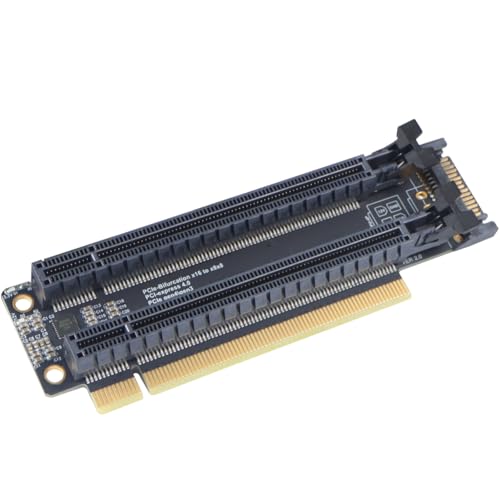
- PCIe 4.0 x16 to x8/x8 split support
- 20mm slot spacing for better clearance
- Aux power input and LED status indicator
Best For: Builders with BIOS-supported bifurcation who want a Gen4-ready two-slot expansion setup.
Best for GPU Bifurcation Builds
JMT PCI-E 4.0 x16 to 2-Slot Split Card

- x16 to x8/x8 bifurcation on supported motherboards
- 2cm slot spacing for better clearance
- CPU4P power input and clock-splitting IC
Best For: Users with bifurcation-ready motherboards building dual-GPU or dual-device PCIe setups.
Best for 4x NVMe Expansion – RIITOP Quad NVMe PCIe Adapter
If you need to turn a single x16 slot into a four-drive NVMe array, this pcie bifurcation card is built for exactly that job. It supports PCIe 4.0/3.0 x16 bifurcation on compatible motherboards, adds a heatsink for better thermal handling, and works with multiple M.2 NVMe sizes.
Best For: Builders with a compatible server, X299, or X399 board who want to mount up to four M.2 NVMe drives from one PCIe x16 slot.
Pros:
- Supports up to 4 NVMe SSDs on one x16 slot with proper bifurcation
- Built-in heatsink and LED indicators help with cooling and drive status
- Fits 2280, 2260, 2242, and 2230 M.2 NVMe SSDs
Cons:
- Requires motherboard BIOS support for PCIe x4x4x4x4 bifurcation
- Does not support SATA-based M.2 drives or hardware RAID
- Only one drive may be detected if the system lacks bifurcation support
For compatible systems, this pcie bifurcation card is a practical way to maximize NVMe storage density without occupying extra slots. It is a strong fit for DIY NAS, workstation, or storage-heavy builds where drive count matters more than plug-and-play simplicity.
Best for Dual NVMe Expansion – 10Gtek Dual M.2 NVMe SSD Adapter Card
If your motherboard supports lane bifurcation, this pcie bifurcation card is a straightforward way to add two M.2 NVMe drives from a single PCIe x8 slot. It’s a practical upgrade for desktop users who want faster storage without moving to a full RAID or HBA setup, but BIOS split support is essential for both drives to be recognized.
Best For: Desktop builders and upgraders who need a simple dual-NVMe expansion card for a compatible bifurcated PCIe slot.
Pros:
- Supports two M.2 NVMe drives over one PCIe 3.0 x8 connection
- Works with common M.2 sizes: 2230, 2242, 2260, and 2280
- Includes both full-height and low-profile brackets for flexible installs
- Backward compatible with PCIe 2.0 and PCIe 1.0 slots
Cons:
- Requires motherboard and BIOS bifurcation support
- No hot swapping support
- Standard mounting screw is not included
As a pcie bifurcation card, this adapter is best viewed as a compatibility-first storage expander: great performance potential, but only if your platform can split the PCIe lanes correctly. If you already have the right motherboard, it’s an efficient way to add high-speed NVMe capacity in a compact desktop build.
Best for x4x4x4x4 Splits – Sintech PCI-e 3.0 x16 to 4-Port Split Card
If your motherboard supports lane bifurcation, this pcie bifurcation card is a straightforward way to turn one PCIe x16 slot into four separate expansion connections. It’s aimed at builders who need to run multiple PCIe cards at once, especially on X299, X399, and compatible server boards with x4x4x4x4 support in BIOS.
Best For: Users with a bifurcation-ready motherboard who want to add multiple PCIe x4/x16 cards from a single x16 slot.
Pros:
- Splits one x16 slot into four PCIe connections
- Works with many PCIe x1, x4, x8, and x16 cards
- Includes SATA power input for added power support
- Built with a 2-layer PCB and thicker gold plating
Cons:
- Requires motherboard and CPU support for PCIe bifurcation
- Does not support hardware RAID
- Not a plug-and-play option for unsupported systems
As a pcie bifurcation card, this Sintech model makes the most sense in a properly configured workstation or server build where flexibility matters more than simplicity. If your board can already do x4x4x4x4, it’s a practical expansion solution; if not, it won’t help.
Best for PCIe 5.0 Bifurcation Builds – RIITOP Quad NVMe PCIe 5.0 Adapter with Fan
If you need a pcie bifurcation card that can turn one PCIe 5.0 x16 slot into four NVMe positions, this RIITOP adapter is built for high-bandwidth storage builds on compatible motherboards. It’s a practical choice for users who already have bifurcation support in BIOS and want active cooling for Gen 5 drives.
Best For: Builders with a PCIe 5.0 x16 motherboard slot, bifurcation support, and a need to mount multiple NVMe SSDs for fast storage expansion.
Pros:
- Supports up to 4x NVMe SSDs from one PCIe 5.0 x16 slot on compatible systems
- Built-in fan helps reduce heat and protect Gen 5 drives from throttling
- LED indicators make drive status easy to check at a glance
Cons:
- Requires motherboard BIOS/UEFI bifurcation support; otherwise only one drive may be detected
- No hardware RAID support
- Full PCIe 5.0 performance depends on the CPU, slot, and SSDs also supporting Gen 5
As a pcie bifurcation card, this adapter makes the most sense for enthusiasts who know their platform supports x4x4x4x4 mode and want maximum SSD density without adding a separate storage controller.
Best for 4-Way Expansion – JMT PCI-E 3.0 x16 to 4-Slot Split Card
If your motherboard supports bifurcation, this pcie bifurcation card gives you a straightforward way to turn one PCIe x16 slot into four x4 links for SSDs, network cards, capture cards, or other expansion hardware. It is a practical option for builders who need more add-in capacity without moving to a larger platform.
Best For: Users who need a 4-way PCIe split card for supported motherboards, storage builds, or multi-device expansion.
Pros:
- Splits one PCIe 3.0 x16 slot into four x4 slots for flexible expansion
- SATA power input and onboard capacitors help support heavier loads
- Gold-plated connectors and high-TG board construction add durability
- Power LEDs make it easier to verify each slot is active
Cons:
- Requires motherboard BIOS support for x4x4x4x4 bifurcation
- Limited to PCIe Gen3 speeds and x4 performance per slot
- Not ideal for plug-and-play installs on unsupported systems
As a pcie bifurcation card, this JMT model is best suited to experienced builders who already know their board supports lane splitting and want a simple, slot-dense expansion solution. If your BIOS setup is compatible, it offers a lot of connectivity in one compact card.
Best for PCIe 5.0 Multi-Drive Builds – RIITOP Quad NVMe PCIe 5.0 Adapter
If you need a pcie bifurcation card for packing multiple NVMe drives into a single slot, this RIITOP adapter is built for high-end desktop and server-style builds that support PCIe x16 x4x4x4x4 splitting. It targets users who want four M.2 NVMe SSDs on one expansion card, with PCIe 5.0 bandwidth, onboard LEDs, and a low-profile heatsink to help manage thermals.
Best For: Builders with a bifurcation-capable motherboard who want a four-drive NVMe expansion card for fast storage arrays, scratch disks, or dense workstation storage.
Pros:
- Supports up to four M.2 NVMe SSDs from one PCIe x16 slot
- PCIe 5.0 design with backward compatibility for PCIe 4.0/3.0 systems
- Built-in heatsink and individual SSD status LEDs
- Works with common NVMe sizes from 2230 to 2280
Cons:
- Requires motherboard and CPU bifurcation support to recognize all drives
- Does not support SATA-based M.2 SSDs or hardware RAID
- Full PCIe 5.0 speeds depend on a matching PCIe 5.0 platform
As a pcie bifurcation card, this RIITOP model makes the most sense for buyers who already know their board can split lanes properly. If your platform supports x4x4x4x4, it’s a straightforward way to add dense NVMe storage without moving to a larger RAID or HBA setup.
Best for Dual-GPU Bifurcation Builds – JMT PCI-E 4.0 x16 to 2 Expansion Card
If you need a practical pcie bifurcation card for splitting one x16 slot into two x8 links, this JMT adapter is built around motherboard bifurcation support and BIOS lane settings. It adds a clock-splitting IC, 20mm slot spacing, and a CPU4P power input, making it a stronger fit for dual-GPU or dual-device setups than basic passive splitters.
Best For: Builders who already have a compatible motherboard and want a bifurcation card for dual graphics cards, PCIe expansion, or tidy 2-slot spacing.
Pros:
- Supports x16 to x8/x8 bifurcation on compatible boards
- 20mm slot spacing helps fit larger add-in cards
- Clock splitting IC and CPU4P power port add stability
- PCIe 4.0-rated design with Gen3/Gen4 compatibility
Cons:
- Requires motherboard bifurcation support and BIOS setup
- May need extra power for demanding dual-GPU use
- Gen4 operation depends on specific platform conditions
As a pcie bifurcation card, this model makes the most sense when you already know your board supports x8/x8 mode and you want a cleaner, more capable split-card layout. It is less plug-and-play than a simple adapter, but the added power input and spacing improve its appeal for serious expansion builds.
Best for Fast Storage Builds – SinLoon PCIe 5.0 X16 Bifurcation Card
If your motherboard supports slot bifurcation, this pcie bifurcation card is a flexible way to turn one x16 slot into a mix of storage and expansion lanes. It is aimed at builders who want to add NVMe drives, a low-profile GPU, or other PCIe add-ins without giving up their main slot.
Best For: PC builders who want to split a single x16 slot into x8 + x4 + x4 for fast NVMe storage and light expansion.
Pros:
- Splits one PCIe 5.0 x16 slot into x8 + x4 + x4 for flexible expansion.
- Dual M.2 slots support NVMe SSDs up to 22110, plus 2280 and smaller sizes.
- Works with PCIe 5.0, 4.0, and 3.0 hardware for broad compatibility.
- Includes LED indicators, mounting hardware, and installation tools.
Cons:
- Requires motherboard BIOS support for PCIe bifurcation.
- Top x8 slot may need a low-profile bracket from your installed card.
- Not a plug-and-play upgrade for every system, so compatibility checks are essential.
For compatible systems, this pcie bifurcation card offers a practical way to build out high-speed storage and add-on hardware from a single slot. It is most appealing when you want maximum lane flexibility rather than a simple adapter.
Best for Gen4 Split Builds – JMT PCI-E 4.0 x16 to 2-slot Expansion Card
If you need a pcie bifurcation card for splitting one x16 slot into two GPU or SSD-ready positions, this JMT adapter is built around PCIe 4.0 x16 to x8/x8 operation with 20mm slot spacing. It is a practical choice for systems whose motherboard BIOS supports bifurcation, especially when you want Gen4-capable hardware with onboard power handling and status feedback.
Best For: Builders who need a bifurcation-ready expansion card for dual-device installs and have a motherboard that can switch the slot to x8/x8 mode.
Pros:
- PCIe 4.0 x16 design with x8/x8 split support for modern builds
- 20mm spaced slots help improve physical clearance for larger cards
- Includes CPU 4-pin auxiliary power input and power LED indicator
- Supports PCIe extension cable adapters and uses a clock-splitting IC
Cons:
- Requires motherboard BIOS support for x8/x8 bifurcation
- Full Gen4 operation depends on specific system conditions
- SATA-style power input and setup details may add installation complexity
As a pcie bifurcation card, this JMT model makes the most sense for tinkerers and workstation builders who already know their board supports the right split mode. It is not a plug-and-play fix, but it does offer the hardware features needed for a flexible two-slot expansion setup.
Best for GPU Bifurcation Builds – JMT PCI-E 4.0 x16 to 2-Slot Split Card
If you need a practical pcie bifurcation card for splitting one x16 slot into two x8 links, this JMT adapter is built for multi-GPU or expansion setups that depend on motherboard bifurcation support. It adds 2cm slot spacing, a clock-splitting IC, and auxiliary CPU4P power input, making it a sensible pick when signal stability and physical clearance both matter.
Best For: Builders with a bifurcation-capable motherboard who want a compact x16-to-x8/x8 splitter for dual GPU or dual-device installations.
Pros:
- Supports x16 to x8/x8 bifurcation on compatible boards
- 2cm slot spacing helps with larger cards and cable adapters
- Clock-splitting IC plus LED indicator improve usability
- CPU4P auxiliary power input can help with power-sensitive setups
Cons:
- Requires motherboard BIOS bifurcation support to work
- May need manual PCIe speed tuning for some builds
- Not plug-and-play for every motherboard or GPU combination
For the right system, this pcie bifurcation card is a straightforward way to add two-device support without jumping to a larger riser or expansion platform, but it only makes sense if your motherboard and BIOS can already split the lane layout correctly.
How We Picked These Pcie Bifurcation Cards
We prioritized compatibility, lane-split options, cooling, power delivery, and the number of M.2 slots offered. We also looked for models suited to different generations of PCIe, since a Pcie Bifurcation Card only performs well when it matches your board’s lane allocation and your SSD speed target.
Quick Comparison
In general, x16-to-4x4x4x4 cards are best for users who want maximum NVMe density, while x16-to-2×8 cards suit builders who want fewer drives with simpler setup. Gen5 cards make the most sense on newer platforms, while Gen3 and Gen4 options remain the better-value choice for older systems and mainstream storage builds.
Key Buying Factors for a Pcie Bifurcation Card
Motherboard and BIOS Support
The most important requirement is bifurcation support in the motherboard BIOS. Without it, the card may not detect all drives correctly. Check whether your board supports x4x4x4x4, x8x8, or another split mode before you buy.
PCIe Generation and Slot Width
Match the card’s generation to your platform. A Gen5 card works best in a Gen5 or strong Gen4 environment, while Gen3 and Gen4 cards are often the safer purchase for compatibility and value. Also confirm whether you have a true x16 slot available.
Cooling and Drive Spacing
Multiple NVMe drives can run hot. Heatsinks, fans, and wider M.2 spacing help maintain sustained performance. If your case airflow is modest, cooling becomes more important than raw slot count.
Power Input
Many higher-density cards include SATA or auxiliary power connectors. That extra power helps stabilize multiple drives under load, so don’t overlook the connector type and cable requirements.
Who Should Buy Which Pcie Bifurcation Card?
If you want maximum capacity in one slot, choose a 4-drive x16 card. If you only need two NVMe SSDs, a x8 or x8x8 adapter is usually simpler and easier to fit into a wider range of systems. Builders on newer platforms should look at Gen5 options, while anyone focused on value, compatibility, or older motherboards should lean Gen3 or Gen4. For mixed-use workstations, choose the card that best balances drive count, cooling, and BIOS support rather than chasing the highest spec on paper.