Refurbished workstation PCs for video editing can deliver serious timeline performance, export speed, and storage capacity for far less than a new creator desktop.
Below, we focus on practical buying value: the specs that matter most, the trade-offs to watch for, and which setups fit different editing workflows.
Best 10 Refurbished Workstation PCs for Video Editing Picks for 2026
Best for CAD & Editing
Dell Precision i5 Workstation PC

- 6-core i5-9500 supports smooth everyday editing
- 16GB RAM and 1TB SSD improve responsiveness
- Quadro P620 helps with CAD and multi-display work
Best For: Editors and designers needing a dependable renewed workstation for light-to-moderate video editing.
Best Entry-Level Editing Tower

- i7 CPU, 16GB RAM, and 512GB SSD for everyday editing tasks
- RX 580 8GB adds help for GPU-accelerated apps and casual gaming
- Wi-Fi 6, Bluetooth 5.0, and Windows 11 Home included
Best For: Budget shoppers who need a starter desktop for light 1080p video editing and general productivity.
Best for Balanced Editing Storage
Dell OptiPlex 3040 i5 Video Editing Desktop

- 16GB RAM for smoother multitasking
- 240GB SSD + 2TB HDD for speed and storage
- RX-550 4GB helps with effects and rendering
Best For: Editors who want a refurbished desktop with solid everyday editing performance and lots of file storage.
Best Value Starter

- Core i5, 16GB RAM, and 512GB SSD
- Wi-Fi 6 and Bluetooth 5.0 included
- Prebuilt with Windows 11 Home installed
Best For: Budget buyers who want a ready-to-use desktop for light video editing and everyday work.
Best for RAM-Heavy Editing
HP Workstation PC with Quadro K1200

- 32GB DDR4 RAM for smooth multitasking
- 1TB SSD + 4TB HDD for speed and storage
- Workstation GPU and Windows 11 Pro included
Best For: Editors needing a budget-conscious refurbished tower with lots of memory and storage.
Best for Heavy Multitasking
Dell Precision T5810 Xeon 12-Core 64GB SSD
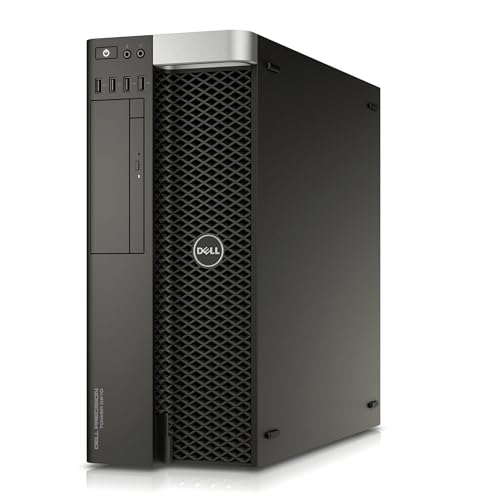
- 12-core Xeon for strong multitasking
- 64GB DDR4 RAM for large editing projects
- 480GB SSD for quick boots and app loading
Best For: Editors who want a workstation tower with lots of CPU cores and memory for value-focused editing work.
Best for Comfort
Dell i7 Quadro Workstation Desktop

- 8-core i7-9700 with 32GB RAM handles editing and multitasking well
- 1TB SSD + 4TB HDD gives fast loading and huge project storage
- Quadro P620 is a practical fit for creative and CAD software
Best For: Editors and designers who need a dependable renewed tower with strong storage and workstation features.
Best with Extra Features
Dell Precision T7810 Xeon Workstation

- Dual Xeon CPUs for strong multi-threaded performance
- Massive 128GB DDR4 RAM for large projects
- 480GB SSD for quicker boot and load times
Best For: Editors who want a powerful refurb tower for CPU-heavy workflows and big multitasking loads.
Best for DIY Upgraders
PCSP P520 Xeon Workstation Tower
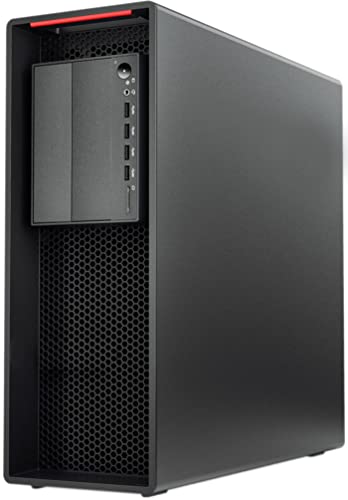
- Xeon W-2135 CPU with up to 4.5GHz turbo
- 64GB ECC RAM already installed
- 900W PSU supports major GPU upgrades
Best For: Editors who want a refurbished workstation they can customize with their own GPU, storage, and OS.
Best Value for Balanced Editing
Dell Precision 3620 i7 Workstation

- 32GB DDR4 RAM supports smoother editing multitasking
- 512GB SSD + 2TB HDD gives speed and large storage
- Good fit for 1080p projects and general creative work
Best For: Editors who want an affordable renewed workstation with strong RAM and storage.
Best for CAD & Editing – Dell Precision i5 Workstation PC
If you want refurbished workstation pcs for video editing that prioritize reliability over flashy specs, the Dell Precision 3431 is a practical pick. Its Core i5-9500, 16GB of RAM, and 1TB SSD give you a responsive everyday editing workflow, while the Quadro P620 adds workstation-grade graphics support for creative apps and multi-display setups.
Best For: Editors, designers, and office users who need a dependable renewed workstation for light-to-moderate video editing, CAD, and multitasking.
Pros:
- 6-core Intel i5-9500 handles everyday editing and multitasking smoothly
- 1TB SSD and 16GB RAM provide fast boot times and roomy storage
- Quadro P620 is well-suited to CAD, design, and stable multi-monitor work
- Windows 11 Pro, WiFi 6, Bluetooth, keyboard, and mouse included
Cons:
- 2GB Quadro P620 is not ideal for heavy 4K or effects-heavy editing
- Refurbished configuration may vary from a brand-new workstation
Overall, this Dell Precision is a solid value if you need refurbished workstation pcs for video editing with business-class dependability and enough speed for common creative workloads. It makes the most sense for users who care more about stable performance and connectivity than high-end GPU power.
Best Entry-Level Editing Tower – STGAubron i7 RX 580 Desktop
If you’re comparing refurbished workstation pcs for video editing, this STGAubron desktop is a low-cost way to get an Intel Core i7, 16GB of RAM, and a 512GB SSD in one package. It’s not a true pro workstation, but it offers enough everyday horsepower for light to moderate editing, general productivity, and mixed home-office use.
Best For: Budget buyers who want a capable starter desktop for 1080p video editing, basic content creation, and multitasking without spending workstation money.
Pros:
- Intel Core i7, 16GB RAM, and SSD storage help keep basic editing tasks responsive.
- Radeon RX 580 8GB can assist with GPU-accelerated apps and casual gaming.
- Wi-Fi 6, Bluetooth 5.0, and multiple USB ports make it easy to connect peripherals.
- Includes Windows 11 Home, RGB accessories, and 1-year parts and labor coverage.
Cons:
- Older 4th-gen i7 platform is dated versus modern workstation CPUs.
- 512GB SSD may fill up quickly with large video projects and cache files.
- Better suited to lighter editing than heavy 4K workflows or long renders.
For refurbished workstation pcs for video editing, this machine makes the most sense when you need a functional, affordable desktop for straightforward projects rather than a high-end creator rig. It’s a practical starter option if your priority is value and usable specs over premium workstation performance.
Best for Balanced Editing Storage – Dell OptiPlex 3040 i5 Video Editing Desktop
If you want refurbished workstation pcs for video editing that balance speed, storage, and everyday reliability, this Dell OptiPlex 3040 is a practical pick. The Core i5-6500, 16GB of RAM, RX-550 graphics, and dual-drive setup give you a solid starting point for 1080p editing, light effects work, and general content creation without paying new-workstation prices.
Best For: Editors who need a refurbished desktop with enough RAM, discrete graphics, and lots of storage for project files and footage.
Pros:
- 16GB RAM helps with multitasking in editing and motion graphics apps
- 240GB SSD + 2TB HDD combines quick boot times with ample media storage
- RX-550 4GB adds useful graphics support for effects and rendering tasks
- Refurbished and tested, with Windows 11 Pro installed
Cons:
- Older 6th-gen i5 is not ideal for heavy 4K timelines or demanding renders
- 240GB SSD is modest if you keep large project caches on the boot drive
- Best suited to entry-level and midrange editing, not pro-grade workstation workloads
This is a strong value option if you’re shopping refurbished workstation pcs for video editing and need more storage than a basic SSD-only desktop. It makes the most sense for creators who prioritize usable specs and workflow convenience over cutting-edge performance.
Best Value Starter – STGAubron RX 560 Editing PC
If you want one of the more affordable refurbished workstation pcs for video editing, this STGAubron desktop is a practical entry point for light-to-moderate projects. Its Core i5, 16GB of RAM, and 512GB SSD provide a usable baseline for basic timeline work, photo editing, and everyday multitasking, while the RX 560 adds a little extra help for display output and lighter creative apps.
Best For: Budget-minded buyers who need a ready-to-use desktop for 1080p editing, schoolwork, and general productivity without building a PC from scratch.
Pros:
- 16GB RAM and a 512GB SSD offer a solid starting point for editing and multitasking
- Wi-Fi 6, Bluetooth 5.0, and included peripherals make setup simple
- Windows 11 Home comes preinstalled for a plug-and-play experience
- RGB fans and a compact prebuilt package add value for the price
Cons:
- RX 560 graphics are entry-level for heavier video effects or 4K workflows
- Core i5 performance is fine for basics, but not ideal for demanding workstation tasks
- Storage capacity may feel limited as project files grow
For shoppers comparing refurbished workstation pcs for video editing, this model makes the most sense when affordability and convenience matter more than high-end rendering speed. It is better suited to light editing and general content creation than to pro-level color grading or complex motion graphics.
Best for RAM-Heavy Editing – HP Workstation PC with Quadro K1200
If you want refurbished workstation pcs for video editing without spending on a brand-new tower, this HP desktop is a practical pick. The 32GB of DDR4 memory and 1TB SSD plus 4TB HDD give you plenty of headroom for projects, media storage, and smoother multitasking, while the Quadro K1200 is aimed at creative workloads and stable drivers.
Best For: Editors who need a capable refurbished desktop for 1080p workflows, large project libraries, and everyday design tasks.
Pros:
- 32GB RAM helps with editing timelines, multitasking, and larger project files
- Fast 1TB SSD plus 4TB HDD offers a good balance of speed and storage
- Quadro K1200 is a workstation-class GPU suited to creative software
- Windows 11 Pro, Wi-Fi, and Bluetooth make setup straightforward
Cons:
- Intel Core i5 and Quadro K1200 are better for modest than heavy 4K workloads
- Refurbished hardware may vary in cosmetic condition
- Not ideal if you need a top-tier GPU for advanced effects or color grading
This is a solid value choice among refurbished workstation pcs for video editing if you care more about memory, storage, and dependable day-to-day performance than cutting-edge graphics power.
Best for Heavy Multitasking – Dell Precision T5810 Xeon 12-Core 64GB SSD
If you want refurbished workstation pcs for video editing that prioritize CPU cores, memory capacity, and fast startup times, the Dell Precision T5810 is a practical option. Its 12-core Xeon, 64GB of DDR4 RAM, and 480GB SSD make it well-suited to timeline work, rendering tasks, and running multiple creative apps at once.
Best For: Editors and creators who need a budget-friendly tower workstation for multitasking, light-to-moderate video editing, and other pro software workloads.
Pros:
- 12-core Xeon processor handles demanding multitasking better than typical desktop PCs
- 64GB DDR4 memory gives you plenty of headroom for editing software and large projects
- 480GB SSD helps the system boot quickly and load applications faster
- Professional-grade Dell Precision platform is built for workstation use
Cons:
- Quadro NVS 315 is a basic graphics card and not ideal for GPU-heavy editing
- No operating system means you’ll need to set up your own software environment
- Older hardware may not match newer workstations in efficiency or upgrade options
For buyers comparing refurbished workstation pcs for video editing, this Dell Precision stands out more for CPU and RAM capacity than graphics power. It’s a solid choice if your workflow depends on editing performance, general creative productivity, and value over cutting-edge GPU acceleration.
Best for Comfort – Dell i7 Quadro Workstation Desktop
If you want one of the more practical refurbished workstation pcs for video editing, this Dell tower delivers a strong mix of CPU power, pro-grade graphics support, and lots of storage. The i7-9700, 32GB of RAM, and 1TB SSD help keep timelines responsive, while the extra 4TB HDD gives you room for raw footage, proxies, and project archives.
Best For: Editors, designers, and technical users who want a reliable refurbished tower for Adobe work, light 3D, and storage-heavy projects.
Pros:
- 8-core Intel i7-9700 and 32GB RAM are solid for editing and multitasking
- 1TB SSD plus 4TB HDD offers fast boot times and plenty of media storage
- Quadro P620 is tuned for creative and CAD applications
- Windows 11 Pro and built-in Wi-Fi/Bluetooth add convenience
Cons:
- Quadro P620 2GB is better for lighter editing than heavy GPU effects
- As a renewed system, cosmetic condition may vary
- May need extra upgrades for demanding 4K or effects-heavy workflows
This is a sensible pick if you want refurbished workstation pcs for video editing without paying for a brand-new tower. It leans more toward dependable productivity than high-end creative horsepower, but the storage and memory make it a strong value for everyday post-production work.
Best with Extra Features – Dell Precision T7810 Xeon Workstation
If you want refurbished workstation pcs for video editing with lots of CPU headroom and memory to spare, the Dell Precision T7810 is built for demanding timelines, exports, and background multitasking. Its dual Xeon setup and 128GB of DDR4 make it a strong fit for editors who prioritize processing power over cutting-edge graphics.
Best For: Editors working with large projects, frequent multitasking, and CPU-heavy media workflows who want lots of RAM at a refurb-friendly price.
Pros:
- Dual Intel Xeon E5-2670 v3 processors deliver strong multi-threaded performance
- 128GB DDR4 memory is excellent for large projects and heavy multitasking
- 480GB SSD gives it a responsive start for booting and project loading
- Plenty of front and rear USB ports for peripherals and external storage
Cons:
- Quadro NVS 315 is very basic for modern video editing and effects work
- No operating system included, so setup time is higher
- Bulkier tower design is not ideal for small desks or portable use
This is a practical pick among refurbished workstation pcs for video editing if your workflow leans heavily on CPU and memory rather than GPU acceleration. It makes more sense for editors who can upgrade the graphics card later than for users who need a ready-to-go creative machine right away.
Best for DIY Upgraders – PCSP P520 Xeon Workstation Tower
If you want one of the more flexible refurbished workstation pcs for video editing, this P520 tower is built around upgrade room rather than a turnkey setup. The Xeon W-2135 and 64GB of ECC memory give you a strong base for editing, encoding, and multitasking, while the no-GPU, no-drive, no-OS configuration lets you add the exact parts you want.
Best For: Editors and power users who want a refurbished tower they can customize with their own graphics card, storage, and operating system.
Pros:
- 6-core/12-thread Xeon with up to 4.5GHz turbo for demanding editing workloads
- 64GB DDR4 ECC RAM installed for smoother multitasking and larger projects
- 900W 80+ Platinum PSU leaves plenty of headroom for a serious GPU upgrade
- Multiple M.2 slots and SATA bays support fast SSDs and large media storage
Cons:
- No GPU, storage, or operating system included
- Requires DIY setup before it’s ready for editing
- Not the best choice if you want a plug-and-play workstation
This is a strong fit if you care more about workstation-grade expandability than convenience. Among refurbished workstation pcs for video editing, it stands out as a build-it-your-way option for users who already know which GPU and storage setup they want.
Best Value for Balanced Editing – Dell Precision 3620 i7 Workstation
If you want refurbished workstation pcs for video editing without overspending, this Dell Precision 3620 is a practical midrange pick. The i7-6700, 32GB of DDR4 RAM, and mixed SSD + HDD storage give you enough responsiveness for everyday editing, project caching, and larger media libraries.
Best For: Editors who need a dependable used workstation for 1080p timelines, general creative work, and storage-heavy projects.
Pros:
- 32GB RAM helps with smoother multitasking and lighter editing workloads
- 512GB SSD plus 2TB HDD offers a good balance of speed and bulk storage
- Compact tower format is easy to fit into a home office or studio desk
- Windows 11 Pro is ready for business and productivity use
Cons:
- Intel HD Graphics 530 is not ideal for GPU-accelerated editing or heavy effects
- Older 6th-gen processor limits headroom for demanding 4K workflows
- Renewed hardware may vary slightly in cosmetic condition
This is a sensible choice if you prioritize RAM and storage over raw graphics power. For buyers comparing refurbished workstation pcs for video editing, it makes the most sense for basic to moderate projects where stable performance and value matter more than top-tier rendering speed.
How We Picked the Best Refurbished Workstation PCs for Video Editing
For Refurbished Workstation PCs for Video Editing, we prioritized CPU strength, RAM capacity, storage configuration, and graphics support before looking at price-to-performance value. We also weighed workstation-grade reliability, upgrade headroom, and whether each system is better suited to 1080p, 4K, or mixed creative work.
Quick Comparison
In general, lower-cost systems with 6th- or 7th-gen Intel Core processors are best for light editing, proxy workflows, and basic content creation. Midrange options with 8th- or 9th-gen Core CPUs, 32GB RAM, and SSD-plus-HDD storage offer a stronger balance for most editors. Older dual-Xeon towers and higher-memory workstations are better for heavy multitasking, large project files, and long-term upgrade flexibility.
Key Buying Factors for Refurbished Workstation PCs for Video Editing
CPU and Core Count
Video editing benefits from a mix of strong single-core speed and enough cores for rendering and encoding. If you work mainly in 1080p, a modern quad- or hexa-core CPU may be enough. For 4K or frequent exports, aim higher if possible.
Memory
16GB is workable for light editing, but 32GB is the better starting point for most buyers. If you handle layered timelines, motion graphics, or larger caches, 64GB or more reduces slowdowns.
Storage
An SSD is essential for the operating system, apps, and active projects. A second HDD can be useful for archives, raw footage, and backups. When comparing Refurbished Workstation PCs for Video Editing, separate boot and media drives are usually more practical than a single small SSD.
GPU
A workstation GPU can help with acceleration in supported apps, especially for effects, playback, and some export tasks. If the system includes an older professional card, make sure your editing software can still use it effectively. A stronger GPU matters more as project complexity rises.
Operating System and Upgrades
Check whether Windows is included, since some refurbished towers ship without an OS. Also confirm PSU capacity, case size, and available drive bays if you expect to add storage, RAM, or a newer graphics card later.
Who Should Buy Which Refurbished Workstation PCs for Video Editing?
Choose entry-level Refurbished Workstation PCs for Video Editing if you mainly cut short-form videos, podcasts, or 1080p projects. Pick a midrange tower with 32GB RAM and SSD plus HDD storage if you want the best all-around value for regular content creation. Go with a higher-end dual-Xeon or Xeon-based workstation if you need maximum multitasking, heavier media workloads, or a more expandable platform for future upgrades.
If your workflow depends on fast turnaround and smooth scrubbing, focus less on flashy features and more on the combination of CPU, memory, and storage that best matches your editing software and footage type.