If you spend hours coding, the right keyboard can make a real difference in comfort, posture, and consistency. The best ergonomic keyboards for programmers pc reduce strain while keeping your workflow fast and familiar.
Below, we focus on practical choices for long typing sessions, whether you want a split layout, a wave design, a mechanical feel, or a wireless setup.
Best 10 Ergonomic Keyboards for Programmers PC Picks for 2026
Best for Wrist Support
Logitech ERGO K860 Wireless Ergonomic Keyboard

- Split curved layout supports a more natural typing posture
- Memory-foam palm rest improves long-session comfort
- Bluetooth or USB receiver connection works well on PC setups
Best For: Programmers who want a full-size ergonomic keyboard with excellent wrist support.
Best Split Design
Kinesis Freestyle2 Ergonomic Keyboard for PC
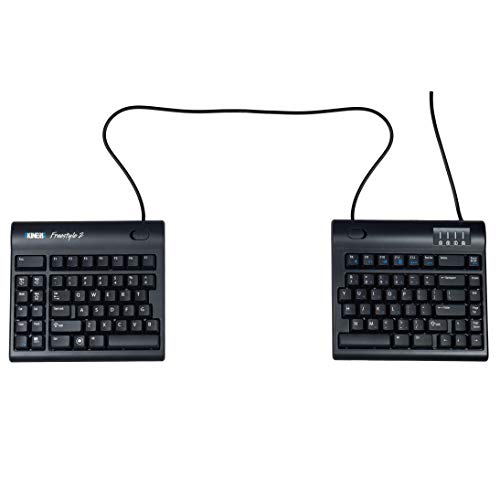
- 20" split separation for personalized hand and shoulder positioning
- Standard Windows shortcuts plus embedded 10-key
- Plug-and-play support for Windows, Linux, and ChromeOS
Best For: Programmers who want a highly adjustable split keyboard with a standard Windows layout.
Best Budget
Wireless Wave Keyboard and Mouse Combo
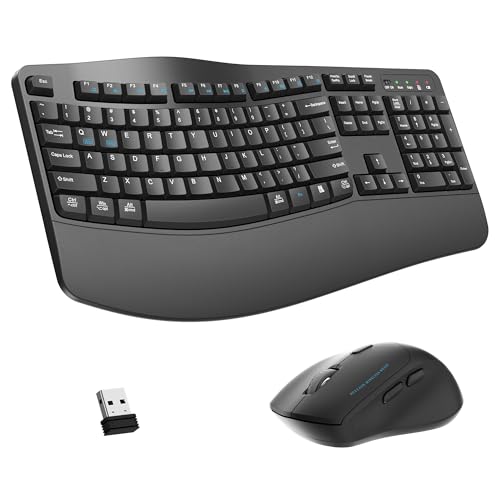
- Wave key layout supports a more natural typing angle
- Wrist rest adds comfort for long coding sessions
- Quiet mouse and 2.4G wireless keep the desk setup simple
Best For: Programmers and PC users who want a comfortable full-size keyboard and mouse combo.
Best Split-Key Ergonomics
Perixx PERIBOARD-512B Wired Ergonomic Keyboard

- Split-key layout helps reduce wrist bending during long typing sessions.
- Curved rows and wrist rest support a more natural typing posture.
- Tactile membrane feel offers a familiar, responsive typing experience.
Best For: Programmers and office typists who want a comfortable wired split keyboard with an easy transition.
Best for Multi-Device Coding
Perixx PERIBOARD-835BL Ergonomic Mechanical

- Split one-piece ergonomic layout eases wrist strain during long sessions.
- Supports wired, Bluetooth, and 2.4 GHz connections across multiple devices.
- Low-profile blue switches plus RGB and macros suit coding workflows.
Best For: Programmers who switch between several devices and want an ergonomic mechanical keyboard.
Best for Backlit Typing
Arteck Ergonomic Split Wired Keyboard

- Split ergonomic layout supports a more natural typing posture
- Cushioned wrist/palm rest improves comfort for long sessions
- 7-color backlighting with adjustable brightness helps in dim rooms
Best For: Programmers who want a comfortable wired split keyboard with backlighting for Windows PCs.
Best for Split-Hand Comfort
Perixx Periduo-605 Wireless Ergonomic Combo

- Split keyboard layout reduces outward wrist bending.
- Includes a vertical mouse with 1000/1500/2000 DPI settings.
- Adjustable palm rest adds support for longer typing sessions.
Best For: Programmers and PC users who want a comfortable split keyboard and vertical mouse set.
Best for Easy Setup
Arteck Ergonomic Wired Split Keyboard

- Split design supports a more natural typing posture.
- Cushioned wrist rest improves comfort for long coding sessions.
- 7-color backlighting with adjustable brightness helps in low light.
Best For: Programmers who want a simple wired ergonomic keyboard with wrist support and backlighting.
Best for Wrist Comfort
Logitech Wave Keys Wireless Ergonomic Keyboard

- Wave-shaped layout supports a more natural typing position
- Cushioned memory-foam palm rest reduces wrist strain
- Bluetooth, Logi Bolt, and Easy-Switch improve flexibility
Best For: Programmers who want a comfortable wireless ergonomic keyboard with strong wrist support.
Best for Wrist Support – Logitech ERGO K860 Wireless Ergonomic Keyboard
If you want one of the more comfortable ergonomic keyboards for programmers pc use, the Logitech ERGO K860 is built to reduce wrist bend and encourage a more natural typing position. Its split, curved layout and generous palm rest make long coding sessions feel less punishing, while still keeping familiar full-size controls and wireless convenience.
Best For: Programmers who spend hours typing and want a full-size ergonomic board with strong wrist support.
Pros:
- Split, curved keyframe helps promote a more natural hand and arm position
- Memory-foam wrist rest adds comfort for long typing sessions
- Bluetooth and USB receiver support make it easy to pair with PC setups
- Full-size layout with numpad keeps it practical for everyday work
Cons:
- Large footprint takes up more desk space than compact keyboards
- Split design can require a short adjustment period
The ERGO K860 is a smart pick if ergonomics matter more than a minimalist layout. For programmers comparing ergonomic keyboards for programmers pc, it stands out as a comfort-first option that still preserves the familiar features most people want at work.
Best Split Design – Kinesis Freestyle2 Ergonomic Keyboard for PC
If you’re comparing ergonomic keyboards for programmers pc, the Kinesis Freestyle2 stands out for its fully split layout and long 20" separation range. That makes it easier to fine-tune shoulder width, wrist angle, and desk positioning without relying on software or special drivers.
Best For: Programmers who want a highly adjustable split keyboard with a standard Windows layout and plug-and-play setup.
Pros:
- Split modules can be rotated and separated up to 20" for a more natural typing posture
- Standard Windows layout includes Cut, Copy, Paste, multimedia keys, and an embedded 10-key
- Low-force membrane switches help reduce finger fatigue during long coding sessions
- Works with Windows, Linux, and ChromeOS without extra software
Cons:
- Membrane switches won’t suit typists who prefer a mechanical feel
- Wired-only design limits placement flexibility on a busy desk
- Full benefit depends on spending time dialing in the split and splay settings
For programmers who need a practical ergonomic upgrade without a learning-heavy setup, the Freestyle2 is a strong fit. Its adjustability is the main reason it earns attention among ergonomic keyboards for programmers pc, especially if shoulder comfort and flexible positioning matter more than mechanical switches.
Best Budget – Wireless Wave Keyboard and Mouse Combo
If you want a low-effort upgrade among ergonomic keyboards for programmers pc, this full-size wave-key combo focuses on comfort first. The curved key layout, wrist rest, and quiet mouse make it a practical pick for long coding sessions, office work, and shared workspaces.
Best For: Programmers, office users, and PC owners who want a budget-friendly ergonomic keyboard and mouse set with built-in wrist support.
Pros:
- Wave-shaped keys and wrist rest help encourage a more natural typing posture
- Quiet mouse clicks and 3 DPI settings suit offices, libraries, and home setups
- 2.4G wireless connection with a shared USB receiver keeps setup simple
- Full-size layout includes function keys and numpad for everyday productivity
Cons:
- Not a split keyboard, so it offers less advanced ergonomics than specialist models
- Plastic-focused design is more practical than premium
- May feel large on compact desks
For buyers comparing ergonomic keyboards for programmers pc, this combo is a solid comfort-first option if you prefer a familiar full-size layout over a more aggressive ergonomic design. It’s especially appealing when you want wrist support, quiet operation, and easy plug-and-play use without extra software.
Best Split-Key Ergonomics – Perixx PERIBOARD-512B Wired Ergonomic Keyboard
If you want one of the more straightforward ergonomic keyboards for programmers pc setups, the Perixx PERIBOARD-512B is built around a split-key layout that helps keep wrists in a more natural position during long coding sessions. Its curved rows, tactile membrane feel, and built-in wrist rest make it a practical pick for anyone who types for hours and wants a simple wired keyboard rather than a learning-heavy ergonomic board.
Best For: Programmers and office users who want an affordable split ergonomic keyboard with a familiar feel.
Pros:
- Split-key design reduces wrist bending and supports a more natural hand position.
- Long key travel and tactile feedback feel more responsive than many basic membrane boards.
- Curved row layout and wrist rest improve comfort during extended typing sessions.
Cons:
- There is a short adjustment period before the layout feels natural.
- Membrane switches may not satisfy users who prefer mechanical keyboards.
For programmers who value comfort over flash, this is a sensible entry into ergonomic keyboards for programmers pc use. It is especially appealing if you want a wired USB board with a familiar typing rhythm and less strain, without paying for a more specialized split or tented design.
Best for All-Day Comfort – Ergonomic Wireless Wave Keyboard Combo
If you’re comparing ergonomic keyboards for programmers pc setups, this wireless combo is aimed at reducing hand strain during long typing sessions while keeping desk setup simple. The wave-shaped keys, wrist rest, and included ergonomic mouse make it a practical pick for users who spend hours coding, writing, or working across Windows and Mac machines.
Best For: Programmers and office users who want an affordable ergonomic keyboard-and-mouse bundle for comfortable everyday typing.
Pros:
- Wave key layout and wrist rest help support a more natural typing posture.
- 2.4GHz wireless combo uses one nano receiver for simple plug-and-play setup.
- Includes a silent ergonomic mouse with 3 DPI levels for smoother navigation.
- Full-size 104-key layout with number pad suits coding, data entry, and general work.
Cons:
- Not a mechanical keyboard, so it won’t appeal to users who prefer tactile switches.
- Shared wireless receiver means it depends on USB connectivity.
- Spill resistance is limited to minor accidents rather than full protection.
For ergonomic keyboards for programmers pc buyers who want comfort first and don’t need premium mechanical features, this combo delivers a straightforward, low-friction upgrade. It’s especially appealing if you want a ready-to-use desktop bundle rather than buying a keyboard and mouse separately.
Best for Multi-Device Coding – Perixx PERIBOARD-835BL Ergonomic Mechanical
If you want ergonomic keyboards for programmers pc that also make it easy to jump between devices, the Perixx PERIBOARD-835BL is a practical pick. Its split one-piece layout, low-profile mechanical switches, and multi-device connectivity are built for long typing sessions, whether you are coding at a desktop or switching over to a laptop or tablet.
Best For: Programmers who want an ergonomic mechanical keyboard with wired, Bluetooth, and 2.4 GHz flexibility for a mixed-device setup.
Pros:
- Split-key ergonomic design helps reduce wrist bend and supports a more natural hand position.
- Connects to up to four devices across wired, 2.4 GHz, and Bluetooth modes.
- Low-profile blue switches give tactile, clicky feedback that many coders prefer.
- RGB backlighting, macro support, and programmable keys add useful workflow customization.
Cons:
- Clicky switches can be loud for shared offices or quiet spaces.
- There is a learning curve if you are new to split ergonomic keyboards.
For programmers comparing ergonomic keyboards for programmers pc, this model stands out for flexibility more than minimalism. It is a strong fit if you value comfort, mechanical feel, and the ability to move quickly between multiple devices without giving up a full ergonomic layout.
Best for Backlit Typing – Arteck Ergonomic Split Wired Keyboard
If you want ergonomic keyboards for programmers pc that keep the typing angle natural without adding wireless hassle, this Arteck split wired model is a practical pick. It combines a cushioned wrist rest, adjustable 7-color backlighting, and a simple USB connection for everyday desktop or laptop coding setups.
Best For: Programmers who want a comfortable wired keyboard with backlighting and a split layout for long coding sessions on Windows PCs.
Pros:
- Split ergonomic layout helps encourage a more natural hand position
- Cushioned wrist and palm rest adds comfort during long typing sessions
- 7 backlight colors with adjustable brightness are useful for low-light workspaces
- USB wired connection keeps setup straightforward and reliable
Cons:
- Wired design may not suit users who prefer a clutter-free desk
- Ergonomic split layouts can take time to get used to
- Best suited to Windows desktops and laptops rather than cross-platform flexibility
This is a solid value-oriented option if you want ergonomic keyboards for programmers pc and prefer a comfortable, backlit wired board over more complex premium ergonomics. It focuses on the basics that matter most for coding: support, visibility, and dependable daily use.
Best for Split-Hand Comfort – Perixx Periduo-605 Wireless Ergonomic Combo
If you want an affordable ergonomic keyboard-and-mouse bundle for long PC sessions, the Perixx Periduo-605 is built to reduce wrist strain without adding a steep learning curve. It’s a practical option for shoppers comparing ergonomic keyboards for programmers pc who want a split layout, compact footprint, and simple plug-and-play setup.
Best For: Programmers and office users who want an easy-to-adapt split keyboard with a vertical mouse in one wireless set.
Pros:
- Split-key design helps keep wrists in a more natural typing position.
- Includes a vertical mouse with adjustable DPI for better all-day comfort.
- Wireless, plug-and-play setup keeps desk clutter low.
- Adjustable palm rest adds support for longer typing sessions.
Cons:
- Membrane low-profile keys won’t suit everyone who prefers mechanical switches.
- PC-focused compatibility limits appeal for multi-platform users.
- The compact layout may take some getting used to at first.
Overall, this combo is a solid comfort-first pick if you’re shopping ergonomic keyboards for programmers pc and want to improve posture without paying for a high-end split board.
Best for Easy Setup – Arteck Ergonomic Wired Split Keyboard
If you want one of the more straightforward ergonomic keyboards for programmers pc, this Arteck wired split keyboard keeps setup simple while adding a cushioned wrist rest and adjustable backlighting for long coding sessions.
Best For: Programmers who want a plug-and-play ergonomic keyboard with a split layout, wrist support, and visible keys for late-night work.
Pros:
- Split design encourages a more natural wrist and forearm position.
- Soft cushioned wrist and palm rest adds comfort during long typing sessions.
- 7 backlight colors with 3 brightness levels help in dim rooms.
- USB wired connection is truly plug-and-play on Windows PCs and laptops.
Cons:
- Wired-only design may not suit users who want a cleaner desk setup.
- Split layout can take some adjustment if you’re used to standard keyboards.
For programmers comparing ergonomic keyboards for programmers pc, this model stands out as a practical, no-fuss option: comfortable enough for daily use, visible enough for low-light typing, and easy to get working right away.
Best for Wrist Comfort – Logitech Wave Keys Wireless Ergonomic Keyboard
If you want one of the more approachable ergonomic keyboards for programmers pc, the Logitech Wave Keys is built around comfort first. Its wavy key layout helps keep your hands and wrists in a more natural position, while the cushioned palm rest adds support during long coding sessions.
Best For: Programmers who want a wireless ergonomic keyboard with strong wrist support, simple setup, and multi-device switching.
Pros:
- Wavy compact design encourages a more natural typing posture
- Memory-foam palm rest helps reduce wrist pressure
- Easy-Switch and Bluetooth/Logi Bolt support make it flexible for multi-device use
- Logi Options+ customization adds useful shortcut control
Cons:
- Not a split keyboard, so it may feel less aggressive than some ergonomic models
- Compact layout may take time to adjust to if you prefer a full-size board
For programmers who spend hours typing and want a gentler feel without a steep learning curve, the Wave Keys is a practical pick. It stands out among ergonomic keyboards for programmers pc because it balances comfort, portability, and everyday usability better than many more specialized designs.
How We Picked These Ergonomic Keyboards for Programmers PC
We prioritized layouts and features that matter most during long development sessions: natural hand position, wrist support, stable key feel, and reliable connectivity. We also looked at whether each keyboard suits coding-heavy use on a desktop PC, including wired, wireless, and multi-device options.
For Ergonomic Keyboards for Programmers PC, comfort should not come at the expense of accuracy. That is why we favored models with sensible key spacing, familiar full-size layouts, and build quality that supports daily use.
Quick Comparison
Split keyboards are usually the best fit if you want maximum adjustability and a more open shoulder position. Wave-style keyboards offer a gentler learning curve and are often easier to adopt quickly. Mechanical ergonomic models can appeal to programmers who want stronger tactile feedback, while combo sets may be best if you also want a matching mouse and a cleaner desk setup.
Key Buying Factors for Ergonomic Keyboards for Programmers PC
Layout and Learning Curve
Split designs can improve alignment, but they may take time to get used to. If you type all day and want immediate comfort, a wave or sculpted layout may be the safer choice.
Wired Vs. Wireless
Wired keyboards are simple and dependable for desk-based coding. Wireless models are better if you want flexibility, a cleaner workspace, or the ability to switch between devices.
Typing Feel
Programmers often prefer consistent key action over flashy features. Consider membrane keys for quiet office use, or mechanical switches if you want more tactile feedback and stronger typing definition.
Wrist and Palm Support
Built-in rests can reduce pressure during long sessions, especially if your desk height is not ideal. The right support should feel natural, not force your wrists upward.
Extra Features
Backlighting, Easy-Switch pairing, and included mouse bundles can be useful, but they should not outweigh comfort and reliability.
Who Should Buy Which Ergonomic Keyboards for Programmers PC?
If you want the most adjustable ergonomic setup, choose a split keyboard. If you prefer a more familiar transition, a wave keyboard is often easier to live with. If you code late or in low light, backlit models can help. And if you want the simplest, lowest-maintenance option for a PC workstation, a wired model is still one of the best choices.
In short, the best Ergonomic Keyboards for Programmers PC are the ones that match your typing habits, desk setup, and comfort needs over the long run.