Choosing the right PoE switch can simplify cabling, reduce clutter, and keep your network devices powered from one place. For small businesses, the best option depends on how many devices you need to run, how much power they draw, and whether you need managed features.
This roundup highlights practical PoE switches for real-world office, surveillance, and mixed-use setups, so you can match the switch to your budget and network size with confidence.
Best 10 Poe Switches for Small Business Picks for 2026
High-Capacity Smart Pick
TP-Link 24-Port PoE+ Managed Switch

- 24 PoE+ ports with 250W total budget
- Easy smart management with web-based tools
- VLANs and SFP slots for flexible expansion
Best For: Small businesses needing many PoE ports and basic network control
Camera-Focused Value

- 8 PoE ports with 2 Gigabit uplinks
- 120W budget and up to 30W per port
- Built for easy PoE camera and NVR setups
Best For: Businesses setting up or expanding camera systems
Compact Desktop Choice

- 4 PoE+ ports with a 65W budget
- Plug-and-play with no software setup
- Fanless metal design for quiet operation
Best For: Small offices needing a simple switch for a few devices
Quiet Essentials Pick

- 4 PoE+ ports with 63W total budget
- Fanless silent operation
- Desktop or wall-mount metal design
Best For: Small teams needing a silent switch for a few devices
Compact 8-Port Control
UGREEN 10-Port PoE Switch with 8 PoE+ and 2 Uplink

- 8 PoE+ gigabit ports with 2 uplinks
- 60W total budget with power prioritization
- Extend and auto-recovery features for cameras
Best For: Small offices needing simple PoE for cameras, APs, or phones
High-Capacity PoE
16-Port Gigabit PoE Switch with SFP
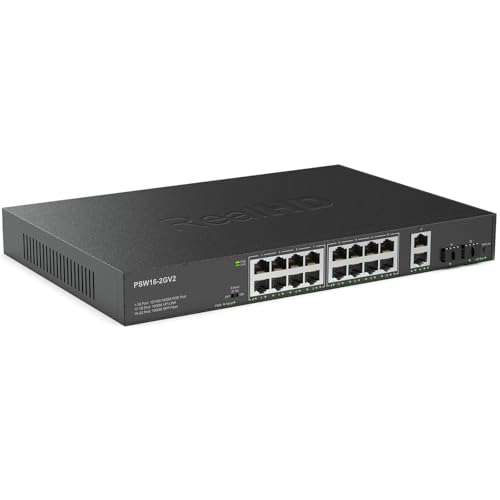
- 16 PoE ports with 300W total budget
- 2 RJ45 uplinks plus 2 SFP ports
- Fanless metal build with plug-and-play setup
Best For: Growing small businesses that need more ports and higher power
Quiet Everyday PoE
TP-Link LS108GP 8-Port Gigabit PoE Switch

- 8 PoE+ gigabit ports with 65W budget
- Fanless design for silent operation
- Auto recovery and extend mode for deployed devices
Best For: Quiet plug-and-play PoE for small offices and camera installs
Compact Smart PoE Pick
4-Port PoE+ Smart Switch for Small Offices
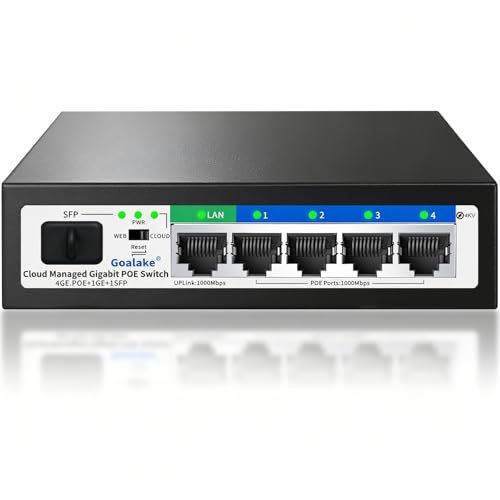
- 4 PoE+ ports with a 52W budget
- Cloud/web management with VLAN and QoS
- Fanless metal build with extend mode
Best For: Small offices or home security setups that need compact smart PoE coverage
High-Port Unmanaged Option
16-Port Switch with 8 PoE+ Ports

- 16 Gigabit ports with 8 PoE+ ports
- 80W dedicated PoE budget
- Unmanaged metal design for simple installs
Best For: Small businesses that need lots of PoE ports with minimal setup
Compact Quiet Performer
5-Port Fanless PoE+ Switch with QoS

- 4 PoE ports with a 60W budget
- Fanless metal design for quiet operation
- QoS and plug-and-play setup
Best For: Small networks that need a simple quiet PoE switch for a few devices
High-Capacity Smart Pick – TP-Link 24-Port PoE+ Managed Switch
For poe switches for small business, this TP-Link model makes sense when you need lots of wired devices on one switch without jumping to a full enterprise platform. It combines 24 PoE+ ports with a 250W budget, plus two SFP slots and easy smart management for offices that want flexible expansion and basic control.
Best For: Small businesses with many PoE devices, segmented networks, and a need for simple smart management.
Pros:
- 24 PoE+ ports with up to 30W per port and a 250W total power budget
- Easy smart management with a web interface and smart configuration utility
- VLAN support helps segment traffic for better network organization
- Auto recovery can reboot unresponsive PoE devices when configured
Cons:
- Requires configuration to use auto recovery
- Bulkier than compact 5-port desktop switches
- More features than a purely plug-and-play setup
If your small business is scaling beyond a few cameras or phones, this switch offers room to grow while still staying relatively approachable. The mix of PoE capacity, VLANs, and SFP uplinks makes it a practical middle ground for organized office networks.
Camera-Focused Value – REOLINK 8-Port PoE Switch
Among poe switches for small business, this REOLINK option stands out if your priority is powering IP cameras or a small surveillance setup. It delivers 8 PoE ports, 2 Gigabit uplinks, and a 120W budget, while keeping setup straightforward with plug-and-play operation and adaptive power handling.
Best For: Small businesses building or expanding a PoE camera system.
Pros:
- 8 PoE ports plus 2 Gigabit uplink ports
- 120W total PoE budget with up to 30W per port
- Intelligent power management helps protect against overload
- Automatically detects PoE vs non-PoE devices
Cons:
- Lower port count than larger office switches
- Power budget is limited to 8 PoE devices
- Designed primarily around camera/NVR use cases
This is a focused choice rather than a general-purpose office switch, which can be a plus if you want a simple surveillance-friendly setup. For businesses that value easy deployment and reliable power distribution to cameras, it covers the essentials well.
Compact Desktop Choice – TP-Link 5-Port PoE Switch
If you want poe switches for small business in a compact, no-fuss format, this TP-Link model is a strong fit for a few powered devices. It offers 4 PoE+ ports, a 65W budget, and one Gigabit non-PoE port, making it a straightforward option for small deployments that do not need advanced management.
Best For: Small offices that need a simple switch for a handful of PoE devices.
Pros:
- 4 PoE+ ports with up to 30W per port
- 65W total PoE budget in a small 5-port design
- Plug-and-play setup with no software required
- Fanless metal case for quiet desktop or wall use
Cons:
- Only 5 total ports, so expansion is limited
- No managed features like VLAN configuration
- Best suited to smaller, simpler networks
This model keeps things practical: power a few cameras, access points, or phones without adding complexity. For small businesses that want a reliable, quiet switch and do not need a full management layer, it is easy to recommend.
Quiet Essentials Pick – NETGEAR 5-Port PoE Switch
For poe switches for small business, this NETGEAR model is a clean fit when you need a tiny, dependable power-and-network hub for a few devices. It includes 4 PoE+ ports with a 63W budget, automatic speed negotiation, and a fanless metal design that works well in quiet office spaces.
Best For: Small teams that want an easy, silent PoE switch for a few powered devices.
Pros:
- 4 PoE+ ports with a 63W total power budget
- Dynamic PoE allocation redistributes unused power
- Fanless design keeps operation silent
- Compact metal housing supports desktop or wall mounting
Cons:
- Only 5 total ports, so it is not built for larger networks
- Unmanaged design offers no advanced configuration
- Regional compatibility is limited to U.S. and Canada
This switch is best thought of as a straightforward essentials unit rather than a feature-rich networking tool. If your office only needs to power a few devices and you want silent operation, it does the job neatly.
Compact 8-Port Control – UGREEN 10-Port PoE Switch with 8 PoE+ and 2 Uplink
If you’re shopping for poe switches for small business, this UGREEN model is a practical fit for compact camera, phone, or access point deployments. It offers 8 PoE+ gigabit ports, 2 gigabit uplinks, and a 60W total power budget, so it can handle a modest PoE setup without adding extra management complexity.
Best For: Small offices that need a simple PoE switch for cameras, APs, or IP phones with room to expand a little.
Pros:
- 8 PoE+ gigabit ports plus 2 gigabit uplinks for flexible small-network layout
- 60W total PoE budget with automatic power prioritization if demand exceeds capacity
- PoE Auto Recovery in Extend Mode can restart frozen or offline powered devices
- Three switchable modes: Standard, Port Isolation, and Extend
Cons:
- 60W budget is lower than larger multi-camera PoE switches
- Extend mode is better suited for reach than top speed
- Unmanaged design may not suit users who want advanced network control
This is a solid budget-conscious choice when you want straightforward PoE delivery and a few useful deployment modes. It stands out most for small-business installs that value simplicity, auto recovery, and enough ports for a focused setup.
High-Capacity PoE – 16-Port Gigabit PoE Switch with SFP
For buyers comparing poe switches for small business, this 16-port option is aimed at bigger camera or access point rollouts where port count matters as much as power. It provides 16 gigabit PoE ports, 2 gigabit RJ45 uplinks, 2 SFP ports, and a 300W PoE power budget, making it a strong fit for larger unmanaged deployments.
Best For: Small businesses that need more PoE ports and higher total power for surveillance or network expansion.
Pros:
- 16 gigabit PoE ports with 300W total power budget
- Includes 2 gigabit RJ45 uplinks and 2 SFP ports for flexible connectivity
- Plug-and-play unmanaged setup keeps installation simple
- Fanless metal housing supports quiet operation
Cons:
- Extend mode reduces speed to 10 Mbps
- Best suited to standard PoE devices listed in the notes
- Larger physical footprint than compact 8-port models
This switch makes sense when a small business is past the basic starter stage and needs more ports without moving to a fully managed system. Its combination of power headroom, uplinks, and SFP support gives it more deployment flexibility than smaller units.
Quiet Everyday PoE – TP-Link LS108GP 8-Port Gigabit PoE Switch
If you want poe switches for small business that are easy to deploy and stay out of the way, the TP-Link LS108GP is a straightforward option. It combines 8 PoE+ gigabit ports, a 65W power budget, extend mode, and PoE auto recovery in a fanless desktop or wall-mount design.
Best For: Small offices that want a quiet, plug-and-play PoE switch for cameras, access points, or similar devices.
Pros:
- 8 PoE+ gigabit ports with up to 30W per port
- 65W total PoE budget for compact installations
- PoE Auto Recovery helps reboot dropped or unresponsive devices
- Fanless operation keeps noise down for office environments
Cons:
- Only 8 PoE ports, so it may not fit larger rollouts
- Unmanaged design offers limited network customization
- Extend mode is for longer reach, not maximum speed
For small businesses that want a dependable, quiet PoE switch without configuration overhead, this TP-Link model is easy to recommend. It covers the basics well and adds recovery and extend features that are especially useful in camera-focused setups.
Compact Smart PoE Pick – 4-Port PoE+ Smart Switch for Small Offices
If you’re comparing poe switches for small business, this Goalake 6-port model is a strong fit for small camera setups, WiFi APs, and mixed office networks. It offers 4 Gigabit PoE+ ports, 1 Gigabit uplink, and 1 SFP slot, with a 52W total PoE budget for simple single-cable power and data.
Best For: Small offices or home security installs needing a compact smart PoE switch with basic remote management.
Pros:
- 4 PoE+ ports deliver up to 30W each, with a 52W total budget.
- Cloud management app and web interface let you monitor and adjust settings remotely.
- VLAN, QoS, storm control, and port mirroring add useful small-business control.
- Fanless metal housing and 4KV lightning protection support quiet, 24/7 operation.
Cons:
- Only 4 ports provide PoE power, so it is best for lighter deployments.
- Passive PoE or non-PoE devices need an active PoE splitter for power delivery.
- 52W budget may be limiting if you plan to power more demanding devices.
This is a practical pick if you want easy setup, quiet operation, and just enough management features for a small business or home security network. The extend mode and SFP option add flexibility, but the real strength is its straightforward fit for smaller installs.
High-Port Unmanaged Option – 16-Port Switch with 8 PoE+ Ports
For buyers shopping poe switches for small business, the Linksys LGS116P makes sense when you need more ports and a higher PoE budget without adding management overhead. It combines 16 Gigabit ports, 8 PoE+ ports, and an 80W power budget in a metal desktop or wall-mount design.
Best For: Businesses that want a simple, high-port-count unmanaged PoE switch for cameras, phones, or access points.
Pros:
- 16-port layout gives plenty of room for growth.
- 8 PoE+ ports share an 80W dedicated PoE budget.
- Unmanaged, plug-and-play setup keeps deployment simple.
- Metal housing and non-blocking 32 Gbps design suit steady business use.
Cons:
- Unmanaged design offers no VLAN or advanced traffic controls.
- PoE ports are only on ports 1 through 8, so planning matters.
- Higher port count may be more than needed for very small setups.
This is a straightforward choice if you want more PoE ports than a compact desktop switch can offer. It favors easy installation and broader device support over smart features, which is often exactly what a small office needs.
Compact Quiet Performer – 5-Port Fanless PoE+ Switch with QoS
If you want a compact option in poe switches for small business, the D-Link DGS-1005P is built for small deployments that need a few powered devices and a quiet footprint. It provides 4 PoE ports, a 60W total budget, Gigabit speeds, and QoS in a small fanless metal chassis.
Best For: Small offices or remote installs that need a durable, easy-to-use PoE switch for a few devices.
Pros:
- 4 PoE ports support up to 30W each with a 60W total budget.
- Fanless metal build helps keep operation quiet.
- QoS can prioritize time-sensitive traffic like VoIP or surveillance.
- Plug-and-play setup keeps installation simple.
Cons:
- Only 5 total ports, so expansion space is limited.
- Best suited for smaller networks rather than larger multi-device deployments.
- No advanced managed features beyond basic QoS.
This model stands out when you want reliable PoE without extra complexity. It is a practical fit for small offices, cameras, phones, or APs where quiet operation and straightforward setup matter more than deep network control.
How We Picked These Poe Switches for Small Business
We focused on switches that fit common small-business use cases: IP cameras, VoIP phones, wireless access points, and basic office networking. Priority went to models with a sensible PoE budget, enough ports for growth, reliable Gigabit performance, and features that make deployment easier, such as auto recovery, VLAN support, or wall-mount options.
We also considered whether a switch is unmanaged or easy-smart, since many Poe Switches for Small Business need to be simple to install but still flexible enough for segmented networks and future expansion.
Quick Comparison
As you compare models, think in three layers: port count, total PoE wattage, and management level. Smaller desktop switches are usually best for a few cameras or an access point and phone pair. Mid-size 8-port and 10-port models offer a better balance for growing offices. Larger 16-port and 24-port switches make more sense when you want a central networking hub for multiple rooms, devices, or a surveillance rack.
Key Buying Factors for Poe Switches for Small Business
Port Count and Uplinks
Count every powered device you plan to connect today, then add headroom. If you expect expansion, look for extra Ethernet ports or SFP uplinks so you can connect to a router, NVR, or another switch without sacrificing PoE ports.
PoE Budget and Device Power Needs
A switch may have enough ports but still run out of power. Check the total PoE budget, not just the per-port standard. High-draw cameras, PTZ models, and some access points can consume much more than basic devices, so a larger watt budget provides better stability.
Managed Vs. Unmanaged
Unmanaged switches are usually the easiest choice for plug-and-play installs. Easy-smart or managed options are better if you need VLANs, QoS, IGMP snooping, traffic separation, or remote troubleshooting. For many Poe Switches for Small Business, limited management features are a useful middle ground.
Mounting, Cooling, and Reliability
Desktop, wall-mount, and rack-ready designs all have a place. Fanless models are quieter and often better for offices, while metal housings and surge-resistant designs can improve durability in always-on environments.
Who Should Buy Which Poe Switches for Small Business?
If you only need to power a few devices, choose a compact 5-port or 6-port switch. If you are building out a small office or surveillance system, an 8-port or 10-port model is often the sweet spot. For multi-room deployments, larger 16-port and 24-port switches are better for consolidation and future growth.
In short, the best choice is the one that matches your device count, PoE budget, and need for network control without paying for features you will never use.