If you need one switch to power devices and extend your network over fiber, poe switches with sfp uplink are a practical upgrade. They’re a smart fit for cameras, access points, VoIP phones, and mixed office or security networks.
Below, we focus on models that balance PoE budget, uplink flexibility, and real-world manageability so you can choose the right switch without overbuying features you won’t use.
Best 10 Poe Switches with Sfp Uplink Picks for 2026
High-Power Rackmount Pick
TP-Link 16-Port PoE+ with SFP Uplinks

- 16 PoE+ ports with 250W budget
- 2 gigabit uplinks plus 2 combo SFP slots
- Plug-and-play metal rackmount design
Best For: Large PoE deployments that need SFP uplinks and rackmount hardware
Compact 2.5G Upgrade
NICGIGA 8-Port PoE+ with 10G SFP+

- 8 x 2.5Gb PoE+ ports
- 2 x 10G SFP+ uplinks
- Fanless unmanaged metal design
Best For: Small to mid-size 2.5G networks needing fast SFP+ uplinks
Managed Office Option
TP-Link Smart PoE Switch with SFP

- 8 PoE+ ports with 61W budget
- 2 Gigabit SFP slots
- Omada SDN and standalone management support
Best For: Small offices that need managed PoE and fiber uplinks
High-Capacity 2.5G Value Pick
NICGIGA 16-Port PoE+ with 10G SFP+
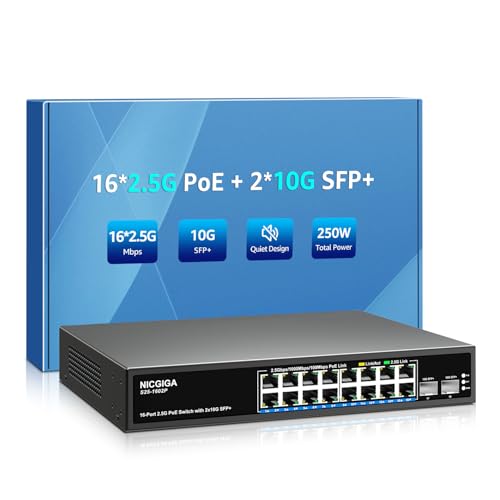
- 16 x 2.5Gb PoE+ ports
- 2 x 10G SFP+ uplinks
- 250W budget in a fanless metal case
Best For: Large unmanaged 2.5G installs needing strong PoE capacity and SFP+ uplinks
Managed Desktop PoE
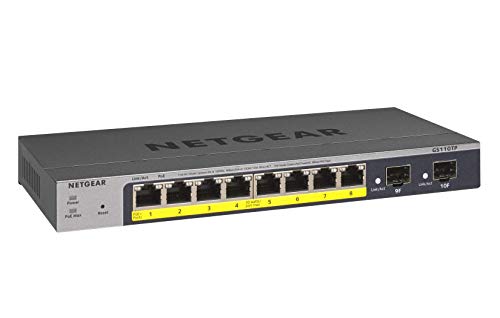
- 8 PoE+ ports with a 55W power budget
- 2 x 1G SFP ports for fiber uplinks
- Smart managed, fanless, and desktop or wall mount
Best For: Compact networks that need managed PoE and dual SFP uplinks
Industrial High-Power PoE

- 4 PoE++ ports deliver up to 90W each
- 2 gigabit SFP uplinks for fiber connections
- PoE watchdog and redundant DC inputs for reliability
Best For: High-power industrial deployments with fiber uplink needs
Managed Pick
Linksys 8-Port PoE+ Switch with 2 SFP Uplinks

- 8 PoE+ gigabit ports with 110W total power
- 2 gigabit SFP uplink slots
- Managed with QoS, VLAN, and port security
Best For: Small networks needing managed PoE+ and SFP uplinks
High-Capacity Choice
16-Port Unmanaged PoE Switch with 2 SFP Ports
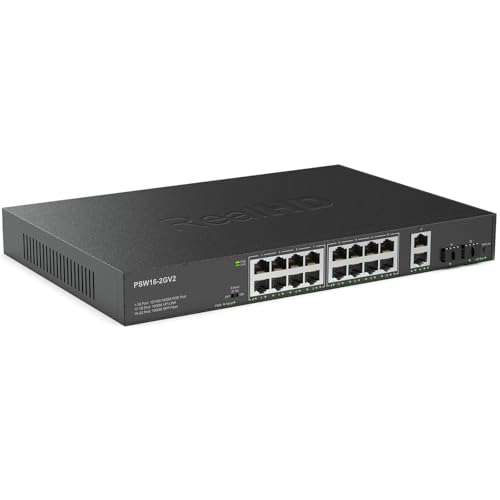
- 16 gigabit PoE ports with 300W total budget
- 2 SFP uplink ports for network expansion
- Fanless metal housing for quiet, plug-and-play use
Best For: High-port-count PoE installations that need simple SFP uplinks
Compact Smart Pick
YuanLey 8-Port PoE Switch with SFP Uplink
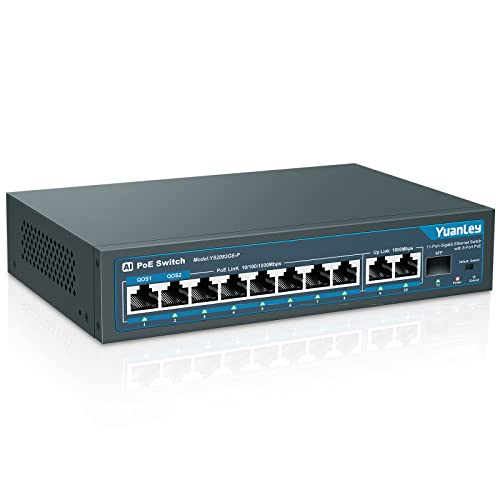
- 8 PoE+ gigabit ports with 120W total power
- 2 gigabit uplink ports plus 1 SFP port
- VLAN isolation, QoS, and AI WatchDog support
Best For: Small networks that want compact PoE power with an SFP uplink option
High-Power Rackmount Pick – TP-Link 16-Port PoE+ with SFP Uplinks
If you need poe switches with sfp uplink for a larger camera or access point deployment, the TP-Link TL-SG1218MP is built around capacity. It offers 16 Gigabit PoE+ ports with a 250W power budget, plus 2 Gigabit uplink ports and 2 combo SFP slots for high-speed backbone connections. That makes it a practical fit when you want plenty of powered ports and a cleaner wired uplink path.
Best For: Rack-mounted installs that need many PoE+ ports and SFP-based uplinks.
Pros:
- 16 PoE+ ports with up to 30W per port and a 250W total power budget
- 2 gigabit uplink ports plus 2 combo SFP slots for flexible network expansion
- Plug-and-play setup with no software installation or configuration required
- Metal case with professional heat dissipation design for durability
Cons:
- Not a managed switch, so advanced control options are limited
- Designed for rack mounting, which may be less convenient for small desktop setups
Overall, this is a strong choice when you want a straightforward PoE switch with SFP uplinks and enough power for a sizable wired deployment. The combination of port count, uplink options, and sturdy construction makes it especially appealing for practical network builds.
Compact 2.5G Upgrade – NICGIGA 8-Port PoE+ with 10G SFP+
For buyers comparing poe switches with sfp uplink in a faster small-to-mid-size network, this NICGIGA model stands out for its 2.5G access ports and 10G SFP+ uplinks. It combines 8 2.5Gb PoE ports with 2 10G SFP+ uplinks, giving you a simple way to connect WiFi 6 hardware, NAS devices, or PoE cameras without adding configuration overhead.
Best For: Small networks that want 2.5G PoE access and 10G fiber uplinks.
Pros:
- 8 x 2.5Gb PoE+ ports with 30W per port and 120W total budget
- 2 x 10G SFP+ uplinks for faster backbone or device connections
- Unmanaged plug-and-play operation with automatic PD detection
- Fanless metal case with 6KV lightning protection and wide temperature range
Cons:
- Supports only 44-57V PoE devices
- Total PoE budget is lower than larger high-port-count options
This is a good fit if your priority is faster edge connectivity rather than maximum port count. The 2.5G PoE ports and 10G SFP+ uplinks make it a sensible step up for modern WiFi 6 and storage-focused setups.
Managed Office Option – TP-Link Smart PoE Switch with SFP
If you want poe switches with sfp uplink and need more control than a basic unmanaged unit, the TP-Link TL-SG2210P V3 is a practical smart-managed choice. It includes 8 Gigabit PoE+ ports, 2 Gigabit SFP slots, and Omada SDN integration for centralized management. That makes it a strong fit for networks where VLANs, security rules, and traffic control matter.
Best For: Small business or office networks that want management features and SFP slots.
Pros:
- 8 PoE+ ports with 61W total PoE capacity
- 2 Gigabit SFP slots for fiber or uplink connections
- Omada SDN support plus standalone web, CLI, SNMP, and RMON management
- Security and traffic tools including VLAN, ACL, QoS, and static routing
Cons:
- Desktop or wall mount only, so it is not rack mountable
- 61W PoE budget may be limiting for heavier powered deployments
For buyers who want visibility and control, this switch is more capable than a plug-and-play model while still staying compact. Its SFP slots and Omada compatibility make it especially useful for managed office networks.
High-Capacity 2.5G Value Pick – NICGIGA 16-Port PoE+ with 10G SFP+
When you need poe switches with sfp uplink for a larger 2.5G rollout, this NICGIGA model offers a lot of physical capacity without moving into managed-switch complexity. It provides 16 x 2.5Gb PoE+ ports and 2 x 10G SFP+ uplinks, along with a 250W PoE budget. That combination suits WiFi 6 access points, PoE cameras, and other devices that benefit from faster access ports and high-speed uplinks.
Best For: Large unmanaged 2.5G PoE setups that need 10G SFP+ uplinks.
Pros:
- 16 x 2.5Gb PoE+ ports with up to 30W per port
- 2 x 10G SFP+ uplinks for higher-speed connectivity
- 250W total PoE budget supports larger powered-device counts
- Fanless metal design with 6KV lightning protection and plug-and-play setup
Cons:
- Only supports 44-57V PoE devices
- Unmanaged design means fewer configuration options
This is the most capacity-focused option in the group for buyers who want fast access ports and SFP+ uplinks without management overhead. If your priority is powering many 2.5G devices from a simple switch, it is an efficient fit.
Flexible Full Gigabit PoE – 8-Port PoE+ with SFP Uplink
If you want poe switches with sfp uplink for a small surveillance or office network, this TP-Link model gives you 8 PoE+ ports plus two gigabit uplinks and a combo SFP slot. It’s a practical fit when you need powered ports for cameras or access points and still want a fiber-ready expansion path.
Best For: Small networks that need PoE power, simple setup, and an SFP option for uplink flexibility.
Pros:
- 8 PoE+ ports provide up to 30W per port with a 123W total PoE budget.
- Includes 2 gigabit non-PoE ports plus 1 combo SFP slot for uplink options.
- Extend mode supports up to 250m PoE transmission for surveillance use.
- Priority and isolation modes add traffic control and broadcast protection.
Cons:
- Extend mode drops speed to 10 Mbps.
- Only one SFP slot is included, and it is a combo port.
- Best suited to compact deployments rather than larger managed networks.
This is a strong pick if you want an easy, plug-and-play PoE switch with SFP uplink flexibility and practical features for camera-heavy installs.
Managed Desktop PoE – 8 PoE+ Ports with Dual SFP
For buyers comparing poe switches with sfp uplink, this NETGEAR smart switch stands out by combining managed control with 8 PoE+ ports and 2 one-gigabit SFP ports. It suits setups where you want fiber expansion, quiet operation, and more visibility than a basic unmanaged switch.
Best For: Users who want a compact managed PoE switch with SFP ports and remote management options.
Pros:
- 8 PoE+ ports with a 55W total PoE budget for powered devices.
- 2 x 1G SFP ports support fiber connectivity and network expansion.
- Smart managed features include secure setup and SNMP management.
- Fanless metal design keeps operation silent and desktop or wall mounting flexible.
Cons:
- PoE budget is relatively modest at 55W total.
- Only sold for U.S. and Canada use.
- May be more switch than needed if you only want basic plug-and-play connectivity.
This is a solid choice if you need a managed desktop switch with real SFP uplink capability and quiet operation for a small business or advanced home network.
Industrial High-Power PoE – 4 BT Ports with SFP Uplinks
If you need poe switches with sfp uplink for demanding devices, this LINOVISION industrial switch is built around high-wattage PoE++ support and dual SFP uplinks. It is a strong fit for PTZ cameras, lighting, and monitoring gear that need more power than a standard PoE+ switch can deliver.
Best For: Industrial or camera-focused installs that need high-power PoE++ and SFP uplink connectivity.
Pros:
- 4 IEEE 802.3bt ports deliver up to 90W each for high-power devices.
- 2 gigabit SFP uplinks provide fiber expansion options.
- Total PoE budget is 120W, with support for up to 240W using an optional power supply.
- PoE watchdog and redundant power input support improve reliability.
Cons:
- Only ports 1-4 provide PoE++ power; ports 5-8 are limited to PoE+.
- Unmanaged design offers less configuration control than smart-managed switches.
- Industrial mounting and power features may be more than casual users need.
This model makes sense when power delivery matters as much as uplink flexibility, especially in tougher installations where watchdog and redundancy features are useful.
Managed Pick – Linksys 8-Port PoE+ Switch with 2 SFP Uplinks
If you want poe switches with sfp uplink for a small network that needs both power and flexible upstream connectivity, the Linksys LGS310MPC is built for practical expansion. It combines 8 PoE+ gigabit ports, a 110W power budget, and 2 gigabit SFP uplink slots, making it a solid fit for cameras, access points, and other wired devices.
Best For: Small business or home installs that need managed PoE+ ports plus SFP uplinks for a cleaner connection back to the core network.
Pros:
- 8 gigabit PoE+ ports with a 110W total power budget
- 2 gigabit SFP uplink slots for dedicated core-network connections
- Managed features including QoS, VLAN, static routing, and MAC-based port security
- Metal housing and desktop or wall-mount flexibility
Cons:
- Only 8 PoE ports, so it is not ideal for larger device counts
- Managed setup may be more than you need for a basic plug-and-play install
This is a good choice when you want more control than an unmanaged switch offers, along with SFP-based uplink options for reliable expansion. The feature set is especially useful if you care about traffic prioritization and securing network access.
High-Capacity Choice – 16-Port Unmanaged PoE Switch with 2 SFP Ports
For buyers comparing poe switches with sfp uplink, this Real HD model focuses on simple deployment and higher power capacity. It offers 16 gigabit PoE ports, 2 SFP ports, and a 300W total PoE budget, so it is aimed at setups with many cameras, access points, or other PoE devices.
Best For: Larger plug-and-play PoE installs that need many powered ports and SFP uplinks without configuration.
Pros:
- 16 gigabit PoE ports with up to 30W per port
- 300W total PoE power budget for heavier device loads
- 2 SFP ports for uplink connections
- Fanless metal housing for quiet operation
Cons:
- Unmanaged design offers no advanced network controls
- Extend mode reduces speed to 10 Mbps
- Not intended for 24V passive PoE devices
This model makes sense if you want straightforward expansion and a lot of PoE capacity. The tradeoff is that it prioritizes easy setup over management features, so it is best when simplicity matters more than configuration control.
Compact Smart Pick – YuanLey 8-Port PoE Switch with SFP Uplink
If you need poe switches with sfp uplink in a compact, budget-friendly layout, the YuanLey 8-port model covers the essentials well. It includes 8 PoE+ gigabit ports, 2 gigabit uplink ports, and 1 SFP port, plus a 120W power budget for small camera, AP, or mixed-device networks.
Best For: Small installations that want PoE+, an SFP option, and basic traffic control in an easy plug-and-play switch.
Pros:
- 8 PoE+ gigabit ports plus 2 gigabit uplink ports and 1 SFP port
- 120W total PoE power with up to 30W per port
- VLAN isolation on ports 1-8 to reduce congestion
- AI WatchDog and QoS support for selected ports
Cons:
- Only one SFP port, so uplink flexibility is limited compared with dual-SFP models
- Unmanaged design means no advanced configuration options
- Not compatible with 24V passive PoE
This switch stands out when you want a compact setup with useful smart features, not a complex managed platform. It is a practical fit for users who need PoE power, an SFP uplink path, and some traffic handling without extra setup.
How We Picked These Poe Switches with Sfp Uplink
We prioritized PoE budget, uplink options, port count, and whether the switch makes sense for common deployments like surveillance, small business LANs, and multi-floor runs. We also looked for a mix of unmanaged, smart managed, and industrial options so the roundup covers different network skill levels and installation needs.
Quick Comparison
In this group, the main differences are power and uplink speed. Smaller gigabit switches are best for modest camera or access point counts, while higher-capacity 2.5G models with 10G SFP+ uplinks are better when you want more headroom for fast NAS traffic or aggregation. Managed models add VLANs, QoS, and monitoring; unmanaged models are simpler and usually easier to deploy.
Key Buying Factors for Poe Switches with Sfp Uplink
PoE Budget and Per-Port Power
Check the total PoE wattage and the maximum output per port. A switch can have many PoE ports but still fall short if several cameras, high-power access points, or PTZ units need to run at once. If you expect growth, choose a budget with room to spare.
Uplink Type and Speed
Not all SFP ports are the same. Standard 1G SFP is fine for basic fiber links, but 10G SFP+ is a better long-term choice if you want a faster backbone or plan to aggregate multiple devices. Make sure the uplink speed matches your router, core switch, or fiber module plan.
Managed Vs. Unmanaged
Unmanaged switches are ideal when you want plug-and-play simplicity. Smart managed options are better if you need VLAN segmentation for cameras and office devices, traffic prioritization for voice or video, or remote visibility into port status.
Port Mix and Installation Environment
Think about whether you need all PoE ports, extra non-PoE ports, or a rugged build for a closet, warehouse, or DIN-rail installation. Industrial models matter when temperature tolerance, compliance, or vibration resistance is part of the job.
Who Should Buy Which Poe Switches with Sfp Uplink?
If you’re building a straightforward camera or access point network, choose an unmanaged switch with enough PoE budget and at least one SFP uplink. If you need segmentation, monitoring, or stronger traffic control, a smart managed model is the better fit. For high-density or faster edge networks, look for 2.5G copper ports and SFP+ uplinks. And if the switch will live in a harsh or compliance-sensitive environment, an industrial model is worth the extra cost.
In short, the best choice depends on power needs, uplink speed, and how much control you want over the network. Focus on those three factors first, and you’ll end up with a switch that fits today’s setup and leaves room to grow.