A 240mm all-in-one cooler can free up space around your CPU socket while offering a clean look and substantial cooling capacity. But radiator fit, fan noise, lighting, and mounting support matter as much as the cooler’s appearance.
These 10 picks span straightforward LED models, ARGB options, and LCD-equipped coolers. Use the roundup to narrow your choices, then check your case and CPU compatibility before you buy.
Best 10 240mm Aio Liquid Coolers Picks for 2026
Value ARGB Pick
Thermalright Aqua Elite 240 V3

- Dual PWM ARGB fans
- 5V 3-pin lighting sync
- AM4, AM5, and Intel support
Best For: Builders seeking coordinated ARGB lighting
Black LCD Pick
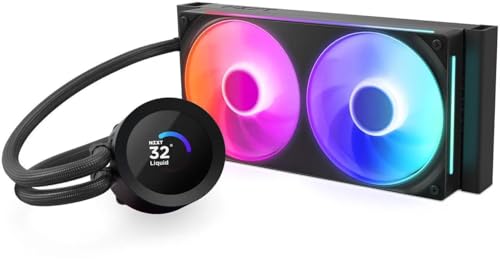
- Customizable 1.54-inch LCD
- Single-frame RGB fan
- Six-year manufacturer warranty
Best For: Black builds with a customizable display
Broad Socket Pick
Thermaltake TH240 ARGB Sync V2

- Wide listed socket support
- Rotating infinity-mirror cap
- Motherboard ARGB synchronization
Best For: Current or older supported CPU sockets
White LCD Pick

- Customizable 1.54-inch LCD
- Single-frame RGB fan
- White finish; six-year warranty
Best For: White builds with a customizable display
Broad Socket Support
Thermalright Frozen Notte 240 Black ARGB V2

- AM2–AM5 and broad Intel socket support
- Two 2,000 RPM PWM fans
- 5V 3-pin ARGB synchronization
Best For: Older or newer supported builds needing ARGB
New Intel Socket Ready
Thermalright Aqua Elite 240 V6 ARGB

- Lists LGA1851, LGA1700, AM4, and AM5
- Two pre-installed PWM ARGB fans
- AMD mounting uses original backplate
Best For: Current AMD and LGA1851 builds with ARGB
Seal-Focused Design
Cooler Master MasterLiquid ML240L RGB V2

- Third-generation dual-chamber pump
- EPDM seal designed for longevity
- Verify included LGA1700 mounting kit
Best For: RGB builds prioritizing pump and seal design
Best for ARGB Builds

- Infinity-mirror ARGB pump
- Two 650–1,750 rpm PWM fans
- AM5/AM4 and LGA1851/1700 support
Best For: Gaming builds that pair current socket support with customizable lighting
Best for White-LED Builds

- 240mm radiator with two PWM fans
- White LED pump accent
- AM5/AM4 and LGA1700/1200/115x support
Best For: A straightforward liquid-cooling build with fixed white pump lighting
Best for No-RGB Setups
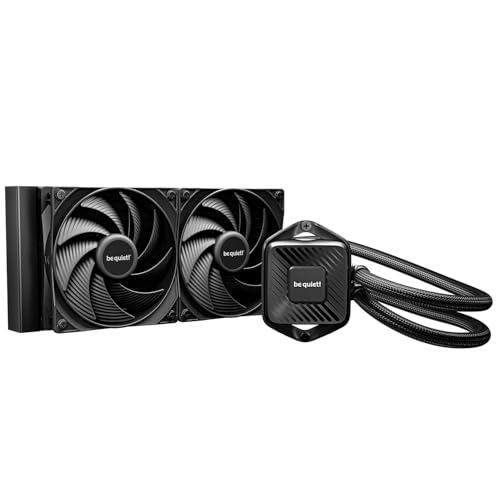
- Non-RGB design
- Daisy-chain Pure Wings 3 PWM fans
- Accessible refill port
Best For: Unlit builds prioritizing cleaner cabling and refill access
Value ARGB Pick – Thermalright Aqua Elite 240 V3
Among 240mm aio liquid coolers, the Thermalright Aqua Elite 240 V3 is a practical option if you want a 240mm radiator and coordinated lighting. Its two PWM ARGB fans and illuminated pump head connect to compatible motherboard lighting headers.
Best For: Builders who want an ARGB-equipped 240mm cooler with support for AM4, AM5, and several Intel sockets.
Pros:
- Two PWM fans with a specified maximum airflow of 66.17 CFM.
- Pump-head and fan lighting can synchronize through a 5V 3-pin ARGB header.
- Includes mounting accessories for supported AMD and Intel platforms.
Cons:
- Motherboard lighting synchronization requires a compatible 5V 3-pin ARGB connection.
- The supplied notes give different maximum fan speeds, so check the listing if that specification matters.
Its straightforward fan-and-pump lighting makes sense for an illuminated build. Check your case’s 240mm radiator clearance and motherboard headers before buying.
Black LCD Pick – NZXT Kraken Plus 240 RGB
If you want one of the 240mm aio liquid coolers with a customizable display, the black NZXT Kraken Plus 240 RGB puts a 1.54-inch LCD on the pump cap. NZXT CAM lets you show temperatures, images, animations, or supported web integrations.
Best For: Black-themed builds where an LCD and tidy fan cabling are priorities.
Pros:
- Customizable LCD adds useful temperature readouts or personal visuals.
- Single-frame RGB fan uses one cable and four screws for a simpler install.
- Pre-applied thermal paste and tool-free brackets support a quicker setup.
- Includes a six-year manufacturer warranty.
Cons:
- LCD customization relies on NZXT CAM software.
- Its display and RGB features may be unnecessary if you only want basic liquid cooling.
The Turbine pump and streamlined fan assembly make this a feature-rich choice for a black build. Confirm 240mm radiator clearance and software preferences before choosing it.
Broad Socket Pick – Thermaltake TH240 ARGB Sync V2
The Thermaltake TH240 ARGB Sync V2 stands out among 240mm aio liquid coolers for its long socket-support list, which includes older Intel and AMD platforms alongside AM5 and LGA 1700. Its rotating infinity-mirror pump cap adds a distinctive lighting accent.
Best For: Builders seeking an ARGB 240mm cooler for a supported current or older CPU socket.
Pros:
- Supports numerous Intel and AMD sockets listed in the product notes.
- ARGB synchronization is designed for ASUS, GIGABYTE, MSI, and ASRock motherboard software.
- Copper water-block base and two PWM fans rated from 500 to 2,000 RPM.
Cons:
- The stated manufacturer warranty is two years.
- Motherboard-controlled lighting depends on compatible RGB software and connections.
Consider this model when socket compatibility and motherboard-synced lighting matter more than an LCD. Verify your exact socket and case radiator clearance before installation.
White LCD Pick – NZXT Kraken Plus 240 RGB
For white-themed PCs, the white NZXT Kraken Plus 240 RGB brings an LCD-equipped option to the 240mm aio liquid coolers category. Its 1.54-inch screen can show system temperatures, images, animations, and supported web integrations through NZXT CAM.
Best For: White builds that call for coordinated RGB lighting and a customizable pump display.
Pros:
- Customizable LCD supports both system readouts and personal visuals.
- Single-frame RGB fan simplifies mounting and cabling.
- Pre-applied thermal paste and tool-free brackets support AM5 and LGA 1851.
- Includes a six-year manufacturer warranty.
Cons:
- NZXT CAM is needed to customize the screen.
- White styling may not suit builds with a different color scheme.
Its white finish, LCD, and simplified fan installation give it a clear role in a display-focused build. Check your case’s 240mm radiator mounting space before ordering.
Broad Socket Support – Thermalright Frozen Notte 240 Black ARGB V2
Among 240mm aio liquid coolers, the Frozen Notte 240 is a practical choice if you want ARGB lighting and support for a wide range of Intel and AMD sockets. It pairs a copper-base pump head with a 240mm aluminum radiator and two PWM fans.
Best For: Builders upgrading an older AM2–AM5 or supported Intel system who want synchronized ARGB lighting.
Pros:
- Supports AM2 through AM5 and multiple Intel sockets, including LGA1700, 2011, and 2066.
- Two 120mm PWM fans are rated up to 2,000 RPM with S-FDB bearings.
- Pump-head and fan lighting sync through a motherboard 5V 3-pin ARGB connection.
Cons:
- The manufacturer recommends a chassis wider than 250mm; check radiator clearance before ordering.
- Motherboard lighting synchronization requires a compatible 5V 3-pin ARGB header.
Its broad socket list is the main draw, especially for a build that may reuse an older motherboard. Confirm case fit and lighting-header availability to make the most of the package.
For shoppers comparing 240mm aio liquid coolers for an LGA1851 build, the Aqua Elite 240 V6 explicitly lists that socket alongside LGA1700 and AM4/AM5. Its 240mm radiator comes with two pre-installed PWM ARGB fans.
Best For: AM4, AM5, or LGA1851 builders who want pre-installed fans and motherboard-synced lighting.
Pros:
- Includes mounting support for LGA1851, LGA1700, AM4, and AM5.
- Pre-installed 120mm fans are rated up to 2,000 RPM and use PWM speed control.
- Fan and water-block lighting support 5V 3-pin motherboard ARGB synchronization.
Cons:
- AMD installation uses the motherboard’s original backplate, so keep it available.
- The listed socket compatibility does not include older AMD platforms such as AM3.
This model makes sense when current socket support and a ready-mounted fan setup matter most. Check the installation requirements before removing an existing AMD cooler.
The MasterLiquid ML240L RGB V2 stands out among 240mm aio liquid coolers for its third-generation dual-chamber pump and EPDM seal design. It also pairs a 240mm radiator with SickleFlow 120 PWM fans and customizable RGB lighting.
Best For: Builders who want a 240mm RGB cooler with a dual-chamber pump and an emphasis on seal construction.
Pros:
- Third-generation dual-chamber pump is designed for cooling efficiency.
- Industrial-grade EPDM seal is intended to improve longevity and resist leaks.
- Listed compatibility spans AM5/AM4 and numerous older Intel and AMD sockets.
Cons:
- The supplied listing separately references an LGA1700 kit; verify what mounting hardware your package includes.
- Listed fan speed tops out at 1,800 RPM, below the 2,000 RPM ratings of the two Thermalright models here.
The pump and seal construction are its clearest differentiators. If you’re installing on LGA1700, confirm the included bracket before committing to the build.
Best for ARGB Builds – Cooler Master 240 Core II
Among 240mm aio liquid coolers, the Cooler Master 240 Core II is a practical choice if you want customizable lighting alongside cooling for a Ryzen 7 or Intel Ultra 7 build. Its dual-chamber pump design directs water flow toward the CPU hotspot.
Best For: AM5 or LGA1851 gaming builds that call for an infinity-mirror ARGB look.
Pros:
- Infinity-mirror ARGB lighting supports motherboard control.
- Includes two PWM fans rated for 650–1,750 rpm and CryoFuze thermal paste.
- Supports AMD AM5/AM4 and Intel LGA1851/1700; includes a five-year manufacturer warranty.
Cons:
- ARGB styling may not suit a build that calls for an unlit cooler.
- The listed socket support does not include older Intel LGA1200 systems.
The included mounting kit and paste cover the essentials for a new build. Check your case’s 240mm radiator clearance before choosing it.
Best for White-LED Builds – ID-COOLING FROSTFLOW X 240
The ID-COOLING FROSTFLOW X 240 keeps things straightforward among 240mm aio liquid coolers: a 240mm radiator, two 120mm PWM fans, and a white LED on the pump. It is worth considering if you prefer fixed white lighting to a customizable ARGB display.
Best For: Builds needing a simple white-lit cooler with support for AM5, AM4, or several Intel sockets.
Pros:
- Includes two 120mm PWM fans and mounting hardware.
- White pump LED provides a consistent lighting accent.
- Supports Intel LGA1700/1200/115x and AMD AM5/AM4.
Cons:
- The pump lighting is described as white LED, not color-customizable ARGB.
- LGA1851 support is not listed in the supplied compatibility details.
Its listed socket range makes it a flexible option for both newer and older builds. If lighting customization matters, choose an ARGB model instead.
Best for No-RGB Setups – be quiet! Pure Loop 3 240mm
The be quiet! Pure Loop 3 stands out among 240mm aio liquid coolers for its non-RGB design and maintenance-minded features. Its PWM pump and two Pure Wings 3 high-speed PWM fans are designed to handle demanding CPU workloads without adding lighting to the case.
Best For: Unlit builds where tidy fan cabling and an accessible refill port are priorities.
Pros:
- Two Pure Wings 3 PWM fans support daisy-chaining for fewer cables.
- Six-pole, three-phase PWM pump is designed for smooth operation.
- Flexible tubes and an accessible refill port simplify installation and later maintenance.
- Supports Intel LGA1851/1700/1200/115x and AMD AM5/AM4.
Cons:
- No RGB lighting for builds that need illuminated components.
- Fans are specified at up to 36.8 dB(A) at maximum speed.
This is the pick for buyers who value a restrained appearance and practical upkeep. The daisy-chain fans are particularly useful when motherboard fan headers are limited.
How We Picked These 240mm Aio Liquid Coolers
We focused on practical differences shoppers can verify: radiator size, included fans, lighting and display features, stated socket support, and the intended use of each cooler. The selection covers simpler designs alongside feature-heavy RGB and LCD options. We did not assume that a higher price or a faster advertised fan speed guarantees better cooling; actual temperatures and noise depend on the CPU, case airflow, fan settings, and installation.
Quick Comparison
For a restrained build, start with the ID-COOLING FROSTFLOW X 240’s white LED look or the be quiet! Pure Loop 3 240 if understated styling is the priority. If you want customizable lighting, compare the Thermalright Aqua Elite and Frozen Notte variants with the Thermaltake TH240 ARGB Sync V2 and Cooler Master RGB or ARGB models. The NZXT Kraken Plus 240 RGB comes in black and white and adds an LCD for builders who specifically want a screen. Those two color versions serve different aesthetics rather than different radiator-size needs.
Key Buying Factors for 240mm Aio Liquid Coolers
Case Fit and Radiator Clearance
Confirm that your case supports a 240mm radiator in your preferred top or front position. A radiator plus two 120mm fans needs more clearance than the radiator alone. Check for interference with tall motherboard heatsinks, RAM, cables, or a long graphics card. Also consider where the tubes will reach comfortably without sharp bends.
CPU Socket and Mounting Hardware
Check the exact product listing for your CPU socket and included brackets before ordering, especially if you use a newer platform or are moving a cooler between systems. Product names may mention broad Intel or AMD support, but the hardware in the box is what matters. Follow the supplied mounting instructions and remove any protective film from the cold plate.
Noise, Controls, and Connections
PWM fans let you tune a quieter fan curve; pump control options vary by model. Make sure your motherboard has the required fan, pump, and lighting headers, or that the cooler includes a suitable controller. ARGB typically requires a compatible addressable header and should not be connected to an incompatible RGB header. LCD models may also need USB connectivity and software.
Cooling Needs and Value
A 240mm AIO is a sensible size for many gaming and general-purpose builds, but it is not an automatic upgrade over every air cooler. For a particularly hot CPU, sustained heavy workloads, or aggressive overclocking, check independent temperature and noise tests for your processor class. Factor in warranty coverage and your tolerance for pump noise as well as the purchase price.
Who Should Buy Which 240mm Aio Liquid Coolers?
Choose a simple LED or understated model if you want liquid cooling without making lighting the centerpiece. Pick an ARGB model if matching the rest of your build matters, and confirm how its lighting is controlled. Consider the NZXT LCD versions only if you will use the display and can accommodate their software and wiring. Above all, buy the model that fits your case and socket first; appearance and extras come next.