USB Type-C to SSD/SATA/IDE Hard Drive Reader review is for buyers who need one adapter to reach old and new drives without a pile of extra hardware.
If you want a universal drive bridge for recovery, copying, or quick access, this USB drive reader is aimed squarely at that job.
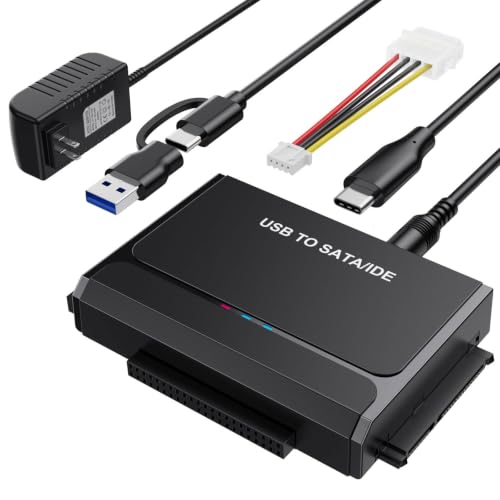
USB Type-C to SSD/SATA/IDE Hard Drive Reader Review Summary
This is a sensible choice for anyone who routinely deals with mixed drive types and does not want separate adapters for SATA, IDE, and optical media.
It is especially relevant for data recovery, disk migration, bench testing, and pulling files off older desktop hardware, where a dedicated external enclosure is often too narrow in scope.
The core appeal is breadth: the listing says it supports 2.5-inch and 3.5-inch SATA HDDs and SSDs, 2.5-inch and 3.5-inch IDE hard drives, and even CD/DVD optical drives.
That makes it less of a single-purpose gadget and more of a small utility tool for people who touch legacy storage more than once or twice a year.
The other big selling point is practical power handling.
The included 12V/2A supply matters because 3.5-inch mechanical drives and legacy IDE units need more than bus power to spin up reliably.
The on/off switch, hot-swap support, and LED activity light all point to a tool designed for bench work, not just casual one-off file transfers.
Review Scorecard
| Category | Score | Editorial rationale |
|---|---|---|
| Drive compatibility | 10/10 | Covers SATA, IDE, SSDs, and optical drives in one unit, which is unusually broad. |
| Recovery usefulness | 9/10 | Ideal for copying, backup, and data rescue from older drives where flexibility matters. |
| Power support | 9/10 | External 12V/2A power is the right call for 3.5-inch and IDE hardware. |
| Ease of use | 8/10 | Plug-and-play design and hot-swap support keep setup straightforward. |
| Speed potential | 8/10 | The listing claims up to 5Gbps over USB 3.x, which is a strong fit for this class. |
| Legacy value | 10/10 | The IDE and Molex support make it especially useful for older systems. |
Bottom line: this is a strong utility adapter for people who value compatibility over compactness. If your work involves drive recovery, cloning, or keeping old hardware accessible, it has a clear purpose.
Key Features and Specifications of USB Type-C to SSD/SATA/IDE Hard Drive Reader
The product is presented as a universal hard drive reader and data transfer converter.
Based on the listing, it is built around a dual-head IDE and SATA layout, with support for both 40-pin and 44-pin IDE connections and standard SATA III drives.
Key supplied details include:
- Supports 2.5-inch and 3.5-inch SATA HDDs and SSDs
- Supports 2.5-inch and 3.5-inch IDE hard drives
- Supports CD/DVD optical drives
- Includes USB-A and USB-C cable options
- Claims up to 5Gbps transfer speed
- Uses an external 12V/2A power adapter
- Includes an on/off switch for drive protection
- Includes LED activity indication
- Includes a 4-pin Molex cable for older 3.5-inch IDE hardware
- Listed as compatible with Windows 11/10/8/7, macOS, Linux, and Chrome OS
That combination matters because many adapters cover only SATA, or only 2.5-inch laptop drives, or only a narrow slice of newer USB-C use cases.
This one is trying to bridge multiple generations of storage in one box.
The included external power is not an accessory detail.
It is a functional requirement if you plan to spin up 3.5-inch drives consistently, and it gives the adapter more credibility for recovery work than minimalist bus-powered cables.
Pros and Cons of USB Type-C to SSD/SATA/IDE Hard Drive Reader
Pros
- Very broad drive compatibility, including SATA, IDE, and optical drives
- External power makes it better suited to full-size desktop drives
- USB-A and USB-C support adds flexibility across older and newer computers
- On/off switch and hot-swap support are useful for cautious drive handling
- The included Molex cable helps with older legacy hardware
Cons
- Larger and less elegant than a simple SSD cable or single-bay enclosure
- More likely to be kept as a bench tool than carried daily
- The broad feature set may be more than casual users need
- Legacy compatibility is valuable, but only if you actually own older drives
The biggest upside is obvious: one adapter can do the work of several.
The biggest tradeoff is also obvious: this is a specialized utility, so buyers who only need occasional access to one modern SATA SSD may be paying for capability they will never use.
Who Should Buy USB Type-C to SSD/SATA/IDE Hard Drive Reader?
This adapter makes the most sense for technicians, home lab users, refurbishers, and anyone dealing with older desktop PCs or mixed storage collections.
It also fits people who do occasional data recovery and need to check multiple drive types without constantly swapping tools.
It is a strong fit if you need to:
- Recover files from old SATA or IDE drives
- Clone or copy data between drives
- Test drives on a bench before reinstalling them
- Access both laptop and desktop drives with one adapter
- Keep one spare tool for legacy storage emergencies
It is less compelling if you only use modern 2.5-inch SSDs and never touch IDE or optical media.
In that case, a smaller USB-C SATA adapter or enclosure would be simpler and easier to store.
Skip it if your workflow is ultra-minimal and all your drives are recent. The adapter is at its best when compatibility is the priority.
Drive Compatibility and Recovery Use Cases
SATA and SSD Work
For SATA HDDs and SSDs, the adapter behaves like a flexible bridge rather than a fixed enclosure.
That is useful when you want to move data quickly between drives or mount a disk for diagnosis without building a permanent external setup.
IDE and Legacy Hardware
The IDE support is the standout feature.
Many modern adapters stop at SATA, but this one is aimed at older systems too, which makes it more valuable for archival work and old-PC rescue jobs.
Desktop Drives and Power
The 12V/2A supply is the practical backbone of the design.
It is what makes 3.5-inch drives and other legacy devices realistic to use, rather than merely supported on paper.
Bench Workflow and Safety
The on/off switch, hot-swap support, and LED indicator all help when you are connecting unknown drives or moving data between devices.
Those are not flashy features, but they reduce friction and make the adapter easier to trust in a recovery setting.
Alternatives to USB Type-C to SSD/SATA/IDE Hard Drive Reader
If you want a more compact option for modern SATA drives only, a StarTech USB to SATA adapter is a common Amazon search worth checking.
If you prefer a one-drive enclosure rather than a multi-drive bridge, look at UGREEN SATA to USB adapter listings on Amazon.
If you need better support for heavy bench use and older storage, search Amazon for Sabrent hard drive dock products.
If legacy IDE compatibility matters but you want to compare styles, search Amazon for Unitek IDE SATA adapter options.
These alternatives make sense when your needs are narrower than this product’s broad compatibility.
The right choice depends on whether you want maximum device coverage or a smaller, more dedicated tool.
Is USB Type-C to SSD/SATA/IDE Hard Drive Reader Worth It?
Yes, if you need broad compatibility and practical drive-handling features in one adapter. This product is worth it for recovery work, legacy storage access, and mixed drive environments where SATA-only tools are not enough.
It is less compelling for casual users who only handle a single modern SSD type, because the extra legacy support adds size and complexity.
But for anyone who regularly deals with old drives, cloned disks, or bench diagnostics, the feature mix is well aligned with the job.
My verdict: buy it if compatibility is the reason you are shopping. If you only need a simple SATA adapter, choose something smaller.
If you need one tool that can reach a lot of older hardware, this is a sensible pick.