PGYTECH CreateMate Memory Card Case review is for buyers who want one compact organizer for several card formats, not another soft pouch that turns into a pocket dump.
If you are asking whether this PGYTECH Memory Card Case for SD/Micro SD/CFA/CFB/XQD/SIM is worth it, the answer depends on whether you value structure, protection, and fast access more than minimal bulk.
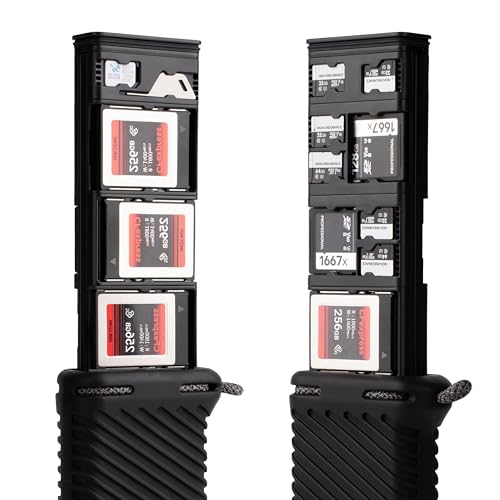
CreateMate Memory Card Case Review Summary
This PGYTECH memory card case makes the most sense for photographers, videographers, drone pilots, and content creators who carry mixed media and want a dedicated place for each card type.
The appeal is not just capacity.
It is the combination of a modular layout, a hard aluminum shell, shock-absorbing silicone, and a travel-friendly size that should reduce the usual scramble for the right card at the wrong time.
Verdict: strong buy for organized mixed-card kits, especially if you regularly move between SD, Micro SD, CFA, CFB, XQD, and Nano SIM cards and want them protected in one carryable case.
Review Scorecard
| Category | Score | Why it matters |
|---|---|---|
| Card-format flexibility | 10/10 | Supports several card families in one case, which is the main reason to choose it. |
| Protection | 9/10 | IP54, aluminum alloy, and silicone together suggest better abuse resistance than fabric pouches. |
| Organization | 9/10 | Modular slots make it easier to keep a mixed workflow sorted by card type. |
| Portability | 8/10 | Small and light enough for travel use, with a carabiner for quick carry. |
| Access speed | 8/10 | The ejector pin is useful when cards need to come out cleanly and quickly. |
| Use-case fit | 10/10 | Clearly aimed at photographers, videographers, drone pilots, and creators on the move. |
Key Features and Specifications of CreateMate Memory Card Case
The headline feature is modular storage.
PGYTECH says the case lets you combine and arrange modules to build the layout you want for SD, Micro SD, CFA, CFB, XQD, and Nano SIM cards.
That is a practical advantage if your kit is not standardized around one card family.
The shell is built around a layered protection approach.
The listing calls out IP54 protection, an aluminum alloy exterior, and a silicone outer layer.
Taken together, that points to a case designed to resist dust, splashes, bumps, and the sort of accidental pressure a bag can create.
It includes 18 slots overall, with a stated mix of modules: 6 SD + Micro SD modules, 3 CFA modules, 6 CFB modules, 2 Micro SD modules, and 1 Nano SIM module.
PGYTECH also includes an ejector pin that doubles as a mini screwdriver, which is a small but thoughtful touch for frequent card swaps.
For carrying, the case comes with a carabiner so it can attach to a backpack, belt loop, or camera bag.
The listed size is 5.5 x 2.48 x 1.14 inches, and the weight is 150 g.
That keeps it in the “carry with you” category rather than the “leave in the studio” category.
Useful specs at a glance
| Spec | Detail |
|---|---|
| Brand | PGYTECH |
| Product type | Memory card case / card organizer |
| Supported cards | SD, Micro SD, CFA, CFB, XQD, Nano SIM |
| Total slots | 18 |
| Protection | IP54, aluminum alloy, silicone |
| Carry option | Included carabiner |
| Size | 5.5 x 2.48 x 1.14 in |
| Weight | 150 g |
Pros and Cons of CreateMate Memory Card Case
Pros
- Highly flexible layout for users who carry different card formats in the same kit.
- Rugged construction with IP54 protection plus aluminum and silicone.
- Compact travel-friendly size that should fit common camera bags and carry kits.
- Carabiner included for quick attachment and easier access.
- Ejector pin included for cleaner card removal and a little extra utility.
Cons
- More specialized than a basic pouch, so casual users may not need this much structure.
- Hard-shell design adds formality and footprint compared with softer, more compressible organizers.
- Best value depends on mixed-format ownership; if you only carry one card type, the modular system is less compelling.
Who Should Buy CreateMate Memory Card Case?
This is a good fit if your workflow spans multiple capture devices or media types.
A wedding photographer, event shooter, travel creator, or drone operator may appreciate having one case that can be laid out around the exact cards used on that job.
It also suits buyers who want a more deliberate storage system.
If you regularly empty pockets into a bag and sort cards later, the CreateMate approach is better because it gives each card a place and keeps the whole setup easier to scan at a glance.
Skip it if you want the lightest possible solution, or if your setup is simple enough that one small pouch already does the job.
The modular build is strongest when you actually use the flexibility.
How the CreateMate Memory Card Case Works in Practice
Modular storage is the real advantage
The value here is not just that the case holds cards.
It is that PGYTECH designed it so you can mix the modules to match your kit.
That matters when one day is all SD, another day is CF cards, and a third day includes Micro SD adapters or a Nano SIM for mobile work.
Protection is built for field use
The combination of IP54, aluminum alloy, and silicone suggests a case that is better suited to real travel and field handling than a simple fabric organizer.
It will not replace a crush-proof hard case meant for extreme abuse, but it is clearly built to survive more than desk duty.
The ejector pin is a small but useful detail
Card cases often fail at the moment of removal, when fingers are cold, rushed, or awkwardly placed.
The included ejector pin should make extraction cleaner, and the fact that it doubles as a mini screwdriver adds a little practical value without cluttering the design.
The carry setup matches its audience
The included carabiner sounds minor until you picture the actual use case.
Being able to clip the case to a backpack or camera bag makes it easier to keep essential media within reach instead of buried in a compartment.
For mobile shooters, that is a real workflow benefit.
Alternatives to CreateMate Memory Card Case
If you want something simpler, consider a Pelican memory card case.
Pelican is a common name for rugged storage, and its card cases are worth comparing if your priority is hard-case durability over modular flexibility.
If you prefer a softer travel organizer, look at a JJC memory card case.
JJC usually appeals to buyers who want straightforward compartmented storage without the more industrial feel of a metal shell.
If you want a premium accessory-style option, search for a Gomatic memory card case.
That is a sensible comparison point if you care about clean carry design and camera-bag integration.
If your setup is mostly one card family, a ProGrade Digital card case may be enough.
It is worth checking if you want a focused storage solution for a simpler media workflow.
Is CreateMate Memory Card Case Worth It?
Yes, if your storage problem is organization as much as protection.
The PGYTECH CreateMate Memory Card Case is worth it for mixed-card users who want a compact, rugged organizer that makes card handling faster and less error-prone.
It is less compelling if you only need a basic holder for one card format or if you want the cheapest possible way to keep media together.
But for photographers and creators who routinely juggle multiple card standards, this is a practical, well-targeted buy.