If you’re looking to enhance your PC’s network performance, consider upgrading to a 2.5Gb Ethernet card. These cards provide faster speeds, making them ideal for gamers, streamers, and anyone needing stable connections. With various options available, you can find one that suits your needs and budget. Let’s explore the top choices and what features make them stand out in a crowded market.
TP-Link 2.5GB PCIe Network Card (TX201)

If you’re a gamer or someone who demands high-speed internet for seamless online experiences, the TP-Link 2.5GB PCIe Network Card (TX201) is an outstanding choice. This adapter delivers speeds up to 2.5 Gbps, considerably faster than standard Gigabit Ethernet. Its versatile compatibility guarantees it works with various Windows versions and Linux. Quality of Service (QoS) prioritizes your gaming performance, while Wake on LAN (WOL) lets you power up your computer remotely. Installation is a breeze, often recognized automatically by Windows. Plus, with a solid 4.6-star rating and a 2-year warranty, you can trust its reliability for your network needs.
Best For: Gamers and users who require high-speed internet connectivity for seamless online experiences.
Pros:
- Easy installation with automatic recognition by Windows.
- Achieves speeds over 2 Gbps, significantly enhancing network performance.
- Versatile compatibility with various operating systems and backward compatibility with older Ethernet standards.
Cons:
- Some users reported connectivity issues when waking from sleep mode.
- Driver updates may be necessary to resolve occasional connectivity problems.
- Limited support for older operating systems beyond those specified.
BrosTrend 2.5Gb Network Card PCIe Network Adapter

The BrosTrend 2.5Gb Network Card PCIe Network Adapter is an excellent choice for gamers and streamers looking to boost their online performance. With speeds 2.5 times faster than standard Gigabit adapters, you’ll experience reduced latency and improved responsiveness. This card supports various Windows systems, ensuring compatibility and easy installation through plug-and-play or simple driver downloads. Its durable metal shielding minimizes electromagnetic interference, enhancing connection stability, while excellent heat dissipation promotes longevity. Whether you’re transferring local data or connecting to a host server, this adapter elevates your network experience, making it a solid investment for any performance enthusiast.
Best For: Gamers and streamers seeking high-speed internet performance with low latency.
Pros:
- 2.5 Gbps speed delivers significantly faster connections compared to standard Gigabit adapters.
- Durable build quality with metal shielding minimizes electromagnetic interference for stable connections.
- Easy installation with plug-and-play support for Windows 10 and straightforward driver setup for other systems.
Cons:
- Compatibility may vary with non-Windows operating systems, requiring additional driver research.
- Limited to PCIe slots, which may not be available on all older motherboards.
- Performance benefits are best realized with compatible high-speed internet plans and network infrastructure.
YuanLey 2.5G PCIe Network Card

For gamers and streamers seeking lightning-fast connectivity, the YuanLey 2.5G PCIe Network Card stands out with its ultra-fast 2.5Gbps speeds—2.5 times faster than traditional Gigabit Ethernet. This card, built with the Realtek RTL8125B chip, guarantees efficient data transfer and ultra-low latency, making it perfect for 4K streaming and large file transfers. It features universal compatibility with Windows, Linux, and Mac OS, and offers both standard and low-profile brackets for versatile installation. Plus, with lifetime technical support, you’ll get help whenever you need it, assuring a smooth and reliable networking experience.
Best For: Gamers and streamers looking for ultra-fast, reliable networking solutions for high-performance applications.
Pros:
- Ultra-fast 2.5Gbps speeds, significantly enhancing gaming and streaming experiences.
- Universal compatibility with major operating systems, ensuring ease of integration.
- Lifetime technical support available for troubleshooting and performance optimization.
Cons:
- May require driver downloads for non-Windows 10 systems, which could be inconvenient for some users.
- Performance may be limited by the existing network infrastructure and router capabilities.
- Installation might be challenging for users unfamiliar with PCIe slots and hardware setup.
BrosTrend 5Gb PCIe Network Card for PC

Looking for a high-performance network solution? The BrosTrend 5Gb PCIe Network Card is perfect for your desktop PC, delivering an impressive 5 Gbps speed—five times faster than standard Gigabit cards. It’s compatible with Windows 11/10 and Server 2022, ensuring easy installation. Users rave about its lightning-fast performance for gaming and streaming, thanks to 5GBASE-T technology. Weighing just 2.16 ounces, it features a sturdy aluminum design for ideal heat dissipation. With a solid 4.6-star rating from over 500 reviews, this network card is a reliable choice for anyone looking to boost their network speed. Don’t miss out!
Best For: Gamers and streamers looking for a high-speed network solution to enhance their online experience.
Pros:
- Unmatched speed of 5 Gbps, significantly outperforming standard Gigabit cards.
- Easy installation process with out-of-the-box compatibility for newer Linux kernels.
- Sturdy and reliable design built with high-quality aluminum for effective heat dissipation.
Cons:
- Requires driver installation to achieve the full 5Gbps speed; otherwise, speeds may be limited.
- Some users report concerns about long-term durability and driver compatibility.
- Limited support for older operating systems, which may affect some users.
SODOLA 2.5Gb PCIe Network Card

With its impressive 2.5Gbps speed, the SODOLA 2.5Gb PCIe Network Card is an excellent choice for gamers and professionals seeking to enhance their network performance. Featuring the reliable Realtek RTL8125B controller, it slides easily into PCIe slots and auto-installs on Windows. Users appreciate its stable performance, especially with fiber connections. While some may encounter driver issues on Windows 11, updating from Realtek often resolves them. This card’s support for advanced features like WOL and VLAN makes it versatile, and its one-year replacement warranty guarantees peace of mind. Upgrade your network today with this reliable card!
Best For: Gamers and professionals looking to upgrade their network performance with reliable and fast connectivity.
Pros:
- Easy installation with auto-setup on Windows, compatible with various motherboards.
- Achieves impressive speeds of 2.5Gbps, significantly enhancing network performance.
- Supports advanced features like WOL and VLAN, adding versatility for different network setups.
Cons:
- Some users may experience driver issues on Windows 11, requiring updates from Realtek.
- Performance can vary based on network setups and cable quality.
- Not suitable for laptops, which require USB network adapters instead.
GiGaPlus 2.5Gb PCIe Network Card

The GiGaPlus 2.5Gb PCIe Network Card stands out as the ideal choice for gamers and content creators who demand high-speed connectivity. With speeds up to 2.5Gbps, it greatly outperforms standard Ethernet, enhancing your gaming, live broadcasts, and downloads. Compatible with Windows, Mac OS, and Linux, this card requires no drivers for Windows 10, making installation a breeze. Its PCIe interface supports various slots, and it comes with both standard and low-profile brackets. Users report impressive speeds of 2.1 to 2.3Gbps, ensuring you get the most from your high-speed internet plan. Plus, lifetime tech support is included.
Best For: Gamers and content creators seeking high-speed connectivity for optimal performance in gaming, live broadcasts, and downloads.
Pros:
- Supports speeds up to 2.5Gbps, significantly enhancing internet performance.
- Easy installation with plug-and-play functionality, especially for Windows 10 and 11 users.
- Lifetime technical support and rigorous testing ensure reliability and quality.
Cons:
- May require driver installation for non-Windows 10 operating systems.
- Compatibility limited to PCIe slots, not usable in older PCI-only motherboards.
- Some users may need to modify brackets for specific case setups.
2.5GBase-T PCIe Network Adapter RTL8125B
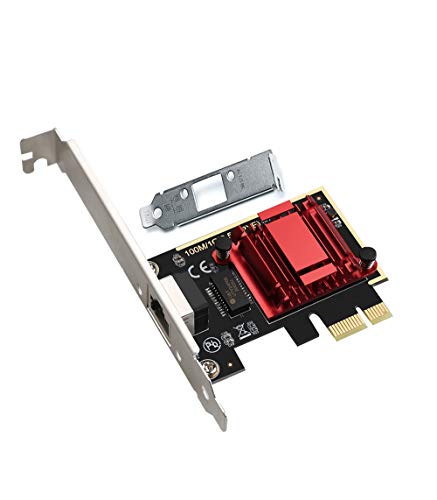
If you need a network adapter that greatly boosts your internet speed for gaming, streaming, or file transfers, the 2.5GBase-T PCIe Network Adapter RTL8125B is an ideal choice. With speeds of up to 2.5 Gbps, it outperforms traditional 1 Gbps cards, enhancing your online experience. Installation’s a breeze, thanks to its plug-and-play design and compatibility with various operating systems. Users love its stable performance and efficient power management, even under heavy loads. Plus, the low-profile bracket guarantees it fits snugly in your PC. With a 4.5-star rating and positive reviews, it’s a solid investment for your network needs.
Best For: Gamers, streamers, and small businesses seeking high-speed internet connectivity for improved performance and efficiency.
Pros:
- Easy installation with plug-and-play compatibility across multiple operating systems.
- Delivers speeds up to 2.5 Gbps, significantly enhancing file transfer, online gaming, and streaming experiences.
- Low-profile design fits in a variety of cases while maintaining stable performance under heavy usage.
Cons:
- May require specific motherboard compatibility for optimal performance.
- Not compatible with ESXI 7.0, which could limit usage for certain server setups.
- Limited warranty and return policy, with fees applicable for misuse or misrepresentation.
TRENDnet 2.5GBase-T PCIe Network Adapter (TEG-25GECTX)

For gamers and professionals seeking a reliable upgrade to their network infrastructure, the TRENDnet 2.5GBase-T PCIe Network Adapter (TEG-25GECTX) stands out with its ability to convert a standard PCIe slot into a high-speed 2.5Gbps Ethernet port. It supports various speeds, including 1Gbps and 100Mbps over standard Cat5e cables. With its compact dimensions and compatibility with Windows and Linux, installation is a breeze. You’ll appreciate features like Jumbo Frame support and VLAN tagging. Backed by a three-year warranty and positive user feedback, this adapter proves to be an excellent investment for boosting your network performance.
Best For: Gamers and professionals looking for a reliable upgrade to enhance their network performance with high-speed connectivity.
Pros:
- Easy installation with plug-and-play functionality across various operating systems.
- Supports advanced features like Jumbo Frame and VLAN tagging for improved performance.
- Backed by a three-year warranty, ensuring long-term reliability.
Cons:
- Limited to compatibility with Windows and Linux, potentially excluding some users.
- Requires Cat5e cables to achieve 2.5Gbps speeds, which may necessitate additional purchases for optimal performance.
- Some users may need to perform firmware updates for enhanced functionality.
GLOTRENDS 2.5Gb PCIe Network Card for Desktop PC

Looking to upgrade your desktop’s network capabilities? The GLOTRENDS 2.5Gb PCIe Network Card is an excellent choice. Equipped with a Realtek RTL8125BG controller, it supports data rates of 2500/1000/100Mbps, ensuring automatic speed negotiation for ideal performance. Installation is straightforward, especially with plug-and-play compatibility for Windows 11. You’ll also appreciate the included regular and low-profile brackets. With a stellar 4.5-star rating from over 500 users, this card enhances network speed and stability, making it perfect for gaming and streaming. Plus, you’ll benefit from lifetime technical support if you encounter any issues. Upgrade today for a faster experience!
Best For: Users looking to upgrade their desktop network capabilities for enhanced speed and stability, particularly for gaming and streaming.
Pros:
- Easy installation with plug-and-play compatibility for Windows 11.
- High performance with data rates up to 2.5Gbps, ideal for demanding applications.
- Lifetime technical support available for troubleshooting and driver assistance.
Cons:
- Mixed compatibility reports with certain systems, such as OPNSense.
- Some users experienced driver performance issues and speed discrepancies during file transfers.
- Recommendations to uninstall conflicting drivers, like Killer Ethernet, for optimal performance.
2.5Gb PCIe Network Card with Intel I226-V Chip

The XikeStor 2.5Gb PCIe Network Card, featuring the Intel I226-V chip, is ideal for gamers and content creators who demand high-speed connectivity without interruption. It supports speeds up to 2.5Gbps, ensuring smooth file transfers and enhanced system responsiveness. Installation is straightforward, with compatibility for Windows 10/11, Linux, and VMware ESXi. The card includes both standard and low-profile brackets, fitting various cases. While many users praise its easy setup and performance, some experienced stability issues. Be sure to check motherboard compatibility and BIOS settings before purchasing to maximize your network’s potential. Upgrade your connectivity today!
Best For: Gamers and content creators seeking high-speed, reliable network connectivity for seamless performance.
Pros:
- Easy installation and compatibility with various operating systems, including Windows 10/11 and Linux.
- Supports transmission rates up to 2.5Gbps, significantly improving file transfer speeds and system responsiveness.
- Includes both standard and low-profile brackets, making it versatile for different computer case sizes.
Cons:
- Some users have reported stability issues and driver difficulties that may affect performance.
- Instances of the network card failing after a short period of use have been noted by certain customers.
- Requires BIOS settings check and driver installation for optimal performance, which may be a hurdle for less experienced users.
Factors to Consider When Choosing 2.5Gb Ethernet Cards for PC
When you’re choosing a 2.5Gb Ethernet card for your PC, there are several key factors to keep in mind. You’ll want to take into account compatibility with your operating system, how easy it is to install, and the performance ratings. Don’t forget to weigh build quality, durability, and price to guarantee you get the best value for your investment.
Compatibility With Operating Systems
Choosing a 2.5Gb Ethernet card that suits your system requires careful consideration of operating system compatibility. Most cards work with a variety of systems, including Windows (11/10/8.1/8/7) and many Linux distributions. However, some cards might need driver installation for ideal performance, especially on non-Windows 10 systems. Compatibility can also differ; certain models support older operating systems, while newer ones often focus on more recent versions. Many 2.5Gb cards are designed to be backward compatible, allowing them to operate at lower speeds like 1Gbps or 100Mbps. Before you buy, double-check your system requirements and verify compatibility with your motherboard and slot configuration for a smooth installation and operation.
Installation Ease and Support
Finding a 2.5Gb Ethernet card that fits your system not only involves checking compatibility but also considering installation ease and ongoing support. Many cards feature plug-and-play functionality, especially with Windows 10 and 11, allowing for a quick and hassle-free setup. Most options support various operating systems, including Linux and macOS, ensuring you can use them across platforms. Installation brackets typically come in standard and low-profile sizes, accommodating different PC cases. You’ll find driver installation straightforward, as many cards are recognized automatically by your operating system, reducing your setup time. Additionally, manufacturers often provide lifetime technical support, giving you peace of mind for any installation or troubleshooting issues that may arise.
Performance and Speed Ratings
To guarantee you get the best performance from your 2.5Gb Ethernet card, it’s essential to look for models that can achieve speeds up to 2.5 Gbps, considerably outpacing standard Gigabit options. Many cards reliably deliver speeds over 2 Gbps during tests, making them ideal for high-demand tasks like gaming and streaming. Opt for cards with advanced chipsets, like Realtek RTL8125B or Intel I226-V, as they facilitate efficient data transfer and low latency during heavy usage. Additionally, support for features like Jumbo Frames can boost data throughput, especially in local networks. Don’t overlook driver compatibility—proper installations affect performance and stability across different operating systems, so choose a card with strong user feedback on this aspect.
Build Quality and Durability
When it comes to selecting a 2.5Gb Ethernet card, build quality and durability play an essential role in guaranteeing reliable performance. Look for cards made with durable materials, like metal shielding, to minimize electromagnetic interference and enhance connection stability. High-quality heat dissipation features, such as integrated heat sinks, are critical for preventing overheating during heavy usage, prolonging your card’s lifespan. Additionally, cards with advanced chipsets assure consistent performance and lower latency, which is essential for gaming or streaming. Check for low-profile brackets to confirm compatibility with various case sizes, enhancing overall durability. Finally, a solid warranty and responsive customer support offer peace of mind, helping you address any potential issues with your network card.
Price and Value Comparison
Selecting the right 2.5Gb Ethernet card goes beyond just build quality and durability; price and value are also key factors in your decision. Prices typically range from $30 to $100, influenced by chipset quality, features, and brand reputation. Many cards offer strong value, with average performance ratings around 4.5 out of 5 stars, reflecting user satisfaction. Consider installation ease—plug-and-play models save time and frustration, making them worth a slightly higher price. Warranty options, ranging from one year to lifetime support, can enhance perceived value, particularly if compatibility issues arise. Finally, keep in mind that while higher-priced models may promise better performance, most cards achieve speeds between 2.1 to 2.5 Gbps in real-world tests.
Chipset and Technology Features
Choosing the right chipset for your 2.5Gb Ethernet card is essential for achieving ideal performance. Popular options like the Realtek RTL8125B and Intel I226-V offer efficient data transfer and reduced latency, enhancing your network experience. When selecting a card, look for features like Wake on LAN (WOL) and PXE support, which enhance remote management. Advanced technologies such as Jumbo Frame support and VLAN tagging can greatly boost network efficiency, especially in high-demand environments. Guarantee compatibility with various PCIe slots (x1, x4, x8, x16) for flexible installation across different systems. Finally, check for driver support across multiple operating systems, including various Windows versions and Linux distributions, to maximize your card’s functionality and achieve ideal speeds.
Warranty and Technical Assistance
While evaluating 2.5Gb Ethernet cards, it is important to take into account the warranty and technical assistance offered by manufacturers. Many cards come with warranties ranging from one year to a lifetime, providing you with protection against defects. This peace of mind can be vital for your investment. Technical assistance is another key factor; 24/7 support guarantees you can get help with installation, troubleshooting, and performance optimization whenever you need it. Look for manufacturers that offer multiple support channels, like phone, email, or live chat, for easier accessibility. Additionally, extensive online resources, including driver updates and installation guides, can help you maximize your network card’s performance, making your experience smoother and more efficient.
Bracket Type and Size Options
When it comes to 2.5Gb Ethernet cards, bracket type and size options play a essential role in guaranteeing a smooth installation. Many cards offer standard and low-profile brackets, giving you flexibility for various PC cases, from desktops to mini PCs. If you’re working with a compact build, opting for a low-profile bracket can make a significant difference. It’s important to verify compatibility with PCIe slots (X1, X4, X8, X16) to fit your motherboard properly. Selecting the right bracket not only secures the card but also promotes ideal airflow, impacting performance and longevity. Some cards even feature heat dissipation designs within their brackets, enhancing stability during heavy usage. Make your choice wisely to maximize your network speed!