In 2025, upgrading your internet experience is essential, especially with the rise of WiFi 6E technology. You’ll find that the right adapter can make a significant difference in speed and connectivity for gaming, streaming, or simply browsing. With several options available, it’s important to know what features matter most. Let’s explore the top contenders that can elevate your online performance and help you make an informed choice.
NETGEAR Nighthawk WiFi 6E USB Adapter (A8000)

If you’re looking for a top-tier WiFi 6E experience, the NETGEAR Nighthawk WiFi 6E USB Adapter (A8000) is an excellent choice for Windows PC users. This compact adapter offers impressive AXE3000 tri-band speeds, reaching up to 3Gbps. By accessing the exclusive WiFi 6E band, you’ll enjoy enhanced HD video conferencing, gaming, and streaming. The cradle design allows flexible placement, while the flippable antenna helps you find the strongest signal. Installation is a breeze—just plug it into your desktop or laptop. With compatibility for any WiFi 6 or 6E router, you’re all set for superior performance.
Best For: Windows PC users seeking a high-performance WiFi 6E solution for gaming, streaming, and video conferencing.
Pros:
- Impressive speeds: Achieves AXE3000 tri-band wireless speed of up to 3Gbps.
- Enhanced experience: Accesses the exclusive WiFi 6E band for superior HD video conferencing, gaming, and streaming.
- Easy installation: Simple plug-and-play setup without the need for additional hardware or ISP changes.
Cons:
- Compatibility requirement: Requires a WiFi 6E router or mesh system to utilize the 6GHz band.
- Windows only: Specifically designed for Windows PCs, limiting use for other operating systems.
- Potential signal interference: Performance may be affected in environments with many competing wireless signals.
EDUP USB 3.0 WiFi 6E Adapter for PC (AXE3000)

The EDUP USB 3.0 WiFi 6E Adapter (AXE3000) is an excellent choice for users seeking high-speed internet connectivity on their PCs. With support for Windows 10/11 and Linux, this adapter offers seamless plug-and-play functionality. It utilizes WiFi 6E technology, delivering impressive speeds up to 600Mbps on 2.4GHz, 1200Mbps on 5GHz, and 1200Mbps on 6GHz across three frequency bands. Equipped with dual 5dBi antennas, it enhances your wireless range and stability. Plus, the USB 3.0 interface boosts data transfer speeds, making it ideal for streaming and gaming. With a solid warranty and positive customer feedback, it’s a reliable upgrade.
Best For: Users looking for a high-speed Wi-Fi solution for their PCs that supports multiple operating systems and enhances internet connectivity.
Pros:
- WiFi 6E technology ensures faster and more stable connections across three frequency bands.
- Dual 5dBi antennas improve wireless range and signal stability, perfect for streaming and gaming.
- USB 3.0 interface offers significantly faster data transfer speeds compared to USB 2.0.
Cons:
- Requires driver installation for Windows, which may be less convenient for some users.
- Some users have reported limited driver support on Windows compared to Linux.
- Alternative adapters may offer better functionality for specific use cases.
QGOO USB 3.0 WiFi 6E Adapter for Desktop PC
For gamers and streamers seeking exceptional performance, the QGOO USB 3.0 WiFi 6E Adapter is a standout choice. With speeds up to 5.4 Gbps, this tri-band dongle guarantees smooth 8K streaming and fast file transfers. Its dual 5dBi antennas enhance signal strength, while WPA3 encryption keeps your connection secure. Installation is a breeze with plug-and-play functionality, compatible with Windows 10/11 and various devices. Users appreciate its compact design, perfect for travel. However, some report connectivity issues, suggesting you adjust driver settings and avoid utility software for peak performance. Overall, it’s a reliable, cost-effective solution for your internet needs.
Best For: Gamers and streamers looking for high-speed internet performance and seamless connectivity.
Pros:
- Offers impressive speeds up to 5.4 Gbps, ideal for 8K streaming and fast file transfers.
- Easy plug-and-play installation with no need for additional driver downloads.
- Compact design makes it travel-friendly and compatible with various devices.
Cons:
- Some users report connectivity issues and dropouts after initial use.
- Recommended to avoid utility software for optimal performance.
- Potential long-term reliability concerns noted by some users.
GIGABYTE WiFi 6E Expansion Card

GIGABYTE’s WiFi 6E GC-WBAX210 Expansion Card stands out as an excellent choice for gamers and streamers seeking high-speed connectivity. With speeds of up to 2400 Mbps and tri-band support, you’ll enjoy seamless online experiences. The Intel Wi-Fi 6E AX210 module guarantees enhanced performance while the dedicated 6GHz spectrum delivers ultra-low latencies. Installation is a breeze—just find an empty PCIe slot and connect the USB header for Bluetooth. Users rave about its reliability, with an impressive average rating of 4.6 stars. Plus, the AORUS antenna boosts signal quality, making this card a must-have for your PC upgrade.
Best For: Gamers and streamers looking for high-speed, reliable internet connectivity with low latency.
Pros:
- Excellent speeds of up to 2400 Mbps for seamless gaming and streaming experiences.
- Easy installation process with automatic driver installation on Windows.
- High-performance AORUS antenna enhances signal quality and range.
Cons:
- Limited compatibility with only Windows 10 and Windows 11.
- Requires an empty PCIe slot and a USB header, which may not be available on all motherboards.
- The price may be higher compared to standard WiFi cards without Wi-Fi 6E capabilities.
TP-Link WiFi 6 USB Adapter (Archer TX20U Plus)

Looking for a reliable upgrade to your PC’s wireless capabilities? The TP-Link WiFi 6 USB Adapter (Archer TX20U Plus) might be your answer. With AX1800 speeds, it supports dual-band connections—574 Mbps on 2.4GHz and 1201 Mbps on 5GHz—ideal for gaming and streaming. Its dual high-gain 5dBi antennas enhance range and signal quality, while MU-MIMO and OFDMA technologies reduce latency. Setup is a breeze with plug-and-play functionality, and WPA3 encryption keeps your connection secure. Weighing just 2.88 ounces, it’s compact and easy to position with the included 1.2-meter USB 3.0 cable. Enjoy seamless connectivity!
Best For: Those seeking a high-speed wireless solution for gaming, streaming, and seamless connectivity in their home or office.
Pros:
- High-speed performance with AX1800 speeds for smooth gaming and streaming experiences.
- Easy plug-and-play setup with preloaded drivers, making installation straightforward.
- Enhanced range and signal quality due to dual high-gain antennas and advanced technologies like MU-MIMO and OFDMA.
Cons:
- Some users report intermittent disconnections that may require driver reinstalls.
- Optimal performance is dependent on using a USB 3.0 port, limiting compatibility with older systems.
- A few customers have mentioned the need for disabling internal Wi-Fi for proper installation, adding an extra step in setup.
TP-Link WiFi 6E PCIe WiFi Card for PC (Archer TXE75E)

The TP-Link WiFi 6E PCIe WiFi Card (Archer TXE75E) stands out as an ideal choice for gamers and streamers seeking ultra-fast, reliable connectivity. With speeds up to 2402 Mbps on both the 6 GHz and 5 GHz bands, you’ll experience seamless online gaming and streaming. The dual antennas guarantee peak signal reception, while Bluetooth 5.3 offers faster speeds and broader coverage. Enhanced WPA3 security keeps your network safe from threats. Installation is straightforward, needing a PCIe slot and a USB header for Bluetooth. With a stellar rating of 4.6 stars, this card delivers impressive performance you can count on.
Best For: Gamers and streamers seeking ultra-fast and reliable connectivity with the latest Wi-Fi technology.
Pros:
- High-Speed Performance: Offers speeds up to 2402 Mbps on both 6 GHz and 5 GHz bands for seamless online activities.
- Dual Antennas: Equipped with dual antennas for optimal signal reception and extended coverage.
- Enhanced Security: Features WPA3 security for improved protection against wireless threats.
Cons:
- Installation Requirements: Requires an open PCIe slot and USB header for Bluetooth functionality, which may not be available in all setups.
- Windows 11 Compatibility: The 6 GHz Wi-Fi feature requires Windows 11, limiting compatibility with older operating systems.
- Driver Updates Needed: Users must ensure they regularly update drivers from the TP-Link website for optimal performance.
NEWFAST WiFi 6E USB Adapter for Desktop PC

For gamers and streamers seeking a high-performance upgrade, the NEWFAST WiFi 6E USB Adapter for Desktop PC stands out with its impressive speeds of up to 5400Mbps. You’ll enjoy lightning-fast connections, achieving 2402 Mbps on the 6 GHz and 5 GHz bands, perfect for HD streaming and gaming. Its four adjustable antennas and beamforming technology guarantee a strong signal from your router. Plus, with advanced WPA3-SAE encryption, you can browse securely without worry. Setup is a breeze—just plug it in, and you’re ready to connect. If you’re using Windows 11, the 6 GHz connectivity is a game-changer.
Best For: Gamers and streamers seeking high-performance WiFi connectivity for HD streaming and gaming.
Pros:
- Delivers ultra-fast speeds up to 5400Mbps, ensuring smooth gameplay and streaming.
- Equipped with four adjustable antennas and beamforming technology for enhanced signal strength.
- Utilizes advanced WPA3-SAE encryption for secure online browsing.
Cons:
- Requires Windows 11 for access to the 6 GHz band; Windows 10 users are limited to 5 GHz and 2.4 GHz.
- May not be compatible with older operating systems or devices.
- Physical size of the adapter may obstruct adjacent USB ports on some desktop models.
OKN WiFi 6E AX5400 PCIe WiFi Card for Desktop PC
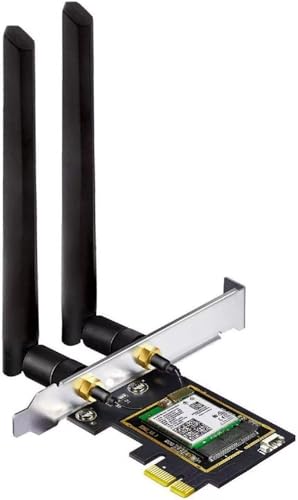
Experience lightning-fast internet with the OKN WiFi 6E AX5400 PCIe WiFi Card, perfect for gamers and streamers seeking top-tier performance. With peak data rates up to 5400 Mbps, this card supports WiFi 6E technology, ensuring you enjoy seamless 8K streaming and VR experiences. Its integrated Bluetooth 5.3 enhances connectivity, supporting a variety of devices with improved range and speed. The dual 5dBi antennas help eliminate dead zones, providing extensive coverage. Plus, with compatibility for Windows 10/11 and easy installation, upgrading your desktop’s internet capabilities has never been simpler. Get ready for a smoother online experience!
Best For: Gamers and streamers seeking high-speed internet with minimal latency for optimal performance.
Pros:
- Supports WiFi 6E technology with peak data rates up to 5400 Mbps for seamless 8K streaming and VR experiences.
- Integrated Bluetooth 5.3 enhances connectivity range and speed for various devices.
- Dual 5dBi external antennas improve signal reception and reduce dead zones, increasing overall network coverage.
Cons:
- Requires Windows 11 or Windows 10 Dev version for 6GHz Wi-Fi functionality.
- Installation might require additional steps for driver setup from the Intel website.
- Compatibility limited to desktop PCs with PCIe slots, not suitable for laptops or older systems.
BrosTrend AXE5400 WiFi 6E USB Adapter

Offering blazing speeds up to 5.4 Gbps, the BrosTrend AXE5400 WiFi 6E USB Adapter is an excellent choice for gamers and streamers who demand high-performance connectivity. With tri-band capabilities, it delivers 2402 Mbps on both the 6 GHz and 5 GHz bands, plus 574 Mbps on 2.4 GHz. Its two adjustable antennas and Beamforming technology enhance your WiFi signal, making it perfect for 8K streaming and large file transfers. Installation is hassle-free with plug-and-play functionality. While many users enjoy stable connections, be mindful of occasional reports regarding long-term reliability. Overall, it’s a solid investment for your desktop connectivity needs.
Best For: Gamers and streamers seeking high-performance WiFi connectivity and enhanced signal strength.
Pros:
- High speeds up to 5.4 Gbps with tri-band capabilities for optimal performance.
- Easy plug-and-play installation with no physical CD required.
- Enhanced signal reception with adjustable antennas and Beamforming technology.
Cons:
- Mixed user reviews regarding long-term connection stability.
- Some reports of frequent disconnections after a few months of use.
- May require caution for potential reliability concerns over time.
TP-Link AC600 USB WiFi Adapter for PC (Archer T2U Plus)

The TP-Link AC600 USB WiFi Adapter (Archer T2U Plus) stands out as an excellent choice for budget-conscious users looking to enhance their PC’s wireless connectivity. With dual-band support and speeds up to 433 Mbps on 5 GHz, it guarantees a stable connection for streaming and gaming. The high-gain 5dBi antenna improves signal reception, while its compact design makes it easy to carry. Setup is straightforward, compatible with various Windows and Mac versions. Although some users mention intermittent disconnections, overall feedback highlights its reliability and performance, making it a solid option for affordable wireless upgrades.
Best For: Budget-conscious users looking to enhance their PC’s wireless connectivity with reliable performance.
Pros:
- Dual-band support providing speeds up to 433 Mbps on 5 GHz for stable connections.
- High-gain 5dBi antenna improves signal reception and overall wireless performance.
- Easy setup and compatibility with various Windows and Mac OS versions.
Cons:
- Some users report intermittent disconnections and issues related to Realtek chipset compatibility.
- Customer support experiences have been reported as lacking and installation instructions can be misleading.
- Potential stability and power issues reported by a subset of users.
Factors to Consider When Choosing Wifi 6e Adapters for PC
When choosing a WiFi 6E adapter for your PC, you’ll want to take into account several key factors. Speed capabilities, compatibility with your system, and the installation process can greatly impact your experience. Additionally, pay attention to antenna design and security features to guarantee you get the best performance and protection.
Speed Capabilities
Speed capabilities play an essential role in choosing the right WiFi 6E adapter for your PC. WiFi 6E adapters can deliver impressive speeds, reaching up to 5400 Mbps in tri-band configurations by utilizing the 6 GHz band alongside 5 GHz and 2.4 GHz frequencies. The 6 GHz band reduces congestion and supports high-demand applications like gaming and streaming, allowing speeds up to 2402 Mbps. If you’re connecting multiple devices, consider dual-band or tri-band adapters that provide combined speeds of up to 5.4 Gbps. Additionally, technologies like MU-MIMO and OFDMA optimize data handling, minimizing latency. With advanced antenna designs and beamforming, these adapters maintain high speeds even at greater distances from your router, ensuring an exceptional internet experience.
Compatibility Requirements
Choosing the right WiFi 6E adapter for your PC involves considering several compatibility factors. First, verify the adapter works with your operating system, as many require Windows 11 for full functionality on the 6 GHz band. Next, check if you need to download specific drivers from the manufacturer’s website for ideal performance. It’s also essential to confirm that your desktop or laptop has the necessary USB ports (USB 3.0 or higher) to achieve maximum data transfer speeds. Additionally, confirm that the adapter supports your current WiFi router or mesh system, especially if it’s a WiFi 6E model. If you opt for a PCIe expansion card, make sure your PC has an available PCIe slot and any required USB headers for extra features.
Installation Process
After ensuring compatibility with your PC, the installation process for a WiFi 6E adapter is straightforward. Many adapters offer plug-and-play functionality, allowing you to connect without needing extra software or drivers. However, some require driver installation, which you can usually download from the manufacturer’s website or find on a CD—just verify that it’s compatible with your operating system. If you opt for a PCIe WiFi card, make sure you have an available PCIe slot on your motherboard. USB adapters are easier, connecting to any USB port, preferably USB 3.0 for better performance. Be aware that some models might need additional setup, like connecting a USB header for Bluetooth or adjusting antennas for ideal signal reception.
Antenna Design
Antenna design is a pivotal factor when selecting a WiFi 6E adapter for your PC, as it directly influences your internet experience. Look for adapters with dual or multiple antennas, as they often provide enhanced signal coverage and stability. External antennas, especially adjustable ones, let you optimize angles for better reception, minimizing dead zones. Additionally, consider adapters that utilize beamforming technology, which focuses the WiFi signal towards your devices for improved performance and range. The number of antennas also affects how well the adapter handles multiple connections, with MU-MIMO technology benefiting from this design. High-gain antennas, like 5dBi models, can greatly boost both transmission and reception strength, ensuring faster and more reliable internet connections.
Security Features
When upgrading to a WiFi 6E adapter, security features play an essential role in protecting your network. Look for adapters that support WPA3 encryption, which enhances password security and safeguards against unauthorized access. Advanced features like WPA3-SAE are vital, as they defend against brute force and offline dictionary attacks, adding an extra security layer.
Also, check for MU-MIMO and OFDMA technologies, which improve network efficiency and maintain secure connections in congested environments. It’s important that the adapter can handle multiple simultaneous connections securely, especially in homes with many devices. Finally, review user feedback regarding the adapter’s security performance, as some may face vulnerabilities or compatibility issues with certain operating systems or network configurations.
Price Considerations
Price is an essential factor to take into account when choosing a WiFi 6E adapter for your PC. You’ll find prices ranging from around $30 for basic models to over $100 for high-performance options. Generally, adapters that offer speeds up to 5400 Mbps come at a higher cost. Keep in mind that additional features like multiple antennas, tri-band support, and enhanced security protocols such as WPA3 can also increase the price. Warranty and customer support options play a role, too; more expensive models often provide longer warranties and better support. It’s vital to balance your budget with your performance needs to guarantee you make a wise investment for your PC’s connectivity.