If you’re looking to enhance your PC’s connectivity, USB-C Ethernet adapters are a solid choice. With various options available, you can find one that fits your specific needs, whether it’s for gaming, streaming, or transferring large files. These adapters offer reliable performance and ease of use. But which ones stand out with regard to speed and functionality? Let’s explore the top contenders that might just elevate your internet experience.
UGREEN USB C to Ethernet Adapter, Plug and Play 1Gbps Ethernet Adapter

If you’re looking for a reliable and high-speed connection for your laptop or tablet, the UGREEN USB C to Ethernet Adapter is an excellent choice. This plug-and-play adapter supports speeds up to 1000Mbps, ensuring a stable wired connection for work, gaming, or streaming. Its aluminum case enhances durability and heat dissipation, while the reinforced cable tail guarantees longevity. With compatibility across various devices, including MacBook Pro, iPhone 15/16, and Nintendo Switch, you can easily connect to any system lacking an Ethernet port. Plus, the LED indicator keeps you informed of your connection status, making it user-friendly and efficient.
Best For: Those seeking a reliable, high-speed wired internet connection for devices without built-in Ethernet ports, such as laptops, tablets, and gaming consoles.
Pros:
- Plug-and-play functionality, making it easy to set up without the need for additional drivers on most operating systems.
- Supports high-speed internet up to 1000Mbps, ideal for demanding tasks like gaming and streaming.
- Durable design with an aluminum case for heat dissipation and a reinforced cable tail for added longevity.
Cons:
- Requires driver installation for older operating systems like Windows XP/7/Vista and Linux, which may complicate usage for some users.
- Limited to devices with USB-C or Thunderbolt ports, excluding older models that do not support these connections.
- May not provide the same performance as a built-in Ethernet port on some devices, depending on hardware limitations.
Anker USB C 3.0 to Ethernet Adapter

The Anker USB C 3.0 to Ethernet Adapter is an excellent choice for anyone seeking a reliable and high-speed internet connection on their USB-C devices. With speeds up to 1 Gbps, it guarantees a stable connection for gaming and general use. Its lightweight, compact design features a durable aluminum exterior and braided-nylon cable, making it easy to carry. You’ll appreciate the plug-and-play functionality across various operating systems, including Windows 11 and Chrome OS. Plus, with an 18-month warranty, you can confidently enjoy its performance. Just keep in mind some users report fit stability issues in USB-C ports.
Best For: Users seeking a high-speed, reliable internet connection for their USB-C devices, particularly for gaming and general use.
Pros:
- Fast and stable internet speeds up to 1 Gbps for seamless connectivity.
- Lightweight and compact design makes it portable and easy to carry.
- Plug-and-play functionality works across multiple operating systems, including Windows 11 and Chrome OS.
Cons:
- Some users report fit stability issues in USB-C ports, leading to a less secure connection.
- A few complaints about overheating in cheaper alternatives, although Anker’s quality is emphasized.
- Limited compatibility with devices that do not have a USB-C port.
uni USB C to Ethernet Adapter, Driver Free Gigabit Ethernet LAN Network Adapter

For those who demand a reliable and fast internet connection, the uni USB C to Ethernet Adapter stands out as an excellent choice. This driver-free adapter supports speeds up to 1Gbps, ensuring you enjoy a stable online experience. Its compact design and braided nylon cable enhance durability while the premium aluminum casing helps with heat dissipation. You’ll appreciate the plug-and-play functionality, which means no driver installations are necessary. Compatible with various devices, from MacBook Pro to Samsung Galaxy, it’s perfect for large downloads and video calls. Plus, with 24/7 customer support and an 18-month warranty, you’re well-covered.
Best For: Users seeking a reliable and high-speed internet connection for activities like large downloads and video calls across various devices.
Pros:
- Plug-and-play functionality with no driver installation required, making it user-friendly.
- Compact and lightweight design with a durable braided nylon cable and premium aluminum casing.
- Compatible with a wide range of devices, ensuring versatility for different users.
Cons:
- Not compatible with Nintendo Switch, limiting its use for some gamers.
- Some users have suggested that longer cable lengths could improve convenience.
- Performance may be limited to users with CAT6 or higher Ethernet cables for maximum speed.
TP-Link USB C to Ethernet Adapter (UE300C)

Transforming your USB-C port into a reliable wired connection, the TP-Link USB C to Ethernet Adapter (UE300C) is perfect for anyone who needs stable internet for online meetings, gaming, or streaming. With speeds up to 1 Gbps, it guarantees smooth HD video streaming and large file transfers. Its compact, lightweight design makes it easy to carry, while the plug-and-play setup means you won’t need additional drivers. Compatible with numerous devices like MacBook Pro, Dell XPS, and Chromebook, this adapter maintains consistent performance without overheating, making it a dependable choice for both home and travel use.
Best For: Anyone in need of a reliable and fast wired internet connection for online meetings, gaming, or streaming on USB-C compatible devices.
Pros:
- High-speed performance with up to 1 Gbps speeds for smooth streaming and large file transfers.
- Compact and portable design makes it easy to carry for travel or remote work.
- Plug-and-play setup eliminates the need for drivers, ensuring compatibility with multiple operating systems.
Cons:
- Requires CAT6 or higher cables for optimal 1 Gbps speeds, which may incur additional costs.
- Limited to devices with USB-C ports, excluding older laptops or devices without this connection type.
- Although it has a solid build, it may not have the same durability as some more expensive alternatives.
Amazon Basics USB-C to RJ45 Gigabit Ethernet Adapter

Offering a seamless way to connect to Ethernet networks, the Amazon Basics USB-C to RJ45 Gigabit Ethernet Adapter is perfect for anyone who needs a reliable wired connection, especially in areas where Wi-Fi may falter. Weighing just 0.798 ounces, this compact adapter features a durable aluminum housing and plug-and-play functionality, so you won’t need extra drivers. It delivers speeds up to 1 Gbps, making it ideal for streaming and gaming. Compatible with various devices, including laptops and tablets, it’s a cost-effective solution for professionals on the go, ensuring you stay connected wherever you are.
Best For: Those seeking a reliable wired connection for streaming, gaming, and professional use in environments with unstable Wi-Fi.
Pros:
- Compact and lightweight design makes it highly portable for on-the-go professionals.
- Delivers high-speed performance up to 1 Gbps, suitable for large file transfers and streaming.
- Durable aluminum housing enhances longevity and provides a premium feel.
Cons:
- Some compatibility issues reported with certain Android devices, affecting app performance over Ethernet.
- Minor challenges with Ethernet cable locking clips may arise during use.
- Requires driver installation for optimal performance on Linux systems.
BENFEI USB-C to Ethernet Adapter (Compatible with iPhone 15 Pro/Max, MacBook Pro/Air 2023, iPad Pro, iMac, S23, XPS 17)

The BENFEI USB-C to Ethernet Adapter stands out as an ideal choice for users of the latest devices like the iPhone 15 Pro/Max, MacBook Pro/Air 2023, and iPad Pro, as it guarantees a reliable wired connection when wireless options fall short. With plug-and-play functionality, you’ll enjoy gigabit speeds up to 1Gbps, ensuring stable connections for large file transfers and gaming. Its compact design and durable braided nylon cable make it easy to use and long-lasting. Plus, you can count on an 18-month warranty and helpful customer service for any questions, making it a trustworthy option for your connectivity needs.
Best For: Users of the latest devices like iPhone 15 Pro/Max and MacBook Pro/Air 2023 who need a reliable wired internet connection.
Pros:
- Plug-and-play functionality allows for easy setup without additional configuration.
- Gigabit speeds up to 1Gbps ensure stable connections for large file transfers and gaming.
- Durable design with a braided nylon cable and aluminum casing enhances longevity and heat resistance.
Cons:
- Not compatible with Nintendo Switch, limiting its versatility for some users.
- Some users have reported issues with durability over time.
- Requires CAT6 or higher Ethernet cables to achieve maximum speed, which may necessitate additional purchases.
UGREEN USB C to Ethernet Adapter 2.5G

If you’re looking to boost your internet speed for tasks like 4K streaming or online gaming, the UGREEN USB C to Ethernet Adapter 2.5G is a standout choice. It supports speeds up to 2.5Gbps, perfect for fast downloads and stable connections. This adapter features a Realtek RTL8156BG chipset, ensuring low power consumption and reliable performance. With its durable aluminum casing and plug-and-play setup, you can easily connect to devices like your MacBook or iPad Pro. Plus, at around $20, it offers excellent value, making it a smart investment for anyone needing a faster wired connection.
Best For: Users seeking a reliable and high-speed wired internet connection for activities like streaming, gaming, and large file transfers.
Pros:
- Supports high speeds up to 2.5Gbps, enhancing download and streaming experiences.
- Durable aluminum casing ensures longevity and resistance to wear.
- Plug-and-play setup for easy installation across various devices.
Cons:
- May require driver installation for Windows users, complicating setup for some.
- Performance is dependent on using CAT6 cables or better for optimal results.
- Solid construction could scratch surfaces if not stored properly.
UGREEN USB to Ethernet Adapter with 3 USB 3.0 Ports
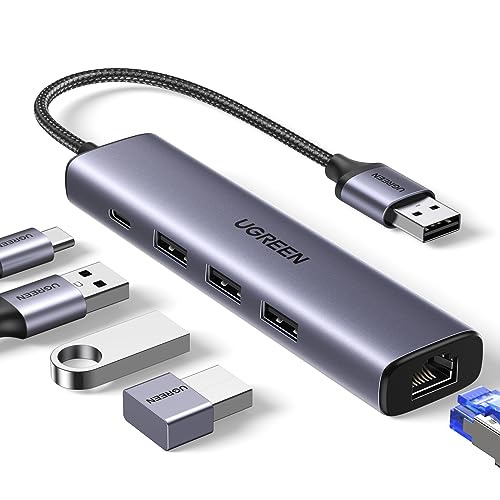
For those who need to maximize connectivity on their laptops or MacBooks, the UGREEN USB to Ethernet Adapter with 3 USB 3.0 Ports stands out with its 5-in-1 design. This adapter features a gigabit Ethernet port that delivers speeds up to 1000Mbps, perfect for gaming and streaming. You’ll also benefit from three USB 3.0 ports, providing data transfer speeds of up to 5Gbps—ten times faster than USB 2.0. Installation is easy, requiring no drivers on most systems. Plus, the Type-C power supply port supports high-demand peripherals, making it a versatile choice for enhancing your productivity.
Best For: Users seeking to enhance connectivity and network performance on laptops or MacBooks with multiple USB peripherals.
Pros:
- High-speed connectivity: Gigabit Ethernet port provides network speeds up to 1000Mbps for reliable online activities.
- Fast data transfer: Three USB 3.0 ports support data sync speeds up to 5Gbps, significantly improving transfer rates.
- Easy installation: Plug and play compatibility with Windows 11/10/8.1, macOS, and Chrome OS simplifies setup without drivers.
Cons:
- Driver installation required for older systems: Users with Windows XP/7/8/Vista and Linux need to install drivers manually.
- Power supply limitations: Type-C power supply port is for powering devices only and does not charge host devices like laptops.
- Limited to USB 3.0 speeds: While faster than USB 2.0, the USB 3.0 ports may not meet the needs of users requiring even higher data transfer rates.
UtechSmart USB C Hub Multiport Adapter (6 In 1)

Looking for a versatile solution to expand your connectivity options? The UtechSmart USB C Hub Multiport Adapter (6 in 1) is perfect for you. With a reliable 1000M Ethernet port, 4K HDMI output, and three USB 3.0 ports, it delivers smooth data transfer speeds up to 5 Gbps. Plus, its 100W Power Delivery guarantees fast charging while you multitask. Weighing just 3.03 ounces, it’s easy to carry. Users rave about its plug-and-play functionality, although some noted overheating in high-demand situations. Backed by an 18-month warranty, UtechSmart offers solid customer support for peace of mind.
Best For: Those seeking a compact and versatile USB-C hub for enhanced connectivity with multiple devices.
Pros:
- Fast Data Transfer: Supports speeds up to 5 Gbps with three USB 3.0 ports.
- 4K HDMI Output: Ideal for gaming, video editing, and high-quality streaming.
- Reliable Customer Support: Comes with an 18-month warranty and responsive customer service.
Cons:
- Potential Overheating: Some users experienced overheating during high-demand usage.
- HDMI Compatibility Issues: Mixed experiences reported based on device compatibility with HDMI output.
- Initial Recognition Problems: Some users faced issues with device recognition, often needing a proper power connection.
TP-Link USB C to Ethernet Adapter (UE302C)

The TP-Link USB C to Ethernet Adapter (UE302C) is the ideal choice for anyone needing a reliable, high-speed internet connection on their USB-C devices. With support for data transfer rates up to 2.5 Gbps, you’ll enjoy seamless 4K/8K streaming, quick file transfers, and smooth online gaming. Its plug-and-play design means you can connect instantly without software hassles. Weighing just 0.96 ounces and crafted from durable aluminum alloy, it’s portable and built to last. Plus, it works with various devices and operating systems, ensuring versatility for your networking needs. Upgrade your connection hassle-free with this dependable adapter.
Best For: Users seeking a reliable and high-speed internet connection on their USB-C devices for activities like streaming, gaming, and large file transfers.
Pros:
- Supports data transfer rates up to 2.5 Gbps, enhancing online gaming and streaming experiences.
- Plug-and-play design allows for instant connection without the need for software installation.
- Lightweight and portable design makes it easy to transport and use with various devices.
Cons:
- Limited to devices with USB-C or Thunderbolt ports, which may exclude some older models.
- May not support specific advanced network features found in some high-end adapters.
- Performance can be impacted by the quality of the existing network infrastructure.
Factors to Consider When Choosing USB C Ethernet Adapters for PC
When you’re choosing a USB-C Ethernet adapter for your PC, you should consider several key factors. Speed capabilities and build quality can greatly impact your connection experience, while compatibility range guarantees it works with your devices. Don’t forget to look at port selection and plug-and-play functionality for added convenience.
Speed Capabilities
As you explore USB-C Ethernet adapters for your PC, understanding their speed capabilities is essential for optimizing your internet experience. Most adapters support speeds of 10/100/1000 Mbps (1 Gbps), while some advanced models can reach up to 2.5 Gbps, enhancing data transfers and streaming. To maximize these speeds, verify your adapter is compatible with CAT6 or higher Ethernet cables. Remember, performance can vary based on your device and network conditions, but many users notice significant improvements over Wi-Fi. When choosing an adapter, check if it supports backward compatibility with 100 Mbps and 10 Mbps, confirming it works with older networks. Ultimately, your actual speed will depend on your device’s capabilities and your network’s quality.
Build Quality
Choosing a USB-C Ethernet adapter involves more than just speed; build quality plays an essential role in ensuring durability and performance. Look for adapters with aluminum housing, as they offer better heat dissipation and resist wear compared to plastic. A braided nylon cable can enhance longevity by minimizing wear and tear, while reinforced connectors prevent damage from frequent use. Opt for compact and lightweight designs to make portability easier without adding bulk to your bag. Features like non-slip designs and snug fits in USB-C ports help maintain stable connections, reducing disconnection risks during use. Remember, high-quality materials lead to improved performance, including better signal transfer and reduced overheating during extended use.
Compatibility Range
Verifying your USB-C Ethernet adapter is compatible with your devices is crucial, especially since compatibility can vary widely among brands and models. First, check if the adapter supports Thunderbolt 3 or 4 connections for better performance, particularly if you’re using high-speed internet or engaging in data-heavy tasks. Also, verify that it works with your operating system; some devices might need specific drivers, while others may offer plug-and-play functionality. It’s also wise to take into account backward compatibility with older Ethernet standards like 100Mbps or 10Mbps for flexibility in various network environments. Finally, assess the range of devices the adapter supports, including gaming consoles and peripherals, to make sure it enhances your tech ecosystem effectively.
Port Selection
After confirming compatibility with your devices, the next step is to evaluate the port selection of USB-C Ethernet adapters. Consider how many ports you’ll need; some adapters come with additional USB 3.0 ports, allowing you to connect peripherals and enhance functionality. It’s also essential to check that the adapter supports the right Ethernet speed—1Gbps or 2.5Gbps—to match your internet service for peak performance. Look for a robust build quality, like aluminum casing, which guarantees durability and effective heat dissipation during extended use. Finally, think about the form factor; a lightweight and compact design is more convenient if you plan to travel or use the adapter in various environments.
Plug-and-Play Functionality
Plug-and-play functionality is a game changer when it comes to USB-C Ethernet adapters for your PC. With this feature, you can connect the adapter directly to your device without any software installations, giving you immediate internet access. Many of these adapters support various operating systems like Windows, macOS, and Chrome OS, ensuring seamless compatibility across your devices. This is especially useful when Wi-Fi is unstable or unavailable, providing a reliable connection whenever you need it. Plus, these user-friendly adapters have no complex setup procedures, making them perfect for both tech-savvy users and those less familiar with technology. Instant connectivity can considerably boost your productivity, minimizing downtime during video calls, online gaming, or large file transfers.
Warranty and Support
When choosing a USB-C Ethernet adapter for your PC, the warranty and support options can greatly influence your decision. Look for adapters with a solid warranty period; some offer 18 months, while others provide even longer coverage, showing the manufacturer’s confidence in their product. Also, consider customer support availability—24/7 professional service can be invaluable for troubleshooting. Check customer feedback on warranty claims; positive experiences often indicate a responsive support system. Additionally, review return policies that allow full refunds within specified periods for faulty products. Finally, verify the warranty covers both parts and labor, giving you peace of mind about the longevity and reliability of your device.