If you’re looking to boost your internet speed, USB-C to 10Gb Ethernet adapters are a smart choice. They offer impressive performance for everything from gaming to creative work. With numerous options available, you might wonder which ones stand out. From reliable brands to cutting-edge features, there’s a lot to take into account. Let’s explore the top contenders that could enhance your connectivity experience.
SABRENT USB-C to 5G Ethernet Adapter

If you’re looking for a reliable and high-speed connection for your devices, the SABRENT USB-C to 5G Ethernet Adapter is an excellent choice. This compact adapter supports true 5GbE performance when paired with compatible hardware. It features plug-and-play installation for Windows 10/11 and macOS, making setup a breeze. Constructed from durable aluminum alloy, it’s built to last, and its LED indicator keeps you informed of connection status. While most users praise its performance, some Linux users might need to install specific drivers. Overall, it’s a solid option for boosting your network speed effortlessly.
Best For: Users seeking a high-speed Ethernet connection for devices with USB-C ports, particularly those using Windows or macOS.
Pros:
- Plug-and-play installation for easy setup on Windows 10/11 and macOS.
- Compact and durable design made from aluminum alloy for portability and longevity.
- Supports true 5GbE performance with compatible hardware for optimal network speeds.
Cons:
- Some Linux users may need to manually install drivers for optimal performance.
- A few users reported connectivity issues or device failures after limited usage.
- Performance may be limited by lower-speed components, such as older cables or routers.
ACASIS 10Gb Ethernet Adapter for USB4 Ports
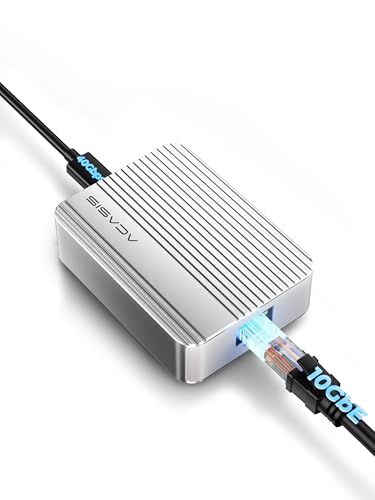
The ACASIS 10Gb Ethernet Adapter is an ideal choice for creative professionals and gamers who demand high-speed internet connectivity. With speeds up to 10Gbps, it’s perfect for large file transfers and 4K video editing. Weighing just 4.4 ounces and measuring 3.44 x 2.51 x 1.09 inches, it’s compact yet powerful. This adapter works seamlessly with USB4 ports and supports various speeds, ensuring compatibility with your Mac or Windows system. While users appreciate its performance, some have noted it can get warm during use. However, it’s backed by a solid warranty, making it a reliable option for your connectivity needs.
Best For: Creative professionals and gamers seeking high-speed internet connectivity for demanding tasks like large file transfers and 4K video editing.
Pros:
- High-speed performance with up to 10Gbps, ideal for bandwidth-intensive applications.
- Compact and lightweight design, making it easy to carry and use with USB4 ports.
- Plug-and-play compatibility with macOS/Linux and a driver available for Windows.
Cons:
- Device can get warm during use, which may raise concerns about overheating.
- Lack of indicator lights for connection status can be inconvenient for users who frequently plug and unplug.
- Requires a USB4 interface, limiting compatibility with older devices.
Anker USB C to Ethernet Adapter

Designed for tech-savvy users and professionals seeking a reliable internet connection, the Anker USB C to Ethernet Adapter delivers impressive speeds of up to 2.5 Gbps. Its compact aluminum design makes it lightweight and portable, perfect for on-the-go use. Compatible with devices like the MacBook Pro and iPad Pro, it offers a plug-and-play experience on Windows and Linux without the hassle of driver installation. While many users praise its performance, some have reported issues with certain MacBook models or older systems. Overall, it’s a solid choice for those needing stable and fast internet connectivity.
Best For: Tech-savvy users and professionals seeking a reliable and high-speed internet connection for their USB-C compatible devices.
Pros:
- High-speed internet connectivity up to 2.5 Gbps with compatible cables.
- Lightweight and portable aluminum design, ideal for travel.
- Plug-and-play functionality for easy setup on Windows and Linux without driver installation.
Cons:
- Compatibility issues reported with newer MacBook models (M1, M2).
- Some users experienced performance limitations with older systems and certain network switches.
- Not compatible with devices that have USB 2.0 ports.
UGREEN USB C to Ethernet Adapter

For tech-savvy users seeking lightning-fast internet connectivity, the UGREEN USB C to Ethernet Adapter stands out with its impressive 5Gb performance, which boosts data transfer speeds by 400% compared to traditional Gigabit options. This adapter is perfect for your MacBook Air/Pro or XPS, utilizing the efficient RTL8157 chip for reduced power consumption and heat. It supports 5Gb speeds with CAT6 cables and requires USB 3.2 Gen2 for peak performance. Designed with aluminum casing and heat dissipation holes, it prevents overheating. Remember, it works best when directly connected, avoiding adapters or hubs for the fastest results.
Best For: Tech-savvy users who need ultra-fast internet connectivity for devices like MacBook Air/Pro or XPS.
Pros:
- Impressive 5Gb performance enhances data transfer speeds by 400% compared to traditional Gigabit options.
- Efficient RTL8157 chip reduces power consumption and heat generation, promoting longevity.
- Aluminum casing with heat dissipation holes prevents overheating during high-speed usage.
Cons:
- Requires USB 3.2 Gen2 for optimal performance, limiting compatibility with older devices.
- Driver installation needed for Windows and Linux, which may be inconvenient for some users.
- Not compatible with USB to USB C adapters, hubs, or docking stations, restricting connection options.
WAVLINK USB C to Ethernet Adapter

If you’re looking for lightning-fast internet speeds, the WAVLINK USB C to Ethernet Adapter is an excellent choice. This adapter converts USB-C to RJ45, delivering speeds up to 5000Mbps—five times faster than traditional options. Its durable aluminum casing guarantees stability, while the RTL8157 chipset enhances performance. To achieve those impressive speeds, make certain your broadband exceeds 5G, and you’re using a CAT6A Ethernet cable connected to a USB 3.2 port. Compatible with various operating systems, the WAVLINK adapter is perfect for anyone needing reliable connectivity. Just remember, driver installation may be necessary for older systems.
Best For: Users seeking high-speed internet connectivity with USB-C devices, especially for gaming, streaming, or heavy data usage.
Pros:
- Ultra-fast speeds of up to 5000Mbps, significantly faster than traditional adapters.
- Durable aluminum casing provides stability and heat dissipation.
- Wide compatibility with various operating systems, ensuring versatile use.
Cons:
- Requires specific conditions for optimal speeds, including broadband over 5G and a CAT6A Ethernet cable.
- Driver installation may be needed for older operating systems, adding complexity.
- Not compatible with many devices, such as Nintendo Switch and most Android devices.
Cable Matters USB C to Ethernet Adapter

The Cable Matters USB C to Ethernet Adapter stands out for users seeking high-speed internet connectivity, boasting a remarkable 5 Gbps transfer rate. It’s compatible with a variety of devices, including MacBook, iMac, and Dell XPS, and supports multiple operating systems. The rugged aluminum design guarantees durability, while the plug-and-play setup makes installation a breeze. To optimize performance, just remember to install the latest Realtek driver if you’re using an older system. Users praise its stability and speed, making it a solid choice for streaming and gaming, with a good balance of performance and price.
Best For: Users looking for a high-speed, reliable USB C to Ethernet connection for streaming, gaming, and large file transfers.
Pros:
- High-speed transfer rate of 5 Gbps for optimal internet performance.
- Durable aluminum design with effective heat management and flexibility.
- Easy plug-and-play setup on most operating systems.
Cons:
- Requires the latest Realtek driver installation for optimal performance on older systems.
- Not compatible with Android devices, limiting its use for some users.
- Runs warmer than expected, which may concern some users despite stable performance.
UGREEN USB C to Ethernet Adapter 2.5G

Engineered for users seeking enhanced internet speed, the UGREEN USB C to Ethernet Adapter 2.5G delivers a remarkable 2.5Gbps connection, making it ideal for gamers, streamers, and professionals alike. This adapter is compatible with a range of devices, including MacBook Air/Pro and iPhone 15 Pro/Max. Its Realtek chip guarantees low power consumption and stable performance, while the durable aluminum casing enhances longevity. Enjoy plug-and-play convenience, achieving impressive transfer rates of approximately 260.88 MB/s for large files. Priced around $20, it’s a solid investment for those upgrading their network for faster wired connectivity.
Best For: Gamers, streamers, and professionals seeking enhanced wired internet speed and stability.
Pros:
- Fast Connection: Supports internet speeds up to 2.5Gbps for smooth streaming and gaming.
- Plug-and-Play: Easy installation with minimal setup requirements; generally no drivers needed.
- Durable Design: High-quality aluminum casing that resists wear and tear.
Cons:
- Driver Requirement for Windows: May require driver installation for some Windows users, adding an extra step.
- Surface Scratches: The aluminum casing can scratch surfaces if not stored properly.
- Cable Compatibility: Optimal performance requires CAT6 or better cables, which may be an additional expense.
OWC Thunderbolt 4 Ethernet Adapter

For professionals needing high-speed network connections, the OWC Thunderbolt 4 10G Ethernet Adapter stands out with its impressive support for transfer speeds up to 10Gb/s. You’ll benefit from real-world tested speeds nearing 900MB/s, perfect for large file transfers, video editing, and live streaming gaming. This adapter works seamlessly with any Thunderbolt-equipped Mac or Windows computer and supports various Ethernet standards for flexibility. With a cable distance of up to 100 meters, you can easily set up your workspace. Plus, it’s Wake-on-LAN ready, ensuring remote access to your devices is a breeze. Enjoy reliable and fast connectivity!
Best For: Professionals in need of high-speed network connections for tasks like large file transfers, video editing, and live streaming.
Pros:
- High transfer speeds of up to 10Gb/s, with real-world speeds nearing 900MB/s.
- Compatible with any Thunderbolt-equipped Mac or Windows computer, ensuring versatility.
- Wake-on-LAN ready for easy remote access to devices.
Cons:
- Some users report recognition issues at startup.
- Limited to a 1-year warranty, which may be shorter than some competitors.
- Requires specific cable types for optimal performance over longer distances.
OWC Thunderbolt 3 10G Ethernet Adapter

If you’re looking to enhance your network performance, the OWC Thunderbolt 3 10G Ethernet Adapter is an excellent choice, especially for professionals who require high-speed connectivity for tasks like video editing or large file transfers. This adapter connects easily to Thunderbolt 3 or 4 ports on both Mac and Windows systems, supporting speeds up to 10Gb/s. It’s bus-powered and energy-efficient, making it a practical option for extended use. Users appreciate its plug-and-play functionality and stable connections, although some have reported disconnections on specific setups. Overall, it’s a reliable tool for those needing fast, efficient networking.
Best For: Professionals and power users who require high-speed wired network connections for tasks like video editing and large file transfers.
Pros:
- Plug-and-play functionality for easy setup without the need for drivers on macOS.
- Supports multiple speed options up to 10Gb/s, ideal for high-performance networking.
- Cross-platform compatibility with both Mac and Windows systems.
Cons:
- Some users report disconnection issues, particularly on M1 iMacs with macOS Sequoia 15.3.
- The adapter can get warm to hot during extended use, which may raise concerns about heat management.
- Limited warranty period of just one year may not be sufficient for heavy users.
Anker USB C 3.0 to Ethernet Adapter, Portable 1-Gigabit Network Hub

The Anker USB C 3.0 to Ethernet Adapter is an ideal choice for anyone needing a reliable and fast internet connection on the go. Weighing just 0.8 ounces and measuring 2.05 x 0.94 x 0.55 inches, its portable design fits easily into your bag. With speeds up to 1 Gbps, it connects instantly to a variety of devices, including MacBook Pro and Galaxy S9. Users appreciate its plug-and-play functionality and sturdy aluminum housing. Plus, an 18-month warranty gives you peace of mind. For a balance of performance and portability, this adapter delivers excellent value in the crowded market.
Best For: Individuals seeking a compact and reliable USB-C Ethernet adapter for fast internet access on various devices.
Pros:
- High-speed connectivity with up to 1 Gbps for seamless online activities, including gaming and streaming.
- Lightweight and portable design makes it easy to carry for users on the go.
- Plug-and-play functionality ensures compatibility with multiple operating systems without the need for additional software.
Cons:
- Some users have reported fit stability issues in USB-C ports, preferring other brands for a more secure connection.
- Occasional complaints about overheating and durability in cheaper alternatives, despite Anker’s quality build.
- Limited to devices with USB-C ports, which may not be compatible with all computers or peripherals.
Factors to Consider When Choosing Usb C to 10GB Ethernet Adapters
When choosing a USB-C to 10Gb Ethernet adapter, you should consider several key factors. Think about compatibility with your devices, your specific speed requirements, and the design and durability of the adapter. Also, keep in mind heat management and whether you’ll need to install any drivers for peak performance.
Compatibility With Devices
Choosing the right USB-C to 10Gb Ethernet adapter hinges on confirming compatibility with your devices. First, verify your device has a USB-C port that supports data transfer, ideally USB 3.1 Gen 1 or higher, for peak performance. Next, check the operating system compatibility; some adapters may need driver installations on Windows or Linux, while macOS typically offers plug-and-play functionality. It’s also vital to verify that the adapter supports the Ethernet standards your network uses, like 10GbE or 5GbE. Additionally, consider the type of cable you’ll use; CAT6a or better cables are often necessary for maximum speed. Finally, confirm the adapter meets your specific use case, whether for gaming, streaming, or large file transfers.
Speed Requirements
Achieving ideal speed with a USB-C to 10Gb Ethernet adapter hinges on several key factors. First, verify your USB-C port supports USB 3.2 Gen 2 or higher; otherwise, you won’t hit that 10Gbps mark. Next, using a CAT6a or better Ethernet cable is vital for consistently reaching those top speeds. Be mindful of your network infrastructure—older routers and switches may not support 10GbE standards, limiting your performance. Some adapters might negotiate down to lower speeds based on the connected device’s capabilities, impacting overall speed. Finally, remember that real-world speeds can fluctuate due to network conditions, hardware compatibility, and the type of data being transferred, often resulting in speeds lower than the theoretical maximum.
Design and Durability
While speed is a significant factor, the design and durability of USB-C to 10Gb Ethernet adapters also play an important role in your overall experience. Look for adapters made from durable materials like aluminum alloy, which enhance longevity and aid in heat dissipation during extended use. A compact and lightweight design makes it easy to take your adapter on the go, guaranteeing portability and convenience. Additionally, a rugged exterior can resist wear and tear, maintaining performance in various environments. Some adapters come with status LED indicators, allowing you to monitor connection activity and troubleshoot issues effectively. Prioritizing these design elements will guarantee you choose an adapter that meets your needs and stands the test of time.
Heat Management
When it comes to USB-C to 10Gb Ethernet adapters, effective heat management is vital for maintaining performance and stability during high-speed data transfers. High-speed operations generate significant heat, which can affect your adapter’s reliability. Look for models with aluminum alloy casings that enhance heat dissipation, keeping temperatures ideal even during prolonged use. Some adapters come equipped with internal features like ventilation holes to minimize overheating during demanding tasks. If you plan to use the adapter heavily, consider those with built-in fans for additional cooling. Remember, high temperatures can lead to reduced reliability and lifespan, so choosing an adapter with effective heat management is important for your high-bandwidth applications.
Driver Installation Needs
Effective heat management is only one part of guaranteeing your USB-C to 10Gb Ethernet adapter performs at its best. Driver installation is vital, especially for Windows users, who often need to download drivers from the manufacturer’s website or rely on Windows Update for compatibility. If you’re using Linux, be prepared to manually install specific drivers for chipsets like the r8152 or AX88179 to access full functionality. On the flip side, many macOS and Linux adapters offer plug-and-play capabilities, minimizing driver hassles. Remember, outdated drivers can cause connectivity issues or slow performance, so regular updates are necessary. Always check compatibility requirements before purchasing to avoid surprises with driver needs and guarantee peak speeds.
Price and Value
Choosing the right USB-C to 10Gb Ethernet adapter requires careful consideration of price and value, especially since these adapters can range from around $20 to over $100. Higher-priced options usually offer better build quality, advanced features like heat management, and faster transfer speeds, making them worthwhile for professional use. When evaluating your choices, check the compatibility with your existing hardware, as adapters supporting higher speeds may need specific USB-C standards and cabling. Don’t forget to look at warranties; longer coverage often reflects the manufacturer’s confidence in the product’s reliability. Finally, user reviews can provide valuable insights into performance stability and ease of use in different network environments, helping you make a more informed decision.