The right microscope soldering camera can make tiny pads, traces, and components easier to inspect without forcing you into an uncomfortable bench position. Today’s digital models add HDMI output, built-in screens, adjustable stands, and recording features to traditional magnification.
We compare 10 options for hobbyists, technicians, makers, and repair professionals, with attention to image clarity, focusing control, working space, lighting, and everyday usability.
Best 10 Microscope Soldering Cameras Picks for 2026
Best All-Purpose Station

- Three lenses for soldering, general inspection, and slides
- 2160P HDMI output with 7-inch display
- Expanded station with helping hands and tool storage
Best For: Multi-purpose electronics benches and makers
Best Autofocus Pick

- AI autofocus with responsive TOF distance sensing
- 4K video, 52MP images, and 8-inch IPS display
- Rechargeable battery plus freeze and split-screen modes
Best For: Fast, versatile inspection with minimal manual focusing
Best Large-Screen Station

- Large 10.1-inch display for comfortable bench viewing
- Three lenses with 2160P HDMI video output
- Complete soldering station with helping hands and storage
Best For: Dedicated workshops needing a spacious display
Best Compact Budget Option
5-Inch LCD Soldering Microscope

- Standalone 5-inch IPS screen with battery power
- C-clamp and flexible arm free both hands
- Plug-and-play PC viewing without extra software
Best For: Basic PCB repair and compact solder-joint inspection
Best 3D View
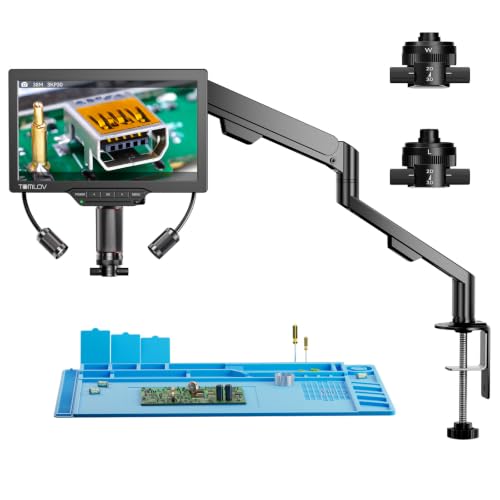
- 3D side-viewing with 360° rotation
- Magnetic long-distance and wide-angle lenses
- 3K 7-inch display with flexible viewing options
Best For: PCB repair, micro soldering, and multi-angle inspection
Best Budget-Friendly Detail View

- 7-inch screen with 12MP photos and 1080p video
- Stable metal base with adjustable stand
- Built-in and gooseneck lighting
Best For: Hobby electronics, light soldering, and coin inspection
Best Overall
Andonstar AD409-SA Slide-Rail Soldering Microscope

- Spacious slide-rail arm for large PCBs
- 2160P video with HDMI and 10.1-inch display
- Includes endoscope and measurement software
Best For: Large PCB repairs and flexible bench inspection
Best Beginner-Friendly
TOMLOV DM9 Max Digital Soldering Microscope

- Easy 10.1-inch screen-based operation
- Adjustable lens and side LED lighting
- Includes remote and 16GB microSD card
Best For: Beginners, hobbyists, and coin collectors
Best 4K Output
LINKMICRO LM208S-A Flexible-Arm Microscope
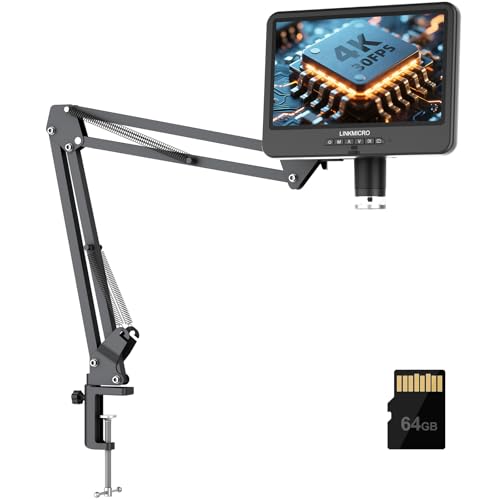
- 4K 30FPS HDMI output for smooth inspection
- Extended flexible arm for larger repair work
- USB, audio recording, and 64GB card included
Best For: 4K demonstrations, motherboard repair, and content creation
Best All-Purpose Station – Andonstar AD246S-M Plus 2160P
Among microscope soldering cameras, the Andonstar AD246S-M Plus stands out as a complete workstation rather than just a camera. It combines 2160P HDMI output, a 7-inch display, three interchangeable lenses, and a soldering-focused stand with storage and helping hands.
Best For: Makers and repair technicians who want one microscope for soldering, coin inspection, and biological slides.
Pros:
- Three lenses cover soldering, general inspection, and biological slides.
- 2160P video, HDMI output, Windows measurement software, and included 32GB card.
- Expanded soldering area, tool holder, rotatable helping hands, and anti-static mat.
Cons:
- Manual focusing and lens changes require hands-on adjustments.
- The full workstation setup takes more space than a basic camera-and-screen unit.
This is a strong choice when versatility and included bench accessories matter as much as image quality. Its 24-month warranty and broad accessory package further support long-term workshop use.
Best Autofocus Pick – Elikliv EM4K-AF 4K Microscope
The Elikliv EM4K-AF is one of the more advanced microscope soldering cameras for users who prefer automated focusing. Its AI-assisted autofocus, TOF sensor, 4K video, and large 8-inch IPS display are designed to make detailed inspection faster and easier.
Best For: Soldering, watchmaking, coin inspection, and users who want autofocus with a larger on-device screen.
Pros:
- AI autofocus and TOF sensing can adjust focus in about two seconds.
- 4K UHD video, 52MP images, HDMI/USB output, and a 1280 × 800 IPS screen.
- Rechargeable battery, smart controller, freeze mode, and split-screen viewing.
- Broad base and taller 10-inch stand accommodate coins and repair work.
Cons:
- The included 16GB card is smaller than the 32GB cards supplied with some alternatives.
- Its advanced feature set may be more than needed for simple solder-joint checks.
Choose this model if autofocus and workflow features are priorities. The combination of 4K output, a large display, and battery operation also makes it flexible for bench or portable inspection.
Best Large-Screen Station – Andonstar AD249S-M Plus
For shoppers comparing microscope soldering cameras, the Andonstar AD249S-M Plus offers the same versatile three-lens concept as a compact workstation but adds a larger 10.1-inch display. It also includes 2160P HDMI output, a soldering extension base, and dedicated bench accessories.
Best For: Workshop users who want a larger built-in screen for soldering, repairs, coin viewing, and slide inspection.
Pros:
- 10.1-inch display provides a spacious viewing area for detailed work.
- Three lenses support soldering, general objects, and biological slides.
- 2160P HDMI video, 32GB card, remote control, and Windows measurement software.
- Helping hands, tool holder, storage boxes, extension base, and anti-static mat are included.
Cons:
- Manual focusing and interchangeable lenses are less convenient than autofocus systems.
- The larger station requires substantial bench space.
This is a particularly practical option for a dedicated repair bench where screen size and included organization accessories matter. Its 2-year manufacturer warranty adds useful coverage for a feature-rich setup.
Best Compact Budget Option – 5-Inch LCD Soldering Microscope
This 5-inch LCD model is a straightforward choice among microscope soldering cameras for PCB repair and solder-joint inspection. It works without a computer, uses a flexible arm and C-clamp to free both hands, and connects to Windows or Mac as a plug-and-play PC camera.
Best For: Electronics hobbyists who need a compact, battery-powered inspection microscope for soldering checks.
Pros:
- 5-inch IPS screen allows standalone use without a computer.
- C-clamp and flexible arm help keep both hands available for repair work.
- Simple Windows Camera and Mac Photo Booth connection without third-party software.
- Up to 1000x digital magnification is available through physical positioning and manual focus.
Cons:
- It is not autofocus; users must adjust distance and the focus wheel manually.
- A microSD card up to 32GB is required for saving photos and 1080P videos but is not included.
- The setup is intended for micro-details rather than full-screen views of large objects.
This model makes sense when low-complexity operation, portability, and a hands-free clamp are more important than 4K output or a full soldering workstation. Be sure to budget for a compatible microSD card.
Best 3D View – TOMLOV TM3K-3D
For shoppers comparing microscope soldering cameras, the TOMLOV TM3K-3D stands out with side-viewing and 360-degree 3D imaging. Its long-distance lens leaves room for hands-on PCB work, while the built-in 7-inch 3K IPS display provides a clear view without requiring a separate monitor.
Best For: PCB repair, micro soldering, jewelry inspection, and users who want multi-angle viewing.
Pros:
- 3D side-viewing and 360-degree rotation help reveal solder joints and components from multiple angles.
- Magnetic L and W lenses switch without tools for either working distance or wide-angle viewing.
- Flexible arm stand, HDMI, USB, and built-in display support varied workstations.
- Adjustable gooseneck lighting can help target shadows and glare.
Cons:
- The feature-rich 3D setup may be more than casual users need.
- Its supplied notes do not specify autofocus or a fully enclosed lighting system.
The TM3K-3D is a strong choice when viewing angle and workspace flexibility matter as much as magnification. It is particularly suited to detailed repair work where a standard straight-on camera can hide important edges.
Best Large Workspace – Andonstar AD109
The Andonstar AD109 is one of the more workspace-friendly microscope soldering cameras in this group. Its 27.56-inch boom arm and broad adjustment range are designed for large PCBs and multi-tool setups, while the 10.1-inch IPS screen keeps the live view easy to share.
Best For: Large electronics workspaces, soldering oversized PCBs, and coin inspection.
Pros:
- Long boom arm extends up to 27.56 inches and rotates 360 degrees with a 170-degree tilt range.
- 10.1-inch IPS screen displays 1080p video and supports 12MP photos.
- Dual LED lighting combines built-in LEDs with a 56-LED ring light for adjustable illumination.
- USB-C connectivity works with Windows and Mac, and a remote enables hands-free capture and zoom.
Cons:
- The remote requires batteries, which are not included.
- The extended arm may require more bench space than a compact stand.
Choose the AD109 when reach and positioning freedom are priorities. It offers a practical balance for users who switch between soldering, coin examination, and computer-based image capture.
Best Budget-Friendly Detail View – TOMLOV DM9
The TOMLOV DM9 is a straightforward option for shoppers seeking microscope soldering cameras for light electronics work and general close-up inspection. It combines a built-in 7-inch screen, adjustable stand, 12MP still images, and 1080p video with a stable metal base.
Best For: Hobby electronics, light soldering, coin collecting, and everyday close-up inspection.
Pros:
- Stable metal base and adjustable 8.5-inch stand support hands-on inspection.
- Built-in 7-inch LCD screen offers a comfortable direct viewing experience.
- 12MP photos and 1080p video support documentation and sharing.
- Eight built-in LEDs plus two flexible gooseneck lights provide adjustable illumination.
Cons:
- The notes describe it as suitable for light soldering, rather than emphasizing advanced professional repair.
- Its fixed metal stand offers less reach than a long boom arm.
The DM9 makes sense for beginners and hobbyists who want an uncomplicated screen-based microscope with useful capture features. Its lighting and stable base also make it versatile for coins, crafts, and small components.
Best Overall – Andonstar AD409-SA Slide-Rail Soldering Microscope
For shoppers comparing microscope soldering cameras, the Andonstar AD409-SA stands out for its unusually spacious slide-rail setup. Its 10.1-inch IPS display, 2160P recording, HDMI output, and endoscope make it suitable for detailed PCB work as well as hard-to-reach inspections.
Best For: Large PCB repairs, precision soldering, and users who need flexible camera positioning.
Pros:
- Slide-rail arm creates a generous working area for large boards and multiple tools.
- All-metal rails, C-clamps, and industrial lens support stable, focused inspection.
- Includes HDMI, Windows PC, Wi-Fi, measurement software, remote control, and a 2-in-1 endoscope.
Cons:
- The extensive stand and accessories require more bench space than a compact microscope.
- Windows PC compatibility is specified for the microscope, while the endoscope is not supported through that connection.
The AD409-SA is a strong choice when workspace, stability, and inspection flexibility matter more than a minimalist setup. Its included soldering mat and two-year warranty add practical value for regular bench use.
Best Beginner-Friendly – TOMLOV DM9 Max Digital Soldering Microscope
The TOMLOV DM9 Max is a practical option among microscope soldering cameras for beginners, hobbyists, and collectors. Its 10.1-inch IPS screen, adjustable lighting, remote control, and simple one-button recording make close-up inspection easy without relying on a computer.
Best For: Beginner soldering, coin inspection, watch work, and general household detail viewing.
Pros:
- Large 10.1-inch display with a 178° viewing angle is comfortable for extended viewing.
- 5X-1500X zoom, eight lens LEDs, and two dimmable gooseneck lights cover varied subjects.
- Includes a 16GB microSD card, remote control, PC/monitor connection, and audio-capable video recording.
Cons:
- Video recording is listed up to 1080p rather than 4K.
- The 12.6-inch stand and 7-by-8-inch base may offer less clearance than larger flexible-arm systems.
The DM9 Max balances accessibility and useful features rather than targeting demanding industrial workflows. It is a sensible entry point for users who want a screen-based microscope for solder joints, coins, and small repairs.
Best 4K Output – LINKMICRO LM208S-A Flexible-Arm Microscope
For microscope soldering cameras focused on detailed recording and external displays, the LINKMICRO LM208S-A offers real-time 4K at 30 frames per second. Its flexible arm provides extended clearance for motherboard repairs, while HDMI and USB connections support larger-screen viewing and computer recording.
Best For: Detailed soldering demonstrations, motherboard repair, content creation, and large coin inspection.
Pros:
- Real-time 3840×2160 video at 30FPS is available on the built-in screen and HDMI displays.
- Flexible arm reaches up to 27.5 inches with a maximum 23.6-inch working height.
- Supports synchronized audio recording, USB PC/Mac connection, and includes a 64GB microSD card.
Cons:
- The extended flexible-arm design may be more equipment than needed for small, simple repairs.
- Its 4K recording and larger working range can make the setup less compact than basic stands.
The LM208S-A is the strongest fit here for users who prioritize high-resolution output, generous tool clearance, and shareable recordings. Its adjustable lighting and full-view coin capacity also broaden its usefulness beyond soldering.
How We Picked These Microscope Soldering Cameras
We evaluated the selected models around the features that matter most during PCB inspection and soldering: displayed image quality, focus range, usable working distance, screen size, stand stability, lighting, camera positioning, and connection options. Resolution claims can vary by processing and output mode, so a higher number alone does not guarantee a better live soldering view.
We also considered practical differences between compact LCD microscopes, HDMI-ready systems, autofocus designs, dual-lens or 3D cameras, and flexible-arm setups. A good choice should match your bench space and working style rather than simply offer the highest advertised magnification.
Quick Comparison
- Best for a balanced bench setup: Choose a 7- to 10-inch digital microscope with a stable stand, adjustable LED lighting, and HDMI output.
- Best for convenience: Autofocus models reduce manual adjustment when inspecting boards at different heights.
- Best for depth perception: Dual-lens or 3D designs can make component height and tool placement easier to judge.
- Best for larger work areas: A flex-arm stand or long working distance leaves more room for a soldering iron and tweezers.
- Best for basic repairs: A compact 5- or 7-inch LCD model can provide useful magnification without taking over the bench.
Key Buying Factors for Microscope Soldering Cameras
Image and Focus
Look for a sharp live image with dependable manual or autofocus control. For soldering, stable focus and low-latency video are often more valuable than extreme digital magnification, which can enlarge blur and vibration.
Working Distance and Stand Design
Check how much room remains between the lens and the board. A longer working distance is usually more comfortable for soldering. The stand should resist movement when you touch the PCB, while a flexible arm can improve positioning if it is sturdy enough.
Display and Connectivity
A built-in 7- or 10.1-inch screen is convenient for standalone work. HDMI output is useful when you want a larger monitor or a low-delay external display. If documentation matters, check whether the camera supports photos, video recording, or computer connectivity.
Lighting and Adjustability
Adjustable LEDs help reveal joints, shadows, and surface texture. Diffused or controllable illumination is preferable because bright reflections can hide solder defects on glossy boards.
Who Should Buy Which Microscope Soldering Cameras?
Beginners and occasional repair users should prioritize an affordable LCD model with simple controls, a stable base, and enough working room for basic components. Frequent hobbyists may benefit from HDMI output, a larger display, improved focusing, and a more adjustable stand.
Technicians and serious makers should consider autofocus, dual-lens or 3D viewing, recording capability, and a rigid setup that stays aligned during extended sessions. If you regularly work on large boards or use bulky tools, prioritize working distance and arm clearance over maximum zoom. Finally, verify available bench space, camera height, power requirements, and mounting flexibility before buying.