The best compact microscope soldering cameras make tiny components easier to inspect while keeping your hands free for soldering, rework, and testing. The models in this roundup range from portable USB cameras to larger HDMI systems with adjustable stands and built-in screens.
We compare resolution, magnification, focusing, display options, working space, and stand design so you can choose a camera that fits your bench, budget, and repair workflow.
Best 10 Compact Microscope Soldering Cameras Picks for 2026
Best All-Purpose Station

- 2160P HDMI microscope with three interchangeable lenses
- Expanded soldering base with storage and helping hands
- Includes 7-inch monitor, software support, and 32GB SD card
Best For: Versatile electronics repair and general microscopy
Best Autofocus Pick

- AI autofocus and TOF sensor adjust focus quickly
- 4K video, 52MP images, and an 8-inch IPS screen
- Rechargeable battery plus HDMI and USB outputs
Best For: Fast-focus soldering, coin, and watch inspection
Best Flexible Three-Lens Value

- Three lenses cover soldering, coins, and biological slides
- 2160P video with HDMI output and Windows measurement software
- Boom-arm stand, remote, LEDs, and 32GB SD card included
Best For: Multi-purpose hobby and electronics inspection
Best Compact Budget Setup
5-inch LCD Soldering Microscope

- 5-inch IPS screen works without a computer
- Flexible arm and C-clamp keep both hands free
- Plug-and-play PC camera mode needs no extra software
Best For: Basic PCB repair in tight workspaces
Best All-Purpose Kit
Andonstar AD249S-M Plus 3-Lens Microscope

- Three lenses for soldering, inspection, and slides
- 2160P HDMI output with 10.1-inch display
- Includes helping hands, tool holder, and storage
Best For: Multi-purpose electronics work and soldering setups
Best Budget-Friendly Viewer
TOMLOV DM9 7-Inch Digital Microscope

- Stable metal base for inspection and light soldering
- 7-inch screen with 1080P video capture
- Flexible lighting and 16GB included storage
Best For: Coin collecting and occasional hobby electronics work
Most Versatile
Ninyoon Full HD USB Microscope Camera

- Works with phones, tablets, and major computer operating systems
- Full HD 1080p imaging with photo and video capture
- Lightweight handheld design with stand and LED illumination
Best For: Portable, multi-device soldering and inspection
Best All-Purpose Bench Setup
Andonstar AD210 Digital Microscope

- 10.1-inch IPS display with 1080p video and 12MP photos
- Adjustable stand with up to 26cm working distance
- Includes memory card, remote, multiple lights, and slide stage
Best For: Bench soldering, coin collecting, and general microscopy
Best for High-Resolution Repair
LINKMICRO LM208S-A 4K Microscope
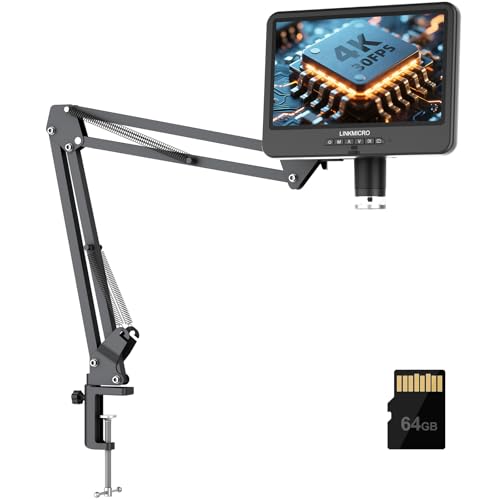
- Real-time 4K 30FPS output with built-in 10.1-inch IPS screen
- 70cm arm reach and up to 60cm working height
- HDMI and USB connectivity plus audio recording support
Best For: Detailed PCB repair, demonstrations, and video creation
Best All-Purpose Station – Andonstar AD246S-M Plus
For shoppers comparing compact microscope soldering cameras, the Andonstar AD246S-M Plus stands out as a complete workstation rather than just a camera. It combines 2160P HDMI output, three interchangeable lenses, a 7-inch monitor, and an expanded soldering area with storage and helping hands.
Best For: Electronics repairers who want a versatile soldering station that can also inspect coins, plants, stones, and biological slides.
Pros:
- Three lenses cover soldering, general inspection, and biological slides.
- 2160P recording, HDMI output, Windows measurement software, and a 32GB SD card support detailed viewing and documentation.
- Expanded base, tool holder, storage boxes, helping hands, and anti-static mat create a well-equipped repair workspace.
- Adjustable LED lighting and remote control improve viewing and operation flexibility.
Cons:
- The extensive accessory set and larger station footprint may be more than a basic repair setup needs.
- Lens changes and focusing are manual.
This is the strongest choice for buyers who want one adaptable microscope platform with dedicated soldering accessories and broad observation capabilities.
Best Autofocus Pick – Elikliv EM4K-AF
The Elikliv EM4K-AF is a compelling option among compact microscope soldering cameras for users who want autofocus convenience. Its AI-assisted autofocus, TOF sensor, 4K video, 8-inch IPS display, and rechargeable battery make it suited to detailed work without constant manual refocusing.
Best For: Soldering, watchmaking, coin inspection, and portable viewing where quick autofocus and a large display are priorities.
Pros:
- Autofocus uses AI algorithms and a TOF sensor for quick focal adjustments.
- 4K UHD video, 52MP imaging, and a 1280 x 800P IPS screen provide detailed viewing.
- Rechargeable battery, HDMI/USB outputs, split-screen, freeze mode, and smart controls add flexibility.
- The broad-base 10-inch stand accommodates coins and soldering tasks.
Cons:
- The 1-year manufacturer warranty is shorter than some competing options.
- Its larger screen and stand may be less compact than a simple bench camera.
Choose this model if autofocus and image quality matter more than having interchangeable specialty lenses or the smallest possible footprint.
Best Flexible Three-Lens Value – Andonstar AD246S-M
The Andonstar AD246S-M gives compact microscope soldering cameras a broader role with three interchangeable lenses and a sturdy boom-arm stand. It offers 2160P video, HDMI viewing, adjustable LEDs, and Windows measurement software for both repair work and general observation.
Best For: Hobbyists, families, and electronics users who want one manual-focus microscope for soldering, coins, and simple biological demonstrations.
Pros:
- Lens L supports soldering and repair, while Lens A and Lens D handle general and biological viewing.
- 2160P recording and HDMI output support larger-screen inspection.
- Adjustable boom arm and metal construction suit a larger soldering work envelope.
- Includes a 32GB SD card, remote control, prepared slides, and adjustable LED lighting.
Cons:
- Focusing and lens changes are manual.
- Unlike the Plus version, the listed kit does not include the expanded base, tool holder, or helping hands.
This is a practical middle ground for buyers who want the AD246S-M platform and multi-purpose lenses without the Plus model’s expanded station accessories.
Best Compact Budget Setup – 5-inch LCD Soldering Microscope
For straightforward PCB work, this 5-inch model is one of the more compact microscope soldering cameras in the group. It uses a flexible arm and C-clamp to keep both hands free, while the built-in IPS screen allows inspection without a computer.
Best For: Basic soldering checks and electronics repair in tight workspaces where a small, battery-powered setup is useful.
Pros:
- 5-inch IPS display works without a computer and is designed to reduce viewing strain.
- Flexible goose-neck arm and C-clamp adapt to tight spaces while keeping hands free.
- Plug-and-play PC camera mode works with Windows Camera or Mac Photo Booth without extra software.
- Battery-powered design and compact build support convenient bench use.
Cons:
- It is not autofocus; users must adjust distance and the focus wheel manually.
- A Micro SD card up to 32GB is required for saving videos and photos but is not included.
- The setup is intended for micro-details rather than full-screen views of large objects.
This is a sensible choice for focused PCB inspection when simplicity, a small display, and a hands-free clamp matter more than maximum resolution or multi-lens versatility.
Best All-Purpose Kit – Andonstar AD249S-M Plus 3-Lens Microscope
For shoppers comparing compact microscope soldering cameras, the Andonstar AD249S-M Plus stands out as a complete workstation rather than just a camera. It combines a 10.1-inch display, 2160P HDMI output, three interchangeable lenses, and a soldering-focused base with helping hands and tool storage.
Best For: Electronics repairers who want one microscope for soldering, general inspection, and biological slides.
Pros:
- Three lenses cover soldering, general inspection, and biological-slide viewing.
- 2160P video, HDMI output, a 32GB card, and Windows measurement software support documentation and larger-screen viewing.
- Expanded soldering station includes helping hands, tool holder, storage boxes, and an anti-static mat.
- Adjustable LED brightness, remote control, and a 10.1-inch monitor make operation convenient.
Cons:
- The included stand and accessories create a larger workstation footprint than a basic camera-only microscope.
- Changing magnification ranges requires physically swapping lenses.
The AD249S-M Plus is the most versatile option here, especially if your projects extend beyond PCB work. Choose it when the bundled soldering setup and broad lens coverage matter more than keeping the workbench minimal.
Best Budget-Friendly Viewer – TOMLOV DM9 7-Inch Digital Microscope
The TOMLOV DM9 is a practical choice among compact microscope soldering cameras for hobbyists who also inspect coins and small objects. Its 7-inch screen, metal stand, 1080P video, and adjustable lighting provide a stable setup for light soldering and close-up observation.
Best For: Coin collectors, DIY users, and hobby electronics projects that need occasional soldering inspection.
Pros:
- Solid metal base and adjustable 8.5-inch stand help reduce shaking during inspection.
- Built-in 7-inch screen offers a comfortable direct-viewing experience.
- 12MP photos, 1080P video, PC connectivity, and included 16GB storage support records and sharing.
- Eight built-in LEDs plus two flexible gooseneck lights help illuminate subjects from different angles.
Cons:
- It is positioned for light soldering tasks rather than as a specialized, full-featured soldering station.
- The 7-inch display is smaller than the screens included with the two Andonstar models.
The DM9 offers a sensible balance for users who split their time between coin inspection and small electronics work. It is a good fit when stability, direct screen viewing, and flexible lighting are more important than maximum soldering-specific accessories.
Best for Large Work Areas – Andonstar AD109 Boom-Arm Microscope
For compact microscope soldering cameras that need more working room, the Andonstar AD109 uses an extra-long boom arm instead of a cramped fixed stand. Its 10.1-inch IPS display, 1080P video, USB-C connectivity, and dual LED lighting make it suited to PCB work, coin inspection, and other detailed projects.
Best For: Soldering larger PCBs or arranging multiple tools around a flexible microscope arm.
Pros:
- 70cm boom arm, 360-degree rotation, and a 170-degree tilt range provide broad positioning flexibility.
- 10.1-inch IPS screen displays 1080P video and 12MP photos with a wide viewing angle.
- Eight built-in LEDs and a 56-LED ring light offer adjustable illumination for coin relief and electronics work.
- USB-C connectivity supports plug-and-play viewing with Windows and Mac, while the remote enables touch-free capture and zoom.
Cons:
- The 260x maximum magnification is lower than the maximum listed for the AD249S-M Plus.
- The long boom arm may be more workspace than users with small, fixed work areas need.
- The remote requires batteries, which are not included.
The AD109 is the strongest choice when access around the subject matters most. Its long, adjustable arm leaves room for soldering tools and larger boards, while the lighting and screen also support coin and general-detail work.
Most Versatile – Ninyoon Full HD USB Microscope Camera
For shoppers seeking compact microscope soldering cameras that work across multiple devices, the Ninyoon offers a portable, plug-and-play design with Full HD imaging. It connects to iPhone, iPad, Android, Windows, Mac, Linux, and Chrome computers, making it practical for quick electronics inspections and general close-up viewing.
Best For: Users who want a lightweight, multi-platform camera for occasional soldering, inspection, education, and handheld use.
Pros:
- Supports direct connection to phones, tablets, and computers across several operating systems.
- Full HD 1080p photo and video output with image noise reduction.
- Compact 0.2 kg design with a stand, anti-slip base, LED lighting, and handheld flexibility.
- Uses native webcam protocols for driver-free computer operation.
Cons:
- Mobile use requires the dedicated app, and some Android brands require OTG activation.
- It does not include the larger display or expanded working space of dedicated bench microscopes.
The Ninyoon is the most flexible choice here for buyers prioritizing portability and broad device compatibility. Its 1080p output is suited to routine soldering checks, though users doing extensive bench repair may prefer a larger stand-mounted model.
Best All-Purpose Bench Setup – Andonstar AD210 Digital Microscope
The Andonstar AD210 is a strong option among compact microscope soldering cameras when you want a dedicated screen and a stable work surface. Its 10.1-inch IPS display, adjustable metal stand, multiple lights, and generous working-distance range support electronics repair as well as coin and slide viewing.
Best For: Hobbyists and repair users who want a complete bench microscope kit for soldering, coin inspection, and basic biological observation.
Pros:
- Large 10.1-inch IPS screen with a 178-degree viewing angle.
- Supports 1080p video and 12MP photos for documenting work.
- Adjustable 1cm to 26cm working distance provides room for soldering tools and larger objects.
- Includes a 32GB memory card, remote control, adjustable LED lighting, and bottom light stage.
Cons:
- Its larger screen and metal stand make it less portable than a handheld USB camera.
- The feature-rich kit may be more than needed for simple close-up inspections.
Choose the AD210 if comfortable bench use matters more than minimum size. The dedicated display and extended stand are particularly useful for soldering, while the included accessories make it a versatile option beyond electronics repair.
Best for High-Resolution Repair – LINKMICRO LM208S-A 4K Microscope
For demanding electronics work, the LINKMICRO LM208S-A stands out among compact microscope soldering cameras with 4K 30FPS output and a flexible arm stand. Its built-in 10.1-inch screen, HDMI connectivity, USB computer support, and extended reach are designed for detailed PCB repair and comfortable hands-on operation.
Best For: Electronics repairers, content creators, and hobbyists who need high-resolution video, broad positioning range, and external display support.
Pros:
- Delivers real-time 4K 30FPS output on the built-in screen and compatible HDMI monitors.
- Flexible arm reaches up to 70cm and provides up to 60cm of working height.
- Supports HDMI and USB connections for viewing, recording, and sharing.
- Includes an 8-level LED system, microphone, remote control, and 64GB Micro SD card.
Cons:
- The extended arm stand requires more workspace than a basic handheld microscope.
- Its advanced 4K and HDMI features may be unnecessary for occasional inspection.
The LM208S-A is the most capable choice for detailed soldering demonstrations and larger repair projects. Its flexible arm creates useful clearance around a workpiece, while 4K recording and audio support make it especially well suited to tutorials and documentation.
How We Picked the Best Compact Microscope Soldering Cameras
We focused on features that matter during real electronics work rather than relying on magnification claims alone. Our comparison considers image resolution, frame rate, autofocus or manual focusing, screen size, HDMI and USB connectivity, illumination, lens flexibility, and the amount of working room beneath the camera.
Stand stability also matters. A camera that shakes when you touch a circuit board can be frustrating, even when its image is sharp. We therefore included models with different support styles, including compact clamps, flexible arms, and larger desktop stands. The selection also spans 1080p, 2160p, and 4K cameras for different levels of detail and budget.
Quick Comparison
- Best overall flexibility: A multi-lens HDMI model with a large screen and adjustable stand.
- Best for autofocus: A 4K autofocus camera that reduces manual adjustment between inspection tasks.
- Best compact option: A 5-inch LCD or USB handheld model for smaller benches and occasional repairs.
- Best for detailed inspection: A 2160p or 4K system with a stable stand and generous working distance.
- Best for portability: A USB camera that connects to a phone, tablet, or computer.
Key Buying Factors for Compact Microscope Soldering Cameras
Resolution and Frame Rate
Higher resolution helps reveal solder bridges, cracked joints, and small markings, but it is only useful when the optics and lighting are also adequate. A 1080p camera can handle general repair, while 2160p and 4K models are better suited to detailed inspection. A smooth 30fps feed is helpful when positioning tools or moving a board.
Focus and Working Distance
Autofocus is convenient for changing subjects, but manual focus can provide steadier results during soldering. Look for enough clearance beneath the lens to fit tweezers, an iron, and other tools without constantly bumping the stand. Multi-lens kits can provide useful flexibility between wide inspection views and closer detail.
Display and Connectivity
Built-in LCD screens keep the setup self-contained and are often easier to use at a bench. HDMI output can provide a larger external display with low latency, while USB connectivity is useful for recording, sharing, or using a computer, tablet, or phone. Check device compatibility before buying a portable USB model.
Lighting and Stability
Adjustable LED lighting helps control reflections on solder and components. A weighted base, clamp, or rigid arm is essential for a steady image. Flexible arms save space but may need careful positioning, especially at high magnification.
Who Should Buy Which Compact Microscope Soldering Cameras?
Choose a desktop HDMI microscope if you regularly repair PCBs and want a large, low-latency view with plenty of working room. Choose an autofocus 4K model if you inspect different boards, components, or objects throughout the day and want faster setup.
Choose a compact LCD system for a small workbench or occasional soldering projects. Choose a USB handheld camera if portability, phone or computer connectivity, and a lower purchase price matter more than a built-in screen or heavy-duty stand.
Before ordering, confirm the included lens options, screen size, stand dimensions, output ports, and stated working distance. Those details usually determine whether a microscope feels convenient in daily use.