The right control deck can turn complex streaming setups into a row of quick, reliable commands. Budget-friendly models now offer customizable keys, LCD displays, dials, and audio controls for far less than premium studio hardware.
We compared 10 budget stream control decks for layout, programmability, software flexibility, and everyday streaming value, helping you choose a practical setup for OBS, Twitch, YouTube, gaming, and content creation.
Best 10 Budget Stream Control Decks Picks for 2026
Reliable All-Rounder

- 15 customizable LCD keys
- Broad plugin support for streaming and creative apps
- Mac and PC compatible via USB-C
Best For: Streamers and creators wanting a familiar 15-key control layout
Compact Knob Specialist
Streonor S6 Mini Stream Controller
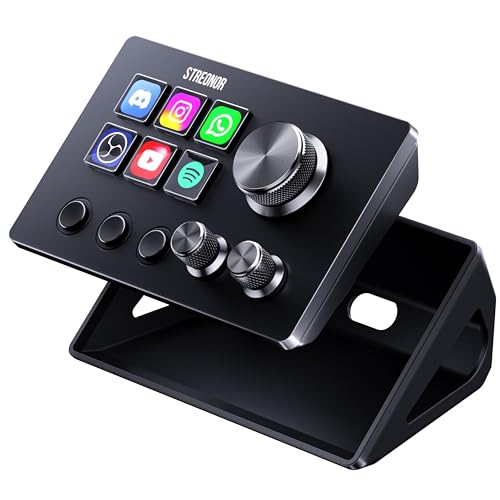
- Six LCD keys plus three rotary knobs
- Three dedicated scene-switching keys
- Compact design with 100+ plugins
Best For: Small desks and users who prioritize physical audio controls
Feature-Packed Visual Deck

- 18 programmable keys with 15 LCD displays
- Supports multi-hotkey macros and custom images
- RGB light ring and broad app compatibility
Best For: Users wanting extensive macros and visual customization
Status Display Workhorse
Streonor S15 Stream Controller

- 15 customizable LCD keys
- Three panels for supported status information
- 100+ plugins and multi-profile control pages
Best For: Multitaskers who want controls plus at-a-glance system information
Best Compact Pick
ActionRing N3 V3 Stream Controller

- Six LCD keys plus three control dials
- Supports macros, OBS, media, and app shortcuts
- Windows/macOS compatible with a 24-month warranty
Best For: Compact streaming and productivity setups
Best Feature-Rich Pick

- 10 LCD keys, four RGB knobs, and a touch bar
- Supports chained macros and 500+ plugins
- Adds RGB lighting, ergonomic stand, and USB dock
Best For: Streaming, editing, gaming, and office workflows
Best All-Around Pick

- 12 controls with LCD, tap, and rotary buttons
- Supports OBS, streaming apps, audio, and media commands
- Animated icons and VSDinside marketplace support
Best For: Creators wanting balanced controls and broad compatibility
Versatile Value Pick
SOOMFON 6-Key Stream Controller

- Six customizable LCD keys with visual feedback
- Three dials plus three page-control buttons
- Includes stand and desktop adhesive
Best For: Streamers wanting physical dials in a compact, budget deck
Compact Starter Pick
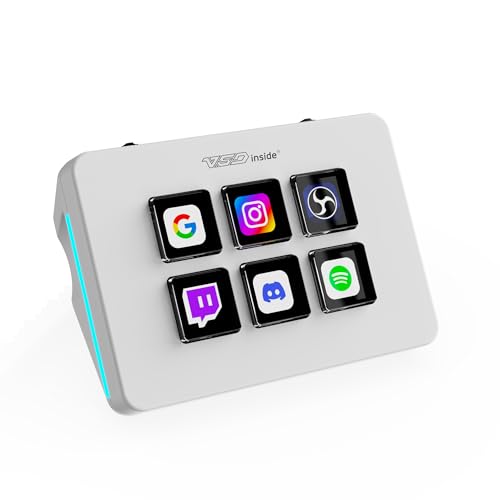
- Six customizable LCD macro keys
- Dual side RGB light bars
- Compact USB-powered design
Best For: Beginners and desk-space-conscious users
High-Capacity Budget Pick

- 18 programmable controls with 15 LCD keys
- Supports multi-step and simultaneous macros
- RGB light ring and built-in utility plugins
Best For: Users needing many shortcuts for streaming, editing, or gaming
Reliable All-Rounder – Elgato Stream Deck MK.2
The Elgato Stream Deck MK.2 is a proven choice for shoppers comparing budget stream control decks with a straightforward 15-key layout. Its customizable LCD keys, visual feedback, and broad plugin support make it useful for streaming, creative work, and everyday shortcuts.
Best For: Streamers and creators who want a familiar 15-key controller for OBS, media, audio, and productivity commands.
Pros:
- 15 customizable LCD keys provide clear visual command labels.
- Supports multi-action commands, audio controls, app launches, and social posts.
- Works with popular services and tools including OBS, Twitch, YouTube, Discord, Spotify, and Philips Hue.
- Compatible with Mac and PC through USB-C.
Cons:
- It does not include rotary knobs or dedicated scene-switching controls.
- The 15-key layout may take more desk space than a mini controller.
Choose this model when you value established software support and easy-to-read LCD keys over extra physical controls. It is a balanced option for a traditional stream-control workflow.
Compact Knob Specialist – Streonor S6 Mini Stream Controller
The Streonor S6 Mini stands out among budget stream control decks for combining six LCD keys with three rotary knobs and three scene-switching keys. Its compact design suits smaller desks, mobile setups, and users who want physical audio or timeline controls.
Best For: Streamers and editors who need compact control with dedicated knobs for volume, microphone levels, zoom, or scrolling.
Pros:
- Combines six customizable LCD keys, three rotary knobs, and three scene keys.
- Supports shortcuts, app launches, folders, media controls, and multi-action macros.
- Offers 100+ plugins, icon packs, GIF icons, scenes, and customizable layouts.
- Compact form factor is well suited to smaller workspaces.
Cons:
- Only six keys provide LCD labeling, fewer than standard 15-key decks.
- Linux is not supported.
- Stable operation requires a direct USB 3.0 connection rather than a USB hub.
This is a practical pick when knobs matter as much as programmable keys. The S6 Mini trades key count for hands-on adjustment and a smaller footprint.
Feature-Packed Visual Deck – VSD M18 Streaming Deck
The VSD M18 is a versatile option for shoppers seeking budget stream control decks with extensive macro capacity and visual customization. It provides 18 programmable keys, including 15 visual LCD keys and three buttons, plus multi-hotkey actions and an RGB light ring.
Best For: Streamers, gamers, and creative professionals who want many programmable actions with customizable icons and lighting.
Pros:
- Provides 18 programmable keys, including 15 LCD keys and three buttons.
- Supports JPG, PNG, and GIF key visuals for easier command recognition.
- One-touch macros can launch apps, open files and websites, control media, and switch OBS scenes.
- Compatible with Windows 11 and later and macOS 11.0 and later.
Cons:
- The supplied notes do not specify Linux support.
- Its larger 18-key feature set may be more than casual users need.
- Some listed integrations may depend on the relevant software or service.
The M18 favors customization and capacity, making it a strong fit for users who want more than a basic macro pad. Its RGB ring and visual keys also add a more personalized desktop presentation.
Status Display Workhorse – Streonor S15 Stream Controller
The Streonor S15 combines a familiar 15-key layout with three non-touch status display panels, giving budget stream control decks an information-focused twist. It is designed for switching between streaming, editing, office, gaming, and productivity profiles.
Best For: Multitaskers who want programmable controls alongside at-a-glance system or workspace information.
Pros:
- Offers 15 customizable LCD keys for shortcuts, OBS controls, and app actions.
- Three status panels can display supported information such as weather, time, temperatures, and system performance.
- Preset control pages support different streaming, editing, office, and gaming workflows.
- Includes action flows, 100+ plugins, icon packs, and GIF customization.
Cons:
- The status panels are non-touch displays.
- Linux is not supported.
- Some third-party connections may require an account, subscription, or membership.
The S15 is especially appealing if monitoring information is part of your workflow. It delivers the familiar usability of a 15-key deck while adding dedicated panels for useful real-time context.
Best Compact Pick – ActionRing N3 V3 Stream Controller
For shoppers comparing budget stream control decks, the ActionRing N3 V3 offers a compact mix of six customizable LCD keys and three dials. It can trigger macros, launch apps, manage media, and switch OBS scenes from a Windows or macOS desktop.
Best For: Streamers and productivity-focused users who want customizable controls in a small, lightweight deck.
Pros:
- Six customizable LCD keys support images, GIFs, and single- or multi-action commands.
- Three dials provide convenient volume and playback controls.
- Works with Windows and macOS, including OBS, Discord, Excel, Photoshop, and Premiere Pro.
- Includes a 24-month manufacturer warranty.
Cons:
- Has fewer programmable keys than the larger decks in this roundup.
- Requires USB power and software setup to access its customization features.
The N3 V3 is a sensible budget choice when desk space matters more than maximum button count. Its LCD keys, dials, plugin support, and two-year warranty give it useful flexibility for streaming and everyday shortcuts.
Best Feature-Rich Pick – VSD N4 Pro Stream Controller
Among budget stream control decks, the VSD N4 Pro stands out for its broader control surface: 10 customizable LCD keys, four RGB knobs, and an interactive touch bar. It is designed for streaming, editing, gaming, and office workflows on Windows 10+ and macOS 11.0+.
Best For: Creators who want extensive controls, multi-step macros, visual customization, and a built-in USB dock.
Pros:
- Offers 10 programmable LCD keys, four RGB knobs, and a touch bar.
- Supports chained macros, multiple scene presets, and custom PNG, JPG, and GIF icons.
- Includes 500+ downloadable plugins and functions as a USB soundboard for computer audio controls.
- Features adjustable RGB lighting, a foldable 60-degree stand, and a passive USB dock.
Cons:
- Its audio controls send commands to the computer but do not produce sound through built-in speakers.
- It is larger and more feature-heavy than a basic shortcut keypad.
- Warranty coverage is listed as one year.
The N4 Pro is the strongest option here for buyers who want a full-featured control center rather than a minimal macro pad. The extra knobs, touch bar, stand, and USB dock add versatility, though they may be unnecessary for simple streaming shortcuts.
Best All-Around Pick – TreasLin N3 Stream Controller
The TreasLin N3 is a versatile option for shoppers seeking budget stream control decks with visual buttons and physical controls. Its 12-button layout combines six LCD keys, three tap buttons, and three rotary buttons for quick access to OBS, media, audio, lighting, and app commands.
Best For: Streamers, podcasters, gamers, and creators who want a balanced control layout with animated icons and broad software compatibility.
Pros:
- Combines six visual LCD buttons, three tap buttons, and three rotary buttons.
- One-touch macros can launch apps, enter text, control media, switch OBS scenes, and adjust audio.
- Works with Windows and macOS and supports OBS, Streamlabs, Twitch, YouTube, Discord, Spotify, and Photoshop.
- Supports animated custom icons and access to the VSDinside plugin marketplace.
Cons:
- Spotify integration requires an active Spotify Premium account.
- The listed warranty is one year.
- It has one USB-C connection and no additional USB dock is specified.
The TreasLin N3 offers a practical middle ground: more physical control options than a basic deck, while remaining focused on fast one-touch actions. Its animated icons and wide app support make it especially appealing for creators who want a personalized streaming interface.
Versatile Value Pick – SOOMFON 6-Key Stream Controller
For shoppers comparing budget stream control decks, the SOOMFON offers six customizable LCD keys plus three page buttons and three multifunction dials. It is designed for OBS, Twitch, YouTube, Discord, Spotify, Voicemod, and other supported software on compatible Windows and Mac systems.
Best For: Streamers who want physical dials for volume, brightness, and similar adjustments without moving to a larger deck.
Pros:
- Six customizable LCD keys provide visual feedback and one-touch access to apps, files, websites, or actions.
- Three dials add hands-on control for settings such as volume and brightness.
- Includes a removable 40-degree stand and adhesive for a more stable desktop setup.
- Supports a plug-in marketplace with downloadable configurations, icons, and plugins.
Cons:
- Linux is not supported.
- Spotify integration requires an active Spotify Premium account.
- Compatibility is limited to Windows 10 64-bit or newer and macOS Big Sur 11.0 or newer.
The SOOMFON is a practical budget choice when dials matter as much as macro keys. Its modest six-key layout is less suited to users who need a large number of simultaneous shortcuts, but the added controls improve day-to-day streaming usability.
Compact Starter Pick – VSD Mini Macro Pad
The VSD Mini is a space-saving option among budget stream control decks, pairing six customizable LCD keys with programmable shortcuts for OBS, apps, websites, media, and text input. It connects by USB to Windows or macOS, while Linux users can adapt it through the company’s open-source SDK.
Best For: Beginners, gamers, and office users who want a small programmable keypad with customizable lighting.
Pros:
- Six LCD keys support custom images, GIFs, and single- or multi-step macros.
- Compact design helps preserve desk space while retaining shortcut functionality.
- Dual side RGB light bars offer automatic color cycling and personalized lighting.
- Built-in plugins include clock, weather, calendar, and stopwatch functions.
Cons:
- Exclusive VSD Craft software is required for full setup; it is not plug-and-play.
- The capacitive touch buttons do not use mechanical switches.
- USB powered, with no built-in battery.
This VSD model fits buyers who prioritize a small footprint and broad shortcut flexibility over a larger control surface. It is a particularly approachable option for basic streaming and productivity workflows, provided you are comfortable installing the required software.
High-Capacity Budget Pick – VSD M18 Macro Pad
For buyers who need more shortcuts without stepping up to a premium control surface, the VSD M18 provides 18 programmable controls: 15 LCD visual keys and three physical buttons. It supports multi-step macros, media commands, app launches, and OBS scene switching on compatible Windows and Mac systems.
Best For: Streamers, editors, and gamers who need a high number of customizable actions in one deck.
Pros:
- 18 controls offer substantially more shortcut capacity than six-key alternatives.
- LCD keys accept JPG, PNG, and GIF images or animations for function identification.
- Operation Follow supports multi-step macros in custom or simultaneous sequences.
- Built-in clock, weather, calendar, stopwatch, and schedule-reminder plugins add desktop utility.
Cons:
- Native Linux plug-and-play support is unavailable.
- Listed system requirements specify Windows 11 or newer and macOS 11.0 or newer.
- The device uses a USB connection and does not offer standalone battery operation.
The M18 is the strongest choice here for shortcut density. Its larger key count can reduce repetitive mouse and keyboard work across streaming, editing, gaming, and office tasks, although its system requirements and lack of native Linux plug-and-play support narrow compatibility.
How We Picked the Best Budget Stream Control Decks
We focused on the features that matter most during real streaming sessions: programmable controls, key visibility, profile support, software compatibility, build practicality, and ease of setup. The selection includes compact six-key pads, full 15-key decks, LCD-equipped controllers, and models with dials or dedicated audio controls.
We also considered how well each deck fits common workflows, including launching scenes, muting microphones, triggering sound effects, opening apps, controlling music, and managing shortcuts in OBS, Twitch, and YouTube. A lower price is useful only when the controls remain dependable and easy to customize.
Quick Comparison
- Best for a familiar all-purpose layout: Elgato Stream Deck MK.2 with 15 macro keys.
- Best for compact desks: Six-key options such as the Streonor S6 and SOOMFON decks.
- Best for visible commands: LCD-key models, including the Streonor S15, VSD M18, and TreasLin deck.
- Best for audio-focused control: The VSD N4 Pro and SOOMFON models with additional controls.
- Best for simple shortcut use: Compact VSD Mini and ActionRing-style macro pads.
Key Buying Factors for Budget Stream Control Decks
Number and Type of Controls
Count the actions you need during a broadcast. Six keys can handle essential commands such as scene changes, microphone mute, and camera control. A 15-key layout is better for multiple scenes, sound effects, apps, social tools, and layered profiles. Dials and buttons can make volume and audio adjustments faster than keyboard shortcuts.
LCD Visibility and Customization
LCD keys can show icons, labels, or changing status information, which reduces mistakes when commands multiply. Basic macro pads may be cheaper and perfectly suitable if you can remember fixed key positions or create your own labels.
Software and Profile Support
Check whether the controller works with your operating system and preferred streaming software. Profile switching is especially valuable if you stream different games or also use the deck for video editing, productivity, or music production.
Desk Space and Connectivity
Measure the available area before choosing a full-size deck. Look for a stable footprint, accessible USB connection, and a layout that does not force awkward wrist positioning. Compact models are easier to travel with, while larger decks reduce the need for multiple profiles.
Audio Features
If you frequently adjust microphone, game, music, or monitoring levels, prioritize a deck with dials or dedicated audio functions. Otherwise, standard programmable keys may provide better value for scene and shortcut control.
Who Should Buy Which Budget Stream Control Decks?
New streamers should choose a compact, easy-to-program model with enough keys for essential OBS commands. Regular Twitch or YouTube creators will generally benefit from 15-key layouts or LCD controls that make larger command libraries easier to manage. Audio-heavy broadcasters should consider models with dials and dedicated audio controls. Traveling creators and gamers should prioritize small USB macro pads that fit beside a laptop. Finally, power users on a budget should look for customizable LCD keys and profile support rather than simply choosing the deck with the highest key count.