Commercial-grade USB video adapters help businesses expand displays, capture live video, and connect modern computers to HDMI, DVI, VGA, or SDI equipment without replacing an entire workstation or production system.
This roundup compares ten options across multi-monitor output, video capture, network-to-USB conversion, operating-system support, resolution, and deployment features so you can choose the right adapter for your environment.
Best 10 Commercial-Grade USB Video Adapters Picks for 2026
Best Multi-Monitor Adapter
WAVLINK USB to HDMI DisplayLink Adapter

- Supports up to six monitors on PCs
- Works with USB-A, USB-C, and Thunderbolt devices
- Requires DisplayLink driver installation
Best For: Expanding compatible computers into multi-monitor workstations
Best Capture Card for Live Video
AVMATRIX UC2018 SDI/HDMI Capture Card

- Captures SDI and HDMI sources up to 1080p60
- Uses uncompressed YUY2 video capture
- Plug-and-play with major operating systems and software
Best For: Streaming, conferencing, recording, and broadcast capture
Best Dual-Display Windows Adapter

- Adds two HDMI displays from one USB-A connection
- Supports 4K 30Hz plus 1080p 60Hz
- Includes a three-year warranty and technical assistance
Best For: Windows productivity workstations with dual HDMI monitors
Best IP Video Decoder
Magewell Pro Convert IP to USB

- Converts NDI and other IP streams to UVC webcam output
- Supports video up to 1080p60 with two-channel audio
- Includes PTZ control and remote-management features
Best For: AV-over-IP, conferencing, streaming, and network-camera integration
Best Dual-Output Pick
StarTech USB 3.0 HDMI/DVI Adapter

- Drives HDMI and DVI-I/VGA outputs
- Supports up to 1920x1200 video
- Compatible with several Windows, Linux, macOS, and Chrome OS versions
Best For: Dual-monitor workstations using USB 3.0
Best Windows-Only Choice

- Outputs 1080p at 60Hz
- Bus-powered and travel-friendly
- Supports Windows Intel, AMD, and ARM systems
Best For: Single-HDMI Windows workstation expansions
Best Multi-Platform Value
Plugable USB 2.0 Display Adapter

- Supports DVI, HDMI, and VGA
- Adds multiple 1920x1080 displays
- Works with Windows, macOS, and ChromeOS
Best For: Flexible multi-monitor setups with mixed connectors
Best Analog Capture Pick
Windows USB Video Capture Adapter
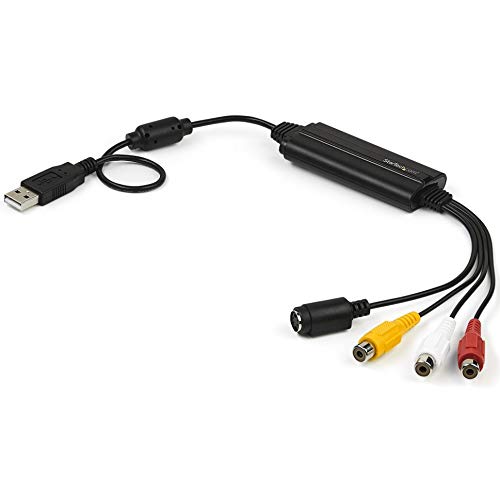
- Captures composite and S-Video with RCA audio
- Supports NTSC, PAL, and SECAM standard-definition video
- Compact, bus-powered design for Windows systems
Best For: Digitizing VHS, camcorder, and other analog video on Windows
Best Quad-Display Workstation Pick

- Drives four HDMI displays at 1080p and 60Hz
- Supports up to five screens with a laptop display
- Includes monitor-arrangement software
Best For: Windows multi-monitor workstations and boardroom setups
Best Versatile USB-C Pick

- Outputs 4K at 60Hz through HDMI or Mini DisplayPort
- Supports VGA and DVI displays up to 1080p
- Offers 95W Power Delivery pass-through
Best For: USB-C laptops connecting to mixed modern and legacy displays
Best Multi-Monitor Adapter – WAVLINK USB to HDMI DisplayLink Adapter
For offices and home workstations needing commercial-grade USB video adapters, the WAVLINK USB 3.0/USB-C to HDMI adapter is a flexible choice for expanding a compatible computer display setup. It supports mirroring or extending a screen at resolutions up to 2048×1152 at 60Hz or 2560×1440 at 50Hz, with up to six total monitors on PCs when using one adapter per monitor.
Best For: Windows, macOS, ChromeOS, Ubuntu, and compatible Android users building multi-monitor productivity workspaces.
Pros:
- Supports up to six additional monitors on PCs, with one adapter required per display.
- Works with USB-A, USB-C, Thunderbolt 3/4/5, and USB 4 devices.
- Includes external microphone input and earphone output.
- Offers broad operating-system support and an 18-month limited warranty.
Cons:
- DisplayLink driver installation is required.
- Maximum resolution and refresh rate vary by mode, including 2560×1440 at 50Hz.
This is a practical option when the priority is adding several external displays across supported computers. Buyers should confirm operating-system compatibility and plan for the required DisplayLink software before deployment.
Best Capture Card for Live Video – AVMATRIX UC2018 SDI/HDMI Capture Card
The AVMATRIX UC2018 is a commercial-grade USB video adapter for capturing SDI or HDMI sources on a computer. It handles uncompressed YUY2 video up to 1080p60, includes line-in audio, and connects through USB 3.0 Type-C for streaming, recording, conferencing, and other production workflows.
Best For: Live streaming, church broadcasts, tele-education, videoconferencing, game capture, and recording HDMI or SDI sources.
Pros:
- Accepts both SDI and HDMI input signals and automatically detects the source.
- Captures uncompressed YUY2 video up to 1080p60.
- Plug-and-play compatibility works with Windows, macOS, Linux, OBS, Zoom, Teams, and other listed software.
- Compact design and a stated operating range from -20°C to 60°C.
Cons:
- It is a capture device rather than a USB-to-monitor display adapter.
- Requires a computer with a USB 3.0 port.
- Maximum capture resolution is 1080p60.
Choose this model when you need to bring an SDI or HDMI feed into production software with minimal setup. Its UVC/UAC operation and broad software compatibility make it well suited to straightforward capture and streaming systems.
Best Dual-Display Windows Adapter – StarTech USB-A to Dual HDMI
The StarTech USB32HD2 is a commercial-grade USB video adapter designed for Windows workstations that need two HDMI outputs from one USB-A connection. It supports one display up to 4K at 30Hz and a second display at 1080p60, making it useful for office productivity and workstation expansion.
Best For: Windows-only office and home workstations adding two HDMI monitors through a single USB-A port.
Pros:
- Adds up to two extended HDMI displays to a laptop or desktop.
- Supports one 3840×2160 display at 30Hz and one 1080p display at 60Hz.
- Works across Windows x86, x64, and ARM platforms, including listed Snapdragon X systems.
- Includes a three-year warranty and lifetime 24/5 multilingual technical assistance.
Cons:
- Compatible only with Windows; macOS, ChromeOS, and Linux are not supported.
- Administrator rights are required for driver installation.
- The 4K output is limited to 30Hz.
This adapter is a focused choice for Windows users who want dual-monitor support without replacing a desktop or docking station. Confirm administrative access and monitor requirements, particularly if smooth 4K playback is important.
Best IP Video Decoder – Magewell Pro Convert IP to USB
The Magewell Pro Convert IP to USB is a commercial-grade USB video adapter for turning network video streams into a standard UVC webcam feed. It decodes NDI, NDI HX2/HX3, RTMP, RTSP, SRT, and other listed protocols, then outputs video and audio through USB-C at up to 1080p60 for conferencing, streaming, and AV-over-IP workflows.
Best For: AV teams connecting NDI or other IP video sources to Zoom, Teams, OBS, vMix, and similar applications.
Pros:
- Converts supported Ethernet video streams into a driver-free UVC/UAC webcam device.
- Supports NDI, NDI HX2/HX3, RTSP, RTMP, SRT, HTTP, RTP, and UDP sources.
- Outputs YUY2 or NV12 up to 1080p60, plus MJPEG at 1080p30.
- Offers PTZ control, web-based configuration, and HTTP API support.
Cons:
- Designed for network video sources, not direct HDMI or SDI inputs.
- Maximum listed output resolution is 1080p.
- Requires an Ethernet network source and USB connection to the host computer.
This decoder is a strong fit for organizations transitioning IP video into familiar USB-based applications. Its protocol coverage and remote-management features provide useful flexibility, provided the source is available over a supported network stream.
Best Dual-Output Pick – StarTech USB 3.0 HDMI/DVI Adapter
For buyers comparing commercial-grade USB video adapters, this StarTech model stands out when one USB 3.0 connection needs to drive both HDMI and DVI/VGA outputs. It supports up to 1920×1200 video, 1080p, and 5.1 surround sound, while remaining backward compatible with USB 2.0.
Best For: Workstations that need two additional display connections from one USB adapter.
Pros:
- Provides one DVI-I/VGA port and one HDMI output.
- Supports 1080p and 1920×1200 video with 5.1 surround sound audio.
- Works with Windows, selected macOS versions, Ubuntu, and Chrome OS.
- Includes a two-year limited warranty and TAA certification.
Cons:
- USB 3.0 is recommended for optimal performance.
- Operating-system support varies by version, particularly on macOS.
This is the most versatile choice of the three for mixed-monitor environments. Its dual-output design is useful for office deployments, though buyers should verify operating-system compatibility before ordering.
Best Windows-Only Choice – StarTech USB-A HDMI Converter
This StarTech adapter is a compact option among commercial-grade USB video adapters for adding one HDMI display to a Windows laptop or desktop. Its USB 5Gbps connection supports 1920×1200 or 1080p video at 60Hz, with two-channel audio carried through HDMI.
Best For: Windows workstations that need one portable, bus-powered HDMI display adapter.
Pros:
- Supports 1080p at 60Hz and up to 1920×1200 resolution.
- Bus-powered design requires no separate power supply.
- Works across Windows X86, X64, and ARM platforms, including Snapdragon X Copilot+ PCs.
- Compact 2.4-inch cable design is convenient for travel.
Cons:
- Windows-only; it does not support macOS, ChromeOS, or Linux.
- Administrator rights are required to install the driver.
- Provides one HDMI output rather than multiple display connectors.
Choose this model when Windows compatibility and 60Hz HDMI output matter more than cross-platform flexibility. It is straightforward for managed Windows environments, provided driver installation permissions are available.
Best Multi-Platform Value – Plugable USB 2.0 Display Adapter
For flexible commercial-grade USB video adapters across mixed environments, the Plugable UGA-165 supports DVI, HDMI, and VGA connections through included adapters. It can add up to six additional 1920×1080 displays on supported Windows systems, while also working with current macOS and ChromeOS versions.
Best For: Professionals who need adaptable connectors or multiple displays across Windows, macOS, and ChromeOS computers.
Pros:
- Supports DVI, HDMI, and VGA display connections.
- Can support up to six additional 1920×1080 displays on Windows, or up to four on macOS.
- Works with Windows 11, 10, 8.1, 7, XP, macOS 10.14+, and ChromeOS.
- Compact, bus-powered design includes DVI-to-HDMI and DVI-to-VGA adapters.
Cons:
- Uses USB 2.0, so it is not the fastest interface in this comparison.
- USB-C computers require a separate USB-C-to-USB-A adapter.
- Multi-display limits vary by operating system.
This is the strongest pick for connector flexibility and broad platform support. Its USB 2.0 interface and operating-system display limits make it less appropriate when maximum bandwidth or high-performance graphics are the priority.
Best Analog Capture Pick – Windows USB Video Capture Adapter
For digitizing legacy media, this commercial-grade USB video adapter converts composite or S-Video with two-channel RCA audio into standard-definition digital video. It is a practical choice for Windows users working with VCRs, camcorders, or other analog sources.
Best For: Windows-based VHS, VCR, camcorder, and other standard-definition analog video capture.
Pros:
- Captures composite and S-Video sources with stereo RCA audio.
- Supports NTSC, PAL, and SECAM formats at up to 30fps or 25fps.
- Works with third-party software such as OBS through TWAIN-compatible drivers.
- Compact, lightweight, and USB bus-powered for portable use.
Cons:
- Windows-only compatibility limits use with macOS, ChromeOS, and Linux.
- Designed for standard-definition capture rather than HD video.
- Administrator rights may be needed for software and driver setup.
If your priority is preserving or streaming older analog footage on a Windows computer, this adapter offers the appropriate inputs and included software in a compact package. It is less suitable for modern high-definition display expansion.
Best Quad-Display Workstation Pick – USB-A Quad HDMI Adapter
This commercial-grade USB video adapter is built for Windows workstations that need several external screens. Its USB 3.0 connection can drive up to four HDMI displays at 1080p and 60Hz, making it useful for productivity-heavy desk or boardroom setups.
Best For: Windows users expanding a laptop or desktop workstation to multiple HDMI monitors.
Pros:
- Adds up to four extended HDMI displays at 1080p and 60Hz.
- Supports up to five total displays when the laptop screen is included.
- Bus-powered design requires no separate power supply.
- Includes software for window arrangement and multi-monitor management.
Cons:
- Compatible only with Windows; macOS, ChromeOS, and Linux are not supported.
- Driver installation requires administrator rights.
- All HDMI outputs replicate the same two-channel audio source.
For a Windows office, remote-work station, or presentation area, this adapter provides an efficient way to add four 1080p screens from one USB-A port. Confirm Windows compatibility and available system resources before purchasing.
Best Versatile USB-C Pick – 5-in-1 4K Video Adapter
For mixed office and presentation environments, this commercial-grade USB video adapter connects a USB-C laptop to HDMI, Mini DisplayPort, VGA, or DVI displays. It also provides 4K 60Hz output through HDMI or Mini DisplayPort and up to 95W of USB-C Power Delivery pass-through.
Best For: USB-C and Thunderbolt 3 laptops that connect to modern or legacy monitors, TVs, and projectors.
Pros:
- Supports HDMI 2.0 and Mini DisplayPort up to 4K at 60Hz.
- Provides VGA and DVI output up to 1080p for older displays.
- Passes through up to 95W of USB-C Power Delivery.
- Works across Windows, macOS, Linux, and ChromeOS without drivers.
Cons:
- Only one of the four video output types can be used at a time.
- Requires a host USB-C port that supports DisplayPort Alt Mode.
- It does not include a separate power plug or USB-C power adapter.
This is the most flexible option of the three for users who regularly switch between 4K monitors, older VGA or DVI equipment, and projectors. Its cable-management design and broad operating-system support further suit mobile workstations and shared presentation spaces.
How We Picked the Best Commercial-Grade USB Video Adapters
We evaluated these Commercial-Grade USB Video Adapters by looking at their primary use case, supported connectors, maximum resolution and refresh rate, USB interface, driver requirements, operating-system compatibility, and deployment flexibility. We also considered features that matter in offices, classrooms, control rooms, houses of worship, and streaming environments, such as multi-display support, UVC compatibility, TAA designation, network-video support, and reliable connection options.
Because “video adapter” can mean either a display-output device or a capture product, this list includes both categories. Check each product’s intended function before buying: an HDMI display adapter generally cannot capture a camera feed, while a capture adapter does not necessarily drive an external monitor.
Quick Comparison
| Use Case | What to Prioritize | Relevant Options |
|---|---|---|
| Multiple office monitors | Display count, DisplayLink support, and Windows compatibility | WAVLINK, StarTech dual- and quad-HDMI models |
| Single external display | Output type, resolution, refresh rate, and available USB port | StarTech HDMI, HDMI/DVI, Plugable |
| Camera or SDI/HDMI capture | Input format, frame rate, latency, and UVC support | AVmatrix, StarTech SVID2USB232 |
| Network video to USB | Supported protocols and decoder compatibility | Magewell Pro Convert IP to USB |
| USB-C connectivity | Alternate-mode support, power delivery, and port selection | StarTech USB-C 5-in-1 |
Key Buying Factors for Commercial-Grade USB Video Adapters
Output, Input, or Conversion?
Start by identifying the signal direction. USB-to-HDMI, USB-to-DVI, and USB-to-VGA products add display outputs. HDMI, SDI, or composite capture devices convert incoming video into a USB webcam-style feed. Network decoders handle IP video streams and present them as USB video sources.
Resolution and Refresh Rate
1080p at 60Hz is suitable for many presentations, signage, video calls, and live production workflows. Choose a 4K-capable adapter when you need sharper desktop text or high-resolution playback, and verify whether 4K is limited to 30Hz or available at 60Hz. Multi-monitor products may support different maximum resolutions on different outputs.
Compatibility and Drivers
Many USB display adapters depend on DisplayLink or another host driver, and several products here are Windows-only. Confirm the exact Windows version, USB generation, corporate software restrictions, and whether administrator access is required. For capture, UVC support can simplify use with conferencing and streaming applications.
Ports, Bandwidth, and Installation
USB 3.0 is generally preferable for high-resolution display expansion and uncompressed capture. USB 2.0 adapters can work for basic office displays but may impose lower bandwidth limits. Also check whether the host has USB-A or USB-C, whether a hub is required, and whether the adapter includes the necessary cables.
Who Should Buy Which Commercial-Grade USB Video Adapters?
Choose the WAVLINK or a StarTech multi-output model for expanding a Windows workstation across several monitors. Select a single-output StarTech or Plugable adapter for a simpler legacy-display connection. The AVmatrix model is better suited to HDMI or SDI camera capture and live streaming, while the StarTech capture adapter targets more traditional analog or composite workflows. Magewell is the specialized choice for organizations receiving NDI or other IP video protocols. For laptops with USB-C, the StarTech multiport adapter offers a practical mix of display and peripheral connectivity, provided the computer supports the required USB-C video mode.