The best ergonomic phone charging stands do more than hold your phone upright. They position the screen at a comfortable angle, keep charging cables manageable, and make notifications, calls, recipes, and video meetings easier to view.
We compared 10 charging stands and docks across adjustability, compatibility, charging performance, portability, and everyday desk practicality to help you choose the right setup.
Best 10 Ergonomic Phone Charging Stands Picks for 2026
Best Universal Adjustable Stand
OMOTON C2 Aluminum Phone Holder

- 270-degree angle adjustment
- Charging cutout fits thick cases and grips
- Supports phones, e-readers, and iPad mini models
Best For: Multi-device households using wired charging
Best Rotating MagSafe Charger

- 15W wireless output with MagSafe compatibility
- 360-degree rotation plus adjustable tilt
- Includes 24-month warranty and charging protections
Best For: MagSafe-compatible iPhone users wanting fast, adjustable charging
Best Adjustable Stand
Height-Adjustable Lamicall Phone Holder

- 150–269mm height range with 90° angle adjustment
- Supports 4–10-inch phones and small tablets
- Weighted base with case-friendly cradle
Best For: Flexible, stable desk positioning
Best Budget Wireless Charger

- 7.5W iPhone and up to 10W Samsung charging
- Supports portrait and landscape orientation
- Handles many cases up to 5mm thick
Best For: Simple, case-friendly Qi charging
Best Magnetic Stand
VRIG 360° Wireless Charging Phone Stand

- Up to 15W magnetic wireless charging
- 170–300mm height adjustment and 360° rotation
- Includes a magnetic ring for compatible Android phones
Best For: Adjustable MagSafe-style desk charging
Best Budget Pick
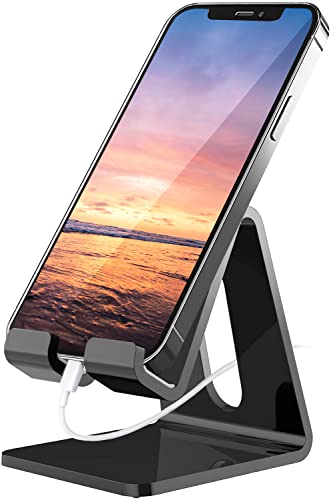
- Supports 4- to 8-inch devices
- Ergonomic tabletop viewing angle
- Charging cutout and anti-slip pads
Best For: Cable-connected use at desks and nightstands
Best Adjustable Wireless Stand
OTM Essentials Wireless Charging Stand

- Qi wireless charging for compatible phones
- Adjustable hands-free viewing angle
- Space-saving desk and nightstand design
Best For: Everyday charging in offices and bedrooms
Best Fast-Charging Value
NANAMI Fast Wireless Charging Stand

- Two-coil design with wider charging area
- Supports select 10W and 7.5W modes
- Vertical or horizontal charging positions
Best For: Qi-phone owners seeking faster, flexible charging
Best Apple 15W MagSafe Stand – Dual-Hinge Collapsible Dock
The Lamicall stand is a specialized option among ergonomic phone charging stands, pairing a compact aluminum frame with a dual-hinge design for adjustable viewing. It holds the original Apple 15W MagSafe Charger, but the charger is not included and the stand does not fit Apple’s newer 25W MagSafe charger.
Best For: iPhone and AirPods users who already own the original Apple 15W MagSafe Charger and want a foldable desk or nightstand stand.
Pros:
- Dual hinges allow flexible viewing angles for calls, videos, recipes, and bedside charging.
- Aluminum construction, rubber base pads, and a center slot help provide stability and scratch protection.
- Foldable design is convenient for storage or travel.
Cons:
- MagSafe charger is not included.
- Only fits the original Apple 15W MagSafe Charger, not the 25W version.
- Best suited to MagSafe-compatible iPhone models without a case or with a compatible MagSafe case.
This is a polished, adjustable choice when you already have the specified Apple charger. Its strict charger compatibility makes checking your existing MagSafe model essential before buying.
Best Qi Value Stand – Anker 313 10W Wireless Charger
The Anker 313 is a straightforward choice among ergonomic phone charging stands, letting you charge a Qi-compatible phone while viewing it in portrait or landscape orientation. It delivers up to 10W for Samsung devices and 7.5W for iPhones, with a suitable 9V/2A adapter required for best performance.
Best For: Qi-device owners who want an uncomplicated charging stand for messaging, Face ID, or watching videos.
Pros:
- Works with Qi-certified devices from Apple, Samsung, and other major brands.
- Supports portrait charging for messaging and landscape viewing for videos.
- Includes a 3-foot Micro-USB cable and an 18-month warranty.
Cons:
- Power adapter is not included.
- Charging is limited to up to 10W, or 7.5W for iPhone models.
- Cases must be no more than 2.5 mm thick; magnets, metal plates, or cards can interfere.
The Anker 313 focuses on broad Qi compatibility and hands-free viewing rather than premium speed. It is a sensible basic stand if you have an appropriate adapter and a compatible case.
Best Universal Adjustable Stand – OMOTON C2 Aluminum Phone Holder
The OMOTON C2 is a versatile non-charging dock that fits naturally into a roundup of ergonomic phone charging stands, with a bottom cutout for connecting your own cable while the device rests in place. Its rotating shaft, widened aluminum base, and extended hook accommodate phones, thick cases, grips, and some small tablets.
Best For: Households that need an adjustable stand for multiple smartphones, e-readers, or an iPad mini while charging by cable.
Pros:
- 270-degree adjustment helps set a comfortable viewing angle.
- Open charging cutout and 0.79-inch hook work with thick cases and back grips.
- 3mm aluminum construction, widened base, and silicone pads help resist wobbling and slipping.
- Broad compatibility covers 4- to 8-inch smartphones, e-readers, and iPad mini models.
Cons:
- It is a passive stand and does not include a wireless charger or charging cable.
- The listed compact dimensions may be less suitable for larger tablets beyond the stated compatibility range.
Choose the C2 when adjustability and device flexibility matter more than integrated wireless charging. The cable cutout keeps it useful at a desk, nightstand, kitchen counter, or workout area.
Best Rotating MagSafe Charger – Anker MagGo Qi2 15W Stand
The Anker MagGo combines fast 15W wireless output with a rotating, tilt-adjustable stand, making it one of the most feature-rich ergonomic phone charging stands here. Its magnetic charging surface supports hands-free use and 360-degree orientation changes, while ActiveShield 2.0 monitors temperature and helps protect against charging-related risks.
Best For: MagSafe-compatible iPhone users who want fast wireless charging, adjustable viewing, and easy portrait-to-landscape rotation.
Pros:
- Offers up to 15W wireless output with MagSafe-compatible charging.
- 360-degree rotation and adjustable tilt support flexible viewing angles.
- Built-in stand enables hands-free watching, working, or gaming.
- Includes a 24-month warranty and temperature, overcurrent, overvoltage, and overheating protections.
Cons:
- Power adapter is not included; the package includes the stand and cable.
- Its magnetic charging benefits are primarily aimed at compatible iPhone and AirPods devices.
- USB-C connection and included power setup may require checking your existing adapter.
This is the strongest fit for users prioritizing charging speed and viewing flexibility. Confirm that your phone supports the required magnetic charging experience and plan to provide a compatible power adapter.
Best Adjustable Stand – Height-Adjustable Lamicall Phone Holder
For shoppers comparing ergonomic phone charging stands, the Lamicall is a flexible desk option for hands-free viewing while your phone remains accessible for charging. Its height and viewing angle adjust to suit calls, reading, streaming, and everyday desk use.
Best For: Users who want broad device compatibility, substantial height adjustment, and a stable stand for phones or small tablets.
Pros:
- Adjusts from 150 to 269mm and offers a 90° viewing-angle adjustment.
- Supports smartphones and small tablets from 4 to 10 inches; larger devices should be used in landscape mode.
- Weighted metal base, reinforced aluminum support rod, and rubber feet improve stability.
- Accommodates cases up to 0.71 inches thick.
Cons:
- Devices with ring holders, wallet cases, grips, or bulky rear attachments may not fit securely.
- It is primarily designed for smartphones and small tablets, rather than larger tablets.
This is a strong choice when ergonomic positioning and compatibility matter more than built-in wireless charging. The wide adjustment range makes it especially useful for changing between seated desk work and higher viewing positions.
Best Budget Wireless Charger – YUWISS Qi Charging Stand
Among ergonomic phone charging stands, the YUWISS focuses on convenient wireless charging and an easy-to-view tabletop design. It supports portrait and landscape charging, making it practical for calls, messages, music, or watching content without removing many common cases.
Best For: Users seeking an affordable Qi charging stand for compatible iPhone, Samsung Galaxy, and other wireless-charging phones.
Pros:
- Supports 7.5W charging for compatible iPhones and up to 10W for selected Samsung Galaxy devices.
- Charges vertically or horizontally for flexible viewing.
- Works with many cases up to 5mm thick, excluding magnetic or metal attachments that interfere with charging.
- Includes charging protection features such as temperature, over-current, and over-voltage protection.
Cons:
- QC3.0 power adapter is required for the listed faster charging modes and is not included.
- Charging speeds and compatibility depend on the phone and power adapter.
The YUWISS is a sensible pick for straightforward wireless charging in a compact stand format. Its main limitation is the need to supply a compatible adapter, so factor that into the total setup cost.
Best Magnetic Stand – VRIG 360° Wireless Charging Phone Stand
The VRIG combines ergonomic desk positioning with magnetic wireless charging, making it one of the more versatile ergonomic phone charging stands for compatible phones. Its height adjustment, tilt, and 360° rotation help you position the screen for calls, meetings, streaming, or general hands-free use.
Best For: MagSafe iPhone users and Android users who want magnetic mounting, adjustable height, and wireless charging in one desk stand.
Pros:
- Supports up to 15W wireless charging for compatible devices.
- Adjusts from 170 to 300mm and rotates 360° for flexible viewing.
- Strong magnetic hold is designed for iPhone 12–18 series and MagSafe cases.
- Includes a magnetic enhancement ring for compatible Android phones and other non-MagSafe devices.
Cons:
- Non-MagSafe Android phones require the included magnetic ring for use with the magnetic mount.
- Wireless charging compatibility is dependent on the phone, case, and magnetic setup.
Choose the VRIG when adjustability and magnetic convenience are priorities. It offers a broader ergonomic range than a fixed stand, though users should confirm their phone and case support the required magnetic charging arrangement.
Best Budget Pick – Crpich Acrylic Phone Stand
If you want ergonomic phone charging stands without adding wireless charging hardware, the Crpich Acrylic Phone Stand offers a simple tabletop solution. Its raised viewing angle supports hands-free use while a reserved charging hole lets you connect a cable during charging.
Best For: Desks, nightstands, kitchens, and users who want a lightweight stand for phones, tablets, or e-readers.
Pros:
- Supports many 4- to 8-inch smartphones, tablets, and e-readers, including devices in cases.
- Ergonomic elevated angle can promote a more comfortable viewing and typing position.
- 4mm acrylic construction, rubber pads, and protective hooks help keep devices and surfaces protected.
- Charging cutout supports cable-connected use while the phone rests in the stand.
Cons:
- It is a passive stand, so wireless charging is not built in.
- The notes do not indicate adjustable viewing angles.
- Its compact design may be less suitable for larger tablets.
The Crpich is a practical choice when positioning and hands-free access matter more than integrated charging. It is especially appealing for shoppers who already have a preferred charging cable and want a low-profile acrylic stand.
Best Adjustable Wireless Stand – OTM Essentials Wireless Charging Stand
The OTM Essentials combines upright phone placement with Qi wireless charging, making it a convenient option among ergonomic phone charging stands. Its adjustable viewing angle keeps a compatible smartphone accessible for notifications, video calls, streaming, and browsing.
Best For: Home offices, bedside tables, dorm rooms, and anyone seeking a space-saving wireless charging station.
Pros:
- Qi wireless charging lets compatible smartphones charge without an extra charging cable connected to the phone.
- Adjustable viewing angle supports hands-free use at a desk or nightstand.
- Upright stand design keeps the phone visible and within reach while charging.
- Compact desktop styling helps reduce charging-area clutter.
Cons:
- Compatibility is limited to smartphones that support wireless charging.
- It uses a USB-A connection, which may require an available USB-A power source.
- The supplied details do not specify charging speeds beyond a 5V, 2A output rating.
This model suits shoppers who want a straightforward wireless charging dock with adjustable positioning. Its clean design and upright orientation make it useful for keeping a phone visible without occupying much desk or nightstand space.
Best Fast-Charging Value – NANAMI Fast Wireless Charging Stand
The NANAMI Wireless Charging Stand is a strong fit for shoppers prioritizing speed and flexible viewing. Its two-coil design supports a wider charging area, while the stand accommodates vertical or horizontal placement for calls, videos, and other hands-free use.
Best For: Users with compatible iPhone, Samsung Galaxy, or other Qi-enabled phones who want faster wireless charging and flexible orientation.
Pros:
- Two-coil construction provides a wider charging area and supports faster charging than a standard wireless charger.
- Supports up to 10W charging for select Samsung devices and 7.5W for select iPhones with a suitable adapter.
- Vertical or horizontal placement allows viewing and answering calls while charging.
- Overcharge and over-temperature protection, anti-slip feet, and a charging-status LED add practical safeguards.
Cons:
- Power adapter is not included; a QC 2.0 or QC 3.0 adapter is recommended for fast charging.
- Phone-case thickness limits apply, including a tighter limit for iPhone 12 and 13 series cases.
- Metal, magnets, and credit cards must be removed before charging.
The NANAMI offers more charging flexibility than a basic stand, particularly when paired with the recommended power adapter. Check your phone, case thickness, and available adapter before buying to make sure the advertised charging modes apply.
How We Picked the Best Ergonomic Phone Charging Stands
We focused on the features that matter during daily use: viewing-angle flexibility, height adjustment, charging compatibility, stability, cable access, foldability, and overall ease of use. The selection includes MagSafe and Qi2 options, standard wireless charging stands, and non-charging holders for shoppers who already own a separate charger.
Compatibility was also important. Some stands are designed around magnetic iPhones, while others support a broader range of smartphones through a cradle or open stand design. We also considered whether a stand can keep the phone elevated without blocking the charging port, case, camera, or buttons.
Quick Comparison
- Best for MagSafe users: Choose a magnetic stand with strong alignment and a compatible iPhone case.
- Best for mixed-device households: Look for a universal cradle with an open charging cutout.
- Best for portability: Select a foldable or collapsible model with adjustable hinges.
- Best for simple desk organization: A compact wired charging stand can reduce cable clutter while keeping the screen visible.
Key Buying Factors for Ergonomic Phone Charging Stands
Viewing Angle and Height
A stand should place the display close to eye level and allow a comfortable tilt for reading, calls, and video. Dual-hinge or height-and-angle adjustment offers more flexibility than a fixed cradle, especially on a desk used for both sitting and standing.
Charging Standard and Speed
Check whether the stand includes wireless charging or only provides a holder for your existing charger. Qi, Qi2, and MagSafe models can offer convenient alignment, but maximum speed depends on the phone, charger, power adapter, and case. A charging stand may not include a wall adapter, so verify what is in the box.
Stability and Case Clearance
A broad base, grippy feet, and sturdy hinges help prevent tipping when you tap the screen. If you use a protective case, confirm that the cradle or magnetic connection can accommodate it. Thick, metal, or poorly aligned cases may reduce wireless charging reliability.
Portability and Cable Management
Foldable designs suit travel and small workspaces. For a permanent desk setup, prioritize a stable footprint and a clean cable route through the stand or charging cutout.
Who Should Buy Which Ergonomic Phone Charging Stands?
Choose an adjustable magnetic stand if you use a compatible iPhone and want quick alignment, portrait or landscape viewing, and easy access during calls. Choose a universal adjustable holder if your household uses different phone brands or you want maximum case flexibility.
Choose a compact fixed or acrylic stand for basic hands-free viewing at the lowest complexity. Choose a foldable wireless model if you move between rooms, travel frequently, or need a charging dock that stores easily. Before buying, confirm your phone model, charging standard, case thickness, and whether a power adapter is included.