A good charging stand keeps your phone powered and visible without taking over your desk or nightstand. The best budget phone charging stands balance charging speed, device compatibility, viewing angles, and everyday convenience.
We compared 10 affordable options, including wireless stands, USB-C docks, and multi-device stations, to help you find the right fit for your phone and charging setup.
Best 10 Budget Phone Charging Stands Picks for 2026
Best Fast-Charging Pick
INIU 15W Wireless Charging Stand

- Up to 15W wireless charging
- Portrait and landscape charging
- Adaptive LED and temperature monitoring
Best For: Faster wireless charging with flexible phone viewing
Best Simple Qi Stand
Anker 313 Wireless Charger Stand

- Up to 10W Qi charging
- Portrait or landscape viewing
- Works through cases up to 2.5 mm
Best For: Basic wireless charging for Qi-compatible phones
Best Wired Budget Dock

- Upright wired USB-C charging
- Built-in cable for a cleaner setup
- Designed to fit most standard cases
Best For: Type-C phones needing an affordable desk or bedside dock
Best Multi-Device Value

- Charges iPhone, Apple Watch, and AirPods
- Compact 2.7-by-3.5-inch base
- Includes 20W PD charger and USB-C cable
Best For: Apple users consolidating three everyday devices
Best Value Pick
Amazon Basics 10W Wireless Charging Stand

- 10W Samsung/LG and 7.5W iPhone charging
- Portrait or landscape charging through thin cases
- Includes USB cable, but no AC adapter
Best For: Simple Qi charging for shoppers who already own a suitable adapter
Best Complete Kit
REPIND 15W Wireless Charging Stand

- Up to 15W for compatible Google Pixel phones
- Includes 18W adapter and USB cable
- Two-coil stand works vertically or horizontally
Best For: A complete fast-charging stand package with adapter included
Best Case-Friendly Pick
YUWISS Z23 Wireless Charging Stand

- Charges through many cases up to 5mm thick
- Supports 10W Samsung and 7.5W iPhone charging
- Includes LED, anti-slip bars, and USB cable
Best For: Case users who want an affordable, versatile Qi charging stand
Best Budget USB-C Stand
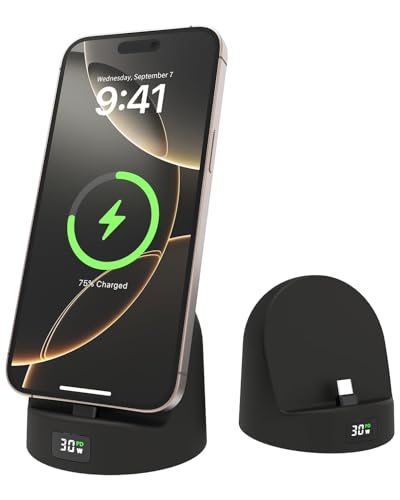
- 72° viewing angle for hands-free use
- LED power display shows charging progress
- Silicone USB-C design for phones and select tablets
Best For: USB-C users wanting a simple wired stand
Best Sleep-Friendly Wireless Stand
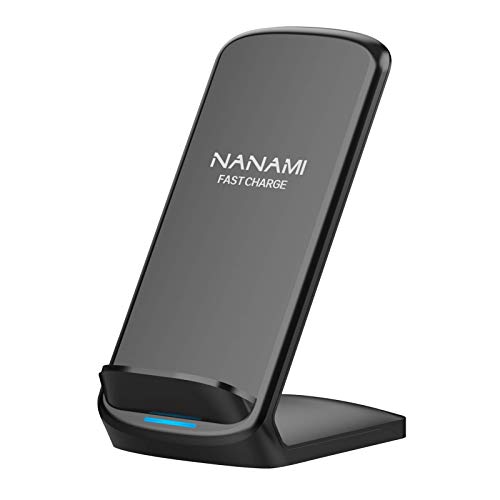
- Portrait and landscape charging angles
- Indicator light turns off after 10 seconds
- Supports many iPhone, Samsung, Pixel, and LG models
Best For: Bedside wireless charging with minimal light
Best Value With Wall Adapter

- Includes 20W PD adapter and USB-C cable
- Charges vertically or horizontally
- Multi-layer safety and foreign-object detection
Best For: A complete wireless charging setup out of the box
Best Fast-Charging Pick – INIU 15W Wireless Charging Stand
For shoppers comparing budget phone charging stands, the INIU wireless station combines a compact upright design with up to 15W charging and a wider charging area. Its dual coils support portrait or landscape viewing, while the adaptive LED is designed to stay less distracting at night.
Best For: Users who want faster wireless charging, flexible viewing, and broad iPhone or Samsung compatibility.
Pros:
- Supports up to 15W charging, with dedicated modes for LG, Samsung, iPhone, and other devices.
- Dual coils allow charging in portrait or landscape orientation.
- Adaptive LED dims in darker conditions, and NTC temperature monitoring helps protect the phone battery.
- Includes a USB-C cable, three-year care coverage, and lifetime technical support.
Cons:
- Wireless charging speeds vary by phone model.
- Metal attachments and other charging obstructions may interfere with wireless charging.
This is a strong all-around option when charging speed and viewing flexibility matter more than having a multi-device dock.
Best Simple Qi Stand – Anker 313 Wireless Charger Stand
The Anker 313 is a straightforward choice among budget phone charging stands, offering Qi-certified wireless charging in a space-saving stand format. It supports portrait charging for messaging and Face ID, or landscape positioning for watching videos.
Best For: Qi-compatible phone users who want a basic branded wireless stand for a desk or bedside table.
Pros:
- Provides up to 10W for Samsung Galaxy phones and 7.5W for iPhones.
- Works with Qi-certified devices from Apple, Samsung, and other major brands.
- Supports portrait and landscape viewing while charging.
- Charges through compatible plastic, rubber, or TPU cases up to 2.5 mm thick.
Cons:
- The recommended 9V/2A power adapter is not included.
- Charging is limited to 10W maximum and may take several hours for an iPhone.
- Metal plates, magnetic attachments, and cards can interfere with charging.
Choose this model for simple Qi functionality and Anker support, but factor the cost of a suitable power adapter into the budget.
Best Wired Budget Dock – USB-C Phone Charging Stand
This USB-C cradle is one of the more practical budget phone charging stands for users who prefer a wired connection. It keeps a compatible phone upright while charging and includes a built-in cable for a cleaner desk, nightstand, kitchen counter, or office setup.
Best For: Type-C phone owners who want an inexpensive upright dock for hands-free viewing and daily charging.
Pros:
- Holds the phone upright for videos, calls, messages, recipes, and FaceTime.
- Extended USB-C connector is designed to work with most standard phone cases.
- Built-in cable helps reduce desk and nightstand clutter.
- Compatible with a range of Type-C phones and Nintendo Switch or Switch Lite.
Cons:
- It is a wired USB-C dock rather than a wireless charger.
- Compatibility is limited to devices with the appropriate USB-C connection.
- The supplied notes do not indicate an included wall power adapter.
This dock makes sense for a low-cost, tidy charging station when your phone uses USB-C and you do not need wireless convenience.
Best Multi-Device Value – 3-in-1 Apple Charging Station
For Apple households comparing budget phone charging stands, this 3-in-1 station consolidates an iPhone, Apple Watch, and AirPods in one compact base. It includes a 20W PD charger, supports portrait or landscape phone charging, and folds for easier travel.
Best For: Apple users who want one space-saving station for charging an iPhone, Apple Watch, and AirPods or AirPods Pro.
Pros:
- Provides dedicated charging spots for an iPhone, Apple Watch, and AirPods or AirPods Pro.
- Compact 2.7-by-3.5-inch base helps save nightstand or desk space.
- Built-in dual coils support portrait and landscape phone charging.
- Includes a USB-C cable and 20W PD charger, plus case support up to 4 mm.
Cons:
- Designed primarily for Apple devices and compatible wireless-charging phones.
- Apple Watch Series 1 and 2 are not compatible.
- Metal or magnetic attachments may interfere with wireless charging.
This is the most useful choice for reducing cable clutter across several Apple accessories, provided your watch and AirPods case are supported.
Best Value Pick – Amazon Basics 10W Wireless Charging Stand
For shoppers comparing budget phone charging stands, this Amazon Basics model covers the essentials at a straightforward price: Qi wireless charging, portrait or landscape placement, and a USB cable in the box. It delivers up to 10W on compatible LG and Samsung phones and 7.5W on compatible iPhones, but you will need to supply the AC adapter.
Best For: Buyers who want a simple, case-friendly Qi stand from a familiar brand and already have a suitable USB power adapter.
Pros:
- Supports vertical and horizontal charging for messaging, calls, or videos.
- Charges through most rubber, plastic, or TPU cases under 5mm thick.
- Includes a 4-foot USB-A to USB-C cable and Qi-certified safety protections.
Cons:
- AC adapter is not included.
- Optimal charging requires a Quick Charge 3.0 or PD 3.0 adapter rated at least 9V/2A.
- Faster iPhone charging may require removing the case.
This is a practical budget pick when you already have the right wall adapter. Its adjustable viewing orientation and broad Qi compatibility make it more useful than a basic charging pad, while the missing adapter adds to the setup cost if you need a complete kit.
Best Complete Kit – REPIND 15W Wireless Charging Stand
Among budget phone charging stands, this REPIND model stands out as a ready-to-use package because it includes an 18W power adapter and USB cable. Its two-coil design supports portrait or landscape charging, with up to 15W for compatible Google Pixel phones, 10W for Samsung devices, and 7.5W for compatible iPhones.
Best For: Buyers who want a fast-charging stand with the wall adapter included and broad Google Pixel, Samsung, and iPhone support.
Pros:
- Includes an 18W power adapter and USB-A to USB-C cable.
- Offers four charging modes, including up to 15W for compatible Pixel phones.
- Two coils support vertical or horizontal charging, with an anti-slip base and raised support.
- Provides temperature, over-current, and over-voltage protection.
Cons:
- The supplied details list a European Type C plug, which may not suit every outlet.
- Charging speeds vary by phone model and supported wireless standard.
- The charging indicator may be distracting in a dark room.
The included adapter makes this one of the more convenient options for a budget setup. Check the plug type before ordering, then match the stand’s stated charging mode to your phone to determine whether its higher advertised wattage applies.
Best Case-Friendly Pick – YUWISS Z23 Wireless Charging Stand
This YUWISS Z23 is a useful option for shoppers seeking budget phone charging stands that can work with a protective case still fitted. It supports up to 10W charging for compatible Samsung phones and 7.5W for compatible iPhones, with portrait and landscape positioning, though the required QC 3.0 adapter is sold separately.
Best For: Users who want a low-cost, case-friendly stand for older or current Qi-compatible iPhone, Samsung, Pixel, and LG devices.
Pros:
- Designed to charge through many cases up to 5mm thick.
- Supports vertical and horizontal viewing while charging.
- Includes charging-status LED, anti-slip bars, and multiple protection features.
- Works with a broad range of Qi-compatible phones and some wireless earbuds.
Cons:
- Power adapter is not included.
- Magnetic or metal attachments and other foreign objects can interfere with charging.
- Maximum charging rates depend on the phone and a compatible QC 3.0 adapter.
The Z23 makes the most sense when case compatibility and flexible viewing matter more than having the newest charging speeds. Budget for a suitable adapter, and remove magnetic accessories before charging to avoid interference.
Best Budget USB-C Stand – LED Display Charging Dock
For shoppers comparing budget phone charging stands, this silicone USB-C dock combines a viewing stand with wired charging. Its 72-degree tilt keeps a compatible phone visible while it charges, and the LED power display provides a quick look at charging progress.
Best For: USB-C phone and tablet users who want an affordable wired stand for a nightstand, desk, or travel bag.
Pros:
- 72-degree angle supports hands-free viewing and interaction.
- LED display helps monitor charging power.
- Silicone construction is designed to be durable and protect the device.
- Supports up to 30W input according to the supplied specifications.
Cons:
- Only includes one USB-C charging port and no power plug.
- Cases thicker than approximately 2mm may interfere with use.
- Compatibility is centered on USB-C devices.
This is a practical low-cost choice when you prefer a direct cable connection over wireless charging. Check your phone’s connector and case thickness before buying, especially if you use a protective case.
Best Sleep-Friendly Wireless Stand – NANAMI Fast Wireless Charger
The NANAMI stand is a strong contender among budget phone charging stands for anyone who wants to set a compatible phone down instead of plugging it in. Its dual-coil design supports vertical or horizontal charging, while the indicator light shuts off after 10 seconds for a quieter bedside setup.
Best For: iPhone, Samsung, Google Pixel, and LG users seeking convenient wireless charging at a desk or bedside table.
Pros:
- Supports wireless charging in portrait or landscape orientation.
- Offers up to 15W charging for supported devices, with device-specific limits.
- Safety features help protect against overcharge, overcurrent, overvoltage, and overheating.
- Includes a USB-C cable and is designed to work with many cases up to 5mm thick.
Cons:
- An 18W wall charger is required for quick charging and is not included.
- Metal attachments and credit cards must be removed before charging.
- Some cases or phone models may require positioning adjustments.
With broad compatibility and a sleep-friendly indicator, this model suits shared bedrooms and workspaces. It is especially convenient if your phone supports wireless charging and you already have an appropriate wall adapter.
Best Value With Wall Adapter – 20W Wireless Charging Stand
This wireless model stands out among budget phone charging stands because it includes a 20W PD USB-C wall adapter and cable. Its dual coils allow vertical or horizontal placement, while built-in safety monitoring and foreign-object detection add useful protection for everyday desk charging.
Best For: Users who want a ready-to-use wireless charging stand for compatible iPhone, Samsung, or Google Pixel phones.
Pros:
- Includes a 20W PD wall adapter and 3.3-foot USB-C cable.
- Dual-coil design supports portrait and landscape charging.
- Provides device-specific charging rates up to 15W, with a stated 20W peak power.
- Includes overheat, overcurrent, overvoltage, short-circuit, and foreign-object protection.
Cons:
- It is not magnetic and does not charge iPads or Apple Watches.
- Actual charging speed depends on the phone model.
- Wireless charging requires a compatible device and proper placement.
Because the adapter is included, this stand can be a convenient value for a new charging setup. Choose it if you want wireless convenience without separately shopping for a suitable power brick, but verify that your device is supported.
How We Picked the Best Budget Phone Charging Stands
We focused on practical value rather than headline charging speeds alone. Each option was considered for charging standard support, compatibility with popular iPhone, Samsung Galaxy, and Google Pixel devices, stand stability, viewing comfort, cable or adapter inclusions, and ease of use on a desk or nightstand.
We also included several types of stands: basic Qi wireless chargers, USB-C phone docks, multi-device charging stations, and models bundled with power adapters. This makes the roundup useful for shoppers with different phones, cases, and charging habits.
Quick Comparison
| Stand type | Best for | What to check |
|---|---|---|
| Basic wireless stand | Simple hands-free charging | Qi support, wattage, and power adapter |
| USB-C dock | Direct wired charging | Connector position and phone-case fit |
| 3-in-1 station | Charging multiple Apple devices | Device compatibility and included cables |
| Fast wireless stand | Convenient top-ups | Phone-specific charging limits and adapter requirements |
Key Buying Factors for Budget Phone Charging Stands
Compatibility and Charging Standard
Confirm that the stand supports your phone and its case. Qi wireless models are broadly compatible, but advertised wattage may vary by device. Magnetic alignment, if offered, may require a compatible phone or case. USB-C docks can provide a more dependable connection, but the connector must line up with your phone’s port.
Power Output and Included Accessories
Higher wattage does not always mean faster charging because phones regulate their own input. Check whether the package includes a wall adapter. A stand sold with only a USB cable may require a suitable power brick to reach its stated performance.
Viewing Angle and Stability
A useful stand should let you see notifications, use video calls, or follow recipes while charging. Look for a weighted base, a stable cradle, and enough clearance for your case. An adjustable or angled design is especially helpful on a work desk.
Nightstand Features and Convenience
LED indicators can confirm that charging has started, but bright lights may be distracting overnight. Consider cable management, portrait and landscape support, heat ventilation, and whether the stand leaves room for a phone grip or thick case.
Who Should Buy Which Budget Phone Charging Stands?
Choose a basic wireless stand if you want the simplest hands-free setup for one phone. A USB-C dock is better when dependable wired charging matters more than cable-free convenience. Apple users charging an iPhone alongside other devices should consider a 3-in-1 station, while households with mixed devices should prioritize broad Qi or USB-C compatibility.
For frequent top-ups, choose a model paired with an appropriate fast-charging adapter. For overnight charging, stability, low indicator brightness, and case compatibility are usually more important than maximum wattage. Among Budget Phone Charging Stands, the best choice is the one that matches your phone, power adapter, and daily routine without adding unnecessary features.