A small desk does not have to limit your connectivity. The right USB docking station can turn a laptop into a cleaner workstation with external displays, storage, networking, and charging through one compact setup.
We selected 10 docks and docking-stand designs for different workspace needs, from simple dual-monitor hubs to higher-port models for demanding home offices. Use the guide below to match features, size, and compatibility to your desk.
Best 10 USB Docking Stations for Small Desks Picks for 2026
Compact Dual-Screen Pick

- Compact footprint for small workspaces
- One 4K60 or two 4K30 HDMI displays
- 85W pass-through charging and card readers
Best For: Windows users building a compact dual-monitor desk
Clutter-Reducing Workstation Pick
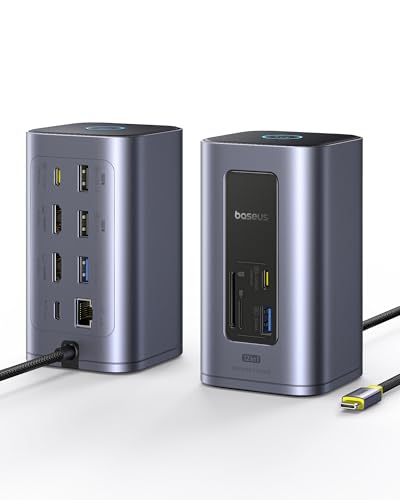
- Dual 4K outputs and 10Gbps data ports
- 31.5-inch host cable helps manage placement
- 12-in-1 connectivity with smart power saving
Best For: Windows users needing many ports in one workstation dock
Triple-Display Expansion Pick

- Three display outputs with 8K DisplayPort support
- 10Gbps USB-C data and 1000Mbps Ethernet
- 100W input delivers up to 85W to the laptop
Best For: Users who need three monitors from one compact dock
Dual-4K Performance Pick

- Dual 4K60 HDMI for compatible Windows laptops
- Four 10Gbps USB-A/C data ports
- Lightweight 91-gram aluminum design
Best For: Windows users wanting fast dual-monitor connectivity
Best Ergonomic Upgrade
BENFEI 7-in-1 Laptop Stand Dock

- Adjustable aluminum stand with anti-slip support
- HDMI 4K@60Hz, card readers, and USB 3.2
- Up to 85W laptop pass-through charging
Best For: Ergonomic laptop elevation on compact workspaces
Best Multi-Display Hub
HoDo 8-in-1 Triple-Monitor Dock

- Dual HDMI, DisplayPort, and VGA outputs
- Up to 87W safe laptop charging
- Three USB 2.0 peripheral ports
Best For: Compact workstations with multiple external displays
Best Portable Stand
Umaniy Foldable 8-in-1 Laptop Dock

- Folds compactly and weighs 0.9 pounds
- 4K HDMI, 5Gbps USB, and SD/TF readers
- Nine-level stand adjustment with up to 85W charging
Best For: Travel-friendly laptop elevation and everyday connectivity
Reliable Dual-Display Pick

- Dual HDMI supports up to 1920x1200 at 60Hz
- Six USB ports plus Ethernet and audio
- No laptop charging or 4K support
Best For: Productivity users needing dual HD monitors and many legacy ports
High-Connectivity 4K Hub

- Dual 4K HDMI plus DisplayPort output
- 100W PD input with up to 87W for the laptop
- Eight USB ports, Ethernet, and audio
Best For: Windows users building a multi-monitor workstation with one USB-C connection
Compact 4K Charging Choice

- Dual HDMI supports 4K at 60Hz
- Up to 90W laptop charging from 100W PD input
- SD/MicroSD readers and four fast USB ports
Best For: Compact workstations needing dual 4K displays, charging, and card readers
Compact Dual-Screen Pick – Anker 8-in-1 Dual HDMI Dock
If you need USB docking stations for small desks, the Anker 8-in-1 hub keeps the footprint modest while adding dual HDMI, Ethernet, card readers, and USB connectivity through one USB-C port. It can drive one 4K display at 60Hz or two displays at 4K 30Hz, making it a practical choice for a compact workstation.
Best For: Small desks using a Windows laptop and one or two external monitors.
Pros:
- Compact 4.65-by-2.01-inch design that suits space-constrained setups.
- Dual HDMI, 1Gbps Ethernet, USB-A ports, and SD/microSD readers cover common desk accessories.
- Supports up to 85W pass-through charging with a compatible 100W charger and USB-C cable.
- Works with USB-C, USB4, and Thunderbolt connections on supported systems.
Cons:
- Charger and USB-C cable are not included.
- On macOS, both external monitors show identical content.
- Not compatible with Linux.
This is a space-efficient dock for everyday productivity, especially if you value a small enclosure and built-in card readers. Confirm your laptop supports DisplayPort Alt Mode and Power Delivery before buying.
Clutter-Reducing Workstation Pick – Baseus 12-in-1 Air Dock
The Baseus Spacemate Nomos Air is a feature-rich option among USB docking stations for small desks, consolidating display, USB, networking, and card-reader connections in one unit. Its 31.5-inch host cable can help position the dock conveniently, while dual 4K outputs and 10Gbps ports support demanding workflows.
Best For: Windows laptop users who need many connections and dual 4K displays.
Pros:
- 12-in-1 design includes dual HDMI, six USB ports, Ethernet, card readers, and PD input.
- Supports dual 4K displays and up to 10Gbps data transfers.
- Long 31.5-inch host cable can help reduce cable crowding around a laptop.
- Smart power-saving mode disconnects other ports while maintaining PD charging.
Cons:
- Charger is not included.
- Its 6.46-by-4.72-by-2.91-inch body is larger than the most compact hubs.
- The listed dual-monitor feature is intended for Windows systems.
This dock prioritizes connection density and workspace organization over the smallest possible enclosure. It is a strong fit when a small desk still needs extensive peripheral support, provided you have room for its larger body.
Triple-Display Expansion Pick – Acer 11-in-1 USB-C Dock
For a small desk that needs multiple screens without several separate adapters, Acer’s 11-in-1 dock combines HDMI, DisplayPort, USB, Ethernet, charging, and card-reader connections. It supports up to three displays, including two 4K screens plus a 1080p screen in the listed triple-display configuration.
Best For: Multi-monitor Windows, macOS, or ChromeOS setups that need three display outputs.
Pros:
- Offers two HDMI ports, one DisplayPort, two USB-C ports, and two USB-A ports.
- Supports up to 8K at 30Hz over DisplayPort or 4K at 60Hz over HDMI for single-display use.
- Triple-display setup can reach 4K60 + 4K60 + 1080p60.
- Provides 1Gbps Ethernet, 10Gbps USB-C data, card readers, and up to 85W laptop charging.
Cons:
- Requires a compatible full-function USB-C port and a 100W power adapter for stable operation.
- The triple-display configuration includes one 1080p output rather than three 4K displays.
- Power adapter and cable are not stated as included.
This Acer is the most display-focused choice in the group. It can replace several adapters on a compact desk, but check your laptop’s USB-C video, data, and charging support before relying on the full feature set.
Dual-4K Performance Pick – UGREEN 7-in-1 Aluminum Dock
The UGREEN 7-in-1 dock is a streamlined option for USB docking stations for small desks, with two HDMI outputs, four 10Gbps USB-A and USB-C data ports, and USB-C PD input. It is particularly suited to laptops with a full-function USB-C or Thunderbolt port and supports dual 4K displays at 60Hz on compatible Windows systems.
Best For: Windows users who want dual 4K60 monitors and fast peripheral connectivity in a compact dock.
Pros:
- Two HDMI ports support dual 4K at 60Hz when the laptop supports DP1.4.
- Four USB-A and USB-C data ports offer 10Gbps transfer speeds.
- 100W PD input supports laptop charging with a compatible 100W or higher charger.
- Lightweight 91-gram aluminum dock suits portable or space-limited setups.
Cons:
- Power adapter and charging cable are not included.
- USB data ports do not provide charging or video output.
- macOS is limited to mirrored monitor content rather than separate extended displays.
This dock keeps the port selection focused and the chassis light while delivering strong dual-display and data performance. It is a good match for a tidy Windows desk, but macOS users should accept the mirroring limitation.
Best Ergonomic Upgrade – BENFEI 7-in-1 Laptop Stand Dock
For USB docking stations for small desks, the BENFEI combines a height-adjustable aluminum laptop stand with useful ports in one footprint. It adds HDMI, card readers, USB 3.2 connectivity, and USB-C charging while helping raise the screen to a more comfortable viewing height.
Best For: Small desks where ergonomic laptop elevation and built-in expansion are both priorities.
Pros:
- Adjusts from 68mm to 178mm and supports laptops up to 4.5kg.
- Includes HDMI 4K@60Hz, SD and Micro SD card slots, two USB-A 3.2 ports, and USB-C 3.2.
- Supports up to 100W input and 85W USB-C pass-through charging.
- Aluminum construction and anti-slip silicone help keep the laptop stable.
Cons:
- Its 250 x 240mm footprint may be substantial on exceptionally narrow desks.
- It is heavier than a standalone USB-C hub at 1.22kg.
This is a strong space-conscious choice if you want one accessory to organize ports and improve laptop posture. Its higher weight and stand footprint are trade-offs for the added stability and ergonomics.
Best Multi-Display Hub – HoDo 8-in-1 Triple-Monitor Dock
If your small desk needs several displays without a collection of separate adapters, this USB-C docking station offers four video outputs in one unit. It supports dual HDMI, DisplayPort, and VGA, along with USB peripherals and USB-C power delivery.
Best For: Users who need flexible dual- or triple-monitor connectivity from a compatible laptop.
Pros:
- Provides two HDMI outputs, DisplayPort, and VGA for multiple display options.
- Supports up to 100W input and up to 87W safe laptop output through USB-C PD.
- Three USB 2.0 ports suit keyboards, mice, and other low-speed peripherals.
- Plug-and-play design and broad compatibility with supported USB-C and Thunderbolt systems.
Cons:
- USB ports are limited to USB 2.0 speeds of up to 480Mbps.
- VGA connection limits all displays to 1080p.
- MacOS mirrors external monitors rather than providing independent extended screens.
This dock is most compelling for a compact multi-monitor workstation, but compatibility requires a full-featured USB-C port with DisplayPort Alt Mode. Check your laptop and display requirements before buying, especially if you need fast USB storage or independent Mac display extension.
Best Portable Stand – Umaniy Foldable 8-in-1 Laptop Dock
For USB docking stations for small desks that also need to travel, the Umaniy pairs a foldable laptop riser with an eight-in-one USB-C hub. It adds 4K HDMI, USB-A and USB-C data ports, SD/TF readers, and laptop charging while folding into a compact package.
Best For: Students, travelers, and flexible workspaces that need a portable laptop stand with core docking features.
Pros:
- Foldable 0.9-pound design measures 10.5 x 2.2 x 0.9 inches and includes a storage bag.
- Nine-level height adjustment, triangular support, and silicone pads help stabilize the laptop.
- Offers 4K HDMI at 30Hz, 5Gbps USB-A and USB-C data, plus SD/TF card readers.
- Supports up to 100W input with up to 85W available for the laptop.
Cons:
- HDMI output is limited to 4K at 30Hz.
- The hub supports a maximum of one hard drive and advises against high-power devices.
- HDMI requires a USB-C port with DisplayPort Alt Mode.
This stand is a practical all-in-one option when portability matters as much as desk organization. It covers everyday display, storage-card, and peripheral needs, though users seeking 4K at 60Hz or heavier device loads should consider a more capable dock.
Reliable Dual-Display Pick – Plugable UD-3900
For shoppers comparing USB docking stations for small desks, the Plugable UD-3900 keeps a compact footprint while adding two HDMI outputs, Gigabit Ethernet, audio connections, and six USB ports through one host connection. It is a practical productivity dock, though its display support requires a driver and tops out below 4K.
Best For: Windows, macOS, or ChromeOS users who need dual HD monitors and plenty of USB connectivity for office and web-based work.
Pros:
- Supports two HDMI displays up to 1920×1200 at 60Hz.
- Offers Gigabit Ethernet, headphone and microphone jacks, and six USB ports.
- Uses a hybrid USB 3.0 and USB-C host cable for broader compatibility.
- Includes two-year coverage and lifetime support.
Cons:
- Does not support 4K, DisplayPort, gaming, or HDCP-protected streaming content.
- Requires DisplayLink driver installation on macOS 14 and later.
- Does not charge the connected laptop.
The UD-3900 is a sensible small-desk choice when reliable office expansion matters more than high-resolution video or laptop charging. Its broad port selection is useful for a fixed workstation, but users wanting one-cable power delivery should look elsewhere.
High-Connectivity 4K Hub – LIONWEI 13-in-1 Dock
The LIONWEI 13-in-1 is a strong option for USB docking stations for small desks when one compact unit needs to handle displays, storage, networking, peripherals, and charging. It supports dual 4K HDMI outputs plus DisplayPort, but display-extension behavior depends heavily on the operating system.
Best For: Windows laptop users who want triple-display capability, fast USB transfers, and up to 100W Power Delivery from a single USB-C dock.
Pros:
- Provides two 4K HDMI outputs and one DisplayPort connection.
- Includes eight USB ports, Gigabit Ethernet, audio, and two USB-C ports.
- Supports up to 100W Power Delivery, with 87W available to the laptop after dock power use.
- Offers 10Gbps data transfer through USB-C 3.1.
Cons:
- On macOS, only one monitor can be extended; additional displays mirror the same content.
- Requires a full-featured USB-C connection and a compatible operating system for the advertised display modes.
- The dock uses 13W of the connected power input.
With its unusually broad port selection, this LIONWEI dock can reduce cable clutter on a constrained desk and serve as a central workstation hub. It is most compelling for Windows users; Mac buyers should verify that its mirroring limitation fits their workflow.
Compact 4K Charging Choice – Acer 9-in-1 USB-C Dock
The Acer 9-in-1 dock fits the small-desk brief with a short built-in cable, aluminum body, and a useful mix of display, USB, card-reader, and charging ports. It is designed for laptops with a full-featured USB-C port and supports dual 4K HDMI displays, while Mac users should note the display-mirroring limitation.
Best For: Laptop users who want dual 4K HDMI, memory-card access, fast USB ports, and up to 90W of laptop charging in a compact dock.
Pros:
- Supports two HDMI displays at up to 4K and 60Hz.
- Delivers up to 90W to the laptop from a 100W Power Delivery input.
- Includes three USB-A ports, one USB-C port, and SD/MicroSD slots.
- Has a 0.65-foot built-in cable, aluminum construction, and a security lock button.
Cons:
- Requires a full-featured USB-C port that supports display, charging, and data.
- macOS can only mirror the same content across external monitors.
- Does not include a dedicated Ethernet or audio port in the listed nine-port configuration.
The Acer is a well-rounded choice for a tidy compact workstation, especially for users who regularly move files from SD cards and need laptop charging. Its dual-display capability is excellent on supported systems, but Mac users should confirm that mirrored output is acceptable.
How We Picked the Best USB Docking Stations for Small Desks
We focused on docks that consolidate several connections without taking over limited workspace. Selection criteria included overall footprint, port variety, display support, USB data speeds, power-delivery capability, portability, and practical desk organization. We also included both standalone USB-C docks and laptop-stand designs so shoppers can choose between maximum flexibility and a more integrated setup.
Before buying, confirm your laptop’s USB-C port supports video output if you want HDMI displays. A USB-C-shaped port alone does not guarantee DisplayPort Alt Mode or Thunderbolt compatibility.
Quick Comparison
| Best For | Recommended Type | Features to Prioritize |
|---|---|---|
| Basic home office | Compact 7-in-1 or 8-in-1 dock | HDMI, USB-A, USB-C, and charging |
| Dual monitors | Multi-display USB-C dock | Two video outputs and compatible display modes |
| Three-monitor setups | 11-in-1 or universal dock | Display support, bandwidth, and operating-system compatibility |
| Photo and video storage | Dock with card readers | SD, microSD, and fast USB ports |
| Minimal desk footprint | Laptop stand with integrated dock | Foldability, stability, height, and cable routing |
Key Buying Factors for USB Docking Stations for Small Desks
Size, Layout, and Cable Management
Measure the available depth and check where the dock’s ports are located. Front-facing card readers and USB ports are convenient, while rear-facing display and power connections help keep cables out of sight. A laptop stand can save even more room, but verify that its width and weight capacity suit your computer.
Display Support and Resolution
Check the maximum resolution and refresh rate for every display output, not just the headline specification. Dual-monitor support can vary by operating system, laptop chipset, and connection type. Some universal docks rely on DisplayLink software, while simpler USB-C docks require native video support.
Power Delivery and USB Performance
Power Delivery lets one cable charge a compatible laptop while the dock handles peripherals. Compare the dock’s stated wattage with your laptop’s charger requirement, allowing for overhead. For external drives, look for 5Gbps or 10Gbps USB ports rather than assuming every USB-C connector offers the same speed.
Compatibility and Everyday Ports
Confirm support for Windows, macOS, ChromeOS, or your specific computer before ordering. Count the ports you will actually use: HDMI, USB-A, USB-C data, Ethernet, audio, SD, and microSD. Extra ports are useful only if they do not create unnecessary bulk or cost.
Who Should Buy Which USB Docking Stations for Small Desks?
Choose a compact 7-in-1 or 8-in-1 model if you need a straightforward single-monitor office setup with a few accessories. A dual-monitor dock is better for multitasking, spreadsheets, and larger workflows, provided your laptop supports the required display configuration. Choose a higher-port 11-in-1 or 13-in-1 model when you need Ethernet, multiple displays, card readers, and several peripherals from one connection.
For the smallest work surfaces, an integrated laptop stand with docking ports can combine elevation and connectivity while freeing space beneath the computer. Frequent travelers should favor a lighter, foldable hub. Users with fast external SSDs, large media files, or many simultaneous accessories should prioritize high-speed USB ports and adequate power delivery over the largest possible port count.