The best USB docking stations for small businesses simplify desk setups by connecting laptops to monitors, wired networks, keyboards, storage, and other essential peripherals through one compact hub.
We compared 10 options across display support, charging, port selection, compatibility, and everyday business practicality to help you choose a dependable fit for your team.
Best 10 USB Docking Stations for Small Businesses Picks for 2026
Best Compact Dual-Display Hub

- Dual HDMI with up to 4K/60Hz single-display output
- Gigabit Ethernet, card readers, and USB-A connectivity
- Up to 85W pass-through charging; charger sold separately
Best For: Compact Windows or ChromeOS workstations needing dual displays
Best OEM Office Dock

- HDMI, dual DisplayPort, Ethernet, USB, and audio
- Includes a 100W power adapter
- Designed around several HP business notebook families
Best For: HP-centered offices with fixed desk workstations
Best Mixed-Device Productivity Dock

- Dual HDMI output up to 1920x1200
- USB-C and USB-A host cables included
- Ten ports for office peripherals and Gigabit Ethernet
Best For: Mixed Windows, macOS, and ChromeOS productivity desks
Best Triple-Display Workstation Dock

- Supports up to three 1080p/60Hz displays on Windows
- 13 ports with HDMI, DisplayPort, USB, Ethernet, and card readers
- Includes 135W adapter with up to 85W laptop charging
Best For: Windows power users building multi-monitor workstations
Best Dual-Display Workstation Dock

- Two HDMI outputs for up to dual 4K 60Hz on supported systems
- 65W charging, Gigabit Ethernet, USB, and audio connectivity
- Driverless setup for compatible Windows and ChromeOS laptops
Best For: Windows and ChromeOS teams building dual-monitor desks
Best Port-Rich Expansion Hub
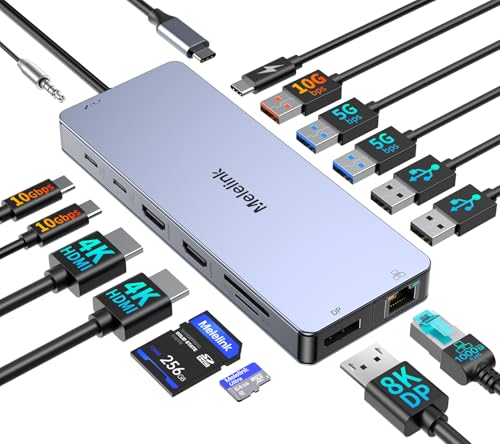
- 15 ports with dual HDMI, DisplayPort, Ethernet, USB, card readers, and audio
- Supports up to three displays on compatible Windows systems
- 100W PD input, 87W safe laptop output, and 10Gbps USB data
Best For: Windows workstations needing extensive connectivity
Best Triple-Display Dock for Hybrid Teams
Plugable 12-in-1 Triple HDMI Dock

- Supports up to three extended HDMI displays across compatible systems
- 100W charging, Gigabit Ethernet, six USB 3.0 ports, and audio
- Designed for mixed Windows, macOS, and ChromeOS office fleets
Best For: Hybrid teams and hot-desking environments
Best Renewed Business Dock

- Dual-monitor support via DisplayPort and HDMI
- Up to 100W notebook charging
- Seven-plus ports in a compact renewed design
Best For: Windows users building a tidy dual-monitor workstation
Best Dual-4K Expansion

- Drives two 4K displays at 60Hz
- Six USB 3.0 ports plus Ethernet and audio
- Supports USB-C and USB 3.0 host connections
Best For: Productivity-focused teams needing dual 4K monitors
Best Budget Dual-HDMI Dock

- Dual HDMI output up to 1920×1200 at 60Hz
- Six USB ports plus Ethernet and audio
- Two-year warranty with lifetime support
Best For: Everyday office productivity with dual HD monitors
Best Compact Dual-Display Hub – Anker 8-in-1 USB-C Dock
For small businesses seeking USB docking stations for small businesses, this compact Anker hub combines dual HDMI output, Ethernet, card readers, and pass-through charging in a single USB-C connection. It supports one 4K display at 60Hz or two displays at 4K/30Hz, though macOS mirrors both external monitors.
Best For: Small teams using compatible Windows or ChromeOS laptops that need dual monitors and essential connectivity in a compact format.
Pros:
- Two HDMI ports support one 4K/60Hz display or two 4K/30Hz displays.
- Includes Gigabit Ethernet, USB-A ports, SD and microSD readers, and USB-C PD input.
- Supports up to 85W pass-through charging with a compatible charger and cable.
- Compact, lightweight design with an 18-month warranty.
Cons:
- 100W wall charger and USB-C cable are not included.
- macOS mirrors the image across both external monitors.
- Not compatible with Linux.
This is a practical choice when desk space and straightforward connectivity matter more than extensive expansion. Confirm that the laptop supports DP Alt Mode and Power Delivery before purchasing.
Best OEM Office Dock – HP USB-C Dock G5
The HP USB-C Dock G5 is a business-oriented option among USB docking stations for small businesses, with DisplayPort, HDMI, Gigabit Ethernet, USB connectivity, audio, and a 100W power adapter. Its listed compatibility focuses on several HP Elite, ProBook, and mobile thin client systems.
Best For: Offices standardizing compatible HP notebooks with a dedicated dock and built-in power adapter.
Pros:
- Includes HDMI, two DisplayPort connections, Gigabit Ethernet, USB, and audio.
- Comes with a 100W power adapter.
- Designed for several HP Elite, ProBook, and mobile thin client models.
- Compact 4.8-inch square footprint.
Cons:
- Compatibility details are centered on specific HP notebook families.
- Heavier than compact hub-style alternatives at about 23.98 ounces.
- Limited supplied details about support for non-HP laptops.
For an HP-focused workplace, the Dock G5 offers the port selection and dedicated power setup expected at a permanent desk. Verify the exact laptop model and required display connections before deploying it across a team.
Best Mixed-Device Productivity Dock – Plugable Dual HDMI Dock
This Plugable model is a flexible choice among USB docking stations for small businesses managing mixed Windows, macOS, and ChromeOS fleets. It offers dual HDMI output up to 1920×1200, USB-C and USB-A host connectivity, Ethernet, audio, and ten total ports for everyday office work.
Best For: IT-managed productivity desks that need dual HDMI monitors across newer and older laptops.
Pros:
- Supports two HDMI displays up to 1920×1200 from one USB connection.
- Includes both USB-C and USB-A host cables for broader laptop compatibility.
- Provides two 5Gbps USB ports, four USB 2.0 ports, Ethernet, and audio.
- Supports Windows, macOS, and ChromeOS with documented driver requirements.
Cons:
- Does not charge the connected laptop.
- macOS requires DisplayLink software for external displays.
- Does not support DisplayPort monitors, HDCP content, gaming, or full-screen video playback.
This dock is well suited to email, browser-based tools, documents, and other standard business workloads. Its no-charge design means each workstation should retain a separate laptop charger.
Best Triple-Display Workstation Dock – Anker 13-in-1 USB-C Dock
For growing teams that need extensive connectivity, this Anker 13-in-1 dock is one of the more capable USB docking stations for small businesses. It combines HDMI, DisplayPort, high-speed USB, Ethernet, card readers, audio, and included 135W power delivery, with up to three 1080p displays on supported Windows systems.
Best For: Windows-based power users who need triple-display multitasking, fast peripheral connections, and included laptop charging.
Pros:
- Supports up to three 1080p/60Hz external monitors on Windows 10/11 and ChromeOS with MST.
- Offers 13 ports, including HDMI, DisplayPort, 10Gbps USB-C, 5Gbps USB-A, Ethernet, and card readers.
- Provides up to 85W laptop charging and 18W phone charging simultaneously.
- Includes a 135W power adapter and has a space-saving vertical design.
Cons:
- macOS limits external monitors to mirror mode.
- Triple-display support depends on compatible Windows or ChromeOS hardware and MST.
- Requires checking USB-C DP Alt Mode and Power Delivery support.
This is the strongest fit for a Windows-heavy office that wants a full desktop-style setup from one cable. It is less compelling for Mac teams that require independently extended external displays.
Best Dual-Display Workstation Dock – Plugable Dual 4K USB-C Dock
For small businesses standardizing USB docking stations for small businesses, the Plugable UD-MSTH2 is a practical choice for Windows and compatible ChromeOS laptops. One USB-C connection supports two HDMI monitors, Gigabit Ethernet, common USB accessories, audio, and up to 65W laptop charging.
Best For: Windows or ChromeOS teams that need a simple dual-monitor desk setup for spreadsheets, multitasking, and video calls.
Pros:
- Supports two HDMI displays at up to 4K 60Hz each on compatible host systems.
- Includes Gigabit Ethernet, USB-C, three USB-A ports, audio, and a security lock slot.
- Driverless setup on supported systems, with a 110W power adapter and lifetime support.
Cons:
- Dual 4K 60Hz output depends on the laptop’s display capabilities and DP Alt Mode support.
- Not recommended for Mac users who need two extended external displays.
This dock keeps a small-business workstation tidy without requiring software installation, but buyers should verify USB-C video support and operating-system compatibility before deployment.
Best Port-Rich Expansion Hub – Melelink 15-in-1 USB-C Dock
For small businesses needing USB docking stations for small businesses with broad peripheral support, this Melelink 15-in-1 model packs display, networking, storage, and USB connectivity into one aluminum multiport dock. It can drive up to three displays on compatible Windows systems and supports up to 87W of laptop output when paired with a suitable 100W charger.
Best For: Windows users who need many ports, fast USB transfers, wired Ethernet, card readers, and flexible multi-monitor support.
Pros:
- Provides 15 ports, including dual HDMI, DisplayPort, Gigabit Ethernet, USB-C, USB-A, SD, MicroSD, and audio.
- Supports dual 4K 60Hz displays or triple-display output on compatible DP 1.4 Windows systems.
- Includes USB 3.2 ports rated up to 10Gbps and up to 100W input with 87W safe laptop output.
Cons:
- Full functionality requires a full-featured USB-C or Thunderbolt 3/4 port with video output.
- MacBook systems only support the same image on external monitors according to the supplied notes.
- The 100W power adapter is not listed as included.
This is a strong fit for a port-hungry workstation, especially where Windows users handle external drives, memory cards, multiple monitors, and wired networking. Confirm the laptop’s USB-C specifications before buying.
Best Triple-Display Dock for Hybrid Teams – Plugable 12-in-1 Triple HDMI Dock
For small businesses deploying USB docking stations for small businesses across mixed laptop fleets, this Plugable 12-in-1 dock is designed for multi-monitor workspaces. It combines up to three HDMI displays, Gigabit Ethernet, six USB 3.0 peripherals, audio, and 100W USB-C Power Delivery for shared or assigned desks.
Best For: Hybrid teams using Windows, macOS, or ChromeOS laptops that need up to three extended displays and managed office connectivity.
Pros:
- Supports up to three extended HDMI displays: one 4K at 30Hz and two 1080p at 60Hz through Alt Mode and DisplayLink.
- Works across compatible Windows, macOS, and ChromeOS USB-C, USB4, and Thunderbolt systems.
- Offers 100W Power Delivery, Gigabit Ethernet, six USB 3.0 ports, audio, and lifetime technical support.
Cons:
- macOS requires driver installation for the DisplayLink functionality.
- Not compatible with Linux, and HDCP is not supported.
- Display performance varies by connection method, with the Alt Mode display limited to 4K at 30Hz.
This dock is particularly suitable for hot-desking and mixed-device deployments where consistent multi-monitor access matters. IT teams should account for macOS driver installation and the Linux limitation before standardizing it.
Best Renewed Business Dock – Lenovo USB-C Universal Dock
For small businesses seeking USB docking stations for small businesses, the Lenovo USB-C Universal Business Dock offers a compact way to expand a compatible laptop with one cable. It supports two external monitors, multiple USB connections, and up to 100W notebook charging, making it a practical fit for hybrid workstations.
Best For: Professionals who want a tidy USB-C desk setup with dual-display support and laptop charging.
Pros:
- Supports two external monitors through one DisplayPort and one HDMI port.
- Provides three USB-A and two USB-C ports within seven-plus total ports.
- Offers up to 100W charging for the connected notebook.
- Renewed unit is tested and certified, with a 90-day warranty.
Cons:
- The supplied compatibility details specifically identify Windows compatibility, so other operating systems should be verified before purchase.
- As a renewed product, it may have limited to no signs of wear.
This Lenovo dock is a strong choice when charging, dual-monitor support, and a space-saving design matter more than extensive legacy connectivity.
Best Dual-4K Expansion – Plugable UD-6950Z Dock
The Plugable UD-6950Z is a flexible option for small businesses that need USB docking stations for small businesses with broad connectivity. Its DisplayLink design supports two 4K monitors, while six USB 3.0 ports, Gigabit Ethernet, and audio connections help create a complete office workstation.
Best For: Windows, macOS, or ChromeOS office users who need dual 4K displays and extensive peripheral connectivity.
Pros:
- Supports two 4K monitors at up to 3840×2160 at 60Hz through HDMI or DisplayPort outputs.
- Includes six USB 3.0 ports, Gigabit Ethernet, and an audio jack.
- Works with USB-C and USB 3.0 host connections.
- Supports Windows, macOS with a driver, and ChromeOS; Windows and ChromeOS offer plug-and-play functionality.
Cons:
- It does not charge the host computer.
- It is intended for productivity rather than gaming and does not support HDCP-protected playback.
- It is not compatible with Linux, while macOS requires manual driver installation.
Choose this Plugable dock when display resolution and port selection are priorities. Businesses should budget for separate laptop charging and confirm operating-system requirements before ordering.
Best Budget Dual-HDMI Dock – Plugable UD-3900
The Plugable UD-3900 is a straightforward choice for small businesses looking for USB docking stations for small businesses without needing 4K video. A hybrid USB 3.0 and USB-C host cable connects the laptop to dual HDMI displays, wired Gigabit Ethernet, audio, and six USB ports.
Best For: Office and productivity users who need dual HD monitors, wired networking, and extra USB connectivity.
Pros:
- Supports two HDMI displays up to 1920×1200 at 60Hz.
- Provides Gigabit Ethernet, headphone and microphone jacks, two USB 3.0 ports, and four USB 2.0 ports.
- Works with Windows, macOS with a manual driver, and ChromeOS.
- Includes a two-year limited warranty and lifetime support.
Cons:
- 4K video and DisplayPort connections are not supported.
- The dock does not charge the host laptop.
- It is not compatible with Linux or Unix systems and does not support HDCP-protected content.
For standard office workloads, the UD-3900 delivers useful dual-screen and peripheral expansion at a sensible feature level. It is best suited to teams that do not require 4K output or laptop charging through the dock.
How We Picked the Best USB Docking Stations for Small Businesses
We focused on the features that matter most in a shared office or home-work environment: reliable display connectivity, useful USB port layouts, laptop charging support, broad operating-system compatibility, and straightforward setup. The lineup includes compact USB-C hubs, universal USB 3.0 docks, and business-oriented models from Anker, HP, Lenovo, and Plugable.
Because laptop ports and operating systems vary, we also considered whether each dock is best suited to Windows, ChromeOS, USB-C laptops, or mixed-device workplaces. Display limits and connection requirements should always be checked before purchase.
Quick Comparison
| Best For | Recommended Type | What to Prioritize |
|---|---|---|
| Basic dual-monitor desks | Dual HDMI or HDMI/DisplayPort dock | Resolution support, stable video output |
| Three-screen workstations | Triple-display USB-C dock | Host compatibility, bandwidth, power delivery |
| Mixed laptop fleets | Universal USB docking station | Operating-system support and drivers |
| Business-standard deployments | HP or Lenovo USB-C dock | Reliability, management, and warranty coverage |
Key Buying Factors for USB Docking Stations for Small Businesses
Display Support
Confirm the number of monitors, connector types, and maximum resolution your employees need. Dual 1080p is sufficient for many administrative desks, while 4K support is better for design, data-heavy, and multitasking workflows. Triple-display docks may require compatible USB-C video standards or specialized drivers.
Power Delivery
A dock with USB-C Power Delivery can charge a compatible laptop while it runs peripherals and displays. Check the dock’s wattage against the laptop’s charger requirements; a lower-rated dock may charge slowly or fail to maintain power under heavy workloads.
Compatibility and Setup
USB-C does not guarantee video output. The laptop’s USB-C port must support DisplayPort Alt Mode or another supported video standard. Universal USB 3.0 docks can work with more computers but may depend on DisplayLink software and can behave differently across operating systems.
Ports and Network Connectivity
Count the ports your team actually uses, including USB-A, USB-C, Ethernet, audio, SD card, and HDMI or DisplayPort. Gigabit Ethernet is valuable for stable video calls, file transfers, and offices with unreliable Wi-Fi.
Who Should Buy Which USB Docking Stations for Small Businesses?
Choose a compact Anker-style USB-C hub for employees who need a portable setup with essential ports. Pick a Plugable dual-display model for practical office multitasking, especially when a team needs flexible monitor connections. Triple-display docks suit analysts, traders, developers, and power users who benefit from more screen space.
For standardized business deployments, HP and Lenovo docks are sensible choices when fleet compatibility, support, and a familiar enterprise ecosystem matter. Before ordering in quantity, test one unit with every major laptop model your business uses and verify monitor resolution, charging behavior, drivers, and sleep-wake reliability.